

RingChart and AnalogWatch: what changed
Revision 1 to 2. Removed lines have a minus sign; added lines have a plus sign.
| Old | New | Line | |
|---|---|---|---|
| 1 | 1 | > **Warning:** The chart components needed by this component have been removed from Lazarus in version 1.4. Since this time this page is outdated. | |
| 2 | 2 | ||
| 3 | - | ||
| 4 | - | ||
| 5 | 3 | ## About | |
| 6 | 4 | ||
| 7 | 5 | *TRingChart* component is an elliptic Sectors Chart that we can consider a twin of the LCL TChart Component in the sense that has the same structure, particularly for the data input structure, but the rest is original. | |
| 8 | 6 | ||
| 9 | 7 | **What's new?** | |
| 10 | 8 | ||
| 11 | 9 | 1. it is accurate in the sense that every sector surface is really proportionated to his pie percentage (TCanvas.RadialPie is similar but not exact for area) so if a green sector value is 17.27% of total values the green area is the 17.27% of the total ellipse area; | |
| 12 | 10 | 2. it allows to include: | |
| 13 | 11 | - label (value and/or percentage) | |
| 14 | 12 | - legend (none, inside or outside) | |
| 15 | 13 | 3. it manage value as double (not only integer) | |
| 16 | 14 | 4. it allows: | |
| 17 | 15 | - change a single sector (Name or label, Value and color) | |
| 18 | 16 | - delete a single sector; | |
| 19 | 17 | 5. it can appeares as a ring sectorized or a Pie (very rough) | |
| 20 | 18 | ||
| 21 | 19 | *TAnalogWatch* is a graphic component that use a timer to show the current time in analog way. Just put it on a form. You can personalize the watch with your fovourites colors. An OnAppointment notify event has been added in the latest version that is triggered when the current time is equal to MeetTime (please read carefully the readme.txt file). From the version 0.3 (thanks to Seth Grover) the Watch has differents "mode": | |
| 22 | 20 | ||
| 23 | 21 | 1. "Clock" - the current default mode | |
| 24 | 22 | 2. "Stopwatch" - behaves like a stopwatch (you set the mode to stopwatch mode and then set StopwatchRunning to true or false to start/stop the stopwatch) | |
| 25 | 23 | 3. "Defined" mode - simply displays the time you tell it to display with the DefinedTime property. | |
| 26 | 24 | ||
| 27 | 25 | Furthermore there are some properties that hide/shows thinks like the tick marks, the digits on the clock face, and each hand individually . The zip file contains a Lazarus Package that allows you to easy install the components (just compile and install). Furthermore, there is a simple example that shows how to use the components. | |
| 28 | 26 | ||
| 29 | 27 | These components have been tested on win32 and linux (gtk1) but it should be cross-platform. | |
| 30 | 28 | ||
| 31 | 29 | ## Screenshot | |
| 32 | 30 | ||
| 33 | 31 | Here are how they appear. RingChart is with these setting: | |
| 34 | 32 | ||
| 35 | 33 | - Legend:=lpOutSide; | |
| 36 | 34 | - KindOfLabel:=klBoth; | |
| 37 | 35 | - Ring:=true; | |
| 38 | 36 | ||
| 39 | - | ||
| 40 | - | ||
| 41 | - | ||
| 42 | - | ||
| 37 | + | 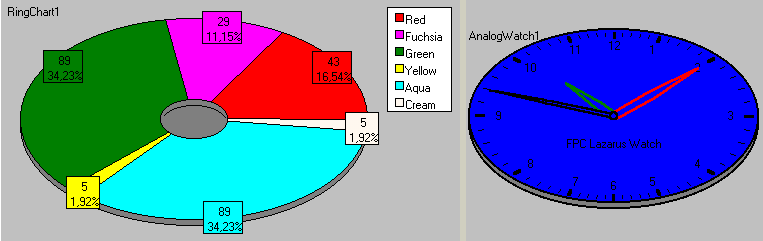 | |
| 43 | 38 | ||
| 44 | 39 | ## Author | |
| 45 | 40 | ||
| 46 | 41 | Salvatore Coppola | |
| 47 | 42 | ||
| 48 | 43 | ## License | |
| 49 | 44 | ||
| 50 | 45 | modified LGPL same as Lazarus LCL license (see the COPYING.LGPL and the COPYING.modifiedLGPL that come with this package or the same files that come with the Lazarus distro) | |
| 51 | 46 | ||
| 52 | 47 | ## Download | |
| 53 | 48 | ||
| 54 | 49 | The latest release can be found on the [Lazarus CCR Files page](http://sourceforge.net/projects/lazarus-ccr/files/RingChart%20and%20AnalogWatch/) | |
| 55 | 50 | ||
| 56 | 51 | ## Change Log | |
| 57 | 52 | ||
| 58 | 53 | - Version 0.1 2005/11/22 | |
| 59 | 54 | - Version 0.2 2006/02/26 | |
| 60 | 55 | - Version 0.3 2007/04/13 | |
| 61 | 56 | ||
| 62 | 57 | ## Dependencies / System Requirements | |
| 63 | 58 | ||
| 64 | 59 | - FCL and LCL that come with Lazarus | |
| 65 | 60 | ||
| 66 | 61 | Status: Beta | |
| 67 | 62 | ||
| 68 | 63 | ## Installation | |
| 69 | 64 | ||
| 70 | 65 | - Unpack the zip file where you want, for instance "mylazarus\mycomponents": you will find "mylazarus\mycomponents\ringwatch" that contain the files package and the example | |
| 71 | 66 | - Open lazarus | |
| 72 | 67 | - Open the package ringwatch.lpk with Component/Open package file (.lpk) | |
| 73 | 68 | - (Click on Compile only if you don't want to install the component into the IDE) | |
| 74 | 69 | - Click on Install | |
| 75 | 70 | - After installation the components will be available in the *Misc* tab of the IDE. | |
| 76 | 71 | ||
| 77 | 72 | ## Usage | |
| 78 | 73 | ||
| 79 | 74 | After installed, you will find in 'Misc' tab of the Lazarus Compontens 2 new components: | |
| 80 | 75 | ||
| 81 | 76 | *RingChart*: Drop the components on a form. Change some properties as you like and use this code to fill the Chart (how many sectors you want): | |
| 82 | 77 | ||
| 83 | 78 | ``` pascal | |
| 84 | 79 | procedure TForm1.Button1Click(Sender: TObject); | |
| 85 | 80 | begin | |
| 86 | 81 | RingChart1.Clear; | |
| 87 | 82 | RingChart1.AddSector('Red', 25.5, clRed); | |
| 88 | 83 | RingChart1.AddSector('Fuchsia', 12.2, clFuchsia); | |
| 89 | 84 | RingChart1.AddSector('Green', 15, clGreen); | |
| 90 | 85 | RingChart1.AddSector('Yellow', 4, clYellow); | |
| 91 | 86 | RingChart1.AddSector('Aqua', 20, clAqua); | |
| 92 | 87 | RingChart1.AddSector('Cream', 6.33, clCream); | |
| 93 | 88 | end; | |
| 94 | 89 | ``` | |
| 95 | 90 | ||
| 96 | 91 | *AnalogWatch*: Put it on a form Set colors as you want. If you assign the OnAppointment don't forget to set the MeetTime. You can use the MeetTime property Editor registered in the Lazarus IDE to easy assign his value or simply set it in the OI | |
| 97 | 92 | ||
| 98 | 93 | ## The ringchartwatch Example Application | |
| 99 | 94 | ||
| 100 | 95 | The ringchartwatch.lpi example is included in the example directory Install the ringwatch package Before to compile and run it with Lazarus and FPC | |
| 101 | 96 | ||
| 102 | 97 | ## See also | |
| 103 | 98 | ||
| 104 | 99 | - [[TAChart]] | |
| 105 | 100 | ||
| 106 | 101 | --- | |
| 107 | 102 | *From the Free Pascal wiki, page "RingChart and AnalogWatch", as it stood on 2020-02-25 after a change by Trev, out of the wiki's dump of 2024-05-26. Copyright stays with the author who wrote it, according to the old wiki's [[Licensing]] page. If you have concerns about this material, [message the admin](/wiki-contact).* | |
| 108 | 103 | Category: Charting | |
| 109 | 104 | Category: Components | |
| 110 | 105 | Category: Lazarus-CCR |