

Reference: MSEgui/TFace: what changed
Revision 0 to 1. Removed lines have a minus sign; added lines have a plus sign.
Title: Reference: MSEgui/TFace
| Old | New | Line | |
|---|---|---|---|
| 1 | + | # TFace | |
| 2 | + | ||
| 3 | + | The visual appearance of a widget is specified by the properties Face and Frame. Face concerns the widget itself, Frame the appearance around it. | |
| 4 | + | ||
| 5 | + | ## Reference | |
| 6 | + | ||
| 7 | + | ### Hierarchy | |
| 8 | + | ||
| 9 | + | - TObject | |
| 10 | + | - TPersistent | |
| 11 | + | - TVirtualPersistent | |
| 12 | + | - TNullInterfacesPersistent | |
| 13 | + | - TOptionalPersistent | |
| 14 | + | - TCustomFace | |
| 15 | + | - TFace | |
| 16 | + | ||
| 17 | + | ### Properties | |
| 18 | + | ||
| 19 | + | #### Fade | |
| 20 | + | ||
| 21 | + | You can specify a color fade with two or more colors. (You can specify with one color too, but that's no fade...) | |
| 22 | + | ||
| 23 | + | The picture was generated with the following code. Please not, that green is not exactly in the middle, but moved to the left - the position isn't 0.5, it's 0.3. | |
| 24 | + | ||
| 25 | + | 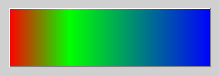 | |
| 26 | + | ||
| 27 | + | ``` pascal | |
| 28 | + | procedure tmainfo.Button3Execute(const sender: TObject); | |
| 29 | + | begin | |
| 30 | + | if Button3.Face = nil then | |
| 31 | + | Button3.Face := TFace.Create; | |
| 32 | + | Button3.Face.Fade_color.Count := 3; | |
| 33 | + | Button3.Face.Fade_color.Items[0] := cl_red; | |
| 34 | + | Button3.Face.Fade_color.Items[1] := cl_green; | |
| 35 | + | Button3.Face.Fade_color.Items[2] := cl_blue; | |
| 36 | + | Button3.Face.Fade_pos.Count := 3; | |
| 37 | + | Button3.Face.Fade_pos.Items[0] := 0; | |
| 38 | + | Button3.Face.Fade_pos.Items[1] := 0.3; | |
| 39 | + | Button3.Face.Fade_pos.Items[2] := 1; | |
| 40 | + | end; | |
| 41 | + | ``` | |
| 42 | + | ||
| 43 | + | With the Fade_direction you specify the direction: | |
| 44 | + | ||
| 45 | + | 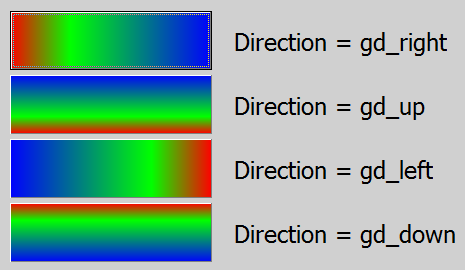 | |
| 46 | + | ||
| 47 | + | ``` pascal | |
| 48 | + | property fade_direction: graphicdirectionty default gd_right; | |
| 49 | + | ``` | |
| 50 | + | ||
| 51 | + | You can also specify a opacity and a fade of it. In the following the left picture is without opacity, the middle is with a opacity fade from cl_white to cl_black from 0.7 to 1, and the right picture is a opacity fade from cl_white to cl_black from 0 to 1 and a underlying picture and options = \[fao_fadeoverlay\]. | |
| 52 | + | ||
| 53 | + | 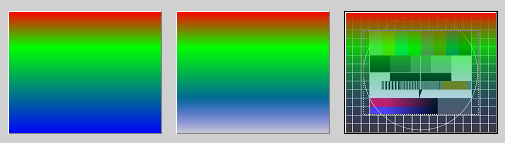 | |
| 54 | + | ||
| 55 | + | With the property Fade_opacity you can specify a opacity for the whole face without any fade. Typical opacity colors are cl_black and cl_white, but you can use every other color. | |
| 56 | + | ||
| 57 | + | ``` pascal | |
| 58 | + | property Fade_opacity: colorty default cl_none; | |
| 59 | + | property Fade_opapos: trealarrayprop; | |
| 60 | + | property fade_opacolor: tfadeopacolorarrayprop; | |
| 61 | + | ``` | |
| 62 | + | ||
| 63 | + | #### FrameImage | |
| 64 | + | ||
| 65 | + | With the property FrameImage you can paint individual frames by using a TImageList. In the imalge list their are used 8 consecutive images. The images for the edges will be stretched as needed - this will look very strange, if this images are not suitable (look the followong picture). | |
| 66 | + | ||
| 67 | + | 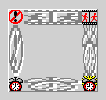 | |
| 68 | + | ||
| 69 | + | For a "good loking example" see [[Reference: MSEgui/TFrame|TFrame.FrameImage]]. | |
| 70 | + | ||
| 71 | + | ``` pascal | |
| 72 | + | property FrameImage_list: timagelist; | |
| 73 | + | // imagenr 0 = topleft, 1 = left, 2 = bottomleft, 3 = bottom, | |
| 74 | + | // 4 = bottomright 5 = right, 6 = topright, 7 = top | |
| 75 | + | property FrameImage_offset: integer default 0; | |
| 76 | + | ``` | |
| 77 | + | ||
| 78 | + | #### Framei | |
| 79 | + | ||
| 80 | + | You can specify spacings to the borders of the widget: | |
| 81 | + | ||
| 82 | + | 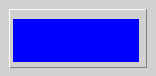 | |
| 83 | + | ||
| 84 | + | ``` pascal | |
| 85 | + | procedure tmainfo.Button3Execute(const sender: TObject); | |
| 86 | + | begin | |
| 87 | + | if Button3.Face = nil then | |
| 88 | + | Button3.Face := TFace.Create; | |
| 89 | + | Button3.Face.Fade_color.Count := 1; | |
| 90 | + | Button3.Face.Fade_color.Items[0] := cl_blue; | |
| 91 | + | Button3.Face.Framei_left := 4; | |
| 92 | + | Button3.Face.Framei_bottom := 6; | |
| 93 | + | Button3.Face.Framei_right := 8; | |
| 94 | + | Button3.Face.Framei_top := 10; | |
| 95 | + | end; | |
| 96 | + | ``` | |
| 97 | + | ||
| 98 | + | #### Image | |
| 99 | + | ||
| 100 | + | With the property Image you can assign a pixel graphic to the face. Use Face.Image.Mask_Source for masking this pixel grahic. Meanwhile there is no difference between assigning a picture or using Face.Image.Source at use of masking. | |
| 101 | + | ||
| 102 | + |  | |
| 103 | + | ||
| 104 | + | ``` pascal | |
| 105 | + | procedure tmainfo.ButtonClick(const Sender: TObject); | |
| 106 | + | var | |
| 107 | + | LRoot: string; | |
| 108 | + | begin | |
| 109 | + | LRoot := ExtractFilePath(Application.ApplicationName); | |
| 110 | + | BitmapComp1.Bitmap.LoadFromFile(LRoot + 'FuBK.jpg'); | |
| 111 | + | BitmapComp2.Bitmap.LoadFromFile(LRoot + '112_linien_1.jpg'); | |
| 112 | + | ||
| 113 | + | Button1.CreateFace; | |
| 114 | + | Button1.Face.Image.Source := BitmapComp1; | |
| 115 | + | Button1.Face.Image.Alignment := [al_fit]; | |
| 116 | + | ||
| 117 | + | Button2.CreateFace; | |
| 118 | + | Button2.Face.Image.Source := BitmapComp2; | |
| 119 | + | Button2.Face.Image.Alignment := [al_fit]; | |
| 120 | + | ||
| 121 | + | Button3.CreateFace; | |
| 122 | + | Button3.Face.Image.Source := BitmapComp1; // no masking at earlier versions, works now | |
| 123 | + | Button3.Face.Image.Alignment := [al_fit]; | |
| 124 | + | Button3.Face.Image.Mask_Source := BitmapComp2; | |
| 125 | + | ||
| 126 | + | Button4.CreateFace; | |
| 127 | + | Button4.Face.Image.Assign(BitmapComp1.Bitmap); // masking | |
| 128 | + | Button4.Face.Image.Alignment := [al_fit]; | |
| 129 | + | Button4.Face.Image.Mask_Source := BitmapComp2; | |
| 130 | + | end; | |
| 131 | + | ``` | |
| 132 | + | ||
| 133 | + | Use the property Face.Image.Alignment to align, stretch or tile the image: | |
| 134 | + | ||
| 135 | + | 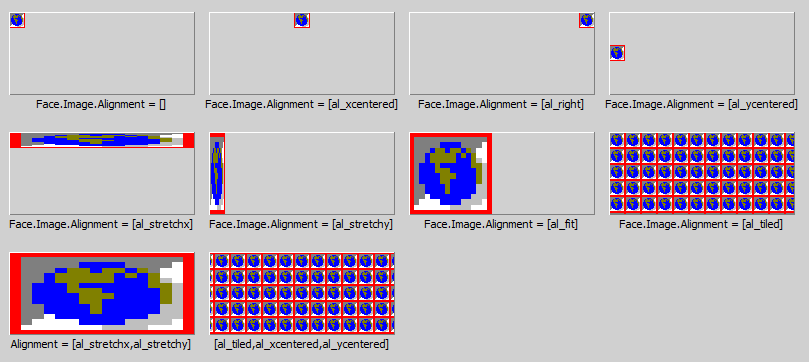 | |
| 136 | + | ||
| 137 | + | Use \[al_NoMaskScale\], if you want to scale the picture, but not the mask: | |
| 138 | + | ||
| 139 | + | 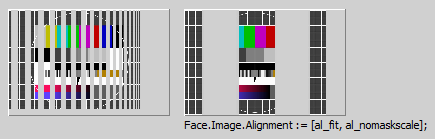 | |
| 140 | + | ||
| 141 | + | If you have a 2-Color-Bitmap, you can specify with ColorForeground and ColorBackground it's colors: | |
| 142 | + | ||
| 143 | + | 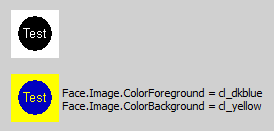 | |
| 144 | + | ||
| 145 | + | If you are downsizing pictures with small lines, the al_interpol, al_and and al_or will make a difference (al_and and al_or only with Windows): | |
| 146 | + | ||
| 147 | + | 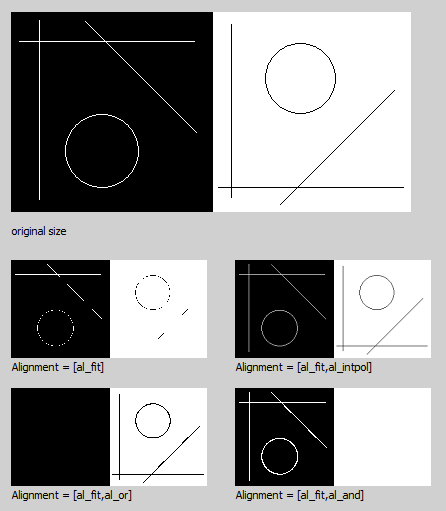 | |
| 148 | + | ||
| 149 | + | - bmo_storeorigformat: Normally if one loads a bitmap at design time a simple proprietary format is used to store the pixel data in the form. If bmo_storeorigformat is set the original imagedata will be stored. That means that at runtime the according mseformat*read unit must be available. | |
| 150 | + | ||
| 151 | + | - bmo_runtimeformatdata: Normally the original imagedata of bmo_storeorigformat will be deleted after creating the bitmap handle, bmo_runtimeformatdata inhibits deleting. | |
| 152 | + | ||
| 153 | + | - TransparentColor: If bmo_masked is set, one color get transparent and you the instead of it the background. If TransparentColor is cl_default, the color of the pixel in the left bottom corner is used as TransparentColor, otherwise you can specify it with this property. | |
| 154 | + | ||
| 155 | + | 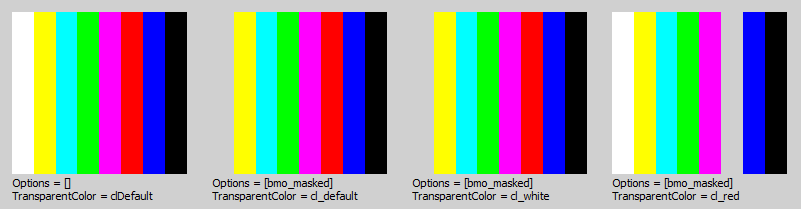 | |
| 156 | + | ||
| 157 | + | Assume one loads a ARGB *.png with a 8bit alphachannel. TMaskedBitmap creates a bmk_rgb bitmap for the RGB values and a bmk_gray bitmap for the alpha values, options becomes \[bmo_masked,bmo_graymask\]. The mask bitmap is TMaskedBitmap.mask, the type is "tbitmap" which has a canvas. | |
| 158 | + | ||
| 159 | + | Loading a *.png with a 1bit alphachannel creates a bmk_mono mask bitmap, options becomes \[bmo_masked,bmo_monomask\]. Loading a RGB *.png without alphachannel does not create a mask bitmap, options becomes \[\]. | |
| 160 | + | ||
| 161 | + | Now a mask bitmap can be attached by setting options bmk_masked, setting of bmk_colormask or bmk_graymask defines the bitmapkind of the mask bitmap. The new mask bitmap will be initialised to be transparent for main bitmap pixels with the color of TMaskedBitmap.TransparentColor. | |
| 162 | + | ||
| 163 | + | #### Template and LocalProps | |
| 164 | + | ||
| 165 | + | You can assign Template to a TFaceComp-instance to take the face settings of this non-visual component. | |
| 166 | + | ||
| 167 | + | If a special property of TFace should not specified by Template but the local TFace-settings, use LocalProps to except this property of template settings for this widget. | |
| 168 | + | ||
| 169 | + | ``` pascal | |
| 170 | + | facelocalpropty = (fal_options,fal_framei_left,fal_framei_top, | |
| 171 | + | fal_framei_right,fal_framei_bottom, | |
| 172 | + | fal_fadirection,fal_image, | |
| 173 | + | fal_fapos,fal_facolor,fal_faopapos,fal_faopacolor, | |
| 174 | + | fal_fatransparency, | |
| 175 | + | fal_faopacity,fal_frameimagelist,fal_frameimageoffset); | |
| 176 | + | facelocalpropsty = set of facelocalpropty; | |
| 177 | + | ||
| 178 | + | property LocalProps: facelocalpropsty; | |
| 179 | + | property Template: TFaceComp; | |
| 180 | + | ``` | |
| 181 | + | ||
| 182 | + | #### Options | |
| 183 | + | ||
| 184 | + | 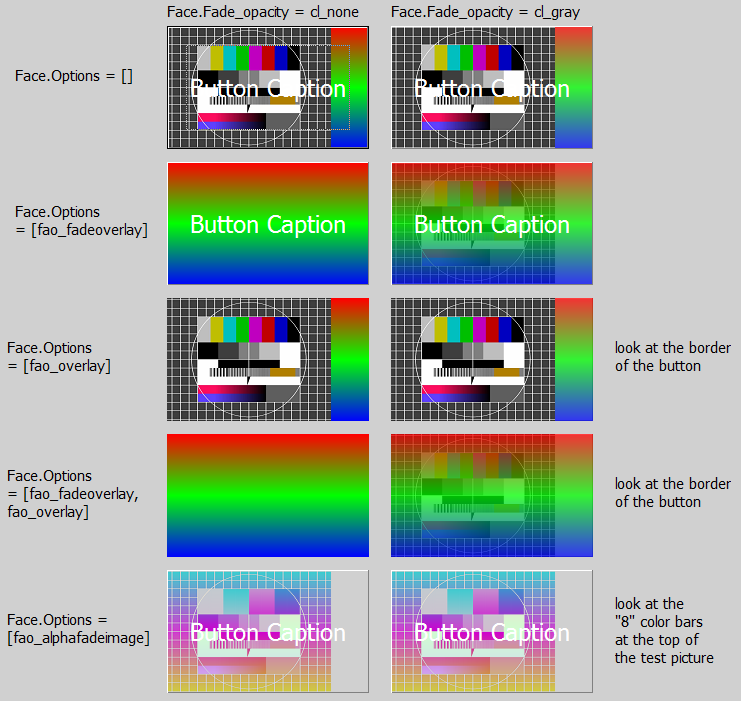 | |
| 185 | + | ||
| 186 | + | ``` pascal | |
| 187 | + | faceoptionty = (fao_alphafadeimage,fao_alphafadenochildren,fao_alphafadeall, | |
| 188 | + | fao_alphaimage, | |
| 189 | + | fao_fadeoverlay,fao_overlay); | |
| 190 | + | faceoptionsty = set of faceoptionty; | |
| 191 | + | ||
| 192 | + | property options: faceoptionsty default []; | |
| 193 | + | ``` | |
| 194 | + | ||
| 195 | + | ### Methods | |
| 196 | + | ||
| 197 | + | ### Events | |
| 198 | + | ||
| 199 | + | ## Known issues | |
| 200 | + | ||
| 201 | + | ### Issues of the class | |
| 202 | + | ||
| 203 | + | ### Issues of this documentation | |
| 204 | + | ||
| 205 | + | Feel free to add your points here. | |
| 206 | + | ||
| 207 | + | What do the following at Image: | |
| 208 | + | ||
| 209 | + | - origformat | |
| 210 | + | ||
| 211 | + | --- | |
| 212 | + | *From the Free Pascal wiki, page "Reference: MSEgui/TFace", as it stood on 2020-02-25 after a change by Trev, out of the wiki's dump of 2024-05-26. Copyright stays with the author who wrote it, according to the old wiki's [[Licensing]] page. If you have concerns about this material, [message the admin](/wiki-contact).* | |
| 213 | + | Category: MSEide+MSEgui |