

Qt5 Interface: what changed
Revision 1 to 2. Removed lines have a minus sign; added lines have a plus sign.
| Old | New | Line | |
|---|---|---|---|
| 1 | 1 | *(Qt only)* | |
| 2 | 2 | ||
| 3 | 3 | ## Introduction | |
| 4 | 4 | ||
| 5 | 5 | This interface is based on Qt 5 (Qt 5.6.2 is tested). For documentation, fixes and download, go to [Qt Project](http://qt-project.org/) (Installers at [download 5.6.2](https://download.qt.io/new_archive/qt/5.6/5.6.2/)). Lazarus with Qt5 interface (qt5-lcl) can be used on Windows 32/64, Linux x32/x64/arm, macOS x64 (Cocoa). Qt5 widgetsets have been available in Lazarus from 1.8 stable release. | |
| 6 | 6 | ||
| 7 | 7 | Most current Linux distros have a suitable Qt5 in their standard repositories however, long term support releases have issues due to their age. Ubuntu 16.04 has QT5.5 that is too old and 18.04 ships a problematic version of *libQt5Pas* that needs to be replaced, see below. Nice [howto](https://github.com/zoltanleo/fpc_lazarus_notes/blob/main/README_ENG.md#installing_qt_lazarus)by forum user zoltanleo (suitable for qt6 also). | |
| 8 | 8 | ||
| 9 | 9 | ## Windows | |
| 10 | 10 | ||
| 11 | 11 | There is a *Q5Pas1.dll* binary available. | |
| 12 | 12 | ||
| 13 | 13 | - x86: <https://gitlab.com/freepascal.org/lazarus/binaries/-/raw/main/i386-win32/qt5/Qt5Pas1.dll?inline=false> | |
| 14 | 14 | ||
| 15 | 15 | no 64-bit version yet. | |
| 16 | 16 | ||
| 17 | 17 | The build is based on MinGW, thus you want to use the MinGW Qt library (i.e. qt-opensource-windows-x86-mingw492-5.6.2.exe). | |
| 18 | 18 | ||
| 19 | 19 | If you need to build **cbindings** project, you need **MinGW**. You can use **MinGW** from the Qt package (qt-opensource-windows-x86-mingw492-5.6.2.exe) - it's an optional component of Qt package installation. | |
| 20 | 20 | ||
| 21 | 21 | ### Running and Deployment | |
| 22 | 22 | ||
| 23 | 23 | The project needs to be deployed with *Q5Pas1.dll*. | |
| 24 | 24 | ||
| 25 | 25 | For Qt5 .dlls that should be deployed, see Qt5 guides: <https://doc.qt.io/qt-5/windows-deployment.html>. | |
| 26 | 26 | ||
| 27 | 27 | For MinGW based package the following set of DLLs would be required to run a single FORM project. | |
| 28 | 28 | ||
| 29 | 29 | Those DLLs come with Qt5 package (can be found at C:\Qt\Qt5.6.2\5.6\mingw49_32\bin). | |
| 30 | 30 | ||
| 31 | 31 | ||
| 32 | 32 | Qt5Core.dll | |
| 33 | 33 | ||
| 34 | 34 | Qt5PrintSupport.dll | |
| 35 | 35 | ||
| 36 | 36 | Qt5Widgets.dll | |
| 37 | 37 | ||
| 38 | 38 | Qt5Gui.dll | |
| 39 | 39 | ||
| 40 | 40 | Qt5Network.dll | |
| 41 | 41 | ||
| 42 | 42 | libstdc++-6.dll | |
| 43 | 43 | ||
| 44 | 44 | libwinpthread-1.dll | |
| 45 | 45 | ||
| 46 | 46 | libgcc_s_dw2-1.dll | |
| 47 | 47 | ||
| 48 | 48 | Builds based on MSVC rather than MinGW might have different set of (non Qt5) dlls required. Note that [Qt5Pas1.dll](https://gitlab.com/freepascal.org/lazarus/binaries/-/raw/main/i386-win32/qt5/Qt5Pas1.dll?inline=false) is built against Qt5-5.6.2, but Qt5Pas1.dll can be used with any Qt5 \> 5.6.2. | |
| 49 | 49 | ||
| 50 | 50 | ## Linux | |
| 51 | 51 | ||
| 52 | 52 | ### Lazarus | |
| 53 | 53 | ||
| 54 | 54 | <img src="SelectQt5.png" title="Image of Qt5 selected" width="200" alt="Image of Qt5 selected" />Lazarus "out of the box" on Linux uses and makes apps for GTK2. It is not marked as having a dependency on Qt5 so if you wish to make Qt5 apps or build a Qt5 version of Lazarus you probably will need to install *libQt5Pas-dev*, Using your distros repository: | |
| 55 | 55 | ||
| 56 | 56 | - Fedora, Mageia - sudo dnf install qt5pas-devel \<enter\> | |
| 57 | 57 | - Ubuntu, Debian - sudo apt install libqt5pas-dev \<enter\> | |
| 58 | 58 | ||
| 59 | 59 | it will bring along the necessary Qt5 libraries as dependencies, typically about 50Meg on a system that has no existing Qt5 needs. If you wish to use a Qt5 version of Lazarus, build from source with a command like "make bigide LCL_PLATFORM=qt5 \<enter\>" but note the default GTK2 Lazarus is quite happy to build Qt5 apps for you. | |
| 60 | 60 | ||
| 61 | 61 | From within Lazarus, to choose to build a Qt5 app, Projects-\>ProjectOptions-\>AdditionsandOverrides and click Set "LCLWidgetType", and select Qt5 for the current Build Mode. Better yet, add a special build mode for Qt5, maybe a release and debug. | |
| 62 | 62 | ||
| 63 | 63 | > **Note:** that if you install Lazarus using you distribution's version of Lazarus, you may need to specifically ask for the Qt5 LCL components. If installing from source, you will get the lot right from the start. | |
| 64 | 64 | ||
| 65 | 65 | Don't forget, when releasing your app, it should be marked as being dependent on libqt5pas1. | |
| 66 | 66 | ||
| 67 | 67 | ### libqt5pas | |
| 68 | 68 | ||
| 69 | 69 | *libqt5pas* is a library that bridges between Qt5 and your Lazarus application. Newer distros (U20.04, Debian Buster etc) have working versions available in their repositories. Mark you application as dependent on libqt5pas1 and all will be OK. You, as a developer using Qt5 will also need libqt5pas-dev as mentioned above. | |
| 70 | 70 | ||
| 71 | 71 | > **Note:** if you are using a version of Lazarus later than 2.2.0 you (and your end users) will need libQt5Pas greater or equal to 1.2.10. It will take some time for the distributions to update the version they distribute, so either build your own or use the unofficial <https://github.com/davidbannon/libqt5pas/releases/latest> debs and rpms as mentioned below. Remember, your end users need 1.2.10 too ! | |
| 72 | 72 | ||
| 73 | 73 | Using your distros repository - | |
| 74 | 74 | ||
| 75 | 75 | - Fedora, Mageia - sudo dnf install qt5pas\<enter\> | |
| 76 | 76 | - Ubuntu, Debian - sudo apt install libqt5pas1 \<enter\> | |
| 77 | 77 | ||
| 78 | 78 | #### Do I have a problem with the version ? | |
| 79 | 79 | ||
| 80 | 80 | The version of libQt5Pas will cause concern to the following people, remember this affects you as a developer AND your end users. | |
| 81 | 81 | ||
| 82 | 82 | - Very Old Linux distribution users, such as Ubuntu 16.04 - sorry, no solution, do not use Qt5 if you need support such Operating Systems. | |
| 83 | 83 | - Old Linux Distributions such as U18.04, still officially supported until 2023 but uses an inadequate libQt5Pas. You will see a crash if your application uses TMemo. Replace the existing libQt5Pas. | |
| 84 | 84 | - Current LTS distributions like Ubuntu 20.04, 22.04, Debian Bullseye etc will have libQt5Pas earlier than 1.2.10 (1.2.6) and thats a problem if you use a Lazarus version later than 2.0.12. Again, you can replace the existing libQt5Pas | |
| 85 | 85 | ||
| 86 | 86 | You can check the libQt5Pas package version in human-friendly form by issueing this command: `ls -al libQt5Pas.so*` in the following folder: | |
| 87 | 87 | ||
| 88 | 88 | On Debian / Ubuntu variants: `/usr/lib/x86_64-linux-gnu` | |
| 89 | 89 | ||
| 90 | 90 | On Raspberry OS: `/usr/lib/arm-linux-gnueabihf` | |
| 91 | 91 | ||
| 92 | 92 | **Replace your libQt5Pas ?** | |
| 93 | 93 | ||
| 94 | 94 | Two options, use a deb or rpm from <https://github.com/davidbannon/libqt5pas/releases/latest> - you might need to ensure your Package Manager does not object or, even, replace your bright shiny new one with its preferred distro one. Shout out on the Forum if you need something other than just the 64bit debs and RPMs there (Signing, 32bit, Pacman etc). Install with, eg, sudo apt install ./libqt5pas1_2.10-0_amd64.deb \<enter\>. As a developer, you will also need the -dev package, remove an existing one if present. | |
| 95 | 95 | ||
| 96 | 96 | Secondly, the Lazarus source has the code to build your own, you will need gcc and a few other things, documented in the README.txt. Then copy the new library over top of your existing libQt5Pas1 (as root of course) | |
| 97 | 97 | ||
| 98 | 98 | Note 1 that these two deb packages are made for Ubuntu 18.04 (or later), they will not help at all on Ubuntu 16.04 as its main Qt5 libraries are too old. | |
| 99 | 99 | ||
| 100 | 100 | Note 2 Ubuntu will constantly overwrite this pair of updated packages via it's 'unattended update' tool. You must blacklist the packages to force the unattended update tool from undoing your good work. | |
| 101 | 101 | ||
| 102 | 102 | ### Systems using Wayland | |
| 103 | 103 | ||
| 104 | 104 | Some distributions use Wayland by default (e.g. the default Fedora with a GNOME desktop) and Qt5 does not work with Wayland. You will receive a message like: | |
| 105 | 105 | ||
| 106 | 106 | QSocketNotifier: Can only be used with threads started with QThread | |
| 107 | 107 | [FORMS.PP] ExceptionOccurred | |
| 108 | 108 | .... | |
| 109 | 109 | ||
| 110 | 110 | Logout, from the login screen click the small gear symbol, select "GNOME on XOrg". Log back in again. | |
| 111 | 111 | ||
| 112 | 112 | There is, apparently a Wayland plugin for Qt5, for the brave - <https://wayland.freedesktop.org/qt5.html> | |
| 113 | 113 | ||
| 114 | 114 | ### Qt5 Colours | |
| 115 | 115 | ||
| 116 | 116 | On Linux, sometimes Qt5 apps will inherit the colours it uses from the Desktop/OS. However this does not always work and appears to be Distribution / Desktop dependent. With the current fad of Dark Themes, a more reliable approach is to use qt5ct. qt5ct appears to be in most distribution's repository and is a quick and easy install. When you run it, it opens on the "Appearance" tab, for a Dark Theme, choose Palette = Custom, Color Scheme = Darker. Click "Apply" and "OK" to close the app. | |
| 117 | 117 | ||
| 118 | - | ||
| 119 | - | ||
| 120 | - | ||
| 121 | - | ||
| 118 | + | 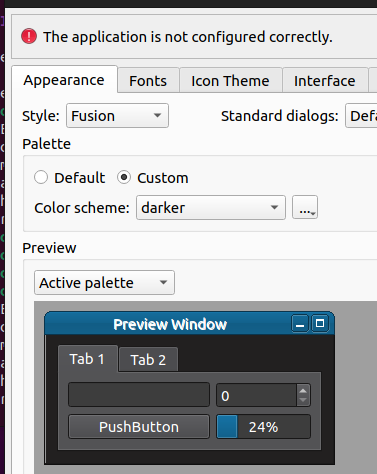 | |
| 122 | 119 | ||
| 123 | 120 | Did you note the message across the top, "The application is not configured correctly" ? What it is worried about is that you have not added the environment variable setting that will tell your app to use the colours you just set. You can set it for just one application by setting it in the application's command line : | |
| 124 | 121 | ||
| 125 | 122 | QT_QPA_PLATFORMTHEME=qt5ct myapplication | |
| 126 | 123 | ||
| 127 | 124 | That may be added to the app's Desktop file or maybe you edit the menu entry. The alternative is to add it /etc/environment (obviously without the application's name) so it is automatically set for all apps, you need to logout and back in again. Adding an entry into your own .bashrc is not quite appropriate in that GUI apps started from the menu for example will not be told about it. Note: On Debian installing qt5ct automatically add QT_QPA_PLATFORMTHEME to environment variables. | |
| 128 | 125 | ||
| 129 | 126 | ### Why Qt5 instead of GTK ? | |
| 130 | 127 | ||
| 131 | 128 | Good question ! Most Linux Lazarus applications are built using the default GTK2. The various Linux distributions are delivering fewer and fewer GTK2 apps, generally 'upgrading' to GTK3. However, the Lazarus GTK3 interface still needs some work and its not ready for production systems yet. Until late 2019, this has not mattered much, GTK2 works fine. But Ubuntu19.10 does not have GTK2 libraries installed by default and Xfce has announced its next release will be GTK2 free, apparently many distributions are looking to drop GTK2 from their default kits. While you can still install GTK2, its pretty big.... | |
| 132 | 129 | ||
| 133 | 130 | Qt5 is an obvious solution, its already installed on distros like Fedora 30 plus, its a relatively lightweight addition to Ubuntu, only 48Meg compared with GTK2's 445Meg. If you mark your application dependent on libqt5pas then it will be installed at the same time, bringing along the other qt5 files if necessary. Manually installing libqt5pas with your package manager (as long as it resolves dependencies!) will also work. | |
| 134 | 131 | ||
| 135 | 132 | Clearly, Qt based distributions, ones using Plasma or KDE as a desktop will require only *libqt5pas*. | |
| 136 | 133 | ||
| 137 | 134 | ## macOS (64-bit) | |
| 138 | 135 | ||
| 139 | 136 | The following steps have been tested with macOS 10.13.6 (High Sierra), Xcode command line tools 10.0.0 (no Xcode required), Lazarus 1.8.4 and minimum Qt 5.6.2 (Qt 5.12.xx works without problems too). | |
| 140 | 137 | ||
| 141 | 138 | After installing Qt 5.6.2 (see above), open up a terminal window and run these commands (paths may vary): | |
| 142 | 139 | ||
| 143 | 140 | export LazarusDir=/Developer/Lazarus | |
| 144 | 141 | export QtDir=~/Qt5.6.2 | |
| 145 | 142 | cd $LazarusDir/lcl/interfaces/qt5/cbindings | |
| 146 | 143 | export PATH=$QtDir/5.6/clang_64/bin:$PATH | |
| 147 | 144 | qmake | |
| 148 | 145 | ||
| 149 | 146 | **If `qmake` fails** with the following error: | |
| 150 | 147 | ||
| 151 | 148 | xcode-select: error: tool 'xcodebuild' requires Xcode, but active developer directory '/Library/Developer/CommandLineTools' is a command line tools instance | |
| 152 | 149 | ||
| 153 | 150 | **it does not** mean that you have to install Xcode. See [Qt without Xcode](https://gist.github.com/shoogle/750a330c851bd1a924dfe1346b0b4a08) for a workaround and try running `qmake` again. (The Xcode dependency seems to be fixed in Qt 5.9.4 or maybe earlier.) | |
| 154 | 151 | ||
| 155 | 152 | Proceed the build process with the following commands: | |
| 156 | 153 | ||
| 157 | 154 | make | |
| 158 | 155 | make install | |
| 159 | 156 | ||
| 160 | 157 | It may be helpful to add symlinks to the Qt5Pas.framework and other *.framework files (so no modifications to the path are required): | |
| 161 | 158 | ||
| 162 | 159 | cd /Library/Frameworks/ | |
| 163 | 160 | sudo ln -s $QtDir/5.6/clang_64/lib/*.framework . | |
| 164 | 161 | ||
| 165 | 162 | Remember that Qt5 is 64 bit, so in Lazarus under Tools - Options - Environment, you need to change Compiler Executable from `/usr/local/bin/ppc386` to `/usr/local/bin/ppcx64` . With ppc386, you would later get the following errors when compiling your Lazarus projects: | |
| 166 | 163 | ||
| 167 | 164 | Error: linker: Undefined symbols for architecture i386: | |
| 168 | 165 | Error: linker: "_QAbstractButton_click", referenced from: | |
| 169 | 166 | [...] | |
| 170 | 167 | ld: symbol(s) not found for architecture i386 | |
| 171 | 168 | ||
| 172 | 169 | Finally, create a new Lazarus project (or open an existing one), open Project - Project options - Compiler options - Additions and overrides, set `LCLWidgetType:=qt5` . You should now be able to compile your project with the Qt5 widget set. | |
| 173 | 170 | ||
| 174 | 171 | ## Example Project | |
| 175 | 172 | ||
| 176 | 173 | See [First Steps with Lazarus Qt5 interface](https://tondrej.blogspot.com/2018/04/first-steps-with-lazarus-qt5-interface.html) for an example project for Win32, Win64, macOS (64 bit) and Linux (64 bit). | |
| 177 | 174 | ||
| 178 | 175 | --- | |
| 179 | 176 | *From the Free Pascal wiki, page "Qt5 Interface", as it stood on 2023-05-01 after a change by Alextp, out of the wiki's dump of 2024-05-26. Copyright stays with the author who wrote it, according to the old wiki's [[Licensing]] page. If you have concerns about this material, [message the admin](/wiki-contact).* |