

Project Groups: what changed
Revision 1 to 2. Removed lines have a minus sign; added lines have a plus sign.
| Old | New | Line | |
|---|---|---|---|
| 1 | 1 | ## Install | |
| 2 | 2 | ||
| 3 | 3 | The package is available since Lazarus 1.5. | |
| 4 | 4 | ||
| 5 | 5 | - Go to Package \> Install/Uninstall Packages. | |
| 6 | 6 | - Search in **Available for installation'' for**lazprojectgroups'''. | |
| 7 | 7 | - Select it. | |
| 8 | 8 | - Click on **Install selection**. | |
| 9 | 9 | - Save and rebuild IDE. The IDE will ask for confirmation, then it build the package, links it in and restarts itself. | |
| 10 | 10 | ||
| 11 | 11 | ## Features | |
| 12 | 12 | ||
| 13 | 13 | ### Menu items | |
| 14 | 14 | ||
| 15 | 15 | - New project group - creates a new project group with the active project as target. Same function as the editor **More / New**. | |
| 16 | 16 | - Open project group - opens a dialog to select an .lpg file | |
| 17 | 17 | - Open recent project group - list of recently opened groups | |
| 18 | 18 | - Save project group - same function as the editor **Save** button. | |
| 19 | 19 | - Saves project group as - same function as the editor **More / Save As** button. | |
| 20 | 20 | ||
| 21 | 21 | ### Editor | |
| 22 | 22 | ||
| 23 | - | ||
| 24 | - | ||
| 25 | - | ||
| 26 | - | ||
| 23 | + | 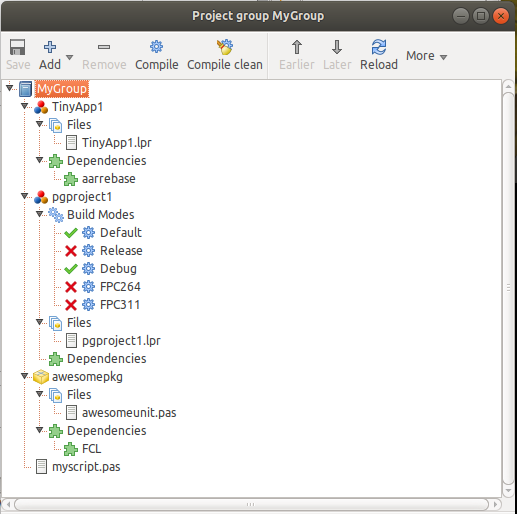 | |
| 27 | 24 | ||
| 28 | 25 | #### Editor toolbar | |
| 29 | 26 | ||
| 30 | 27 | - **Save** - saves the .lpg including the .lpg files of nested project groups. | |
| 31 | 28 | - **Add** | |
| 32 | 29 | - **Add from file** - Add projects (*.lpi), packages (*.lpk), Groups (*.lpg), single Pascal mfile (*.pas, *.pp) or scripts (e.g. *.sh, *.bat) | |
| 33 | 30 | - **Add current project** - Add active project to project group | |
| 34 | 31 | - **Remove** - removes target from the list and puts it into **removed targets**. | |
| 35 | 32 | - **Compile** - compiles the selected target: | |
| 36 | 33 | - Project/Build Mode: if the project and build mode is active it calls the IDE function, otherwise it uses lazbuild to compile the project. lazbuild automatically compiles outdated packages used by the project - same as the IDE. | |
| 37 | 34 | - Package: ompile using lazbuild. It uses lazbuild to compile a package in order to build independent of any project. It uses the target OS and CPU of lazbuild. lazbuild automatically compiles outdated packages used by the package. | |
| 38 | 35 | - Pascal module: builds the file using the IDE directives. | |
| 39 | 36 | - Project Group: builds all targets of the project group | |
| 40 | 37 | - Script: runs the script | |
| 41 | 38 | - **Compile Clean** - same as **Compile**, except it passes -B to lazbuild when compiling, telling FPC to rebuild every unit it finds sources | |
| 42 | 39 | - **Earlier** - moves the target one position up | |
| 43 | 40 | - **Later** - moves the target one position down | |
| 44 | 41 | - **Reload** - reloads the current .lpg, rebuilding the whole tree. | |
| 45 | 42 | - **More** | |
| 46 | 43 | - **New** - create a new project group. Closes the old and opens the new. | |
| 47 | 44 | - **Save As** - saves the project group as a different file. | |
| 48 | 45 | - **Undo** - undo the last Delete | |
| 49 | 46 | - **Redo** - not yet implemented | |
| 50 | 47 | - **Options** - Opens the options frame. Same as Tools / Options / Environment / Project Groups | |
| 51 | 48 | - **Info** - Opens a dialog showing some information, e.g. all source paths of the project group | |
| 52 | 49 | ||
| 53 | 50 | #### Popup menu | |
| 54 | 51 | ||
| 55 | 52 | Right clicking on a node gives the following menu items depending on the selected node: | |
| 56 | 53 | ||
| 57 | 54 | - **Copy filename** - copies the filename of the selected target to the clipboard | |
| 58 | 55 | - **Run** - Open the target in the IDEthis loads the project in the IDE | |
| 59 | 56 | - **Compile** | |
| 60 | 57 | - **Compile clean** | |
| 61 | 58 | - **Compile from here** - compiles this target and all targets below. | |
| 62 | 59 | - **Remove** | |
| 63 | 60 | - **Earlier** | |
| 64 | 61 | - **Later** | |
| 65 | 62 | - **Open** - same as double click | |
| 66 | 63 | - Project: this opens the project in the IDE (closing the currently active). | |
| 67 | 64 | - Package: opens the package editor of the package. | |
| 68 | 65 | - Pascal file: opens it in the source editor | |
| 69 | 66 | - **Properties** | |
| 70 | 67 | - Project: as open, except it also opens the Project Options. | |
| 71 | 68 | - Package: opens the package editor of the package. | |
| 72 | 69 | - Pascal file: opens the dialog to setup the IDE directives for Build and Run. | |
| 73 | 70 | ||
| 74 | 71 | ## Concepts | |
| 75 | 72 | ||
| 76 | 73 | ### Projects | |
| 77 | 74 | ||
| 78 | 75 | - The IDE has only one active project. The active project defines the active target OS, CPU and processor, the loaded packages, search paths and other compiler flags. And the active project has exactly one active build mode. | |
| 79 | 76 | - When compiling the active project build mode the normal IDE function *DoBuildProject* is called. | |
| 80 | 77 | - When compiling another build mode of the active project the active build mode is switched and *DoBuildProject* is called. | |
| 81 | 78 | - When compiling a non active project the external tool **lazbuild** is called and output is shown in the Messages window. Hints/Warnings/Errors of files outside the active project or its packages might be interpreted wrong by the IDE. | |
| 82 | 79 | - Note: You can add the same project multiple times. For example add *ProjectA* with build mode *Debug* active, then *ProjectA* again, except with build mode *Release* active. | |
| 83 | 80 | ||
| 84 | 81 | ### Package | |
| 85 | 82 | ||
| 86 | 83 | - A package is affected by the active project, for example the project defines the target OS and CPU. | |
| 87 | 84 | - When compiling a package the tool *lazbuild* is called to make sure the active project has no effect. *lazbuild* uses the target OS/CPU it was compiled with. | |
| 88 | 85 | ||
| 89 | 86 | ### Pascal file | |
| 90 | 87 | ||
| 91 | 88 | - If you want to see output of the **Run** command, add the following directive to the file: | |
| 92 | 89 | ||
| 93 | 90 | ``` pascal | |
| 94 | 91 | {%RunFlags Messages+} | |
| 95 | 92 | ``` | |
| 96 | 93 | ||
| 97 | 94 | - Hint: You can use instantfpc scripts to write Pascal scripts to do arbitrary things, like creating a zip, update documentation, install, uploading files. See [[InstantFPC]] | |
| 98 | 95 | ||
| 99 | 96 | Example for an instantfpc script: | |
| 100 | 97 | ||
| 101 | 98 | ``` pascal | |
| 102 | 99 | #!/usr/bin/instantfpc | |
| 103 | 100 | {%BuildCommand instantfpc --skip-run -B -gl myscript.pas} | |
| 104 | 101 | {%RunCommand instantfpc -gl myscript.pas} | |
| 105 | 102 | {%RunFlags Messages+} | |
| 106 | 103 | begin | |
| 107 | 104 | writeln('Running MyScript ...'); | |
| 108 | 105 | end. | |
| 109 | 106 | ``` | |
| 110 | 107 | ||
| 111 | 108 | ### Nested Project Group | |
| 112 | 109 | ||
| 113 | 110 | You can add a project group as a sub target of the project group. | |
| 114 | 111 | ||
| 115 | 112 | ## Other features | |
| 116 | 113 | ||
| 117 | 114 | - By default if the project group editor was open when closing the IDE, the editor will reopen on next start with the last open group. You can disable this in the options. | |
| 118 | 115 | - You can redirect Compile/Build to compile the selected target in the project group editor. See Tools / Options / Project Groups / "Compile" and "Build" compile target | |
| 119 | 116 | - Option "Show target paths": Disable: show file names without path, Enable: show file names with paths relative to directory of lpg | |
| 120 | 117 | - Find in files now has the option to search in all files in the currently loaded project group | |
| 121 | 118 | ||
| 122 | 119 | ## Bugs / ToDos | |
| 123 | 120 | ||
| 124 | 121 | - Not yet updating menu items enabled state. | |
| 125 | 122 | - Changes in the IDE are not yet updating the project group editor. After altering you need to click **Reload**. | |
| 126 | 123 | - Changes on disk are not yet recognized. Use **Reload**. | |
| 127 | 124 | - Show active build mode, active project | |
| 128 | 125 | - "New" button to create a package/project/file and add to project groups | |
| 129 | 126 | - clean function, like the Run / Clean up and build dialog | |
| 130 | 127 | - drag and drop within the editor | |
| 131 | 128 | - reorder targets | |
| 132 | 129 | - move targets between sub groups | |
| 133 | 130 | - move file to another project/package | |
| 134 | 131 | - save session in project group, allowing to quickly switch the active project | |
| 135 | 132 | - load sub projects in IDE to use code navigation for files not in the active project | |
| 136 | 133 | - find references in files | |
| 137 | 134 | ||
| 138 | 135 | --- | |
| 139 | 136 | *From the Free Pascal wiki, page "Project Groups", as it stood on 2020-09-17 after a change by Trev, out of the wiki's dump of 2024-05-26. Copyright stays with the author who wrote it, according to the old wiki's [[Licensing]] page. If you have concerns about this material, [message the admin](/wiki-contact).* | |
| 140 | 137 | Category: Lazarus | |
| 141 | 138 | Category: Lazarus IDE plugins | |
| 142 | 139 | Category: Packages |