

Package Tabs
Install
The package is available since Lazarus 1.5.
- Go to Package > Install/Uninstall Packages.
- Search in Available for installation for packagetabs.
- Select it.
- Click on Install selection.
- Save and rebuild IDE. The IDE will ask for confirmation, then it build the package, links it in and restarts itself.
Features
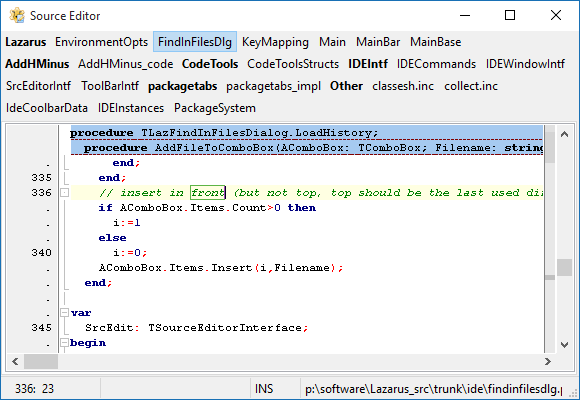
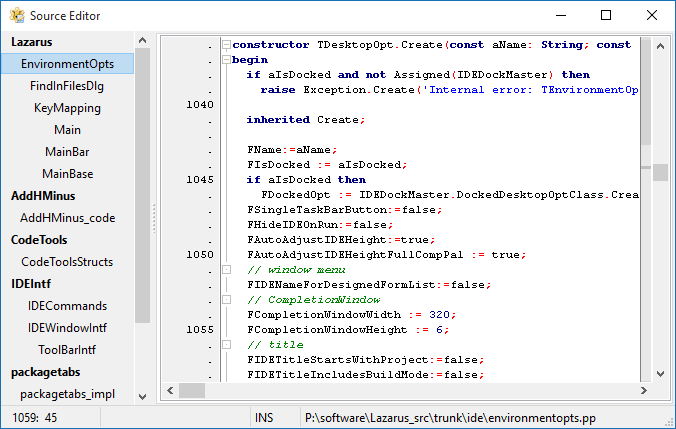
When installed, this package replaces source editor tabs/pages with buttons sorted by package and name. It correctly places the tabs according to the "Source notebook tabs position" setting (IDE Options -> Editor -> Pages and Windows -> Notebook Tabs).
Both the file buttons and package titles have popup-menus with additional commands.
Recommended IDE settings changes
Because the enhancement fixes the order of pages, it can be useful to remap "Ctrl+Tab" and "Ctrl+Shift+Tab" key shortcuts to "Go to previous editor in history" and "Go to next editor in history" that are by default available with "Ctrl+~" and "Ctrl+Shift+~".
Screenshots
Tabs on top
Tabs left
From the Free Pascal wiki, page "Package Tabs", as it stood on 2016-01-20 after a change by FTurtle, out of the wiki's dump of 2024-05-26. Copyright stays with the author who wrote it, according to the old wiki's Licensing page. If you have concerns about this material, message the admin.
Talk about this page
Nobody has opened a bench for this page yet. Sign in to open one.