

Old LCL Unicode Support: what changed
Revision 1 to 2. Removed lines have a minus sign; added lines have a plus sign.
| Old | New | Line | |
|---|---|---|---|
| 1 | 1 | **For historical reference only.**\ | |
| 2 | 2 | For current information about Unicode support in Lazarus see [[Unicode Support in Lazarus]]. | |
| 3 | 3 | ||
| 4 | 4 | ## Introduction | |
| 5 | 5 | ||
| 6 | 6 | As of 0.9.25, Lazarus has full Unicode support in all platforms except Gtk 1. This page covers Unicode in Lazarus up to version 1.4 which still uses FPC 2.6.4. | |
| 7 | 7 | ||
| 8 | 8 | Starting from 2.0 Lazarus will have improved Unicode support using features of FPC 3.0+. See details here: [[Unicode Support in Lazarus]] | |
| 9 | 9 | ||
| 10 | 10 | ## Instructions for users | |
| 11 | 11 | ||
| 12 | 12 | Even though Lazarus has Unicode widgetsets, it's important to note that not everything is Unicode. It's the responsibility of the developer to know what is the encoding of their strings and do the proper conversion between libraries which expect different encodings. | |
| 13 | 13 | ||
| 14 | 14 | Usually the encoding is per library (e.g. a dynamic library DLL or a Lazarus package). Each library will uniformly expect 1 kind of encoding, which will usually either be Unicode (UTF-8 for Lazarus) or ANSI (which actually means the system encoding, and may be UTF-8 or not). The RTL and the FCL of FPC \<= 2.6 expect ANSI strings. | |
| 15 | 15 | ||
| 16 | 16 | You can convert between Unicode and ANSI using | |
| 17 | 17 | ||
| 18 | 18 | - the **UTF8ToAnsi** and **AnsiToUTF8** functions from the (FPC) System unit | |
| 19 | 19 | - or the **UTF8ToSys** and **SysToUTF8** from the (Lazarus) FileUtil unit. | |
| 20 | 20 | ||
| 21 | 21 | The latter two are smarter (faster) but pull more code into your program. | |
| 22 | 22 | ||
| 23 | 23 | ### FPC is not Unicode aware | |
| 24 | 24 | ||
| 25 | 25 | The Free Pascal Runtime Library (RTL), and the Free Pascal Free Component Library (FCL) in current FPC versions (\<= 2.6.x) are ANSI, so you will need to convert strings coming from Unicode libraries or going to Unicode libraries (e.g. the LCL). | |
| 26 | 26 | ||
| 27 | 27 | There are significant improvements to development branches of FPC 2.7.1 with regard to Strings. See RawByteString and UTF8String in [[FPC Unicode support]]. | |
| 28 | 28 | ||
| 29 | 29 | ### Converting between ANSI and Unicode | |
| 30 | 30 | ||
| 31 | 31 | > **Note:** AnsiToUTF8 and UTF8ToAnsi require a widestring manager under Linux, BSD and Mac OS X. You can use the SysToUTF8 and UTF8ToSys functions (unit FileUtil) or add the widestring manager by adding cwstring as one of the first units to your program's uses section. | |
| 32 | 32 | ||
| 33 | 33 | Examples: | |
| 34 | 34 | ||
| 35 | 35 | Say you get a string from a TEdit and you want to give it to some RTL file routine: | |
| 36 | 36 | ||
| 37 | 37 | ``` pascal | |
| 38 | 38 | var | |
| 39 | 39 | MyString: string; // utf-8 encoded | |
| 40 | 40 | begin | |
| 41 | 41 | MyString := MyTEdit.Text; | |
| 42 | 42 | SomeRTLRoutine(UTF8ToAnsi(MyString)); | |
| 43 | 43 | end; | |
| 44 | 44 | ``` | |
| 45 | 45 | ||
| 46 | 46 | And for the opposite direction: | |
| 47 | 47 | ||
| 48 | 48 | ``` pascal | |
| 49 | 49 | var | |
| 50 | 50 | MyString: string; // ANSI encoded | |
| 51 | 51 | begin | |
| 52 | 52 | MyString := SomeRTLRoutine; | |
| 53 | 53 | MyTEdit.Text := AnsiToUTF8(MyString); | |
| 54 | 54 | end; | |
| 55 | 55 | ``` | |
| 56 | 56 | ||
| 57 | 57 | ### Widestrings and Ansistrings | |
| 58 | 58 | ||
| 59 | 59 | A widestring is a string type whose basic data holding elements have a size of 2 bytes. Widestrings almost always hold data in the UTF-16 encoding. See [[Widestrings]] | |
| 60 | 60 | ||
| 61 | 61 | Note that while each data point accessible as an array of a widestring has 2 bytes, in UTF-16 a character may have 1 or 2 data points, which would then occupy 2 or 4 bytes. This means that accessing a Widestring as an array and expecting to obtain UTF-16 characters this way is **completely wrong** and will fail when a 4 byte character is present in the string. Note also that UTF-16, like UTF-8, may have decomposed characters. The character "Á" for example might be encoded as a single character or as 2 characters: "A" + a modifying accent. Thus in Unicode a text which involves accented letters can often be encoded in multiple ways and Lazarus and FPC do not handle this automatically. | |
| 62 | 62 | ||
| 63 | 63 | When passing Ansistrings to Widestrings you have to convert the encoding. | |
| 64 | 64 | ||
| 65 | 65 | ``` pascal | |
| 66 | 66 | var | |
| 67 | 67 | w: widestring; | |
| 68 | 68 | begin | |
| 69 | 69 | w:='Über'; // wrong, because FPC will convert system codepage to UTF16 | |
| 70 | 70 | w:=UTF8ToUTF16('Über'); // correct | |
| 71 | 71 | Button1.Caption:=UTF16ToUTF8(w); | |
| 72 | 72 | end; | |
| 73 | 73 | ``` | |
| 74 | 74 | ||
| 75 | 75 | ### UTF8 strings and characters | |
| 76 | 76 | ||
| 77 | 77 | Until Lazarus 0.9.30 the UTF-8 handling routines were in the LCL in the unit LCLProc. In Lazarus 0.9.31+ the routines in LCLProc are still available for backwards compatibility but the real code to deal with UTF-8 is located in the lazutils package in the unit lazutf8. | |
| 78 | 78 | ||
| 79 | 79 | To execute operations on UTF-8 strings please use routines from the unit lazutf8 instead of routines from the SysUtils routine from Free Pascal, because SysUtils is not yet prepared to deal with Unicode, while lazutf8 is. Simply substitute the routines from SysUtils with their lazutf8 equivalent, which always has the same name except for an added "UTF8" prefix. | |
| 80 | 80 | ||
| 81 | 81 | #### UTF-8 String Copy, Length, LowerCase, etc | |
| 82 | 82 | ||
| 83 | 83 | Nearly all operations which one might want to execute with UTF-8 strings are covered by the routines in the unit lazutf8 (unit LCLProc for Lazarus 0.9.30 or lower). See the following list of routines taken from lazutf8.pas: | |
| 84 | 84 | ||
| 85 | 85 | ``` pascal | |
| 86 | 86 | function UTF8CharacterLength(p: PChar): integer; | |
| 87 | 87 | function UTF8Length(const s: string): PtrInt; | |
| 88 | 88 | function UTF8Length(p: PChar; ByteCount: PtrInt): PtrInt; | |
| 89 | 89 | function UTF8CharacterToUnicode(p: PChar; out CharLen: integer): Cardinal; | |
| 90 | 90 | function UnicodeToUTF8(u: cardinal; Buf: PChar): integer; inline; | |
| 91 | 91 | function UnicodeToUTF8SkipErrors(u: cardinal; Buf: PChar): integer; | |
| 92 | 92 | function UnicodeToUTF8(u: cardinal): shortstring; inline; | |
| 93 | 93 | function UTF8ToDoubleByteString(const s: string): string; | |
| 94 | 94 | function UTF8ToDoubleByte(UTF8Str: PChar; Len: PtrInt; DBStr: PByte): PtrInt; | |
| 95 | 95 | function UTF8FindNearestCharStart(UTF8Str: PChar; Len: integer; | |
| 96 | 96 | BytePos: integer): integer; | |
| 97 | 97 | // find the n-th UTF8 character, ignoring BIDI | |
| 98 | 98 | function UTF8CharStart(UTF8Str: PChar; Len, CharIndex: PtrInt): PChar; | |
| 99 | 99 | // find the byte index of the n-th UTF8 character, ignoring BIDI (byte len of substr) | |
| 100 | 100 | function UTF8CharToByteIndex(UTF8Str: PChar; Len, CharIndex: PtrInt): PtrInt; | |
| 101 | 101 | procedure UTF8FixBroken(P: PChar); | |
| 102 | 102 | function UTF8CharacterStrictLength(P: PChar): integer; | |
| 103 | 103 | function UTF8CStringToUTF8String(SourceStart: PChar; SourceLen: PtrInt) : string; | |
| 104 | 104 | function UTF8Pos(const SearchForText, SearchInText: string): PtrInt; | |
| 105 | 105 | function UTF8Copy(const s: string; StartCharIndex, CharCount: PtrInt): string; | |
| 106 | 106 | procedure UTF8Delete(var s: String; StartCharIndex, CharCount: PtrInt); | |
| 107 | 107 | procedure UTF8Insert(const source: String; var s: string; StartCharIndex: PtrInt); | |
| 108 | 108 | ||
| 109 | 109 | function UTF8LowerCase(const AInStr: string; ALanguage: string=''): string; | |
| 110 | 110 | function UTF8UpperCase(const AInStr: string; ALanguage: string=''): string; | |
| 111 | 111 | function FindInvalidUTF8Character(p: PChar; Count: PtrInt; | |
| 112 | 112 | StopOnNonASCII: Boolean = false): PtrInt; | |
| 113 | 113 | function ValidUTF8String(const s: String): String; | |
| 114 | 114 | ||
| 115 | 115 | procedure AssignUTF8ListToAnsi(UTF8List, AnsiList: TStrings); | |
| 116 | 116 | ||
| 117 | 117 | //compare functions | |
| 118 | 118 | ||
| 119 | 119 | function UTF8CompareStr(const S1, S2: string): Integer; | |
| 120 | 120 | function UTF8CompareText(const S1, S2: string): Integer; | |
| 121 | 121 | ``` | |
| 122 | 122 | ||
| 123 | 123 | ### Dealing with directory and filenames | |
| 124 | 124 | ||
| 125 | 125 | Lazarus controls and functions expect filenames and directory names in UTF-8 encoding, but the RTL uses ANSI strings for directories and filenames. | |
| 126 | 126 | ||
| 127 | 127 | For example, consider a button which sets the Directory property of the TFileListBox to the current directory. The RTL Function [[doc:rtl/sysutils/getcurrentdir.html|GetCurrentDir]] is ANSI, not Unicode, so conversion is needed: | |
| 128 | 128 | ||
| 129 | 129 | ``` pascal | |
| 130 | 130 | procedure TForm1.Button1Click(Sender: TObject); | |
| 131 | 131 | begin | |
| 132 | 132 | FileListBox1.Directory:=SysToUTF8(GetCurrentDir); | |
| 133 | 133 | // or use the functions from the FileUtil unit | |
| 134 | 134 | FileListBox1.Directory:=GetCurrentDirUTF8; | |
| 135 | 135 | end; | |
| 136 | 136 | ``` | |
| 137 | 137 | ||
| 138 | 138 | The unit FileUtil defines common file functions with UTF-8 strings: | |
| 139 | 139 | ||
| 140 | 140 | ``` pascal | |
| 141 | 141 | // basic functions similar to the RTL but working with UTF-8 instead of the | |
| 142 | 142 | // system encoding | |
| 143 | 143 | ||
| 144 | 144 | // AnsiToUTF8 and UTF8ToAnsi need a widestring manager under Linux, BSD, Mac OS X | |
| 145 | 145 | // but normally these OS use UTF-8 as system encoding so the widestringmanager | |
| 146 | 146 | // is not needed. | |
| 147 | 147 | function NeedRTLAnsi: boolean;// true if system encoding is not UTF-8 | |
| 148 | 148 | procedure SetNeedRTLAnsi(NewValue: boolean); | |
| 149 | 149 | function UTF8ToSys(const s: string): string;// as UTF8ToAnsi but more independent of widestringmanager | |
| 150 | 150 | function SysToUTF8(const s: string): string;// as AnsiToUTF8 but more independent of widestringmanager | |
| 151 | 151 | ||
| 152 | 152 | // file operations | |
| 153 | 153 | function FileExistsUTF8(const Filename: string): boolean; | |
| 154 | 154 | function FileAgeUTF8(const FileName: string): Longint; | |
| 155 | 155 | function DirectoryExistsUTF8(const Directory: string): Boolean; | |
| 156 | 156 | function ExpandFileNameUTF8(const FileName: string): string; | |
| 157 | 157 | function ExpandUNCFileNameUTF8(const FileName: string): string; | |
| 158 | 158 | {$IFNDEF VER2_2_0} | |
| 159 | 159 | function ExtractShortPathNameUTF8(Const FileName : String) : String; | |
| 160 | 160 | {$ENDIF} | |
| 161 | 161 | function FindFirstUTF8(const Path: string; Attr: Longint; out Rslt: TSearchRec): Longint; | |
| 162 | 162 | function FindNextUTF8(var Rslt: TSearchRec): Longint; | |
| 163 | 163 | procedure FindCloseUTF8(var F: TSearchrec); | |
| 164 | 164 | function FileSetDateUTF8(const FileName: String; Age: Longint): Longint; | |
| 165 | 165 | function FileGetAttrUTF8(const FileName: String): Longint; | |
| 166 | 166 | function FileSetAttrUTF8(const Filename: String; Attr: longint): Longint; | |
| 167 | 167 | function DeleteFileUTF8(const FileName: String): Boolean; | |
| 168 | 168 | function RenameFileUTF8(const OldName, NewName: String): Boolean; | |
| 169 | 169 | function FileSearchUTF8(const Name, DirList : String): String; | |
| 170 | 170 | function FileIsReadOnlyUTF8(const FileName: String): Boolean; | |
| 171 | 171 | function GetCurrentDirUTF8: String; | |
| 172 | 172 | function SetCurrentDirUTF8(const NewDir: String): Boolean; | |
| 173 | 173 | function CreateDirUTF8(const NewDir: String): Boolean; | |
| 174 | 174 | function RemoveDirUTF8(const Dir: String): Boolean; | |
| 175 | 175 | function ForceDirectoriesUTF8(const Dir: string): Boolean; | |
| 176 | 176 | ||
| 177 | 177 | // environment | |
| 178 | 178 | function ParamStrUTF8(Param: Integer): string; | |
| 179 | 179 | function GetEnvironmentStringUTF8(Index : Integer): String; | |
| 180 | 180 | function GetEnvironmentVariableUTF8(const EnvVar: String): String; | |
| 181 | 181 | function GetAppConfigDirUTF8(Global: Boolean): string; | |
| 182 | 182 | ``` | |
| 183 | 183 | ||
| 184 | 184 | ### East Asian languages on Windows | |
| 185 | 185 | ||
| 186 | 186 | The default font (Tahoma) for user interface controls under Windows XP is capable of correctly displaying several scripts/alphabets/languages, including Arabic, Russian (Cyrillic alphabet) and Western languages (Latin/Greek alphabets), but not East Asian languages, like Chinese, Japanese and Korean. | |
| 187 | 187 | ||
| 188 | 188 | Simply by going to the Control Panel, choosing Regional Settings, clicking on the Languages Tab and installing the East Asia Language Pack, the standard user interface font will start showing those languages correctly. Obviously Windows XP versions localized for those languages will already have this language pack installed. Extended instructions [here](http://newton.uor.edu/Departments&Programs/AsianStudiesDept/Language/asianlanguageinstallation_XP.html). | |
| 189 | 189 | ||
| 190 | 190 | Later Windows versions presumably have support for these languages out of the box. | |
| 191 | 191 | ||
| 192 | 192 | ### Usage of UTF-8 | |
| 193 | 193 | ||
| 194 | 194 | See details in [[UTF8 strings and characters]] | |
| 195 | 195 | ||
| 196 | 196 | ## Free Pascal Particularities | |
| 197 | 197 | ||
| 198 | 198 | ### UTF8 and source files - the missing BOM | |
| 199 | 199 | ||
| 200 | 200 | When you create source files with Lazarus and type some non-ASCII characters the file is saved in UTF8. It does **not** use a **BOM** (Byte Order Mark). You can change the encoding via right click on source editor / File Settings / Encoding. Apart from the fact that UTF-8 files are not supposed to have BOMs, the reason for the lacking BOM is how FPC treats Ansistrings. For compatibility the LCL uses Ansistrings and for portability the LCL uses UTF8. | |
| 201 | 201 | ||
| 202 | 202 | Note: Some MS Windows text editors might treat the files as encoded with the system codepage (OEM codepage) and show them as invalid characters. **Do not add the BOM.** If you add the BOM you have to change all string assignments. | |
| 203 | 203 | ||
| 204 | 204 | For example: | |
| 205 | 205 | ||
| 206 | 206 | ``` pascal | |
| 207 | 207 | Button1.Caption := 'Über'; | |
| 208 | 208 | ``` | |
| 209 | 209 | ||
| 210 | 210 | When no BOM is given (and no codepage parameter was passed) the compiler treats the string as system encoding and copies each byte unconverted to the string. This is how the LCL expects strings. | |
| 211 | 211 | ||
| 212 | 212 | ``` pascal | |
| 213 | 213 | // source file saved as UTF without BOM | |
| 214 | 214 | if FileExists('Über.txt') then ; // wrong, because FileExists expects system encoding | |
| 215 | 215 | if FileExistsUTF8('Über.txt') then ; // correct | |
| 216 | 216 | ``` | |
| 217 | 217 | ||
| 218 | 218 | ## Unicode essentials | |
| 219 | 219 | ||
| 220 | 220 | The Unicode standard maps integers from 0 to 10FFFF(h) to characters. Each such mapping is called a code point. In other words, Unicode characters are in principle defined for code points from U+000000 to U+10FFFF (0 to 1 114 111). | |
| 221 | 221 | ||
| 222 | 222 | There are three major schemes for representing Unicode code points as unique byte sequences. These schemes are called Unicode transformation formats: UTF-8, UTF-16 and UTF-32. Conversions between all of them are possible. Here are their basic properties: | |
| 223 | 223 | ||
| 224 | 224 | ` UTF-8 UTF-16 UTF-32`\ | |
| 225 | 225 | `Smallest code point [hex] 000000 000000 000000`\ | |
| 226 | 226 | `Largest code point [hex] 10FFFF 10FFFF 10FFFF`\ | |
| 227 | 227 | `Code unit size [bits] 8 16 32`\ | |
| 228 | 228 | `Minimal bytes/character 1 2 4`\ | |
| 229 | 229 | `Maximal bytes/character 4 4 4` | |
| 230 | 230 | ||
| 231 | 231 | **UTF-8** has several important and useful properties: It is interpreted as a sequence of bytes, so that the concept of lo- and hi-order byte does not exist. Unicode characters U+0000 to U+007F (ASCII) are encoded simply as bytes 00h to 7Fh (ASCII compatibility). This means that files and strings which contain only 7-bit ASCII characters have the same encoding under both ASCII and UTF-8. All characters \>U+007F are encoded as a sequence of several bytes, each of which has the two most significant bits set. No byte sequence of one character is contained within a longer byte sequence of another character. This allows easy searching for substrings. The first byte of a multibyte sequence (representing a non-ASCII character) is always in the range C0h to FDh and it indicates how many bytes follow for this character. All further bytes in a multibyte sequence are in the range 80h to BFh. This allows easy resynchronization and robustness. | |
| 232 | 232 | ||
| 233 | 233 | **UTF-16** has the following most important properties: It uses a single 16-bit word to encode characters from U+0000 to U+d7ff, and a pair of 16-bit words to encode any of the remaining Unicode characters. | |
| 234 | 234 | ||
| 235 | 235 | Finally, any Unicode character can be represented as a single 4 byte/32-bit unit in **UTF-32**. | |
| 236 | 236 | ||
| 237 | 237 | For more, see: [Unicode FAQ - Basic questions](http://www.unicode.org/faq/basic_q.html), [Unicode FAQ - UTF-8, UTF-16, UTF-32 & BOM](http://www.unicode.org/faq/utf_bom.html), [Wikipedia: UTF-8](http://en.wikipedia.org/wiki/UTF-8) [1](http://en.wikipedia.org/wiki/ISO-8859) | |
| 238 | 238 | ||
| 239 | 239 | # Implementation Details | |
| 240 | 240 | ||
| 241 | 241 | ## Lazarus/LCL generally uses only UTF-8 | |
| 242 | 242 | ||
| 243 | 243 | Since the GTK1 interface was declared obsolete in Lazarus 0.9.31, all LCL interfaces are Unicode capable and the LCL uses and accepts only UTF-8 encoded strings, unless in routines explicitly marked as accepting other encodings. | |
| 244 | 244 | ||
| 245 | 245 | ## Unicode-enabling the win32 interface | |
| 246 | 246 | ||
| 247 | 247 | ### Overview | |
| 248 | 248 | ||
| 249 | 249 | First, and most importantly, all Unicode patches for the Win32 interface must be enclosed by IFDEF WindowsUnicodeSupport, to avoid breaking the existing ANSI interface. After this stabilizes, all ifdefs will be removed and only the Unicode part will remain. At his moment all existing programs that use ANSI characters will need migration to Unicode. | |
| 250 | 250 | ||
| 251 | 251 | ### No Unicode support on Win9x | |
| 252 | 252 | ||
| 253 | 253 | Windows platforms \<=Win9x are based on ISO code page standards and only partially support Unicode. Windows platforms starting with Windows NT (e.g. Windows 2000, XP, Vista, 7, 8) and Windows CE fully support Unicode. | |
| 254 | 254 | ||
| 255 | 255 | Win 9x and NT offer two parallel sets of API functions: the old ANSI enabled *A and the new, Unicode enabled *W. *W functions accept wide strings - UTF-16 encoded strings - as parameters. | |
| 256 | 256 | ||
| 257 | 257 | Windows 9x has all *W functions but they mostly have empty implementations, so they do nothing. Only some some *W functions are fully implemented in 9x; these are listed below in the section "Wide functions present on Windows 9x". This property is relevant as it allows to have one single application for both Win9x and WinNT and detect at runtime which set of APIs to use. | |
| 258 | 258 | ||
| 259 | 259 | Windows CE only uses Wide API functions. | |
| 260 | 260 | ||
| 261 | 261 | #### Wide functions present on Windows 9x | |
| 262 | 262 | ||
| 263 | 263 | Some Wide API functions are present on Windows 9x. Here is a list of such functions: <http://support.microsoft.com/kb/210341> | |
| 264 | 264 | ||
| 265 | 265 | Conversion example: | |
| 266 | 266 | ||
| 267 | 267 | ``` pascal | |
| 268 | 268 | GetTextExtentPoint32(hdcNewBitmap, LPSTR(ButtonCaption), | |
| 269 | 269 | Length(ButtonCaption), TextSize); | |
| 270 | 270 | ``` | |
| 271 | 271 | ||
| 272 | 272 | Becomes: | |
| 273 | 273 | ||
| 274 | 274 | ``` pascal | |
| 275 | 275 | {$ifdef WindowsUnicodeSupport} | |
| 276 | 276 | GetTextExtentPoint32W(hdcNewBitmap, PWideChar(Utf8Decode(ButtonCaption)), Length(WideCaption), TextSize); | |
| 277 | 277 | {$else} | |
| 278 | 278 | GetTextExtentPoint32(hdcNewBitmap, LPSTR(ButtonCaption), Length(ButtonCaption), TextSize); | |
| 279 | 279 | {$endif} | |
| 280 | 280 | ``` | |
| 281 | 281 | ||
| 282 | 282 | #### Functions that need Ansi and Wide versions | |
| 283 | 283 | ||
| 284 | 284 | First Conversion example: | |
| 285 | 285 | ||
| 286 | 286 | ``` pascal | |
| 287 | 287 | function TGDIWindow.GetTitle: String; | |
| 288 | 288 | var | |
| 289 | 289 | l: Integer; | |
| 290 | 290 | begin | |
| 291 | 291 | l := Windows.GetWindowTextLength(Handle); | |
| 292 | 292 | SetLength(Result, l); | |
| 293 | 293 | Windows.GetWindowText(Handle, @Result[1], l); | |
| 294 | 294 | end; | |
| 295 | 295 | ``` | |
| 296 | 296 | ||
| 297 | 297 | Becomes: | |
| 298 | 298 | ||
| 299 | 299 | ``` pascal | |
| 300 | 300 | function TGDIWindow.GetTitle: String; | |
| 301 | 301 | var | |
| 302 | 302 | l: Integer; | |
| 303 | 303 | AnsiBuffer: string; | |
| 304 | 304 | WideBuffer: WideString; | |
| 305 | 305 | begin | |
| 306 | 306 | ||
| 307 | 307 | {$ifdef WindowsUnicodeSupport} | |
| 308 | 308 | ||
| 309 | 309 | if UnicodeEnabledOS then | |
| 310 | 310 | begin | |
| 311 | 311 | l := Windows.GetWindowTextLengthW(Handle); | |
| 312 | 312 | SetLength(WideBuffer, l); | |
| 313 | 313 | l := Windows.GetWindowTextW(Handle, @WideBuffer[1], l); | |
| 314 | 314 | SetLength(WideBuffer, l); | |
| 315 | 315 | Result := Utf8Encode(WideBuffer); | |
| 316 | 316 | end | |
| 317 | 317 | else | |
| 318 | 318 | begin | |
| 319 | 319 | l := Windows.GetWindowTextLength(Handle); | |
| 320 | 320 | SetLength(AnsiBuffer, l); | |
| 321 | 321 | l := Windows.GetWindowText(Handle, @AnsiBuffer[1], l); | |
| 322 | 322 | SetLength(AnsiBuffer, l); | |
| 323 | 323 | Result := AnsiToUtf8(AnsiBuffer); | |
| 324 | 324 | end; | |
| 325 | 325 | ||
| 326 | 326 | {$else} | |
| 327 | 327 | ||
| 328 | 328 | l := Windows.GetWindowTextLength(Handle); | |
| 329 | 329 | SetLength(Result, l); | |
| 330 | 330 | Windows.GetWindowText(Handle, @Result[1], l); | |
| 331 | 331 | ||
| 332 | 332 | {$endif} | |
| 333 | 333 | ||
| 334 | 334 | end; | |
| 335 | 335 | ``` | |
| 336 | 336 | ||
| 337 | 337 | ### Screenshots | |
| 338 | 338 | ||
| 339 | - | ||
| 340 | - | ||
| 341 | - | ||
| 342 | - | ||
| 339 | + | 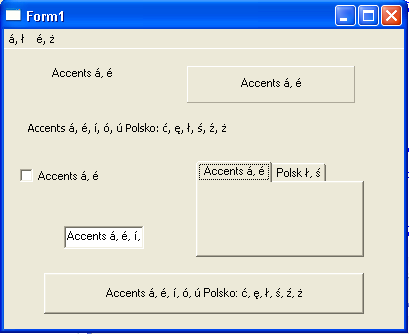 | |
| 343 | 340 | ||
| 344 | 341 | # FPC codepages | |
| 345 | 342 | ||
| 346 | 343 | The compiler (FPC) supports specifying the code page in which the source code has been written via the command option *-Fc* (e.g. *-Fcutf8*) and the equivalent *codepage* directive (e.g. *{\$codepage utf8}*). In this case, rather than literally copying the bytes that represent the string constants in your program, the compiler will interpret all character data according to that codepage. There are two things to watch out for though: | |
| 347 | 344 | ||
| 348 | 345 | - on Unix platforms, make sure you include a widestring manager by adding the *cwstring* unit to your uses-clause. When using unit LazUtf8, this is already done. Without it, the program will not be able to convert all character data correctly when running. It's not included by default because this unit makes your program dependent on libc, which makes cross-compilation harder. | |
| 349 | 346 | - When using *-Fc* or *\$codepage* the compiler converts all string constants that contain non-ASCII characters to widestring constants. These are automatically converted back to ansistring (either at compile time or at run time), but this can cause one caveat if you try to mix both characters and ordinal values in a single string constant: | |
| 350 | 347 | ||
| 351 | 348 | For example: | |
| 352 | 349 | ||
| 353 | 350 | ``` pascal | |
| 354 | 351 | program project1; | |
| 355 | 352 | {$codepage utf8} | |
| 356 | 353 | {$mode objfpc}{$H+} | |
| 357 | 354 | {$ifdef unix} | |
| 358 | 355 | uses cwstring; | |
| 359 | 356 | {$endif} | |
| 360 | 357 | var | |
| 361 | 358 | a,b,c: string; | |
| 362 | 359 | begin | |
| 363 | 360 | a:='ä'; | |
| 364 | 361 | b:='='#$C3#$A4; // #$C3#$A4 is UTF-8 for ä | |
| 365 | 362 | c:='ä='#$C3#$A4; | |
| 366 | 363 | writeln(a,b); // writes ä=ä | |
| 367 | 364 | writeln(c); // writes ä=ä | |
| 368 | 365 | end. | |
| 369 | 366 | ``` | |
| 370 | 367 | ||
| 371 | 368 | When compiled and executed, this will write: | |
| 372 | 369 | ||
| 373 | 370 | ä=ä | |
| 374 | 371 | ä=ä | |
| 375 | 372 | ||
| 376 | 373 | The reason is once the *ä* is encountered, as mentioned above the rest of the constant string assigned to 'c' will be parsed as a widestring. As a result the \#\$C3 and \#\$A4 are interpreted as widechar(#\$C3) and widechar(#\$A4), rather than as ansichars. | |
| 377 | 374 | ||
| 378 | 375 | # See Also | |
| 379 | 376 | ||
| 380 | 377 | - [[Character and string types]] | |
| 381 | 378 | - [[UTF-8]] - Description of UTF-8 strings | |
| 382 | 379 | - [[FPC Unicode support]] | |
| 383 | 380 | - [[for-in loop|for-in_loop#Traversing_UTF-8_strings]] - Code snippet that shows how to traverse UTF8 strings | |
| 384 | 381 | - [[unicode use cases]] | |
| 385 | 382 | ||
| 386 | 383 | --- | |
| 387 | 384 | *From the Free Pascal wiki, page "Old LCL Unicode Support", as it stood on 2020-02-21 after a change by Trev, out of the wiki's dump of 2024-05-26. Copyright stays with the author who wrote it, according to the old wiki's [[Licensing]] page. If you have concerns about this material, [message the admin](/wiki-contact).* | |
| 388 | 385 | Category: FPC | |
| 389 | 386 | Category: LCL | |
| 390 | 387 | Category: Unicode |