

OPM External Update json Editor: what changed
Revision 2 to 3. Removed lines have a minus sign; added lines have a plus sign.
| Old | New | Line | |
|---|---|---|---|
| 1 | 1 | ## Information and Downloads | |
| 2 | 2 | ||
| 3 | 3 | ### Screenshots | |
| 4 | 4 | ||
| 5 | 5 | 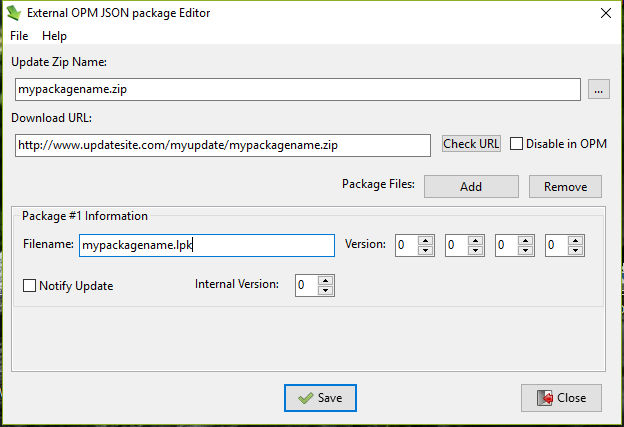 | |
| 6 | 6 | ||
| 7 | 7 | 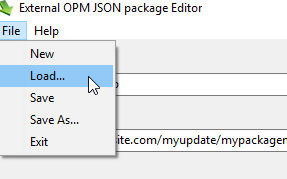 | |
| 8 | 8 | ||
| 9 | 9 | 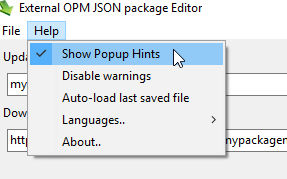 | |
| 10 | 10 | ||
| 11 | 11 | ------------------------------------------------------------------------ | |
| 12 | 12 | ||
| 13 | 13 | ### Purpose | |
| 14 | 14 | ||
| 15 | 15 | - To make and maintain package update information for [[Online Package Manager]] easily, accurately and quickly. | |
| 16 | 16 | ||
| 17 | 17 | ### Installation | |
| 18 | 18 | ||
| 19 | 19 | - There is a Windows Installer and a Zipfile of Linux executables (see #Download below) available. | |
| 20 | 20 | - Source code is also available to compile with Lazarus v1.62+ and FPC v3.00+ (best with Laz1.7+/fpc3.11+) | |
| 21 | 21 | ||
| 22 | 22 | #### Directory Structure | |
| 23 | 23 | ||
| 24 | 24 | - OPM External Update json Editor is designed to be deployed in the same folder as your component. | |
| 25 | 25 | - If you maintain multiple components in separate folders, a copy of OPM External Update json Editor should be deployed in the main folder of each one. | |
| 26 | 26 | - Each copy of OPM External Update json Editor will maintain its own distinct cfg file in the GetAppConfigDir location. | |
| 27 | 27 | - When first started up, OPM External Update json Editor will make the subfolders: | |
| 28 | 28 | ||
| 29 | - | ||
| 30 | - | ||
| 29 | + | ```text | |
| 30 | + | - \updates | |
| 31 | + | - \locale | |
| 32 | + | ``` | |
| 31 | 33 | ||
| 32 | 34 | * Suggested structure for your component: | |
| 33 | 35 | ||
| 34 | - | ||
| 35 | - | ||
| 36 | - | ||
| 37 | - | ||
| 36 | + | ```text | |
| 37 | + | - \componentfolder | |
| 38 | + | - \componentfolder\stable_version | |
| 39 | + | - \componentfolder\stable_version\updates | |
| 40 | + | - \componentfolder\stable_version\locale | |
| 41 | + | ``` | |
| 38 | 42 | ||
| 39 | 43 | - \componentfolder - contains the working version of your component code (development source, libs, backups, resources, executables and so on) | |
| 40 | 44 | - \componentfolder\stable_version - contains the published version (stable source code only), and also a copy of JsonEditor(.exe) | |
| 41 | 45 | - \componentfolder\stable_version\updates - contains the update json and update Zipfile | |
| 42 | 46 | - \componentfolder\stable_version\locale - contains the language files for OPM External Update json Editor | |
| 43 | 47 | - This works very well in practise, especially if your project is under version control (svn, github etc) | |
| 44 | 48 | ||
| 45 | 49 | ### Making a new OnlinePackageManager update json | |
| 46 | 50 | ||
| 47 | 51 | - Fire up OPM External Update json Editor (jsoneditor\[.exe\]) and fill in all the fields for your package. | |
| 48 | 52 | - If you use the ellipsis button \[...\] to locate your Zipfile, OPM External Update json Editor will offer to copy the Zipfile to the \updates folder if it was in a different folder | |
| 49 | 53 | - **It is essential that the package lpk name exactly matches the one already installed in [[Online Package Manager]]**, otherwise you can choose whatever filenames you like. | |
| 50 | 54 | - The first time you use OPM External Update json Editor, a pop-up hint window will show you what each field is for. | |
| 51 | 55 | - When you click \[Save\], if any field needs amending a dialog will tell you what is wrong, and problem fields will highlight. | |
| 52 | 56 | - Only a validated json will be saved to disk. | |
| 53 | 57 | - By default the json is named update_\<zipfilename\>.json and saved to the \updates folder | |
| 54 | 58 | - OPM External Update json Editor will offer to Auto-Load the same component info when it is next opened. | |
| 55 | 59 | - If you have a multiple components entry in OPM (e.g. Designtime and Runtime), you can make an update_json file for them all (Click \[Add\] in OPM External Update json Editor) | |
| 56 | 60 | - Each can have its own version number and other characteristics | |
| 57 | 61 | - Finally, upload the Zipfile and json file to a place where [[Online Package Manager]] can find it. | |
| 58 | 62 | - Please note: After you uploaded the JSON the changes are not immediately visible in the tree. Usually it takes 1-2 min. or less. | |
| 59 | 63 | ||
| 60 | 64 | ### Maintaining a package with OnlinePackageManager and OPM External Update json Editor | |
| 61 | 65 | ||
| 62 | 66 | - Make a new update Zipfile and put it into the \updates folder | |
| 63 | 67 | - Pay attention to embedded paths in the zip | |
| 64 | 68 | - You can include example/demo source code in the Zip | |
| 65 | 69 | - Be sure to prune out anything not needed, like /backup /lib folders and executables etc. | |
| 66 | 70 | - Fire up JsonEditor and click File/Load | |
| 67 | 71 | - If Auto-Load was chosen, it will already have loaded the last-saved package info | |
| 68 | 72 | - Update the version info for your package(s) thus: | |
| 69 | 73 | ||
| 70 | 74 | **"DownloadZipURL"** --\> Link to your new, updated package | |
| 71 | 75 | ||
| 72 | 76 | **"DisableInOPM"** --\> If you want to temporary disable your package, set this boolean to true. It's useful for maintenance, the package will be grayed out in the tree. The user cannot download/install/update the package. | |
| 73 | 77 | ||
| 74 | 78 | **"Version"/"ForceNotify"/"InternalVersion"** --\> To trigger an update message on the users computer, you can either: | |
| 75 | 79 | ||
| 76 | 80 | - Increase the **"Version"** number. Useful when you want to release a new version of the package. | |
| 77 | 81 | - Set **"ForceNotify"** to true. Useful after a minor change in your source, that does not require a version change or in case of trunk version. To prevent continous error messages, **"ForceNotify"** must be used in combination with **"InternalVersion"**. After the user updates the package, OPM locally stores the **"InternalVersion"** value. If you want to trigger a new message, increase **"InternalVersion"** with one. If **"ForceNotify"** is true, **"Version"** is always ignored. | |
| 78 | 82 | ||
| 79 | 83 | The most common scenario is this: | |
| 80 | 84 | ||
| 81 | 85 | - Modify **"DownloadZipURL"** | |
| 82 | 86 | - Increase version number when necessary. | |
| 83 | 87 | ||
| 84 | 88 | - Click \[Save\] in OPM External Update json Editor | |
| 85 | 89 | - Finally, upload the Zipfile and json file to a place where OPM can find it. | |
| 86 | 90 | - Please note: After you uploaded the JSON the changes are not immediately visible in the tree. Usually it takes 1-2 min. or less. | |
| 87 | 91 | ||
| 88 | 92 | ### Licence | |
| 89 | 93 | ||
| 90 | 94 | - OPM External Update json Editor is published under a general GPL license. | |
| 91 | 95 | ||
| 92 | 96 | ### Languages | |
| 93 | 97 | ||
| 94 | 98 | - OPM External Update json Editor is available in English or Español. Help/Languages | |
| 95 | 99 | ||
| 96 | 100 | ## Download | |
| 97 | 101 | ||
| 98 | 102 | - Windows installer: <https://sourceforge.net/projects/lazautoupdate/files/otherpackages/setup_jsoneditor.exe> | |
| 99 | 103 | - Linux Zipfile: <https://sourceforge.net/projects/lazautoupdate/files/otherpackages/linux_jsonpackager.zip> | |
| 100 | 104 | - Source code: <https://svn.code.sf.net/p/lazarus-ccr/svn/applications/json_packager/> | |
| 101 | 105 | ||
| 102 | 106 | ------------------------------------------------------------------------ | |
| 103 | 107 | ||
| 104 | 108 | ### Links | |
| 105 | 109 | ||
| 106 | 110 | [[Online Package Manager]] | |
| 107 | 111 | ||
| 108 | 112 | Minesadorada | |
| 109 | 113 | ||
| 110 | 114 | --- | |
| 111 | 115 | *From the Free Pascal wiki, page "OPM External Update json Editor", as it stood on 2017-10-20 after a change by Mai, out of the wiki's dump of 2024-05-26. Copyright stays with the author who wrote it, according to the old wiki's [[Licensing]] page. If you have concerns about this material, [message the admin](/wiki-contact).* | |
| 112 | 116 | Category: Applications created with Lazarus | |
| 113 | 117 | Category: Components | |
| 114 | 118 | Category: Help | |
| 115 | 119 | Category: Install | |
| 116 | 120 | Category: Online Package Manager | |
| 117 | 121 | Category: Packages | |
| 118 | 122 | Category: Utilities |