

ODBCConn/ja: what changed
Revision 2 to 3. Removed lines have a minus sign; added lines have a plus sign.
| Old | New | Line | |
|---|---|---|---|
| 1 | - | ||
| 1 | + | --- | |
| 2 | + | [[Portal:Databases/ja|**データベースのポータル**]] | |
| 3 | + | 参照: · [[Databases/ja|Databases 概要]] · [[Database libraries/ja|ライブラリ]] · [[Database field type/ja|フィールドの型]] · [[Data Controls tab/ja|コントロール]] · [[Lazarus DB Faq/ja|FAQ]] · [[SqlDBHowto/ja]] · [[Working With TSQLQuery/ja|TSQLQuery の利用]] · [[How to write in-memory database applications in Lazarus/FPC/ja|メモリ上で動作するデータベースの作り方]] · チュートリアル/練習となる記事: · [[Lazarus Database Overview/ja|概要]] · [[SQLdb Tutorial0/ja|0 - データベースのセットアップ]] · [[SQLdb Tutorial1/ja|1 - 開始]] · [[SQLdb Tutorial2/ja|2 - 編集]] · [[SQLdb Tutorial3/ja|3 - クエリ]] · [[SQLdb Tutorial4/ja|4 - データモジュール]] · [[SQLdb Programming Reference/ja]] · 各種データベース · [[Advantage Database Server/ja|Advantage]] \- [[MySQLDatabases/ja|MySQL]] \- [[mssqlconn/ja|MSSQL]] \- [[postgres/ja|Postgres]] \- [[Firebird/ja|Interbase]] \- [[Firebird/ja|Firebird]] \- [[Oracle/ja|Oracle]] \- ODBC \- [[TParadox/ja|Paradox]] \- [[SQLite/ja|SQLite]] \- [[Lazarus Tdbf Tutorial/ja|dBASE]] \- [[MS Access/ja|MS Access]] \- [[Zeos tutorial/ja|Zeos]] | |
| 4 | + | ||
| 5 | + | **ODBCConn** ユニットはOpen Database Connectivity (ODBC)データソースにSQLbの接続を実装している。 | |
| 2 | 6 | ||
| 3 | 7 | ## 概要 | |
| 4 | 8 | ||
| 5 | 9 | ### ODBC | |
| 6 | 10 | ||
| 7 | - | ||
| 11 | + | ODBC (Open Database Connectivity) とは単純なAPIである、ODBC APIを用いて、さまざまなデータベース全体に接続することのできる技術である。 | |
| 8 | 12 | ||
| 9 | - | ||
| 13 | + | さまざまなプラットフォームに向けて、ODBCの実装があり、ほとんどのデータベースマネジメントシステムにドライバがある。 公式のODBCドキュメンテーションは[MSDN ODBC site](<http://msdn.microsoft.com/en-us/library/ms710252\(VS.85\).aspx>)である。 | |
| 10 | 14 | ||
| 11 | 15 | ### TODBCConnection | |
| 12 | 16 | ||
| 13 | - | ||
| 17 | + | FreePascalには `odbcsql` と `odbcsqldyn` ユニットが付属する。 | |
| 18 | + | ``` | |
| 19 | + | [[TSQLConnection]] の派生、[[TODBCConnection]] はSQLDBフレームワークを用いるときにODBCによいOOPラッパを提供する。 | |
| 20 | + | ``` | |
| 14 | 21 | ||
| 15 | - | ||
| 22 | + | LazarusではSQLdbコンポーネントタブで `TODBCConnection` が見つかる。 Uses句で`ODBCConn`をコードに加えることにより`TODBCConnection`を用いることもできる。 | |
| 16 | 23 | ||
| 17 | - | ||
| 24 | + | [](</File:sqldbcomponents-n.png>) | |
| 18 | 25 | ||
| 19 | - | ||
| 26 | + | 実装されているもの: | |
| 20 | 27 | ||
| 21 | - | ||
| 22 | - | ||
| 23 | - | ||
| 24 | - | ||
| 25 | - | ||
| 28 | + | * クエリを実行し結果セットを取得する | |
| 29 | + | * Blobを含むほとんどのフィールド型 | |
| 30 | + | * クエリのパラメータ(文字列と整数型) | |
| 31 | + | * クエリを準備する | |
| 32 | + | * UpdateIndexDefs (このためApplyUpdatesを用いることができる) | |
| 26 | 33 | ||
| 27 | - | ||
| 34 | + | 実装されていないもの: | |
| 28 | 35 | ||
| 29 | - | ||
| 30 | - | ||
| 31 | - | ||
| 32 | - | ||
| 33 | - | ||
| 36 | + | * 適当なトランザクションサポート; 現在は各々の接続が1つのトランザクションに対応している | |
| 37 | + | * いくつかのフィールド型 | |
| 38 | + | * SQL_TYPE_UTC* (ODBCのドキュメントには触れられているが、実装はされていないようだ) | |
| 39 | + | * SQL_INTERVAL_* (どのTFieldTypeに対応するのだろうか?) | |
| 40 | + | * SQL_GUID (TGUIDFieldは近年まで実装されていなかった) | |
| 34 | 41 | ||
| 35 | 42 | ### なぜ ODBC なのか ? | |
| 36 | 43 | ||
| 37 | - | ||
| 44 | + | Free Pascalには、例えばMySQL、PostgreSQL、Firebird、Microsoft SQL Server (2.6.1以降)、Oracleなどのいくつかのデータベースに接続するためのコンポーネントが同梱されている。 | |
| 38 | 45 | ||
| 39 | - | ||
| 46 | + | これらのデータベースから漏れているもの、例えば [[MS Access]] そしておそらくMicrosoft SQL Serverのようなものにとって、ODBCは広く受け入れられ、よく確立したソリューションである (VB.Net/C#開発者はOLEDBもしくはODBCよりもSQLClientを最速のパフォーマンスのために用いることが薦められているが、LazarusのODBCは十分で、信頼性に足るものである)。 | |
| 40 | 47 | ||
| 41 | - | ||
| 48 | + | TODBCConnectionはアプリケーションに対するGLPではない厳格なMySQLのライセンスを回避して独自に開発され、MySQL ABには従わない。 [FLOSS exception](<http://www.mysql.com/company/legal/licensing/foss-exception.html>). | |
| 42 | 49 | ||
| 43 | 50 | ## ODBC と ODBC ドライバをインストールする | |
| 44 | 51 | ||
| 45 | - | ||
| 52 | + | ODBCを用いてデータベースに接続する前に、以下をインストールする必要がある | |
| 46 | 53 | ||
| 47 | - | ||
| 48 | - | ||
| 54 | + | * ODBCドライバマネージャ | |
| 55 | + | * 接続したいデータベースに対する特定のODBCドライバ | |
| 49 | 56 | ||
| 50 | - | ||
| 57 | + | この節ではこれに関する仕方を概観するが、それぞれのドキュメントを参照されたい。 | |
| 51 | 58 | ||
| 52 | 59 | ### ODBC ドライバマネージャ | |
| 53 | 60 | ||
| 54 | 61 | #### Windows | |
| 55 | 62 | ||
| 56 | - | ||
| 63 | + | WindowsはODBCドライバマネージャが組み込まれており、それを用いてDSNをセットアップ、設定できる。これは近年のWindowsでは _コントロールパネル_ の _Windowsツール_ に移動している。もしくはスタートボタンを押し、 _ODBC_ と入力する(Windows 7ではこれは"_管理ツール_ "で見つかる) | |
| 57 | 64 | ||
| 58 | - | ||
| 65 | + | もちろん頻繁に使うのであればODBCダイアログをデスクトップのショートカットにしてもよい。 | |
| 59 | 66 | ||
| 60 | - | ||
| 67 | + | [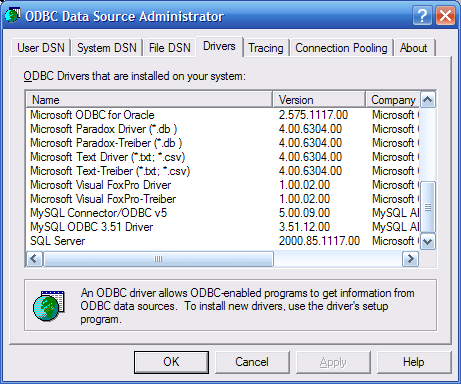](</File:WinXPODBCDataSourceAdministratorDrivers.png>) | |
| 61 | 68 | ||
| 62 | 69 | #### Unices | |
| 63 | 70 | ||
| 64 | - | ||
| 71 | + | Unixベースのプラットフォームには2つのよく知られたODBCドライバマネージャがあり、それらは [unixODBC](<http://www.unixodbc.org>) と [iODBC](<http://www.iodbc.org>) である。`ODBCConn` はunixODBCと動くことが知られており、iODBCの互換性はまだテストが必要である。 | |
| 65 | 72 | ||
| 66 | 73 | ##### Debian | |
| 67 | 74 | ||
| 68 | - | ||
| 69 | - | ||
| 70 | - | ||
| 75 | + | Debianでは _unixodbc_ をインストールすることができる。 | |
| 76 | + | ``` | |
| 71 | 77 | aptitude install unixodbc | |
| 72 | - | ||
| 78 | + | aptitude install unixodbc-bin # もしGUIツールを望むなら | |
| 73 | 79 | ``` | |
| 74 | 80 | ||
| 75 | - | ||
| 81 | + | `odbcsqldyn` ユニットそして `odbcconn`は`libodbc.so`というファイルを探す。 それは`libodbc.so.1` や `libodbc.so.1.0.0`といったファイル名を _許容しない_ 。 | |
| 76 | 82 | ||
| 77 | - | ||
| 78 | - | ||
| 83 | + | Debianの _unixodbc_ パッケージは`/usr/lib/libodbc.so`というシンボリックリンクを生成しないので、 | |
| 79 | 84 | ||
| 80 | - | ||
| 85 | + | * 自分自身でシンボリックリンク: `ln -s libodbc.so.1 /usr/lib/libodbc.so` を作るか、 | |
| 86 | + | * _unixodbc-dev_ パッケージをインストールするそれはシンボリックリンクを生成してくれる。 | |
| 81 | 87 | ||
| 82 | - | ||
| 88 | + | もし _unixodbc-bin_ パッケージをインストールしたなら、`ODBCConfig`プログラムを実行してODBCドライバとDSNの設定ができる。 | |
| 83 | 89 | ||
| 90 | + | ||
| 91 | + | [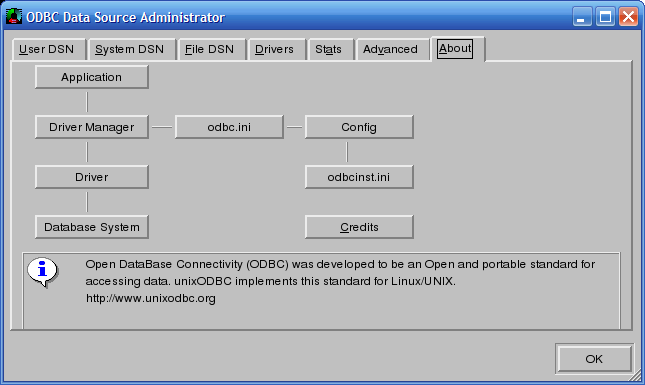](</File:ODBCDataSourceAdministratorAbout.PNG>) | |
| 92 | + | ||
| 84 | 93 | ##### Ubuntu | |
| 85 | 94 | ||
| 86 | - | ||
| 95 | + | UbuntuではDebianでのやり方に従うこと。 Note: _unixodbc-bin_ パッケージはデフォルトのパッケージレポジトリからは得られないかもしれない。 | |
| 87 | 96 | ||
| 88 | 97 | ### ODBC Drivers | |
| 89 | 98 | ||
| 90 | - | ||
| 99 | + | 最新のODBCドライバは以下のリンクからダウンロードできる。訳注:以下にリンクがありますが、保存の時にはじかれましたので、<https://は省いてあります> | |
| 91 | 100 | ||
| 92 | - | ||
| 101 | + | www.devart.com/odbc/sqlserver/download.html Download SQL Server 32/64 bit ODBC driver - latest version of SQL Server ODBC driver which supports Windows, Mac OS X, Linux both on 32 and 64 versions. Compatible with SQL Server 2014\2012\2008 R2\ 2008\2005 (including Express edition), SQL Server 2000 (including MSDE), SQL Server 7, SQL Server Compact 4.0\3.5\3.1. Works on all Lazarus versions. | |
| 93 | 102 | ||
| 94 | - | ||
| 103 | + | www.devart.com/odbc/oracle/download.html Download Oracle 32/64 bit ODBC driver - latest version of Oracle ODBC driver which supports Windows, Mac OS X, Linux both on 32 and 64 versions. Compatible with Oracle servers: 12c, 11g, 10g, 9i, 8i, 8.0, including Oracle Express Edition 11g and 10g. Oracle Clients: 12c, 11g, 10g, 9i, 8i, 8.0. Works on all Lazarus versions. | |
| 95 | 104 | ||
| 96 | - | ||
| 105 | + | www.devart.com/odbc/mysql/download.html Download MySQL 32/64 bit ODBC driver - latest version of MySQL ODBC driver which supports Windows, Mac OS X, Linux both on 32 and 64 versions. Compatible with MySQL servers: 6.0, 5.6, 5.5, 5.1, 5.0, 4.1, 4.0, and 3.23. MariaDB 5.x Works on all Lazarus versions. | |
| 97 | 106 | ||
| 98 | - | ||
| 107 | + | www.devart.com/odbc/postgresql/download.html Download PostgreSQL 32/64 bit ODBC driver - latest version of PostgreSQL ODBC driver which supports Windows, Mac OS X, Linux both on 32 and 64 versions. Compatible with PostgreSQL server versions since 7.1 up to 9.4. Works on all Lazarus versions. | |
| 99 | 108 | ||
| 100 | - | ||
| 109 | + | www.devart.com/odbc/postgresql/download.html Download SQLite 32/64 bit ODBC driver - latest version of SQLite ODBC driver which supports Windows, Mac OS X, Linux both on 32 and 64 versions. Compatible with SQLite versions since 3.0 and higher. Works on all Lazarus versions. | |
| 101 | 110 | ||
| 102 | - | ||
| 111 | + | www.devart.com/odbc/firebird/download.html Download Firebird 32/64 bit ODBC driver - latest version of Firebird ODBC driver which supports Windows, Mac OS X, Linux both on 32 and 64 versions. Compatible with Firebird versions 3, 2.x, 1.x. Works on all Lazarus versions. | |
| 103 | 112 | ||
| 104 | - | ||
| 113 | + | www.devart.com/odbc/interbase/download.html Download Interbase 32/64 bit ODBC driver - latest version of Interbase ODBC driver which supports Windows, Mac OS X, Linux both on 32 and 64 versions. Compatible with all Interbase versions. Works on all Lazarus versions. | |
| 105 | 114 | ||
| 106 | - | ||
| 115 | + | www.devart.com/odbc/sqlazure/download.html Download SQL Azure 32/64 bit ODBC driver - latest version of SQL Azure ODBC driver which supports Windows, Mac OS X, Linux both on 32 and 64 versions. Compatible with all SQL Azure versions. Works on all Lazarus versions. | |
| 107 | 116 | ||
| 108 | 117 | ## ODBC データソースに接続する | |
| 109 | 118 | ||
| 110 | - | ||
| 119 | + | ODBCデータソースに接続するためのパラメータは _接続文字列_ と呼ばれる。 これは`NAME=VALUE;NAME=VALUE`の形の文字列である。 | |
| 111 | 120 | ||
| 112 | - | ||
| 121 | + | `TODBCConnection` はこの接続文字列に対するラッパを提供する。 接続文字列の中でいくつかのプロパティは名前-値の組で表される。独自のパラメータは `Params` プロパティ(それは`TStrings`である)で指定される。 | |
| 113 | 122 | ||
| 114 | - | ||
| 123 | + | このラッパに進む前に、どのようにODBCデータソースが認識されるか基本的な理解が必要となる。 | |
| 115 | 124 | ||
| 116 | 125 | ### DSN 経由で ODBC 接続 | |
| 117 | 126 | ||
| 118 | - | ||
| 127 | + | ODBCドライバマネージャはいくつかのパラメータに代わって、DSNショートカットを作る別の手段を提供する: | |
| 119 | 128 | ||
| 120 | - | ||
| 121 | - | ||
| 129 | + | * DSN (**D** ata**S** ource **N** ame): (固有の)名前によって識別されるシステム、もしくはユーザーによって定義されたデータソースである。DSNはODBCデータソースアドミニストレータを用いて、手動で `odbc.ini` ファイル(またはレジストリ)を編集することで設定できる。 | |
| 130 | + | * File DSN: 接続パラメータを含むファイルである。ODBCデータソースアドミニストレータはたいていGUIによってファイルDSNを作れるようにする。 | |
| 122 | 131 | ||
| 123 | - | ||
| 132 | + | DSNやファイルDSNは接続文字列に追加のパラメータを結合することができ、例えば、パスワードがあげられる。 | |
| 124 | 133 | ||
| 125 | - | ||
| 134 | + | DSNを設定することで、接続の細目がデータソースアドミニストレータのダイアログで確認することができ、そして名付けられたDSNが、のちの接続に用いるのに必要な唯一のものとなる。ゆえに接続の細目は、アプリケーションより _分離_ されソフトウエアにおいてはDSN名だけが用いられる - DSNは仲介者としてふるまう。 | |
| 126 | 135 | ||
| 127 | - | ||
| 136 | + | 名前DSNを用いる利点はODBCマネージャを用いて、コードを変えることなく、データベースを簡単に切り替えられる点にある。これは顧客の多くのデータを用いながら、バグテストを巣つために業務用の開発を行うときに便利である。 | |
| 128 | 137 | ||
| 129 | 138 | ### DSN なしで | |
| 130 | 139 | ||
| 131 | - | ||
| 140 | + | またDSNなしでODBC経由で接続もでき、DSNで設定させる接続文字列(ドライバ、サーバ、データベース、ログイン情報)のすべての詳細を単に示してやればよい。この直接的方法はアプリケーションを新しい端末にインストールするときにDSNを設定する必要をなくす。 | |
| 132 | 141 | ||
| 133 | - | ||
| 142 | + | ODBCの仕様は接続文字列の中で用いられるようにいくつかのパラメータを定義している: | |
| 134 | 143 | ||
| 135 | - | ||
| 136 | - | ||
| 137 | - | ||
| 144 | + | * 2つの特別なパラメータ `DSN` と `FILEDSN` は上述のあらかじめ定義されたパラメータを選択することを可能にする | |
| 145 | + | * `DRIVER` はどのODBCドライバが用いられるか特定する。これは明らかに重要なパラメータである。 | |
| 146 | + | * `UID` と `PWD` はユーザー名とパスワードを供給するために用いられる。 | |
| 138 | 147 | ||
| 139 | - | ||
| 148 | + | その他のパラメータはドライバ固有のものである。 用いられるパラメータとその名前についての詳細を知るには、そのドライバのドキュメントを参照されたい。 | |
| 140 | 149 | ||
| 141 | 150 | ### TODBCConnection プロパティ | |
| 142 | 151 | ||
| 143 | - | ||
| 144 | - | ||
| 145 | - | ||
| 146 | - | ||
| 147 | - | ||
| 148 | - | ||
| 149 | - | ||
| 150 | - | ||
| 151 | - | ||
| 152 | - | ||
| 153 | - | ||
| 154 | - | ||
| 155 | - | ||
| 156 | - | ||
| 157 | - | ||
| 158 | - | ||
| 159 | - | ||
| 160 | - | ||
| 161 | - | ||
| 162 | - | ||
| 163 | - | ||
| 164 | - | ||
| 165 | - | ||
| 166 | - | ||
| 167 | - | ||
| 168 | - | ||
| 169 | - | ||
| 170 | - | ||
| 171 | - | ||
| 172 | - | ||
| 173 | - | ||
| 174 | - | ||
| 175 | - | ||
| 176 | - | ||
| 177 | - | ||
| 178 | - | ||
| 179 | - | ||
| 180 | - | ||
| 181 | - | ||
| 182 | - | ||
| 183 | - | ||
| 184 | - | ||
| 185 | - | ||
| 186 | - | ||
| 187 | - | ||
| 188 | - | ||
| 189 | - | ||
| 190 | - | ||
| 191 | - | ||
| 192 | - | ||
| 193 | - | ||
| 152 | + | 以下はODBC接続文字列に対する `TODBCConnection ` プロパティで用いられるのマッピングを現した表である: | |
| 194 | 153 | ||
| 195 | - | ||
| 154 | + | プロパティ | 型 | 接続文字列パラメータ | |
| 155 | + | ---|---|--- | |
| 156 | + | `Driver` | `string` | `DRIVER` | |
| 157 | + | `DatabaseName` | `string` | `DSN`, ODBC標準の一部である `DATABASENAME`, _ではない_ | |
| 158 | + | `FileDSN` | `string` | `FILEDSN` | |
| 159 | + | `Password` | `string` | `PWD` | |
| 160 | + | `UserName` | `string` | `UID` | |
| 161 | + | `HostName` | `string` | _none_ ; ODBC標準にはないパラメータであるthere is no corresponding parameter in the ODBC standard | |
| 162 | + | `Params` | `TStrings` | 独自のパラメータとして用いること。それぞれの項目は`NAME=VALUE`型になってなければならない。 ここで用いられる1つの重要なパラメータは **`AUTOCOMMIT`** で、これはSQL文が直接実行される(ロールバックの可能性なしに)(デフォルト値、もしくは明示的に `AUTOCOMMIT=1`が用いられる) または手動で、StartTransaction、Commit、CommitRetainingまたはRollbackしなければならない (`AUTOCOMMIT=0`を用いた場合) | |
| 163 | + | ||
| 164 | + | 注意: `TODBCConnection` は必要な時には接続文字列中のエスケープパラメータを考慮してくれる。 | |
| 196 | 165 | ||
| 197 | - | ||
| 166 | + | `LoginPrompt` ブール値プロパティは未だに実装されていない。 正しいウインドウハンドルを見出して、ドライバがパラメータを特定するためのGUIダイアログを示すことができる。 これは接続文字列によって制御されないことに注意すること。しかし、`SQLDriverConnect`ODAC API関数に対する最後のパラメータによる。 | |
| 198 | 167 | ||
| 199 | 168 | ## 例 | |
| 200 | 169 | ||
| 201 | - | ||
| 170 | + | この節ではそれぞれ特定のODBCドライバを用いて、そのDBMSに接続する方法について例示する。 | |
| 202 | 171 | ||
| 203 | 172 | ### Excel に接続する | |
| 204 | 173 | ||
| 205 | - | ||
| 206 | - | ||
| 207 | - | ||
| 174 | + | おそらくWindowsでのみ動く | |
| 208 | 175 | ||
| 209 | - | ||
| 176 | + | このようなエラーを避けるために: トランザクションを開始できませんでした! ODBCエラー: LastReturnCode: SQL_ERROR; Record 1: SqlState: HYC00; NativeError: 106; Message: [Microsoft][ODBC Excel | |
| 210 | 177 | ||
| 211 | - | ||
| 178 | + | ... 以下のようにオートコミットを有効にしなければならない、 | |
| 179 | + | ``` | |
| 212 | 180 | ODBCConnection1.Params.Add('AUTOCOMMIT=1'); | |
| 213 | 181 | ``` | |
| 214 | 182 | ||
| 215 | 183 | ### MySQL に接続する | |
| 216 | 184 | ||
| 217 | - | ||
| 218 | - | ||
| 219 | - | ||
| 185 | + | MyODBCドライバにより、サポートされるパラメータリファレンスに関しては、[[1]](<https://dev.mysql.com/doc/connector-odbc/en/connector-odbc-configuration-connection-parameters.html>) を参照されたい。 | |
| 220 | 186 | ||
| 221 | - | ||
| 187 | + | 加えてここを見ること www.devart.com/odbc/mysql/docs/using_odbc_driver.htm。MySQLにODBCドライバを用いて接続する詳細がある。 | |
| 222 | 188 | ||
| 223 | - | ||
| 224 | - | ||
| 225 | - | ||
| 226 | - | ||
| 227 | - | ||
| 228 | - | ||
| 189 | + | ドライバの名前はプラットフォームとMyODBCのバージョンによって変わるが、例としては: | |
| 229 | 190 | ``` | |
| 230 | - | ||
| 231 | - | ||
| 191 | + | { properties of connection object, i.e. conn: TODBCConnection; } | |
| 192 | + | conn.Driver := 'MySQL'; // (Unix) | |
| 193 | + | conn.Driver := 'MySQL ODBC 3.51 Driver'; // (Windows) | |
| 194 | + | conn.Driver := 'MySQL Connector/ODBC v5'; // (Windows) | |
| 195 | + | // 注意: ドライバ名は他に随所あるSQL 接続文字列のように{}を必要としない。 | |
| 196 | + | ``` | |
| 232 | 197 | ||
| 233 | - | ||
| 234 | - | ||
| 235 | - | ||
| 236 | - | ||
| 237 | - | ||
| 238 | - | ||
| 239 | - | ||
| 240 | - | ||
| 198 | + | 他のパラメータ (DSNを用いない場合) : | |
| 241 | 199 | ``` | |
| 200 | + | conn.UserName := 'myUsername'; | |
| 201 | + | conn.Password := 'myPassword'; | |
| 202 | + | // conn.Params (TStrings) set using .add method : | |
| 203 | + | conn.Params.Add('server=example.com'); | |
| 204 | + | conn.Params.Add('port=3306'); | |
| 205 | + | conn.Params.Add('database=myDatabase'); | |
| 206 | + | conn.Params.Add('charset=utf8'); | |
| 207 | + | ``` | |
| 242 | 208 | ||
| 243 | 209 | ### MS Access に接続する | |
| 244 | 210 | ||
| 245 | - | ||
| 211 | + | Please see [[MS Access]]. | |
| 246 | 212 | ||
| 247 | 213 | ### Connecting to Microsoft SQL Server | |
| 248 | 214 | ||
| 249 | - | ||
| 250 | - | ||
| 251 | - | ||
| 215 | + |  **Note:** FPC 2.6.0、Lazarusより新しいバージョンではMS SQL Server に直接接続をサポートしている。[[Lazarus Database Overview|MSSQL]]を参照されたい | |
| 252 | 216 | ||
| 253 | - | ||
| 217 | + | MS SQLのODBCドライバ接続の詳細と接続文字列の例は www.devart.com/odbc/sqlserver/docs/using_odbc_driver.htmを参照されたい。 | |
| 254 | 218 | ||
| 255 | - | ||
| 219 | + | www.connectionstrings.com/sql-server#p7 には接続文字列の詳細がある。 | |
| 256 | 220 | ||
| 257 | - | ||
| 258 | - | ||
| 259 | - | ||
| 221 | + | Microsoft SQL Server ODBC 接続文字列例: | |
| 260 | 222 | ``` | |
| 223 | + | Server=<server name>; // または<server name>\<instance name> | |
| 224 | + | Database=<database name>; | |
| 225 | + | ``` | |
| 261 | 226 | ||
| 262 | 227 | ### Oracle に接続する | |
| 263 | 228 | ||
| 264 | - | ||
| 265 | - | ||
| 266 | - | ||
| 229 | + | 簡便で苦痛の少ない接続のためには www.devart.com/odbc/oracle/docs/using_odbc_driver.htm を参照されたい。 | |
| 267 | 230 | ||
| 268 | - | ||
| 231 | + | Oracle ODBC 接続文字列例: | |
| 232 | + | ``` | |
| 269 | 233 | Login Prompt=False; | |
| 270 | - | ||
| 271 | - | ||
| 272 | - | ||
| 234 | + | Data Source=ORCL; | |
| 235 | + | User ID=scott; | |
| 236 | + | Password=tiger | |
| 273 | 237 | ``` | |
| 274 | 238 | ||
| 275 | 239 | ### PosgreSQLに接続する | |
| 276 | 240 | ||
| 277 | - | ||
| 278 | - | ||
| 279 | - | ||
| 241 | + | 簡便で苦痛の少ない接続のためには www.devart.com/odbc/postgresql/docs/using_odbc_driver.htm を参照されたい。 | |
| 280 | 242 | ||
| 281 | - | ||
| 243 | + | PostgreSQL ODBC 接続文字列例: | |
| 244 | + | ``` | |
| 282 | 245 | Login Prompt=False; | |
| 283 | - | ||
| 284 | - | ||
| 285 | - | ||
| 286 | - | ||
| 287 | - | ||
| 246 | + | Data Source=localhost; | |
| 247 | + | User ID=postgres; | |
| 248 | + | Password=postgres; | |
| 249 | + | Database=postgres; | |
| 250 | + | Schema=public | |
| 288 | 251 | ``` | |
| 289 | 252 | ||
| 290 | 253 | ### SQLite に接続する | |
| 291 | 254 | ||
| 292 | - | ||
| 293 | - | ||
| 294 | - | ||
| 255 | + | 簡便で苦痛の少ない接続のためには www.devart.com/odbc/sqlite/docs/using_odbc_driver.htm を参照されたい。 | |
| 295 | 256 | ||
| 296 | - | ||
| 257 | + | SQLite ODBC 接続文字列例: | |
| 258 | + | ``` | |
| 297 | 259 | Login Prompt=False; | |
| 298 | - | ||
| 260 | + | Database=c:\test.db3 | |
| 299 | 261 | ``` | |
| 300 | 262 | ||
| 301 | 263 | ### Firebird に接続する | |
| 302 | 264 | ||
| 303 | - | ||
| 304 | - | ||
| 305 | - | ||
| 265 | + | 簡便で苦痛の少ない接続のためには www.devart.com/odbc/firebird/docs/using_odbc_driver.htm を参照されたい。 | |
| 306 | 266 | ||
| 307 | - | ||
| 267 | + | Firebird ODBC 接続文字列例: | |
| 268 | + | ``` | |
| 308 | 269 | Data Source=127.0.0.1; | |
| 309 | - | ||
| 310 | - | ||
| 311 | - | ||
| 312 | - | ||
| 270 | + | User ID=sysdba; | |
| 271 | + | Password=masterkey; | |
| 272 | + | Client Library=fbclient.dll; | |
| 273 | + | Database=c:\fbd.fdb | |
| 313 | 274 | ``` | |
| 314 | 275 | ||
| 315 | 276 | #### Named DSN | |
| 316 | 277 | ||
| 317 | - | ||
| 318 | - | ||
| 319 | - | ||
| 320 | - | ||
| 321 | - | ||
| 322 | - | ||
| 278 | + | Windowsではあらかじめ存在するDNSでこのように書ける: | |
| 323 | 279 | ``` | |
| 324 | - | ||
| 325 | - | ||
| 280 | + | { properties of connection object, i.e. conn: TODBCConnection; } | |
| 281 | + | conn.DatabaseName := '<Your_DSN_Name>'; | |
| 282 | + | { Leave all other conn. properties empty } | |
| 283 | + | ``` | |
| 326 | 284 | ||
| 327 | - | ||
| 285 | + | #### DSN-なし | |
| 328 | 286 | ||
| 329 | - | ||
| 330 | - | ||
| 331 | - | ||
| 332 | - | ||
| 333 | - | ||
| 334 | - | ||
| 335 | - | ||
| 336 | - | ||
| 337 | - | ||
| 287 | + | DSNなし: | |
| 338 | 288 | ``` | |
| 339 | - | ||
| 340 | - | ||
| 289 | + | { properties of connection object, i.e. conn: TODBCConnection; } | |
| 290 | + | conn.Driver := 'SQL Server'; | |
| 291 | + | // 注意: 随所にあるSQL接続文字列例と異なり、ドライバ名は{}を必要としない。 | |
| 292 | + | { HostnameとDatabaseNameは空にしておく} | |
| 293 | + | { set conn.Params (TStrings) : } | |
| 294 | + | conn.Params.Add('Database=<yourdatabasename>'); | |
| 295 | + | conn.Params.Add('Server=.\SQLEXPRESS'); | |
| 296 | + | conn.Params.Add('Trusted_Connection=Yes'); // or 'Integrated Security=SSPI' | |
| 297 | + | ``` | |
| 341 | 298 | ||
| 342 | - | ||
| 299 | + | 注意: この例では、インスタンスSQLEXPRESSでローカル端末(server=)に接続している。それに代わりホスト名を用いることができ、デフォルトインスタンスを省略できる。詳しくはMSのドキュメントを参照されたい。 | |
| 343 | 300 | ||
| 344 | - | ||
| 301 | + | 信頼性のある接続(統合化セキュリティまたはSSPIとして知られる)はWindowsのユーザー認証でログインすることを意味する。Trusted_Connection lineを省略できるが、ユーザ-ID、(Uid=...)、パスワード(Pwd=...)は指定する必要がある。 | |
| 345 | 302 | ||
| 346 | - | ||
| 303 | + | #### DSN 例 | |
| 347 | 304 | ||
| 348 | - | ||
| 305 | + | この例ではMS SQL Serverテーブル'journal_entries'という名前のレコードを選択してMemo1という名前のMemoコントロールに'journal_entries'の列の値のすべてを表示する | |
| 306 | + | ``` | |
| 349 | 307 | // uses ODBCConn, sqldb; | |
| 350 | - | ||
| 351 | - | ||
| 352 | - | ||
| 353 | - | ||
| 354 | - | ||
| 355 | - | ||
| 356 | - | ||
| 357 | - | ||
| 358 | - | ||
| 359 | - | ||
| 360 | - | ||
| 361 | - | ||
| 362 | - | ||
| 363 | - | ||
| 364 | - | ||
| 365 | - | ||
| 366 | - | ||
| 367 | - | ||
| 368 | - | ||
| 369 | - | ||
| 370 | - | ||
| 371 | - | ||
| 372 | - | ||
| 373 | - | ||
| 374 | - | ||
| 375 | - | ||
| 376 | - | ||
| 377 | - | ||
| 378 | - | ||
| 379 | - | ||
| 380 | - | ||
| 381 | - | ||
| 382 | - | ||
| 383 | - | ||
| 384 | - | ||
| 308 | + | procedure TForm1.Button1Click(Sender: TObject); | |
| 309 | + | var | |
| 310 | + | S: String; | |
| 311 | + | conn : TODBCConnection; // uses ODBCConn | |
| 312 | + | query: TSQLQuery; // uses sqldb | |
| 313 | + | transaction: TSQLTransaction; // uses sqldb | |
| 314 | + | ||
| 315 | + | begin | |
| 316 | + | conn := TODBCCOnnection.Create(nil); | |
| 317 | + | query := TSQLQuery.Create(nil); | |
| 318 | + | transaction := TSQLTransaction.Create(nil); | |
| 319 | + | try | |
| 320 | + | try | |
| 321 | + | conn.DatabaseName := 'sqlserverdsn'; {replace this with your DSN, if you use any} | |
| 322 | + | conn.UserName:= 'sa'; //自身の名前に変えること | |
| 323 | + | conn.Password:= 'thepassword'; //自身のパスワードに変えることreplace with your password | |
| 324 | + | // DSNで定義するプロパティをオーバーライドできる | |
| 325 | + | //例えば、conn.Params.Add('Database=some_other_db'); | |
| 326 | + | ||
| 327 | + | conn.Transaction := transaction; | |
| 328 | + | query.DataBase := conn; | |
| 329 | + | { "could not retrieve primary key metadata"を避けるため: | |
| 330 | + | - query.UsePrimaryKeyAsKey:=falseと | |
| 331 | + | (好ましくは) | |
| 332 | + | - query.PacketRecords to -1 | |
| 333 | + | もしSQL Server, これに代わりSQL Native Client ODBC ドライバでMARSを有効にする。 | |
| 334 | + | http://bugs.freepascal.org/view.php?id=13241を参照されたい。} | |
| 335 | + | query.PacketRecords:=-1; //retrieve all data at once | |
| 336 | + | query.SQL.Text := 'select journal_entry from journal_entries'; | |
| 337 | + | query.Open; | |
| 338 | + | S := ''; | |
| 339 | + | while not query.EOF do | |
| 340 | + | begin | |
| 341 | + | S := S + query.FieldByName('journal_entry').AsString + #13#10; | |
| 342 | + | query.Next; | |
| 343 | + | end; | |
| 344 | + | finally | |
| 345 | + | query.Free; | |
| 346 | + | conn.Free; | |
| 347 | + | transaction.Free; | |
| 348 | + | end; | |
| 349 | + | except | |
| 350 | + | on E: Exception do | |
| 351 | + | ShowMessage(E.message); | |
| 385 | 352 | end; | |
| 386 | - | ||
| 387 | - | ||
| 388 | - | ||
| 389 | - | ||
| 353 | + | Memo1.Text:= S; | |
| 390 | 354 | end; | |
| 391 | - | ||
| 392 | - | ||
| 393 | - | ||
| 394 | - | ||
| 395 | - | ||
| 396 | - | ||
| 397 | 355 | ``` | |
| 398 | 356 | ||
| 399 | - | ||
| 400 | - | ||
| 401 | - | ||
| 402 | - | ||
| 403 | - | ||
| 404 | - | ||
| 405 | - | ||
| 406 | - | ||
| 407 | - | ||
| 408 | - | ||
| 409 | - | ||
| 410 | - | ||
| 411 | - | ||
| 357 | + | 実際接続文字列のすべての部分にconn.Paramsを用いることができる。上記を改造すると、今回はSQL Serverバージョンがポップアップメッセージを出す: | |
| 412 | 358 | ``` | |
| 413 | - | ||
| 414 | - | ||
| 359 | + | conn.Params.Add('Driver=SQL Server'); | |
| 360 | + | conn.Params.Add('Server=OURBIGSERVER'); | |
| 361 | + | conn.Params.Add('Database=TestDataBase'); | |
| 362 | + | conn.Params.Add('Integrated Security=SSPI'); // use Windows logon credentials | |
| 363 | + | // conn.Transaction := transaction;以外の他の conn. プロパティはセットされない | |
| 364 | + | ||
| 365 | + | query.DataBase := conn; | |
| 366 | + | query.SQL.Text := 'select @@version'; | |
| 367 | + | query.Open; | |
| 368 | + | showmessage(query.Fields[0].AsString); // Fields are numbered starting from 0 | |
| 369 | + | ``` | |
| 415 | 370 | ||
| 416 | - | ||
| 371 | + | 関数がサポートされる、例えば '`SELECT * FROM MyTestFunc()`'- しかし、レコードセットを返す _ストアドプロシージャ_ 問題が起きるかもしれない。 例えば、'`EXEC MyStoredProcedure`'がデータ行を返し、(SQL Server Management Studioや _SqlCmd_ DOSコマンド`C:\>sqlcmd -S MyServer -E -d MyDataBase -Q "exec MySP"`)、次いで`query.open`を行うと以下のエラーが出る: "Cannot open a non-select statement" (おそらくFPC 2.6以降で修正される) | |
| 417 | 372 | ||
| 418 | - | ||
| 373 | + | 行のセットを返さないストアドプロシージャまたは他のSQLコマンド(CREATE,INSERT,UPDATE,DELETE)を呼ぶときには、`query.Open`の代わりに `query.ExecSQL`を用いること。 | |
| 419 | 374 | ||
| 420 | - | ||
| 375 | + | ストアドプロシージャパラメータは例えば'`EXEC MySP @param1=23`'で動く。 | |
| 421 | 376 | ||
| 422 | - | ||
| 423 | - | ||
| 424 | - | ||
| 425 | - | ||
| 377 | + | パラメータを用いることは、 _SQLインジェクションの脆弱性_ を回避するために推奨される。この場合、SQLステートメントは値を直接生み出さないが、指名された代理人が用いられる。そしてパラメータは別個に指定される。この方法を用いることはデータベースを改竄するための試みにおける、様々なフィールドへの悪意のあるSQLコマンドを挿入することが不可能となる。そしてサーバはステートメントのどの部分が値で何がコマンドであるかが区別がつくようになる。例えば、直接95を組み立てるWHERE句に代わって、指名されたパラメータ'testval'を用いることである。 | |
| 426 | 378 | ``` | |
| 379 | + | query.SQL.Text := 'select * from mytable where field2>:testval'; | |
| 380 | + | query.Params.ParamByName('testval').AsString := '95'; | |
| 381 | + | query.open; | |
| 382 | + | ``` | |
| 427 | 383 | ||
| 428 | 384 | ## ODBCデバッグとエラー | |
| 429 | 385 | ||
| 430 | 386 | ### トランザクションの問題 | |
| 431 | 387 | ||
| 432 | - | ||
| 388 | + | Lazarus 1.2.4 (FPC 2.6.4)では ODBC トランザクションの振る舞いが変わった。transaction behaviour has changed. これは以前は動いていたコードが動かなくなる可能性を示唆する。 | |
| 433 | 389 | ||
| 434 | - | ||
| 390 | + | 解決には[[User Changes 2.6.4|User_Changes_2.6.4#TODBCConnection_.28odbcconn.29_No_longer_autocommit]]を参照されたい。 | |
| 435 | 391 | ||
| 436 | 392 | ### エラーメッセージ | |
| 437 | 393 | ||
| 438 | - | ||
| 394 | + | ODBC APIはいずれもsuccessコードを返す。もしエラーがあったら、`SQLGetDiagRec`を呼ぶことでより詳細な情報が取得できる。(完全性のおかげで: APIコールが`SQL_SUCCES_WITH_INFO`も返すときに診断レコードが利用可能である) | |
| 439 | 395 | ||
| 440 | - | ||
| 396 | + | `TODBCConnection`は各種ODBCコールの戻り値を監視し、`EODBCException`を構築する。 この例外の`message`は | |
| 441 | 397 | ||
| 442 | - | ||
| 443 | - | ||
| 444 | - | ||
| 445 | - | ||
| 446 | - | ||
| 447 | - | ||
| 398 | + | * エラーが発生したとき`TODBCConnection`が何をしていたか特定するメッセージ | |
| 399 | + | * ODBC APIコールの戻り値 | |
| 400 | + | * 診断レコードの数値(`SQLGetDiagRec`を使って得られる); 各々のレコードは3つのフィールドからなる: | |
| 401 | + | * エラーを特定する5文字のエラーコード | |
| 402 | + | * 'ネイティブエラーコード' | |
| 403 | + | * エラーを述べるメッセージ | |
| 448 | 404 | ||
| 449 | - | ||
| 405 | + | #### ファンクションシークエンスエラー | |
| 450 | 406 | ||
| 451 | - | ||
| 407 | + | もし、`ODBCConn`の最終セクションでファンクションシークエンスエラー('Function sequence error')が生じたら、おそらくすべてのクエリと接続が閉じていない。 | |
| 452 | 408 | ||
| 453 | 409 | #### Rollback が効かない | |
| 454 | - | ||
| 455 | - | ||
| 456 | - | ||
| 457 | - | ||
| 410 | + | ``` | |
| 458 | 411 | TSQLTransaction.Rollback | |
| 459 | 412 | ``` | |
| 460 | 413 | ||
| 461 | - | ||
| 414 | + | の問題に遭遇しているが、SQLはそれにもかかわらずコミットしているのには、ODBC接続はおそらくAUTOCOMMITモードになっている。これをどのようにして修正するには、[[ODBCConn|the remarks about the AUTOCOMMIT connection parameter]] を参照されたい。 | |
| 462 | 415 | ||
| 463 | 416 | ### 追跡 | |
| 464 | 417 | ||
| 465 | - | ||
| 418 | + | ほとんどのODBCマネージャは追跡ログへすべてのODBC APIコールのログを記録する、追跡オプションを持っている。 これはODBCアプリケーションををデバッグするときに非常に有用である。 Windows、unixODBCの双方のデータソースアドミニストレーション GUIは追跡オプションを設定するタブを有している。 | |
| 466 | 419 | ||
| 467 | - | ||
| 420 | + | もちろんODBC APIに詳しい開発者だけでなく、それは問題を特定するのに役立たせることもできる。また、バグトラッカーに問題を報告するにも追跡ログを活用することができる。 | |
| 468 | 421 | ||
| 469 | 422 | ## 以下も参照のこと | |
| 470 | 423 | ||
| 471 | - | ||
| 424 | + | * [[MS Access]] Using ODBC to access Microsoft Access databases | |
| 472 | 425 | ||
| 473 | 426 | --- | |
| 474 | - | ||
| 427 | + | *From the Free Pascal wiki, page "ODBCConn/ja", as the Internet Archive kept it on 2025-01-17, last changed on 2024-09-25. Copyright stays with the author who wrote it, according to the old wiki's [[Licensing]] page. If you have concerns about this material, [message the admin](/wiki-contact).* |