

ODBCConn/ja: what changed
Revision 1 to 2. Removed lines have a minus sign; added lines have a plus sign.
| Old | New | Line | |
|---|---|---|---|
| 1 | 1 | **ODBCConn** ユニットはOpen Database Connectivity (ODBC)データソースにSQLbの接続を実装している。 | |
| 2 | 2 | ||
| 3 | 3 | ## 概要 | |
| 4 | 4 | ||
| 5 | 5 | ### ODBC | |
| 6 | 6 | ||
| 7 | 7 | ODBC (Open Database Connectivity) とは単純なAPIである、ODBC APIを用いて、さまざまなデータベース全体に接続することのできる技術である。 | |
| 8 | 8 | ||
| 9 | 9 | さまざまなプラットフォームに向けて、ODBCの実装があり、ほとんどのデータベースマネジメントシステムにドライバがある。 公式のODBCドキュメンテーションは\[<http://msdn.microsoft.com/en-us/library/ms710252(VS.85>).aspx MSDN ODBC site\]である。 | |
| 10 | 10 | ||
| 11 | 11 | ### TODBCConnection | |
| 12 | 12 | ||
| 13 | 13 | FreePascal ships with ODBC headers; they are in the `odbcsql` and `odbcsqldyn` units. [[TODBCConnection]] is an [[TSQLConnection]] descendant providing a nice OOP wrapper for ODBC using the SQLdb framework. | |
| 14 | 14 | ||
| 15 | 15 | In Lazarus, you can find the `TODBCConnection` component on the SQLdb component tab. You can also use the `TODBCConnection` component in your code by adding `ODBCConn` to your uses clause. | |
| 16 | 16 | ||
| 17 | - | ||
| 18 | - | ||
| 19 | - | ||
| 20 | - | ||
| 17 | + |  | |
| 21 | 18 | ||
| 22 | 19 | What has been implemented: | |
| 23 | 20 | ||
| 24 | 21 | - executing queries and retrieving result sets | |
| 25 | 22 | - most field types, including blobs | |
| 26 | 23 | - query parameters (string and integer types) | |
| 27 | 24 | - preparing queries | |
| 28 | 25 | - UpdateIndexDefs (so you can use ApplyUpdates) | |
| 29 | 26 | ||
| 30 | 27 | What is left to be implemented: | |
| 31 | 28 | ||
| 32 | 29 | - proper transaction support; currently each connection corresponds to one transaction | |
| 33 | 30 | - some field types | |
| 34 | 31 | - SQL_TYPE_UTC* (these are mentioned in the ODBC docs, but seem not to be used in implementations) | |
| 35 | 32 | - SQL_INTERVAL_* (what would be the corresponding TFieldType?) | |
| 36 | 33 | - SQL_GUID (TGUIDField was not implemented, until recently) | |
| 37 | 34 | ||
| 38 | 35 | ### なぜ ODBC なのか ? | |
| 39 | 36 | ||
| 40 | 37 | FreePascal ships with components for connecting to several databases, such as MySQL, PostGreSQL, Firebird, Microsoft SQL Server (since 2.6.1), Oracle, etc. | |
| 41 | 38 | ||
| 42 | 39 | For those databases missing from the list, like [[MS Access]] and perhaps Microsoft SQL Server, ODBC is an acceptable and well established solution. (VB.net/C# developers are recommended to use SQLClient rather than OLEDB or ODBC for the ultimate in performance, but here in Lazarus ODBC will work adequately and reliably) | |
| 43 | 40 | ||
| 44 | 41 | The TODBCConnection component was developed originally to circumvent the strict MySQL license for applications that are not GPLed or do not obey MySQL AB's [FLOSS exception](http://www.mysql.com/company/legal/licensing/foss-exception.html). | |
| 45 | 42 | ||
| 46 | 43 | ## ODBC と ODBC ドライバをインストールする | |
| 47 | 44 | ||
| 48 | 45 | Before you can connect to your database using ODBC, you need to install | |
| 49 | 46 | ||
| 50 | 47 | - an ODBC Driver Manager | |
| 51 | 48 | - an ODBC driver specific to the DBMS you want to connect to | |
| 52 | 49 | ||
| 53 | 50 | This section will give a brief overview of the steps involved. However, please consult the relevant documentation for a definitive reference. | |
| 54 | 51 | ||
| 55 | 52 | ### ODBC ドライバマネージャ | |
| 56 | 53 | ||
| 57 | 54 | #### Windows | |
| 58 | 55 | ||
| 59 | 56 | Windows has an ODBC Driver Manager built in, which allows DSNs to be set up, and other configuration. It is found in the *Control Panel*, in later Windows versions with categorised sections it was moved into the *Administrative Tools* area. Or you may simply click the Start button and enter *ODBC* into the Run box (in Windows 7 this appears as "*Search programs and files*"). | |
| 60 | 57 | ||
| 61 | 58 | You can, of course, create a desktop shortcut to the ODBC dialog if you find yourself using it frequently. | |
| 62 | 59 | ||
| 63 | - | ||
| 64 | - | ||
| 65 | - | ||
| 66 | - | ||
| 60 | + | 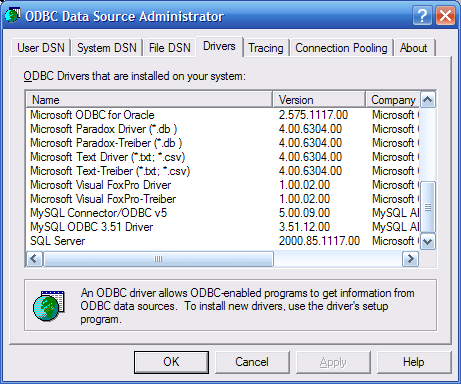 | |
| 67 | 61 | ||
| 68 | 62 | #### Unices | |
| 69 | 63 | ||
| 70 | 64 | Two popular ODBC Driver Managers for Unix-based platforms are [unixODBC](http://www.unixodbc.org) and [iODBC](http://www.iodbc.org). `ODBCConn` is known to work with unixODBC; iODBC compatibility still has to be tested. | |
| 71 | 65 | ||
| 72 | 66 | ##### Debian | |
| 73 | 67 | ||
| 74 | 68 | For Debian, you can install the *unixodbc* package: | |
| 75 | 69 | ||
| 76 | 70 | ``` bash | |
| 77 | 71 | aptitude install unixodbc | |
| 78 | 72 | aptitude install unixodbc-bin # if you want some GUI tools | |
| 79 | 73 | ``` | |
| 80 | 74 | ||
| 81 | 75 | The `odbcsqldyn` unit, and hence `odbcconn`, will search for a file called `libodbc.so`. It will *not* accept a file named like `libodbc.so.1` or `libodbc.so.1.0.0`. Debian's *unixodbc* package does not create a symlink with the name `/usr/lib/libodbc.so`; you must either | |
| 82 | 76 | ||
| 83 | 77 | - create the link yourself: `ln -s libodbc.so.1 /usr/lib/libodbc.so`, or | |
| 84 | 78 | - install the *unixodbc-dev* package, which does create the symlink. | |
| 85 | 79 | ||
| 86 | 80 | If you installed the *unixodbc-bin* package, you can run the `ODBCConfig` program to configure ODBC drivers and DSNs. | |
| 87 | 81 | ||
| 88 | - | ||
| 89 | - | ||
| 90 | - | ||
| 91 | - | ||
| 82 | + | 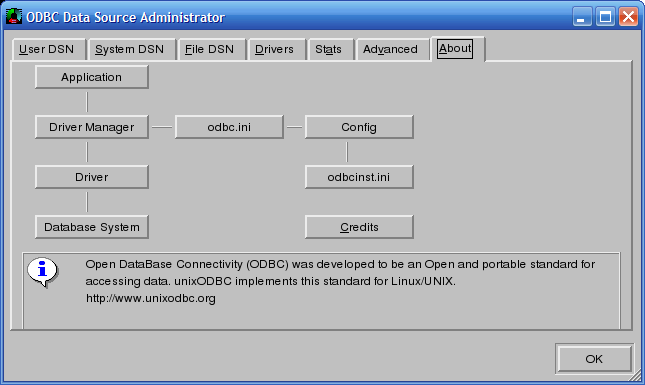 | |
| 92 | 83 | ||
| 93 | 84 | ##### Ubuntu | |
| 94 | 85 | ||
| 95 | 86 | For Ubuntu, follow the instruction for Debian. Note: the *unixodbc-bin* package might not be available from the default package repository. | |
| 96 | 87 | ||
| 97 | 88 | ### ODBC Drivers | |
| 98 | 89 | ||
| 99 | 90 | 訳注:以下にリンクがありますが、保存の時にはじかれましたので、https://は省いてあります You can download latest ODBC drivers using the following links: | |
| 100 | 91 | ||
| 101 | 92 | www.devart.com/odbc/sqlserver/download.html Download SQL Server 32/64 bit ODBC driver - latest version of SQL Server ODBC driver which supports Windows, Mac OS X, Linux both on 32 and 64 versions. Compatible with SQL Server 2014\2012\2008 R2\\ 2008\2005 (including Express edition), SQL Server 2000 (including MSDE), SQL Server 7, SQL Server Compact 4.0\3.5\3.1. Works on all Lazarus versions. | |
| 102 | 93 | ||
| 103 | 94 | www.devart.com/odbc/oracle/download.html Download Oracle 32/64 bit ODBC driver - latest version of Oracle ODBC driver which supports Windows, Mac OS X, Linux both on 32 and 64 versions. Compatible with Oracle servers: 12c, 11g, 10g, 9i, 8i, 8.0, including Oracle Express Edition 11g and 10g. Oracle Clients: 12c, 11g, 10g, 9i, 8i, 8.0. Works on all Lazarus versions. | |
| 104 | 95 | ||
| 105 | 96 | www.devart.com/odbc/mysql/download.html Download MySQL 32/64 bit ODBC driver - latest version of MySQL ODBC driver which supports Windows, Mac OS X, Linux both on 32 and 64 versions. Compatible with MySQL servers: 6.0, 5.6, 5.5, 5.1, 5.0, 4.1, 4.0, and 3.23. MariaDB 5.x Works on all Lazarus versions. | |
| 106 | 97 | ||
| 107 | 98 | www.devart.com/odbc/postgresql/download.html Download PostgreSQL 32/64 bit ODBC driver - latest version of PostgreSQL ODBC driver which supports Windows, Mac OS X, Linux both on 32 and 64 versions. Compatible with PostgreSQL server versions since 7.1 up to 9.4. Works on all Lazarus versions. | |
| 108 | 99 | ||
| 109 | 100 | www.devart.com/odbc/postgresql/download.html Download SQLite 32/64 bit ODBC driver - latest version of SQLite ODBC driver which supports Windows, Mac OS X, Linux both on 32 and 64 versions. Compatible with SQLite versions since 3.0 and higher. Works on all Lazarus versions. | |
| 110 | 101 | ||
| 111 | 102 | www.devart.com/odbc/firebird/download.html Download Firebird 32/64 bit ODBC driver - latest version of Firebird ODBC driver which supports Windows, Mac OS X, Linux both on 32 and 64 versions. Compatible with Firebird versions 3, 2.x, 1.x. Works on all Lazarus versions. | |
| 112 | 103 | ||
| 113 | 104 | www.devart.com/odbc/interbase/download.html Download Interbase 32/64 bit ODBC driver - latest version of Interbase ODBC driver which supports Windows, Mac OS X, Linux both on 32 and 64 versions. Compatible with all Interbase versions. Works on all Lazarus versions. | |
| 114 | 105 | ||
| 115 | 106 | www.devart.com/odbc/sqlazure/download.html Download SQL Azure 32/64 bit ODBC driver - latest version of SQL Azure ODBC driver which supports Windows, Mac OS X, Linux both on 32 and 64 versions. Compatible with all SQL Azure versions. Works on all Lazarus versions. | |
| 116 | 107 | ||
| 117 | 108 | ## ODBC データソースに接続する | |
| 118 | 109 | ||
| 119 | 110 | The parameters for connecting to an ODBC data source are described in a *connection string*. This is a string of the form `NAME=VALUE;NAME=VALUE`. | |
| 120 | 111 | ||
| 121 | 112 | `TODBCConnection` provides a wrapper around this connection string. Some of its properties are mapped to name-value pairs in the connection string, and custom parameters can be specified in the `Params` property (which is a `TStrings`). | |
| 122 | 113 | ||
| 123 | 114 | Before going to the details of this wrapper, you must first have a basic understanding of how an ODBC data source is identified. | |
| 124 | 115 | ||
| 125 | 116 | ### DSN 経由で ODBC 接続 | |
| 126 | 117 | ||
| 127 | 118 | An ODBC driver manager provides alternative ways to make DSN shortcuts for a set of parameters: | |
| 128 | 119 | ||
| 129 | 120 | - DSN (**D**ata**S**ource **N**ame): a system or user defined data source, identified by a (unique) name. DSNs can be configured using the ODBC Data Source Administrator or by manually editing the `odbc.ini` file (or registry). | |
| 130 | 121 | - File DSN: a file which contains connection parameters. An ODBC Data Source Administrator usually allows you to create File DSNs from the GUI. | |
| 131 | 122 | ||
| 132 | 123 | The parameters in a DSN or File DSN can always be combined with additional parameters in the connection string, for example to specify a password. | |
| 133 | 124 | ||
| 134 | 125 | By setting up a DSN the connection details can be verified to work within the manager dialog, and then the named DSN is all that is needed to use the connection later. The connection details are therefore *decoupled* from your application, as only the DSN name is used in your software - the DSN acting as a go-between. | |
| 135 | 126 | ||
| 136 | 127 | An advantage to using a named DSN is that you may easily switch between databases using the ODBC Manager, without changing your code. This is useful in commercial development to test for bugs using a number of sets of your clients' data. | |
| 137 | 128 | ||
| 138 | 129 | ### DSN なしで | |
| 139 | 130 | ||
| 140 | 131 | You may also connect via ODBC without using a DSN, simply supplying all the details in the Connection String that you would otherwise set up in a DSN (driver,server,database,login details). This more direct method avoids the need to set up a DSN when installing your application on a new machine. | |
| 141 | 132 | ||
| 142 | 133 | The ODBC specification defines a few parameters that can be used in a connection string: | |
| 143 | 134 | ||
| 144 | 135 | - Two special parameters, `DSN` and `FILEDSN`, allow one to select a set of pre-defined parameters, as described above. | |
| 145 | 136 | - The `DRIVER` specifies which ODBC driver to use. Obviously, this is a very important parameter. | |
| 146 | 137 | - The `UID` and `PWD` parameters are used to supply a username and password. | |
| 147 | 138 | ||
| 148 | 139 | All other parameters are driver dependent. Please refer to the documentation of the specific driver to learn more about available parameters and their names. | |
| 149 | 140 | ||
| 150 | 141 | ### TODBCConnection プロパティ | |
| 151 | 142 | ||
| 152 | 143 | The following table describes the mapping of `TODBCConnection` properties to ODBC connection string parameters: | |
| 153 | 144 | ||
| 154 | - | ||
| 155 | - | ||
| 156 | - | ||
| 157 | - | ||
| 158 | - | ||
| 159 | - | ||
| 160 | - | ||
| 161 | - | ||
| 162 | - | ||
| 163 | - | ||
| 164 | - | ||
| 165 | - | ||
| 166 | - | ||
| 167 | - | ||
| 168 | - | ||
| 169 | - | ||
| 170 | - | ||
| 171 | - | ||
| 172 | - | ||
| 173 | - | ||
| 174 | - | ||
| 175 | - | ||
| 176 | - | ||
| 177 | - | ||
| 178 | - | ||
| 179 | - | ||
| 180 | - | ||
| 181 | - | ||
| 182 | - | ||
| 183 | - | ||
| 184 | - | ||
| 185 | - | ||
| 186 | - | ||
| 187 | - | ||
| 188 | - | ||
| 189 | - | ||
| 190 | - | ||
| 191 | - | ||
| 192 | - | ||
| 193 | - | ||
| 194 | - | ||
| 195 | - | ||
| 196 | - | ||
| 197 | - | ||
| 198 | - | ||
| 199 | - | ||
| 200 | - | ||
| 145 | + | **Property** | |
| 146 | + | ||
| 147 | + | **Type** | |
| 148 | + | ||
| 149 | + | **Connection string parameter** | |
| 150 | + | ||
| 151 | + | `Driver` | |
| 152 | + | ||
| 153 | + | `string` | |
| 154 | + | ||
| 155 | + | `DRIVER` | |
| 156 | + | ||
| 157 | + | `DatabaseName` | |
| 158 | + | ||
| 159 | + | `string` | |
| 160 | + | ||
| 161 | + | `DSN`, *not* to something like `DATABASENAME`, which is not part of the ODBC standard | |
| 162 | + | ||
| 163 | + | `FileDSN` | |
| 164 | + | ||
| 165 | + | `string` | |
| 166 | + | ||
| 167 | + | `FILEDSN` | |
| 168 | + | ||
| 169 | + | `Password` | |
| 170 | + | ||
| 171 | + | `string` | |
| 172 | + | ||
| 173 | + | `PWD` | |
| 174 | + | ||
| 175 | + | `UserName` | |
| 176 | + | ||
| 177 | + | `string` | |
| 178 | + | ||
| 179 | + | `UID` | |
| 180 | + | ||
| 181 | + | `HostName` | |
| 182 | + | ||
| 183 | + | `string` | |
| 184 | + | ||
| 185 | + | *none*; there is no corresponding parameter in the ODBC standard | |
| 186 | + | ||
| 187 | + | `Params` | |
| 188 | + | ||
| 189 | + | `TStrings` | |
| 190 | + | ||
| 191 | + | Use this to specify custom parameters. Each item must be of the form `NAME=VALUE`. | |
| 192 | + | ||
| 193 | + | One important parameter that can be used is **`AUTOCOMMIT`** which determines if SQL statements are directly executed (without possibility of a rollback) (default setting, or set explicitly using `AUTOCOMMIT=1`) or whether you need to manually call StartTransaction and Commit, CommitRetaining or Rollback (set using `AUTOCOMMIT=0`) | |
| 201 | 194 | ||
| 202 | 195 | Note that `TODBCConnection` will take care of escaping parameter values in the connection string (when required). | |
| 203 | 196 | ||
| 204 | 197 | The `LoginPrompt` boolean property is not implemented yet. It would require finding the correct window handle, so a driver can show a GUI dialog to specify parameters. Note that this is not controlled by the connection string, but rather by the last parameter to the ODBC API function `SQLDriverConnect`. | |
| 205 | 198 | ||
| 206 | 199 | ## 例 | |
| 207 | 200 | ||
| 208 | 201 | In this section, examples are given of connecting to certain DBMSs using their specific ODBC drivers. | |
| 209 | 202 | ||
| 210 | 203 | ### Excel に接続する | |
| 211 | 204 | ||
| 212 | 205 | Probably works on Windows only. | |
| 213 | 206 | ||
| 214 | 207 | To avoid errors like: Could not start transaction! ODBC error details: LastReturnCode: SQL_ERROR; Record 1: SqlState: HYC00; NativeError: 106; Message: \[Microsoft\]\[ODBC Excel Driver\]Optional feature not implemented ; | |
| 215 | 208 | ||
| 216 | 209 | ... you'll have to enable autocommit, something like | |
| 217 | 210 | ||
| 218 | 211 | ``` pascal | |
| 219 | 212 | ODBCConnection1.Params.Add('AUTOCOMMIT=1'); | |
| 220 | 213 | ``` | |
| 221 | 214 | ||
| 222 | 215 | ### MySQL に接続する | |
| 223 | 216 | ||
| 224 | 217 | For a reference of supported parameters by the MyODBC driver, see [1](https://dev.mysql.com/doc/connector-odbc/en/connector-odbc-configuration-connection-parameters.html). | |
| 225 | 218 | ||
| 226 | 219 | Additionally you may check this www.devart.com/odbc/mysql/docs/using_odbc_driver.htm mysql odbc connection guide. It has a detail explanation of how to connect to MySQL using ODBC. | |
| 227 | 220 | ||
| 228 | 221 | The driver name differs a bit depending on the platform and MyODBC version; examples are : | |
| 229 | 222 | ||
| 230 | 223 | ``` pascal | |
| 231 | 224 | { properties of connection object, i.e. conn: TODBCConnection; } | |
| 232 | 225 | conn.Driver := 'MySQL'; // (Unix) | |
| 233 | 226 | conn.Driver := 'MySQL ODBC 3.51 Driver'; // (Windows) | |
| 234 | 227 | conn.Driver := 'MySQL Connector/ODBC v5'; // (Windows) | |
| 235 | 228 | // note: driver name doesn't need {} like it does in SQL Connection Strings elsewhere | |
| 236 | 229 | ``` | |
| 237 | 230 | ||
| 238 | 231 | Other parameters (when not using a DSN) : | |
| 239 | 232 | ||
| 240 | 233 | ``` pascal | |
| 241 | 234 | conn.UserName := 'myUsername'; | |
| 242 | 235 | conn.Password := 'myPassword'; | |
| 243 | 236 | // conn.Params (TStrings) set using .add method : | |
| 244 | 237 | conn.Params.Add('server=example.com'); | |
| 245 | 238 | conn.Params.Add('port=3306'); | |
| 246 | 239 | conn.Params.Add('database=myDatabase'); | |
| 247 | 240 | conn.Params.Add('charset=utf8'); | |
| 248 | 241 | ``` | |
| 249 | 242 | ||
| 250 | 243 | ### MS Access に接続する | |
| 251 | 244 | ||
| 252 | 245 | Please see [[MS Access]]. | |
| 253 | 246 | ||
| 254 | 247 | ### Connecting to Microsoft SQL Server | |
| 255 | 248 | ||
| 256 | 249 | > **Note:** Newer versions than FPC 2.6.0 and Lazarus versions using those support a direct SQLDB connection to MS SQL Server; see [[Lazarus Database Overview|MSSQL]] | |
| 257 | 250 | ||
| 258 | 251 | Use this www.devart.com/odbc/sqlserver/docs/using_odbc_driver.htm mssql odbc driver connection examples which include step by step tutorial and connection strings. | |
| 259 | 252 | ||
| 260 | 253 | See www.connectionstrings.com/sql-server#p7 for more details on connection strings. | |
| 261 | 254 | ||
| 262 | 255 | Microsoft SQL Server ODBC connection string example: | |
| 263 | 256 | ||
| 264 | 257 | ``` pascal | |
| 265 | 258 | Server=<server name>; // or <server name>\<instance name> | |
| 266 | 259 | Database=<database name>; | |
| 267 | 260 | ``` | |
| 268 | 261 | ||
| 269 | 262 | ### Oracle に接続する | |
| 270 | 263 | ||
| 271 | 264 | Use this www.devart.com/odbc/oracle/docs/using_odbc_driver.htm odbc oracle connection guide to perform easy and painless connection to Oracle. | |
| 272 | 265 | ||
| 273 | 266 | Oracle ODBC connection string example: | |
| 274 | 267 | ||
| 275 | 268 | ``` pascal | |
| 276 | 269 | Login Prompt=False; | |
| 277 | 270 | Data Source=ORCL; | |
| 278 | 271 | User ID=scott; | |
| 279 | 272 | Password=tiger | |
| 280 | 273 | ``` | |
| 281 | 274 | ||
| 282 | 275 | ### PosgreSQLに接続する | |
| 283 | 276 | ||
| 284 | 277 | Use this www.devart.com/odbc/postgresql/docs/using_odbc_driver.htm postgresql odbc connection guide to perform easy and painless connection to PostgreSQL database. | |
| 285 | 278 | ||
| 286 | 279 | PostgreSQL ODBC connection string example: | |
| 287 | 280 | ||
| 288 | 281 | ``` pascal | |
| 289 | 282 | Login Prompt=False; | |
| 290 | 283 | Data Source=localhost; | |
| 291 | 284 | User ID=postgres; | |
| 292 | 285 | Password=postgres; | |
| 293 | 286 | Database=postgres; | |
| 294 | 287 | Schema=public | |
| 295 | 288 | ``` | |
| 296 | 289 | ||
| 297 | 290 | ### SQLite に接続する | |
| 298 | 291 | ||
| 299 | 292 | Use this www.devart.com/odbc/sqlite/docs/using_odbc_driver.htm sqlite odbc connection guide to perform easy and painless connection to SQLite database. | |
| 300 | 293 | ||
| 301 | 294 | SQLite ODBC connection string example: | |
| 302 | 295 | ||
| 303 | 296 | ``` pascal | |
| 304 | 297 | Login Prompt=False; | |
| 305 | 298 | Database=c:\test.db3 | |
| 306 | 299 | ``` | |
| 307 | 300 | ||
| 308 | 301 | ### Firebird に接続する | |
| 309 | 302 | ||
| 310 | 303 | Use this www.devart.com/odbc/firebird/docs/using_odbc_driver.htm firebird odbc connection guide to perform easy and painless connection to Firebird database. | |
| 311 | 304 | ||
| 312 | 305 | Firebird ODBC connection string example: | |
| 313 | 306 | ||
| 314 | 307 | ``` pascal | |
| 315 | 308 | Data Source=127.0.0.1; | |
| 316 | 309 | User ID=sysdba; | |
| 317 | 310 | Password=masterkey; | |
| 318 | 311 | Client Library=fbclient.dll; | |
| 319 | 312 | Database=c:\fbd.fdb | |
| 320 | 313 | ``` | |
| 321 | 314 | ||
| 322 | 315 | #### Named DSN | |
| 323 | 316 | ||
| 324 | 317 | On Windows, you can use something like this with an existing named DSN: | |
| 325 | 318 | ||
| 326 | 319 | ``` pascal | |
| 327 | 320 | { properties of connection object, i.e. conn: TODBCConnection; } | |
| 328 | 321 | conn.DatabaseName := '<Your_DSN_Name>'; | |
| 329 | 322 | { Leave all other conn. properties empty } | |
| 330 | 323 | ``` | |
| 331 | 324 | ||
| 332 | 325 | #### DSN-less | |
| 333 | 326 | ||
| 334 | 327 | Without a DSN: | |
| 335 | 328 | ||
| 336 | 329 | ``` pascal | |
| 337 | 330 | { properties of connection object, i.e. conn: TODBCConnection; } | |
| 338 | 331 | conn.Driver := 'SQL Server'; | |
| 339 | 332 | // note: driver name doesn't need {} like it does in SQL Connection Strings elsewhere | |
| 340 | 333 | { Leave Hostname and DatabaseName properties empty } | |
| 341 | 334 | { set conn.Params (TStrings) : } | |
| 342 | 335 | conn.Params.Add('Database=<yourdatabasename>'); | |
| 343 | 336 | conn.Params.Add('Server=.\SQLEXPRESS'); | |
| 344 | 337 | conn.Params.Add('Trusted_Connection=Yes'); // or 'Integrated Security=SSPI' | |
| 345 | 338 | ``` | |
| 346 | 339 | ||
| 347 | 340 | Note: In this example, we connect to the local machine (server=.), on the instance SQLEXPRESS. You can use a hostname instead of ., and you can omit the instance to connect to the default instance. See MS documentation for details. | |
| 348 | 341 | ||
| 349 | 342 | Using a trusted connection (also known as integrated security or SSPI) means you login using your Windows user credentials. You can omit the Trusted_Connection line, but then you need to specify user ID (Uid=...) and password (Pwd=...). | |
| 350 | 343 | ||
| 351 | 344 | #### DSN example | |
| 352 | 345 | ||
| 353 | 346 | The example code below selects the rows from a MS SQL Server table called 'journal_entries' and displays all the values of column 'journal_entry' in a Memo control called Memo1. | |
| 354 | 347 | ||
| 355 | 348 | ``` pascal | |
| 356 | 349 | // uses ODBCConn, sqldb; | |
| 357 | 350 | procedure TForm1.Button1Click(Sender: TObject); | |
| 358 | 351 | var | |
| 359 | 352 | S: String; | |
| 360 | 353 | conn : TODBCConnection; // uses ODBCConn | |
| 361 | 354 | query: TSQLQuery; // uses sqldb | |
| 362 | 355 | transaction: TSQLTransaction; // uses sqldb | |
| 363 | 356 | ||
| 364 | 357 | begin | |
| 365 | 358 | conn := TODBCCOnnection.Create(nil); | |
| 366 | 359 | query := TSQLQuery.Create(nil); | |
| 367 | 360 | transaction := TSQLTransaction.Create(nil); | |
| 368 | 361 | try | |
| 369 | 362 | try | |
| 370 | 363 | conn.DatabaseName := 'sqlserverdsn'; {replace this with your DSN, if you use any} | |
| 371 | 364 | conn.UserName:= 'sa'; //replace with your user name | |
| 372 | 365 | conn.Password:= 'thepassword'; //replace with your password | |
| 373 | 366 | // You can override the properties defined in the DSN, e.g. | |
| 374 | 367 | //conn.Params.Add('Database=some_other_db'); | |
| 375 | 368 | ||
| 376 | 369 | conn.Transaction := transaction; | |
| 377 | 370 | query.DataBase := conn; | |
| 378 | 371 | { To avoid "could not retrieve primary key metadata": | |
| 379 | 372 | - either use query.UsePrimaryKeyAsKey:=false | |
| 380 | 373 | or (preferred) | |
| 381 | 374 | - query.PacketRecords to -1 | |
| 382 | 375 | If you are using SQL Server, you could alternatively enable MARS in your SQL Native Client ODBC driver. | |
| 383 | 376 | See http://bugs.freepascal.org/view.php?id=13241 } | |
| 384 | 377 | query.PacketRecords:=-1; //retrieve all data at once | |
| 385 | 378 | query.SQL.Text := 'select journal_entry from journal_entries'; | |
| 386 | 379 | query.Open; | |
| 387 | 380 | S := ''; | |
| 388 | 381 | while not query.EOF do | |
| 389 | 382 | begin | |
| 390 | 383 | S := S + query.FieldByName('journal_entry').AsString + #13#10; | |
| 391 | 384 | query.Next; | |
| 392 | 385 | end; | |
| 393 | 386 | finally | |
| 394 | 387 | query.Free; | |
| 395 | 388 | conn.Free; | |
| 396 | 389 | transaction.Free; | |
| 397 | 390 | end; | |
| 398 | 391 | except | |
| 399 | 392 | on E: Exception do | |
| 400 | 393 | ShowMessage(E.message); | |
| 401 | 394 | end; | |
| 402 | 395 | Memo1.Text:= S; | |
| 403 | 396 | end; | |
| 404 | 397 | ``` | |
| 405 | 398 | ||
| 406 | 399 | In fact it is possible to use conn.Params for all parts of the connection string, if we modify the above - this time showing the SQL Server version in a pop-up message : | |
| 407 | 400 | ||
| 408 | 401 | ``` pascal | |
| 409 | 402 | conn.Params.Add('Driver=SQL Server'); | |
| 410 | 403 | conn.Params.Add('Server=OURBIGSERVER'); | |
| 411 | 404 | conn.Params.Add('Database=TestDataBase'); | |
| 412 | 405 | conn.Params.Add('Integrated Security=SSPI'); // use Windows logon credentials | |
| 413 | 406 | // no other conn. properties set, apart from conn.Transaction := transaction; | |
| 414 | 407 | ||
| 415 | 408 | query.DataBase := conn; | |
| 416 | 409 | query.SQL.Text := 'select @@version'; | |
| 417 | 410 | query.Open; | |
| 418 | 411 | showmessage(query.Fields[0].AsString); // Fields are numbered starting from 0 | |
| 419 | 412 | ``` | |
| 420 | 413 | ||
| 421 | 414 | Functions are supported - e.g. '`SELECT * FROM MyTestFunc()`' - but there may be issues with *Stored Procedures* that return recordsets. For example, if '`EXEC MyStoredProcedure`' returns data rows (verified in SQL Server Management Studio or with the *SqlCmd* DOS command: `C:\>sqlcmd -S MyServer -E -d MyDataBase -Q "exec MySP"`) then `query.open` will give an error : "Cannot open a non-select statement" (this may be fixed after FPC 2.6) | |
| 422 | 415 | ||
| 423 | 416 | To call a Stored Procedure or to issue other SQL commands that return no rowsets (CREATE,INSERT,UPDATE,DELETE), use `query.ExecSQL` instead of `query.Open` | |
| 424 | 417 | ||
| 425 | 418 | Stored Procedure parameters work, e.g. '`EXEC MySP @param1=23`' | |
| 426 | 419 | ||
| 427 | 420 | The use of *Parameters* is recommended to avoid *SQL injection vulnerabilities*. In this case the SQL statement isn't built with values directly, but a named placeholder is used instead - and then the parameter is specified separately. Using this method it isn't possible to inject malicious SQL commands into variable fields in an attempt to tamper with the database; the server then knows specifically what part of the statement is a value and what is command. For example, instead of building a WHERE clause directly with the value 95 (`'... WHERE field2>95'`), instead use a named parameter like 'testval' - | |
| 428 | 421 | ||
| 429 | 422 | ``` pascal | |
| 430 | 423 | query.SQL.Text := 'select * from mytable where field2>:testval'; | |
| 431 | 424 | query.Params.ParamByName('testval').AsString := '95'; | |
| 432 | 425 | query.open; | |
| 433 | 426 | ``` | |
| 434 | 427 | ||
| 435 | 428 | ## ODBCデバッグとエラー | |
| 436 | 429 | ||
| 437 | 430 | ### トランザクションの問題 | |
| 438 | 431 | ||
| 439 | 432 | In Lazarus 1.2.4 (FPC 2.6.4), ODBC transaction behaviour has changed. This may cause previously working code to stop working. | |
| 440 | 433 | ||
| 441 | 434 | For a solution, see [[User Changes 2.6.4|User_Changes_2.6.4#TODBCConnection_.28odbcconn.29_No_longer_autocommit]] | |
| 442 | 435 | ||
| 443 | 436 | ### エラーメッセージ | |
| 444 | 437 | ||
| 445 | 438 | Each ODBC API call also returns a succes code; if there is an error, more information can be retrieved using calls to `SQLGetDiagRec`. (For the sake of completeness: diagnostic records are also available when an API call returns `SQL_SUCCES_WITH_INFO`.) | |
| 446 | 439 | ||
| 447 | 440 | `TODBCConnection` checks the return code of each ODBC call and contructs an `EODBCException`. The `message` of this exception consists of: | |
| 448 | 441 | ||
| 449 | 442 | - a message identifying what the `TODBCConnection` was doing when the error occurred | |
| 450 | 443 | - the return code of the ODBC API call (e.g. `SQL_ERROR`) | |
| 451 | 444 | - a number of diagnostic records (obtained using `SQLGetDiagRec`); each record consists of three fields: | |
| 452 | 445 | - a 5-character error code identifying the error | |
| 453 | 446 | - a 'native error code' | |
| 454 | 447 | - a message describing the error | |
| 455 | 448 | ||
| 456 | 449 | #### Function sequence error | |
| 457 | 450 | ||
| 458 | 451 | If you get a 'Function sequence error' in the finalization section of the `ODBCConn` unit, then you probably did not properly clean up all you queries and connections. | |
| 459 | 452 | ||
| 460 | 453 | #### Rollback が効かない | |
| 461 | 454 | ||
| 462 | 455 | If you issue | |
| 463 | 456 | ||
| 464 | 457 | ``` pascal | |
| 465 | 458 | TSQLTransaction.Rollback | |
| 466 | 459 | ``` | |
| 467 | 460 | ||
| 468 | 461 | commands but your SQL is committed regardless, your ODBC connection probably is in AUTOCOMMIT mode; see [[ODBCConn|the remarks about the AUTOCOMMIT connection parameter]] on how to correct this. | |
| 469 | 462 | ||
| 470 | 463 | ### 追跡 | |
| 471 | 464 | ||
| 472 | 465 | Most ODBC managers have a tracing option in which all ODBC API calls are logged to a trace log. This can be very useful for debugging an ODBC application. The ODBC Data Source Administration GUI of both Windows and unixODBC have a tab where you can configure the tracing option. | |
| 473 | 466 | ||
| 474 | 467 | Of course the trace log is mainly useful for developers that are familiar with the ODBC API, but it can help to identify the problem. Also, you can attach a trace log if you report a problem to the bug tracker. | |
| 475 | 468 | ||
| 476 | 469 | ## 以下も参照のこと | |
| 477 | 470 | ||
| 478 | 471 | - [[MS Access]] Using ODBC to access Microsoft Access databases | |
| 479 | 472 | ||
| 480 | 473 | --- | |
| 481 | 474 | *From the Free Pascal wiki, page "ODBCConn/ja", as it stood on 2024-04-03 after a change by Ariben, out of the wiki's dump of 2024-05-26. Copyright stays with the author who wrote it, according to the old wiki's [[Licensing]] page. If you have concerns about this material, [message the admin](/wiki-contact).* |