

NiceSideBar: what changed
Revision 2 to 3. Removed lines have a minus sign; added lines have a plus sign.
| Old | New | Line | |
|---|---|---|---|
| 1 | 1 | 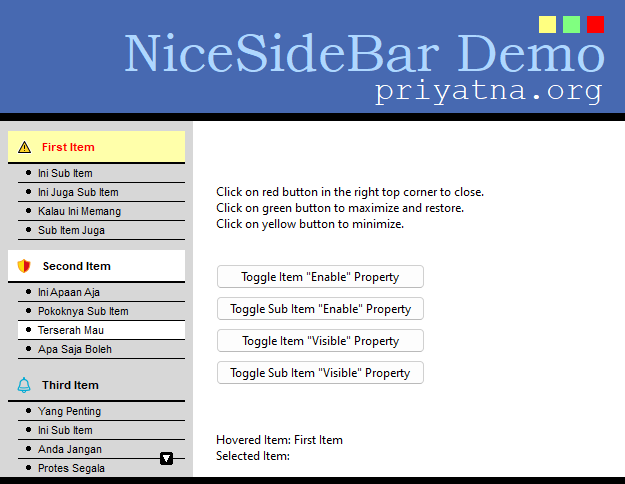 | |
| 2 | 2 | ||
| 3 | 3 | The following text is based on the *readme.html* file which is included in the *NiceSideBar* installation directory. It is written by the original author of the component, Priyatna. The text was also published on the author's web site which, however, is not available any more. | |
| 4 | 4 | ||
| 5 | 5 | ## Introduction | |
| 6 | 6 | ||
| 7 | 7 | **NiceSideBar** is a visual component for Delphi and for Lazarus which can be used as a menu. It mimics a side menu usually used in web sites. It has a flat design and is highly customizable. It supports two menu levels (menu and sub menu). Each menu can have a glyph that is supplied by an image list. It has hover state effect too. | |
| 8 | 8 | ||
| 9 | 9 | ## Version History | |
| 10 | 10 | ||
| 11 | 11 | ### Version 2.0 | |
| 12 | 12 | ||
| 13 | 13 | Released: June 2023 | |
| 14 | 14 | ||
| 15 | 15 | - Lazarus support | |
| 16 | 16 | - Cross-platform: Win32/64, Linux (gtk2, gtk3, qt, qt5, qt6), macOS (cocoa) | |
| 17 | 17 | - High-dpi support in the Lazarus version | |
| 18 | 18 | ||
| 19 | 19 | ### Version 1.2 | |
| 20 | 20 | ||
| 21 | 21 | Released: January 12, 2008 | |
| 22 | 22 | ||
| 23 | 23 | - Added properties to items and subitems: Enabled, Visible, ItemEnabled, ItemVisible | |
| 24 | 24 | - Added properties: disabled colors, disabled images | |
| 25 | 25 | - Keyboard control: PgUp, PgDown, Up and Down arrows | |
| 26 | 26 | - Reported bugs fixed | |
| 27 | 27 | ||
| 28 | 28 | ### Version 1.1 | |
| 29 | 29 | ||
| 30 | 30 | Released: June 28, 2007 | |
| 31 | 31 | ||
| 32 | 32 | - Reported bugs fixed | |
| 33 | 33 | ||
| 34 | 34 | ### Version 1.0 | |
| 35 | 35 | ||
| 36 | 36 | Released: May 26th, 2007 | |
| 37 | 37 | ||
| 38 | 38 | - Initial Release | |
| 39 | 39 | ||
| 40 | 40 | ## License | |
| 41 | 41 | ||
| 42 | 42 | This library is released under **Mozilla Public License**. You can use it in your freeware, shareware or commercial softwares. You can send your modification to me, and if I decide to include it in the main distribution, I will add your name as a contributor. You can read full licensing information in the file *License.txt* in the *NiceSideBar* installation folder. | |
| 43 | 43 | ||
| 44 | 44 | ## Download and installation | |
| 45 | 45 | ||
| 46 | 46 | The easiest way for Lazarus users is to get the package from the [[Online Package Manager]] (OPM) which is installed with newer Lazarus versions. Simply open its menu item, check "NiceSideBar" in the tree list, and click "Install". Then OPM will take care of the download and the installation. | |
| 47 | 47 | ||
| 48 | 48 | Since the OPM version may not always be up-to-date, you can also download the development version from the "Lazarus Component and Code Repository" (CCR) where a zipped snapshot is provided (https://sourceforge.net/p/lazarus-ccr/svn/HEAD/tree/components/nicegrid/). Alternatively, if you use SVN you can use the following SVN command in a console window: | |
| 49 | 49 | ||
| 50 | - | ||
| 50 | + | ```text | |
| 51 | + | svn checkout svn://svn.code.sf.net/p/lazarus-ccr/svn/components/nicesidebar nicesidebar | |
| 52 | + | ``` | |
| 51 | 53 | ||
| 52 | 54 | This applies also for Delphi users. | |
| 53 | 55 | ||
| 54 | 56 | In **Lazarus**, open the *nicesidebarlaz.lpk* file in the package editor ("Package" \> "Open Package File (.lpk)"), click "Use" \> "Install", and let the IDE recompile itself. | |
| 55 | 57 | ||
| 56 | 58 | In **Delphi**, open *NiceSideBarD7.dpk* in the IDE and press the *Install* button. Another package is provided in the download for newer Delphi versions, named *NiceSideBarXE11*; although tested under Delphi XE11 (Alexandria) it should work in other Delphi versions as well. | |
| 57 | 59 | ||
| 58 | 60 | The component will appear on the **priyatna.org** component palette tab. | |
| 59 | 61 | ||
| 60 | 62 | ## Documentation | |
| 61 | 63 | ||
| 62 | 64 | ### Methods | |
| 63 | 65 | ||
| 64 | 66 | Here are some main methods of the component: | |
| 65 | 67 | ||
| 66 | 68 | - `procedure`` BeginUpdate;` | |
| 67 | 69 | ||
| 68 | 70 | ||
| 69 | 71 | Call this method to temporarily prevent the control from updating its content. This is useful when you want to add bulky items to the control. | |
| 70 | 72 | ||
| 71 | 73 | - `procedure`` EndUpdate;` | |
| 72 | 74 | ||
| 73 | 75 | ||
| 74 | 76 | This method is used to re-enable update after calling BeginUpdate. You must call BeginUpdate prior to call this method. | |
| 75 | 77 | ||
| 76 | 78 | ### Properties | |
| 77 | 79 | ||
| 78 | 80 | These are some main properties of the component: | |
| 79 | 81 | ||
| 80 | 82 | - `property`` Items: TSideBarItems;` | |
| 81 | 83 | ||
| 82 | 84 | ||
| 83 | 85 | A collection of items. Each item usually has sub-items. You can associate item with a menu group. Each item can have a glyph supplied from an image list, while sub-items use bullets. | |
| 84 | 86 | ||
| 85 | 87 | - `property`` ItemIndex``: Integer;` | |
| 86 | 88 | ||
| 87 | 89 | ||
| 88 | 90 | Specifies which item currently is selected. | |
| 89 | 91 | ||
| 90 | 92 | - `property`` SubItemIndex: Integer;` | |
| 91 | 93 | ||
| 92 | 94 | ||
| 93 | 95 | Specifies which sub-item currently is selected. | |
| 94 | 96 | ||
| 95 | 97 | - `property`` ItemStyle: TSideBarItemStyle;` | |
| 96 | 98 | ||
| 97 | 99 | ||
| 98 | 100 | This is where you can customize an item: normal state font and color, selected state font and color, hover state font and color, and also line color. | |
| 99 | 101 | ||
| 100 | 102 | - `property`` SubItemStyle: TSideBarItemStyle;` | |
| 101 | 103 | ||
| 102 | 104 | ||
| 103 | 105 | This is where you can customize sub-items: normal state font and color, selected state font and color, hover state font and color, and also line color. | |
| 104 | 106 | ||
| 105 | 107 | - `property`` Bullets: TSideBarBulletStyle;` | |
| 106 | 108 | ||
| 107 | 109 | ||
| 108 | 110 | This is where you can customize bullets: visibility, normal hover and selected state colors, outline colors and size. Currently it has three bullet style: round, rectangle and diamond. | |
| 109 | 111 | ||
| 110 | 112 | - `property`` Scrollers: TSideBarScrollerStyle;` | |
| 111 | 113 | ||
| 112 | 114 | ||
| 113 | 115 | This is where you can customize the scroller arrow: normal, hover and selected colors and outline colors. | |
| 114 | 116 | ||
| 115 | 117 | - `property`` ItemHeight: Integer;` | |
| 116 | 118 | ||
| 117 | 119 | ||
| 118 | 120 | Specifies the item height in pixels. | |
| 119 | 121 | ||
| 120 | 122 | - `property`` SubItemHeight: Integer;` | |
| 121 | 123 | ||
| 122 | 124 | ||
| 123 | 125 | Specifies the height of sub-items in pixels. | |
| 124 | 126 | ||
| 125 | 127 | - `property`` Alignment: TSideBarAlign;` | |
| 126 | 128 | ||
| 127 | 129 | ||
| 128 | 130 | Specifies alignment of the item caption: left, right or centered. | |
| 129 | 131 | ||
| 130 | 132 | - `property`` Margin: Integer;` | |
| 131 | 133 | ||
| 132 | 134 | ||
| 133 | 135 | Specifies the margin, in pixels. | |
| 134 | 136 | ||
| 135 | 137 | - `property`` GroupSeparator: Integer;` | |
| 136 | 138 | ||
| 137 | 139 | ||
| 138 | 140 | Specifies the vertical margin between groups (items), in pixels. | |
| 139 | 141 | ||
| 140 | 142 | - `property`` Indent: Integer;` | |
| 141 | 143 | ||
| 142 | 144 | ||
| 143 | 145 | Specifies the amount of indentation of sub-items, in pixels. | |
| 144 | 146 | ||
| 145 | 147 | - `property`` AlwaysExpand: Boolean;` | |
| 146 | 148 | ||
| 147 | 149 | ||
| 148 | 150 | Set to `true` if you want the control to always expands its sub-items. | |
| 149 | 151 | ||
| 150 | 152 | - `property`` Images: TImageList;` | |
| 151 | 153 | ||
| 152 | 154 | ||
| 153 | 155 | Specifies the image list to use for items. | |
| 154 | 156 | ||
| 155 | 157 | - `property`` HoverImages: TImageList;` | |
| 156 | 158 | ||
| 157 | 159 | ||
| 158 | 160 | Specifies an image list to use for items when in hover mode. | |
| 159 | 161 | ||
| 160 | 162 | - `property`` SelectedImages: TImageList;` | |
| 161 | 163 | ||
| 162 | 164 | ||
| 163 | 165 | Specifies an image list to use for items when in selected mode. | |
| 164 | 166 | ||
| 165 | 167 | - `property`` HandPointCursor: Boolean;` | |
| 166 | 168 | ||
| 167 | 169 | ||
| 168 | 170 | Set to `true` to use a handpoint cursor instead the default one. | |
| 169 | 171 | ||
| 170 | 172 | - `property`` OnHover: TSideBarEvent;` | |
| 171 | 173 | ||
| 172 | 174 | ||
| 173 | 175 | An event that is fired everytime the mouse hovers over an item or sub-item. | |
| 174 | 176 | ||
| 175 | 177 | - `property`` OnSelect: TSideBarEvent;` | |
| 176 | 178 | ||
| 177 | 179 | ||
| 178 | 180 | An event that is fired everytime the user selects an item or sub-item. | |
| 179 | 181 | ||
| 180 | 182 | - `property`` OnCustomDrawItem: TSideBarCustomDrawItem;` | |
| 181 | 183 | ||
| 182 | 184 | ||
| 183 | 185 | You can customize item drawing by handling this event. | |
| 184 | 186 | ||
| 185 | 187 | - `property`` OnCustomDrawSubItem: TSideBarCustomDrawSubItem;` | |
| 186 | 188 | ||
| 187 | 189 | ||
| 188 | 190 | You can customize sub-item drawing by handling this event. | |
| 189 | 191 | ||
| 190 | 192 | - `property`` OnCustomDrawNonItem: TSideBarCustomDrawNonItem;` | |
| 191 | 193 | ||
| 192 | 194 | ||
| 193 | 195 | You can customize background drawing by handling this event. | |
| 194 | 196 | ||
| 195 | 197 | - `property`` OnCustomDrawScroller: TSideBarCustomDrawScroller;` | |
| 196 | 198 | ||
| 197 | 199 | ||
| 198 | 200 | You can customize scroller drawing by handling this event. | |
| 199 | 201 | ||
| 200 | 202 | ## Contact | |
| 201 | 203 | ||
| 202 | 204 | Don't hesitate to report any bug or whish to me: | |
| 203 | 205 | ||
| 204 | 206 | Priyatna Bandung - Indonesia | |
| 205 | 207 | ||
| 206 | 208 | <http://www.priyatna.org/> | |
| 207 | 209 | ||
| 208 | 210 | [mailto:me@priyatna.org](mailto:me@priyatna.org) | |
| 209 | 211 | ||
| 210 | 212 | > **Note:** The http address is no longer available. You may report bugs also in the Lazarus bug tracker for the CCR project, | |
| 211 | 213 | ||
| 212 | 214 | --- | |
| 213 | 215 | *From the Free Pascal wiki, page "NiceSideBar", as it stood on 2023-06-26 after a change by Wp, out of the wiki's dump of 2024-05-26. Copyright stays with the author who wrote it, according to the old wiki's [[Licensing]] page. If you have concerns about this material, [message the admin](/wiki-contact).* |