

New IDE features since: what changed
Revision 2 to 3. Removed lines have a minus sign; added lines have a plus sign.
| Old | New | Line | |
|---|---|---|---|
| 1 | 1 | This page contains a list of major IDE features that made Lazarus even more impressive. All features are sorted by the Lazarus release version that they became available in. | |
| 2 | 2 | ||
| 3 | 3 | If you would like to contribute to this page, please read the following page ([[Creating animated gifs for wiki]]) giving hints on creating animated gifs for this wiki. | |
| 4 | 4 | ||
| 5 | 5 | # Overview | |
| 6 | 6 | ||
| 7 | 7 | Version | |
| 8 | 8 | ||
| 9 | 9 | Category | |
| 10 | 10 | ||
| 11 | 11 | Feature | |
| 12 | 12 | ||
| 13 | 13 | # prior to v0.9.4 (2004 and earlier) | |
| 14 | 14 | ||
| 15 | 15 | ## form designer guidelines (June 2002) | |
| 16 | 16 | ||
| 17 | 17 | The Form Designer shows green or blue guidelines when you position components. This help you align or size components correctly. When components are correctly aligned or sized, then guidelines are shown. | |
| 18 | 18 | ||
| 19 | 19 | 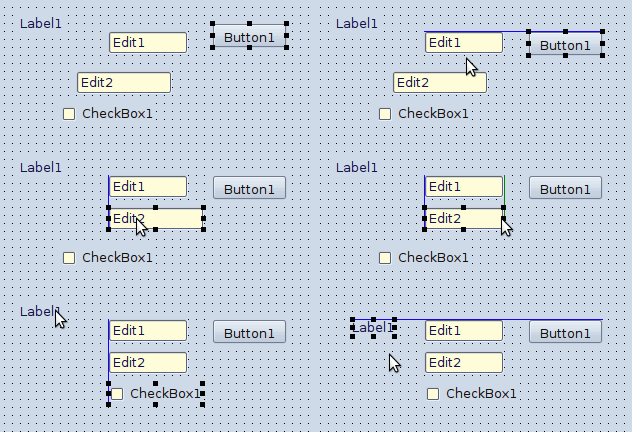 | |
| 20 | 20 | ||
| 21 | 21 | # (2005-01-09) | |
| 22 | 22 | ||
| 23 | 23 | Invert Assignment tool | |
| 24 | 24 | ||
| 25 | 25 | # v0.9.10 (2005-10-06) | |
| 26 | 26 | ||
| 27 | 27 | ## Integrated Documentation Editor | |
| 28 | 28 | ||
| 29 | 29 | Lazarus IDE is now capable of editing the external fpdoc help (xml) files while you are working with the source code. The FPDoc Editor can be found at: **View -\> FPDoc Editor** menu option. As you navigate your code, the FPDoc Editor window gets updated with the related documentation. External help files prevent you from obfuscating your source code. fpdoc is similar to the JavaDoc technology, but with its own features and syntax. | |
| 30 | 30 | ||
| 31 | 31 | 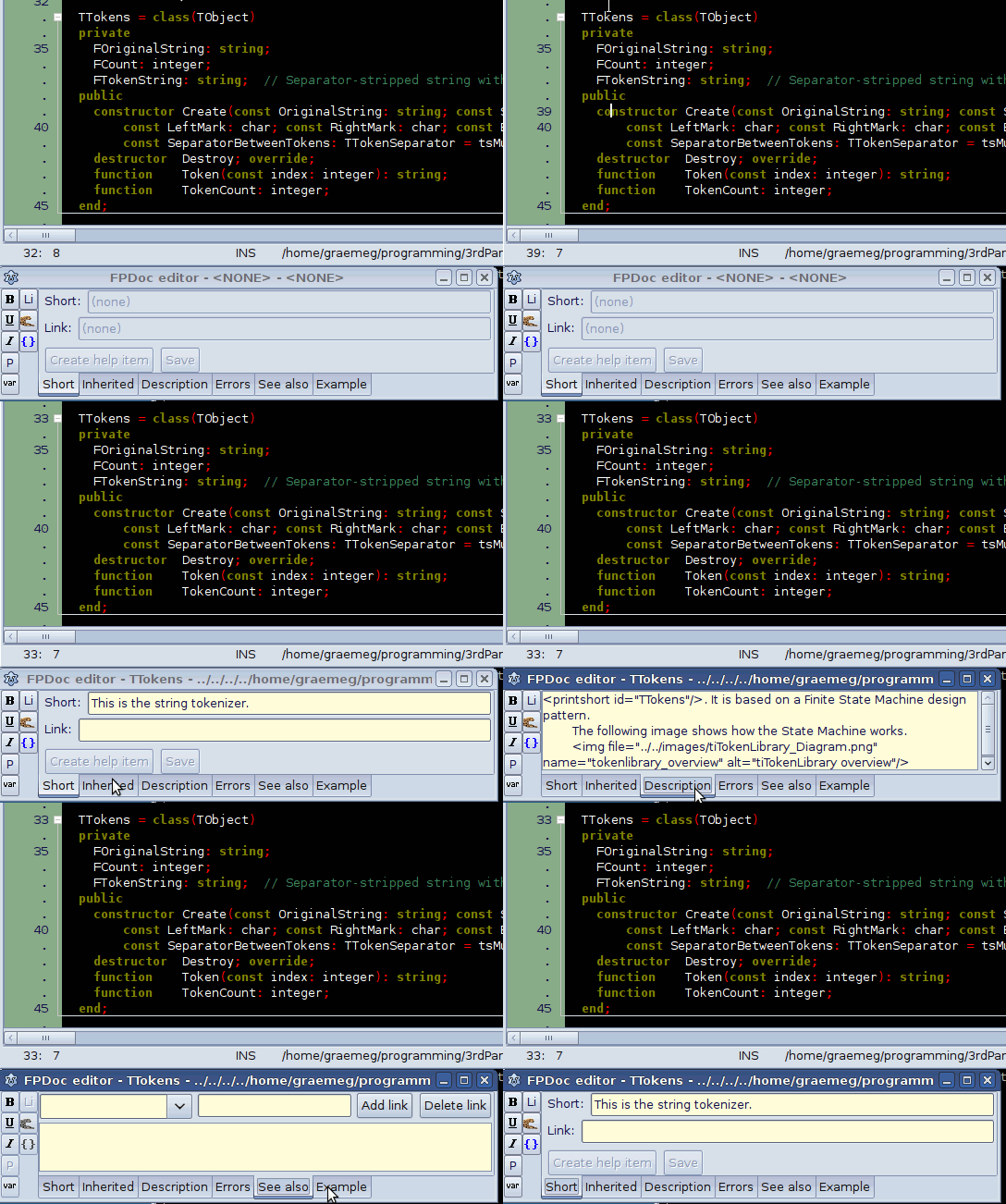 | |
| 32 | 32 | ||
| 33 | 33 | # v0.9.13 (2006-02-03) | |
| 34 | 34 | ||
| 35 | 35 | ## Quick Fixes | |
| 36 | 36 | ||
| 37 | 37 | - Quick Fix for improving message: Unit not found | |
| 38 | 38 | - Quick Fix for Sender not used | |
| 39 | 39 | ||
| 40 | 40 | # v0.9.17 (2006-05-27) | |
| 41 | 41 | ||
| 42 | 42 | - Quick Fix for some linker errors | |
| 43 | 43 | ||
| 44 | 44 | # v0.9.18 (2006-09-18) | |
| 45 | 45 | ||
| 46 | 46 | ## procedure list | |
| 47 | 47 | ||
| 48 | 48 | This makes finding methods in your current unit really fast! It can be found at **Search \> Procedure list** (Hotkey is Alt+G). The procedure list enables you to view a list of Free Pascal / Lazarus procedures in the current unit and quickly jump to the implementation. Include files are also supported and the method list gets filtered as you type the partial method name. | |
| 49 | 49 | ||
| 50 | 50 | 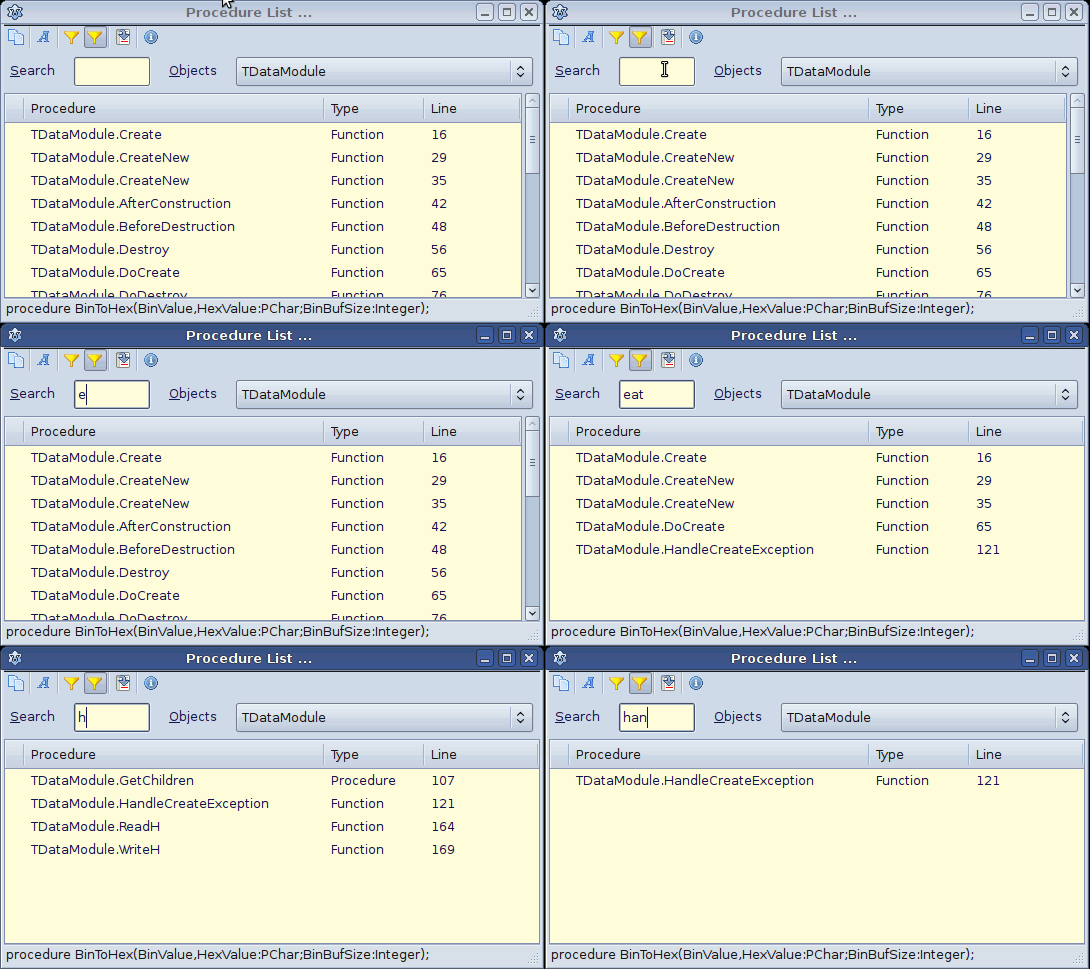 | |
| 51 | 51 | ||
| 52 | 52 | # v0.9.20 (2006-11-05) | |
| 53 | 53 | ||
| 54 | 54 | ## divider lines in editor | |
| 55 | 55 | ||
| 56 | 56 | The Lazarus editor supports drawing horizontal divider lines between classes, methods, nested procedures, begin..end blocks and many more. So now there is no need to add extra blank lines or {*******...} comments between classes or methods. In the upcoming v0.9.28 release this feature is very customizable in the "**Environment \> Options \> Editor \> Divider Drawing**" screen. In the following screenshot it shows some divider lines using the default color and a divider line for nested procedures using a customized color. | |
| 57 | 57 | ||
| 58 | 58 | 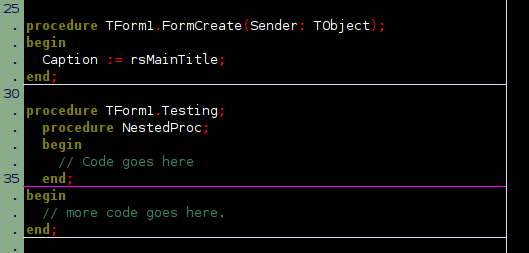 | |
| 59 | 59 | ||
| 60 | 60 | # v0.9.24 (2007-11-05) | |
| 61 | 61 | ||
| 62 | 62 | - Quick Fix for fpc warning constructing a class with abstract methods | |
| 63 | 63 | ||
| 64 | 64 | ## editor toolbar | |
| 65 | 65 | ||
| 66 | 66 | The editor toolbar plug-in allows you to define toolbar buttons to any of the IDE menu items. | |
| 67 | 67 | ||
| 68 | 68 | 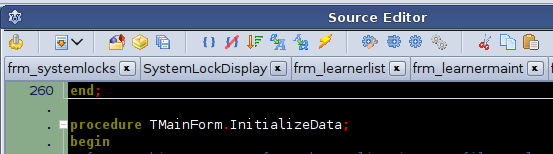 | |
| 69 | 69 | ||
| 70 | 70 | # v0.9.26 (2008-10-25) | |
| 71 | 71 | ||
| 72 | 72 | ## fpdoc help inside editor tooltips | |
| 73 | 73 | ||
| 74 | 74 | Lazarus can now display fpdoc documentation inside the tooltip help. Packages and Project can all be setup to find the related fpdoc (*.xml) help files, which then enables Lazarus to display the extended help in the tooltips. Simply hover the mouse over various parts of the code to see the tooltips in action. In the image below the mouse was hovered over the TCollection class definition. | |
| 75 | 75 | ||
| 76 | 76 | 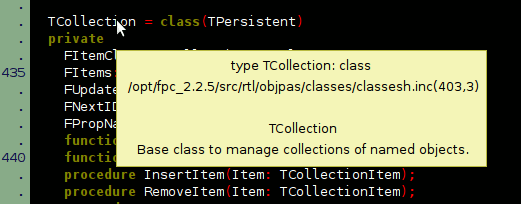 | |
| 77 | 77 | ||
| 78 | 78 | # v0.9.28 (2009-10-12) | |
| 79 | 79 | ||
| 80 | 80 | ## block matching | |
| 81 | 81 | ||
| 82 | 82 | The IDE automatically highlights matching blocks - begin..end pairs. | |
| 83 | 83 | ||
| 84 | 84 | 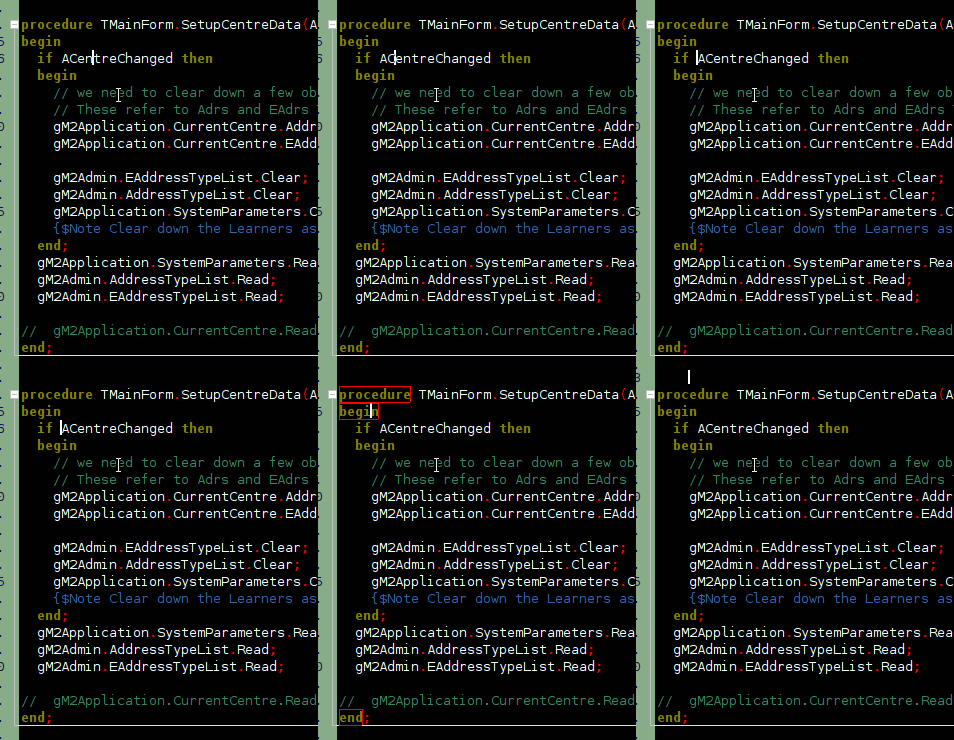 | |
| 85 | 85 | ||
| 86 | 86 | ## code macro OfAll | |
| 87 | 87 | ||
| 88 | 88 | The code templates of the IDE can use code macros. Writing code macros is easy. The new code macro *\$OfAll()* creates a list of enums for case statements as demonstrated in the image below: | |
| 89 | 89 | ||
| 90 | 90 | 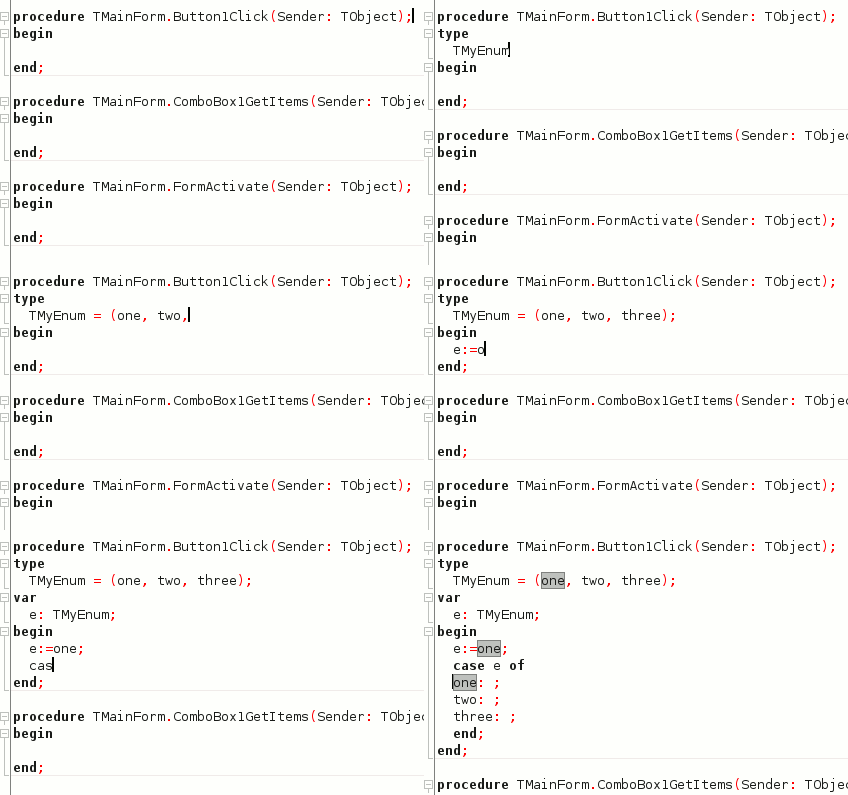 | |
| 91 | 91 | ||
| 92 | 92 | (Hint: The separator line between text and folder marks can be enabled via [[IDE Window: Editor Options|Margin and gutter]]) | |
| 93 | 93 | ||
| 94 | 94 | New users will automatically get the new macro. Old users can either delete their ~/.lazarus/lazarus.dci or add the template themselves. How to create the template: | |
| 95 | 95 | ||
| 96 | 96 | - IDE menu / Environment / code templates | |
| 97 | 97 | - Add. Token: "ofall" or whatever you like. Comment: "case variable of \<list of all enums\> end" | |
| 98 | 98 | - Click ok to add it | |
| 99 | 99 | - The new template is selected below. | |
| 100 | 100 | - check "Enable macros" | |
| 101 | 101 | - The code of the template: | |
| 102 | 102 | ||
| 103 | - | ||
| 104 | - | ||
| 103 | + | ``` pascal | |
| 104 | + | of | |
| 105 | + | |$OfAll()end; | |
| 106 | + | ``` | |
| 105 | 107 | ||
| 106 | 108 | - click ok to save and close the templates. | |
| 107 | 109 | ||
| 108 | 110 | ## Code Templates with macro \$Param | |
| 109 | 111 | ||
| 110 | 112 |  | |
| 111 | 113 | ||
| 112 | 114 | To use this feature add the following macro (or delete your old config): | |
| 113 | 115 | ||
| 114 | - | ||
| 115 | - | ||
| 116 | - | ||
| 117 | - | ||
| 118 | - | ||
| 119 | - | ||
| 116 | + | ``` pascal | |
| 117 | + | $param(variable) := $param(typename).Create; | |
| 118 | + | try | |
| 119 | + | | | |
| 120 | + | finally | |
| 121 | + | $param(variable,sync=1).Free; | |
| 122 | + | end; | |
| 123 | + | ``` | |
| 120 | 124 | ||
| 121 | 125 | ## Syncron-Edit | |
| 122 | 126 | ||
| 123 | 127 |  | |
| 124 | 128 | ||
| 125 | 129 | # v0.9.30 (2011-03-28) | |
| 126 | 130 | ||
| 127 | 131 | - Quick Fix for message: unit1(): fatal: can not find unit2 used by unit3 | |
| 128 | 132 | - Quick Fix for identifier not found: add local variable | |
| 129 | 133 | - Quick Fix for identifier not found: search via Code Browser | |
| 130 | 134 | - Quick Fix for unit not found: remove unit from uses section | |
| 131 | 135 | - Quick Fix for note local variable not used: remove variable | |
| 132 | 136 | - Quick Fix for hints: add IDE directive {%H-} | |
| 133 | 137 | ||
| 134 | 138 | ## Multi Source Editor | |
| 135 | 139 | ||
| 136 | 140 | Lazarus can now open as many Source-Editor-Windows as you want, and you can freely move files between them. | |
| 137 | 141 | ||
| 138 | 142 | It is also possible to view the same file in multiple Windows. | |
| 139 | 143 | ||
| 140 | 144 | 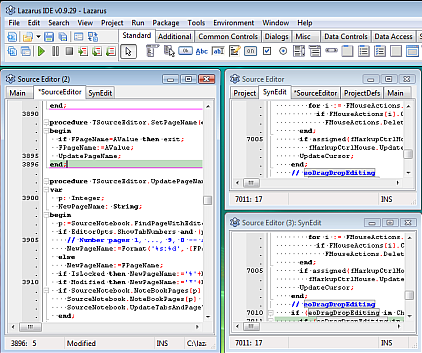 | |
| 141 | 145 | ||
| 142 | 146 | [[http://lazarus-dev.blogspot.com/2010/04/using-multiply-editor-windows.html|Multiply Source-Editor-Windows]] | |
| 143 | 147 | ||
| 144 | 148 | ## Docked IDE | |
| 145 | 149 | ||
| 146 | 150 | The IDE now supports docking. Install either the package [[Anchor Docking|AnchorDockingDsgn]] or EasyDockMgrDsgn. | |
| 147 | 151 | ||
| 148 | 152 | 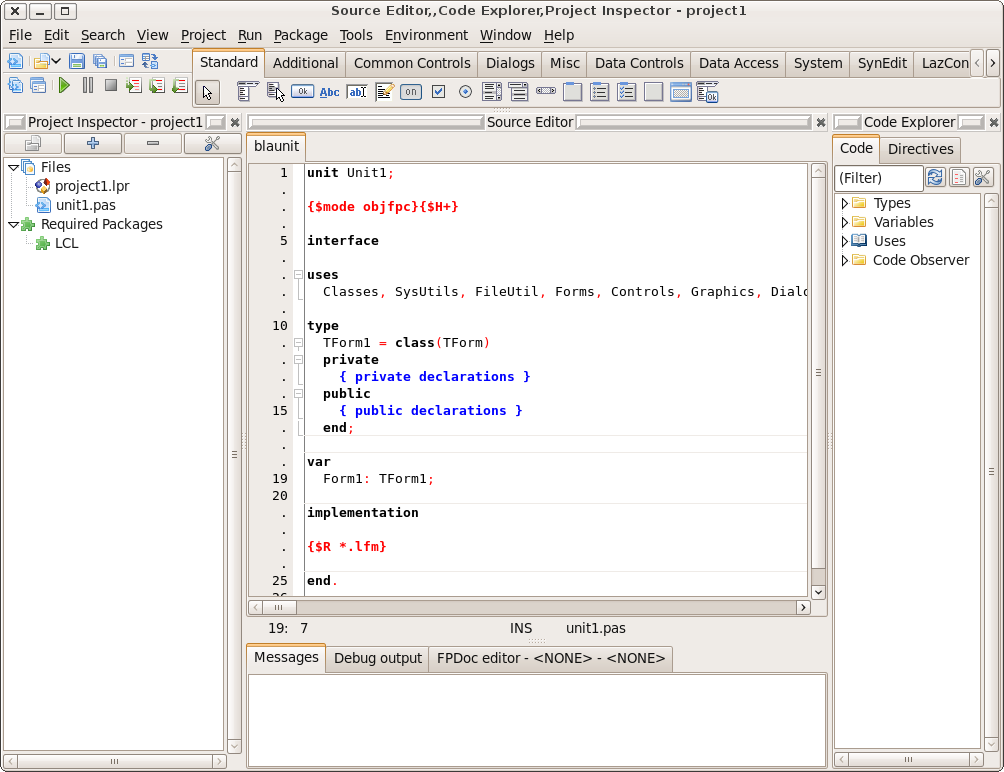 | |
| 149 | 153 | ||
| 150 | 154 | ## Code folding with hiding option for Comments | |
| 151 | 155 | ||
| 152 | 156 | Comments in the source code can be completely folded away (hidden). The context menu (on the fold gutter) provides info on the nested folds at the selected line | |
| 153 | 157 | ||
| 154 | 158 | 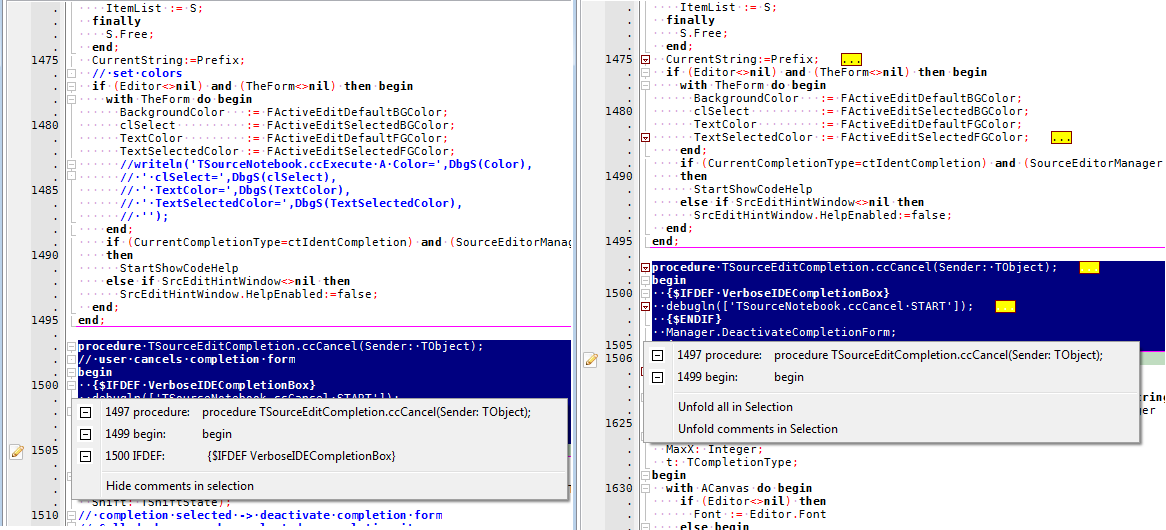 | |
| 155 | 159 | ||
| 156 | 160 | # v1.0 (2012-08-29) | |
| 157 | 161 | ||
| 158 | 162 | - Quick Fix: cant find unit: show ppu of installed package | |
| 159 | 163 | ||
| 160 | 164 | ## Folding (Hiding) text by selection | |
| 161 | 165 | ||
| 162 | 166 | Lazarus can now fold any text/code segment you want. Just select the text and hide it. (These folds are not remembered in the session, restoring folds on load only works for folds at keywords) | |
| 163 | 167 | ||
| 164 | 168 | 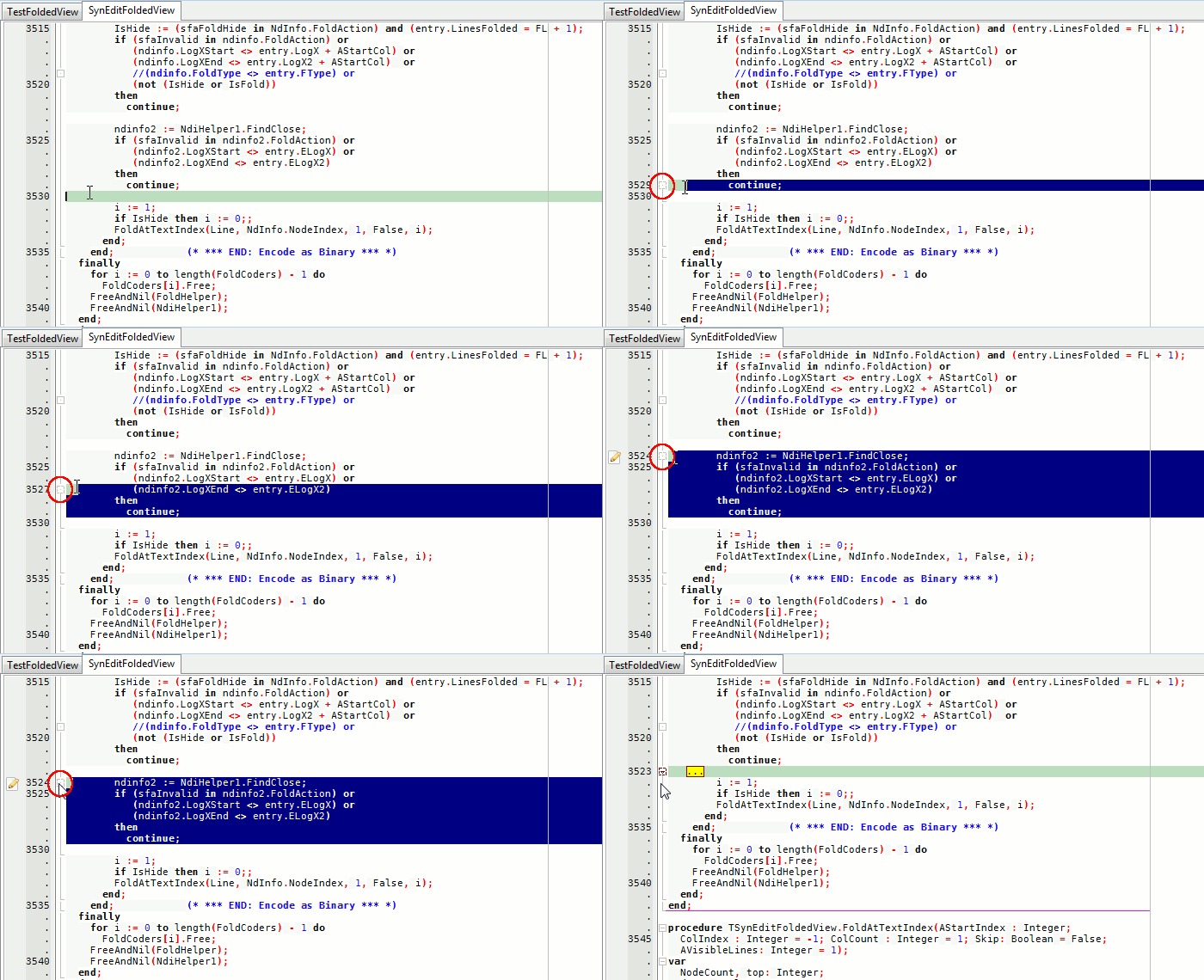 | |
| 165 | 169 | ||
| 166 | 170 | ## Watches/Locals History in debugger | |
| 167 | 171 | ||
| 168 | 172 | A history of Watches and Locals | |
| 169 | 173 | ||
| 170 | 174 | More Info: [[http://lazarus-dev.blogspot.com/2011/05/remember-remember-history-of-debugging.html blog]] 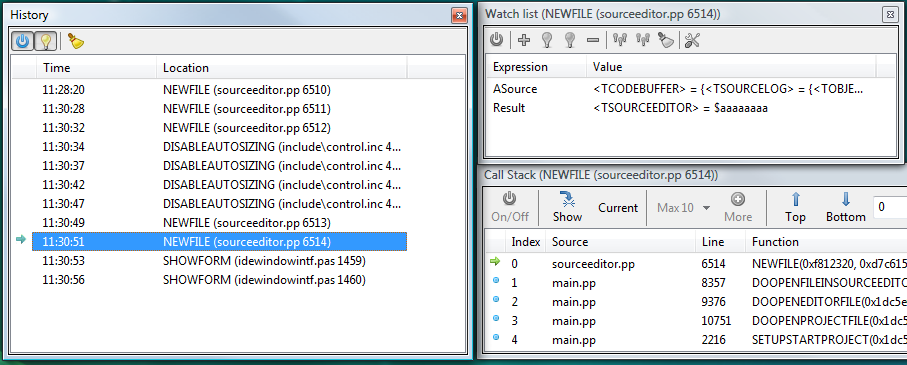 | |
| 171 | 175 | ||
| 172 | 176 | ## Macro Recorder for Code Editor | |
| 173 | 177 | ||
| 174 | 178 | The source-code editor can record and play macros | |
| 175 | 179 | ||
| 176 | 180 | ## Procedure/Class-Name Hint for long declarations | |
| 177 | 181 | ||
| 178 | 182 | The editor displays an embedded hint with the name of the current Procedure/Class if the top of the declaration is scrolled out | |
| 179 | 183 | ||
| 180 | 184 | # v1.2 (2014-03-04) | |
| 181 | 185 | ||
| 182 | 186 | ## Command Macros can be saved | |
| 183 | 187 | ||
| 184 | 188 | 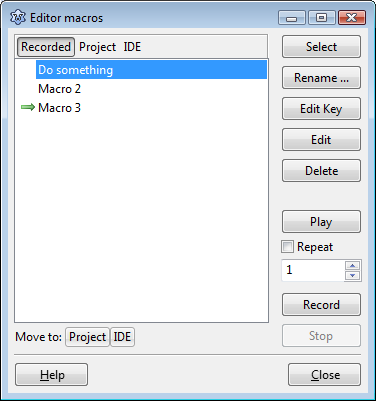 | |
| 185 | 189 | ||
| 186 | 190 | Support for multiple command macros, that can be saved with session or IDE config. [[IDE Window: Editor Macros]] | |
| 187 | 191 | ||
| 188 | 192 | ## PascalScript macros | |
| 189 | 193 | ||
| 190 | 194 | ## Multiple user defined word highlight/markup | |
| 191 | 195 | ||
| 192 | 196 | The user can define any amount of different markup settings, and assign his own choice of words,expressions (one line terms) to them. This allows to highlight all occurrences of one or more identifiers of interest. | |
| 193 | 197 | ||
| 194 | 198 | Words to be highlighted can be toggled via keyboard. Words can be highlighted per editor, or across all editors. A list of pre-defined words can be defined, that will be active when the IDE starts. | |
| 195 | 199 | ||
| 196 | 200 | 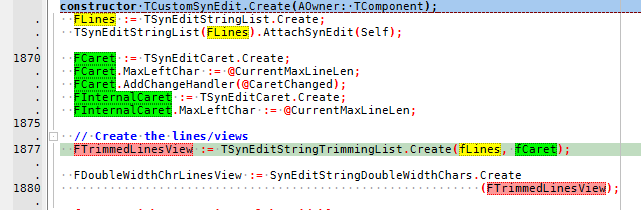 | |
| 197 | 201 | ||
| 198 | 202 | [[IDE Window: Editor User Defined Words|See documentation]] | |
| 199 | 203 | ||
| 200 | 204 | ## Package Graph Control | |
| 201 | 205 | ||
| 202 | 206 | The package graph now shows the package dependencies as graph. | |
| 203 | 207 | ||
| 204 | 208 | This new control is part of the package LazControls and used by the IDE itself as well. The control shows a graph consisting of nodes and edges as a level graph (this type of graph is also called a layered graph). | |
| 205 | 209 | ||
| 206 | 210 | 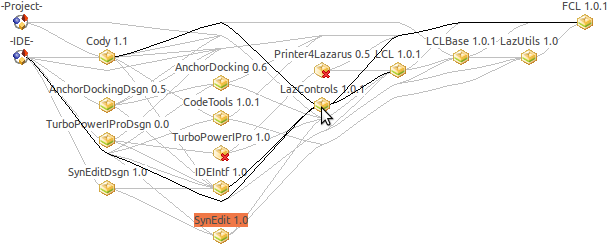 | |
| 207 | 211 | ||
| 208 | 212 | ## Dialog to find and remove unneeded package dependencies | |
| 209 | 213 | ||
| 210 | 214 | Available via package editor / context menu of a dependency or via the package graph. | |
| 211 | 215 | ||
| 212 | 216 | 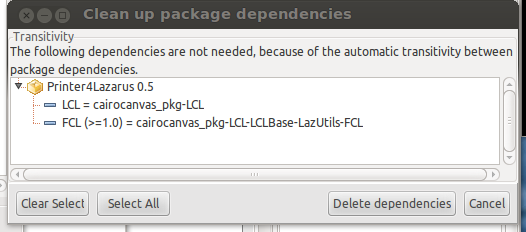 | |
| 213 | 217 | ||
| 214 | 218 | ## Auto-continue for comments and strings | |
| 215 | 219 | ||
| 216 | 220 | ## Project Additions and Overrides | |
| 217 | 221 | ||
| 218 | 222 | Projects can now add compiler options to packages and override the output directories depending on the current build mode. You can also add compiler options to all projects on a machine depending on build mode. | |
| 219 | 223 | ||
| 220 | 224 | [[IDE Window: Compiler Options|Additions and Overrides]] | |
| 221 | 225 | ||
| 222 | 226 | 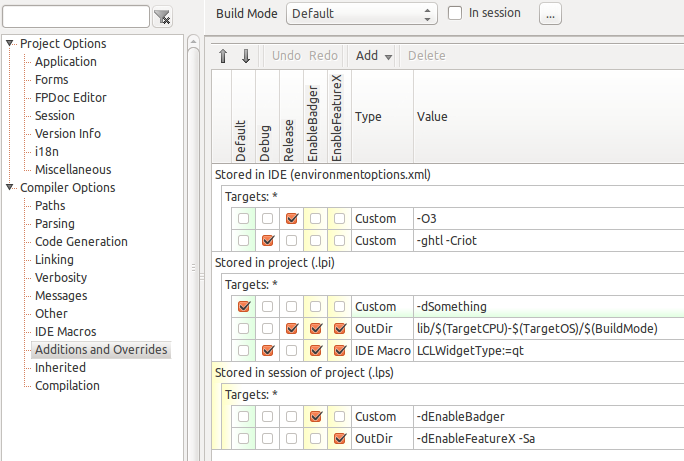 | |
| 223 | 227 | ||
| 224 | 228 | ## Low-lighting inactive \$IFDEF code | |
| 225 | 229 | ||
| 226 | 230 | 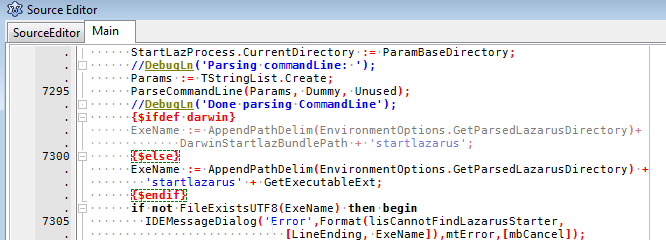 | |
| 227 | 231 | ||
| 228 | 232 | ## Unit Dependencies | |
| 229 | 233 | ||
| 230 | 234 | You can now find out what units uses a unit. | |
| 231 | 235 | ||
| 232 | 236 | [[IDE Window: Unit dependencies|Unit Dependencies]] | |
| 233 | 237 | ||
| 234 | 238 | 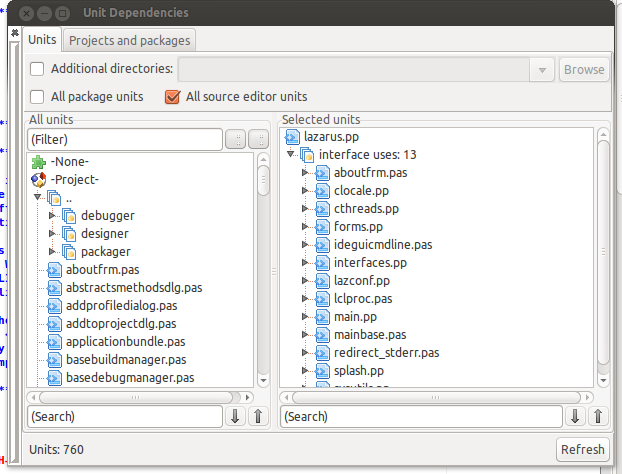 | |
| 235 | 239 | ||
| 236 | 240 | ## Quick Fix for circular unit not found | |
| 237 | 241 | ||
| 238 | 242 | When you create a cycle between units, the compiler only reports one edge of the cycle. Right click on the message / Show unit dependencies will open the unit dependencies dialog with a full path from unit A to unit B to unit A. | |
| 239 | 243 | ||
| 240 | 244 | ## Find references of used unit | |
| 241 | 245 | ||
| 242 | 246 | Position source editor cursor on a unit within a uses clause. Then right click / Find / Find references of used unit. This will find all references within the current unit to the used unit. | |
| 243 | 247 | ||
| 244 | 248 | # v1.4 (2015-04-22) | |
| 245 | 249 | ||
| 246 | 250 | ## Designer supports Undo | |
| 247 | 251 | ||
| 248 | 252 | This is one of the coolest improvements in this release. Earlier if you worked on a complex layout of components inside a Panel and then deleted the Panel by accident, there was no way to get it back. Now there is! | |
| 249 | 253 | ||
| 250 | 254 | ## Drag and Drop refactoring of files in project and packages | |
| 251 | 255 | ||
| 252 | 256 | Drag and Drop support was added to both Project inspector and Package editor. | |
| 253 | 257 | ||
| 254 | 258 | ## Parallel building packages | |
| 255 | 259 | ||
| 256 | 260 | Compilation of packages is now threaded. The Messages window has coloured header lines with information, one header per package. So when your project depends on multiple packages that have to be compiled, the IDE starts multiple threads to compile all those packages. This speeds up the compilation especially for larger projects, like the Lazarus IDE itself. | |
| 257 | 261 | ||
| 258 | 262 | Downside is that sections in the Messages window are updated in random order, thus it is more difficult to follow the compilation process. Parallel compilation can be disabled by setting "Maximum parallel processes" to 1. | |
| 259 | 263 | ||
| 260 | 264 | ## Message Marks | |
| 261 | 265 | ||
| 262 | 266 | For each compiler message listed in the Messages window the Source Editor shows an icon in the left gutter, a line in the right gutter and the offending token is given a wavey underline. Right-clicking on the left gutter icon shows a context menu with a list of quick fixes. | |
| 263 | 267 | ||
| 264 | 268 | The wavey underlines and other marks are only updated after compilation. This differs from the real-time syntax check in new Delphi versions where the wavey underline comes and goes while typing. | |
| 265 | 269 | ||
| 266 | 270 | 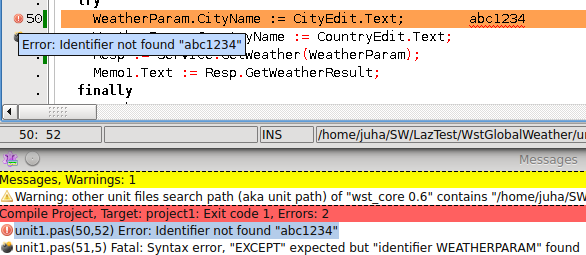 | |
| 267 | 271 | ||
| 268 | 272 | ## Messages windows shows translated messages | |
| 269 | 273 | ||
| 270 | 274 | You can use the FPC provided translation files to show messages in many languages like German and French. | |
| 271 | 275 | ||
| 272 | 276 | ## Messages windows allows to search with highlighting | |
| 273 | 277 | ||
| 274 | 278 | Explanation | |
| 275 | 279 | ||
| 276 | 280 | ## Hint windows and Object Inspector info box have HTML rendering by default | |
| 277 | 281 | ||
| 278 | 282 | Hints showing suitably formatted text give the IDE a more professional appearance, and the documentation shown usually includes clickable hyperlinks to sources and associated packages. Hint formatting was only available previously if you installed the TurboPowerIProDsgn package. It was not installed by default due to outstanding bugs which are now resolved. | |
| 279 | 283 | ||
| 280 | 284 | 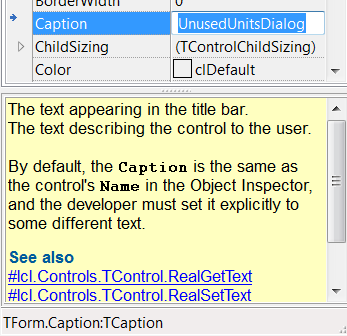 | |
| 281 | 285 | ||
| 282 | 286 | ## Editor Toolbar is visible by default | |
| 283 | 287 | ||
| 284 | 288 | The Editor Toolbar package was improved and is now installed by default. It has preconfigured buttons for "Jump Back" and "Jump Forward" features. Those buttons are often requested by new users. This toolbar makes Lazarus yet more newbie-friendly. It can be hidden from View-menu, thus there is no need to uninstall the package any more. | |
| 285 | 289 | ||
| 286 | 290 | 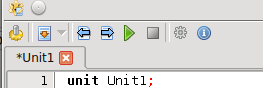 | |
| 287 | 291 | ||
| 288 | 292 | ## Checkbox can be used as a Boolean property editor in OI | |
| 289 | 293 | ||
| 290 | 294 | A Checkbox is maybe the most natural control for editing Booleans. It can be configured in Object Inspector environment settings, although the Combobox with "False" and "True" choices is still the default. | |
| 291 | 295 | ||
| 292 | 296 | 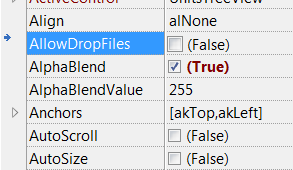 | |
| 293 | 297 | ||
| 294 | 298 | ## Component palette is configurable | |
| 295 | 299 | ||
| 296 | 300 | The order of components and pages in the component palette can be changed by user. There is a new options page for it under environment options. | |
| 297 | 301 | ||
| 298 | 302 | 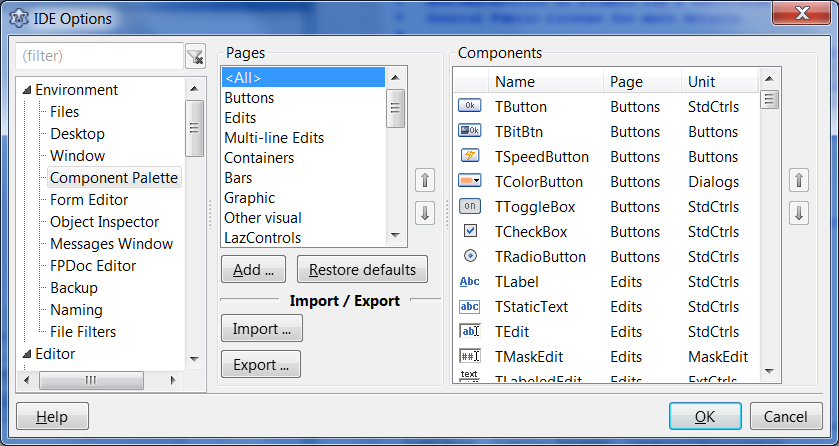 | |
| 299 | 303 | ||
| 300 | 304 | # v1.6 | |
| 301 | 305 | ||
| 302 | 306 | - Quick fix for fpc message *Local variable "i" does not seem to be initialized*: insert assignment | |
| 303 | 307 | - Added TFlowPanel in ExtCtrls.pp | |
| 304 | 308 | ||
| 305 | 309 | ## Multi Caret | |
| 306 | 310 | ||
| 307 | 311 | The editor allows multiple carets. Those can be set from column mode selection (Shift-Alt-Select), individually (Shift-Ctrl-Left-mouse or Shift-Ctrl-Insert-Key), or from selection (see image) | |
| 308 | 312 | ||
| 309 | 313 | 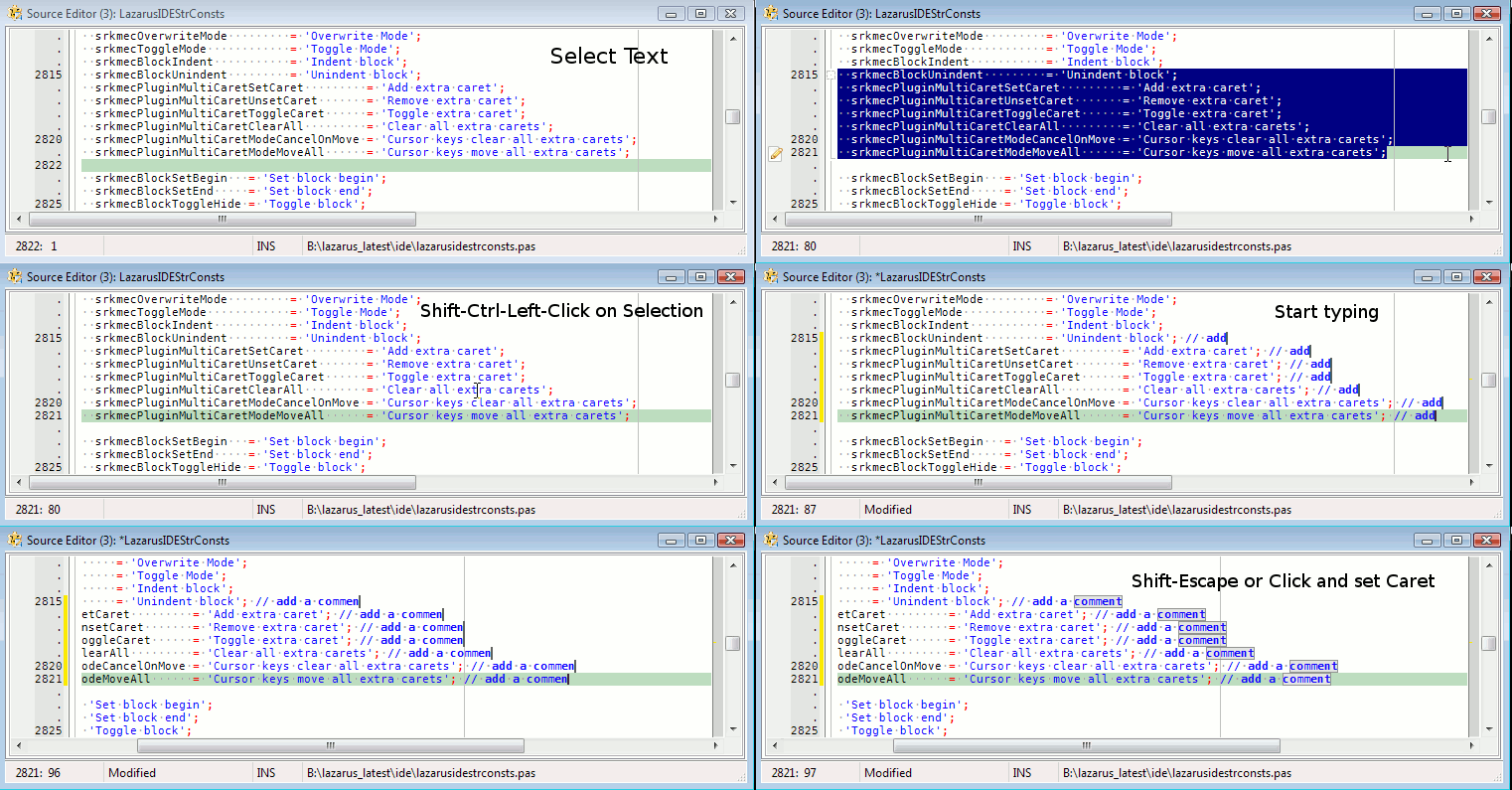 | |
| 310 | 314 | ||
| 311 | 315 | See also [[IDE Window: Editor Options General|Multi Caret]] and [[SynEdit MultiCaret plugin]] | |
| 312 | 316 | ||
| 313 | 317 | ## Project Groups | |
| 314 | 318 | ||
| 315 | 319 | 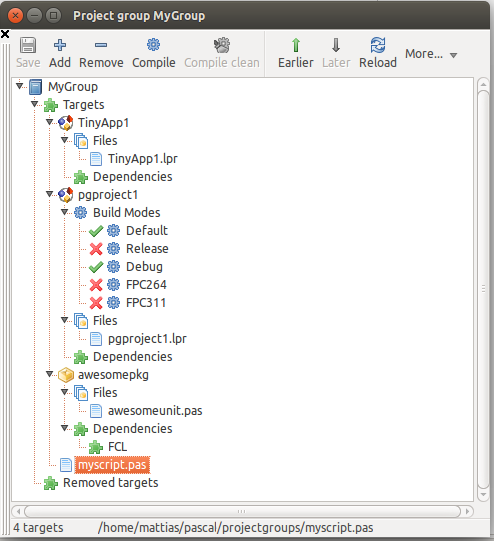 | |
| 316 | 320 | ||
| 317 | 321 | See [[Project Groups]]. | |
| 318 | 322 | ||
| 319 | 323 | ## Desktops | |
| 320 | 324 | ||
| 321 | 325 | 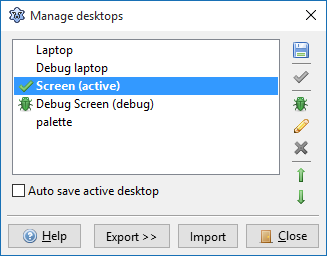 | |
| 322 | 326 | ||
| 323 | 327 | See [[IDE Window: Desktops|Desktops]] | |
| 324 | 328 | ||
| 325 | 329 | ## IDE CoolBar | |
| 326 | 330 | ||
| 327 | 331 | Replaces the old static Toolbar. ToDo: upload an animation about changing Coolbar layout. | |
| 328 | 332 | ||
| 329 | 333 | ## Package Tabs | |
| 330 | 334 | ||
| 331 | 335 | 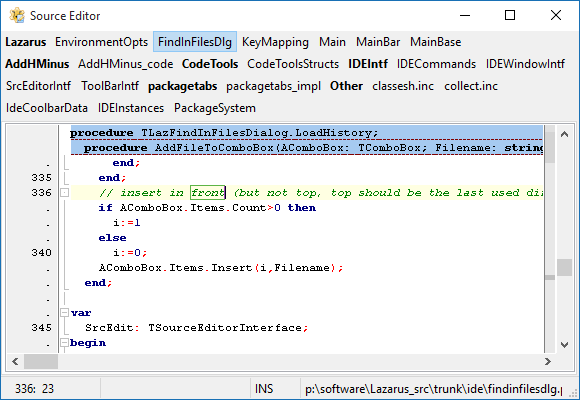 | |
| 332 | 336 | ||
| 333 | 337 | See [[Package Tabs]] | |
| 334 | 338 | ||
| 335 | 339 | ## Favorites | |
| 336 | 340 | ||
| 337 | 341 | 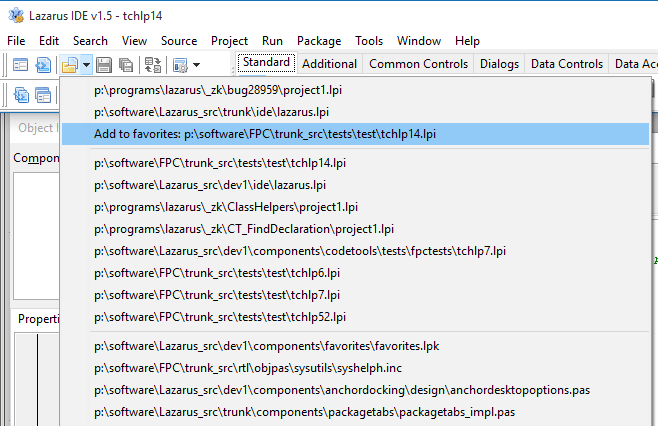 | |
| 338 | 342 | ||
| 339 | 343 | See [[Favorites]] | |
| 340 | 344 | ||
| 341 | 345 | # v1.8 | |
| 342 | 346 | ||
| 343 | 347 | - Quick fix for any fpc hint, note or warning: insert compiler directive {\$warn id off} | |
| 344 | 348 | ||
| 345 | 349 | ## Outline for Pascal Sources | |
| 346 | 350 | ||
| 347 | 351 | The editor can outline pascal code blocks, such as if/then, loops, try/except, begin/end and others. | |
| 348 | 352 | ||
| 349 | 353 | Settings can be found under Tools -\> Options -\> Editor on the pages "Markup and Matches" and "Colors" | |
| 350 | 354 | ||
| 351 | 355 | 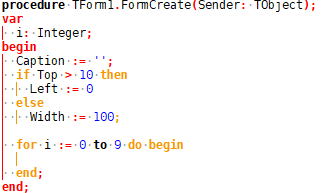 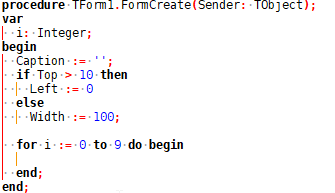 | |
| 352 | 356 | ||
| 353 | 357 | # Unsorted | |
| 354 | 358 | ||
| 355 | 359 | Any items below this point have not been sorted per Lazarus release yet. | |
| 356 | 360 | ||
| 357 | 361 | ## built-in diff viewer | |
| 358 | 362 | ||
| 359 | 363 | ... | |
| 360 | 364 | ||
| 361 | 365 | ## refactoring | |
| 362 | 366 | ||
| 363 | 367 | ... | |
| 364 | 368 | ||
| 365 | 369 | ## favorites in Object Inspector | |
| 366 | 370 | ||
| 367 | 371 | ... | |
| 368 | 372 | ||
| 369 | 373 | ## integrated unit testing with FPCUnit | |
| 370 | 374 | ||
| 371 | 375 | ... | |
| 372 | 376 | ||
| 373 | 377 | ## better anchoring and margins in form designer | |
| 374 | 378 | ||
| 375 | 379 | ... | |
| 376 | 380 | ||
| 377 | 381 | ## file browser | |
| 378 | 382 | ||
| 379 | 383 | ... | |
| 380 | 384 | ||
| 381 | 385 | ## CodeTools | |
| 382 | 386 | ||
| 383 | 387 | - word completion | |
| 384 | 388 | - Rename component in Designer auto-renames all instances in unit. | |
| 385 | 389 | ||
| 386 | 390 | ... | |
| 387 | 391 | ||
| 388 | 392 | ## Include files | |
| 389 | 393 | ||
| 390 | 394 | ... | |
| 391 | 395 | ||
| 392 | 396 | ## Lazarus Packages | |
| 393 | 397 | ||
| 394 | 398 | ... | |
| 395 | 399 | ||
| 396 | 400 | ## Enclose Selection | |
| 397 | 401 | ||
| 398 | 402 | Select some text in editor. Right Click to get popup menu. Select "Refactoring \> Enclose Selection". | |
| 399 | 403 | ||
| 400 | 404 | ## Quick Fix: Remove unit | |
| 401 | 405 | ||
| 402 | 406 | In messages window | |
| 403 | 407 | ||
| 404 | 408 | ## Code Observer | |
| 405 | 409 | ||
| 406 | 410 | ... | |
| 407 | 411 | ||
| 408 | 412 | ## Line Change indicators | |
| 409 | 413 | ||
| 410 | 414 | ... | |
| 411 | 415 | ||
| 412 | 416 | --- | |
| 413 | 417 | *From the Free Pascal wiki, page "New IDE features since", as it stood on 2019-01-07 after a change by Martin, out of the wiki's dump of 2024-05-26. Copyright stays with the author who wrote it, according to the old wiki's [[Licensing]] page. If you have concerns about this material, [message the admin](/wiki-contact).* | |
| 414 | 418 | Category: Historical | |
| 415 | 419 | Category: IDE | |
| 416 | 420 | Category: Lazarus | |
| 417 | 421 | Category: Release Notes |