

mbColorLib: what changed
Revision 0 to 1. Removed lines have a minus sign; added lines have a plus sign.
Title: mbColorLib
| Old | New | Line | |
|---|---|---|---|
| 1 | + | ## About | |
| 2 | + | ||
| 3 | + | 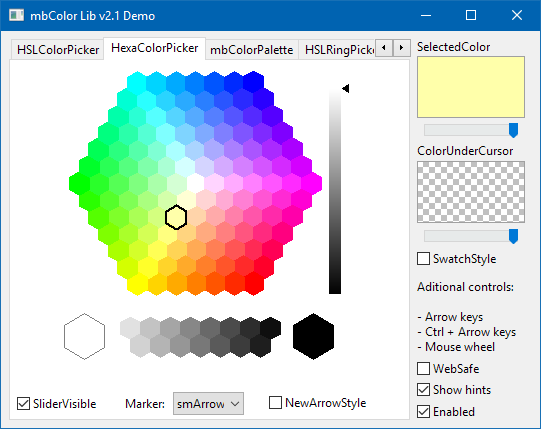 Comprehensive library with more than 30 components for color selection in several color models (RGB, CYMK, HSV, HSL, CIE-Lab). The components can be combined to create numerous new tools and color dialogs. | |
| 4 | + | ||
| 5 | + | ### Authors | |
| 6 | + | ||
| 7 | + | - Original author: Marko Binić | |
| 8 | + | - Lazarus port: Werner Pamler | |
| 9 | + | ||
| 10 | + | ### License | |
| 11 | + | ||
| 12 | + | Original license text by Marko Binić from the file *Readme.rtf* in the installation folder: *"License is granted to use, modify and redistribute these units in your applications as you see fit. You are given COMPLETE FREEDOM with the sources found in this pack; you're free to use it in ANY kind of app without even mentioning my name, my site or any other stuff, that depends on your good will and nothing else. I will accept any modifications and incorporate them in this pack if they'll help make it better. You are under NO obligation to pay for these components to neither me nor anyone else trying to sell them in their current form. If you wish to support development of these components you can do so by contributing some source or making a donation, again this solely depends on your good will."* | |
| 13 | + | ||
| 14 | + | ## Usage | |
| 15 | + | ||
| 16 | + |  | |
| 17 | + | ||
| 18 | + | Currently, the mbColorLib consists of 30 visual multi-purpose color picker components, a color selection dialog and 1 standard action for picking color from the desktop. The visual components can be classified by the color model to which they apply. | |
| 19 | + | ||
| 20 | + | ### RGB color pickers | |
| 21 | + | ||
| 22 | + |  The RColorPicker, GColorPicker, BColorPicker, as well as the RAxisColorPicker, GAxisColorPicker, BAxisColorPicker can be used to select a color using the RGB color model. In this model, the colors red, green and blue are used as base colors. If these color components are turned off the resulting color is black, like on a monitor screen. Increasing the red, green, blue values adds color to the monitor until the final color, white, is reached. Therefore, this is called *addtive color mixing*. | |
| 23 | + | ||
| 24 | + | The **RColorPicker** is a simple 1-dimensional slider which can be used to adjust the red component of the final color which is accessible from the property `SelectedColor`. Whenever the color changes an event `OnChange` is generated. The green and blue components can be set by corresponding properties. | |
| 25 | + | ||
| 26 | + | Correspondingly, the **GColorPicker** and **BColorPicker** components are responsible for the green and blue base color values. | |
| 27 | + | ||
| 28 | + | The **RAxisColorPicker** is a 2-dimensional color picker. It is the complement of the RColorPicker and varies the green and blue color values in the rectangle defined by the rectangle spanned by the component. The blue value increases horizontally, and the green value increases vertically. The red value is held fixed. The point of the `SelectedColor` is marked by a circle or a cross (property `MarkerStyle`) and can be controlled by dragging the mouse or using the arrow keys. Whenever the selected color changed, the event `OnChange` is fired. | |
| 29 | + | ||
| 30 | + | The event `OnChange` can be used to link the red color component of the RAxisColorPicker to the red color component selected by a RColorPicker: | |
| 31 | + | ||
| 32 | + | ``` pascal | |
| 33 | + | procedure TForm1.RColorPickerChange(Sender: TObject); | |
| 34 | + | begin | |
| 35 | + | RAxisColorPicker.Red := RColorPicker.Red; | |
| 36 | + | end; | |
| 37 | + | ``` | |
| 38 | + | ||
| 39 | + | Similarly, the **GAxisColorPicker** and **BAxisColorPicker** are the complements of the GColorPicker and BColorPicker. The GAxisColorPicker varies blue and red, the BAxisColorPicker green and red on the horizontal and vertical axes, respectively. | |
| 40 | + | ||
| 41 | + | ### CMYK color pickers | |
| 42 | + | ||
| 43 | + |  The CMYK color model is usually employed by color printers. The unprinted sheet of paper is white, i.e. reflects all light. Printing a cyan dye onto the paper absorbs its complementary color, red, from the spectrum; green and blue can pass the dye without being changed (ideally). Similarly magenta and yellow are used to subtract the green and blue colors from the white color of the paper. Since colors are subtracted this process is called *subtractive color mixing*. Cyan, magenta, and yellow are the base colors of the CMY color model, but usually a black dye is added for achieving better color saturation, and this leads to the name CMYK. | |
| 44 | + | ||
| 45 | + | The **CColorPicker**, **MColorPicker**, **YColorPicker**, and **KColorPicker** are 1-dimensional trackbars to modify the color components cyan, magenta, yellow and black in the CMYK color model. Like before with the RGB pickers, the resulting color is accessible in the property `SelectedColor`. | |
| 46 | + | ||
| 47 | + | ### HSL and HSV color pickers | |
| 48 | + | ||
| 49 | + | In contrast to the technically oriented RGB and CMYK color models, HSL and HSV provide a more natural access to color. HSL stands for **h**ue, **s**aturation and **l**uminance, while the V in HSV stands for **v**alue. | |
| 50 | + | ||
| 51 | + | Both models describe colors as points in a cylinder. The central axis of the cylinder ranges from black at the bottom to white at the top with neutral colors in between. The angle around the cylinder corresponds to the *hue*, the radial distance from the axis is the *saturation*, and the distance along the axis is the *luminance* or *value* (brightness). While the *luminance* of the HSL model scans the full axial direction from black to white, the *value* of the HSV model begins at black and stops halfways between black and white where the color is "purest". | |
| 52 | + | ||
| 53 | + | Numbers for hue, saturation, luminance and value can be expressed in several units. Hence each component offers a property `MaxXXX` (XXX = hue, saturation, luminance, or value). The same settings must be used if several pickers are combined. | |
| 54 | + | ||
| 55 | + | In addition, all hue/saturation/luminance/value pickers share the property `BrightnessMode` which acts as a switch between the HSL and HSV color models. If `BrightnessMode` is `bmLuminance` then the HSL model is active, and the brightness of a color is described by the *luminance* value L, and if `bmValue` is used then the HSV model is active and the brightness is expressed in terms of the *value* V. Again, if several pickers are combined they must share the same `BrighnessMode` setting because the HSL and HSV color models result in different number pairs of saturation/luminance and saturation/value. | |
| 56 | + | ||
| 57 | + | mbColorLib provides a variety of 1-dimensional, 2-dimensional and combined pickers: | |
| 58 | + | ||
| 59 | + |  *Hue* can be varied by means of the **HRingPicker** which resembles the cylindrical representation described above. But there is also a linear slider, the **HColorPicker**. Being a cylindrical coordinate, the hues are usually given in degrees, but the scale can be changed by the property `MaxHue` (`360` by default). | |
| 60 | + | ||
| 61 | + |  There exist also linear trackbar color pickers for *saturation* (**SColorPicker**, gray-to-red gradient icon) and *luminance* or *value* (**LVColorPicker**, black-to-white gradient icon). The luminance and value pickers are combined within the same component, luminance is selected by setting the property `BrighnessMode` to `bmLuminance` while `bmValue` is for picking color value data. | |
| 62 | + | ||
| 63 | + |  *Hue* and *saturation* can be selected simultaneously by means of the **HSColorPicker**. Here, hue varies horizontally while saturation increases vertically. Thus, each point in this rectangle is a specific combination of hue and saturation. | |
| 64 | + | ||
| 65 | + |  The **HSCirclePicker** allows selection of *hue* and *saturation* as well. Here the hues are arranged around a circle with decreasing saturation towards the center. The selected color is defined by the intersection point of a constant-hue radial line and a constant-saturation circle. | |
| 66 | + | ||
| 67 | + |  Similarly, the **SLColorPicker** can be used to select pairs of *saturation* and *luminance* for a specific hue. Saturation varies along the horizontal axis, while luminance increases vertically.\ | |
| 68 | + |  The **HSLColorPicker** (left icon) combines a HSColorPicker for *hue* and *saturation* selection with an LVColorpicker for *luminance* selection. In the **HSLRingPicker** (right icon) the *hue* can be picked from a HRingPicker arranged around a SLColorPicker panel for selection of *saturation* and *luminance*. In each case, the `SelectedColor` is a unique color which does not depend on any other parameter. Please note that in spite of their name name the pickers work in both HSL and HSV color models depending on the setting of `BrightnessMode`. | |
| 69 | + | ||
| 70 | + |  The **SLHColorPicker**, finally, consists of a SLColor picker panel for selection of *saturation* and *luminance* and a vertical HPicker trackbar for selection of *hue*.\ | |
| 71 | + | ||
| 72 | + | ### CIELab pickers | |
| 73 | + | ||
| 74 | + | The **CIELab color space** includes all perceivable colors. It is device-independent, i.e. colors are defined independently of how they are created and of the device they are displayed on. It contains dimensions `L` for lightness and `a` and `b` for a transition between opponent color pairs: | |
| 75 | + | ||
| 76 | + | - The **lightness**, L, represents the darkest black at L = 0, and the brightest white at L = 100 | |
| 77 | + | - **a** is the axis of the red/green opponent colors, with green at negative a and red at positive a values | |
| 78 | + | - **b**, similarly, is the axis of the yellow/blue opponent colors with blue at negative and yellow at positive b values. | |
| 79 | + | ||
| 80 | + | a and b usually run between -100 and 100. | |
| 81 | + | ||
| 82 | + |  mbColorLib contains three similar color pickers for the CIELab color model. Each one of them holds one of the three dimensions constant and allows selection of the two other dimensions by clicking in a rectangle spanned by these other dimensions. The name of the constant dimension is specified in the name of the component: TCIEAColorPicker (left icon), TCIEBColorPicker (center icon), TCIELColorPicker (right icon). | |
| 83 | + | ||
| 84 | + | ### Palette pickers | |
| 85 | + | ||
| 86 | + | #### HexaColorPicker | |
| 87 | + | ||
| 88 | + |  The **HexaColorPicker** is similar to the HSCirclePicker, but it plays only discrete colors arranged in a hexagon. Hue varies around the circumference of the hexagon. The center hexagon is gray, its brightness depends the setting of the adjacent slider. The brightness of the colors between the perimeter and center hexagons is interpolated. In addition, there is also a set of predefined gray value hexagons (see the screenshot above).\ | |
| 89 | + | ||
| 90 | + | #### ColorPalette | |
| 91 | + | ||
| 92 | + |  The **ColorPalette** is useful for selection of a color from a set of predefined colors ("palette"). In this picker, the colors are arranged by rows in any order. | |
| 93 | + | ||
| 94 | + | Colors can be added to the palette in several ways: | |
| 95 | + | ||
| 96 | + | - Call `GeneratePalette(ABaseColor: Color)` to create a palette with various shades of the base color provided | |
| 97 | + | - Call `GenerateGradientPalette(Color: array of TColor)` to create a palette for a gradient defined by the specified color array | |
| 98 | + | - Assign a stringlist with color strings (in rgb format) to the `Colors` property; an additional list with color names can be assigned to the `ColorNames` - it will be used for popup hints to be displayed if the mouse is above a palette field. | |
| 99 | + | - Load a palette from a file by setting the filename ot the `Palette` property. The reader accepts palette files in the JASC .pal and Photoshop .aco and .act formats. | |
| 100 | + | ||
| 101 | + | #### ColorList and ColorTree | |
| 102 | + | ||
| 103 | + |  **TmbColorList** (left icon) is a color selection listbox which displays a color box along with the color name. **TmbColorTree** (right icon) looks very similar, but clicking on the dropdown field at the right opens a subnode with the RGB and Hex color information. | |
| 104 | + | ||
| 105 | + | Colors are added to both controls by calling `AddColor(AName: String; AColor: TColor)`\ | |
| 106 | + | ||
| 107 | + | ### Other tools | |
| 108 | + | ||
| 109 | + | #### OfficeColorDialog | |
| 110 | + | ||
| 111 | + |  The two-page **OfficeColorDialog** is similar to the kind of color selection tool that Microsoft had used in its Office applications. It is a two-page dialog with these properties: | |
| 112 | + | ||
| 113 | + | - On the "standard" page, it contains a hexacolor picker. | |
| 114 | + | - On the "custom" page, there are several combined color pickers which can be selected by the "picker" combobox. | |
| 115 | + | - In addition, colors can be selected directly by entering the R, G, B, or H, S, L values. | |
| 116 | + | ||
| 117 | + | #### DeskPickerButton and DeskPickerAction | |
| 118 | + | ||
| 119 | + |  The **mbDeskPickerButton**, if clicked by the mouse, changes the mouse cursor to a pipette. Move the mouse to the point on the desktop with the color that you want to use, click the mouse, and the color will be available in the property `SelectedColor`. | |
| 120 | + | ||
| 121 | + | The same task can be performed with the **mbDeskPickerAction** which can be assigned to the `Action` property of any other control to trigger the color selection process. | |
| 122 | + | ||
| 123 | + | > **Warning:** While the pipette cursor is shown an invisible window is placed on top of the desktop to catch the mouse events. Debugging during this phase by means of breakpoints can make the system unresponsive. | |
| 124 | + | ||
| 125 | + | #### ColorPreview | |
| 126 | + | ||
| 127 | + |  The **mbColorPreview** is not a color picker, it can be used to display the currently selected color of other pickers or the color under the mouse cursor. Set its property `Color` to the `SelectedColor` of the picker in the picker's `OnChange` event.\ | |
| 128 | + | ||
| 129 | + | ### Demo projects | |
| 130 | + | ||
| 131 | + | Two demo projects are contained in the folder *examples* of the component installation directory: | |
| 132 | + | ||
| 133 | + | - **fulldemo** shows application of all the components included in the *mbColorLib*. | |
| 134 | + | - **axispickers** demonstrates the combination of RAxisColorPicker and RColorPicker, GAxisColorPicker and GColorPicker and BAxisColorPicker and BColorPicker. | |
| 135 | + | - **trackbars** demonstrates all trackbar color selectors. | |
| 136 | + | ||
| 137 | + | ## Download and installation | |
| 138 | + | ||
| 139 | + | - **Development version:** Use an svn client to download from [<https://svn.code.sf.net/p/lazarus-ccr/svn/components/mbColorLib>](https://svn.code.sf.net/p/lazarus-ccr/svn/components/mbColorLib) | |
| 140 | + | - **Release version:** download a zip file from [Lazarus CCR at SourceForge](http://sourceforge.net/projects/lazarus-ccr/files/mbColorLib/) | |
| 141 | + | - **Install** the package `mbcolorliblaz` in the Lazarus IDE. All icons are added to the component palette page *"mbColorLib"*. | |
| 142 | + | ||
| 143 | + | ## Change Log | |
| 144 | + | ||
| 145 | + | ### Version 2.2 | |
| 146 | + | ||
| 147 | + | - Initial commit of the library to the Lazarus Components and Code Repository. It is based on the last published Delphi version 2.0.1 available from [<http://mxs.bergsoft.net>](http://mxs.bergsoft.net). In the Lazarus version Delphi support has been dropped. | |
| 148 | + | ||
| 149 | + | ### Changes with respect to Delphi version | |
| 150 | + | ||
| 151 | + | If you are planning to convert an existing application written with the mbColorLib for Delphi to Lazarus you must be aware of several code-breaking changes introduced in the new version: | |
| 152 | + | ||
| 153 | + | - All **units typical of Delphi** (Windows, Messages etc) were replaced by Lazarus units (LCLIntf, LMessages etc). | |
| 154 | + | - The pickers for the HSL/HSV color model have an enumeration property **BrightnessMode** to switch between both color models (`bmLuminance` --\> HSL, `bmValue` --\> HSV) | |
| 155 | + | - Each HSL/HSV picker has new properties `MaxHue`, `MaxSaturation`, `MaxLuminance`, and `MaxValue`. This was introduced because there is no unique unit system for the corresponding quantities, and the old implementation was a mix-up of both color models. | |
| 156 | + | - TLColorPicker and TVColorPicker were removed and replaced by **TLVColorPicker** which contains both picker variants. | |
| 157 | + | - The original THSVColorPicker was renamed to **THSCirclePicker** because this better describes its functionality. The original unit *HSVColorPicker.pas* was renamed to *HSCirclePicker.pas*. | |
| 158 | + | - Former properties `HValue`, `HueValue` were replaced by `Hue` for better naming consistency. Similarly with the properties for saturation, luminance and value. Also, in some RGB pickers the properties `RValue`, `GValue`, and `BValue` were replaced by `Red`, `Green`, and `Blue`. | |
| 159 | + | ||
| 160 | + | --- | |
| 161 | + | *From the Free Pascal wiki, page "mbColorLib", as it stood on 2020-02-20 after a change by Trev, out of the wiki's dump of 2024-05-26. Copyright stays with the author who wrote it, according to the old wiki's [[Licensing]] page. If you have concerns about this material, [message the admin](/wiki-contact).* | |
| 162 | + | Category: Color | |
| 163 | + | Category: Components | |
| 164 | + | Category: Graphics | |
| 165 | + | Category: Lazarus-CCR |