

Mac Preferences and About Menu: what changed
Revision 1 to 2. Removed lines have a minus sign; added lines have a plus sign.
| Old | New | Line | |
|---|---|---|---|
| 1 | 1 | *(macOS only)* | |
| 2 | 2 | ||
| 3 | 3 | There are certain items that should appear in the default application menu on the macOS menu bar of your application. While Lazarus does automatically add: | |
| 4 | 4 | ||
| 5 | 5 | - Services | |
| 6 | 6 | - Hide MyApp | |
| 7 | 7 | - Hide Others | |
| 8 | 8 | - Show All | |
| 9 | 9 | - Quit MyApp | |
| 10 | 10 | ||
| 11 | 11 | Lazarus does not add an "About MyApp" menu item or a "Preferences..." menu item. To add these two items on the same application menu as Quit, you have to perform a little trick. | |
| 12 | 12 | ||
| 13 | 13 | Add a MainMenu component from the Standard tab of the component palette to your main form. Create a menu item and change its caption property in the Object Inspector to the name of your application just for reference. Then, under that menu add three sub-menu items with the following captions: About MyApp, "-" (a separator) and "Preferences..." | |
| 14 | 14 | ||
| 15 | - | ||
| 16 | - | ||
| 17 | - | ||
| 18 | - | ||
| 15 | + | 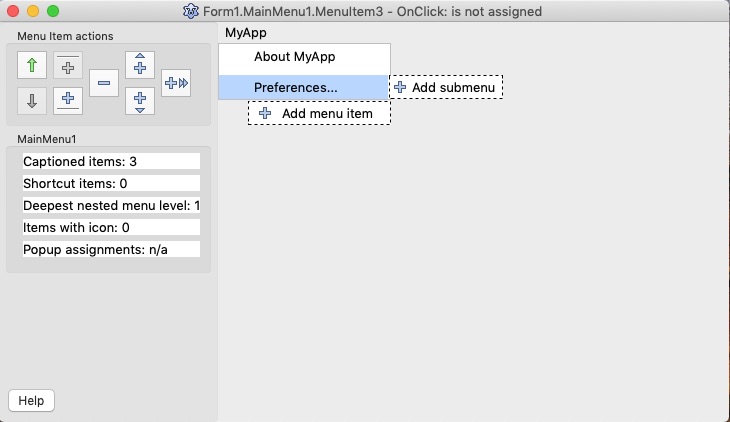 | |
| 19 | 16 | ||
| 20 | 17 | Assign the "Preferences..." Menu Item Shortcut "Command ," using the ShortCut Editor (choose the Menu item ShortCut property in the Object Inspector and click on the ellipsis dots next to it). After checking the Meta key, change the Unknown key to a comma, this is how your shortcut will appear: | |
| 21 | 18 | ||
| 22 | - | ||
| 23 | - | ||
| 24 | - | ||
| 25 | - | ||
| 19 | + | 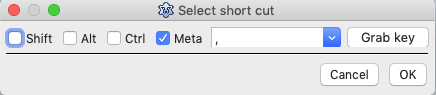 | |
| 26 | 20 | ||
| 27 | 21 | Finally, to get these items on the MyApp application menu, we must change the caption of the first menu item in the main form's OnCreate event handler as follows: | |
| 28 | 22 | ||
| 29 | 23 | ``` pascal | |
| 30 | 24 | procedure TForm1.FormCreate(Sender: TObject); | |
| 31 | 25 | var | |
| 32 | 26 | AppMenu : TMenuItem; | |
| 33 | 27 | begin | |
| 34 | 28 | AppMenu := TMenuItem.Create(Self); // Application menu | |
| 35 | 29 | AppMenu.Caption := #$EF#$A3#$BF; // Unicode Apple logo char | |
| 36 | 30 | MainMenu.Items.Insert(0, AppMenu); | |
| 37 | 31 | end; | |
| 38 | 32 | ``` | |
| 39 | 33 | ||
| 40 | 34 | After recompiling your application and running it, you will notice that "About MyApp" and "Preferences..." have been added to the MyApp menu, which is where they should be. | |
| 41 | 35 | ||
| 42 | - | ||
| 43 | - | ||
| 44 | - | ||
| 45 | - | ||
| 36 | + | 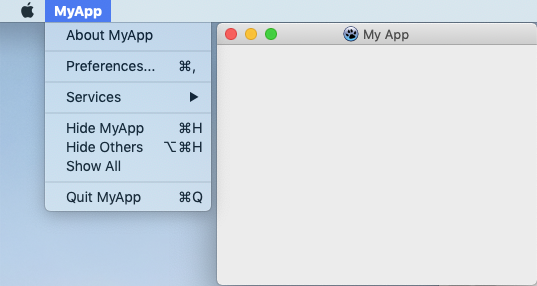 | |
| 46 | 37 | ||
| 47 | 38 | Did you notice the problem? Do you really want to call your application "MyApp" and not "My App"? | |
| 48 | 39 | ||
| 49 | 40 | No, you cannot change the project file "program MyApp" to "program My App" or you are told "MyApp.lpr(1,11) Fatal: Syntax error, ";" expected but "identifier APP" found". | |
| 50 | 41 | ||
| 51 | 42 | The solution is to change your application Info.plist file by opening your application bundle, navigating to Contents, double-clicking on Info.plist and using the Xcode plist editor to change the value of the "Bundle name" key to the string "My App" and saving it. Now when you run "MyApp" it displays as "My App". | |
| 52 | 43 | ||
| 53 | 44 | Of course you would also now need to change the "About MyApp" caption too :-) | |
| 54 | 45 | ||
| 55 | 46 | Finished? No. The Lazarus-generated menu items still show "Hide MyApp" and "Quit MyApp". To change these to "My App" you need to modify the main form's OnCreate event handler as below: | |
| 56 | 47 | ||
| 57 | 48 | ``` pascal | |
| 58 | 49 | procedure TForm1.FormCreate(Sender: TObject); | |
| 59 | 50 | var | |
| 60 | 51 | AppMenu : TMenuItem; | |
| 61 | 52 | begin | |
| 62 | 53 | Application.Title := 'My App'; | |
| 63 | 54 | AppMenu := TMenuItem.Create(Self); // Application menu | |
| 64 | 55 | AppMenu.Caption := #$EF#$A3#$BF; // Unicode Apple logo char | |
| 65 | 56 | MainMenu.Items.Insert(0, AppMenu); | |
| 66 | 57 | end; | |
| 67 | 58 | ``` | |
| 68 | 59 | ||
| 69 | 60 | And here is the final result: | |
| 70 | 61 | ||
| 71 | - | ||
| 72 | - | ||
| 73 | - | ||
| 74 | - | ||
| 62 | + | 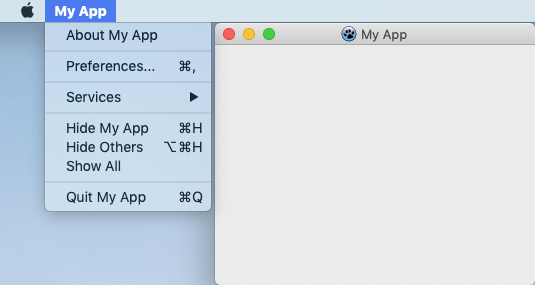 | |
| 75 | 63 | ||
| 76 | 64 | To connect the menu options to an action, add a TActionList to the main form, add actions for About and Preferences (edit the properties and then create the appropriate OnExecute event handlers for each action), and then modify the main form's OnCreate event handler as below: | |
| 77 | 65 | ||
| 78 | 66 | ``` pascal | |
| 79 | 67 | procedure TForm1.FormCreate(Sender: TObject); | |
| 80 | 68 | var | |
| 81 | 69 | AppMenu : TMenuItem; | |
| 82 | 70 | AppAboutCmd : TMenuItem; | |
| 83 | 71 | AppSepCmd : TMenuItem; | |
| 84 | 72 | AppPrefCmd : TMenuItem; | |
| 85 | 73 | begin | |
| 86 | 74 | Application.Title := 'My App'; | |
| 87 | 75 | ||
| 88 | 76 | AppMenu := TMenuItem.Create(Self); // Application menu | |
| 89 | 77 | AppMenu.Caption := #$EF#$A3#$BF; // Unicode Apple logo char | |
| 90 | 78 | MainMenu.Items.Insert(0, AppMenu); | |
| 91 | 79 | ||
| 92 | 80 | AppAboutCmd := TMenuItem.Create(Self); | |
| 93 | 81 | AppAboutCmd.Action:= ActionList1.Actions[1]; | |
| 94 | 82 | AppMenu.Add(AppAboutCmd); // Add About as item in application menu | |
| 95 | 83 | ||
| 96 | 84 | AppSepCmd := TMenuItem.Create(Self); | |
| 97 | 85 | AppSepCmd.Caption := '-'; | |
| 98 | 86 | AppMenu.Add(AppSepCmd); // Add menu separator | |
| 99 | 87 | ||
| 100 | 88 | AppPrefCmd := TMenuItem.Create(Self); | |
| 101 | 89 | AppPrefCmd.Action:= ActionList1.Actions[2]; | |
| 102 | 90 | AppMenu.Add(AppPrefCmd); // Add Preferences as item in application menu | |
| 103 | 91 | ||
| 104 | 92 | AppSepCmd := TMenuItem.Create(Self); | |
| 105 | 93 | AppSepCmd.Caption := '-'; | |
| 106 | 94 | AppMenu.Add(AppSepCmd); // Add menu separator | |
| 107 | 95 | end; | |
| 108 | 96 | ``` | |
| 109 | 97 | ||
| 110 | 98 | ## See also | |
| 111 | 99 | ||
| 112 | 100 | - [[Mac Show Application Title, Version, and Company|Mac About Box with one line of code]] | |
| 113 | 101 | - [[Introduction to platform-sensitive development]] | |
| 114 | 102 | - [[Mac Preferences Read and Write]] | |
| 115 | 103 | - [[Mac Show Application Title, Version, and Company]] | |
| 116 | 104 | - [[Add an Apple Help Book to your macOS app]] | |
| 117 | 105 | - [[macOS Programming Tips]] | |
| 118 | 106 | ||
| 119 | 107 | --- | |
| 120 | 108 | *From the Free Pascal wiki, page "Mac Preferences and About Menu", as it stood on 2021-12-09 after a change by Trev, out of the wiki's dump of 2024-05-26. Copyright stays with the author who wrote it, according to the old wiki's [[Licensing]] page. If you have concerns about this material, [message the admin](/wiki-contact).* |