

macOS extensions: what changed
Revision 0 to 1. Removed lines have a minus sign; added lines have a plus sign.
Title: macOS extensions
| Old | New | Line | |
|---|---|---|---|
| 1 | + | *(macOS only)* | |
| 2 | + | ||
| 3 | + | The package is intended to provide additional macOS **Cocoa** specific features. | |
| 4 | + | ||
| 5 | + | **Note**: It's expected that those features will not work on any other system or as well as for deprecated **Carbon** API on macOS. However, it's expected that a project using the package would still succeffully compile and run on any other target. | |
| 6 | + | ||
| 7 | + | ## General Info | |
| 8 | + | ||
| 9 | + | Author: Dmitry 'skalogryz' Boyarintsev | |
| 10 | + | ||
| 11 | + | License: [modified](http://svn.freepascal.org/svn/lazarus/trunk/COPYING.modifiedLGPL) [LGPL](http://svn.freepascal.org/svn/lazarus/trunk/COPYING.LGPL) (same as the FPC RTL and the Lazarus LCL). You can contact the author if the modified LGPL doesn't work with your project licensing. | |
| 12 | + | ||
| 13 | + | Repository: <https://github.com/skalogryz/macosext> | |
| 14 | + | ||
| 15 | + | ## Extensions | |
| 16 | + | ||
| 17 | + | After installation a new "macOS" tab is added to the components palette. All additional components are available in this tab: | |
| 18 | + | ||
| 19 | + |  | |
| 20 | + | ||
| 21 | + | ### MacOSFormProp | |
| 22 | + | ||
| 23 | + | The component is introduced to control MacOS NSWindow specific attributes and features, not available via LCL API. | |
| 24 | + | ||
| 25 | + | #### Appearance | |
| 26 | + | ||
| 27 | + | 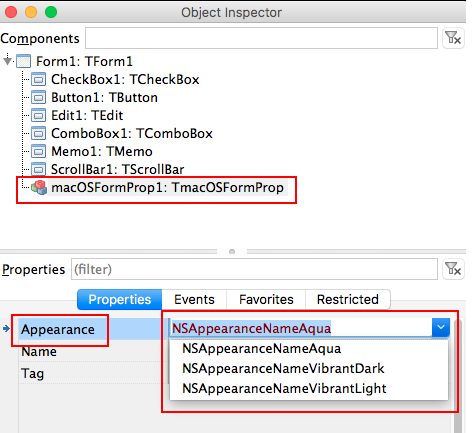 [NSAppearance](https://developer.apple.com/documentation/appkit/nsappearance?language=objc) class was introduced in macOS 10.9 for the first time. It controls window appearance options. The fact that it's per window configuration makes it different from Themes - that's system wide configuration. | |
| 28 | + | ||
| 29 | + | **Appearance** property of TmacOSFormProp component is used to adjust the appearance. | |
| 30 | + | ||
| 31 | + | Apple suggests that there are 3 appearance styles currently available in the system: | |
| 32 | + | ||
| 33 | + | `* NSAppearanceNameAqua`\ | |
| 34 | + | `* NSAppearanceNameVibrantDark`\ | |
| 35 | + | `* NSAppearanceNameVibrantLight` | |
| 36 | + | ||
| 37 | + | The property itself is a string. It is not restricted to these 3 options only. It's **case-sensitive** name of the appearance [as provided by macOS](https://developer.apple.com/documentation/appkit/nsappearance/standard_appearances?language=objc). | |
| 38 | + | ||
| 39 | + | The value of the property can be changed in design time as well as run-time. As soon as the value is changed, it's expected that the appearance of the form, is changed. | |
| 40 | + | ||
| 41 | + | **Note:** if the form that's hosts TmacOSFormProp is embedded into another form, then the behavior is not defined. However, it's expected the parent form appearance would change. | |
| 42 | + | ||
| 43 | + | Using TmacOSFormProp is not desired on any component other than form. I.e. it's possible to use it on a frame, but in that case, the appearance of the hosting would be changed. | |
| 44 | + | ||
| 45 | + | In case multiple TmacOSFormProp are used, the later action would be used as preference. Multiple TmacOSFormProp are not desired for use, and might forbidden in future versions. | |
| 46 | + | ||
| 47 | + | The implementation is checking for the presence of NSAppearance class dynamically. Thus, if the code is launched on an earlier version of macOS, it would still be able to run, even though will not do anything. | |
| 48 | + | ||
| 49 | + | This is how the default **Aqua** style might look like: | |
| 50 | + | ||
| 51 | + | 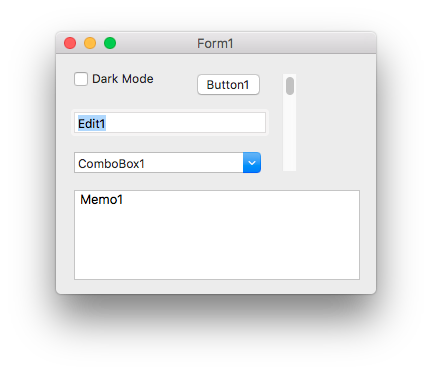 | |
| 52 | + | ||
| 53 | + | This is how the **Dark** style might look like: | |
| 54 | + | ||
| 55 | + | 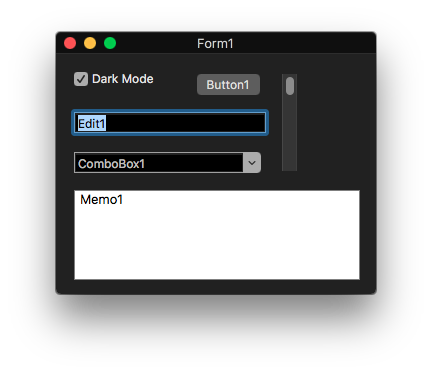 | |
| 56 | + | ||
| 57 | + | (Note that some controls are not affected by Appearance - TMemo. This is macOS default behavior and expected result) | |
| 58 | + | ||
| 59 | + | The actual style look as well style availability depends on a certain macOS version, and might change overtime at Apple's decision | |
| 60 | + | ||
| 61 | + | You can refer to **appearance** sample application. | |
| 62 | + | ||
| 63 | + | #### DocEdited | |
| 64 | + | ||
| 65 | + | The property indicates if the window should reflect the document as "edited" (true) or not (false). | |
| 66 | + | ||
| 67 | + | In systems other than macOS, a change in a document is typically indicated by adding asterisk character to the end of the window caption. | |
| 68 | + | ||
| 69 | + | macOS provides a special UI behavior in this case. | |
| 70 | + | ||
| 71 | + | 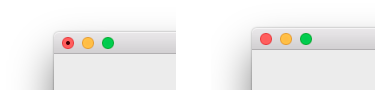 | |
| 72 | + | ||
| 73 | + | ### MacOSUIProc | |
| 74 | + | ||
| 75 | + | The unit provides additional macOS UI utilities. | |
| 76 | + | ||
| 77 | + | #### PromptUserSheet | |
| 78 | + | ||
| 79 | + | The function shows a simple user dialog as a sheet (sheets are modal to a window, not to the entire application). Does nothing on any other platform. (todo - it's possible to implement it as modal forms). Parameters are similar (while not identical) to PromptUser function: | |
| 80 | + | ||
| 81 | + | - DialogCaption: string | |
| 82 | + | - DialogMessage: string | |
| 83 | + | - DialogType - type of the dialog. idDialogXXX (declared at LCLType) | |
| 84 | + | - Buttons - array of button types that should be shown (refer to idButtonXXX list at LCLType) | |
| 85 | + | - DefaultIndex - default button index | |
| 86 | + | - AParentForm: TCustomForm - a form where the sheet should be shown | |
| 87 | + | ||
| 88 | + | ## To be Implemented | |
| 89 | + | ||
| 90 | + | - NSToolbar support - TToolbar doesn't correspond to macOS UI guidelines | |
| 91 | + | ||
| 92 | + | ## See Also | |
| 93 | + | ||
| 94 | + | - [[Cocoa Interface]] - LCL implementation of cocoa widgetset | |
| 95 | + | - [NSAppearance](https://developer.apple.com/documentation/appkit/nsappearance?language=objc) - NSAppearance class reference in Apple documentation | |
| 96 | + | ||
| 97 | + | --- | |
| 98 | + | *From the Free Pascal wiki, page "macOS extensions", as it stood on 2019-12-14 after a change by Trev, out of the wiki's dump of 2024-05-26. Copyright stays with the author who wrote it, according to the old wiki's [[Licensing]] page. If you have concerns about this material, [message the admin](/wiki-contact).* | |
| 99 | + | Category: Cocoa | |
| 100 | + | Category: Components | |
| 101 | + | Category: macOS |