

macOS Frameworks: what changed
Revision 1 to 2. Removed lines have a minus sign; added lines have a plus sign.
| Old | New | Line | |
|---|---|---|---|
| 1 | 1 | A framework is a bundle (a structured directory) that contains a dynamic shared library along with its associated resources, such as image files and header files. When you develop an application, your project links to one or more frameworks. Your code accesses the capabilities of a framework through the application programming interface (API), which is published by the framework through its header files. Because the library is dynamically shared, multiple applications can access the framework code and resources simultaneously. The system loads the code and resources of a framework into memory, as needed, and shares the one copy of a resource among all applications. A special kind of Framework is a system Plugin (or driver). | |
| 2 | 2 | ||
| 3 | 3 | Distributing dynamic libraries as Frameworks is unique to macOS. All macOS system APIs come in the form of a framework. Many third-party libraries also come in the form of Frameworks for macOS (eg SDL) while providing an option to be loaded as a regular dynamic library. | |
| 4 | 4 | ||
| 5 | 5 | ## Linking to a Framework | |
| 6 | 6 | ||
| 7 | 7 | The framework can be linked either via a source code: | |
| 8 | 8 | ||
| 9 | 9 | ``` pascal | |
| 10 | 10 | {$linkframework SDL2} | |
| 11 | 11 | ``` | |
| 12 | 12 | ||
| 13 | 13 | or via a linker instructions: | |
| 14 | 14 | ||
| 15 | - | ||
| 15 | + | ```text | |
| 16 | + | -framework SDL2 | |
| 17 | + | ``` | |
| 16 | 18 | ||
| 17 | 19 | For FPC command-line, each parameter should be prefixed with "-k": | |
| 18 | 20 | ||
| 19 | - | ||
| 21 | + | ```text | |
| 22 | + | -k-framework -kSDL2 | |
| 23 | + | ``` | |
| 20 | 24 | ||
| 21 | 25 | Since the concept of Frameworks exists in macOS only, these instructions should be carefully isolated from other systems (otherwise they might produce compile time or link time errors). | |
| 22 | 26 | ||
| 23 | 27 | If linker produces an error such as "framework cannot be found", the search path for the framework must be specified (using the "-F" linker parameter): | |
| 24 | 28 | ||
| 25 | - | ||
| 29 | + | ```text | |
| 30 | + | -F /Library/Frameworks | |
| 31 | + | ``` | |
| 26 | 32 | ||
| 27 | 33 | **Note**: | |
| 28 | 34 | ||
| 29 | 35 | - the linker search path will be set to the current system-wide SDK used, as configured by Xcode command-line tools. | |
| 30 | 36 | - any third party Frameworks should either be installed, or the path should be explicitly specified via -F parameter. | |
| 31 | 37 | - -F is only used for the developer machine at link-time. It doesn't affect how the framework is searched at the run-time | |
| 32 | 38 | ||
| 33 | 39 | ## Distributing an application with a Framework | |
| 34 | 40 | ||
| 35 | 41 | 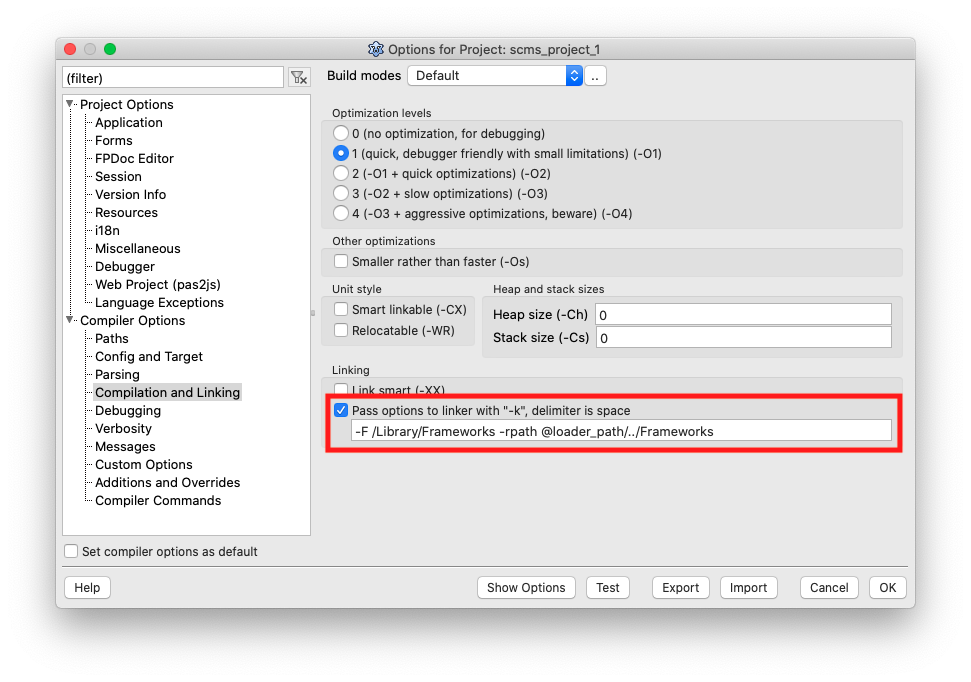 | |
| 36 | 42 | ||
| 37 | 43 | One of the beauties of the **bundles** system in macOS is that the application hides all of its necessary resources within a [[Application Bundle|bundle]]. Resources include library dependencies, such as third-party frameworks, which remove the need for the end user to have to install separately any needed third-party framework in their macOS system. | |
| 38 | 44 | ||
| 39 | 45 | (NEVER distribute system frameworks with your application!) | |
| 40 | 46 | ||
| 41 | 47 | The typical placement of a framework in **macOS** bundle is under "Frameworks" directory of "Contents": | |
| 42 | 48 | ||
| 43 | - | ||
| 44 | - | ||
| 45 | - | ||
| 46 | - | ||
| 47 | - | ||
| 48 | - | ||
| 49 | - | ||
| 50 | - | ||
| 51 | - | ||
| 52 | - | ||
| 53 | - | ||
| 49 | + | ```text | |
| 50 | + | MyApp.app/ | |
| 51 | + | Contents/ | |
| 52 | + | Frameworks/ | |
| 53 | + | SDL2.Framework | |
| 54 | + | Else.Framework | |
| 55 | + | Foo.Framework | |
| 56 | + | Info.plist | |
| 57 | + | MacOS/ | |
| 58 | + | myapp | |
| 59 | + | PkgInfo | |
| 60 | + | Resources/ | |
| 61 | + | ``` | |
| 54 | 62 | ||
| 55 | 63 | (for iOS the placement is similar, but different) | |
| 56 | 64 | ||
| 57 | 65 | However, such framework will need to be loaded in runtime. Thus the linker MUST BE given an instruction to specify the "Frameworks" folder as a runtime framework load path. | |
| 58 | 66 | ||
| 59 | 67 | This is done by specifying additional linker command: | |
| 60 | 68 | ||
| 61 | - | ||
| 69 | + | ```text | |
| 70 | + | -rpath @loader_path/../Frameworks | |
| 71 | + | ``` | |
| 62 | 72 | ||
| 63 | 73 | - "@loader_path" - is a special value that is recognized by the dynamic loader (see "man dyld") during the application load. For the macOS application bundle it would be the "MacOS" directory. As a result "@loader_path../Frameworks" will actually point to "Frameworks" folder of the bundle. | |
| 64 | 74 | ||
| 65 | 75 | ### Troubleshooting | |
| 66 | 76 | ||
| 67 | 77 | If "rpath" was not specified, the application might fail to start. The error log (or running from the command line) might reveal an error like this: | |
| 68 | 78 | ||
| 69 | - | ||
| 70 | - | ||
| 71 | - | ||
| 72 | - | ||
| 73 | - | ||
| 79 | + | ```text | |
| 80 | + | user@user-mac MacOS % ./myapp | |
| 81 | + | dyld: Library not loaded: @rpath/SDL2.framework/Versions/A/SDL2_mixer | |
| 82 | + | Referenced from: /Applications/MyApp.app/Contents/MacOS/./myapp | |
| 83 | + | Reason: image not found | |
| 84 | + | zsh: abort ./myapp | |
| 85 | + | ``` | |
| 74 | 86 | ||
| 75 | 87 | In order to see what RPATH was specified by the linker, simply run the `otool -l myapp` command. At the end of the load commands list you should see an "LC_RPATH" entry (or entries): | |
| 76 | 88 | ||
| 77 | - | ||
| 78 | - | ||
| 79 | - | ||
| 80 | - | ||
| 89 | + | ```text | |
| 90 | + | Load command 28 | |
| 91 | + | cmd LC_RPATH | |
| 92 | + | cmdsize 40 | |
| 93 | + | path @loader_path/../Frameworks (offset 12) | |
| 94 | + | ``` | |
| 81 | 95 | ||
| 82 | 96 | If you see no LC_RPATH then none was specified. | |
| 83 | 97 | ||
| 84 | 98 | ## Frameworks or Dynamic Libraries | |
| 85 | 99 | ||
| 86 | 100 | Frameworks themselves are simply special directory structures that contain a dynamic library, and possibly headers and other associated resources. The same approach as application [[Application Bundle|bundles]]. | |
| 87 | 101 | ||
| 88 | 102 | In many cases it's possible to load a dynamic library that resides within a framework structure at run-time, without needing to link the framework. | |
| 89 | 103 | ||
| 90 | 104 | There's no restriction so far NOT to use dynamic libraries. The choice should be driven by the code maintenance tasks. Linking frameworks might be easier when it comes to an update (as there's no need to track the version of the library, if it needs to change). | |
| 91 | 105 | ||
| 92 | 106 | ## See also | |
| 93 | 107 | ||
| 94 | 108 | - [[Application Bundle]]. | |
| 95 | 109 | - [[macOS Dynamic Libraries]]. | |
| 96 | 110 | - [[macOS Static Libraries]]. | |
| 97 | 111 | - [[macOS Programming Tips|macOS Libraries]]. | |
| 98 | 112 | ||
| 99 | 113 | ## External links | |
| 100 | 114 | ||
| 101 | 115 | - [Apple: Framework Programming Guide](https://developer.apple.com/library/archive/documentation/MacOSX/Conceptual/BPFrameworks/Frameworks.html#//apple_ref/doc/uid/10000183i). | |
| 102 | 116 | ||
| 103 | 117 | --- | |
| 104 | 118 | *From the Free Pascal wiki, page "macOS Frameworks", as it stood on 2021-12-06 after a change by Alextp, out of the wiki's dump of 2024-05-26. Copyright stays with the author who wrote it, according to the old wiki's [[Licensing]] page. If you have concerns about this material, [message the admin](/wiki-contact).* |