

macOS File and Custom URL Scheme Associations: what changed
Revision 1 to 2. Removed lines have a minus sign; added lines have a plus sign.
| Old | New | Line | |
|---|---|---|---|
| 1 | 1 | ## Overview | |
| 2 | 2 | ||
| 3 | 3 | macOS does not have a central registry like Windows to which applications explicitly write information. Instead, every application with a graphical interface has a [[macOS property list files|property list file]] named `Info.plist`, roughly equivalent to a manifest in the Windows world, stored in its [[Application Bundle|application bundle]]. The `Info.plist` file may optionally include file type association and custom URL scheme information. | |
| 4 | 4 | ||
| 5 | 5 | macOS Launch Services is an API that enables a running application to open other applications or their document files in a way similar to the Finder or the Dock. Using Launch Services, an application can perform such tasks as: | |
| 6 | 6 | ||
| 7 | 7 | - Open (launch or activate) another application | |
| 8 | 8 | - Open a document or a URL (uniform resource locator) in another application | |
| 9 | 9 | - Identify the preferred application for opening a given document or URL | |
| 10 | 10 | - Register information about the kinds of document files and URLs an application is capable of opening | |
| 11 | 11 | - Obtain appropriate information for displaying a file or URL on the screen, such as its icon, display name, and kind string | |
| 12 | 12 | - Maintain and update the contents of the Recent Items menu | |
| 13 | 13 | ||
| 14 | 14 | Launch Services automatically registers an application with the database the first time the application becomes known to the system. This can occur when: | |
| 15 | 15 | ||
| 16 | 16 | - The Finder reports an application has been added to the Applications folder. | |
| 17 | 17 | - An application installer is run. | |
| 18 | 18 | - When a document is opened that has no preferred application, the user is asked to select an application to use, and that application is registered with Launch Services. | |
| 19 | 19 | - When the built-in Launch Services tool is run whenever you boot your Mac or login as a user. This tool scans the Applications folder looking for any new applications that have been placed there. | |
| 20 | 20 | ||
| 21 | 21 | When you open a document or URL, Launch Services is used to determine which application should open the item. Launch Services uses the following specific order: | |
| 22 | 22 | ||
| 23 | 23 | - If the user has manually set a file association, then Launch Services will use that application to open the document or URL. | |
| 24 | 24 | - If the document has a file name extension, Launch Services will find all applications that list the extension as compatible. | |
| 25 | 25 | - If the document has a four-character file type, Launch Services finds all applications that accept that file type. | |
| 26 | 26 | - If more than one application is found, then: | |
| 27 | 27 | - If the document has a four-character creator type that matches an application: | |
| 28 | 28 | - Give preference to applications on the boot volume; | |
| 29 | 29 | - Give preference to applications on local volumes rather than remote volumes. | |
| 30 | 30 | - If two or more applications still meet the criteria, give preference to the newest version. | |
| 31 | 31 | ||
| 32 | 32 | ## Identifying the type of content in a file | |
| 33 | 33 | ||
| 34 | 34 | There are two primary techniques for identifying the type of content in a file: | |
| 35 | 35 | ||
| 36 | 36 | - Uniform Type Identifiers (UTIs) | |
| 37 | 37 | - Filename extensions | |
| 38 | 38 | ||
| 39 | 39 | A UTI is a string that uniquely identifies a class of entities considered to have a "type". UTIs provide consistent identifiers for data on which all applications and services can recognise and rely. They are also more flexible than most other techniques because you can use them to represent any type of data, not just files and directories. Examples of UTIs include: | |
| 40 | 40 | ||
| 41 | 41 | - public.text — A public type that identifies text data. | |
| 42 | 42 | - public.jpeg — A public type that identifies JPEG image data. | |
| 43 | 43 | - com.apple.bundle — An Apple type that identifies a bundle directory. | |
| 44 | 44 | - com.apple.application-bundle — An Apple type that identifies a bundled app. | |
| 45 | 45 | ||
| 46 | 46 | Whenever a UTI-based interface is available for specifying file types, you should prefer that interface over any others. Many macOS interfaces allow you to specify UTIs corresponding to the files or directories you want to work with. | |
| 47 | 47 | ||
| 48 | 48 | One way the system determines the UTI for a given file is by looking at its filename extension. A filename extension is a string of characters appended to the end of a file and separated from the main filename with a period. Each unique string of characters identifies a file of a specific type. For example, the .png extension identifies a file with image data in the portable network graphics format. | |
| 49 | 49 | ||
| 50 | 50 | Note: Because period characters are valid characters in macOS filenames, only the characters after the last period in a filename are considered part of the filename extension. Everything to the left of the last period is considered part of the filename itself. | |
| 51 | 51 | ||
| 52 | 52 | If your application defines custom file formats, you should register those formats and any associated filename extensions in your application's `Info.plist` file. The `CFBundleDocumentTypes` key specifies the file formats that your application recognises and is able to open. Entries for any custom file formats should include both a filename extension and UTI corresponding to the file contents. The system uses that information to direct files with the appropriate type to your application. | |
| 53 | 53 | ||
| 54 | 54 | ## Simple MyEditor example application | |
| 55 | 55 | ||
| 56 | 56 | We shall start by creating a very simple editor application to which we will add our own custom file type extension. After that is working we will then add a custom URL scheme so that other applications (eg Safari) when faced with our custom URL scheme will offer to open files in our MyEditor application. | |
| 57 | 57 | ||
| 58 | 58 | - Start a new Lazarus application | |
| 59 | 59 | - Drop a memo on the form | |
| 60 | 60 | - Drop three buttons on the form | |
| 61 | 61 | - name one button btnOpen | |
| 62 | 62 | - name one button btnSave | |
| 63 | 63 | - name one button btnQuit | |
| 64 | 64 | - Drop an OpenDialog on the form | |
| 65 | 65 | - Drop a SaveDialog on the form | |
| 66 | 66 | - Copy the button click handlers from the code below into your unit1.pas file | |
| 67 | 67 | ||
| 68 | 68 | ``` pascal | |
| 69 | 69 | procedure TForm1.btnOpenClick(Sender: TObject); | |
| 70 | 70 | begin | |
| 71 | 71 | LoadMemo; | |
| 72 | 72 | end; | |
| 73 | 73 | ||
| 74 | 74 | procedure TForm1.btnSaveClick(Sender: TObject); | |
| 75 | 75 | begin | |
| 76 | 76 | SaveMemo; | |
| 77 | 77 | end; | |
| 78 | 78 | ||
| 79 | 79 | procedure TForm1.btnQuitClick(Sender: TObject); | |
| 80 | 80 | begin | |
| 81 | 81 | close; | |
| 82 | 82 | end; | |
| 83 | 83 | ``` | |
| 84 | 84 | ||
| 85 | 85 | - Go to the [[IDE Window: Object Inspector|Object Inspector]], select each button in turn, select the Events tab, select the OnClick event and double click the empty field. The correct event handler for each button should be chosen automatically. | |
| 86 | 86 | - In the private section, before the public section, of TForm1 in the Interface section at the top of the unit add: | |
| 87 | 87 | ||
| 88 | 88 | ``` pascal | |
| 89 | 89 | sTmp : string; | |
| 90 | 90 | procedure LoadMemo; | |
| 91 | 91 | procedure SaveMemo; | |
| 92 | 92 | ``` | |
| 93 | 93 | ||
| 94 | 94 | - Add these two procedures after the button click handlers: | |
| 95 | 95 | ||
| 96 | 96 | ``` pascal | |
| 97 | 97 | procedure TForm1.LoadMemo; | |
| 98 | 98 | begin | |
| 99 | 99 | if OpenDialog1.Execute then | |
| 100 | 100 | sTmp:=OpenDialog1.Filename; | |
| 101 | 101 | ||
| 102 | 102 | if FileExists(sTmp) then | |
| 103 | 103 | memo1.Lines.LoadFromFile(sTmp) | |
| 104 | 104 | else | |
| 105 | 105 | showmessage('File not found: ' + sTmp); | |
| 106 | 106 | end; | |
| 107 | 107 | ||
| 108 | 108 | procedure TForm1.SaveMemo; | |
| 109 | 109 | begin | |
| 110 | 110 | ||
| 111 | 111 | if SaveDialog1.Execute then | |
| 112 | 112 | begin | |
| 113 | 113 | try | |
| 114 | 114 | memo1.Lines.SaveToFile(SaveDialog1.FileName); | |
| 115 | 115 | except on EStreamError do | |
| 116 | 116 | showmessage('Could not save file: ' + SaveDialog1.FileName); | |
| 117 | 117 | end; | |
| 118 | 118 | end | |
| 119 | 119 | end; | |
| 120 | 120 | ``` | |
| 121 | 121 | ||
| 122 | 122 | - Compile and run the application. You should be able to Open a file in the editor, Save a file and Quit the application. | |
| 123 | 123 | ||
| 124 | 124 | - If you encounter any errors, compare your unit1.pas against the full unit1.pas below and make any necessary corrections: | |
| 125 | 125 | ||
| 126 | 126 | ``` pascal | |
| 127 | 127 | unit Unit1; | |
| 128 | 128 | ||
| 129 | 129 | {$mode objfpc}{$H+} | |
| 130 | 130 | ||
| 131 | 131 | interface | |
| 132 | 132 | ||
| 133 | 133 | uses | |
| 134 | 134 | Classes, SysUtils, Forms, Controls, Graphics, Dialogs, StdCtrls; | |
| 135 | 135 | ||
| 136 | 136 | type | |
| 137 | 137 | ||
| 138 | 138 | { TForm1 } | |
| 139 | 139 | ||
| 140 | 140 | TForm1 = class(TForm) | |
| 141 | 141 | btnOpen: TButton; | |
| 142 | 142 | btnSave: TButton; | |
| 143 | 143 | btnQuit: TButton; | |
| 144 | 144 | Memo1: TMemo; | |
| 145 | 145 | OpenDialog1: TOpenDialog; | |
| 146 | 146 | SaveDialog1: TSaveDialog; | |
| 147 | 147 | procedure btnOpenClick(Sender: TObject); | |
| 148 | 148 | procedure btnQuitClick(Sender: TObject); | |
| 149 | 149 | procedure btnSaveClick(Sender: TObject); | |
| 150 | 150 | private | |
| 151 | 151 | sTmp : string; | |
| 152 | 152 | procedure LoadMemo; | |
| 153 | 153 | procedure SaveMemo; | |
| 154 | 154 | public | |
| 155 | 155 | ||
| 156 | 156 | end; | |
| 157 | 157 | ||
| 158 | 158 | var | |
| 159 | 159 | Form1: TForm1; | |
| 160 | 160 | ||
| 161 | 161 | implementation | |
| 162 | 162 | ||
| 163 | 163 | {$R *.lfm} | |
| 164 | 164 | ||
| 165 | 165 | { TForm1 } | |
| 166 | 166 | ||
| 167 | 167 | procedure TForm1.btnOpenClick(Sender: TObject); | |
| 168 | 168 | begin | |
| 169 | 169 | Form1.LoadMemo; | |
| 170 | 170 | end; | |
| 171 | 171 | ||
| 172 | 172 | procedure TForm1.btnSaveClick(Sender: TObject); | |
| 173 | 173 | begin | |
| 174 | 174 | Form1.SaveMemo; | |
| 175 | 175 | end; | |
| 176 | 176 | ||
| 177 | 177 | procedure TForm1.btnQuitClick(Sender: TObject); | |
| 178 | 178 | begin | |
| 179 | 179 | Form1.Close; | |
| 180 | 180 | end; | |
| 181 | 181 | ||
| 182 | 182 | procedure TForm1.LoadMemo; | |
| 183 | 183 | begin | |
| 184 | 184 | if OpenDialog1.Execute then | |
| 185 | 185 | sTmp:=OpenDialog1.Filename; | |
| 186 | 186 | ||
| 187 | 187 | if FileExists(sTmp) then | |
| 188 | 188 | memo1.Lines.LoadFromFile(sTmp) | |
| 189 | 189 | else | |
| 190 | 190 | showmessage('File not found: ' + sTmp); | |
| 191 | 191 | end; | |
| 192 | 192 | ||
| 193 | 193 | procedure TForm1.SaveMemo; | |
| 194 | 194 | begin | |
| 195 | 195 | if SaveDialog1.Execute then | |
| 196 | 196 | begin | |
| 197 | 197 | try | |
| 198 | 198 | memo1.Lines.SaveToFile(SaveDialog1.FileName); | |
| 199 | 199 | except on EStreamError do | |
| 200 | 200 | showmessage('Could not save file: ' + SaveDialog1.FileName); | |
| 201 | 201 | end; | |
| 202 | 202 | end | |
| 203 | 203 | end; | |
| 204 | 204 | ||
| 205 | 205 | end. | |
| 206 | 206 | ``` | |
| 207 | 207 | ||
| 208 | 208 | ## Adding your custom file type extension | |
| 209 | 209 | ||
| 210 | 210 | Lazarus will have created an [[Application Bundle|application bundle]] for our MyEditor application. Use Finder to navigate to the project directory, right-click on the bundle directory MyEditor.app and select "Show package contents". Open the Contents subdirectory and you should see: a MacOS subdirectory, a Resources subdirectory, a Pkginfo file and the application's `Info.plist` [[macOS property list files|property list file]]. Open the file with TextEditor.app and the content should look very similar to this: | |
| 211 | 211 | ||
| 212 | 212 | ``` xml | |
| 213 | 213 | <?xml version="1.0" encoding="UTF-8"?> | |
| 214 | 214 | <!DOCTYPE plist PUBLIC "-//Apple Computer//DTD PLIST 1.0//EN" "http://www.apple.com/DTDs/PropertyList-1.0.dtd"> | |
| 215 | 215 | <plist version="1.0"> | |
| 216 | 216 | <dict> | |
| 217 | 217 | <key>CFBundleDevelopmentRegion</key> | |
| 218 | 218 | <string>English</string> | |
| 219 | 219 | <key>CFBundleExecutable</key> | |
| 220 | 220 | <string>MyEditor</string> | |
| 221 | 221 | <key>CFBundleName</key> | |
| 222 | 222 | <string>MyEditor</string> | |
| 223 | 223 | <key>CFBundleIdentifier</key> | |
| 224 | 224 | <string>com.company.MyEditor</string> | |
| 225 | 225 | <key>CFBundleInfoDictionaryVersion</key> | |
| 226 | 226 | <string>6.0</string> | |
| 227 | 227 | <key>CFBundlePackageType</key> | |
| 228 | 228 | <string>APPL</string> | |
| 229 | 229 | <key>CFBundleSignature</key> | |
| 230 | 230 | <string>MyEd</string> | |
| 231 | 231 | <key>CFBundleShortVersionString</key> | |
| 232 | 232 | <string>0.1</string> | |
| 233 | 233 | <key>CFBundleVersion</key> | |
| 234 | 234 | <string>1</string> | |
| 235 | 235 | <key>CSResourcesFileMapped</key> | |
| 236 | 236 | <true/> | |
| 237 | 237 | <key>CFBundleDocumentTypes</key> | |
| 238 | 238 | <array> | |
| 239 | 239 | <dict> | |
| 240 | 240 | <key>CFBundleTypeRole</key> | |
| 241 | 241 | <string>Viewer</string> | |
| 242 | 242 | <key>CFBundleTypeExtensions</key> | |
| 243 | 243 | <array> | |
| 244 | 244 | <string>*</string> | |
| 245 | 245 | </array> | |
| 246 | 246 | <key>CFBundleTypeOSTypes</key> | |
| 247 | 247 | <array> | |
| 248 | 248 | <string>fold</string> | |
| 249 | 249 | <string>disk</string> | |
| 250 | 250 | <string>****</string> | |
| 251 | 251 | </array> | |
| 252 | 252 | </dict> | |
| 253 | 253 | </array> | |
| 254 | 254 | <key>NSHighResolutionCapable</key> | |
| 255 | 255 | <true/> | |
| 256 | 256 | </dict> | |
| 257 | 257 | </plist> | |
| 258 | 258 | ``` | |
| 259 | 259 | ||
| 260 | 260 | We will now add our custom filename extension to the property list so that MyEditor will be the default application used to open such files. Delete the highlighted lines and insert these replacement lines: | |
| 261 | 261 | ||
| 262 | 262 | ``` xml | |
| 263 | 263 | <key>CFBundleTypeName</key> | |
| 264 | 264 | <string>My Custom File</string> | |
| 265 | 265 | <key>LSHandlerRank</key> | |
| 266 | 266 | <string>Owner</string> | |
| 267 | 267 | <key>CFBundleTypeRole</key> | |
| 268 | 268 | <string>Editor</string> | |
| 269 | 269 | <key>LSTypeIsPackage</key> | |
| 270 | 270 | <false/> | |
| 271 | 271 | <key>CFBundleTypeIconFile</key> | |
| 272 | 272 | <string>txt.icns</string> | |
| 273 | 273 | <key>CFBundleTypeExtensions</key> | |
| 274 | 274 | <array> | |
| 275 | 275 | <string>xyy</string> | |
| 276 | 276 | </array> | |
| 277 | 277 | ``` | |
| 278 | 278 | ||
| 279 | 279 | Save the file. You will notice that we have changed the "role" from Viewer to Editor and we have added our custom file extension (xyy). If you only need to open files and not edit them, you should leave the "role" as viewer. We have also added an icon file "txt.icns" so that Finder will display your icon for your custom file extension. | |
| 280 | 280 | ||
| 281 | 281 | Now we need to add an OnDropFiles event handler to our form. Copy the following code into your unit1.pas file before the last line which contains **end.**: | |
| 282 | 282 | ||
| 283 | 283 | ``` pascal | |
| 284 | 284 | procedure TForm1.FormDropFiles(Sender: TObject; | |
| 285 | 285 | const FileNames: array of string); | |
| 286 | 286 | begin | |
| 287 | 287 | memo1.Lines.LoadFromFile(FileNames[0]); | |
| 288 | 288 | end; | |
| 289 | 289 | ``` | |
| 290 | 290 | ||
| 291 | 291 | Go to the Object Inspector, choose Form1, select the Events tab and double-click the empty OnDropFiles field. FormDropFiles should be automatically added to the field. Now compile the application. | |
| 292 | 292 | ||
| 293 | 293 | As you have run MyEditor before, its original `Info.plist` file will have been cached in the Launch Service database and so the changes we made to it will not be noticed. The quickest way to fix this is to copy the MyEditor.app bundle to the Applications directory. As Lazarus only keeps a link to the executable file in the application bundle, before you copy the MyEditor application bundle, you will need to replace the file link with the executable file. Open an Applications \> Utilities \> Terminal and execute the following commands: | |
| 294 | 294 | ||
| 295 | - | ||
| 296 | - | ||
| 297 | - | ||
| 298 | - | ||
| 299 | - | ||
| 300 | - | ||
| 301 | - | ||
| 302 | - | ||
| 295 | + | ```text | |
| 296 | + | cd <your project directory> | |
| 297 | + | echo "Test file content" > test.xyy // Create a test.xyy file while here | |
| 298 | + | rm MyEditor.app/Contents/MacOS/MyEditor // remove the link to the executable from the bundle | |
| 299 | + | cp MyEditor MyEditor.app/Contents/MacOS/MyEditor // copy the executable to the bundle | |
| 300 | + | cp -R MyEditor.app /Applications/ // copy the application bundle to /Applications | |
| 301 | + | rm MyEditor.app/Contents/MacOS/MyEditor // remove the executable from the bundle | |
| 302 | + | cd MyEditor.app/Contents/MacOS/MyEditor | |
| 303 | + | ln -s ../../../MyEditor . // restore the link to the executable | |
| 304 | + | ``` | |
| 303 | 305 | ||
| 304 | 306 | Now, from Finder, you should be able to double-click on your `test.xyy` file and receive the following dialog: | |
| 305 | 307 | ||
| 306 | 308 | 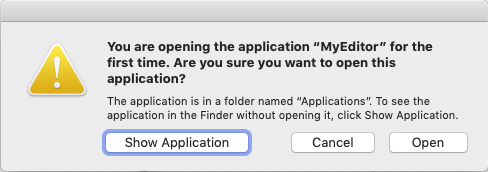 | |
| 307 | 309 | ||
| 308 | 310 | Choose Open and MyEditor should open... and display the content of your `test.xyy` file. You can also drop the `test.xyy` file on the application's icon and it will open the file. | |
| 309 | 311 | ||
| 310 | 312 | ## Adding your custom URL scheme | |
| 311 | 313 | ||
| 312 | 314 | Apple supports common URL schemes associated with system applications, such as http, https, ftp, and mailto. You can define your own custom scheme and register your application to support it. For this demonstration we are going to define the custom xyy:// scheme. So, when Safari comes across xyy://some_file, it will ask you if you want to use MyEditor to open it. | |
| 313 | 315 | ||
| 314 | 316 | For MyEditor to support a custom URL scheme, we need to do the following: | |
| 315 | 317 | ||
| 316 | 318 | 1. Define the format for the scheme. | |
| 317 | 319 | 2. Register the scheme so that macOS directs appropriate URLs to MyEditor. | |
| 318 | 320 | 3. Handle the URLs that MyEditor receives. | |
| 319 | 321 | ||
| 320 | 322 | - Our format is trivial. What follows our custom URL scheme (xyy://) will just be a filename to open. | |
| 321 | 323 | ||
| 322 | 324 | - To register the URL scheme we return to MyEditor's `Info.plist` property list file which currently looks like this: | |
| 323 | 325 | ||
| 324 | 326 | ``` xml | |
| 325 | 327 | <?xml version="1.0" encoding="UTF-8"?> | |
| 326 | 328 | <!DOCTYPE plist PUBLIC "-//Apple Computer//DTD PLIST 1.0//EN" "http://www.apple.com/DTDs/PropertyList-1.0.dtd"> | |
| 327 | 329 | <plist version="1.0"> | |
| 328 | 330 | <dict> | |
| 329 | 331 | <key>CFBundleDevelopmentRegion</key> | |
| 330 | 332 | <string>English</string> | |
| 331 | 333 | <key>CFBundleExecutable</key> | |
| 332 | 334 | <string>MyEditor</string> | |
| 333 | 335 | <key>CFBundleName</key> | |
| 334 | 336 | <string>MyEditor</string> | |
| 335 | 337 | <key>CFBundleIdentifier</key> | |
| 336 | 338 | <string>com.company.MyEditor</string> | |
| 337 | 339 | <key>CFBundleInfoDictionaryVersion</key> | |
| 338 | 340 | <string>6.0</string> | |
| 339 | 341 | <key>CFBundlePackageType</key> | |
| 340 | 342 | <string>APPL</string> | |
| 341 | 343 | <key>CFBundleSignature</key> | |
| 342 | 344 | <string>MyEd</string> | |
| 343 | 345 | <key>CFBundleShortVersionString</key> | |
| 344 | 346 | <string>0.1</string> | |
| 345 | 347 | <key>CFBundleVersion</key> | |
| 346 | 348 | <string>1</string> | |
| 347 | 349 | <key>CSResourcesFileMapped</key> | |
| 348 | 350 | <true/> | |
| 349 | 351 | <key>CFBundleDocumentTypes</key> | |
| 350 | 352 | <array> | |
| 351 | 353 | <dict> | |
| 352 | 354 | <key>CFBundleTypeName</key> | |
| 353 | 355 | <string>My Custom File</string> | |
| 354 | 356 | <key>LSHandlerRank</key> | |
| 355 | 357 | <string>Owner</string> | |
| 356 | 358 | <key>CFBundleTypeRole</key> | |
| 357 | 359 | <string>Editor</string> | |
| 358 | 360 | <key>LSTypeIsPackage</key> | |
| 359 | 361 | <false/> | |
| 360 | 362 | <key>CFBundleTypeIconFile</key> | |
| 361 | 363 | <string>txt.icns</string> | |
| 362 | 364 | <key>CFBundleTypeExtensions</key> | |
| 363 | 365 | <array> | |
| 364 | 366 | <string>xyy</string> | |
| 365 | 367 | </array> | |
| 366 | 368 | <key>CFBundleTypeOSTypes</key> | |
| 367 | 369 | <array> | |
| 368 | 370 | <string>fold</string> | |
| 369 | 371 | <string>disk</string> | |
| 370 | 372 | <string>****</string> | |
| 371 | 373 | </array> | |
| 372 | 374 | </dict> | |
| 373 | 375 | </array> | |
| 374 | 376 | <key>NSHighResolutionCapable</key> | |
| 375 | 377 | <true/> | |
| 376 | 378 | </dict> | |
| 377 | 379 | </plist> | |
| 378 | 380 | ``` | |
| 379 | 381 | ||
| 380 | 382 | - After the highlighted line above, insert the following lines into the property list file: | |
| 381 | 383 | ||
| 382 | 384 | ``` xml | |
| 383 | 385 | <key>CFBundleURLTypes</key> | |
| 384 | 386 | <array> | |
| 385 | 387 | <dict> | |
| 386 | 388 | <key>CFBundleTypeRole</key> | |
| 387 | 389 | <string>Editor</string> | |
| 388 | 390 | <key>CFBundleURLName</key> | |
| 389 | 391 | <string>com.company.URLScheme</string> | |
| 390 | 392 | <key>CFBundleURLSchemes</key> | |
| 391 | 393 | <array> | |
| 392 | 394 | <string>xyy</string> | |
| 393 | 395 | </array> | |
| 394 | 396 | </dict> | |
| 395 | 397 | </array> | |
| 396 | 398 | ``` | |
| 397 | 399 | ||
| 398 | 400 | - The final step we need to take care of is to handle the URLs that MyEditor receives. To do this we need to add some more code to unit1.pas. The lines to add are highlighted in the listing below which is now the final version of unit1.pas: | |
| 399 | 401 | ||
| 400 | 402 | ``` pascal | |
| 401 | 403 | unit Unit1; | |
| 402 | 404 | ||
| 403 | 405 | {$mode objfpc}{$H+} | |
| 404 | 406 | {$modeswitch objectivec1} | |
| 405 | 407 | ||
| 406 | 408 | interface | |
| 407 | 409 | ||
| 408 | 410 | uses | |
| 409 | 411 | Classes, SysUtils, Forms, Controls, Graphics, Dialogs, StdCtrls, | |
| 410 | 412 | Strutils, CocoaAll, MacOSAll; | |
| 411 | 413 | ||
| 412 | 414 | type | |
| 413 | 415 | THandlerProc = procedure(const url : string); | |
| 414 | 416 | ||
| 415 | 417 | { TAppURLHandler } | |
| 416 | 418 | ||
| 417 | 419 | TAppURLHandler = objcclass(NSObject) | |
| 418 | 420 | public | |
| 419 | 421 | procedure getUrlwithReplyEvent(event : NSAppleEventDescriptor; eventReply: NSAppleEventDescriptor); | |
| 420 | 422 | message 'getUrl:withReplyEvent:'; | |
| 421 | 423 | public | |
| 422 | 424 | callBack : THandlerProc; | |
| 423 | 425 | end; | |
| 424 | 426 | ||
| 425 | 427 | { TForm1 } | |
| 426 | 428 | ||
| 427 | 429 | TForm1 = class(TForm) | |
| 428 | 430 | btnOpen: TButton; | |
| 429 | 431 | btnSave: TButton; | |
| 430 | 432 | btnQuit: TButton; | |
| 431 | 433 | Memo1: TMemo; | |
| 432 | 434 | OpenDialog1: TOpenDialog; | |
| 433 | 435 | SaveDialog1: TSaveDialog; | |
| 434 | 436 | procedure btnOpenClick(Sender: TObject); | |
| 435 | 437 | procedure btnQuitClick(Sender: TObject); | |
| 436 | 438 | procedure btnSaveClick(Sender: TObject); | |
| 437 | 439 | procedure FormCreate(Sender: TObject); | |
| 438 | 440 | procedure FormDropFiles(Sender: TObject; const FileNames: array of string); | |
| 439 | 441 | private | |
| 440 | 442 | sTmp : string; | |
| 441 | 443 | procedure LoadMemo; | |
| 442 | 444 | procedure SaveMemo; | |
| 443 | 445 | public | |
| 444 | 446 | ||
| 445 | 447 | end; | |
| 446 | 448 | ||
| 447 | 449 | var | |
| 448 | 450 | Form1: TForm1; | |
| 449 | 451 | handler : TAppURLHandler; | |
| 450 | 452 | eventManager : NSAppleEventManager; | |
| 451 | 453 | ||
| 452 | 454 | implementation | |
| 453 | 455 | ||
| 454 | 456 | {$R *.lfm} | |
| 455 | 457 | ||
| 456 | 458 | { TForm1 } | |
| 457 | 459 | ||
| 458 | 460 | // Handle my custom URL scheme | |
| 459 | 461 | procedure HandleMyCustomURLProtocol(const FileName: string); | |
| 460 | 462 | var | |
| 461 | 463 | FilePath : String; | |
| 462 | 464 | begin | |
| 463 | 465 | FilePath := ReplaceStr(FileName, 'xyy://', ''); // ditch protocol scheme | |
| 464 | 466 | Form1.memo1.Lines.LoadFromFile(FilePath); // load file into memo | |
| 465 | 467 | end; | |
| 466 | 468 | ||
| 467 | 469 | procedure TAppURLHandler.getUrlwithReplyEvent(event : NSAppleEventDescriptor; eventReply: NSAppleEventDescriptor); | |
| 468 | 470 | var | |
| 469 | 471 | url : NSString; | |
| 470 | 472 | begin | |
| 471 | 473 | url := event.paramDescriptorForKeyword(keyDirectObject).stringValue; | |
| 472 | 474 | callBack(url.UTF8String); | |
| 473 | 475 | end; | |
| 474 | 476 | ||
| 475 | 477 | procedure RegisterURLHandler(HandlerProc : THandlerProc); | |
| 476 | 478 | begin | |
| 477 | 479 | handler := TAppURLHandler.alloc.init; | |
| 478 | 480 | handler.callBack := HandlerProc; | |
| 479 | 481 | eventManager := NSAppleEventManager.sharedAppleEventManager; | |
| 480 | 482 | eventManager.setEventHandler_andSelector_forEventClass_andEventID(handler,ObjCSelector(handler.getUrlwithReplyEvent), kInternetEventClass,kAEGetURL); | |
| 481 | 483 | end; | |
| 482 | 484 | ||
| 483 | 485 | // Form creation handler | |
| 484 | 486 | procedure TForm1.FormCreate(Sender: TObject); | |
| 485 | 487 | begin | |
| 486 | 488 | // Listen for protocol URLs | |
| 487 | 489 | RegisterURLHandler(@HandleMyCustomURLProtocol); | |
| 488 | 490 | ||
| 489 | 491 | // if there is a filename on the command line | |
| 490 | 492 | if ParamCount > 0 then | |
| 491 | 493 | memo1.Lines.LoadFromFile(ParamStr(1)); | |
| 492 | 494 | end; | |
| 493 | 495 | ||
| 494 | 496 | procedure TForm1.btnOpenClick(Sender: TObject); | |
| 495 | 497 | begin | |
| 496 | 498 | Form1.LoadMemo; | |
| 497 | 499 | end; | |
| 498 | 500 | ||
| 499 | 501 | procedure TForm1.btnSaveClick(Sender: TObject); | |
| 500 | 502 | begin | |
| 501 | 503 | Form1.SaveMemo; | |
| 502 | 504 | end; | |
| 503 | 505 | ||
| 504 | 506 | procedure TForm1.btnQuitClick(Sender: TObject); | |
| 505 | 507 | begin | |
| 506 | 508 | Form1.Close; | |
| 507 | 509 | end; | |
| 508 | 510 | ||
| 509 | 511 | procedure TForm1.LoadMemo; | |
| 510 | 512 | begin | |
| 511 | 513 | if OpenDialog1.Execute then | |
| 512 | 514 | sTmp:=OpenDialog1.Filename; | |
| 513 | 515 | ||
| 514 | 516 | if FileExists(sTmp) then | |
| 515 | 517 | memo1.Lines.LoadFromFile(sTmp) | |
| 516 | 518 | else | |
| 517 | 519 | showmessage('File not found: ' + sTmp); | |
| 518 | 520 | end; | |
| 519 | 521 | ||
| 520 | 522 | procedure TForm1.SaveMemo; | |
| 521 | 523 | begin | |
| 522 | 524 | if SaveDialog1.Execute then | |
| 523 | 525 | begin | |
| 524 | 526 | try | |
| 525 | 527 | memo1.Lines.SaveToFile(SaveDialog1.FileName); | |
| 526 | 528 | except on EStreamError do | |
| 527 | 529 | showmessage('Could not save file: ' + SaveDialog1.FileName); | |
| 528 | 530 | end; | |
| 529 | 531 | end | |
| 530 | 532 | end; | |
| 531 | 533 | ||
| 532 | 534 | procedure TForm1.FormDropFiles(Sender: TObject; | |
| 533 | 535 | const FileNames: array of string); | |
| 534 | 536 | begin | |
| 535 | 537 | memo1.Lines.LoadFromFile(FileNames[0]); | |
| 536 | 538 | end; | |
| 537 | 539 | ||
| 538 | 540 | end. | |
| 539 | 541 | ``` | |
| 540 | 542 | ||
| 541 | 543 | - When you have added the new lines, go to the Object Inspector, choose Form1, select the Events tab, go to the OnCreate event and double-click the empty field. The TForm1.FormCreate procedure should be automatically filled in for you. Now compile the application for the last time! | |
| 542 | 544 | ||
| 543 | 545 | - As you have run MyEditor before, the previous `Info.plist` file will have been cached in the Launch Service database and so the changes we made to it will not be noticed. To fix this, first drag the existing MyEditor.app bundle to the Trash Bin, and then copy the MyEditor.app bundle to the Applications directory again. Open an Applications \> Utilities \> Terminal and execute the following commands: | |
| 544 | 546 | ||
| 545 | - | ||
| 546 | - | ||
| 547 | - | ||
| 548 | - | ||
| 549 | - | ||
| 550 | - | ||
| 551 | - | ||
| 547 | + | ```text | |
| 548 | + | cd <your project directory> | |
| 549 | + | rm MyEditor.app/Contents/MacOS/MyEditor // remove the link to the executable from the bundle | |
| 550 | + | cp MyEditor MyEditor.app/Contents/MacOS/MyEditor // copy the executable to the bundle | |
| 551 | + | cp -R MyEditor.app /Applications/ // copy the application bundle to /Applications | |
| 552 | + | rm MyEditor.app/Contents/MacOS/MyEditor // remove the executable from the bundle | |
| 553 | + | cd MyEditor.app/Contents/MacOS/MyEditor | |
| 554 | + | ln -s ../../../MyEditor . // restore the link to the executable | |
| 555 | + | ``` | |
| 552 | 556 | ||
| 553 | 557 | - Now if you open Safari and type `xyy:///Users/<username>/<path to your project directory>/unit1.pas` into the URL box at the top... the following dialog should appear: | |
| 554 | 558 | ||
| 555 | 559 |  | |
| 556 | 560 | ||
| 557 | 561 | - Click Allow and... the file should load. | |
| 558 | 562 | ||
| 559 | 563 | ## Last words | |
| 560 | 564 | ||
| 561 | 565 | As with many things Apple, the CFBundleDocumentTypes entries: | |
| 562 | 566 | ||
| 563 | 567 | - CFBundleTypeExtensions | |
| 564 | 568 | - CFBundleTypeMIMETypes | |
| 565 | 569 | - CFBUndleTypeOSTypes | |
| 566 | 570 | - NSExportableAs | |
| 567 | 571 | ||
| 568 | 572 | were deemed legacy `Info.plist` keys in macOS 10.5 (Leopard) and were deprecated in favour of Uniform Type Identifiers (UTIs) introduced in macOS 10.5 for document-based applications. | |
| 569 | 573 | ||
| 570 | 574 | Instead, you should use the LSItemContentTypes and (new for macOS 10.5) NSExportableTypes keys, and declare the corresponding UTIs as appropriate in the application `Info.plist`. For the declaration of UTIs in `Info.plist` refer to the [[macOS File and Custom URL Scheme Associations|External Links]] below. | |
| 571 | 575 | ||
| 572 | 576 | It should be noted that the legacy keys are still working in macOS 10.15.4 (Catalina). | |
| 573 | 577 | ||
| 574 | 578 | ## See also | |
| 575 | 579 | ||
| 576 | 580 | - [[Application Bundle]] | |
| 577 | 581 | - [[macOS property list files]] | |
| 578 | 582 | ||
| 579 | 583 | ## External links | |
| 580 | 584 | ||
| 581 | 585 | - [Apple: Launch Services](https://developer.apple.com/documentation/coreservices/launch_services) | |
| 582 | 586 | - [Apple:Developing a document-based application](https://developer.apple.com/documentation/appkit/documents_data_and_pasteboard/developing_a_document-based_app) | |
| 583 | 587 | - [Apple: Uniform Type Identifers](https://developer.apple.com/library/archive/documentation/FileManagement/Conceptual/understanding_utis/understand_utis_intro/understand_utis_intro.html) | |
| 584 | 588 | - [Apple: System-declared UTIs](https://developer.apple.com/library/archive/documentation/Miscellaneous/Reference/UTIRef/Articles/System-DeclaredUniformTypeIdentifiers.html) | |
| 585 | 589 | - [Info.plist Keys and Values](https://developer.apple.com/library/archive/documentation/General/Reference/InfoPlistKeyReference/Introduction/Introduction.html) | |
| 586 | 590 | - [Apple: Defining a custom URL scheme](https://developer.apple.com/documentation/uikit/inter-process_communication/allowing_apps_and_websites_to_link_to_your_content/defining_a_custom_url_scheme_for_your_app) | |
| 587 | 591 | ||
| 588 | 592 | --- | |
| 589 | 593 | *From the Free Pascal wiki, page "macOS File and Custom URL Scheme Associations", as it stood on 2021-12-08 after a change by Trev, out of the wiki's dump of 2024-05-26. Copyright stays with the author who wrote it, according to the old wiki's [[Licensing]] page. If you have concerns about this material, [message the admin](/wiki-contact).* |