

macOS App Nap: what changed
Revision 0 to 1. Removed lines have a minus sign; added lines have a plus sign.
Title: macOS App Nap
| Old | New | Line | |
|---|---|---|---|
| 1 | + | ## Overview | |
| 2 | + | ||
| 3 | + | macOS 10.9 (Mavericks) introduced substantial power-saving features under the App Nap umbrella, especially for laptops. App Nap is based on several key principles: | |
| 4 | + | ||
| 5 | + | - The features work without the developer needing to modify existing applications. | |
| 6 | + | - The features keep the hardware as idle as possible given the demand for resources. | |
| 7 | + | - When a Mac is on battery power, only the work the user requests or that is absolutely essential is done. | |
| 8 | + | ||
| 9 | + | App Nap is activated by the operating system when: | |
| 10 | + | ||
| 11 | + | - The application's windows are not visible; eg minimised to the dock or hidden by another application's window(s). | |
| 12 | + | - The application has not updated any visible part of an open window for some time. | |
| 13 | + | - The application is not playing audio. | |
| 14 | + | - The application is not using OpenGL graphics. | |
| 15 | + | - The application is in the background. | |
| 16 | + | - The application has not informed macOS that it is still active via IOKit power management or NSProcessInfo assertions. | |
| 17 | + | ||
| 18 | + | The App Nap power-saving measures include: | |
| 19 | + | ||
| 20 | + | - **Timer throttling**: The frequency with which an application's timers are executed is reduced, increasing CPU idle time when running applications that, for example, check for data. | |
| 21 | + | ||
| 22 | + | - **I/O throttling**: Disk and network activity is assigned the lowest priority for applications that are "napping" thereby reducing the speed at which the application can read/write data from/to a device. This also reduces the likelihood that a napping application will impact an application which is actively being used. | |
| 23 | + | ||
| 24 | + | - **Priority reduction**: The UNIX process priority of an application is reduced so that it receives less available CPU time. | |
| 25 | + | ||
| 26 | + | ### Timer coalescing | |
| 27 | + | ||
| 28 | + | Timer coalescing, although not an App Nap feature, was introduced in Mavericks at the same time. To maximise the amount of time that the CPU spends at idle, timer coalescing shifts the execution of timers by a small amount so that timers of multiple applications are executed at the same time. This is done by applying a time window to every timer based on the importance of the process. A timer can be executed at any time during this window, so may be shifted backward or forward a small amount so that it lines up with other timers that need to be executed at similar times. The timer windows are: | |
| 29 | + | ||
| 30 | + | | Process type | Timer window | | |
| 31 | + | |----------------------------|--------------| | |
| 32 | + | | Application (default) | 1ms | | |
| 33 | + | | System daemon | 70-90ms | | |
| 34 | + | | Background process | 80-120ms | | |
| 35 | + | | Critical/Real time process | 0ms | | |
| 36 | + | ||
| 37 | + | The NSTimer class in Mavericks introduced a new *tolerance* parameter which enables developers to tune how timely timer-event driven events need to be. | |
| 38 | + | ||
| 39 | + | ## Managing App Nap | |
| 40 | + | ||
| 41 | + | App Nap introduced a new API in *NSProcessInfo* which gives developers the ability to inform the operating system when an application is performing a long-running operation that may need to prevent App Nap or system sleep. | |
| 42 | + | ||
| 43 | + | ``` pascal | |
| 44 | + | NSProcessInfoActivity = objccategory external (NSProcessInfo) | |
| 45 | + | function beginActivityWithOptions_reason (options: NSActivityOptions; reason: NSString): NSObject; message 'beginActivityWithOptions:reason:'; | |
| 46 | + | procedure endActivity (activity: NSObject); message 'endActivity:'; | |
| 47 | + | procedure performActivityWithOptions_reason_usingBlock (options: NSActivityOptions; reason: NSString; block: OpaqueCBlock); message 'performActivityWithOptions:reason:usingBlock:'; | |
| 48 | + | ``` | |
| 49 | + | ||
| 50 | + | Be aware that failing to execute *endActivity* after a *beginActivityWithOptions* for an extended period of time can have significant negative impacts on the performance of your user's computer, so only use the minimum amount of time required. | |
| 51 | + | ||
| 52 | + | ### Automatic termination | |
| 53 | + | ||
| 54 | + | Automatic termination is a feature introduced in macOS 10.7 (Lion) that you must explicitly code for in your application. If it is enabled, then your application needs to save the current state of its user interface so that it can be restored later . The system can kill the underlying process for an auto-terminable application at any time, so saving this information maintains application continuity. The system usually kills an application’s underlying process some time after the user has closed all of its windows. However, the system may also kill an application with open windows if it is not currently visible on the screen. | |
| 55 | + | ||
| 56 | + | To support automatic termination, you need to: | |
| 57 | + | ||
| 58 | + | - Declare support for automatic termination either programmatically or setting the *NSSupportsAutomaticTermination* key value to YES in the application's `Info.plist` file. | |
| 59 | + | - Support saving and restoring the application's window configurations. | |
| 60 | + | - Save the user’s data at appropriate times. | |
| 61 | + | - Single-window, library-style applications should implement strategies for saving data at appropriate checkpoints. | |
| 62 | + | - Multiwindow, document-based applications can use the autosaving and saveless documents capabilities in *NSDocument*. | |
| 63 | + | ||
| 64 | + | You can also use the App Nap API to control automatic termination. | |
| 65 | + | ||
| 66 | + | ``` pascal | |
| 67 | + | function beginActivityWithOptions_reason (options: NSActivityOptions; reason: NSString): NSObjectProtocol; message 'beginActivityWithOptions:reason:'; | |
| 68 | + | // Perform some task | |
| 69 | + | procedure endActivity (activity: NSObjectProtocol); message 'endActivity:'; | |
| 70 | + | ``` | |
| 71 | + | ||
| 72 | + | is equivalent to: | |
| 73 | + | ||
| 74 | + | ``` pascal | |
| 75 | + | procedure disbleAutomaticTermination (reason: NSString); | |
| 76 | + | // Perform some task | |
| 77 | + | procedure enableAutomaticTermination (reason: NSString); | |
| 78 | + | ``` | |
| 79 | + | ||
| 80 | + | ## NSActivityOptions | |
| 81 | + | ||
| 82 | + | | Option | Effect | | |
| 83 | + | |----|----| | |
| 84 | + | | NSActivityIdleDisplaySleepDisabled | require the screen to stay powered on | | |
| 85 | + | | NSActivityIdleSystemSleepDisabled | prevent idle sleep | | |
| 86 | + | | NSActivitySuddenTerminationDisabled | prevent sudden termination | | |
| 87 | + | | NSActivityAutomaticTerminationDisabled | prevent automatic termination | | |
| 88 | + | | NSActivityUserInitiated | indicate the application is performing a user-requested action | | |
| 89 | + | | NSActivityUserInitiatedAllowingIdleSystemSleep | indicate the application is performing a user-requested action, but that the system can sleep on idle | | |
| 90 | + | | NSActivityBackground | indicate the application has initiated some kind of work, but not as the direct result of user request | | |
| 91 | + | | NSActivityLatencyCritical | indicate the activity requires the highest amount of timer and I/O precision available | | |
| 92 | + | ||
| 93 | + | ### Recommended usage | |
| 94 | + | ||
| 95 | + | **NSActivityUserInitiated**: Used for finite length activities that the user has explicitly started. Examples include exporting or downloading a user specified file. | |
| 96 | + | ||
| 97 | + | **NSActivityBackground**: Used for finite length activities that are part of the normal operation of your application but are not explicitly started by the user. Examples include autosaving, indexing, and automatic downloading of files. | |
| 98 | + | ||
| 99 | + | **NSActivityLatencyCritical**: If your application requires high priority I/O, you can include the flag (using a bitwise OR). You should only use this flag for activities like audio or video recording that really do require high priority. | |
| 100 | + | ||
| 101 | + | ## Example code | |
| 102 | + | ||
| 103 | + | ``` pascal | |
| 104 | + | unit Unit1; | |
| 105 | + | ||
| 106 | + | {$mode objfpc}{$H+} | |
| 107 | + | {$modeswitch objectivec1} | |
| 108 | + | ||
| 109 | + | interface | |
| 110 | + | ||
| 111 | + | uses | |
| 112 | + | Classes, SysUtils, Forms, Dialogs, StdCtrls, ExtCtrls, CocoaAll; | |
| 113 | + | ||
| 114 | + | { NSProcessInfo } | |
| 115 | + | ||
| 116 | + | type | |
| 117 | + | NSProcessInfoActivity = objccategory external (NSProcessInfo) | |
| 118 | + | function beginActivityWithOptions_reason (options: NSActivityOptions; reason: NSString): NSObjectProtocol; message 'beginActivityWithOptions:reason:'; { available in 10_9, 7_0 } | |
| 119 | + | procedure endActivity (activity: NSObjectProtocol); message 'endActivity:'; { available in 10_9, 7_0 } | |
| 120 | + | procedure performActivityWithOptions_reason_usingBlock (options: NSActivityOptions; reason: NSString; block: OpaqueCBlock); message 'performActivityWithOptions:reason:usingBlock:'; { available in 10_9, 7_0 } | |
| 121 | + | end; | |
| 122 | + | ||
| 123 | + | { TForm1 } | |
| 124 | + | ||
| 125 | + | TForm1 = Class(TForm) | |
| 126 | + | Button1: TButton; | |
| 127 | + | Button2: TButton; | |
| 128 | + | Button3: TButton; | |
| 129 | + | Memo1: TMemo; | |
| 130 | + | procedure Button1Click(Sender: TObject); | |
| 131 | + | procedure Button2Click(Sender: TObject); | |
| 132 | + | procedure Button3Click(Sender: TObject); | |
| 133 | + | private | |
| 134 | + | public | |
| 135 | + | end; | |
| 136 | + | ||
| 137 | + | var | |
| 138 | + | Form1: TForm1; | |
| 139 | + | myActivityToken: NSObjectProtocol; | |
| 140 | + | ||
| 141 | + | implementation | |
| 142 | + | ||
| 143 | + | {$R *.lfm} | |
| 144 | + | ||
| 145 | + | procedure TForm1.Button1Click(Sender: TObject); | |
| 146 | + | begin | |
| 147 | + | Form1.Memo1.Append('beginActivity'); | |
| 148 | + | ||
| 149 | + | myActivityToken := NSProcessInfo.processInfo.beginActivityWithOptions_reason((NSActivityIdleSystemSleepDisabled or NSActivityUserInitiated or NSActivityAutomaticTerminationDisabled), NSSTR('No napping!')); | |
| 150 | + | ||
| 151 | + | if(myActivityToken = Nil) then | |
| 152 | + | begin | |
| 153 | + | Form1.Memo1.Append('No Token!'); | |
| 154 | + | end; | |
| 155 | + | ||
| 156 | + | myActivityToken.retain; | |
| 157 | + | end; | |
| 158 | + | ||
| 159 | + | procedure TForm1.Button2Click(Sender: TObject); | |
| 160 | + | begin | |
| 161 | + | Form1.Memo1.Append('endActivity!'); | |
| 162 | + | ||
| 163 | + | if (myActivityToken <> Nil) then | |
| 164 | + | begin | |
| 165 | + | NSProcessinfo.processinfo.endActivity(myActivityToken); | |
| 166 | + | myActivityToken.release; | |
| 167 | + | myActivityToken := Nil; | |
| 168 | + | end; | |
| 169 | + | end; | |
| 170 | + | ||
| 171 | + | procedure TForm1.Button3Click(Sender: TObject); | |
| 172 | + | begin | |
| 173 | + | Close; | |
| 174 | + | end; | |
| 175 | + | ||
| 176 | + | end. | |
| 177 | + | ``` | |
| 178 | + | ||
| 179 | + | ## App Nap status | |
| 180 | + | ||
| 181 | + | There are two ways of checking the App Nap status of your application. | |
| 182 | + | ||
| 183 | + | ### Method 1: Activity Monitor | |
| 184 | + | ||
| 185 | + | Open Applications \> Utilities \> Activity Monitor which shows the status of App Nap for all running applications as well as other useful information like the energy impact of each application on the system: | |
| 186 | + | ||
| 187 | + | 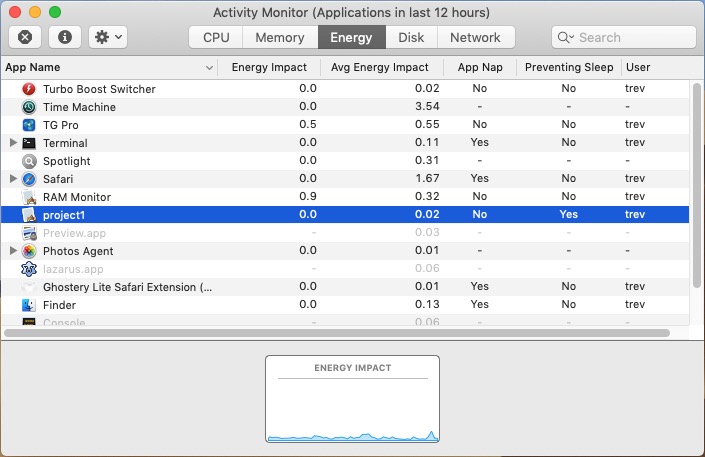 | |
| 188 | + | ||
| 189 | + | ### Method 2: pmset | |
| 190 | + | ||
| 191 | + | Open an Applications \> Utilities \> Terminal and type the command: | |
| 192 | + | ||
| 193 | + | `pmset -g assertionslog` | |
| 194 | + | ||
| 195 | + | which will produce the following output when you run the example code above and click the *BeginActivity* and *EndActivity* buttons. | |
| 196 | + | ||
| 197 | + | `Time Action Type PID(Causing PID) ID Name `\ | |
| 198 | + | `==== ====== ==== ================ == ==== `\ | |
| 199 | + | `02/13 16:35:19 Created PreventUserIdleSystemSleep 1188 0x40e40001880f No napping! `\ | |
| 200 | + | `02/13 16:35:19 System wide status: PreventUserIdleSystemSleep: 1 `\ | |
| 201 | + | `02/13 16:35:29 Released PreventUserIdleSystemSleep 1188 0x40e40001880f No napping! `\ | |
| 202 | + | `02/13 16:35:29 System wide status: PreventUserIdleSystemSleep: 0` | |
| 203 | + | ||
| 204 | + | ## Enhancing App Nap | |
| 205 | + | ||
| 206 | + | While App Nap operates automatically, with very little effort you can enhance its capabilities by actively reducing your application's energy footprint and further lengthening the time users can use their battery-powered devices without needing to plug them into the power. | |
| 207 | + | ||
| 208 | + | Your application knows best about the importance of its activity and should not rely on App Nap to put it into an idle state. The most effective way to enhance App Nap is for your application to listen for notifications that it’s no longer in active use and to reduce or suspend energy-intensive work as quickly as possible which can happen well before the system triggers App Nap automatically. | |
| 209 | + | ||
| 210 | + | ### Implement active application transition delegate methods | |
| 211 | + | ||
| 212 | + | Implement NSApplicationDelegate methods in your application delegate to receive calls when the active state of your application — whether it’s in the foreground or not — changes. | |
| 213 | + | ||
| 214 | + | | Method | When sent by the default notification center | Significance | | |
| 215 | + | |----|----|----| | |
| 216 | + | | applicationWillResignActive | Immediately before the application is deactivated and no longer the foreground (frontmost) application. | Start winding down activity that can be stopped entirely once the change in state has completed. | | |
| 217 | + | | applicationDidResignActive | Immediately after the application is deactivated and gives up its position as the foreground application. | Stop any power-intensive operations, animations, and UI updates as much as possible. | | |
| 218 | + | | applicationWillBecomeActive | Immediately before the application becomes active and comes to the front. | Start resuming operations. | | |
| 219 | + | | applicationDidBecomeActive | Immediately after the application becomes active. | Fully resume operations that were reduced or halted. | | |
| 220 | + | ||
| 221 | + | NSApplicationDelegate methods | |
| 222 | + | ||
| 223 | + | #### Example code | |
| 224 | + | ||
| 225 | + | In the example code below the relevant delegate methods simply log their occurrence. In a real application you would need to replace them with the desired behaviours to reduce or suspend relevant activities and restart activities as required. | |
| 226 | + | ||
| 227 | + | ``` pascal | |
| 228 | + | unit Unit1; | |
| 229 | + | ||
| 230 | + | {$mode objfpc}{$H+} | |
| 231 | + | {$modeswitch objectivec1} | |
| 232 | + | ||
| 233 | + | interface | |
| 234 | + | ||
| 235 | + | uses | |
| 236 | + | Forms, StdCtrls, CocoaAll; | |
| 237 | + | ||
| 238 | + | type | |
| 239 | + | ||
| 240 | + | { TForm1 } | |
| 241 | + | ||
| 242 | + | TForm1 = class(TForm) | |
| 243 | + | Button1: TButton; | |
| 244 | + | procedure Button1Click(Sender: TObject); | |
| 245 | + | procedure FormClose(Sender: TObject; var CloseAction: TCloseAction); | |
| 246 | + | procedure FormCreate(Sender: TObject); | |
| 247 | + | private | |
| 248 | + | ||
| 249 | + | public | |
| 250 | + | ||
| 251 | + | end; | |
| 252 | + | ||
| 253 | + | {TMyAppDelegate} | |
| 254 | + | ||
| 255 | + | TMyAppDelegate = objcclass(NSObject) | |
| 256 | + | private | |
| 257 | + | ||
| 258 | + | public | |
| 259 | + | procedure applicationWillBecomeActive (aNotification: NSNotification); | |
| 260 | + | message 'applicationWillBecomeActive:'; | |
| 261 | + | procedure applicationDidBecomeActive (aNotification: NSNotification); | |
| 262 | + | message 'applicationDidBecomeActive:'; | |
| 263 | + | procedure applicationWillResignActive (aNotification: NSNotification); | |
| 264 | + | message 'applicationWillResignActive:'; | |
| 265 | + | procedure applicationDidResignActive (aNotification: NSNotification); | |
| 266 | + | message 'applicationDidResignActive:'; | |
| 267 | + | end; | |
| 268 | + | ||
| 269 | + | var | |
| 270 | + | Form1: TForm1; | |
| 271 | + | myAppDelegate: TMyAppDelegate; | |
| 272 | + | ||
| 273 | + | implementation | |
| 274 | + | ||
| 275 | + | {$R *.lfm} | |
| 276 | + | ||
| 277 | + | {NSApplication Delegates} | |
| 278 | + | ||
| 279 | + | procedure TMyAppDelegate.applicationWillBecomeActive(aNotification: NSNotification); | |
| 280 | + | begin | |
| 281 | + | NSLog(NSStr('will become active')); | |
| 282 | + | end; | |
| 283 | + | ||
| 284 | + | procedure TMyAppDelegate.applicationDidBecomeActive(aNotification: NSNotification); | |
| 285 | + | begin | |
| 286 | + | NSLog(NSStr('did become active')); | |
| 287 | + | end; | |
| 288 | + | ||
| 289 | + | procedure TMyAppDelegate.applicationWillResignActive (aNotification: NSNotification); | |
| 290 | + | begin | |
| 291 | + | NSLog(NSStr('will resign active')); | |
| 292 | + | end; | |
| 293 | + | procedure TMyAppDelegate.applicationDidResignActive (aNotification: NSNotification); | |
| 294 | + | begin | |
| 295 | + | NSLog(NSStr('did resign active')); | |
| 296 | + | end; | |
| 297 | + | ||
| 298 | + | {Button Events} | |
| 299 | + | ||
| 300 | + | procedure TForm1.Button1Click(Sender: TObject); | |
| 301 | + | begin | |
| 302 | + | NSLog(NSStr('Closing')); | |
| 303 | + | Close; | |
| 304 | + | end; | |
| 305 | + | ||
| 306 | + | {Form Events} | |
| 307 | + | ||
| 308 | + | procedure TForm1.FormCreate(Sender: TObject); | |
| 309 | + | begin | |
| 310 | + | // NSApp | |
| 311 | + | // - The global variable for the shared application instance. | |
| 312 | + | // NSApplication.sharedApplication | |
| 313 | + | // - Returns the application instance, creating it if it doesn’t exist yet. | |
| 314 | + | NSApp := NSApplication.sharedApplication; | |
| 315 | + | NSApp.setDelegate(myAppDelegate); | |
| 316 | + | end; | |
| 317 | + | ||
| 318 | + | procedure TForm1.FormClose(Sender: TObject; var CloseAction: TCloseAction); | |
| 319 | + | begin | |
| 320 | + | if(NSApp.isActive) then | |
| 321 | + | begin | |
| 322 | + | NSLog(NSStr('Exiting')); | |
| 323 | + | exit; | |
| 324 | + | end | |
| 325 | + | else | |
| 326 | + | // needed if any part of form is occluded or does not quit | |
| 327 | + | // until dock icon clicked when quitting via dock menu | |
| 328 | + | begin | |
| 329 | + | NSLog(NSStr('Closing2')); | |
| 330 | + | Application.BringToFront; | |
| 331 | + | CloseAction := TCloseAction.caFree; | |
| 332 | + | end; | |
| 333 | + | end; | |
| 334 | + | ||
| 335 | + | Initialization | |
| 336 | + | NSLog(NSStr('initialization')); | |
| 337 | + | myAppDelegate := TMyAppDelegate.alloc.init; | |
| 338 | + | ||
| 339 | + | Finalization | |
| 340 | + | NSLog(NSStr('finalization')); | |
| 341 | + | myAppDelegate.Release; | |
| 342 | + | end. | |
| 343 | + | ``` | |
| 344 | + | ||
| 345 | + | Typical log output when the executable is started from an Applications \> Utilities \> Terminal: | |
| 346 | + | ||
| 347 | + | `trev@macmini7 [/Users/trev/Programming/LAZARUS/laz_appnap_ex1] $ ./project1.app/Contents/MacOS/project1`\ | |
| 348 | + | `2021-03-01 17:57:40.293 project1[1695:130876] initialization`\ | |
| 349 | + | `2021-03-01 17:57:40.378 project1[1695:130876] will become active`\ | |
| 350 | + | `2021-03-01 17:57:40.379 project1[1695:130876] did become active`\ | |
| 351 | + | `2021-03-01 17:57:43.206 project1[1695:130876] will resign active`\ | |
| 352 | + | `2021-03-01 17:57:43.207 project1[1695:130876] did resign active`\ | |
| 353 | + | `2021-03-01 17:57:47.184 project1[1695:130876] Closing2`\ | |
| 354 | + | `2021-03-01 17:57:47.188 project1[1695:130876] will become active`\ | |
| 355 | + | `2021-03-01 17:57:47.189 project1[1695:130876] did become active`\ | |
| 356 | + | `2021-03-01 17:57:47.190 project1[1695:130876] finalization` | |
| 357 | + | ||
| 358 | + | Alternatively, you can view the output using the Applications \> Utilities \> Console. | |
| 359 | + | ||
| 360 | + | ### Register for application-level occlusion notifications | |
| 361 | + | ||
| 362 | + | As soon as your application or any of its windows becomes hidden, your application should immediately halt any work that is no longer useful. When it becomes visible again, it can immediately refresh its content and resume any power-intensive operations. | |
| 363 | + | ||
| 364 | + | Your application is considered hidden from the user when: | |
| 365 | + | ||
| 366 | + | - Windows of other applications occlude the windows of your application. | |
| 367 | + | - The screen saver is on and occluding all applications’ windows. | |
| 368 | + | - Your application is in a Mission Control space where the user is not working. | |
| 369 | + | ||
| 370 | + | *applicationDidChangeOcclusionState* tells the delegate that the application’s occlusion state changed. | |
| 371 | + | ||
| 372 | + | On receiving this notification, you can query the application's occlusion state. Note that this only notifies about changes in the state of the occlusion, not when the occlusion region changes. You can use this notification to increase responsiveness and save power by halting any expensive calculations that the user cannot see. | |
| 373 | + | ||
| 374 | + | If the *NSApplicationOcclusionStateVisible* global constant variable is set, it means that at least part of a window owned by your application is visible, so your application should continue working as normal. If the variable is not set, it means that no part of any window owned by your application is visible and your application should reduce or halt its operations and calculations because the user will not be able to see the results. | |
| 375 | + | ||
| 376 | + | #### Example code | |
| 377 | + | ||
| 378 | + | In the example code below the relevant delegate method simply logs its occurrence. In a real application you would need to replace it with the desired behaviour to reduce or suspend relevant activities and restart activities as required. | |
| 379 | + | ||
| 380 | + | ``` pascal | |
| 381 | + | unit Unit1; | |
| 382 | + | ||
| 383 | + | {$mode objfpc}{$H+} | |
| 384 | + | {$modeswitch objectivec1} | |
| 385 | + | ||
| 386 | + | interface | |
| 387 | + | ||
| 388 | + | uses | |
| 389 | + | Forms, StdCtrls, CocoaAll; | |
| 390 | + | ||
| 391 | + | type | |
| 392 | + | ||
| 393 | + | { TForm1 } | |
| 394 | + | ||
| 395 | + | TForm1 = class(TForm) | |
| 396 | + | Button1: TButton; | |
| 397 | + | procedure Button1Click(Sender: TObject); | |
| 398 | + | procedure FormClose(Sender: TObject; var CloseAction: TCloseAction); | |
| 399 | + | procedure FormCreate(Sender: TObject); | |
| 400 | + | private | |
| 401 | + | ||
| 402 | + | public | |
| 403 | + | ||
| 404 | + | end; | |
| 405 | + | ||
| 406 | + | {TMyAppDelegate} | |
| 407 | + | ||
| 408 | + | TMyAppDelegate = objcclass(NSObject) | |
| 409 | + | private | |
| 410 | + | ||
| 411 | + | public | |
| 412 | + | procedure applicationDidChangeOcclusionState (aNotification: NSNotification); | |
| 413 | + | message 'applicationDidChangeOcclusionState:'; | |
| 414 | + | end; | |
| 415 | + | ||
| 416 | + | var | |
| 417 | + | Form1: TForm1; | |
| 418 | + | myAppDelegate: TMyAppDelegate; | |
| 419 | + | ||
| 420 | + | implementation | |
| 421 | + | ||
| 422 | + | {$R *.lfm} | |
| 423 | + | ||
| 424 | + | {NSApplication Delegates} | |
| 425 | + | ||
| 426 | + | procedure TMyAppDelegate.applicationDidChangeOcclusionState(aNotification: NSNotification); | |
| 427 | + | begin | |
| 428 | + | NSLog(NSStr('did change occlusion state')); | |
| 429 | + | ||
| 430 | + | // if(NSApp.occlusionState AND NSApplicationOcclusionStateVisible) = 1 << 1 then // OR | |
| 431 | + | if (NSApp.occlusionState AND NSApplicationOcclusionStateVisible) = %00000010 then | |
| 432 | + | NSLog(NSStr('state: visible')) | |
| 433 | + | else | |
| 434 | + | NSLog(NSStr('state: invisible')) | |
| 435 | + | end; | |
| 436 | + | ||
| 437 | + | {Button Events} | |
| 438 | + | ||
| 439 | + | procedure TForm1.Button1Click(Sender: TObject); | |
| 440 | + | begin | |
| 441 | + | NSLog(NSStr('Closing')); | |
| 442 | + | Close; | |
| 443 | + | end; | |
| 444 | + | ||
| 445 | + | {Form Events} | |
| 446 | + | ||
| 447 | + | procedure TForm1.FormCreate(Sender: TObject); | |
| 448 | + | begin | |
| 449 | + | // NSApp | |
| 450 | + | // - The global variable for the shared application instance. | |
| 451 | + | // NSApplication.sharedApplication | |
| 452 | + | // - Returns the application instance, creating it if it doesn’t exist yet. | |
| 453 | + | NSApp := NSApplication.sharedApplication; | |
| 454 | + | NSApp.setDelegate(myAppDelegate); | |
| 455 | + | end; | |
| 456 | + | ||
| 457 | + | procedure TForm1.FormClose(Sender: TObject; var CloseAction: TCloseAction); | |
| 458 | + | begin | |
| 459 | + | if(NSApp.isActive) then | |
| 460 | + | begin | |
| 461 | + | NSLog(NSStr('Exiting')); | |
| 462 | + | exit; | |
| 463 | + | end | |
| 464 | + | else | |
| 465 | + | // needed if any part of form is occluded or does not quit | |
| 466 | + | // until dock icon clicked when quitting via dock menu | |
| 467 | + | begin | |
| 468 | + | NSLog(NSStr('Closing2')); | |
| 469 | + | Application.BringToFront; | |
| 470 | + | CloseAction := TCloseAction.caFree; | |
| 471 | + | end; | |
| 472 | + | end; | |
| 473 | + | ||
| 474 | + | Initialization | |
| 475 | + | NSLog(NSStr('initialization')); | |
| 476 | + | myAppDelegate := TMyAppDelegate.alloc.init; | |
| 477 | + | ||
| 478 | + | Finalization | |
| 479 | + | NSLog(NSStr('finalization')); | |
| 480 | + | myAppDelegate.Release; | |
| 481 | + | end. | |
| 482 | + | ``` | |
| 483 | + | ||
| 484 | + | Typical log output when the executable is started from an Applications \> Utilities \> Terminal: | |
| 485 | + | ||
| 486 | + | `trev@macmini7 [/Users/trev/Programming/LAZARUS/laz_appnap_ex2] $ ./project1.app/Contents/MacOS/project1`\ | |
| 487 | + | `2021-03-01 18:25:51.348 project1[1894:139611] initialization`\ | |
| 488 | + | `2021-03-01 18:25:51.427 project1[1894:139611] did change occlusion state`\ | |
| 489 | + | `2021-03-01 18:25:51.427 project1[1894:139611] state: visible`\ | |
| 490 | + | `2021-03-01 18:25:55.842 project1[1894:139611] did change occlusion state`\ | |
| 491 | + | `2021-03-01 18:25:55.842 project1[1894:139611] state: invisible`\ | |
| 492 | + | `2021-03-01 18:26:00.552 project1[1894:139611] Closing2`\ | |
| 493 | + | `2021-03-01 18:26:00.558 project1[1894:139611] finalization` | |
| 494 | + | ||
| 495 | + | Alternatively, you can view the output using the Applications \> Utilities \> Console. | |
| 496 | + | ||
| 497 | + | ## See also | |
| 498 | + | ||
| 499 | + | - [[macOS Energy Efficiency Guide]] | |
| 500 | + | - [[Accessing macOS System Information|NSProcessInfo]] - accessing system information. | |
| 501 | + | ||
| 502 | + | ## External Links | |
| 503 | + | ||
| 504 | + | - [Apple: Energy Efficiency Guide for Mac Apps](https://developer.apple.com/library/archive/documentation/Performance/Conceptual/power_efficiency_guidelines_osx/index.html#//apple_ref/doc/uid/TP40013929-CH15-SW1). | |
| 505 | + | - [Apple: NSActivityOptions](https://developer.apple.com/documentation/foundation/nsactivityoptions). | |
| 506 | + | - [Apple: NSProcessInfo](https://developer.apple.com/documentation/foundation/nsprocessinfo#/apple_ref/occ/cl/NSProcessInfo). | |
| 507 | + | - [Apple: NSApplicationDelegate](https://developer.apple.com/documentation/appkit/nsapplicationdelegate). | |
| 508 | + | - [Apple: NSApplicationDidChangeOcclusionStateNotification](https://developer.apple.com/documentation/appkit/nsapplicationocclusionstate/nsapplicationocclusionstatevisible). | |
| 509 | + | - [Apple: NSTimer](https://developer.apple.com/documentation/foundation/nstimer). | |
| 510 | + | ||
| 511 | + | --- | |
| 512 | + | *From the Free Pascal wiki, page "macOS App Nap", as it stood on 2021-03-01 after a change by Trev, out of the wiki's dump of 2024-05-26. Copyright stays with the author who wrote it, according to the old wiki's [[Licensing]] page. If you have concerns about this material, [message the admin](/wiki-contact).* |