

MSEide+MSEgui: what changed
Revision 2 to 3. Removed lines have a minus sign; added lines have a plus sign.
| Old | New | Line | |
|---|---|---|---|
| 1 | 1 | ## Introduction | |
| 2 | 2 | ||
| 3 | 3 | The MSEide is a Cross Platform GUI Development System for Pascal programmers, completely written in Pascal. The MSEgui does not feature VCL compatibility. The graphics library provides an interface to win32 and X11. Despite being a single person (Martin Schreiber) effort for the moment, the IDE and GUI has already an amazing feature list: | |
| 4 | 4 | ||
| 5 | 5 | - Internal character encoding is UCS2. | |
| 6 | 6 | - Internationalization tool included. | |
| 7 | 7 | - Docking forms. | |
| 8 | 8 | - Embedded forms (similar to TFrame). | |
| 9 | 9 | - Visual form inheritance. | |
| 10 | 10 | - Links to xlib and gdi32, no external widget library needed. | |
| 11 | 11 | - Database access components and data edit widgets. | |
| 12 | 12 | - Integrated debugging. | |
| 13 | 13 | - Integrated report designer. | |
| 14 | 14 | - Flexible and handy build system with switchable macros. | |
| 15 | 15 | - and more... | |
| 16 | 16 | ||
| 17 | 17 | ### But what about Lazarus? | |
| 18 | 18 | ||
| 19 | 19 | [Lazarus](http://www.lazarus.freepascal.org) is an IDE that aims to provide a high degree of compatibility with VCL code, while providing a native look on many platforms. The native look is very important for many developers, but combined with the VCL compatibility necessitates many complex interfaces to the different native widget sets (Win32, Cocoa, GTK, Qt). The continuous evolution of these native widget sets (gtk1-\>gtk2-\>gtk3, qt-\>qt5) provokes endless catching up. | |
| 20 | 20 | ||
| 21 | 21 | MSEide+MSEgui neither features (or suffers :-) VCL compatibility, nor provides a real native look on target platforms. The graphics library provides an interface to win32 and X11. The advantage of the X11 layer is the immediate availability of a large and stable (in time) target platform. | |
| 22 | 22 | ||
| 23 | 23 | These different goals of both projects make them both fulfill different needs. | |
| 24 | 24 | ||
| 25 | 25 | ### Why this wiki | |
| 26 | 26 | ||
| 27 | 27 | The design of the MSE GUI is a fresh approach to GUI design patterns. It features many innovative solutions for typical GUI tasks. Being innovative, the MSE GUI library differs substantially from VCL/LCL/CLX. Switching from VCL to MSE may be more challenging than switching [[Code Conversion Guide|from VCL to LCL]]. These wiki pages aim to ease the first steps with this promising alternative IDE and GUI library. | |
| 28 | 28 | ||
| 29 | 29 | ## Download and links | |
| 30 | 30 | ||
| 31 | 31 | - MSE project is now part of **mse-org**: <https://github.com/mse-org> | |
| 32 | 32 | ||
| 33 | 33 | - MSEide & MSEgui sources are here: <https://github.com/mse-org/mseide-msegui> | |
| 34 | 34 | ||
| 35 | 35 | - Biography of Martin: <https://sites.google.com/view/martin-schreiber-biography/> | |
| 36 | 36 | ||
| 37 | 37 | - Beginner's tutorial (in Russian) at: <http://freepascal.ru/article/mse/20060108181639/> | |
| 38 | 38 | ||
| 39 | 39 | - See also: "MSEide+MSEgui. Draw lesson." (in Russian): <http://freepascal.ru/article/mse/20060205191314/> | |
| 40 | 40 | ||
| 41 | 41 | - MSElang, the future compiler for the MSEide+MSEgui project: <https://gitlab.com/mseide-msegui/mselang/wikis/home> | |
| 42 | 42 | ||
| 43 | 43 | ## Quick start | |
| 44 | 44 | ||
| 45 | 45 | ### Open Project | |
| 46 | 46 | ||
| 47 | 47 | Launch the IDE and use Project-\>Open to open the provided demo msegui/apps/demo/demo.prj. | |
| 48 | 48 | ||
| 49 | 49 | The title of the IDE reflects the opened project. | |
| 50 | 50 | ||
| 51 | 51 | Hit F9 and (if you followed the installation instructions :-), be amazed by the speed of FPC+MSE. | |
| 52 | 52 | ||
| 53 | 53 | ### First RAD steps | |
| 54 | 54 | ||
| 55 | 55 | Close the running project. Use Project-\>Source to open the project source demo.pas. | |
| 56 | 56 | ||
| 57 | 57 | Ctrl-click on the parameter mainfo in the line application.createform(tmainfo,mainfo); to navigate to main.pas. | |
| 58 | 58 | ||
| 59 | 59 | Click on F12 to toggle between unit and form. | |
| 60 | 60 | ||
| 61 | 61 | Not everything will feel that familiar, because of that, these pages are written. | |
| 62 | 62 | ||
| 63 | 63 | Click on the button, this will auto raise the property editor (unusual but useful). | |
| 64 | 64 | ||
| 65 | 65 | Let us add another button. Make the component palette visible if necessary (View-\>Toolbar-\>Component Palette). | |
| 66 | 66 | ||
| 67 | 67 | Select the tbutton on the widget page. Click on the form to create the button. | |
| 68 | 68 | ||
| 69 | 69 | Give it a caption in the usual way. | |
| 70 | 70 | ||
| 71 | 71 | Creating an event handler does not work with the usual double clicking on the onexecute property. | |
| 72 | 72 | ||
| 73 | 73 | Instead, you must select the onexecute property in the property editor, type the name of an event handler and press enter. | |
| 74 | 74 | ||
| 75 | 75 | The MSE RAD will create the handler and position the pointer on the definition. | |
| 76 | 76 | ||
| 77 | 77 | Use ctrl-shift-down arrow (or up) to navigate between implementation and definition. | |
| 78 | 78 | ||
| 79 | 79 | Just add some code like writeln('Hello world'); Hit F9. | |
| 80 | 80 | ||
| 81 | 81 | The writeln will end up in the target console window of MSE (not the console in which you started MSE). | |
| 82 | 82 | ||
| 83 | 83 | ### Adding a Main Menu | |
| 84 | 84 | ||
| 85 | 85 | #### Add Main Menu | |
| 86 | 86 | ||
| 87 | 87 | Add a tmainmenu component from the Gui component tab to your main form. Click on your mainform (mainfo), so that Object Inspector shows the properties of the mainform. Use the arrow next to the mainmenu property of the mainform, to select tmainmenu1 as the mainmenu of mainfo. | |
| 88 | 88 | ||
| 89 | 89 | #### Add Menu Items | |
| 90 | 90 | ||
| 91 | 91 | In the Object Inspector, expand the mainmenu branch. In this branch, open the menu property of mainmenu. Change the submenu.count of menu to 1 (or higher). Now expand the submenu.count property, which will show "Item 0". Expand "Item 0" and set the caption, for instance to "&File". Now you can repeat the same procedure one level deeper... Change the submenu.count property of "Item 0" to 1. Expand this last submenu.count property and set the caption of the new "Item 0", for instance to "E&xit". Hit F9 and your program should have a menu *F*ile with the entry E*x*it in it. | |
| 92 | 92 | ||
| 93 | 93 | Alternatively, in Object Inspector you may right click a submenu.count property, or an "Item n" property, which will reveal a context sensitive pop up menu. Use this pop up menu to insert, append or delete menu items. | |
| 94 | 94 | ||
| 95 | 95 | Once you have more than one submenu, you can use drag and drop to move the menu items ("Item n"). Start the drag mouse move on the "Item n" line. | |
| 96 | 96 | ||
| 97 | 97 | ### Create New Project | |
| 98 | 98 | ||
| 99 | 99 | In order to create a new project based on a template, use Project-\>New-\>From Template. For a GUI project select "default.prj", for a console project select "console.prj" | |
| 100 | 100 | ||
| 101 | 101 | ## The concept | |
| 102 | 102 | ||
| 103 | 103 | MSEgui is a Pascal program library, which provides the building blocks for developing programs with graphical user interface.<sup>1</sup> | |
| 104 | 104 | ||
| 105 | 105 | MSEide is the corresponding integrated development environment for effective software production with Free Pascal and MSEgui. MSEide is also suitable for the development of gcc and microcontroller applications. | |
| 106 | 106 | ||
| 107 | 107 | Currently MSEide+MSEgui run under i386-linux, x86-64-linux, arm-linux, x86-64-freebsd, i386-win32 and x86-64-win64 while supported microprocessors are CPU32, ARM and AVR32. MSEgui is predominantly platform independent. Additional platforms may be added by implementing the system-dependent software elements. The system-dependent MSEgui modules are located in subdirectories of lib/common/kernel. | |
| 108 | 108 | ||
| 109 | 109 | ### Main development goals | |
| 110 | 110 | ||
| 111 | 111 | - Relevant increase in productivity, compared with other development systems. | |
| 112 | 112 | - Identical appearance and functionality on all platforms, without additional measures in the user code. | |
| 113 | 113 | - Dependence on additional libraries kept as little as possible. | |
| 114 | 114 | - Orthogonality - there should be as little as possible interference between different program elements and as few as possible exceptions and special cases. | |
| 115 | 115 | - Highly parametrised GUI elements. | |
| 116 | 116 | - Working with MSEide+MSEgui should be fun. | |
| 117 | 117 | ||
| 118 | 118 | ### Architecture overview | |
| 119 | 119 | ||
| 120 | 120 | MSEgui requires no external component libraries - it communicates directly with the graphical interface of the operating system, X11 via Xlib on Linux and gdi32 under Windows. | |
| 121 | 121 | ||
| 122 | 122 | For the individual GUI elements no operating system resources are required - only the main windows are known to the operating system. The entire processing of external events (keyboard, mouse, focus control ...) happens within MSEgui on a Pascal level. | |
| 123 | 123 | ||
| 124 | 124 | The base class for GUI elements is a `twidget`. There is no distinction between simple graphic elements and elements which can receive input focus, as is the case in Delphi. All MSEgui widgets have the full functionality of a `twidget` at their disposal. | |
| 125 | 125 | ||
| 126 | 126 | Important features of `twidget` are `twidget.frame` and `twidget.face`. When frame or face are not used, they are represented by NIL pointer, in this way using almost no resources. | |
| 127 | 127 | ||
| 128 | 128 | `twidget.frame` is responsible for the frame around the working area of the element. The appearance of the frame is higly adjustable - it can be a simple and quickly drawable 3D frame, as well as a complex and slower composite construct, based on images. There are also other frame elements, that can build scroll bars, buttons and labels. | |
| 129 | 129 | ||
| 130 | 130 | `twidget.face` draws the background of the working area of a desktop GUI element - color gradients and images in various forms can be shown, while partial transparency is also possible. | |
| 131 | 131 | ||
| 132 | 132 | Setting the properties of frame and face can be centralised by using `tframecomp` and `tfacecomp`, which can be selected into `tframe` and `tface` as templates. | |
| 133 | 133 | ||
| 134 | 134 | The next level of centralization is `tskincontroller`, through which program-wide settings can be made. In order to achieve that, `tskinkontroller` assigns to the GUI elements the appropriate `tframcomp` and `tfacecomp` templates. | |
| 135 | 135 | ||
| 136 | 136 | The control of the widget functions (focusin, focusout, ...) is done by virtual procedures and functions and not through messages. The MSEgui message function has other tasks. Also a Corba-style interface is used - for the safe connection between the various components and the automatic disconnection through destroy, a `tobjectlinker` is used. | |
| 137 | 137 | ||
| 138 | 138 | The type `msestring` is used in MSEgui for storing text. At the moment, msestring equals WideString. However, the reference counted FPC WideString (UnicodeString) is planned to be used under Windows, as soon as it becomes available in one of the future FPC releases. | |
| 139 | 139 | ||
| 140 | 140 | In text files the utf-8, ASCII or the local encoding is used - MSEide+MSEgui does not use utf-16 files. | |
| 141 | 141 | ||
| 142 | 142 | The MSEgui database components provide the conversion from the local encoding or the utf-8 (adjustable) to WideString for the data buffering. For file operations, a set of MSEgui's own functions with WideString interface exists. An MSEgui application can therefore work consistently with WideStrings, which is a significant relief for some tasks. | |
| 143 | 143 | ||
| 144 | 144 | Specialized data edit widgets for the basic data types (integer, real, tdatetime, ...) are available in MSEgui (`tintegeredit`, `trealedit`, `tdatetimeedit`, ...). The main event property of these widgets is `onsetvalue`, which can be used for reacting upon user input. | |
| 145 | 145 | ||
| 146 | 146 | The `t*edit` widgets can be inserted into a `twidgetgrid` and in that way form a column of the appropriate data format. | |
| 147 | 147 | ||
| 148 | 148 | For viewing and editing of data fields a `tdbwidgetgrid` togeather with a set of `tdb*editwidget`s can be used. Worth mentioning are also different lookup components and a `tlookupbuffer`, a fast associative data memory. | |
| 149 | 149 | ||
| 150 | 150 | The basic component of the MSEgui's database environment is `tmsebufdataset`, from which `tmsesqlquery` is derived. MSEgui DB is a fork of the FPC SQLDB system, where TBufDataset and large parts of TSQLQuery and the connection components have been completely rewritten. | |
| 151 | 151 | ||
| 152 | 152 | `tmsebufdataset` offers local indices, calculated and internalcalc-fields, a mode with an interrupted database connection, an in-memory mode where no database connectivity is necessary and can keep a local journal, in order to later reconect a previously disconnected database connection. `tmsebufdataset` stores texts as WideStrings of variable length. | |
| 153 | 153 | ||
| 154 | 154 | Further, there are SQL script components and `tsqlresult` for quick queries without the TDataset overhead. Persistent TField instances are either kept within `tmsesqlquery`, where they can be edited in the object inspector via `tmsesqlquery.controller.fields`, or they can be inserted into forms or modules as as individual components from the 'DBf' component palette. | |
| 155 | 155 | ||
| 156 | 156 | MSEide supports 'visual form inheritance', Submodule (Delphi TFrame equivalent) and allows the assignment of components of other forms or modules to component properties at design time. | |
| 157 | 157 | ||
| 158 | 158 | Internationalization is done via resource modules that are loadable at runtime. The MSEi18n, a tool that supports the import and export of texts in spreadsheet programs is available for editing - therefore facilitating a translation by nonprogrammers. | |
| 159 | 159 | ||
| 160 | 160 | <sup>1</sup>) This chapter is based on a translation of a German text provided by Martin Schreiber. | |
| 161 | 161 | ||
| 162 | 162 | ## Tips: MSEide | |
| 163 | 163 | ||
| 164 | 164 | ### Larger fonts | |
| 165 | 165 | ||
| 166 | 166 | Some may find the standard menu font a bit small. The standard font for the main menu of an MSEgui application is the font defined by the stf_menu stock font. You can change a stock font value with a startup parameter, \<fontheight\> is given in pixels. | |
| 167 | 167 | ||
| 168 | - | ||
| 168 | + | ```text | |
| 169 | + | --FONTALIAS=<alias>,<fontname>[,<fontheight>[,<fontwidth>[,<options>]]] | |
| 170 | + | ``` | |
| 169 | 171 | ||
| 170 | 172 | So if you start the mseide like this, you can get a larger menu font: | |
| 171 | 173 | ||
| 172 | - | ||
| 174 | + | ```text | |
| 175 | + | mseide --FONTALIAS=stf_menu,sans,16 | |
| 176 | + | ``` | |
| 173 | 177 | ||
| 174 | 178 | In order to increase the base font size for all stock fonts use | |
| 175 | 179 | ||
| 176 | - | ||
| 180 | + | ```text | |
| 181 | + | mseide --FONTALIAS=stf_default,,16 | |
| 182 | + | ``` | |
| 177 | 183 | ||
| 178 | 184 | ### Shortcuts | |
| 179 | 185 | ||
| 180 | 186 | Common | |
| 181 | 187 | ||
| 182 | 188 | - **Ctrl+F4** - Close | |
| 183 | 189 | - **Ctrl+S** - Save | |
| 184 | 190 | - **Ctrl+E** - Select page | |
| 185 | 191 | - **F11** - Toggle Form/Inspector | |
| 186 | 192 | - **F12** - Toggle Form/Unit | |
| 187 | 193 | - **Shift+Ctrl+\[0..9\]** - Bookmark 0..9 | |
| 188 | 194 | - **Ctrl+\[0..9\]** - Go to bookmark 0..9 | |
| 189 | 195 | - **Ctrl+LeftClick** - Go to var(class, method, unit) declaration | |
| 190 | 196 | - **Shift+Ctrl+Up** - Go to method declaration | |
| 191 | 197 | - **Shift+Ctrl+Down** - Go to method implementation | |
| 192 | 198 | - **Shift+Ctrl+Space** - Show procedure header | |
| 193 | 199 | ||
| 194 | 200 | Debug | |
| 195 | 201 | ||
| 196 | 202 | - **F7** - Step | |
| 197 | 203 | - **F8** - Next | |
| 198 | 204 | - **F9** - Continue | |
| 199 | 205 | - **Shift+F7** - Finish | |
| 200 | 206 | - **Shift+Ctrl+F8** - Next instruction | |
| 201 | 207 | - **Shift+Ctrl+F7** - Step instruction | |
| 202 | 208 | - **F5** - Toggle breakpoint | |
| 203 | 209 | - **Shift+F5** - Toggle breakpoint enabled/disabled | |
| 204 | 210 | - **Ctrl+B** - Breakpoints on/off | |
| 205 | 211 | - **Ctrl+W** - Watches on/off | |
| 206 | 212 | ||
| 207 | 213 | Editor | |
| 208 | 214 | ||
| 209 | 215 | - **Ctrl+Z** - Undo | |
| 210 | 216 | - **Ctrl+X** - Cut | |
| 211 | 217 | - **Ctrl+C** - Copy | |
| 212 | 218 | - **Ctrl+V** - Paste | |
| 213 | 219 | - **Ctrl+F** - Find | |
| 214 | 220 | - **F3** - Search again | |
| 215 | 221 | - **Ctrl+L** - Go to line. | |
| 216 | 222 | - **Ctrl+I** - Indent block | |
| 217 | 223 | - **Ctrl+U** - Unindent | |
| 218 | 224 | ||
| 219 | 225 | ### Print from IDE | |
| 220 | 226 | ||
| 221 | 227 | You need the [ghostscript](http://ghostscript.com/awki) | |
| 222 | 228 | ||
| 223 | 229 | ### Recent opened files or projects | |
| 224 | 230 | ||
| 225 | 231 | The last opened projects are in the dropdown list of 'Project'-'Open'-'Name'. The last opened files are in the dropdown list of 'File'-'Open'-'Name'. | |
| 226 | 232 | ||
| 227 | 233 | ### Menu Editing | |
| 228 | 234 | ||
| 229 | 235 | - Use submenu.count to set the wanted menu items count. | |
| 230 | 236 | - Right click on submenu.count or on a menu item "Item X" to display a context-sensitive menu that allows to insert,append or delete a submenu entry | |
| 231 | 237 | - Use drag and drop on a submenu entry to move the the item in the array. | |
| 232 | 238 | ||
| 233 | 239 | ### New Panels in the IDE | |
| 234 | 240 | ||
| 235 | 241 | Example, you want to have the watch, stack and cpu window in a window: | |
| 236 | 242 | ||
| 237 | 243 | - select the menu item **View**-**Panels**-**New Panel**. | |
| 238 | 244 | - select the menu item **View**-**Watches**. | |
| 239 | 245 | - drag the Watches window by the grip (not the window title!) in the new panel. | |
| 240 | 246 | - same with Stack and CPU window. | |
| 241 | 247 | - to split horizontal drag one of the grip of the inserted widgets to the left border of the panel. | |
| 242 | 248 | - to split vertical drag one of the grip of the inserted widgets to the bottom border of the panel. | |
| 243 | 249 | - to use tabs drag one of the grip of the inserted widgets to the centre of the panel. | |
| 244 | 250 | ||
| 245 | 251 | ### Design Tab-Order | |
| 246 | 252 | ||
| 247 | 253 | Main way in **MSEide** is set the tab order after all widgets are placed in the form with the popup menu function "Set Tab Order". Select a widget in the container where you wish to set the tab oder, click right, click "Set Tab Order", click row 0, click "Start", click the widget in the container which should get tab order 0, click the widget which should get tab order 1.. | |
| 248 | 254 | ||
| 249 | 255 | An alternative is to drag and drop the rows to the desired position. The first row corresponds to the tab order 0 the second to the 1 and so on. | |
| 250 | 256 | ||
| 251 | 257 | #### Creating a new event handler | |
| 252 | 258 | ||
| 253 | 259 | Select the event you want in the **Object Inspector**, then type name of the new event handler. IDE create a new procedure(declaration and implementation) in the source code. If you double-click the name of the event handler in the **Object Inspector**, source editor opens with the cursor at begin of your handler implementation. | |
| 254 | 260 | ||
| 255 | 261 | ## Tips: MSEgui | |
| 256 | 262 | ||
| 257 | 263 | ### Tabbed control | |
| 258 | 264 | ||
| 259 | 265 | - Put **ttabwidget** control on the form. Now you have container (*ttabwidget1*) for pages. | |
| 260 | 266 | - Put as many **ttabpage** controls on the *ttabwidget1* as tabs you want. | |
| 261 | 267 | ||
| 262 | 268 | ### Splitter | |
| 263 | 269 | ||
| 264 | 270 | We have two widgets (widgetLeft, widgetRight) and we need horizontal splitter between them. | |
| 265 | 271 | ||
| 266 | 272 | - Add TSplitter to form and resize it as you want. | |
| 267 | 273 | - Change the **linkleft** of *tsplitter1* to **widgetLeft** and **linkright** to **widgetRight**. At this step our widgets stick to splitter. | |
| 268 | 274 | - Change the **spo_hmove** to **True**. That's all. | |
| 269 | 275 | - If you want to save a proportion between width of *widgetLeft* and width of *widgetRight* when the main form is resized then change the **so_hprop** to **True**. | |
| 270 | 276 | - If you need the vertical splitter then use other properties **linktop**, **linkbottom**, **spo_vmove**, **spo_vprop**. | |
| 271 | 277 | ||
| 272 | 278 | ### Switch-off auto-scrolling of the form(widget) | |
| 273 | 279 | ||
| 274 | 280 | Change the **container - frame - sbhorz - options - sbo_showauto** property of the form to **False**. | |
| 275 | 281 | ||
| 276 | 282 | ### Read/write data in the twidgetgrid | |
| 277 | 283 | ||
| 278 | 284 | - **editwidget.value** -\> value of the actual row | |
| 279 | 285 | - **editwidget\[rowindex\]** or **editwidget.gridvalue\[rowindex\]** -\> value of the addressed row | |
| 280 | 286 | - **editwidget.gridvalues** the whole column as a dynamic array. | |
| 281 | 287 | ||
| 282 | 288 | ### First events | |
| 283 | 289 | ||
| 284 | 290 | **OnCreate** is called before loaded procedures of the components of the form are called, **OnLoaded** is called after loaded procedures of the components of the form are called. Many components do initializations in loaded procedures, event properties are inactive before procedure loaded of the component is called. | |
| 285 | 291 | ||
| 286 | 292 | ### MDI | |
| 287 | 293 | ||
| 288 | 294 | MDI - application can be created using TDockFormWidget or TDockPanel (as MDI-area) and TDockForm (as ancestor for you MDI-child window). There are examples: | |
| 289 | 295 | ||
| 290 | 296 | - How to use TDockForm with custom MDI-buttons <http://brefi.narod.ru/mdi_example2.tar.gz> or in *\$MSESOURCES/contributed/ivankob/examples* | |
| 291 | 297 | - Simple MDI-controller (create, switch, ... the child windows) <http://mihafpc.narod.ru/MDISample.tar.gz> or in *\$MSESOURCES/contributed/miha* | |
| 292 | 298 | ||
| 293 | 299 | ### Drawing | |
| 294 | 300 | ||
| 295 | 301 | #### Redraw form the additional thread | |
| 296 | 302 | ||
| 297 | 303 | Use a **tthreadcomp** (tab **Gui**) to do the long time procedure. If you need to access widgets and other gui variables from the additional thread, call **application.lock** before and **aplication.unlock** after accessing the main event thread elements. | |
| 298 | 304 | ||
| 299 | 305 | #### Force repaint | |
| 300 | 306 | ||
| 301 | 307 | - **twidget.invalidate** to invalidate an individual widget | |
| 302 | 308 | - **twidget.rootwidget.invalidate** to invalidate the window | |
| 303 | 309 | - **application.invalidate** to invalidate all windows (=forms) in the application | |
| 304 | 310 | ||
| 305 | 311 | #### Draw text | |
| 306 | 312 | ||
| 307 | 313 | There are two methods to draw texts in MSEgui: | |
| 308 | 314 | ||
| 309 | 315 | - Simple text positioning by baseline position of start of the first character with **tcanvas.drawstring**. | |
| 310 | 316 | - With the drawtext procedures of **msedrawstring.pas**. | |
| 311 | 317 | ||
| 312 | 318 | #### Widgets canvas | |
| 313 | 319 | ||
| 314 | 320 | No twidget has a canvas. The canvas used for painting is normally one of the canvas of twindow, it can also be an canvas of a tbitmap or a tprinter or... MSEgui uses one canvas to paint a whole window with all widgets. *tcanvas.font* is initialized by **twidget.getfont**, *canvas.color* by **twidget.actualcolor** before calling **twidget.dopaint**, see **twidget.paint** procedure in msegui.pas. | |
| 315 | 321 | ||
| 316 | 322 | #### Theming (Frames & Faces) | |
| 317 | 323 | ||
| 318 | 324 | Every twidget has a property **frame** and **face**. If they are deactivated (\<disabled\> in object inspector) they are only an nil pointer and need no more resources. Activate them by clicking on the ellipse button in the right object inspector column in the row face respective frame. | |
| 319 | 325 | ||
| 320 | 326 | The **face** property defines the background of the client area of the widget. | |
| 321 | 327 | ||
| 322 | 328 | It is a combination of a fade and a bitmap. Both of them can be semitransparent. The bitmap can be stretched and/or tiled. Example: you want to create a button with a fade as face. | |
| 323 | 329 | ||
| 324 | 330 | - place a *tbutton* on the form. | |
| 325 | 331 | - in object inspector activate property face. | |
| 326 | 332 | - set *face.fade.color.count* to 2. | |
| 327 | 333 | - click on the **+** at *color.count*. | |
| 328 | 334 | - in item 0 select cl_gray. | |
| 329 | 335 | - in item 1 select cl_ltgray, now you have a left to write fade from gray to light gray. | |
| 330 | 336 | - change *face.fade.direction* to *gd_up* or *gd_down*, you get a convex resp. concave fade. | |
| 331 | 337 | ||
| 332 | 338 | If you want, you can blend an additional structure over the fade: | |
| 333 | 339 | ||
| 334 | 340 | - select the wanted pattern image in *face.image*. | |
| 335 | 341 | - activate *face.image.alignment* al_tiled. | |
| 336 | 342 | - adjust *face.image.transparency* to your needs, \$000000 = opaque, \$ffffff = fully transparent. The number defines the transparency of the three color channels (\$RRGGBB). | |
| 337 | 343 | ||
| 338 | 344 | To centralise the face look use an **tfacecomp** (tab *Gui*) and select the facecomp in *template* of the *face* properties. | |
| 339 | 345 | ||
| 340 | 346 | The **frame** property defines the look of an additional frame around the component and shows a possible caption at the widget. Example: you want an lowered frame around and a caption right of the button. | |
| 341 | 347 | ||
| 342 | 348 | - activate property *frame*. | |
| 343 | 349 | - set *frame.levelo* to -1. | |
| 344 | 350 | - set *frame.leveli* to 1. | |
| 345 | 351 | - enter the caption text in *frame.caption*. | |
| 346 | 352 | - set *frame.captionpos* to cp_right. | |
| 347 | 353 | ||
| 348 | 354 | To centralise the frame look use an **tframecomp** (tab *Gui*) and select the framecomp in *template* of the *frame* properties. | |
| 349 | 355 | ||
| 350 | 356 | #### Desktop colors in the MSE application | |
| 351 | 357 | ||
| 352 | 358 | Default values of the mapped colors stored in the array **msegraphics.defaultmapped**. For change it's values you can use function **msegraphics.setcolormapvalue** [Win32 and KDE example](http://www.freepascal.org/wiki/index.php/User:Miha) (*\$MSESOURCES/contributed/miha/GuiStyle.pas*) | |
| 353 | 359 | ||
| 354 | 360 | ## Application examples and screenshots | |
| 355 | 361 | ||
| 356 | 362 | ### A Firebird application | |
| 357 | 363 | ||
| 358 | 364 | The following screen shots are taken from an MSEgui Firebird database application. The programmer writes he has customized the look and feel of his application in about 30 minutes with a tfacecomp and two tframecomp. He states that the look and feel is identical on Linux and Windows. | |
| 359 | 365 | ||
| 360 | 366 | 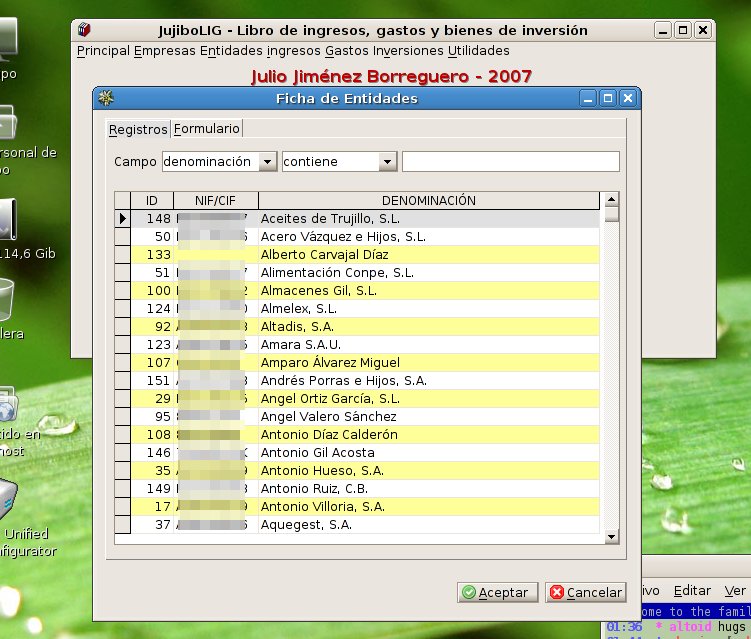 | |
| 361 | 367 | ||
| 362 | 368 |  | |
| 363 | 369 | ||
| 364 | 370 | Linux version: 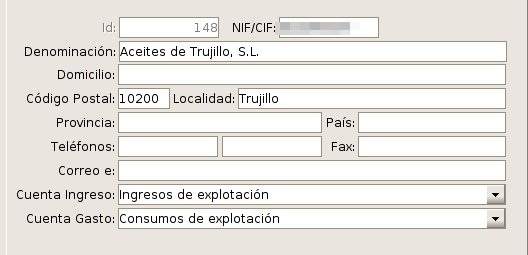 | |
| 365 | 371 | ||
| 366 | 372 | Windows version: 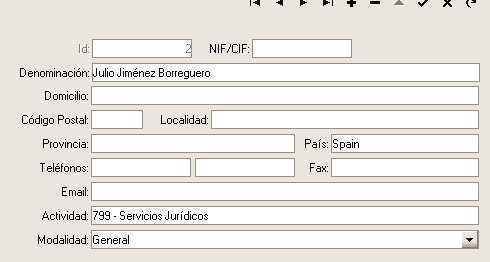 | |
| 367 | 373 | ||
| 368 | 374 | Linux version: 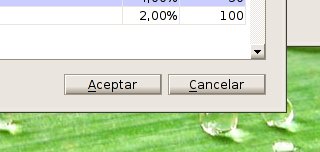 | |
| 369 | 375 | ||
| 370 | 376 | Windows version: 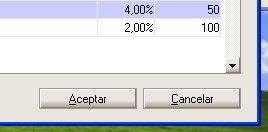 | |
| 371 | 377 | ||
| 372 | 378 | The report is designed and rendered with the built-in MSEide+MSEgui report designer and report generator. | |
| 373 | 379 | ||
| 374 | 380 | 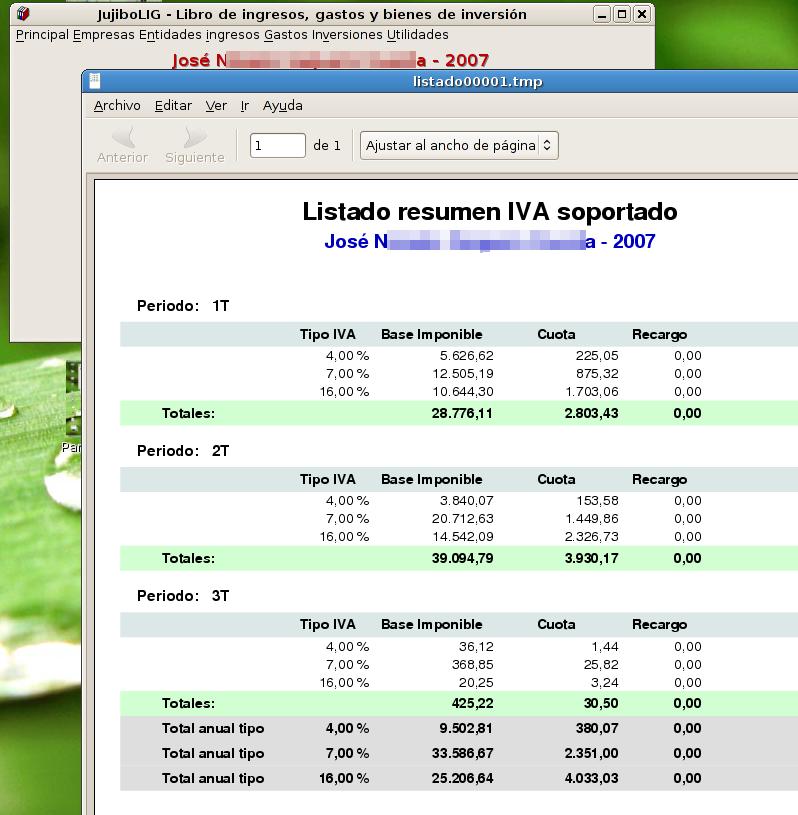 | |
| 375 | 381 | ||
| 376 | 382 | Two MDI forms with fade and flat frame. | |
| 377 | 383 | ||
| 378 | 384 | 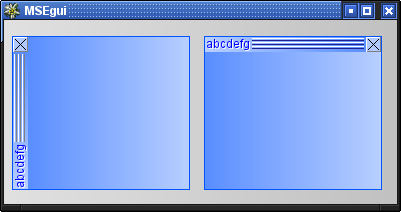 | |
| 379 | 385 | ||
| 380 | 386 | ### An embedded system | |
| 381 | 387 | ||
| 382 | 388 | An embedded system for medical applications, in this case steam sterilizers, was realized with MSE-IDE & MSE-GUI for the control unit, nowadays also commonly called the "human machine interface", HMI. | |
| 383 | 389 | ||
| 384 | 390 | 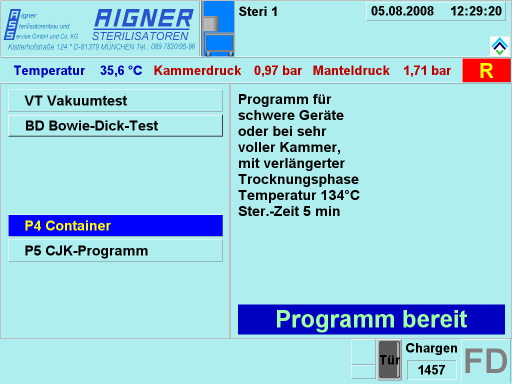 | |
| 385 | 391 | ||
| 386 | 392 | The control unit uses a touch panel a its display, therefore all active controls have to be made rather large to enable the personnel to handle them easily. The main screen consists of a few informational display fields and allows to select the implemented sterilizing processes by means of a menu consisting of several button components showing the process names along with a short description in a separate panel. The visibility of the buttons and their captions are defined during program loading by means of a configuration file. The informational fields display the devices' operating values in real time using a MSE system timer to collect the information from the PLC. | |
| 387 | 393 | ||
| 388 | 394 | 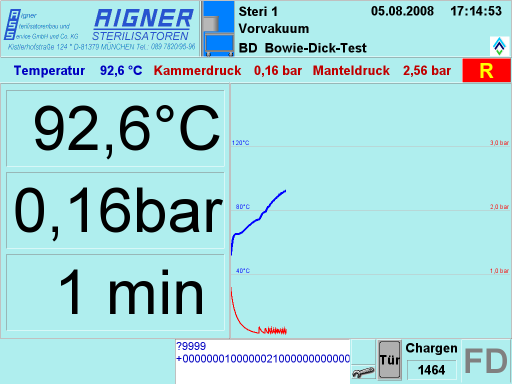 | |
| 389 | 395 | ||
| 390 | 396 | After processing has been started, the display is switched to a different format showing the operating values in large digits on some numeric display field components on the left and a graphical representation of the process history on the right, again both as real time "live displays". If the diagram curves would reach the right panel border, the diagram would change to a scrolling mode, always showing the current state at the extreme right. | |
| 391 | 397 | ||
| 392 | 398 | 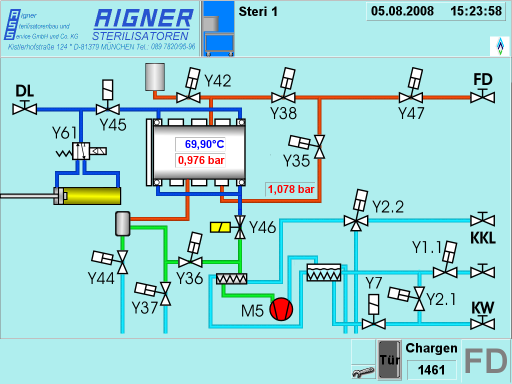 | |
| 393 | 399 | ||
| 394 | 400 | For diagnostic purposes, also a schematic state display is available. This shows a simplified schematic of the apparatus, along with real time animated symbols of the control elements, as there are valves and pumps, each displayed in a derived version of a timage component, created and placed dynamically on program load. Also shown are the most important process values as numerical displays, also dynamically placed. The schematic field really is the output of a separate program, running in parallel to the process display which provides the upper and lower parts of the screen display. | |
| 395 | 401 | ||
| 396 | 402 | 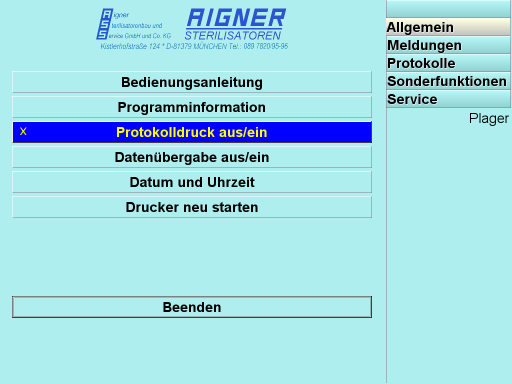 | |
| 397 | 403 | ||
| 398 | 404 | There is also a mode for setting several control and function parameters and to recall previous operational and diagnostic data. It is organised as a tabbed screen containing several run time parametrized menu pages and a couple of display field pages. Some of the pages allow access only after entering a pass code to prevent missuse of critical functions. | |
| 399 | 405 | ||
| 400 | 406 | 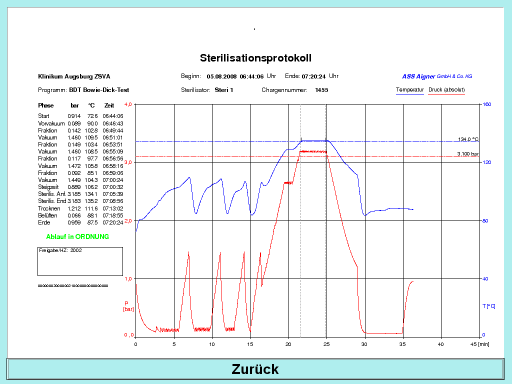 | |
| 401 | 407 | ||
| 402 | 408 | This is a screen displaying a graphical protocol of a previous process. The protocol is usually printed out immediately after termination, as required by the regulations. The printer output is generated as a postscript file, processed by ghostscript both for print out and for the on screen display shown, which uses the png format for loading into the display field. | |
| 403 | 409 | ||
| 404 | 410 | 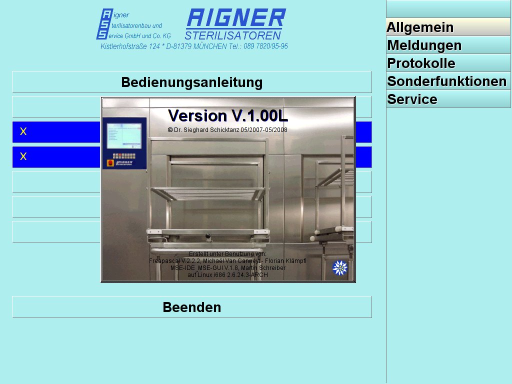 | |
| 405 | 411 | ||
| 406 | 412 | Of course, there is also an attribution display, showing program version, creator information and the tools used for the creation of the system, Free Pascal and MSE-IDE & MSE-GUI. As background, it uses a photography of one such apparatus as it is used in clinics displayed in an image component carrying several label fields used for the text. Above all of that sits a transparent button to close the picture. | |
| 407 | 413 | ||
| 408 | 414 | ## Reference: MSEide | |
| 409 | 415 | ||
| 410 | 416 | - To move and resize components without gridsnap use shift+cursorkeys and ctrl+cursorkeys. | |
| 411 | 417 | - There are many possibilities with properties twidget.frame and twidget.face, for instance tiled semitransparent bitmaps and color fades (all twidget descendants have these properties!). | |
| 412 | 418 | ||
| 413 | 419 | For client area of forms use tmseform.container.frame and tmseform.container.face, tmseform has additionally onpaint to do custom drawing. | |
| 414 | 420 | ||
| 415 | 421 | You can write your own widgets and override procedure dopaint or use teventwidget with onpaint,onresize,onmouseevent,onkeydown,onkeyup... | |
| 416 | 422 | ||
| 417 | - | ||
| 418 | - | ||
| 419 | - | ||
| 420 | - | ||
| 421 | - | ||
| 422 | - | ||
| 423 | - | ||
| 424 | - | ||
| 423 | + | ``` pascal | |
| 424 | + | How to convert filenames to windows format? | |
| 425 | + | Unit msefileutils: | |
| 426 | + | function tosysfilepath(const path: filenamety): filenamety; | |
| 427 | + | procedure tosysfilepath1(var path: filenamety); | |
| 428 | + | Converts to filename format of actual OS. | |
| 429 | + | function tomsefilepath(const path: filenamety): filenamety; | |
| 430 | + | procedure tomsefilepath1(var path: filenamety); | |
| 431 | + | Converts from filename format of actual OS. | |
| 432 | + | ``` | |
| 425 | 433 | ||
| 426 | - | ||
| 427 | - | ||
| 428 | - | ||
| 434 | + | ```text | |
| 435 | + | Where is the MDI ??? | |
| 436 | + | In MSEgui we have tdockform and tdockpanel for that purpose. | |
| 437 | + | Have a look at property dragdock. | |
| 438 | + | ``` | |
| 429 | 439 | ||
| 430 | 440 | ### MSEi18n | |
| 431 | 441 | ||
| 432 | 442 | ## [[Reference: MSEgui]] | |
| 433 | 443 | ||
| 434 | 444 | [[Reference: MSEgui|On this page you can find a working in progress for documenting MSEGUI.]] | |
| 435 | 445 | ||
| 436 | 446 | ## See also | |
| 437 | 447 | ||
| 438 | 448 | - [[MSEide MSEgui first step]] Tutorial for beginners showing to create first program. | |
| 439 | 449 | - [[MSEide MSEgui Howto]] Windows example. | |
| 440 | 450 | ||
| 441 | 451 | ------------------------------------------------------------------------ | |
| 442 | 452 | ||
| 443 | 453 | --- | |
| 444 | 454 | *From the Free Pascal wiki, page "MSEide+MSEgui", as it stood on 2021-08-31 after a change by Alextpp, out of the wiki's dump of 2024-05-26. Copyright stays with the author who wrote it, according to the old wiki's [[Licensing]] page. If you have concerns about this material, [message the admin](/wiki-contact).* | |
| 445 | 455 | Category: MSEide+MSEgui |