

lzRichEdit: what changed
Revision 0 to 1. Removed lines have a minus sign; added lines have a plus sign.
Title: lzRichEdit
| Old | New | Line | |
|---|---|---|---|
| 1 | + | ## About | |
| 2 | + | ||
| 3 | + | This component was created to solve or at least alleviate the lack of RichText component. Component runs on two platforms: Linux (GTK2) / Windows, and has different ways to work on both OS'es. | |
| 4 | + | ||
| 5 | + | - Control in Windows is provided by OS API. Win version supports all features that Win32 API has. | |
| 6 | + | - Linux file reading is made by FPC TRTFParser class, with some changes to support images, this class is slower on complex files. Linux version supports only text formatting. | |
| 7 | + | ||
| 8 | + | The two most important properties are Paragraph and SelAttributes, one takes care of the attributes of the paragraph and the other attributes of text. | |
| 9 | + | ||
| 10 | + | Screenshot: | |
| 11 | + | ||
| 12 | + | 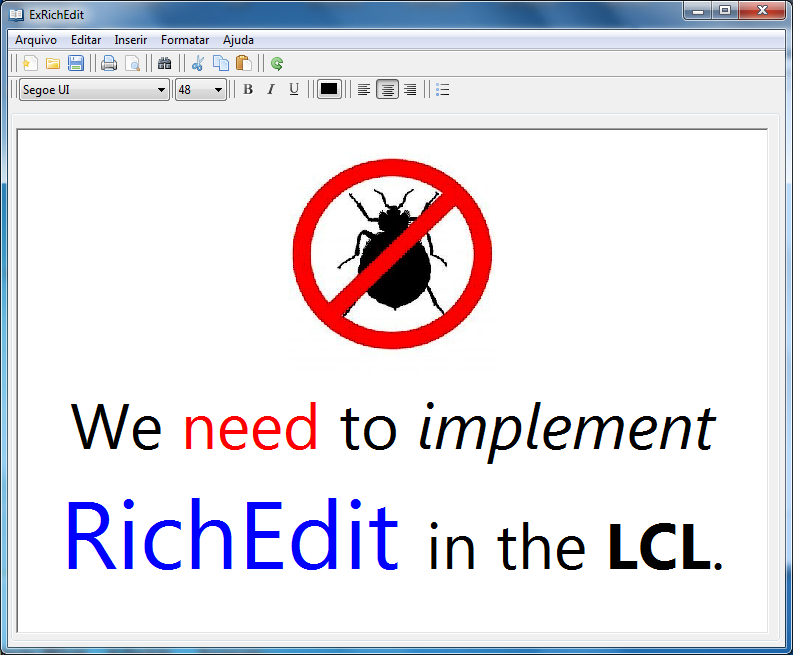 | |
| 13 | + | ||
| 14 | + | ## Author | |
| 15 | + | ||
| 16 | + | Elson Junio (elsonjunio@yahoo.com.br). | |
| 17 | + | ||
| 18 | + | Antônio Galvão. | |
| 19 | + | ||
| 20 | + | ## Platforms | |
| 21 | + | ||
| 22 | + | **Linux** (Gtk2) and **Win32**. | |
| 23 | + | ||
| 24 | + | ## License | |
| 25 | + | ||
| 26 | + | modified LGPL. | |
| 27 | + | ||
| 28 | + | ## Download | |
| 29 | + | ||
| 30 | + | The latest version is available here: <http://sourceforge.net/projects/lazarusfiles/files/lzRichEdit.zip/download> | |
| 31 | + | ||
| 32 | + | SVN: <https://lazarus-br.googlecode.com/svn/trunk/package/lzRichEdit> | |
| 33 | + | ||
| 34 | + | ## Installation | |
| 35 | + | ||
| 36 | + | - Download the package | |
| 37 | + | - Open the package, and install it, rebuilding the IDE | |
| 38 | + | - TlzRichEdit is added to 'Common Controls' component page. | |
| 39 | + | ||
| 40 | + | ## Methods | |
| 41 | + | ||
| 42 | + | ### CopyToClipboard | |
| 43 | + | ||
| 44 | + | Copies RTF text to clipboard. | |
| 45 | + | ||
| 46 | + | ### CutToClipboard | |
| 47 | + | ||
| 48 | + | Cuts RTF text to clipboard. | |
| 49 | + | ||
| 50 | + | ### PasteFromClipboard | |
| 51 | + | ||
| 52 | + | Pastes RTF text from clipboard. | |
| 53 | + | ||
| 54 | + | ### FindText | |
| 55 | + | ||
| 56 | + | Finds text in the control contents. | |
| 57 | + | ||
| 58 | + | ### GetFirstVisibleLine | |
| 59 | + | ||
| 60 | + | Gets the first visible line. | |
| 61 | + | ||
| 62 | + | ### GetRTFSelection | |
| 63 | + | ||
| 64 | + | Gets the selected RTF text to a provided stream. | |
| 65 | + | ||
| 66 | + | ### PutRTFSelection | |
| 67 | + | ||
| 68 | + | Puts the contents of a source RTF stream in the caret position. | |
| 69 | + | ||
| 70 | + | ### GetWordAtPoint | |
| 71 | + | ||
| 72 | + | Gets the word at the (x,y) position. | |
| 73 | + | ||
| 74 | + | ### GetWordAtPos | |
| 75 | + | ||
| 76 | + | Gets the word at the text position. | |
| 77 | + | ||
| 78 | + | ### GetZoomState | |
| 79 | + | ||
| 80 | + | Gets the zoom state of the RichEdit. | |
| 81 | + | ||
| 82 | + | ### SetZoomState | |
| 83 | + | ||
| 84 | + | Sets the zoom state of the RichEdit. | |
| 85 | + | ||
| 86 | + | ### LoadFromFile | |
| 87 | + | ||
| 88 | + | Loads a file. | |
| 89 | + | ||
| 90 | + | ### SaveToFile | |
| 91 | + | ||
| 92 | + | Saves a file. | |
| 93 | + | ||
| 94 | + | ||
| 95 | + | ||
| 96 | + | Prints the contents of the control. | |
| 97 | + | ||
| 98 | + | ### Undo | |
| 99 | + | ||
| 100 | + | Undo modifications. | |
| 101 | + | ||
| 102 | + | ### Redo | |
| 103 | + | ||
| 104 | + | Redo modifications. | |
| 105 | + | ||
| 106 | + | ### ScrollLine | |
| 107 | + | ||
| 108 | + | Scrolls for a given delta line position. | |
| 109 | + | ||
| 110 | + | ### ScrollToCaret | |
| 111 | + | ||
| 112 | + | Scrolls to the caret. | |
| 113 | + | ||
| 114 | + | ### SelectAll | |
| 115 | + | ||
| 116 | + | Selects all text. | |
| 117 | + | ||
| 118 | + | ## Properties | |
| 119 | + | ||
| 120 | + | ### Paragraph | |
| 121 | + | ||
| 122 | + | It is possible to change the current paragraph attributes (it is guided by SelStart) property. | |
| 123 | + | ||
| 124 | + | ##### Alignment: TRichEditAlignment | |
| 125 | + | ||
| 126 | + | Sets / gets the alignment of the paragraph or selected text. | |
| 127 | + | ||
| 128 | + | ##### traLeft | |
| 129 | + | ||
| 130 | + | Paragraph aligned to left. | |
| 131 | + | ||
| 132 | + | ##### traRight | |
| 133 | + | ||
| 134 | + | Paragraph aligned to right. | |
| 135 | + | ||
| 136 | + | ##### traCenter | |
| 137 | + | ||
| 138 | + | Paragraph centered. | |
| 139 | + | ||
| 140 | + | ##### traJustify | |
| 141 | + | ||
| 142 | + | Paragraph justified. | |
| 143 | + | ||
| 144 | + | ##### FirstIndent: Longint | |
| 145 | + | ||
| 146 | + | Sets / gets the indentation of the first line of a paragraph, FirstIndent works differently on Linux and Windows. Under Windows it has a relationship LeftIndent proportional to its value and shouldnt be negative if you want your effect is the recoil of the line, Otherwise the line is advanced. Linux does not the relationship between LeftIndent and FirstIndent and its value must be positive for Causing the retreat of line. | |
| 147 | + | ||
| 148 | + | ##### LeftIndent: Longint | |
| 149 | + | ||
| 150 | + | Sets / gets the paragraph indentation left. | |
| 151 | + | ||
| 152 | + | ##### RightIndent: Longint | |
| 153 | + | ||
| 154 | + | Sets / gets the distance from the text in the paragraph right corner of the control. | |
| 155 | + | ||
| 156 | + | ##### Numbering: TnumberingStyle | |
| 157 | + | ||
| 158 | + | Inserts \\ checks in paragraph marker, only one paragraph at a time. | |
| 159 | + | ||
| 160 | + | ### SelAttributes | |
| 161 | + | ||
| 162 | + | It is possible to change and get attribute values of the selected text. | |
| 163 | + | ||
| 164 | + | ##### Color: TColor | |
| 165 | + | ||
| 166 | + | Used to set / get the color of the selected text. | |
| 167 | + | ||
| 168 | + | ##### BackColor: TColor | |
| 169 | + | ||
| 170 | + | Used to set / get the background color of the selected text. | |
| 171 | + | ||
| 172 | + | ##### Name: TFontName | |
| 173 | + | ||
| 174 | + | Used to set / get the font of the selected text. | |
| 175 | + | ||
| 176 | + | ##### Size: Integer | |
| 177 | + | ||
| 178 | + | Used to set / get the font size of the selected text. | |
| 179 | + | ||
| 180 | + | ##### Style: TFontStyles | |
| 181 | + | ||
| 182 | + | Used to set / recer the font style of the selected text (Linux / Windows). | |
| 183 | + | ||
| 184 | + | ### CaretCoordinates | |
| 185 | + | ||
| 186 | + | ##### Column :Integer | |
| 187 | + | ||
| 188 | + | Reads the caret column position. | |
| 189 | + | ||
| 190 | + | ##### Line :Integer | |
| 191 | + | ||
| 192 | + | Reads the caret line position. | |
| 193 | + | ||
| 194 | + | ### CaretPoint | |
| 195 | + | ||
| 196 | + | ##### X :Integer | |
| 197 | + | ||
| 198 | + | Reads the X pixels position of the caret. | |
| 199 | + | ||
| 200 | + | ##### Y :Integer | |
| 201 | + | ||
| 202 | + | Reads the Y pixels position of the caret. | |
| 203 | + | ||
| 204 | + | ### ScrollPoint | |
| 205 | + | ||
| 206 | + | ##### X :Integer | |
| 207 | + | ||
| 208 | + | Reads and writes the X scrolling position. | |
| 209 | + | ||
| 210 | + | ##### Y :Integer | |
| 211 | + | ||
| 212 | + | Reads and writes the Y scrolling position. | |
| 213 | + | ||
| 214 | + | ### DefaultExtension | |
| 215 | + | ||
| 216 | + | ##### string | |
| 217 | + | ||
| 218 | + | Provides a way to set a file extension different than ".RTF" which can be correctly opened. | |
| 219 | + | ||
| 220 | + | ## Graphic support | |
| 221 | + | ||
| 222 | + | The images support is left up to 3 units: | |
| 223 | + | ||
| 224 | + | - RichOleBox | |
| 225 | + | - RichOle | |
| 226 | + | - GTKTextImage | |
| 227 | + | ||
| 228 | + | These units are in the sample folder and can be placed along with the source code of your program. | |
| 229 | + | ||
| 230 | + | ## More information | |
| 231 | + | ||
| 232 | + | For more information, see the Example Project or contact the author. | |
| 233 | + | ||
| 234 | + | --- | |
| 235 | + | *From the Free Pascal wiki, page "lzRichEdit", as it stood on 2021-08-27 after a change by Trev, out of the wiki's dump of 2024-05-26. Copyright stays with the author who wrote it, according to the old wiki's [[Licensing]] page. If you have concerns about this material, [message the admin](/wiki-contact).* | |
| 236 | + | Category: Components | |
| 237 | + | Category: Lazarus |