

LongTimer: what changed
Revision 3 to 4. Removed lines have a minus sign; added lines have a plus sign.
Title: longtimer LongTimer
| Old | New | Line | |
|---|---|---|---|
| 1 | - | ||
| 1 | + | # Summary | |
| 2 | + | ||
| 3 | + | - TLongTimer is a descendant of TIdleTimer, and keeps all of its properties and methods except the Interval property | |
| 4 | + | - The interval has been changed into a set of additional properties, that allow for very long intervals - Daily, Weekly and Monthly | |
| 5 | + | - The intended use is for TrayIcon applications or services like alarms, updaters or notifiers | |
| 6 | + | ||
| 7 | + | 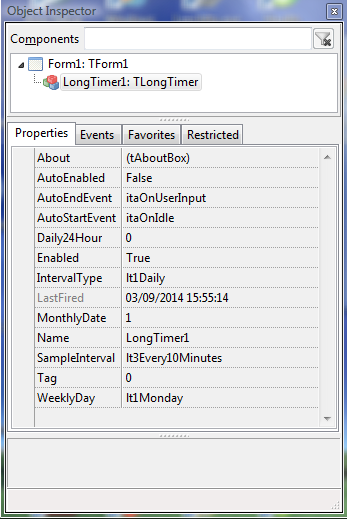 | |
| 8 | + | ||
| 9 | + | # Download | |
| 10 | + | ||
| 11 | + | Download from the [Lazarus CCR here](https://sourceforge.net/p/lazarus-ccr/svn/HEAD/tree/components/longtimer/) | |
| 12 | + | ||
| 13 | + | # Installation | |
| 14 | + | ||
| 15 | + | - Download the 'longtimer' package from the Lazarus CCR repository and copy the folder to a folder off your lazarus components folder | |
| 16 | + | - Install the package (open it, Compile then Install it) and TLongTimer will appear on your 'System' components tab | |
| 17 | + | - Drop onto a form, set properties and you are good to go | |
| 18 | + | - Opening the demo application will give you a good idea how to set the additional properties and use the component | |
| 19 | + | ||
| 20 | + | # License | |
| 21 | + | ||
| 22 | + | - LGPLv2 | |
| 23 | + | ||
| 24 | + | # Support | |
| 25 | + | ||
| 26 | + | - minesadorada on the Freepascal.org forum | |
| 27 | + | - Updates will go to the CCR repository when available | |
| 28 | + | ||
| 29 | + | # Tips | |
| 30 | + | ||
| 31 | + | - Initially, AutoEnabled=False, so TLongTimer will act much as a regular timer | |
| 32 | + | - The enumerated properties IntervalType, SampleInterval and WeeklyDay are displayed in the 'correct' order, and you can set them via code by TypeCasting if you don't want to use the lt type literals. | |
| 33 | + | ||
| 34 | + | eg. | |
| 35 | + | ||
| 36 | + | ``` pascal | |
| 37 | + | LongTimer1.WeeklyDay:=TDay(1); // sets the Weekly Day to Tuesday (2nd in the list) | |
| 38 | + | LongTimer1.SampleInterval:=TSampleInterval(1); // sets the interval sample rate to every 5 minutes (2nd in the list) | |
| 39 | + | LongTimer1.IntervalType:=TIntervalType(1); // sets the interval type to to Weekly (2nd in the list) | |
| 40 | + | ``` | |
| 41 | + | ||
| 42 | + | \- this is exactly equivalent to: | |
| 43 | + | ||
| 44 | + | ``` pascal | |
| 45 | + | LongTimer1.WeeklyDay:=lt2Tuesday�; // sets the Weekly Day to Tuesday | |
| 46 | + | LongTimer1.SampleInterval:=lt2Every5minutes�; // sets the interval sample rate to every 5 minutes | |
| 47 | + | LongTimer1.IntervalType:=lt2Weekly�; // sets the interval type to to Weekly | |
| 48 | + | ``` | |
| 49 | + | ||
| 50 | + | - Every time an interval property is changed, the Timer is temporarily suspended if it is already running | |
| 51 | + | - Number of days in a month is automatically catered for. If you set the MonthlyDate to 31 for instance, in Sept, Apr Jun, Nov it will fire on day 30, and on the last day of February (according to Leap Year) | |
| 52 | + | - The SampleInterval property determines the trade-off between CPU use and accuracy. EveryMinute is the most accurate, but checks the time/date etc every minute so uses more CPU than Every45minutes. However, when Sample interval is Every45Minutes,the IntervalType is ltDaily and the time is set to 2pm, the event could fire as late as 2:45 (which may be an acceptable option) | |
| 53 | + | - If you set AutoEnabled to TRUE then the timer will switch on and off according to Idle status, and could use significant CPU time. Note: This could be desired behaviour if you want to be sure LongTimer won't be working when some time-critical operation in your application is in progress. (This is why TLongTimer was descended from TIdleTimer rather than TTimer) | |
| 54 | + | - You can change SampleInterval and the Interval properties whilst LongTimer is running and it will update | |
| 55 | + | - The event OnSample is fired according to SampleInterval property | |
| 56 | + | ||
| 57 | + | ---- Demo application for TLongTimer | |
| 58 | + | ||
| 59 | + | 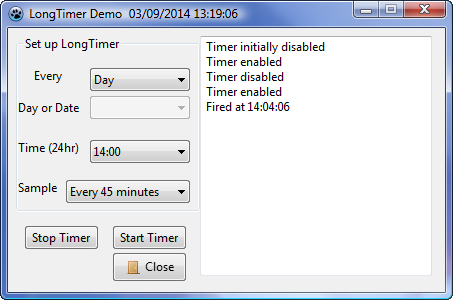 | |
| 60 | + | ||
| 61 | + | --- | |
| 62 | + | *From the Free Pascal wiki, page "LongTimer", as it stood on 2020-02-19 after a change by Trev, out of the wiki's dump of 2024-05-26. Copyright stays with the author who wrote it, according to the old wiki's [[Licensing]] page. If you have concerns about this material, [message the admin](/wiki-contact).* | |
| 63 | + | Category: Components | |
| 64 | + | Category: Lazarus-CCR |