

Legacy Information: Installing Lazarus on Mac: what changed
Revision 1 to 2. Removed lines have a minus sign; added lines have a plus sign.
| Old | New | Line | |
|---|---|---|---|
| 1 | 1 | ## Compatibility | |
| 2 | 2 | ||
| 3 | 3 | Not every combination of Lazarus and Free Pascal is compatible with every installation of the Mac operating system. Please refer to the following table in order to find the correct version for your development environment: | |
| 4 | 4 | ||
| 5 | 5 | ## FPC 2.4.4 bug | |
| 6 | 6 | ||
| 7 | 7 | - FPC 2.4.4 has a bug. You can not compile the IDE with the range check flag **-Cr**. | |
| 8 | 8 | ||
| 9 | 9 | ## Mac OS X 10.4 Tiger | |
| 10 | 10 | ||
| 11 | 11 | - On Mac OS X 10.4 Tiger you have to manually uninstall any previous version before installing a new dmg. Delete the following files and folders: | |
| 12 | 12 | - /Developer/lazarus | |
| 13 | 13 | - /Library/Receipts/lazarus.pkg | |
| 14 | 14 | - /etc/lazarus | |
| 15 | 15 | - /usr/local/bin/lazbuild | |
| 16 | 16 | ||
| 17 | 17 | ## Installing Lazarus 2.0.8, 2.0.10 with FPC 3.2.0 for macOS 10.10 and earlier | |
| 18 | 18 | ||
| 19 | 19 | - \[Lazarus 2.0.8 only\] There is a patch required for Lazarus 2.0.8 so that the Cocoa widgetset can be compiled. See above. | |
| 20 | 20 | ||
| 21 | 21 | - \[Lazarus 2.0.8 + 2.0.10\] There is also a patch needed for FPC 3.2.0. Edit the FPC 3.2.0 source in `../packages/cocoaint/src/CocoaAll.pas` and comment out or remove the CoreImage linking line: | |
| 22 | 22 | ||
| 23 | 23 | ``` pascal | |
| 24 | 24 | unit CocoaAll; | |
| 25 | 25 | interface | |
| 26 | 26 | ||
| 27 | 27 | {$linkframework Cocoa} | |
| 28 | 28 | {$linkframework Foundation} | |
| 29 | 29 | //{$linkframework CoreImage} **Comment out this line** | |
| 30 | 30 | {$linkframework QuartzCore} | |
| 31 | 31 | {$linkframework CoreData} | |
| 32 | 32 | {$linkframework AppKit} | |
| 33 | 33 | ``` | |
| 34 | 34 | ||
| 35 | 35 | - To rebuild FPC 3.2.0 with the patch, you need an FPC 3.0.4 binary installation. My `build_320.sh` shell script to rebuild and reinstall FPC 3.2.0 (adjust path for FPC source as required): | |
| 36 | 36 | ||
| 37 | 37 | ``` sh | |
| 38 | 38 | #!/bin/sh | |
| 39 | 39 | cd /usr/local/share/src/fpc-3.2.0/ | |
| 40 | 40 | svn cleanup --remove-unversioned | |
| 41 | 41 | make clean all FPC=/usr/local/lib/fpc/3.0.4/ppcx64 OS_TARGET=darwin CPU_TARGET=x86_64 OPT="-XR/Library/Developer/CommandLineTools/SDKs/MacOSX.sdk/" | |
| 42 | 42 | make install FPC=/usr/local/lib/fpc/3.0.4/ppcx64 OS_TARGET=darwin CPU_TARGET=x86_64 | |
| 43 | 43 | ``` | |
| 44 | 44 | ||
| 45 | 45 | Note that: | |
| 46 | 46 | ||
| 47 | 47 | - if more than one line above is highlighted, all the highlighted content should be on one line; | |
| 48 | 48 | - you may need to change the second line depending on where your FPC Source code is installed; | |
| 49 | 49 | - you will almost certainly need to run the script by using `sudo`. | |
| 50 | 50 | ||
| 51 | 51 | Now rebuild Lazarus with this `build_laz.sh` shell script (adjust path for Lazarus source as required): | |
| 52 | 52 | ||
| 53 | 53 | ``` sh | |
| 54 | 54 | #!/bin/sh | |
| 55 | 55 | cd ~/Documents/Lazarus/ | |
| 56 | 56 | svn cleanup --remove-unversioned | |
| 57 | 57 | make distclean all LCL_PLATFORM=cocoa CPU_TARGET=x86_64 bigide | |
| 58 | 58 | ``` | |
| 59 | 59 | ||
| 60 | 60 | ## Installing Lazarus 2.0.8 with FPC 3.2.0 for macOS 10.11+ | |
| 61 | 61 | ||
| 62 | 62 | - There is a patch needed for Lazarus 2.0.8 so that the Cocoa widgetset can be compiled: | |
| 63 | 63 | ||
| 64 | 64 | `Index: lcl/interfaces/cocoa/cocoascrollers.pas`\ | |
| 65 | 65 | `===================================================================`\ | |
| 66 | 66 | `--- lcl/interfaces/cocoa/cocoascrollers.pas (revision 63408)`\ | |
| 67 | 67 | `+++ lcl/interfaces/cocoa/cocoascrollers.pas (revision 63409)`\ | |
| 68 | 68 | `@@ -31,8 +31,6 @@`\ | |
| 69 | 69 | ` cocoa_extra, CocoaPrivate;`\ | |
| 70 | 70 | ||
| 71 | 71 | ` type`\ | |
| 72 | 72 | `- TSetDocumentViewType = {$if FPC_FULLVERSION = 30200}id{$else}NSView{$endif};`\ | |
| 73 | 73 | `-`\ | |
| 74 | 74 | ` { TCocoaScrollView }`\ | |
| 75 | 75 | ||
| 76 | 76 | ` TCocoaScrollView = objcclass(NSScrollView)`\ | |
| 77 | 77 | `@@ -51,7 +49,7 @@`\ | |
| 78 | 78 | ` procedure resetCursorRects; override;`\ | |
| 79 | 79 | ` function lclClientFrame: TRect; override;`\ | |
| 80 | 80 | ` function lclContentView: NSView; override;`\ | |
| 81 | 81 | `- procedure setDocumentView(aView: TSetDocumentViewType); override;`\ | |
| 82 | 82 | `+ procedure setDocumentView(aView: NSView); override;`\ | |
| 83 | 83 | ` procedure scrollContentViewBoundsChanged(notify: NSNotification); message 'scrollContentViewBoundsChanged:';`\ | |
| 84 | 84 | ` procedure resetScrollRect; message 'resetScrollRect';`\ | |
| 85 | 85 | ||
| 86 | 86 | `@@ -647,7 +645,7 @@`\ | |
| 87 | 87 | ` Result:=documentView;`\ | |
| 88 | 88 | ` end;`\ | |
| 89 | 89 | ||
| 90 | 90 | `-procedure TCocoaScrollView.setDocumentView(aView: TSetDocumentViewType);`\ | |
| 91 | 91 | `+procedure TCocoaScrollView.setDocumentView(aView: NSView);`\ | |
| 92 | 92 | ` begin`\ | |
| 93 | 93 | ` inherited setDocumentView(aView);`\ | |
| 94 | 94 | ` resetScrollRect;` | |
| 95 | 95 | ||
| 96 | 96 | - After making this patch, recompile Lazarus 2.0.8 from within itself or with this `build_laz.sh` shell script (adjust path for Lazarus source as required): | |
| 97 | 97 | ||
| 98 | 98 | ``` sh | |
| 99 | 99 | #!/bin/sh | |
| 100 | 100 | cd ~/Documents/Lazarus/ | |
| 101 | 101 | svn cleanup --remove-unversioned | |
| 102 | 102 | make distclean all LCL_PLATFORM=cocoa CPU_TARGET=x86_64 bigide | |
| 103 | 103 | ``` | |
| 104 | 104 | ||
| 105 | 105 | ## macOS 10.5 Leopard | |
| 106 | 106 | ||
| 107 | 107 | - After installing Xcode 3.1 (includes the command line tools) for Leopard, the first issue is that Xcode 3.1 does not come with the Clang compiler. | |
| 108 | 108 | ||
| 109 | 109 | - - The solution is to create/add this to the .fpc.cfg file in your home directory: | |
| 110 | 110 | ||
| 111 | 111 | ` #include /etc/fpc.cfg ## only add this line if the .fpc.cfg file does not already exist`\ | |
| 112 | 112 | ` -WM10.5`\ | |
| 113 | 113 | ` -Aas-darwin` | |
| 114 | 114 | ||
| 115 | 115 | - The second issue is that the official [Lazarus Mac OS X i386 download](https://sourceforge.net/projects/lazarus/files/Lazarus%20Mac%20OS%20X%20i386/Lazarus%202.0.10/) of FPC is FPC 3.0.4 and not 3.2.0. | |
| 116 | 116 | - The solution is to download the source for FPC 3.2.0 to your home directory. Open an Applications \> Utilities \> Terminal and: | |
| 117 | 117 | ||
| 118 | 118 | ` svn co `[`https://svn.freepascal.org/svn/fpc/tags/release_3_2_0`](https://svn.freepascal.org/svn/fpc/tags/release_3_2_0)` ` | |
| 119 | 119 | ||
| 120 | 120 | - The third issue is that the official [Lazarus Mac OS X i386 download](https://sourceforge.net/projects/lazarus/files/Lazarus%20Mac%20OS%20X%20i386/Lazarus%202.0.10/) for Lazarus 2.0.10 was compiled with FPC 3.0.4 and not FPC 3.2.0. | |
| 121 | 121 | - The solution is to download the Lazarus release sources to your home directory. Open an Applications \> Utilities \> Terminal and: | |
| 122 | 122 | ||
| 123 | 123 | ` svn co `[`https://svn.freepascal.org/svn/lazarus/tags/lazarus_2_0_10`](https://svn.freepascal.org/svn/lazarus/tags/lazarus_2_0_10)` ` | |
| 124 | 124 | ||
| 125 | 125 | - Compiling FPC 3.2.0 on Leopard is tricky (thanks to Jonas for supplying the solution). Before compiling FPC 3.2.0, make this change to the source so that it will not attempt to link the missing CoreImage framework. Then compile using the following `build_320.sh` script (enter your password at the prompt for the install to proceed): | |
| 126 | 126 | ||
| 127 | 127 | ``` sh | |
| 128 | 128 | #!/bin/sh | |
| 129 | 129 | cd /Users/$USER/release_3_2_0/ | |
| 130 | 130 | svn cleanup | |
| 131 | 131 | make clean all FPC="/usr/local/lib/fpc/3.0.4/ppc386" OS_TARGET=darwin CPU_TARGET=i386 CPU_SOURCE=i386 OPT="-WM10.5 -Aas-darwin -Xs-" | |
| 132 | 132 | sudo make install OS_TARGET=darwin CPU_TARGET=i386 CPU_SOURCE=i386 | |
| 133 | 133 | ||
| 134 | 134 | ``` | |
| 135 | 135 | ||
| 136 | 136 | Note: The highlighted line above should all be on one line. | |
| 137 | 137 | ||
| 138 | 138 | - Compiling Lazarus 2.0.10 is less tricky. Before compiling Lazarus 2.0.10, make this change to the source so that the "run without debugging" option will work. I use the following `build_laz.sh` script: | |
| 139 | 139 | ||
| 140 | 140 | ``` sh | |
| 141 | 141 | #!/bin/sh | |
| 142 | 142 | cd /Users/$USER/lazarus_2_0_10 | |
| 143 | 143 | svn cleanup | |
| 144 | 144 | make distclean all LCL_PLATFORM=carbon CPU_SOURCE=i386 CPU_TARGET=i386 bigide OPT="-WM10.5 -Aas-darwin -Xs- -dCarbonDontUseCocoa" | |
| 145 | 145 | ||
| 146 | 146 | ``` | |
| 147 | 147 | ||
| 148 | 148 | Note: The highlighted line above should all be on one line. | |
| 149 | 149 | ||
| 150 | 150 | - Finally, launch the newly compiled lazarus.app and adjust these Lazarus settings: | |
| 151 | 151 | - Tools \> Options \> Environment \> Files \> Compiler executable: this should be set to **`/usr/local/bin/ppc386`**. | |
| 152 | 152 | - Project \> Project Options \> Custom Options: add **-WM10.5** to the Custom options. | |
| 153 | 153 | - Project \> Project Options \> Config and Target \> Target CPU family: set to **i386**. | |
| 154 | 154 | - Project \> Project Options \> Config and Target \> Current LCL widgetset: set to **Carbon**. | |
| 155 | 155 | - Project \> Project Options: in the left pane, at the bottom, **check** "Set compiler options as default". | |
| 156 | 156 | ||
| 157 | 157 | You should now be able to successfully compile and run the Lazarus default blank form project. | |
| 158 | 158 | ||
| 159 | 159 | ## macOS 10.8 Mountain Lion additional steps | |
| 160 | 160 | ||
| 161 | 161 | - The first issue is that the official Lazarus pkg file downloads will not install on Mountain Lion, giving the error "Lazarus IDE cannot be installed on this disk" being the only disk in the system! | |
| 162 | 162 | ||
| 163 | 163 | - - The solution is to download the Lazarus release sources to your home directory. Open an Applications \> Utilities \> Terminal and: | |
| 164 | 164 | ||
| 165 | 165 | ` svn co `[`https://svn.freepascal.org/svn/lazarus/tags/lazarus_2_0_8`](https://svn.freepascal.org/svn/lazarus/tags/lazarus_2_0_8)\ | |
| 166 | 166 | ` =or=`\ | |
| 167 | 167 | ` svn co `[`https://svn.freepascal.org/svn/lazarus/tags/lazarus_2_0_10`](https://svn.freepascal.org/svn/lazarus/tags/lazarus_2_0_10) | |
| 168 | 168 | ||
| 169 | 169 | - Unfortunately the compiler and assembler in the last version of Xcode and its command line tools available for Mountain Lion is too old to compile Lazarus. | |
| 170 | 170 | - The solution is to download the macOS Clang7 binary package from <https://releases.llvm.org/7.0.0/clang+llvm-7.0.0-x86_64-apple-darwin.tar.xz>, uncompress it and install in your home directory. | |
| 171 | 171 | - Open an Applications \> Utilities \> Terminal and: | |
| 172 | 172 | ||
| 173 | 173 | ``` bash | |
| 174 | 174 | cd /usr/bin | |
| 175 | 175 | sudo mv clang clang.OLD | |
| 176 | 176 | sudo ln -s /Users/$USER/clang/bin/clang clang | |
| 177 | 177 | sudo mv as as.OLD | |
| 178 | 178 | sudo ln -s /Users/$USER/clang/bin/as as | |
| 179 | 179 | ||
| 180 | 180 | ``` | |
| 181 | 181 | ||
| 182 | 182 | Now follow the steps above. | |
| 183 | 183 | ||
| 184 | 184 | ## Resurrecting Subversion (svn) on Catalina, Big Sur and Monterey | |
| 185 | 185 | ||
| 186 | 186 | > **Note:** In August 2021, the Free Pascal Compiler and Lazarus IDE Projects moved their Subversion (svn) repositories to git and now host them on GitLab.com. The Lazarus IDE Project also mirrors their repository on GitHub.com which also allows access to the git repository using Subversion (svn). | |
| 187 | 187 | ||
| 188 | 188 | Xcode version 11.3.1 (Mojave) was the last version to include the Subversion (svn) utilities. You can however copy the utilities and their associated libraries from a Mojave Mac to Catalina, Big Sur and Monterey on both Intel and ARM64 processor Macs. There are two methods to do this - one uses Subversion from Xcode and the other uses Subversion from the command line tools as follows: | |
| 189 | 189 | ||
| 190 | 190 | `cd /Applications/Xcode.app/Contents/Developer/usr/bin`\ | |
| 191 | 191 | `scp svn* <remote_destination>`\ | |
| 192 | 192 | `cd /Applications/Xcode.app/Contents/Developer/usr/lib`\ | |
| 193 | 193 | `scp libsvn_*.dylib <remote_destination>`\ | |
| 194 | 194 | `scp libserf*.dylib <remote_destination>` | |
| 195 | 195 | ||
| 196 | 196 | OR | |
| 197 | 197 | ||
| 198 | 198 | `cd /Library/Developer/CommandLineTools/usr/bin`\ | |
| 199 | 199 | `scp svn* <remote_destination>`\ | |
| 200 | 200 | `cd /Library/Developer/CommandLineTools/usr/lib`\ | |
| 201 | 201 | `scp libsvn_*.dylib <remote_destination>`\ | |
| 202 | 202 | `scp libserf*.dylib <remote_destination>` | |
| 203 | 203 | ||
| 204 | 204 | ## Installation - PowerPC-based Macs | |
| 205 | 205 | ||
| 206 | 206 | Download the three disk images (.dmg files) for fpc, fpcsrc and lazarus from the following link: | |
| 207 | 207 | ||
| 208 | 208 | - [PowerPC-based Macs](https://sourceforge.net/projects/lazarus/files/Lazarus%20Mac%20OS%20X%20powerpc/) | |
| 209 | 209 | ||
| 210 | 210 | Open up each disk image and install in this order: | |
| 211 | 211 | ||
| 212 | 212 | 1. fpc | |
| 213 | 213 | 2. fpcsrc | |
| 214 | 214 | 3. Lazarus | |
| 215 | 215 | ||
| 216 | 216 | After installation the Lazarus application can be found in /Developer/lazarus/, the FPC source files in /usr/local/share/fpcsrc. | |
| 217 | 217 | ||
| 218 | 218 | If you receive a "Can't find unit Interfaces used by Project1" error on trying to compile a blank form, check the following settings in Lazarus (should be set by default): | |
| 219 | 219 | ||
| 220 | 220 | Environment Options | |
| 221 | 221 | ||
| 222 | 222 | ` Lazarus directory: /Developer/lazarus`\ | |
| 223 | 223 | ` Compiler path: /usr/local/bin/ppc386 (PowerPC Macs: /usr/local/bin/ppcppc)`\ | |
| 224 | 224 | ` FPC Source: /usr/local/share/fpcsrc` | |
| 225 | 225 | ||
| 226 | 226 | Project \| Options | |
| 227 | 227 | ||
| 228 | 228 | ` All paths blank`\ | |
| 229 | 229 | ` LCL Widget Type: default (Carbon beta)` | |
| 230 | 230 | ||
| 231 | 231 | Project \| Inspector | |
| 232 | 232 | ||
| 233 | 233 | ` Required Packages`\ | |
| 234 | 234 | ` LCL`\ | |
| 235 | 235 | ||
| 236 | 236 | Note - different versions of Lazarus depend on particular versions of the Free Pascal compiler and will not work with other versions. | |
| 237 | 237 | ||
| 238 | 238 | Another common problem is that the versions of fpc and fpcsrc are different. | |
| 239 | 239 | ||
| 240 | 240 | ### Download stable sources | |
| 241 | 241 | ||
| 242 | 242 | The source code of stable versions is available in the [Lazarus Zip - GZip](http://sourceforge.net/projects/lazarus/files/Lazarus%20Zip%20_%20GZip/) archives. This is an option for users, who want to run the latest official Lazarus versions on "unsupported" machines, e.g. PPC-based Macs. Provided that you have installed the latest stable FPC version together with sources, it is sufficient to download and unpack the zip archive. Move it to the desired location (e.g. your /Developer folder), open a terminal window and change the shell's path to this folder (the easiest way to do this is to type "cd " and then to drag the icon of the freshly unpacked Lazarus folder to the position after this command in the Terminal window). If necessary enter \<return\> and then | |
| 243 | 243 | ||
| 244 | 244 | `[]$ make clean bigide` | |
| 245 | 245 | ||
| 246 | 246 | and \<return\> again. Subsequently, FreePascal will use the makefile in this folder to build the Lazarus IDE. This may take a few minutes, but the process is fully automated. Therefore, you might want to look for a cup of coffee, while FPC is working. If the compiler is ready it prints the number of processed lines and the required time to the shell's output. | |
| 247 | 247 | ||
| 248 | 248 | The last step is to right-klick on the Lazarus bundle icon and to select "Show Package Contents" from the context menu. Then drag the executable "lazarus" to the folder "Contents/MacOS" of the bundle. That's it. | |
| 249 | 249 | ||
| 250 | 250 | ## Installing gdb | |
| 251 | 251 | ||
| 252 | 252 | As of the Lazarus 2.0.0 release this is entirely optional. The IDE now supports LLDB directly. See <http://forum.lazarus-ide.org/index.php/topic,42869.0.html> and <http://wiki.lazarus.freepascal.org/Lazarus_2.0.0_release_notes#LLDB_based_Debugger_.28New.29> | |
| 253 | 253 | ||
| 254 | 254 | Getting gdb to run can be a bit tedious but is worthwhile in the end if using Lazarus \< V2.0 or have some specific requirement for gdb. You probably don't ! | |
| 255 | 255 | ||
| 256 | 256 | This step should be done after installing XCode and before installing FPC/Lazarus. | |
| 257 | 257 | ||
| 258 | 258 | 1. Install fink or brew and use them to install gdb- <http://wiki.freepascal.org/GDB_on_OS_X_Mavericks_and_Xcode_5> | |
| 259 | 259 | 2. Self sign the gdb binary using tools already on your Mac - <https://sourceware.org/gdb/wiki/BuildingOnDarwin> This is the tedious part. The instructions are clear except, perhaps they could have mentioned that after you have set the Keychain to ’System’ you need click ‘Create’ and ‘Done’ on the next screen. Then go and find the cert in your overall list of certs to do the next instruction “using the contextual menu…”. Don’t worry about step “2.1.4 Disable starting the debuggee…”, we’ll address that once Lazarus itself is installed and working. | |
| 260 | 260 | 3. Once Lazarus is installed and fired up, tell it how it should start gdb, that is step 5. | |
| 261 | 261 | ||
| 262 | 262 | **Note** that as of April 2018, there may be issues with newest gdb and High Sierra. <https://forum.lazarus.freepascal.org/index.php/topic,40874.0.html> *According to <https://stackoverflow.com/questions/49001329/gdb-doesnt-work-on-macos-high-sierra-10-13-3>, gdb 8.1 does not work on High Sierra, but 8.0.1 does.* | |
| 263 | 263 | ||
| 264 | 264 | **Part 2 of gdb install, Tell Lazarus about starting gdb** | |
| 265 | 265 | ||
| 266 | 266 | Again, this step is not necessary with Lazarus V2.0 and later. See <http://wiki.lazarus.freepascal.org/Lazarus_2.0.0_release_notes#LLDB_based_Debugger_.28New.29> If you do install (and use) gdb, you must tell Lazarus about how to call gdb. Obviously, this step happens after Lazarus is installed. | |
| 267 | 267 | ||
| 268 | 268 | OK, now you should be able to start Lazarus, it should display the various parts and paths it needs (including gdb) in the little opening screen. You will get an alert there if you chose to not use a debugger. Proceed to the IDE and we now need to tell Lazarus to tell gdb to not open a shell, as noted by a number of Forum users (http://forum.lazarus.freepascal.org/index.php/topic,37310.0.html). Within Lazarus, click Tools \> Options \> Debugger \> General In the “Debugger specific Options” there is a field labeled Debugger_Startup_Options. Type in "--eval-command=set startup-with-shell off" (including the inverted commas) AND press the return key, click OK. Note you cannot copy and paste into this box (##\$!). See screen shot. | |
| 269 | 269 | ||
| 270 | - | ||
| 270 | + | 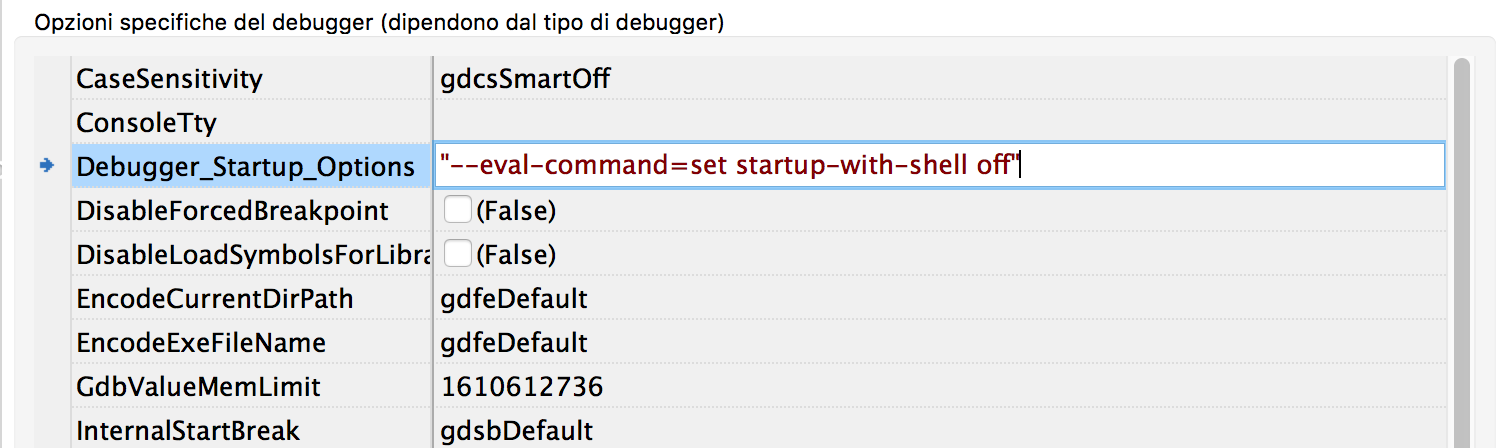 | |
| 271 | 271 | ||
| 272 | 272 | ## Xcode Compatability | |
| 273 | 273 | ||
| 274 | 274 | Information relating to older versions of FPC, Lazarus and Apple Developer Tools | |
| 275 | 275 | ||
| 276 | 276 | ### Compatibility with Xcode 5.0 and newer versions (OS X 10.8, 10.9, 10.10 and 10.11) | |
| 277 | 277 | ||
| 278 | 278 | Like Xcode 4.3+, Xcode 5 and subsequent versions no longer install the command line tools by default. These are required by FPC/Lazarus, however. Unlike in Xcode 4, the installation option is no longer accessible in Xcode 5 via the Downloads tab. Additionally, the "Locations" tab of the preferences dialog may be confusing, as it mentions that the command line tools are installed: | |
| 279 | 279 | ||
| 280 | - | ||
| 280 | + | 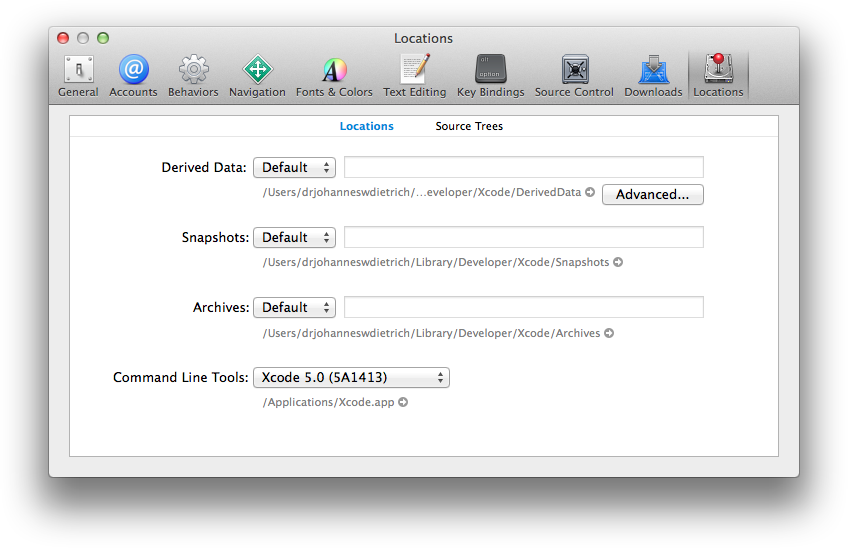 | |
| 281 | 281 | ||
| 282 | + | Default location of command line tools in Xcode 5. | |
| 283 | + | ||
| 284 | + | 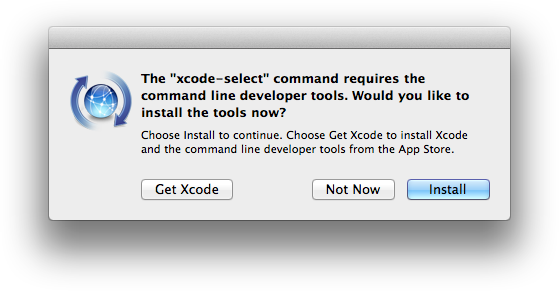 | |
| 285 | + | ||
| 286 | + | Installation of command line tools with the xcode-select command part 1... | |
| 287 | + | ||
| 288 | + | 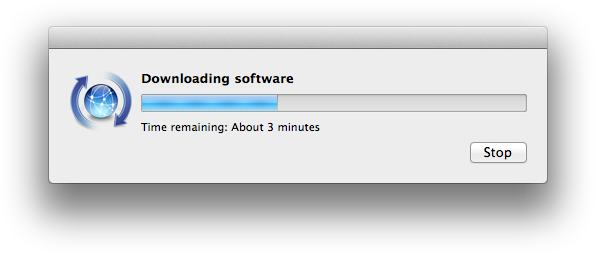 | |
| 289 | + | ||
| 290 | + | ...and part 2. | |
| 291 | + | ||
| 282 | 292 | The first dialog box shows that by default the command line tools are only installed inside the Xcode.app bundle itself. To install them globally, as required by FPC/Lazarus, execute the following terminal command: | |
| 283 | 293 | ||
| 284 | 294 | ``` bash | |
| 285 | 295 | xcode-select --install | |
| 286 | 296 | ``` | |
| 287 | 297 | ||
| 288 | 298 | Depending from your Xcode version alternative steps to install the command line developer tools may be to download them directly in the Xcode preferences window (see screenshots above) or to download them from [developer.apple.com](http://developer.apple.com) (please take care to install the command line tools that are correct exactly for your Xcode version). | |
| 289 | 299 | ||
| 290 | 300 | - You can compile and install the normal gdb. See [[GDB on OS X Mavericks and Xcode 5]]. | |
| 291 | 301 | ||
| 292 | 302 | ### Xcode 4.3+ compatibility (Mac OS X 10.7 / OS X 10.8) | |
| 293 | 303 | ||
| 294 | 304 | Xcode 4.3 and later no longer install the command line tools by default. These are required by FPC/Lazarus. | |
| 295 | 305 | ||
| 296 | 306 | To install them manually, open Xcode, go to Preferences, select "Downloads;" and install the "Command Line Tools". Afterwards, FPC will install and function correctly. | |
| 297 | 307 | ||
| 298 | - | ||
| 308 | + | 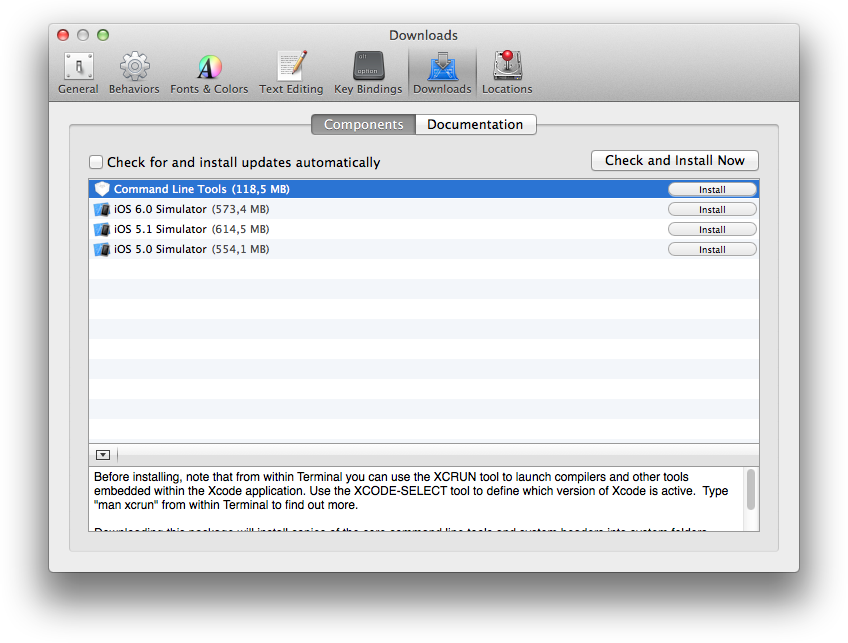 | |
| 309 | + | ||
| 310 | + | 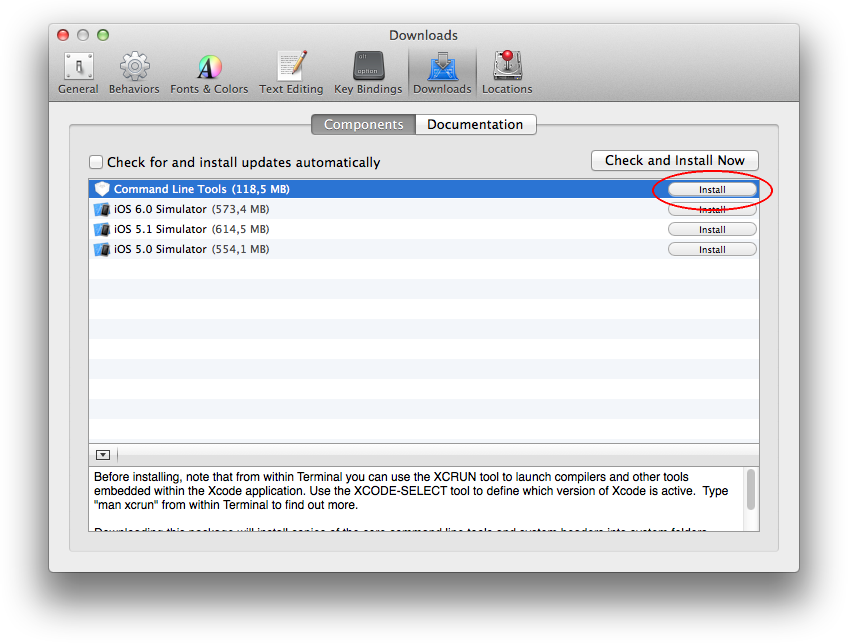 | |
| 311 | + | ||
| 312 | + | 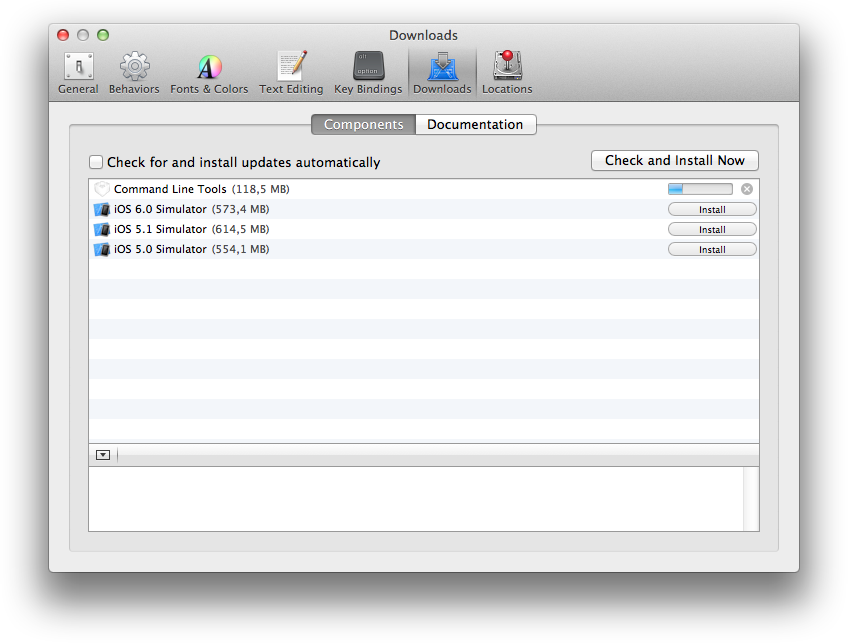 | |
| 299 | 313 | ||
| 300 | 314 | It will be necessary to reinstall the command line tools after each upgrade of Xcode (especially when it's a new major version, the installer may delete the old copies of the command line tools), and also after switching to a new major version of the system software (idem). You may also download the command line tools from [Apple Developer](https://developer.apple.com/download/more/?=command%20line%20tools). | |
| 301 | 315 | ||
| 302 | 316 | ### Xcode 3.2.x compatibility (Mac OS X 10.6) | |
| 303 | 317 | ||
| 304 | 318 | FPC 2.6.0: there is an issue when compiling dynamic libraries with FPC under Mac OS X 10.6 due to a bug in the Xcode 3.2.x linker. This bug has been fixed in Xcode 4. You can work around the bug in Xcode 3.2.x by using the -k-no_order_inits command line parameter when compiling a dynamic library. | |
| 305 | 319 | ||
| 306 | 320 | ### Xcode 3.1.x compatibility (Mac OS X 10.5) | |
| 307 | 321 | ||
| 308 | 322 | Most versions of Lazarus and FPC are compatible with Xcode 3.1 (see the compatibility matrix for detailed reference). The Xcode integration kit is provided as an optional install to allow for developing with Free Pascal directly from Xcode. It is not required for development with Lazarus, however. | |
| 309 | 323 | ||
| 310 | 324 | ### Xcode 2.x compatibility (Mac OS X 10.4) | |
| 311 | 325 | ||
| 312 | 326 | Most versions of Lazarus and FPC are compatible with Xcode 2.3 or newer (see the compatibility matrix for detailed reference). The Xcode integration kit is provided as an optional install to allow for developing with Free Pascal directly from Xcode. It is not required for development with Lazarus, however. Xcode 2.0 was compatible with Lazarus 0.9.x, but it is no longer supported by newer versions of the Lazarus IDE. | |
| 313 | 327 | ||
| 314 | 328 | --- | |
| 315 | 329 | *From the Free Pascal wiki, page "Legacy Information: Installing Lazarus on Mac", as it stood on 2022-06-02 after a change by Trev, out of the wiki's dump of 2024-05-26. Copyright stays with the author who wrote it, according to the old wiki's [[Licensing]] page. If you have concerns about this material, [message the admin](/wiki-contact).* |