

leakview: what changed
Revision 0 to 1. Removed lines have a minus sign; added lines have a plus sign.
Title: leakview
| Old | New | Line | |
|---|---|---|---|
| 1 | + | **Leakview** allows fast navigation through [[heaptrc|HeapTrc]] leak reports. | |
| 2 | + | ||
| 3 | + | 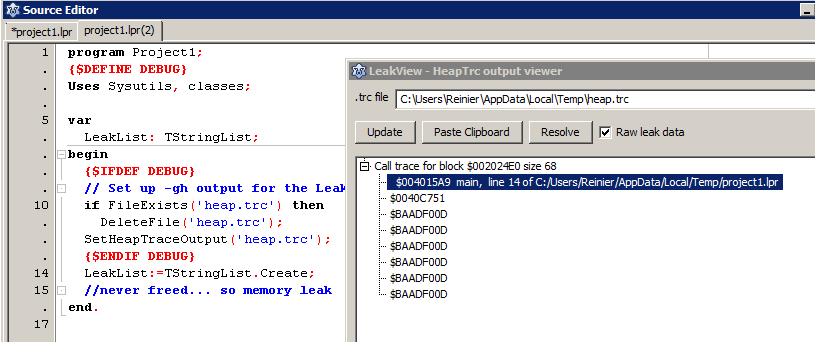 | |
| 4 | + | ||
| 5 | + | ## Usage | |
| 6 | + | ||
| 7 | + | The Leakview utility is available in the IDE under *View / Leaks and Traces*. | |
| 8 | + | ||
| 9 | + | Leakview reads [[heaptrc]] output. For this to work, you'll need to enable heaptrc in your code:\ | |
| 10 | + | **Never include heaptrc in your uses clause manually. This is done implicitly by the compiler when -gh is specified**\ | |
| 11 | + | ||
| 12 | + | ### Enabling heaptrc in Lazarus | |
| 13 | + | ||
| 14 | + | To enable this in your Lazarus project: go to Project Options/Linking and in the Debugging section enable *Use Heaptrc unit (check for mem-leaks) (-gh)* It is also a good idea to include line numbers, so -glh or -gh -gl | |
| 15 | + | ||
| 16 | + | To get meaningful heaptrc results with descriptions to your code lines and not just assembler addresses, go to Tools/Options/Debugger/general and set a debugger. | |
| 17 | + | ||
| 18 | + | You can then let the program log the output of the heaptrc unit to a file. Add the following code fragments in your .lpr, at the beginning of your code to redirect the heaptrc output to file: | |
| 19 | + | ||
| 20 | + | ``` pascal | |
| 21 | + | {$DEFINE debug} // do this here or you can define a -dDEBUG in Project Options/Other/Custom Options, i.e. in a build mode so you can set up a Debug with leakview and a Default build mode without it | |
| 22 | + | ||
| 23 | + | uses | |
| 24 | + | ... | |
| 25 | + | {$IFDEF debug} | |
| 26 | + | , SysUtils | |
| 27 | + | {$ENDIF} | |
| 28 | + | ||
| 29 | + | ... | |
| 30 | + | ||
| 31 | + | begin | |
| 32 | + | {$IFDEF DEBUG} | |
| 33 | + | // Assuming your build mode sets -dDEBUG in Project Options/Other when defining -gh | |
| 34 | + | // This avoids interference when running a production/default build without -gh | |
| 35 | + | ||
| 36 | + | // Set up -gh output for the Leakview package: | |
| 37 | + | if FileExists('heap.trc') then | |
| 38 | + | DeleteFile('heap.trc'); | |
| 39 | + | SetHeapTraceOutput('heap.trc'); | |
| 40 | + | {$ENDIF DEBUG} | |
| 41 | + | ||
| 42 | + | ... | |
| 43 | + | end. | |
| 44 | + | ``` | |
| 45 | + | ||
| 46 | + | ### Enabling heaptrc in FPC | |
| 47 | + | ||
| 48 | + | In FPC, you can specify -gh in your compiler options in fpc.cfg or on the commandline.\ | |
| 49 | + | You can test if your binary is compiled with heaptrace by: | |
| 50 | + | ||
| 51 | + | ``` pascal | |
| 52 | + | {$if Declared(UseHeapTrace)}...{$ifend} | |
| 53 | + | ``` | |
| 54 | + | ||
| 55 | + | Then redirect the heaptrc output to file (instead of standard output). You can use similar code to the Lazarus code or alternatively, set the environment variable, e.g. on *nix: | |
| 56 | + | ||
| 57 | + | ``` bash | |
| 58 | + | export HEAPTRC="log=heap.trc" | |
| 59 | + | ``` | |
| 60 | + | ||
| 61 | + | or Windows: | |
| 62 | + | ||
| 63 | + | ```dos | |
| 64 | + | set HEAPTRC="log=heap.trc" | |
| 65 | + | ``` | |
| 66 | + | ||
| 67 | + | --- | |
| 68 | + | *From the Free Pascal wiki, page "leakview", as it stood on 2022-01-27 after a change by Thaddy, out of the wiki's dump of 2024-05-26. Copyright stays with the author who wrote it, according to the old wiki's [[Licensing]] page. If you have concerns about this material, [message the admin](/wiki-contact).* |