

leakview
English · Русский
Leakview allows fast navigation through HeapTrc leak reports.
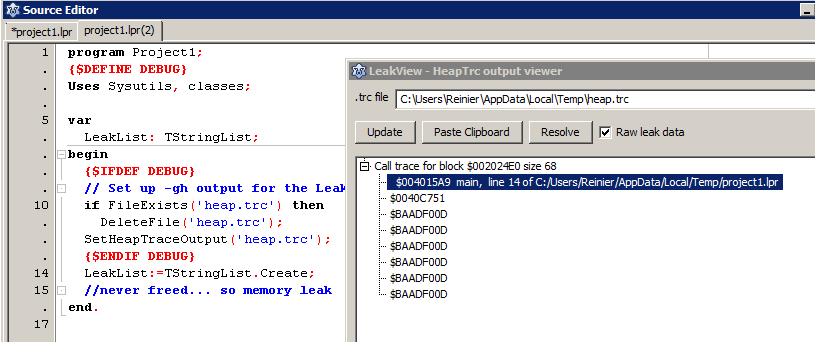
Usage
The Leakview utility is available in the IDE under View / Leaks and Traces.
Leakview reads heaptrc output. For this to work, you'll need to enable heaptrc in your code:
Never include heaptrc in your uses clause manually. This is done implicitly by the compiler when -gh is specified\
Enabling heaptrc in Lazarus
To enable this in your Lazarus project: go to Project Options/Linking and in the Debugging section enable Use Heaptrc unit (check for mem-leaks) (-gh) It is also a good idea to include line numbers, so -glh or -gh -gl
To get meaningful heaptrc results with descriptions to your code lines and not just assembler addresses, go to Tools/Options/Debugger/general and set a debugger.
You can then let the program log the output of the heaptrc unit to a file. Add the following code fragments in your .lpr, at the beginning of your code to redirect the heaptrc output to file:
  {$DEFINE debug}     // do this here or you can define a -dDEBUG in Project Options/Other/Custom Options, i.e. in a build mode so you can set up a Debug with leakview and a Default build mode without it

uses
  ...
  {$IFDEF debug}
  , SysUtils
  {$ENDIF}

...

begin
  {$IFDEF DEBUG}
  // Assuming your build mode sets -dDEBUG in Project Options/Other when defining -gh
  // This avoids interference when running a production/default build without -gh

  // Set up -gh output for the Leakview package:
  if FileExists('heap.trc') then
    DeleteFile('heap.trc');
  SetHeapTraceOutput('heap.trc');
  {$ENDIF DEBUG}

  ...
end.
Enabling heaptrc in FPC
In FPC, you can specify -gh in your compiler options in fpc.cfg or on the commandline.
You can test if your binary is compiled with heaptrace by:
{$if Declared(UseHeapTrace)}...{$ifend}Then redirect the heaptrc output to file (instead of standard output). You can use similar code to the Lazarus code or alternatively, set the environment variable, e.g. on *nix:
export HEAPTRC="log=heap.trc"or Windows:
set HEAPTRC="log=heap.trc"From the Free Pascal wiki, page "leakview", as it stood on 2022-01-27 after a change by Thaddy, out of the wiki's dump of 2024-05-26. Copyright stays with the author who wrote it, according to the old wiki's Licensing page. If you have concerns about this material, message the admin.
Talk about this page
Nobody has opened a bench for this page yet. Sign in to open one.