

LazBarcodes
General
About
LazBarcodes is a set of controls to create 1D and 2D barcodes. The backend engine is a port of Zint at sourceforge. Some units were heavily refactored to obtain a more Pascal-like code.
The library supports the generation of 1D and 2D barcodes:
- 1D barcodes: Code-11, Code-128, Channel code, EAN-128, several 2-of-5 variants, several 3-of-9 variants, EAN, UPC, Plessey, MSI/Plessey, Telepen, medical/pharmaceutical codes (CodaBar, Code-32, Pharma one-track, Pharma two-track, PZN), postal codes (Australian post, Japanese post, Korean Post, Deutsche Post IdentCode and LeitCode, Dutch KIX, Planet, PostNet, Royal Mail RM4SCC)
- Stacked barcodes: PDF417, compact PDF417, MicroPDF417
- 2D barcodes: QR, MicroQR, Aztec, Aztec Rune, Data Matrix, Maxicode
Author
2011 - Jose Mejuto
License
BSD 3 as it is being inherited from the zint source code.
Dependencies / System Requirements
- None
Getting LazBarcodes
The download contains the packages lazbarcodes and lazbarcodes_runtimeonly. The first one gives you visual components of the above barcodes and the second can be used just to access the ported zint code for advanced barcode generation.
Development version
The latest source code can be found on Lazarus-CCR. Use SVN to load the source files, or download the "Snapshot" by clicking on the corresponding button of the sourceforge site and unzip it to some directory. For installation go to "Package" > "Load package file (*.lpk)", navigate to the folder with the downloaded sources and load the fole lazbarcodes_runtimeonly.lpk. Then load the package lazbarcodes.lpk. Click "Use" > "Install", and confirm the question to rebuild the IDE. After some time the IDE restarts, and you find the barcodes in the "LazBarcodes" tab of the component palette.
Release version
Occasionally a release version is prepared and made available for easy installation by means of the Online-Package-Manager in the Lazarus IDE. Open "Package" > "Online package manager", check the item "LazBarcodes" in the list and click "Install". Again, confirm the question to rebuild the IDE. When the IDE restarts after some time you find the barcodes in the "LazBarcodes" tab of the component palette.
Change Log
- v2.0.0: Added a lot of 1D barcodes
- v1.0.3: Internally used units renamed to avoid naming conflict with CodeTyphon package PL_APE.
- v1.0.2: Change of license from GPL to BSD
- Initial development.
Documentation
General
The components installed by the LazBarcodes package descent from TGraphicControl and thus inherit fundamental control properties such as Width, Height, AutoSize, etc. They share a variety of other properties and methods; some properties, however, are not published fwhen they are not appropriate for the current barcode type.
Properties
Text: TCaption- Text to be encoded as a barcode. Note that, depending on the barcode type, there exist limitations on allowed text length and allowed characters.ShowHumanReadableText: Boolean- Displays the encoded text underneath the barcode symbol. Note that the encoding algorithm may add check sum or additional characters to the input text.BarcodeType- Some barcode components can be modified to create various symbologies by selecting the corresponding value in this (type-dependent) enumeration.Scale: Integer- Horizontal scaling factor of the barcode determining the width of the smallest feature (bar or space) in pixels.Scale=0tries to select an internal scale value such that the barcode fills the control's width as much as possible. Note that this scaling factor applies to all bars and spaces and therefore, increasingScaledoes not increase the barcode with gradually but by more or less large steps.SymbolHeight: Integer- Similar toScale, but refers now to the vertical direction. Again,SymbolHeight=0fills adjusts the internal symbol height to fill the heightMinSymbolHeight: Integer- Prevents the symbol to become too small.RecommendedSymbolSize: Boolean- Iftrue, overrides theScaleandSymbolHeightsettings so that the size of the symbol is as close as possible to its specification.AutoSize: Boolean- inherited standard property. Whentrue,WidthandHeightare selected such that the current size of the barcode is enclosed. Note thatAutoSize=trueis ignored whenScale=0orSymbolHeight=0.Margin: Integer- Amount of empty pixels added around the symbolWhitespaceWidth: Integer- Amount of empty pixels added to the left and right of some symbologies to enhance readability of barcode scanners.BearerBarMode: TBearerBarMode = (bbmNone, bbmBearerBars, bbmBox)- adds horizontal bars above and below the barcode (bbmBearerBars) or a box around the barcode (bbmBox). The thickness of the bars and the box border is given by theMarginmultiplied by the currently used internalScaleparameter.ForegroundColor: TColor- Color used to draw the barsBackgroundColor: TColor- Color used to draw the background of the barcode (spaces, margin and text area).
Methods
CopyToClipboard- Copies the barcode to the clipboard as a bitmapSaveToFile(const AFileName: String; AImageClass: TFPImageBitmapClass)- Saves the barcode as a graphic image of the specified class to file.SaveToStream(const AStream: TStream; AImageClass: TFPImageBitmapClass)- Saves the barcode as a graphic image of the specified class to a stream.SaveToEPSFile(const AFileName: String)- Saves the barcode as EPS fileSaveToEPSStream(const AStream: TStream)- Saves the barcode in EPS format as stream.SaveToSVGFile(const AFileName: String)- Saves the barcode in SVG format to fileSaveToSVGStream(const AStream: TStream)- Saves the barcode in SVG format to a streamErrorString: String- In case of an error, this read-only property contains a message why theTextcould not be encoded correctly.
Components
1D codes
<thead>
</thead> <tbody>
<img src="tbarcode2of5.png" title="tbarcode2of5.png" alt="tbarcode2of5.png" /></td>
Matrix 2-of-5</td>
photo finishing<br /> airline ticket marking</td>
photo developing envelopes<br /> warehouse sorting systems</td>
cartons of some products</td>
<img src="tbarcode3of9.png" title="tbarcode3of9.png" alt="tbarcode3of9.png" /></td>
<code>bctLOGMARS</code></td>
LOGMARS</td>
industrial applications<br /> LOGMARS: different bar widths</td>
<code>'–', '.', '$', '/', '+', '%'</code></td>
(C39ext)</td>
industrial applications</td>
<img src="tbarcodec11.png" title="tbarcodec11.png" alt="tbarcodec11.png" /></td>
<img src="tbarcodec128.png" title="tbarcodec128.png" alt="tbarcodec128.png" /></td>
GS1-128</td>
to be given in square parenthesis</td>
<img src="tbarcodechannelcode.png" title="tbarcodechannelcode.png" alt="tbarcodechannelcode.png" /></td>
<img src="tbarcodeean.png" title="tbarcodeean.png" alt="tbarcodeean.png" /></td>
<code>'+'</code> for addon code</td>
<code>'+'</code> for addon code</td>
<code>'+'</code> for addon code</td>
plus 2 check digits</td>
(more compact than UPC/A)</td>
<code>'+'</code> for addon code</td>
<img src="tbarcodemedical.png" title="tbarcodemedical.png" alt="tbarcodemedical.png" /></td>
<img src="tbarcodeplessey.png" title="tbarcodeplessey.png" alt="tbarcodeplessey.png" /></td>
(see <code>CheckChar</code> property below)</td>
<img src="tbarcodepostal.png" title="tbarcodepostal.png" alt="tbarcodepostal.png" /></td>
<a href="http://fileformats.archiveteam.org/wiki/Australia_Post_standard_customer_barcode">http://fileformats.archiveteam.org/wiki/Australia_Post_standard_customer_barcode</a></td>
<code>'A'</code>: Ascender<br /> <code>'F'</code>: Full height<br /> <code>'T'</code>: Tracker (short bar)</td>
<img src="tbarcodetelepen.png" title="tbarcodetelepen.png" alt="tbarcodetelepen.png" /></td>
'X' must be at even character position.</td>
</tbody>
Stacked barcodes
<thead>
</thead> <tbody>
<img src="tbarcodepdf417.png" title="tbarcodepdf417.png" alt="tbarcodepdf417.png" /></td>
Compact PDF417</td>
</tbody>
2D codes
<thead>
</thead> <tbody>
<img src="tbarcodeaztec.png" title="tbarcodeaztec.png" alt="tbarcodeaztec.png" /></td>
<img src="tbarcodeaztecrune.png" title="tbarcodeaztecrune.png" alt="tbarcodeaztecrune.png" /></td>
<img src="tbarcodedatamatrix.png" title="tbarcodedatamatrix.png" alt="tbarcodedatamatrix.png" /></td>
<img src="tbarcodeqr.png" title="tbarcodeqr.png" alt="tbarcodeqr.png" /></td>
<img src="tbarcodemicroqr.png" title="tbarcodemicroqr.png" alt="tbarcodemicroqr.png" /></td>
<img src="tbarcodemaxicode.png" title="tbarcodemaxicode.png" alt="tbarcodemaxicode.png" /></td>
</tbody>
Special properties of some components
TBarcodePlesseyCheckChar: TPlesseyCheckChar- determines the checksum digit(s) added to the MSI/Plessey symbol (used only whenBarcodeType = bctMSIPlessey):pcOneMod10: adds one check digit calculated by a mod 10 algorithmpcTwoMod10: adds two check digits, both calculated by a mod 10 algorithmpcOneMod11: adds one check digit calculated by a mod 11 algorithmpcOneMod10Mod11: add two check digits, the first one calculated by a mod 10, the second one calculated by a mod 11 algorithm.
TBarcodeQRECCLevel: TBarcodeQR_ECCLevel- determines the level of error correction (used also byTBarcodeMicroQR):eBarcodeQR_ECCLevel_Auto: selects one of the other options depending on data lengtheBarcodeQR_ECCLevel_L: Error correction capacity: approx 20% of symbol, recovery capacity: approx 7%eBarcodeQR_ECCLevel_M: Error correction capacity: approx 37% of symbol, recovery capacity: approx 15%eBarcodeQR_ECCLevel_Q: Error correction capacity: approx 55% of symbol, recovery capacity: approx 25%eBarcodeQR_ECCLevel_H: Error correction capacity: approx 65% of symbol, recovery capacity: approx 30%
TBarcodeMaxicodeMode: TBarcodeMaxicodeMode- message modemcmAuto: tries to determine the mode from the type of the datamcmMode2: In addition to theText("secondary message") also a 15-digit "primary message" must be provided in the propertyPrimary. It consists of 9 numerical digits for the US-domestic post-code (propertyPostCode: String), 3 numeric digits for the country code (ISO 3166, propertyCountryCode: Integer) and 3 numeric digits for the service code (propertyServiceCode: Integer).mcmMode3: In addition to theText("secondary message") also a 15-digit "primary message" must be provided in the propertyPrimary. It consists of 6 alphanumeric digits for the international post-code (propertyPostCode: String), 3 numeric digits for the country code (ISO 3166, propertyCountryCode: Integer) and 3 numeric digits for the service code (propertyServiceCode: Integer).mcmMode4: NoPrimaryneeded.mcmMode5: NoPrimaryneeded.mcmMode6: NoPrimaryneeded.
Primary: String- seeTBarcodeMaxicode.ModePostCode: String- seeTBarcodeMaxicode.ModeCountryCode: String- seeTBarcodeMaxicode.ModeServiceCode: String- seeTBarcodeMaxicode.Mode
Demo application
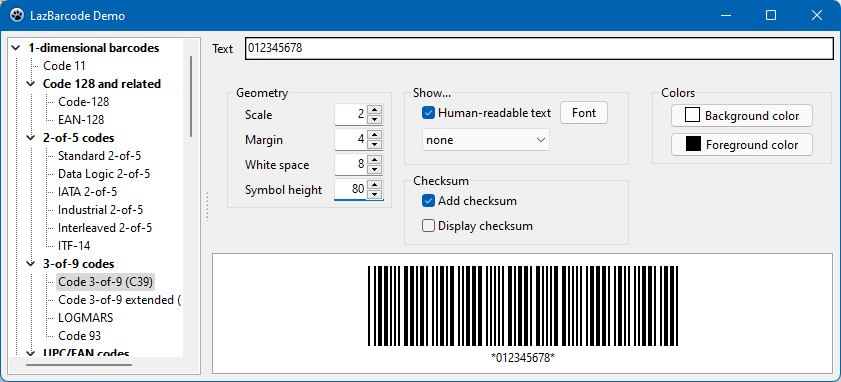
A demo project is contained in the LazBarcodes installation. It allows to generate barcode from all barcode types supported. Please note that - since the requirements on length and characters changes from type to type - sometimes error messages are displayed; in this case, click on the "Sample text" button to use a predefined sample text for the selected barcode type. A screenshot is displayed at the top of this page.
Final notes
If you need the generation of another barcode and it is present in Zint, please ask for it in the Lazarus forum or mailing lists.
From the Free Pascal wiki, page "LazBarcodes", as it stood on 2023-09-17 after a change by Wp, out of the wiki's dump of 2024-05-26. Copyright stays with the author who wrote it, according to the old wiki's Licensing page. If you have concerns about this material, message the admin.
Talk about this page
Nobody has opened a bench for this page yet. Sign in to open one.