

Lazarus on Raspberry Pi: what changed
Revision 2 to 3. Removed lines have a minus sign; added lines have a plus sign.
| Old | New | Line | |
|---|---|---|---|
| 1 | - | ||
| 1 | + | 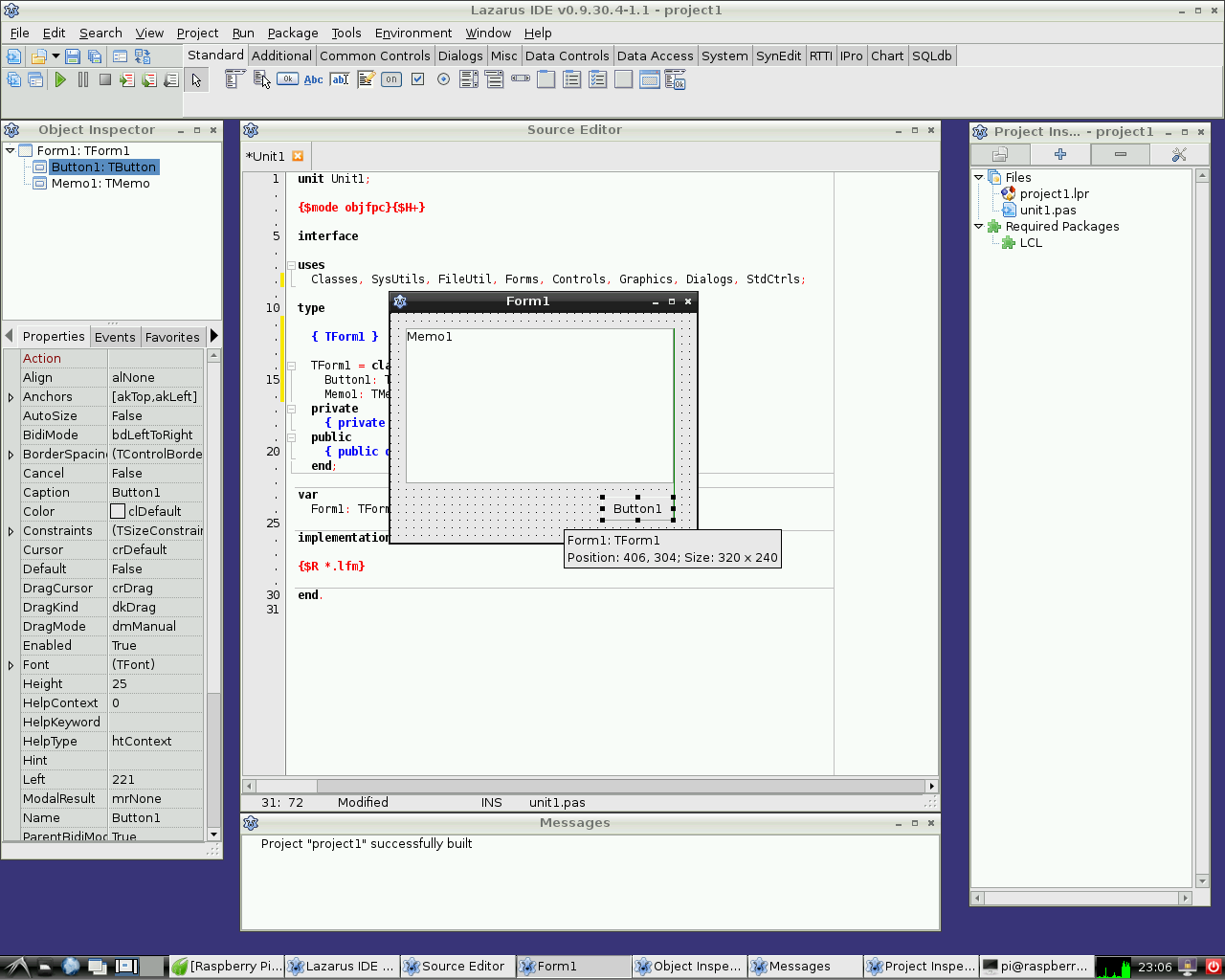 | |
| 2 | 2 | ||
| 3 | 3 | *(Raspberry Pi only)* | |
| 4 | 4 | ||
| 5 | 5 | The **Raspberry Pi** is a credit-card-sized single-board computer. It has been developed in the UK by the Raspberry Pi Foundation with the intention of stimulating the teaching of basic computer science in schools. Raspberry Pis are also used for multiple other purposes that are as different as media servers, robotics and control engineering. | |
| 6 | 6 | ||
| 7 | 7 | The Raspberry Pi Foundation recommends [[Raspbian|the Pasperry Pi OS]] as standard operating system. Alternative systems running on RPI include RISC OS and various [[Portal:Linux|Linux]] distributions, as well as [[Portal:Android|Android]] and [[Portal:FreeBSD|FreeBSD]]. | |
| 8 | 8 | ||
| 9 | 9 | Lazarus runs natively under the Raspbian operating system. | |
| 10 | 10 | ||
| 11 | 11 | ## Installing and compiling Lazarus | |
| 12 | 12 | ||
| 13 | 13 | ### Introduction | |
| 14 | 14 | ||
| 15 | 15 | Installing FPC and Lazarus on a Raspberry Pi is very little different from other Linux boxes, so please refer to [[Installing Lazarus on Linux]]. How ever, there are some RasPi particularities worth noting. | |
| 16 | 16 | ||
| 17 | 17 | - RasPi do not always have enough memory to build Lazarus, this affects the routine rebuild of the IDE that happens when installing packages for example. The solution is to increase swap size (below). | |
| 18 | 18 | - The Lazarus SourceForge repository does not include a pre-made RasPi package. | |
| 19 | 19 | - If you are using the Raspberry Pi OS, its based on Debian and Debian has quite a long release cycle. So, at any one time, the repo provided Lazarus is likely to be out of date and, occasionally, so will the FPC be. | |
| 20 | 20 | - Notwithstanding the above point, at present, late 2023, the Debian Bookworm based Raspberry Pi OS has the appropriate FPC and a Lazarus that suits most people. This will change ! | |
| 21 | 21 | ||
| 22 | 22 | ### Correcting swap file size | |
| 23 | 23 | ||
| 24 | 24 | (Info from forum user "Thaddy", updated.) If you have RPi with memory size less then 4Gb, and you want to build Lazarus from source or use FPCUPdeluxe or just rebuild the IDE after installing a package you need to allocate at least 1G if not 2G of swap. This appears to be particularly so with Raspberry Pi OS based on Bookworm rather than Bullseye. | |
| 25 | 25 | ||
| 26 | 26 | To increase swap you should firstly ensure you have a couple of gig free and - | |
| 27 | 27 | ||
| 28 | 28 | - sudo dphys-swapfile swapoff | |
| 29 | 29 | - sudo nano /etc/dphys-swapfile | |
| 30 | 30 | - in the file, find CONF_SWAPSIZE and change the value to 2048 (or 1024) and save it. | |
| 31 | 31 | - sudo dphys-swapfile setup | |
| 32 | 32 | - sudo dphys-swapfile swapon | |
| 33 | 33 | ||
| 34 | 34 | You should now see the file, /var/swap, increase to 2G (or 1G). On some other operating systems, eg a "pure" debian, you may need to install the dphys-swapfile package. | |
| 35 | 35 | ||
| 36 | 36 | If you don't have enough memory (real memory and swap) then, your compile processes (particularly assembling) will stop and the whole machine freezes. You have been warned ! | |
| 37 | 37 | ||
| 38 | 38 | While you are fiddling with the swap file, consider, if possible, moving the swap file from /var/swap to somewhere off the SDCard, unfortunately, SDCards are not good at the repetitive writes that happen in a swap file. Not critical but a good idea. | |
| 39 | 39 | ||
| 40 | 40 | If you have problems making the swap file, see this <https://forums.raspberrypi.com/viewtopic.php?p=1881546> | |
| 41 | 41 | ||
| 42 | 42 | ### Simple installation | |
| 43 | 43 | ||
| 44 | 44 | Most distributions have a graphic installer of some sort, look for entries like "Add / Remove Software" in your menus. Alternatively, all systems will have a command line interface. As hinted above, its likely that your distribution will have a current FPC, if so, best to use it. More interesting is Lazarus, as it changes more frequently, consider your needs. The Raspberry Pi OS, late 2023, has Lazarus 2.2.6. While version 3.0 of Lazarus is released now, it will take awhile to make it into distro's repos. Some users will, for the time being, be quite happy with Lazarus 2.2.6. Later on, you can remove the distro supplied Lazarus 2.2.6 and build 3.0 from source yourself, its easy. | |
| 45 | 45 | ||
| 46 | 46 | A advantage of using the distro supplied FPC and Lazarus is that they test them, make sure everything needed is there and its very easy. | |
| 47 | 47 | ||
| 48 | 48 | See [the Package Manager Model](https://wiki.freepascal.org/Installing_Lazarus_on_Linux#The_Package_Manager_Model). | |
| 49 | 49 | ||
| 50 | 50 | ### Not Quite as Simple Install | |
| 51 | 51 | ||
| 52 | 52 | There are two other functional alternatives for installing Lazarus, building from source and using [[fpcupdeluxe]], an application that you run on your computer to manage your FPC / Lazarus install. Its very suited to people who just want to get a working install quickly, fpcupdeluxe will do the thinking for them. Fpcupdelux will install (and manage) both FPC and Lazarus and you should use them together. | |
| 53 | 53 | ||
| 54 | 54 | Installing a non distro FPC is a touch more complicated still. Its [possible](https://wiki.freepascal.org/Installing_the_Free_Pascal_Compiler#Compiling_the_FPC_source.2C_using_preinstalled_FPC) to build a new FPC using an older, existing, FPC, might be a challenge for a less powerful Pi. An better option is to [download and install](https://wiki.freepascal.org/Installing_the_Free_Pascal_Compiler#Downloading_FPC_tar_balls) a tarball. | |
| 55 | 55 | ||
| 56 | 56 | Its quite reasonable to use the distro provided FPC and build your own Lazarus. In fact, many users have several lazarus versions installed this way. | |
| 57 | 57 | ||
| 58 | 58 | Building Lazarus [from source](https://wiki.freepascal.org/Installing_Lazarus_on_Linux#Build_Lazarus_from_Source) on a Raspberry Pi is no different from other Linuxes, except, perhaps, for the [[Lazarus on Raspberry Pi|memory issue]]. | |
| 59 | 59 | ||
| 60 | 60 | <File:Lazarus> 0 9 30 4 on RPi 2.png\|Lazarus "out of the box" on Raspberry Pi 2 | |
| 61 | 61 | ||
| 62 | 62 | ### Cross compiling for the Raspberry Pi from Windows | |
| 63 | 63 | ||
| 64 | 64 | 1\. Using fpcup | |
| 65 | 65 | ||
| 66 | 66 | One way is to use fpcup to set up a cross compiler; follow these instructions: [[fpcup|fpcup#Linux_ARM_cross_compiler]] | |
| 67 | 67 | ||
| 68 | 68 | 2\. Using scripts | |
| 69 | 69 | ||
| 70 | 70 | Alternatively, for a more manual approach using batch files, you can follow these steps. | |
| 71 | 71 | ||
| 72 | 72 | 2.1 Prerequisites | |
| 73 | 73 | ||
| 74 | 74 | `FPC 2.7.1 or higher installed with source code`\ | |
| 75 | 75 | `Install the Windows version from the Linaro binutils for linux gnueabihf into %FPCPATH%/bin/win32-armhf-linux `[`1`](https://launchpad.net/linaro-toolchain-binaries/trunk/2013.10/+download/gcc-linaro-arm-linux-gnueabihf-4.8-2013.10_win32.zip) | |
| 76 | 76 | ||
| 77 | 77 | 2.2 Example Windows Batch file (adapt paths as needed) | |
| 78 | 78 | ||
| 79 | 79 | ``` bat | |
| 80 | 80 | set PATH=C:\pp\bin\i386-win32;%PATH%; | |
| 81 | 81 | set FPCMAKEPATH=C:/pp | |
| 82 | 82 | set FPCPATH=C:/pp | |
| 83 | 83 | set OUTPATH=C:/pp271 | |
| 84 | 84 | %FPCMAKEPATH%/bin/i386-win32/make distclean OS_TARGET=linux CPU_TARGET=arm CROSSBINDIR=%FPCPATH%/bin/win32-armhf-linux CROSSOPT="-CpARMV6 -CfVFPV2 -OoFASTMATH" FPC=%FPCPATH%/bin/i386-win32/ppc386.exe | |
| 85 | 85 | ||
| 86 | 86 | %FPCMAKEPATH%/bin/i386-win32/make all OS_TARGET=linux CPU_TARGET=arm CROSSBINDIR=%FPCPATH%/bin/win32-armhf-linux CROSSOPT="-CpARMV6 -CfVFPV2 -OoFASTMATH" FPC=%FPCPATH%/bin/i386-win32/ppc386.exe | |
| 87 | 87 | if errorlevel 1 goto quit | |
| 88 | 88 | %FPCMAKEPATH%/bin/i386-win32/make crossinstall CROSSBINDIR=%FPCPATH%/bin/win32-armhf-linux CROSSOPT="-CpARMV6 -CfVFPV2 -OoFASTMATH" OS_TARGET=linux CPU_TARGET=arm FPC=%FPCPATH%/bin/i386-win32/ppc386.exe INSTALL_BASEDIR=%OUTPATH% | |
| 89 | 89 | ||
| 90 | 90 | :quit | |
| 91 | 91 | pause | |
| 92 | 92 | ``` | |
| 93 | 93 | ||
| 94 | 94 | With the resulting ppcrossarm.exe and ARM RTL you will be able to build a cross Lazarus version as usual and compile FPC projects for the Raspberry Pi and other armhf devices. | |
| 95 | 95 | ||
| 96 | 96 | Remember that not all - especially Windows - libraries are available for Linux arm. | |
| 97 | 97 | ||
| 98 | 98 | ### Cross compiling for the Raspberry Pi from Linux | |
| 99 | 99 | ||
| 100 | 100 | Please see this page <https://wiki.freepascal.org/Cross_Compile_to_RasPi_from_Linux> | |
| 101 | 101 | ||
| 102 | 102 | ## Accessing external hardware | |
| 103 | 103 | ||
| 104 | - | ||
| 104 | + | 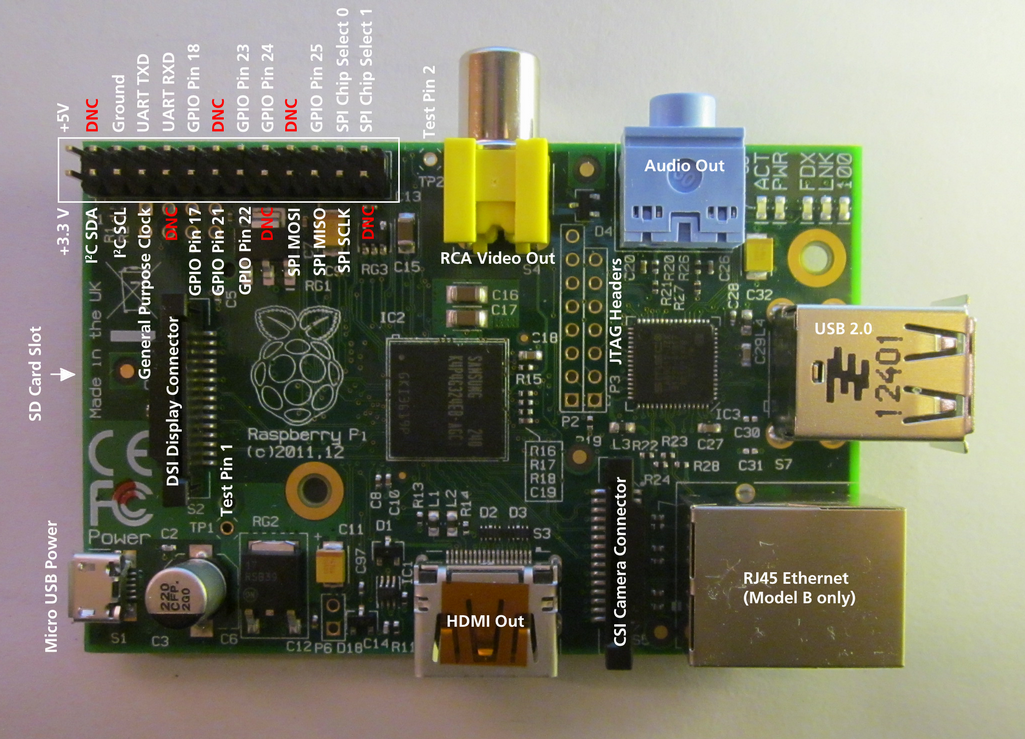 | |
| 105 | 105 | ||
| 106 | 106 | One of the goals in the development of Raspberry Pi was to facilitate effortless access to external devices like sensors and actuators. There are many ways to access the I/O facilities from Lazarus and Free Pascal: | |
| 107 | 107 | ||
| 108 | 108 | 1. [[Lazarus on Raspberry Pi|Direct access]] using the [[BaseUnix]] unit | |
| 109 | 109 | 2. Access through [[Lazarus on Raspberry Pi|encapsulated shell calls]] | |
| 110 | 110 | 3. Access through the [[Lazarus on Raspberry Pi|wiringPi library]]. | |
| 111 | 111 | 4. Access through Unit [[Lazarus on Raspberry Pi|rpi_hal]]. | |
| 112 | 112 | 5. Access through Unit [[Lazarus on Raspberry Pi|PiGpio]]. | |
| 113 | 113 | 6. Access through the [PascalIO](https://github.com/SAmeis/pascalio) library. | |
| 114 | 114 | 7. Access through the [PXL](http://asphyre.net/products/pxl) library. | |
| 115 | 115 | ||
| 116 | 116 | ### Native hardware access | |
| 117 | 117 | ||
| 118 | 118 | 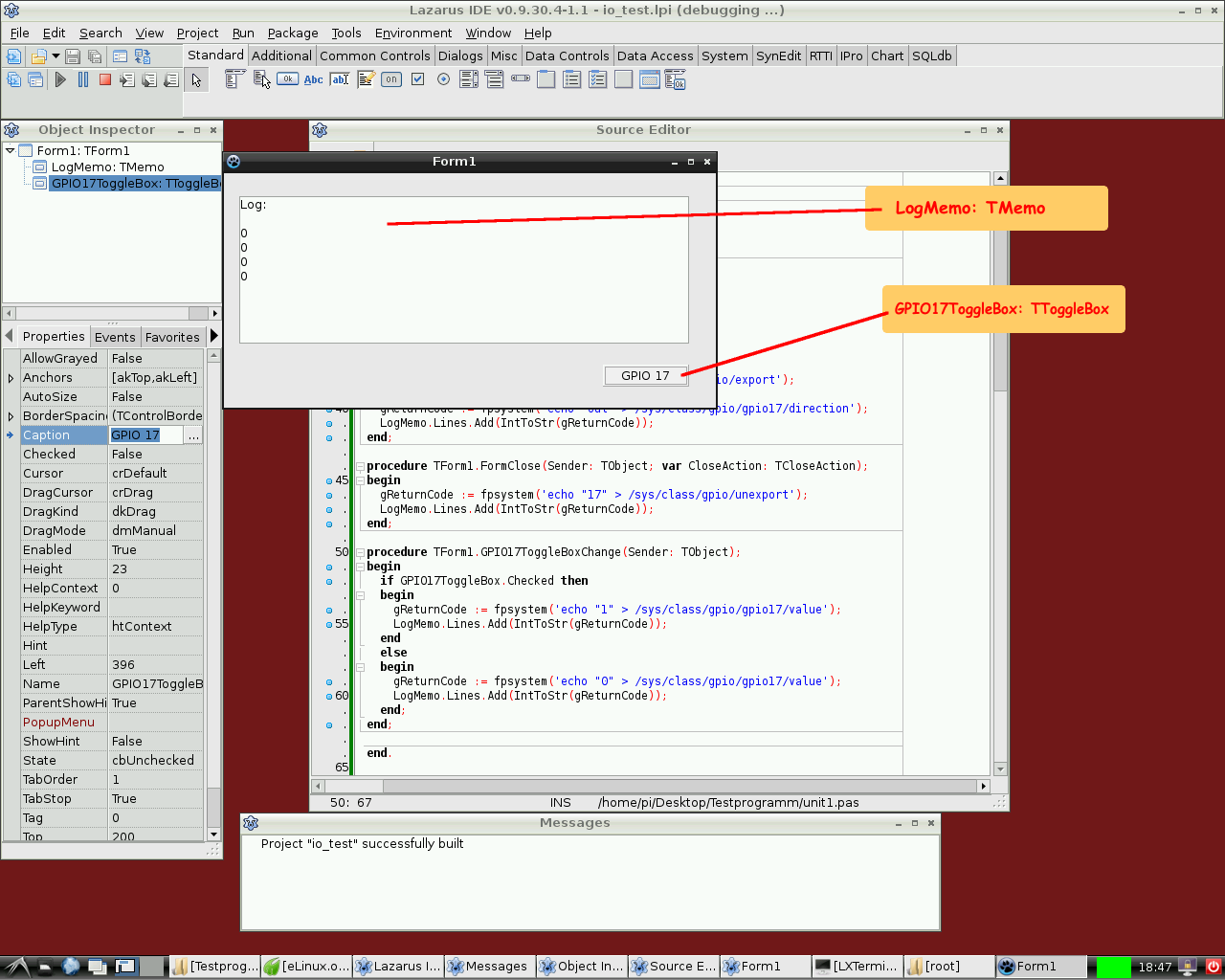 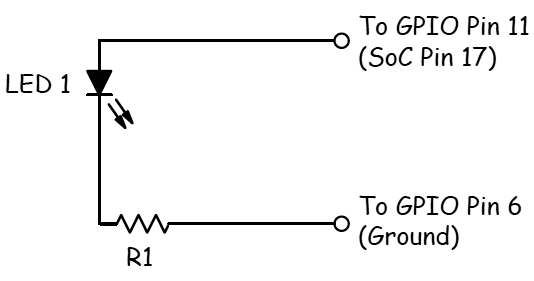 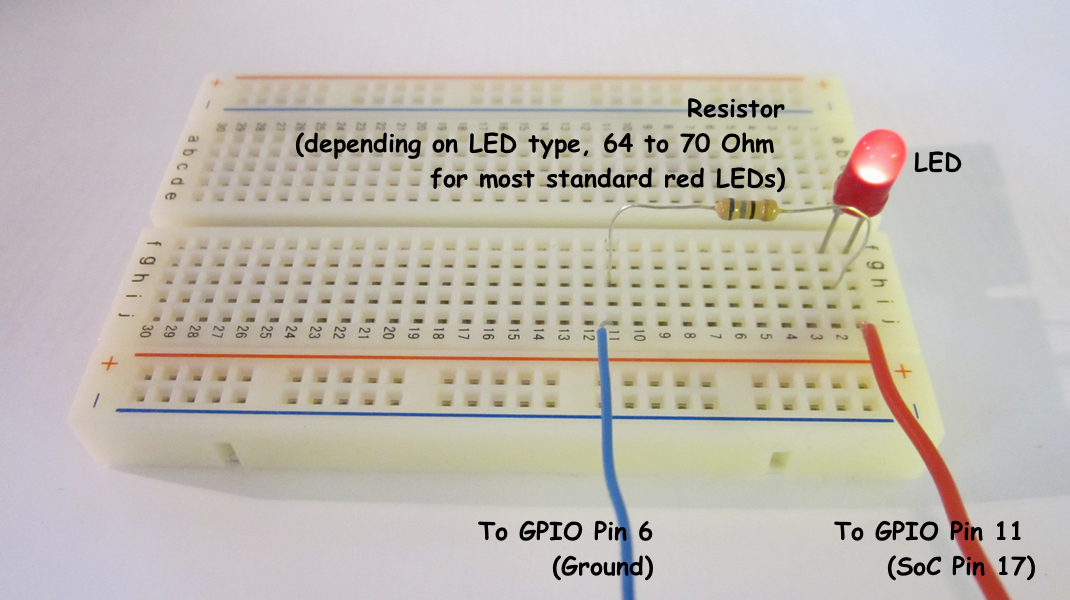 This method provides access to external hardware that doesn't require additional libraries. The only requirement is the BaseUnix library that is part of Free Pascal's RTL. | |
| 119 | 119 | ||
| 120 | 120 | #### Switching a device via the GPIO port | |
| 121 | 121 | ||
| 122 | 122 | The following example lists a simple program that controls the GPIO pin 17 as output to switch an LED, transistor or relays. This program contains a [[doc:lcl/stdctrls/ttogglebox.html|ToggleBox]] with name *GPIO17ToggleBox* and for logging return codes a [[doc:lcl/stdctrls/tmemo.html|TMemo]] called *LogMemo*. | |
| 123 | 123 | ||
| 124 | 124 | For the example, the anode of a LED has been connected with Pin 11 on the Pi's connector (corresponding to GPIO pin 17 of the BCM2835 SOC) and the LED's cathode was wired via a 68 Ohm resistor to pin 6 of the connector (GND) as previously described by Upton and Halfacree. Subsequently, the LED may be switched on and off with the application's toggle box. | |
| 125 | 125 | ||
| 126 | 126 | The code may at first require to be run as root, i.e. either from a root account (not recommended) or via **su**. A better option is to add the user to the gpio group, the i2c group and the spi group. | |
| 127 | 127 | ||
| 128 | 128 | ``` bash | |
| 129 | 129 | sudo adduser pi gpio | |
| 130 | 130 | sudo adduser pi i2c | |
| 131 | 131 | sudo adduser pi spi | |
| 132 | 132 | ``` | |
| 133 | 133 | ||
| 134 | 134 | *Controlling unit:* | |
| 135 | 135 | ||
| 136 | 136 | ``` pascal | |
| 137 | 137 | unit Unit1; | |
| 138 | 138 | ||
| 139 | 139 | {Demo application for GPIO on Raspberry Pi} | |
| 140 | 140 | {Inspired by the Python input/output demo application by Gareth Halfacree} | |
| 141 | 141 | {written for the Raspberry Pi User Guide, ISBN 978-1-118-46446-5} | |
| 142 | 142 | ||
| 143 | 143 | {$mode objfpc}{$H+} | |
| 144 | 144 | ||
| 145 | 145 | interface | |
| 146 | 146 | ||
| 147 | 147 | uses | |
| 148 | 148 | Classes, SysUtils, FileUtil, Forms, Controls, Graphics, Dialogs, StdCtrls, | |
| 149 | 149 | Unix, BaseUnix; | |
| 150 | 150 | ||
| 151 | 151 | type | |
| 152 | 152 | ||
| 153 | 153 | { TForm1 } | |
| 154 | 154 | ||
| 155 | 155 | TForm1 = class(TForm) | |
| 156 | 156 | LogMemo: TMemo; | |
| 157 | 157 | GPIO17ToggleBox: TToggleBox; | |
| 158 | 158 | procedure FormActivate(Sender: TObject); | |
| 159 | 159 | procedure FormClose(Sender: TObject; var CloseAction: TCloseAction); | |
| 160 | 160 | procedure GPIO17ToggleBoxChange(Sender: TObject); | |
| 161 | 161 | private | |
| 162 | 162 | { private declarations } | |
| 163 | 163 | public | |
| 164 | 164 | { public declarations } | |
| 165 | 165 | end; | |
| 166 | 166 | ||
| 167 | 167 | const | |
| 168 | 168 | PIN_17: PChar = '17'; | |
| 169 | 169 | PIN_ON: PChar = '1'; | |
| 170 | 170 | PIN_OFF: PChar = '0'; | |
| 171 | 171 | OUT_DIRECTION: PChar = 'out'; | |
| 172 | 172 | ||
| 173 | 173 | var | |
| 174 | 174 | Form1: TForm1; | |
| 175 | 175 | gReturnCode: longint; {stores the result of the IO operation} | |
| 176 | 176 | ||
| 177 | 177 | implementation | |
| 178 | 178 | ||
| 179 | 179 | {$R *.lfm} | |
| 180 | 180 | ||
| 181 | 181 | { TForm1 } | |
| 182 | 182 | ||
| 183 | 183 | procedure TForm1.FormActivate(Sender: TObject); | |
| 184 | 184 | var | |
| 185 | 185 | fileDesc: integer; | |
| 186 | 186 | begin | |
| 187 | 187 | { Prepare SoC pin 17 (pin 11 on GPIO port) for access: } | |
| 188 | 188 | try | |
| 189 | 189 | fileDesc := fpopen('/sys/class/gpio/export', O_WrOnly); | |
| 190 | 190 | gReturnCode := fpwrite(fileDesc, PIN_17[0], 2); | |
| 191 | 191 | LogMemo.Lines.Add(IntToStr(gReturnCode)); | |
| 192 | 192 | finally | |
| 193 | 193 | gReturnCode := fpclose(fileDesc); | |
| 194 | 194 | LogMemo.Lines.Add(IntToStr(gReturnCode)); | |
| 195 | 195 | end; | |
| 196 | 196 | { Set SoC pin 17 as output: } | |
| 197 | 197 | try | |
| 198 | 198 | fileDesc := fpopen('/sys/class/gpio/gpio17/direction', O_WrOnly); | |
| 199 | 199 | gReturnCode := fpwrite(fileDesc, OUT_DIRECTION[0], 3); | |
| 200 | 200 | LogMemo.Lines.Add(IntToStr(gReturnCode)); | |
| 201 | 201 | finally | |
| 202 | 202 | gReturnCode := fpclose(fileDesc); | |
| 203 | 203 | LogMemo.Lines.Add(IntToStr(gReturnCode)); | |
| 204 | 204 | end; | |
| 205 | 205 | end; | |
| 206 | 206 | ||
| 207 | 207 | procedure TForm1.FormClose(Sender: TObject; var CloseAction: TCloseAction); | |
| 208 | 208 | var | |
| 209 | 209 | fileDesc: integer; | |
| 210 | 210 | begin | |
| 211 | 211 | { Free SoC pin 17: } | |
| 212 | 212 | try | |
| 213 | 213 | fileDesc := fpopen('/sys/class/gpio/unexport', O_WrOnly); | |
| 214 | 214 | gReturnCode := fpwrite(fileDesc, PIN_17[0], 2); | |
| 215 | 215 | LogMemo.Lines.Add(IntToStr(gReturnCode)); | |
| 216 | 216 | finally | |
| 217 | 217 | gReturnCode := fpclose(fileDesc); | |
| 218 | 218 | LogMemo.Lines.Add(IntToStr(gReturnCode)); | |
| 219 | 219 | end; | |
| 220 | 220 | end; | |
| 221 | 221 | ||
| 222 | 222 | procedure TForm1.GPIO17ToggleBoxChange(Sender: TObject); | |
| 223 | 223 | var | |
| 224 | 224 | fileDesc: integer; | |
| 225 | 225 | begin | |
| 226 | 226 | if GPIO17ToggleBox.Checked then | |
| 227 | 227 | begin | |
| 228 | 228 | { Swith SoC pin 17 on: } | |
| 229 | 229 | try | |
| 230 | 230 | fileDesc := fpopen('/sys/class/gpio/gpio17/value', O_WrOnly); | |
| 231 | 231 | gReturnCode := fpwrite(fileDesc, PIN_ON[0], 1); | |
| 232 | 232 | LogMemo.Lines.Add(IntToStr(gReturnCode)); | |
| 233 | 233 | finally | |
| 234 | 234 | gReturnCode := fpclose(fileDesc); | |
| 235 | 235 | LogMemo.Lines.Add(IntToStr(gReturnCode)); | |
| 236 | 236 | end; | |
| 237 | 237 | end | |
| 238 | 238 | else | |
| 239 | 239 | begin | |
| 240 | 240 | { Switch SoC pin 17 off: } | |
| 241 | 241 | try | |
| 242 | 242 | fileDesc := fpopen('/sys/class/gpio/gpio17/value', O_WrOnly); | |
| 243 | 243 | gReturnCode := fpwrite(fileDesc, PIN_OFF[0], 1); | |
| 244 | 244 | LogMemo.Lines.Add(IntToStr(gReturnCode)); | |
| 245 | 245 | finally | |
| 246 | 246 | gReturnCode := fpclose(fileDesc); | |
| 247 | 247 | LogMemo.Lines.Add(IntToStr(gReturnCode)); | |
| 248 | 248 | end; | |
| 249 | 249 | end; | |
| 250 | 250 | end; | |
| 251 | 251 | ||
| 252 | 252 | end. | |
| 253 | 253 | ``` | |
| 254 | 254 | ||
| 255 | 255 | *Main program:* | |
| 256 | 256 | ||
| 257 | 257 | ``` pascal | |
| 258 | 258 | program io_test; | |
| 259 | 259 | ||
| 260 | 260 | {$mode objfpc}{$H+} | |
| 261 | 261 | ||
| 262 | 262 | uses | |
| 263 | 263 | {$IFDEF UNIX}{$IFDEF UseCThreads} | |
| 264 | 264 | cthreads, | |
| 265 | 265 | {$ENDIF}{$ENDIF} | |
| 266 | 266 | Interfaces, // this includes the LCL widgetset | |
| 267 | 267 | Forms, Unit1 | |
| 268 | 268 | { you can add units after this }; | |
| 269 | 269 | ||
| 270 | 270 | {$R *.res} | |
| 271 | 271 | ||
| 272 | 272 | begin | |
| 273 | 273 | Application.Initialize; | |
| 274 | 274 | Application.CreateForm(TForm1, Form1); | |
| 275 | 275 | Application.Run; | |
| 276 | 276 | end. | |
| 277 | 277 | ``` | |
| 278 | 278 | ||
| 279 | 279 | #### Reading the status of a pin | |
| 280 | 280 | ||
| 281 | 281 | 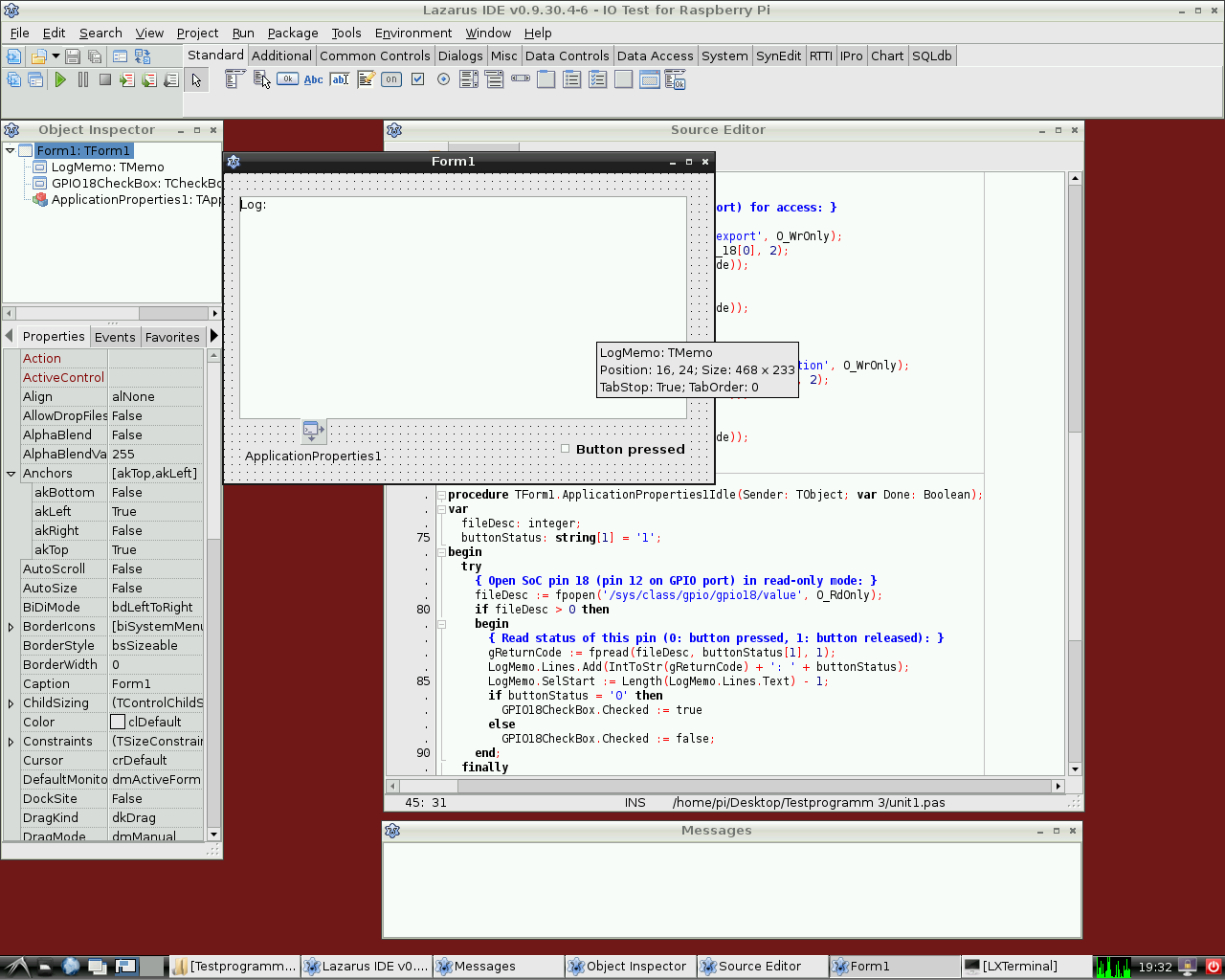 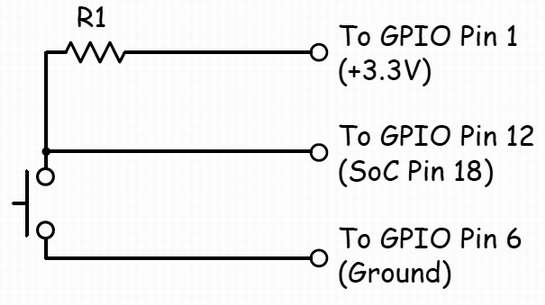 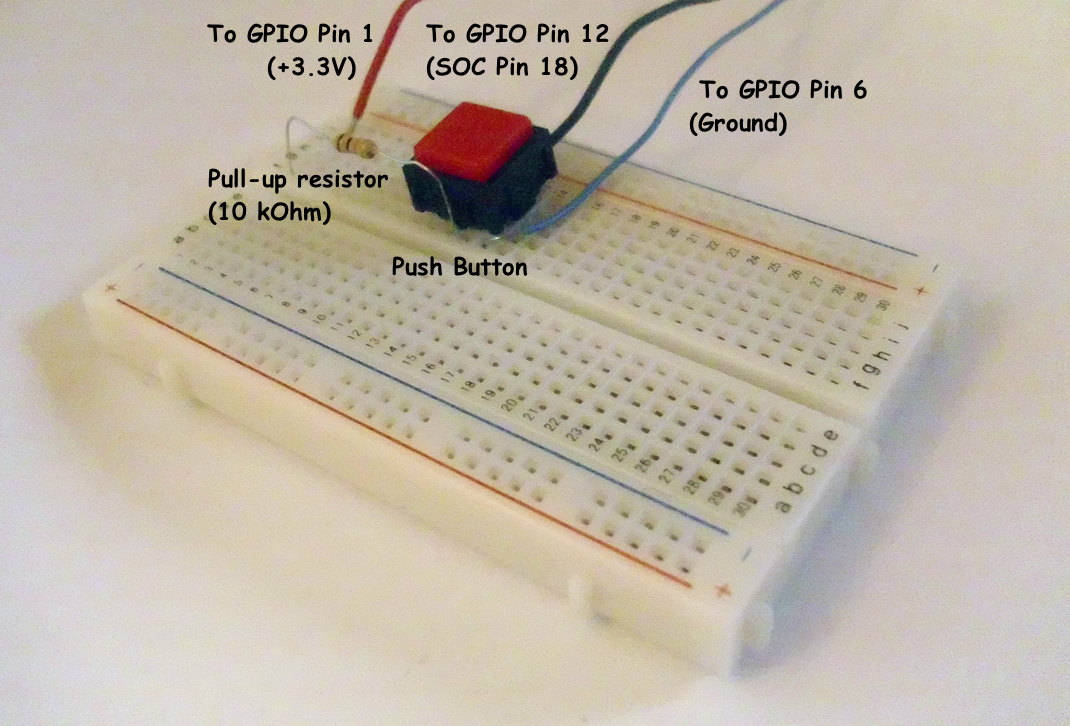 | |
| 282 | 282 | ||
| 283 | 283 | Of course it is also possible to read the status of e.g. a switch that is connected to the GPIO port. | |
| 284 | 284 | ||
| 285 | 285 | The following simple example is very similar to the previous one. It controls the GPIO pin 18 as input for a binary device like a switch, transistor or relais. This program contains a [[doc:lcl/stdctrls/tcheckbox.html|CheckBox]] with name *GPIO18CheckBox* and for logging return codes a [[doc:lcl/stdctrls/tmemo.html|TMemo]] called *LogMemo*. | |
| 286 | 286 | ||
| 287 | 287 | For the example, one pole of a push-button has been connected to Pin 12 on the Pi's connector (corresponding to GPIO pin 18 of the BCM2835 SOC) and via a 10k Ohm pull-up resistor with pin 1 (+3.3V, see wiring diagram). The other pole has been wired to pin 6 of the connector (GND). The program senses the status of the button and correspondingly switches the checkbox on or off, respectively. | |
| 288 | 288 | ||
| 289 | 289 | Note that the potential of pin 18 is high if the button is released (by virtue of the connection to pin 1 via the pull-up resistor) and low if it is pressed (since in this situation pin 18 is connected to GND via the switch). Therefore, the GPIO pin signals 0 if the button is pressed and 1 if it is released. | |
| 290 | 290 | ||
| 291 | 291 | This program has again to be executed as root. | |
| 292 | 292 | ||
| 293 | 293 | *Controlling unit:* | |
| 294 | 294 | ||
| 295 | 295 | ``` pascal | |
| 296 | 296 | unit Unit1; | |
| 297 | 297 | ||
| 298 | 298 | {Demo application for GPIO on Raspberry Pi} | |
| 299 | 299 | {Inspired by the Python input/output demo application by Gareth Halfacree} | |
| 300 | 300 | {written for the Raspberry Pi User Guide, ISBN 978-1-118-46446-5} | |
| 301 | 301 | ||
| 302 | 302 | {This application reads the status of a push-button} | |
| 303 | 303 | ||
| 304 | 304 | {$mode objfpc}{$H+} | |
| 305 | 305 | ||
| 306 | 306 | interface | |
| 307 | 307 | ||
| 308 | 308 | uses | |
| 309 | 309 | Classes, SysUtils, FileUtil, Forms, Controls, Graphics, Dialogs, StdCtrls, | |
| 310 | 310 | ButtonPanel, Unix, BaseUnix; | |
| 311 | 311 | ||
| 312 | 312 | type | |
| 313 | 313 | ||
| 314 | 314 | { TForm1 } | |
| 315 | 315 | ||
| 316 | 316 | TForm1 = class(TForm) | |
| 317 | 317 | ApplicationProperties1: TApplicationProperties; | |
| 318 | 318 | GPIO18CheckBox: TCheckBox; | |
| 319 | 319 | LogMemo: TMemo; | |
| 320 | 320 | procedure ApplicationProperties1Idle(Sender: TObject; var Done: Boolean); | |
| 321 | 321 | procedure FormActivate(Sender: TObject); | |
| 322 | 322 | procedure FormClose(Sender: TObject; var CloseAction: TCloseAction); | |
| 323 | 323 | private | |
| 324 | 324 | { private declarations } | |
| 325 | 325 | public | |
| 326 | 326 | { public declarations } | |
| 327 | 327 | end; | |
| 328 | 328 | ||
| 329 | 329 | const | |
| 330 | 330 | PIN_18: PChar = '18'; | |
| 331 | 331 | IN_DIRECTION: PChar = 'in'; | |
| 332 | 332 | ||
| 333 | 333 | var | |
| 334 | 334 | Form1: TForm1; | |
| 335 | 335 | gReturnCode: longint; {stores the result of the IO operation} | |
| 336 | 336 | ||
| 337 | 337 | implementation | |
| 338 | 338 | ||
| 339 | 339 | {$R *.lfm} | |
| 340 | 340 | ||
| 341 | 341 | { TForm1 } | |
| 342 | 342 | ||
| 343 | 343 | procedure TForm1.FormActivate(Sender: TObject); | |
| 344 | 344 | var | |
| 345 | 345 | fileDesc: integer; | |
| 346 | 346 | begin | |
| 347 | 347 | { Prepare SoC pin 18 (pin 12 on GPIO port) for access: } | |
| 348 | 348 | try | |
| 349 | 349 | fileDesc := fpopen('/sys/class/gpio/export', O_WrOnly); | |
| 350 | 350 | gReturnCode := fpwrite(fileDesc, PIN_18[0], 2); | |
| 351 | 351 | LogMemo.Lines.Add(IntToStr(gReturnCode)); | |
| 352 | 352 | finally | |
| 353 | 353 | gReturnCode := fpclose(fileDesc); | |
| 354 | 354 | LogMemo.Lines.Add(IntToStr(gReturnCode)); | |
| 355 | 355 | end; | |
| 356 | 356 | { Set SoC pin 18 as input: } | |
| 357 | 357 | try | |
| 358 | 358 | fileDesc := fpopen('/sys/class/gpio/gpio18/direction', O_WrOnly); | |
| 359 | 359 | gReturnCode := fpwrite(fileDesc, IN_DIRECTION[0], 2); | |
| 360 | 360 | LogMemo.Lines.Add(IntToStr(gReturnCode)); | |
| 361 | 361 | finally | |
| 362 | 362 | gReturnCode := fpclose(fileDesc); | |
| 363 | 363 | LogMemo.Lines.Add(IntToStr(gReturnCode)); | |
| 364 | 364 | end; | |
| 365 | 365 | end; | |
| 366 | 366 | ||
| 367 | 367 | procedure TForm1.ApplicationProperties1Idle(Sender: TObject; var Done: Boolean); | |
| 368 | 368 | var | |
| 369 | 369 | fileDesc: integer; | |
| 370 | 370 | buttonStatus: string[1] = '1'; | |
| 371 | 371 | begin | |
| 372 | 372 | try | |
| 373 | 373 | { Open SoC pin 18 (pin 12 on GPIO port) in read-only mode: } | |
| 374 | 374 | fileDesc := fpopen('/sys/class/gpio/gpio18/value', O_RdOnly); | |
| 375 | 375 | if fileDesc > 0 then | |
| 376 | 376 | begin | |
| 377 | 377 | { Read status of this pin (0: button pressed, 1: button released): } | |
| 378 | 378 | gReturnCode := fpread(fileDesc, buttonStatus[1], 1); | |
| 379 | 379 | LogMemo.Lines.Add(IntToStr(gReturnCode) + ': ' + buttonStatus); | |
| 380 | 380 | LogMemo.SelStart := Length(LogMemo.Lines.Text) - 1; | |
| 381 | 381 | if buttonStatus = '0' then | |
| 382 | 382 | GPIO18CheckBox.Checked := true | |
| 383 | 383 | else | |
| 384 | 384 | GPIO18CheckBox.Checked := false; | |
| 385 | 385 | end; | |
| 386 | 386 | finally | |
| 387 | 387 | { Close SoC pin 18 (pin 12 on GPIO port) } | |
| 388 | 388 | gReturnCode := fpclose(fileDesc); | |
| 389 | 389 | LogMemo.Lines.Add(IntToStr(gReturnCode)); | |
| 390 | 390 | LogMemo.SelStart := Length(LogMemo.Lines.Text) - 1; | |
| 391 | 391 | end; | |
| 392 | 392 | end; | |
| 393 | 393 | ||
| 394 | 394 | procedure TForm1.FormClose(Sender: TObject; var CloseAction: TCloseAction); | |
| 395 | 395 | var | |
| 396 | 396 | fileDesc: integer; | |
| 397 | 397 | begin | |
| 398 | 398 | { Free SoC pin 18: } | |
| 399 | 399 | try | |
| 400 | 400 | fileDesc := fpopen('/sys/class/gpio/unexport', O_WrOnly); | |
| 401 | 401 | gReturnCode := fpwrite(fileDesc, PIN_18[0], 2); | |
| 402 | 402 | LogMemo.Lines.Add(IntToStr(gReturnCode)); | |
| 403 | 403 | finally | |
| 404 | 404 | gReturnCode := fpclose(fileDesc); | |
| 405 | 405 | LogMemo.Lines.Add(IntToStr(gReturnCode)); | |
| 406 | 406 | end; | |
| 407 | 407 | end; | |
| 408 | 408 | ||
| 409 | 409 | end. | |
| 410 | 410 | ``` | |
| 411 | 411 | ||
| 412 | 412 | The main program is identical to that of the example from above. | |
| 413 | 413 | ||
| 414 | 414 | ### Hardware access via encapsulated shell calls | |
| 415 | 415 | ||
| 416 | 416 | Another way to access the hardware is by encapsulating terminal commands. This is achieved by using the [[Executing External Programs|fpsystem]] function. This method gives access to functions that are not supported by the BaseUnix unit. The following code implements a program that has the same functionality as the program resulting from the first listing above. | |
| 417 | 417 | ||
| 418 | 418 | *Controlling unit:* | |
| 419 | 419 | ||
| 420 | 420 | ``` pascal | |
| 421 | 421 | unit Unit1; | |
| 422 | 422 | ||
| 423 | 423 | {Demo application for GPIO on Raspberry Pi} | |
| 424 | 424 | {Inspired by the Python input/output demo application by Gareth Halfacree} | |
| 425 | 425 | {written for the Raspberry Pi User Guide, ISBN 978-1-118-46446-5} | |
| 426 | 426 | ||
| 427 | 427 | {$mode objfpc}{$H+} | |
| 428 | 428 | ||
| 429 | 429 | interface | |
| 430 | 430 | ||
| 431 | 431 | uses | |
| 432 | 432 | Classes, SysUtils, FileUtil, Forms, Controls, Graphics, Dialogs, StdCtrls, Unix; | |
| 433 | 433 | ||
| 434 | 434 | type | |
| 435 | 435 | ||
| 436 | 436 | { TForm1 } | |
| 437 | 437 | ||
| 438 | 438 | TForm1 = class(TForm) | |
| 439 | 439 | LogMemo: TMemo; | |
| 440 | 440 | GPIO17ToggleBox: TToggleBox; | |
| 441 | 441 | procedure FormActivate(Sender: TObject); | |
| 442 | 442 | procedure FormClose(Sender: TObject; var CloseAction: TCloseAction); | |
| 443 | 443 | procedure GPIO17ToggleBoxChange(Sender: TObject); | |
| 444 | 444 | private | |
| 445 | 445 | { private declarations } | |
| 446 | 446 | public | |
| 447 | 447 | { public declarations } | |
| 448 | 448 | end; | |
| 449 | 449 | ||
| 450 | 450 | var | |
| 451 | 451 | Form1: TForm1; | |
| 452 | 452 | gReturnCode: longint; {stores the result of the IO operation} | |
| 453 | 453 | ||
| 454 | 454 | implementation | |
| 455 | 455 | ||
| 456 | 456 | {$R *.lfm} | |
| 457 | 457 | ||
| 458 | 458 | { TForm1 } | |
| 459 | 459 | ||
| 460 | 460 | procedure TForm1.FormActivate(Sender: TObject); | |
| 461 | 461 | begin | |
| 462 | 462 | { Prepare SoC pin 17 (pin 11 on GPIO port) for access: } | |
| 463 | 463 | gReturnCode := fpsystem('echo "17" > /sys/class/gpio/export'); | |
| 464 | 464 | LogMemo.Lines.Add(IntToStr(gReturnCode)); | |
| 465 | 465 | { Set SoC pin 17 as output: } | |
| 466 | 466 | gReturnCode := fpsystem('echo "out" > /sys/class/gpio/gpio17/direction'); | |
| 467 | 467 | LogMemo.Lines.Add(IntToStr(gReturnCode)); | |
| 468 | 468 | end; | |
| 469 | 469 | ||
| 470 | 470 | procedure TForm1.FormClose(Sender: TObject; var CloseAction: TCloseAction); | |
| 471 | 471 | begin | |
| 472 | 472 | { Free SoC pin 17: } | |
| 473 | 473 | gReturnCode := fpsystem('echo "17" > /sys/class/gpio/unexport'); | |
| 474 | 474 | LogMemo.Lines.Add(IntToStr(gReturnCode)); | |
| 475 | 475 | end; | |
| 476 | 476 | ||
| 477 | 477 | procedure TForm1.GPIO17ToggleBoxChange(Sender: TObject); | |
| 478 | 478 | begin | |
| 479 | 479 | if GPIO17ToggleBox.Checked then | |
| 480 | 480 | begin | |
| 481 | 481 | { Swith SoC pin 17 on: } | |
| 482 | 482 | gReturnCode := fpsystem('echo "1" > /sys/class/gpio/gpio17/value'); | |
| 483 | 483 | LogMemo.Lines.Add(IntToStr(gReturnCode)); | |
| 484 | 484 | end | |
| 485 | 485 | else | |
| 486 | 486 | begin | |
| 487 | 487 | { Switch SoC pin 17 off: } | |
| 488 | 488 | gReturnCode := fpsystem('echo "0" > /sys/class/gpio/gpio17/value'); | |
| 489 | 489 | LogMemo.Lines.Add(IntToStr(gReturnCode)); | |
| 490 | 490 | end; | |
| 491 | 491 | end; | |
| 492 | 492 | ||
| 493 | 493 | end. | |
| 494 | 494 | ``` | |
| 495 | 495 | ||
| 496 | 496 | The main program is identical to that of the example above. This program has to be executed with root privileges, too. | |
| 497 | 497 | ||
| 498 | 498 | ### wiringPi procedures and functions | |
| 499 | 499 | ||
| 500 | 500 | Alex Schaller's wrapper unit for Gordon Henderson's Arduino compatible wiringPi library provides a numbering scheme that resembles that of Arduino boards. | |
| 501 | 501 | ||
| 502 | 502 | **Function wiringPiSetup:longint:** Initializes wiringPi system using the wiringPi pin numbering scheme. | |
| 503 | 503 | ||
| 504 | 504 | **Procedure wiringPiGpioMode(mode:longint):** Initializes wiringPi system with the Broadcom GPIO pin numbering scheme. | |
| 505 | 505 | ||
| 506 | 506 | **Procedure pullUpDnControl(pin:longint;** pud:longint): controls the internal pull-up/down resistors on a GPIO pin. | |
| 507 | 507 | ||
| 508 | 508 | **Procedure pinMode(pin:longint; mode:longint):** sets the mode of a pin to either INPUT, OUTPUT, or PWM_OUTPUT. | |
| 509 | 509 | ||
| 510 | 510 | **Procedure digitalWrite(pin:longint; value:longint):** sets an output bit. | |
| 511 | 511 | ||
| 512 | 512 | **Procedure pwmWrite(pin:longint; value:longint):** sets an output PWM value between 0 and 1024. | |
| 513 | 513 | ||
| 514 | 514 | **Function digitalRead(pin:longint):longint:** reads the value of a given Pin, returning 1 or 0. | |
| 515 | 515 | ||
| 516 | 516 | **Procedure delay(howLong:dword):** waits for at least howLong milliseconds. | |
| 517 | 517 | ||
| 518 | 518 | **Procedure delayMicroseconds(howLong:dword):** waits for at least howLong microseconds. | |
| 519 | 519 | ||
| 520 | 520 | **Function millis:dword:** returns the number of milliseconds since the program called one of the wiringPiSetup functions. | |
| 521 | 521 | ||
| 522 | 522 | ### rpi_hal-Hardware Abstraction Library (GPIO, I2C and SPI functions and procedures) | |
| 523 | 523 | ||
| 524 | 524 | This Unit with around 1700 Lines of Code provided by Stefan Fischer, delivers procedures and functions to access the rpi HW I2C, SPI and GPIO: | |
| 525 | 525 | ||
| 526 | 526 | Just an excerpt of the available functions and procedures: | |
| 527 | 527 | ||
| 528 | 528 | **procedure gpio_set_pin (pin:longword;highlevel:boolean);** { Set RPi GPIO pin to high or low level; Speed @ 700MHz -\> 0.65MHz } | |
| 529 | 529 | ||
| 530 | 530 | **function gpio_get_PIN (pin:longword):boolean;** { Get RPi GPIO pin Level is true when Pin level is '1'; false when '0'; Speed @ 700MHz -\> 1.17MHz } | |
| 531 | 531 | ||
| 532 | 532 | **procedure gpio_set_input (pin:longword);** { Set RPi GPIO pin to input direction } | |
| 533 | 533 | ||
| 534 | 534 | **procedure gpio_set_output(pin:longword);** { Set RPi GPIO pin to output direction } | |
| 535 | 535 | ||
| 536 | 536 | **procedure gpio_set_alt (pin,altfunc:longword);** { Set RPi GPIO pin to alternate function nr. 0..5 } | |
| 537 | 537 | ||
| 538 | 538 | **procedure gpio_set_gppud (mask:longword);** { set RPi GPIO Pull-up/down Register (GPPUD) with mask } | |
| 539 | 539 | ||
| 540 | 540 | ... | |
| 541 | 541 | ||
| 542 | 542 | **function rpi_snr :string;** { delivers SNR: 0000000012345678 } | |
| 543 | 543 | ||
| 544 | 544 | **function rpi_hw :string;** { delivers Processor Type: BCM2708 } | |
| 545 | 545 | ||
| 546 | 546 | **function rpi_proc:string;** { ARMv6-compatible processor rev 7 (v6l) } | |
| 547 | 547 | ||
| 548 | 548 | ... | |
| 549 | 549 | ||
| 550 | 550 | **function i2c_bus_write(baseadr,reg:word; var <data:databuf_t>; lgt:byte; testnr:integer) : integer;** | |
| 551 | 551 | ||
| 552 | 552 | **function i2c_bus_read (baseadr,reg:word; var <data:databuf_t>; lgt:byte; testnr:integer) : integer;** | |
| 553 | 553 | ||
| 554 | 554 | **function i2c_string_read(baseadr,reg:word; var <data:databuf_t>; lgt:byte; testnr:integer) : string;** | |
| 555 | 555 | ||
| 556 | 556 | **function i2c_string_write(baseadr,reg:word; s:string; testnr:integer) : integer;** | |
| 557 | 557 | ||
| 558 | 558 | ... | |
| 559 | 559 | ||
| 560 | 560 | **procedure SPI_Write(devnum:byte; reg,data:word);** | |
| 561 | 561 | ||
| 562 | 562 | **function SPI_Read(devnum:byte; reg:word) : byte;** | |
| 563 | 563 | ||
| 564 | 564 | **procedure SPI_BurstRead2Buffer (devnum,start_reg:byte; xferlen:longword);** | |
| 565 | 565 | ||
| 566 | 566 | **procedure SPI_BurstWriteBuffer (devnum,start_reg:byte; xferlen:longword);** { Write 'len' Bytes from Buffer SPI Dev startig at address 'reg' } | |
| 567 | 567 | ||
| 568 | 568 | ... | |
| 569 | 569 | ||
| 570 | 570 | *Test Program (testrpi.pas):* | |
| 571 | 571 | ||
| 572 | 572 | ``` pascal | |
| 573 | 573 | //Simple Test program, which is using rpi_hal; | |
| 574 | 574 | ||
| 575 | 575 | program testrpi; | |
| 576 | 576 | uses rpi_hal; | |
| 577 | 577 | begin | |
| 578 | 578 | writeln('Show CPU-Info, RPI-HW-Info and Registers:'); | |
| 579 | 579 | rpi_show_all_info; | |
| 580 | 580 | writeln('Let Status LED Blink. Using GPIO functions:'); | |
| 581 | 581 | GPIO_PIN_TOGGLE_TEST; | |
| 582 | 582 | writeln('Test SPI Read function. (piggy back board with installed RFM22B Module is required!)'); | |
| 583 | 583 | Test_SPI; | |
| 584 | 584 | end. | |
| 585 | 585 | ``` | |
| 586 | 586 | ||
| 587 | 587 | ### PiGpio Low-level native pascal unit (GPIO control instead of wiringPi c library) | |
| 588 | 588 | ||
| 589 | 589 | *This Unit (pigpio.pas[2](https://docs.google.com/file/d/0B-b-5ooIWPvGN1BIcEJzRDgyeUE/edit?usp=sharing)) with 270 Lines of Code provided by Gabor Szollosi, works very fast (for ex. GPIO pin output switching frequency 8 MHz) :* | |
| 590 | 590 | ||
| 591 | 591 | ``` pascal | |
| 592 | 592 | ||
| 593 | 593 | unit PiGpio; | |
| 594 | 594 | { | |
| 595 | 595 | BCM2835 GPIO Registry Driver, also can use to manipulate cpu other registry areas | |
| 596 | 596 | ||
| 597 | 597 | This code is tested only Broadcom bcm2835 cpu, different arm cpus may need different | |
| 598 | 598 | gpio driver implementation | |
| 599 | 599 | ||
| 600 | 600 | 2013 Gabor Szollosi | |
| 601 | 601 | } | |
| 602 | 602 | {$mode objfpc}{$H+} | |
| 603 | 603 | ||
| 604 | 604 | interface | |
| 605 | 605 | ||
| 606 | 606 | uses | |
| 607 | 607 | Classes, SysUtils; | |
| 608 | 608 | ||
| 609 | 609 | const | |
| 610 | 610 | REG_GPIO = $3F000;// bcm2835 gpio register 0x2000 0000 (RPi1), 0x3F00 0000 (RPi2) | |
| 611 | 611 | // new fpMap uses page offset, one page is 4096 bytes = 0x1000 so simply calculate 0x2000 0000 / 0x1000 = 0x2000 0 | |
| 612 | 612 | PAGE_SIZE = 4096; | |
| 613 | 613 | BLOCK_SIZE = 4096; | |
| 614 | 614 | // The BCM2835 has 54 GPIO pins. | |
| 615 | 615 | // BCM2835 data sheet, Page 90 onwards. | |
| 616 | 616 | // There are 6 control registers, each control the functions of a block | |
| 617 | 617 | // of 10 pins. | |
| 618 | 618 | ||
| 619 | 619 | CLOCK_BASE = (REG_GPIO + $101); | |
| 620 | 620 | GPIO_BASE = (REG_GPIO + $200); | |
| 621 | 621 | GPIO_PWM = (REG_GPIO + $20C); | |
| 622 | 622 | ||
| 623 | 623 | INPUT = 0; | |
| 624 | 624 | OUTPUT = 1; | |
| 625 | 625 | PWM_OUTPUT = 2; | |
| 626 | 626 | LOW = False; | |
| 627 | 627 | HIGH = True; | |
| 628 | 628 | PUD_OFF = 0; | |
| 629 | 629 | PUD_DOWN = 1; | |
| 630 | 630 | PUD_UP = 2; | |
| 631 | 631 | ||
| 632 | 632 | // PWM | |
| 633 | 633 | ||
| 634 | 634 | PWM_CONTROL = 0; | |
| 635 | 635 | PWM_STATUS = 4; | |
| 636 | 636 | PWM0_RANGE = 16; | |
| 637 | 637 | PWM0_DATA = 20; | |
| 638 | 638 | PWM1_RANGE = 32; | |
| 639 | 639 | PWM1_DATA = 36; | |
| 640 | 640 | ||
| 641 | 641 | PWMCLK_CNTL = 160; | |
| 642 | 642 | PWMCLK_DIV = 164; | |
| 643 | 643 | ||
| 644 | 644 | PWM1_MS_MODE = $8000; // Run in MS mode | |
| 645 | 645 | PWM1_USEFIFO = $2000; // Data from FIFO | |
| 646 | 646 | PWM1_REVPOLAR = $1000; // Reverse polarity | |
| 647 | 647 | PWM1_OFFSTATE = $0800; // Ouput Off state | |
| 648 | 648 | PWM1_REPEATFF = $0400; // Repeat last value if FIFO empty | |
| 649 | 649 | PWM1_SERIAL = $0200; // Run in serial mode | |
| 650 | 650 | PWM1_ENABLE = $0100; // Channel Enable | |
| 651 | 651 | ||
| 652 | 652 | PWM0_MS_MODE = $0080; // Run in MS mode | |
| 653 | 653 | PWM0_USEFIFO = $0020; // Data from FIFO | |
| 654 | 654 | PWM0_REVPOLAR = $0010; // Reverse polarity | |
| 655 | 655 | PWM0_OFFSTATE = $0008; // Ouput Off state | |
| 656 | 656 | PWM0_REPEATFF = $0004; // Repeat last value if FIFO empty | |
| 657 | 657 | PWM0_SERIAL = $0002; // Run in serial mode | |
| 658 | 658 | PWM0_ENABLE = $0001; // Channel Enable | |
| 659 | 659 | ||
| 660 | 660 | type | |
| 661 | 661 | ||
| 662 | 662 | { TIoPort } | |
| 663 | 663 | ||
| 664 | 664 | TIoPort = class // IO bank object | |
| 665 | 665 | private // | |
| 666 | 666 | ||
| 667 | 667 | //function get_pinDirection(aPin: TGpIoPin): TGpioPinConf; | |
| 668 | 668 | ||
| 669 | 669 | public | |
| 670 | 670 | FGpio: ^LongWord; | |
| 671 | 671 | FClk: ^LongWord; | |
| 672 | 672 | FPwm: ^LongWord; | |
| 673 | 673 | procedure SetPinMode(gpin, mode: byte); | |
| 674 | 674 | function GetBit(gpin : byte):boolean;inline; // gets pin bit} | |
| 675 | 675 | procedure ClearBit(gpin : byte);inline;// write pin to 0 | |
| 676 | 676 | procedure SetBit(gpin : byte);inline;// write pin to 1 | |
| 677 | 677 | procedure SetPullMode(gpin, mode: byte); | |
| 678 | 678 | procedure PwmWrite(gpin : byte; value : LongWord);inline;// write pin to pwm value | |
| 679 | 679 | end; | |
| 680 | 680 | ||
| 681 | 681 | { TIoDriver } | |
| 682 | 682 | ||
| 683 | 683 | TIoDriver = class | |
| 684 | 684 | private | |
| 685 | 685 | ||
| 686 | 686 | public | |
| 687 | 687 | destructor Destroy;override; | |
| 688 | 688 | function MapIo:boolean;// creates io memory mapping | |
| 689 | 689 | procedure UnmapIoRegisrty(FMap: TIoPort);// close io memory mapping | |
| 690 | 690 | function CreatePort(PortGpio, PortClk, PortPwm: LongWord):TIoPort; // create new IO port | |
| 691 | 691 | end; | |
| 692 | 692 | ||
| 693 | 693 | var | |
| 694 | 694 | ||
| 695 | 695 | fd: integer;// /dev/mem file handle | |
| 696 | 696 | procedure delayNanoseconds (howLong : LongWord); | |
| 697 | 697 | ||
| 698 | 698 | implementation | |
| 699 | 699 | ||
| 700 | 700 | uses | |
| 701 | 701 | baseUnix, Unix; | |
| 702 | 702 | ||
| 703 | 703 | procedure delayNanoseconds (howLong : LongWord); | |
| 704 | 704 | var | |
| 705 | 705 | sleeper, dummy : timespec; | |
| 706 | 706 | begin | |
| 707 | 707 | sleeper.tv_sec := 0 ; | |
| 708 | 708 | sleeper.tv_nsec := howLong ; | |
| 709 | 709 | fpnanosleep (@sleeper,@dummy) ; | |
| 710 | 710 | end; | |
| 711 | 711 | { TIoDriver } | |
| 712 | 712 | //******************************************************************************* | |
| 713 | 713 | destructor TIoDriver.Destroy; | |
| 714 | 714 | begin | |
| 715 | 715 | inherited Destroy; | |
| 716 | 716 | end; | |
| 717 | 717 | //******************************************************************************* | |
| 718 | 718 | function TIoDriver.MapIo: boolean; | |
| 719 | 719 | begin | |
| 720 | 720 | Result := True; | |
| 721 | 721 | fd := fpopen('/dev/mem', O_RdWr or O_Sync); // Open the master /dev/memory device | |
| 722 | 722 | if fd < 0 then | |
| 723 | 723 | begin | |
| 724 | 724 | Result := False; // unsuccessful memory mapping | |
| 725 | 725 | end; | |
| 726 | 726 | // | |
| 727 | 727 | end; | |
| 728 | 728 | //******************************************************************************* | |
| 729 | 729 | procedure TIoDriver.UnmapIoRegisrty(FMap:TIoPort); | |
| 730 | 730 | begin | |
| 731 | 731 | if FMap.FGpio <> nil then | |
| 732 | 732 | begin | |
| 733 | 733 | fpMUnmap(FMap.FGpio,PAGE_SIZE); | |
| 734 | 734 | FMap.FGpio := Nil; | |
| 735 | 735 | end; | |
| 736 | 736 | if FMap.FClk <> nil then | |
| 737 | 737 | begin | |
| 738 | 738 | fpMUnmap(FMap.FClk,PAGE_SIZE); | |
| 739 | 739 | FMap.FClk := Nil; | |
| 740 | 740 | end; | |
| 741 | 741 | if FMap.FPwm <> nil then | |
| 742 | 742 | begin | |
| 743 | 743 | fpMUnmap(FMap.FPwm ,PAGE_SIZE); | |
| 744 | 744 | FMap.FPwm := Nil; | |
| 745 | 745 | end; | |
| 746 | 746 | end; | |
| 747 | 747 | //******************************************************************************* | |
| 748 | 748 | function TIoDriver.CreatePort(PortGpio, PortClk, PortPwm: LongWord): TIoPort; | |
| 749 | 749 | begin | |
| 750 | 750 | Result := TIoPort.Create;// new io port, pascal calls new fpMap, where offst is page sized 4096 bytes!!! | |
| 751 | 751 | Result.FGpio := FpMmap(Nil, PAGE_SIZE, PROT_READ or PROT_WRITE, MAP_SHARED, fd, PortGpio); // port config gpio memory | |
| 752 | 752 | Result.FClk:= FpMmap(Nil, PAGE_SIZE, PROT_READ or PROT_WRITE, MAP_SHARED, fd, PortClk);; // port clk | |
| 753 | 753 | Result.FPwm:= FpMmap(Nil, PAGE_SIZE, PROT_READ or PROT_WRITE, MAP_SHARED, fd, PortPwm);; // port pwm | |
| 754 | 754 | end; | |
| 755 | 755 | //******************************************************************************* | |
| 756 | 756 | procedure TIoPort.SetPinMode(gpin, mode: byte); | |
| 757 | 757 | var | |
| 758 | 758 | fSel, shift, alt : byte; | |
| 759 | 759 | gpiof, clkf, pwmf : ^LongWord; | |
| 760 | 760 | begin | |
| 761 | 761 | fSel := (gpin div 10)*4 ; //Select Gpfsel 0 to 5 register | |
| 762 | 762 | shift := (gpin mod 10)*3 ; //0-9 pin shift | |
| 763 | 763 | gpiof := Pointer(LongWord(Self.FGpio)+fSel); | |
| 764 | 764 | if (mode = INPUT) then | |
| 765 | 765 | gpiof^ := gpiof^ and ($FFFFFFFF - (7 shl shift)) //7 shl shift komplemens - Sets bits to zero = input | |
| 766 | 766 | else if (mode = OUTPUT) then | |
| 767 | 767 | begin | |
| 768 | 768 | gpiof^ := gpiof^ and ($FFFFFFFF - (7 shl shift)) or (1 shl shift); | |
| 769 | 769 | end | |
| 770 | 770 | else if (mode = PWM_OUTPUT) then | |
| 771 | 771 | begin | |
| 772 | 772 | Case gpin of | |
| 773 | 773 | 12,13,40,41,45 : alt:= 4 ; | |
| 774 | 774 | 18,19 : alt:= 2 ; | |
| 775 | 775 | else alt:= 0 ; | |
| 776 | 776 | end; | |
| 777 | 777 | If alt > 0 then | |
| 778 | 778 | begin | |
| 779 | 779 | gpiof^ := gpiof^ and ($FFFFFFFF - (7 shl shift)) or (alt shl shift); | |
| 780 | 780 | clkf := Pointer(LongWord(Self.FClk)+PWMCLK_CNTL); | |
| 781 | 781 | clkf^ := $5A000011 or (1 shl 5) ; //stop clock | |
| 782 | 782 | delayNanoseconds(200); | |
| 783 | 783 | clkf := Pointer(LongWord(Self.FClk)+PWMCLK_DIV); | |
| 784 | 784 | clkf^ := $5A000000 or (32 shl 12) ; // set pwm clock div to 32 (19.2/3 = 600KHz) | |
| 785 | 785 | clkf := Pointer(LongWord(Self.FClk)+PWMCLK_CNTL); | |
| 786 | 786 | clkf^ := $5A000011 ; //start clock | |
| 787 | 787 | Self.ClearBit(gpin); | |
| 788 | 788 | pwmf := Pointer(LongWord(Self.FPwm)+PWM_CONTROL); | |
| 789 | 789 | pwmf^ := 0 ; // Disable PWM | |
| 790 | 790 | delayNanoseconds(200); | |
| 791 | 791 | pwmf := Pointer(LongWord(Self.FPwm)+PWM0_RANGE); | |
| 792 | 792 | pwmf^ := $400 ; //max: 1023 | |
| 793 | 793 | delayNanoseconds(200); | |
| 794 | 794 | pwmf := Pointer(LongWord(Self.FPwm)+PWM1_RANGE); | |
| 795 | 795 | pwmf^ := $400 ; //max: 1023 | |
| 796 | 796 | delayNanoseconds(200); | |
| 797 | 797 | // Enable PWMs | |
| 798 | 798 | pwmf := Pointer(LongWord(Self.FPwm)+PWM0_DATA); | |
| 799 | 799 | pwmf^ := 0 ; //start value | |
| 800 | 800 | pwmf := Pointer(LongWord(Self.FPwm)+PWM1_DATA); | |
| 801 | 801 | pwmf^ := 0 ; //start value | |
| 802 | 802 | pwmf := Pointer(LongWord(Self.FPwm)+PWM_CONTROL); | |
| 803 | 803 | pwmf^ := PWM0_ENABLE or PWM1_ENABLE ; | |
| 804 | 804 | end; | |
| 805 | 805 | end; | |
| 806 | 806 | end; | |
| 807 | 807 | //******************************************************************************* | |
| 808 | 808 | procedure TIoPort.SetBit(gpin : byte); | |
| 809 | 809 | var | |
| 810 | 810 | gpiof : ^LongWord; | |
| 811 | 811 | begin | |
| 812 | 812 | gpiof := Pointer(LongWord(Self.FGpio) + 28 + (gpin shr 5) shl 2); | |
| 813 | 813 | gpiof^ := 1 shl gpin; | |
| 814 | 814 | end; | |
| 815 | 815 | //******************************************************************************* | |
| 816 | 816 | procedure TIoPort.ClearBit(gpin : byte); | |
| 817 | 817 | var | |
| 818 | 818 | gpiof : ^LongWord; | |
| 819 | 819 | begin | |
| 820 | 820 | gpiof := Pointer(LongWord(Self.FGpio) + 40 + (gpin shr 5) shl 2); | |
| 821 | 821 | gpiof^ := 1 shl gpin; | |
| 822 | 822 | end; | |
| 823 | 823 | //******************************************************************************* | |
| 824 | 824 | function TIoPort.GetBit(gpin : byte):boolean; | |
| 825 | 825 | var | |
| 826 | 826 | gpiof : ^LongWord; | |
| 827 | 827 | begin | |
| 828 | 828 | gpiof := Pointer(LongWord(Self.FGpio) + 52 + (gpin shr 5) shl 2); | |
| 829 | 829 | if (gpiof^ and (1 shl gpin)) = 0 then Result := False else Result := True; | |
| 830 | 830 | end; | |
| 831 | 831 | //******************************************************************************* | |
| 832 | 832 | procedure TIoPort.SetPullMode(gpin, mode: byte); | |
| 833 | 833 | var | |
| 834 | 834 | pudf, pudclkf : ^LongWord; | |
| 835 | 835 | begin | |
| 836 | 836 | pudf := Pointer(LongWord(Self.FGpio) + 148 ); | |
| 837 | 837 | pudf^ := mode; //mode = 0, 1, 2 :Off, Down, Up | |
| 838 | 838 | delayNanoseconds(200); | |
| 839 | 839 | pudclkf := Pointer(LongWord(Self.FGpio) + 152 + (gpin shr 5) shl 2); | |
| 840 | 840 | pudclkf^ := 1 shl gpin ; | |
| 841 | 841 | delayNanoseconds(200); | |
| 842 | 842 | pudf^ := 0 ; | |
| 843 | 843 | pudclkf^ := 0 ; | |
| 844 | 844 | end; | |
| 845 | 845 | //******************************************************************************* | |
| 846 | 846 | procedure TIoPort.PwmWrite(gpin : byte; value : Longword); | |
| 847 | 847 | var | |
| 848 | 848 | pwmf : ^LongWord; | |
| 849 | 849 | port : byte; | |
| 850 | 850 | begin | |
| 851 | 851 | Case gpin of | |
| 852 | 852 | 12,18,40 : port:= PWM0_DATA ; | |
| 853 | 853 | 13,19,41,45 : port:= PWM1_DATA ; | |
| 854 | 854 | else exit; | |
| 855 | 855 | end; | |
| 856 | 856 | pwmf := Pointer(LongWord(Self.FPwm) + port); | |
| 857 | 857 | pwmf^ := value and $FFFFFBFF; // $400 complemens | |
| 858 | 858 | end; | |
| 859 | 859 | //******************************************************************************* | |
| 860 | 860 | end. | |
| 861 | 861 | ``` | |
| 862 | 862 | ||
| 863 | 863 | *Controlling Lazarus unit:(Project files[3](https://drive.google.com/folderview?id=0B-b-5ooIWPvGU043ZTZ0cUc2YkE&usp=sharing))* | |
| 864 | 864 | ||
| 865 | 865 | ``` pascal | |
| 866 | 866 | unit Unit1; | |
| 867 | 867 | ||
| 868 | 868 | {Demo application for GPIO on Raspberry Pi} | |
| 869 | 869 | {Inspired by the Python input/output demo application by Gareth Halfacree} | |
| 870 | 870 | {written for the Raspberry Pi User Guide, ISBN 978-1-118-46446-5} | |
| 871 | 871 | ||
| 872 | 872 | {$mode objfpc}{$H+} | |
| 873 | 873 | ||
| 874 | 874 | interface | |
| 875 | 875 | ||
| 876 | 876 | uses | |
| 877 | 877 | Classes, SysUtils, FileUtil, Forms, Controls, Graphics, Dialogs, StdCtrls, | |
| 878 | 878 | ExtCtrls, Unix, PiGpio; | |
| 879 | 879 | ||
| 880 | 880 | type | |
| 881 | 881 | ||
| 882 | 882 | { TForm1 } | |
| 883 | 883 | ||
| 884 | 884 | TForm1 = class(TForm) | |
| 885 | 885 | GPIO25In: TButton; | |
| 886 | 886 | SpeedButton: TButton; | |
| 887 | 887 | LogMemo: TMemo; | |
| 888 | 888 | GPIO23switch: TToggleBox; | |
| 889 | 889 | Timer1: TTimer; | |
| 890 | 890 | GPIO18Pwm: TToggleBox; | |
| 891 | 891 | Direction: TToggleBox; | |
| 892 | 892 | procedure DirectionChange(Sender: TObject); | |
| 893 | 893 | procedure GPIO18PwmChange(Sender: TObject); | |
| 894 | 894 | procedure GPIO25InClick(Sender: TObject); | |
| 895 | 895 | procedure FormActivate(Sender: TObject); | |
| 896 | 896 | procedure FormClose(Sender: TObject; var CloseAction: TCloseAction); | |
| 897 | 897 | procedure GPIO23switchChange(Sender: TObject); | |
| 898 | 898 | procedure SpeedButtonClick(Sender: TObject); | |
| 899 | 899 | procedure Timer1Timer(Sender: TObject); | |
| 900 | 900 | private | |
| 901 | 901 | { private declarations } | |
| 902 | 902 | public | |
| 903 | 903 | { public declarations } | |
| 904 | 904 | end; | |
| 905 | 905 | ||
| 906 | 906 | const | |
| 907 | 907 | INPUT = 0; | |
| 908 | 908 | OUTPUT = 1; | |
| 909 | 909 | PWM_OUTPUT = 2; | |
| 910 | 910 | LOW = False; | |
| 911 | 911 | HIGH = True; | |
| 912 | 912 | PUD_OFF = 0; | |
| 913 | 913 | PUD_DOWN = 1; | |
| 914 | 914 | PUD_UP = 2; | |
| 915 | 915 | // Convert Raspberry Pi P1 pins (Px) to GPIO port | |
| 916 | 916 | P3 = 0; | |
| 917 | 917 | P5 = 1; | |
| 918 | 918 | P7 = 4; | |
| 919 | 919 | P8 = 14; | |
| 920 | 920 | P10 = 15; | |
| 921 | 921 | P11 = 17; | |
| 922 | 922 | P12 = 18; | |
| 923 | 923 | P13 = 21; | |
| 924 | 924 | P15 = 22; | |
| 925 | 925 | P16 = 23; | |
| 926 | 926 | P18 = 24; | |
| 927 | 927 | P19 = 10; | |
| 928 | 928 | P21 = 9; | |
| 929 | 929 | P22 = 25; | |
| 930 | 930 | P23 = 11; | |
| 931 | 931 | P24 = 8; | |
| 932 | 932 | P26 = 7; | |
| 933 | 933 | ||
| 934 | 934 | var | |
| 935 | 935 | Form1: TForm1; | |
| 936 | 936 | GPIO_Driver: TIoDriver; | |
| 937 | 937 | GpF: TIoPort; | |
| 938 | 938 | PWM :Boolean; | |
| 939 | 939 | i, d : integer; | |
| 940 | 940 | Pin,Pout,Ppwm : byte; | |
| 941 | 941 | ||
| 942 | 942 | implementation | |
| 943 | 943 | ||
| 944 | 944 | {$R *.lfm} | |
| 945 | 945 | ||
| 946 | 946 | { TForm1 } | |
| 947 | 947 | ||
| 948 | 948 | procedure TForm1.FormActivate(Sender: TObject); | |
| 949 | 949 | begin | |
| 950 | 950 | if not GPIO_Driver.MapIo then | |
| 951 | 951 | begin | |
| 952 | 952 | LogMemo.Lines.Add('Error mapping gpio registry'); | |
| 953 | 953 | end | |
| 954 | 954 | else | |
| 955 | 955 | begin | |
| 956 | 956 | GpF := GpIo_Driver.CreatePort(GPIO_BASE, CLOCK_BASE, GPIO_PWM); | |
| 957 | 957 | end ; | |
| 958 | 958 | Timer1.Enabled:= True; | |
| 959 | 959 | Timer1.Interval:= 25; //25 ms controll interval | |
| 960 | 960 | Pin := P22; | |
| 961 | 961 | Pout := P16; | |
| 962 | 962 | Ppwm := P12; | |
| 963 | 963 | i:=1; | |
| 964 | 964 | GpF.SetPinMode(Pout,OUTPUT); | |
| 965 | 965 | GpF.SetPinMode(Pin,INPUT); | |
| 966 | 966 | GpF.SetPullMode(Pin,PUD_Up); // Input PullUp High level | |
| 967 | 967 | end; | |
| 968 | 968 | ||
| 969 | 969 | procedure TForm1.GPIO25InClick(Sender: TObject); | |
| 970 | 970 | begin | |
| 971 | 971 | If GpF.GetBit(Pin) then LogMemo.Lines.Add('In: '+IntToStr(1)) | |
| 972 | 972 | else LogMemo.Lines.Add('In: '+IntToStr(0)); | |
| 973 | 973 | end; | |
| 974 | 974 | ||
| 975 | 975 | procedure TForm1.GPIO18PwmChange(Sender: TObject); | |
| 976 | 976 | begin | |
| 977 | 977 | if GPIO18Pwm.Checked then | |
| 978 | 978 | begin | |
| 979 | 979 | GpF.SetPinMode(Ppwm,PWM_OUTPUT); | |
| 980 | 980 | PWM := True; //PWM on | |
| 981 | 981 | end | |
| 982 | 982 | else | |
| 983 | 983 | begin | |
| 984 | 984 | GpF.SetPinMode(Ppwm,INPUT); | |
| 985 | 985 | PWM := False; //PWM off | |
| 986 | 986 | end; | |
| 987 | 987 | end; | |
| 988 | 988 | ||
| 989 | 989 | procedure TForm1.DirectionChange(Sender: TObject); | |
| 990 | 990 | begin | |
| 991 | 991 | if Direction.Checked then d:=10 else d:=-10; | |
| 992 | 992 | end; | |
| 993 | 993 | ||
| 994 | 994 | ||
| 995 | 995 | procedure TForm1.FormClose(Sender: TObject; var CloseAction: TCloseAction); | |
| 996 | 996 | begin | |
| 997 | 997 | GpF.SetPinMode(Ppwm,INPUT); | |
| 998 | 998 | GpF.ClearBit(Pout); | |
| 999 | 999 | GpIo_Driver.UnmapIoRegisrty(GpF); | |
| 1000 | 1000 | end; | |
| 1001 | 1001 | ||
| 1002 | 1002 | procedure TForm1.GPIO23switchChange(Sender: TObject); | |
| 1003 | 1003 | ||
| 1004 | 1004 | Begin | |
| 1005 | 1005 | Timer1.Enabled := False; | |
| 1006 | 1006 | if GPIO23switch.Checked then | |
| 1007 | 1007 | begin | |
| 1008 | 1008 | GpF.SetBit(Pout); //Turn LED on | |
| 1009 | 1009 | end | |
| 1010 | 1010 | else | |
| 1011 | 1011 | begin | |
| 1012 | 1012 | GpF.ClearBit(Pout); //Turn LED off | |
| 1013 | 1013 | end; | |
| 1014 | 1014 | Timer1.Enabled := True; | |
| 1015 | 1015 | end; | |
| 1016 | 1016 | ||
| 1017 | 1017 | procedure TForm1.SpeedButtonClick(Sender: TObject); | |
| 1018 | 1018 | var | |
| 1019 | 1019 | i,p,k,v: longint; | |
| 1020 | 1020 | ido:TDateTime; | |
| 1021 | 1021 | begin | |
| 1022 | 1022 | ido:= Time; | |
| 1023 | 1023 | k:= TimeStampToMSecs(DateTimeToTimeStamp(ido)); | |
| 1024 | 1024 | LogMemo.Lines.Add('Start: '+TimeToStr(ido)); | |
| 1025 | 1025 | p:=10000000 ; | |
| 1026 | 1026 | For i:=1 to p do Begin | |
| 1027 | 1027 | GpF.SetBit(P16); | |
| 1028 | 1028 | GpF.ClearBit(P16); | |
| 1029 | 1029 | end; | |
| 1030 | 1030 | ido:= Time; | |
| 1031 | 1031 | v:= TimeStampToMSecs(DateTimeToTimeStamp(ido)); | |
| 1032 | 1032 | LogMemo.Lines.Add('Stop: '+TimeToStr(ido)+' Frequency: '+ | |
| 1033 | 1033 | IntToStr(p div (v-k))+' kHz'); | |
| 1034 | 1034 | end; | |
| 1035 | 1035 | ||
| 1036 | 1036 | procedure TForm1.Timer1Timer(Sender: TObject); | |
| 1037 | 1037 | begin | |
| 1038 | 1038 | If PWM then Begin | |
| 1039 | 1039 | If (d > 0) and (i+d < 1024) then begin | |
| 1040 | 1040 | i:=i+d; | |
| 1041 | 1041 | GpF.PwmWrite(Ppwm,i); | |
| 1042 | 1042 | end ; | |
| 1043 | 1043 | If (d < 0) and (i+d > -1) then begin | |
| 1044 | 1044 | i:=i+d; | |
| 1045 | 1045 | GpF.PwmWrite(Ppwm,i); | |
| 1046 | 1046 | end; | |
| 1047 | 1047 | end; | |
| 1048 | 1048 | end; | |
| 1049 | 1049 | ||
| 1050 | 1050 | ||
| 1051 | 1051 | end. | |
| 1052 | 1052 | ``` | |
| 1053 | 1053 | ||
| 1054 | 1054 | ### PXL (Platform eXtended Library) for low level native access to GPIO, I²C, SPI, PWM, UART, V4L2, displays and sensors | |
| 1055 | 1055 | ||
| 1056 | 1056 | - Easy and fast access to GPIO, I²C, SPI, PWM, UART and high precision CPU timer. | |
| 1057 | 1057 | - V4L2 video/image capture using onboard and USB cameras. Serial cameras such as VC0706 and LSY201. | |
| 1058 | 1058 | - OpenGL ES hardware rendering with and without X server. Software rendering. | |
| 1059 | 1059 | - I²C and SPI displays such as SSD1306, SSD1351, PCB8544 (Nokia), HX8357 and ILI9340. | |
| 1060 | 1060 | - Character LCDs with direct pin wiring. | |
| 1061 | 1061 | - Support for Software SPI and UART (bit-banging). | |
| 1062 | 1062 | - Support for SC16IS7x0 (UART controller connected via I²C or SPI), including extra GPIO pins. | |
| 1063 | 1063 | - Support for sensors such as BMP180, DHT22, L3GD20, LSM303 and SHT10. | |
| 1064 | 1064 | - Other features like networking, math, image transformation, effects, drawing primitives... | |
| 1065 | 1065 | ||
| 1066 | 1066 | *More info and download of [PXL library](http://asphyre.net/products/pxl).* | |
| 1067 | 1067 | ||
| 1068 | 1068 | *The PinDrive property is not implemented in the latest download from Asphyre so I am posting the code for my implementation in case anyone needs it. I found that the definition for TPinDrive is incorrect for the BCM2837 chip so I added some code to change it. This could be accomplished more easily by changing the definition but that file could conceivably be used for multiple chips (and I don't control the code) so I made all changes in the code to set the drive mode.* | |
| 1069 | 1069 | ||
| 1070 | 1070 | ``` pascal | |
| 1071 | 1071 | ||
| 1072 | 1072 | procedure TFastGPIO.SetPinDrive(const Pin: TPinIdentifier; const Value: TPinDrive); | |
| 1073 | 1073 | const | |
| 1074 | 1074 | GPPUDadr = $94; | |
| 1075 | 1075 | GPPclkadr = $98; | |
| 1076 | 1076 | type | |
| 1077 | 1077 | TBCM28PinDrive = (drvNone, drvPullDown, drvPullUp); | |
| 1078 | 1078 | var | |
| 1079 | 1079 | dValue: TBCM28PinDrive; | |
| 1080 | 1080 | PinBCM: TPinIdentifier; | |
| 1081 | 1081 | GPPUD, GPPclk: Pointer; | |
| 1082 | 1082 | begin | |
| 1083 | 1083 | case Value of | |
| 1084 | 1084 | TPinDrive.PullUp: dValue := TBCM28PinDrive.drvPullDown; | |
| 1085 | 1085 | TPinDrive.PullDown: dValue := TBCM28PinDrive.drvPullUp; | |
| 1086 | 1086 | else | |
| 1087 | 1087 | dValue := TBCM28PinDrive.drvNone; | |
| 1088 | 1088 | ||
| 1089 | 1089 | PinBCM := ProcessPinNumber(Pin); | |
| 1090 | 1090 | ||
| 1091 | 1091 | GPPUD := GetOffsetPointer(GPPUDadr); | |
| 1092 | 1092 | WriteMemSafe(GPPUD, Cardinal(dValue)); | |
| 1093 | 1093 | FSystemCore.MicroDelay(1); | |
| 1094 | 1094 | ||
| 1095 | 1095 | GPPclk := GetOffsetPointer(GPPclkadr + (Cardinal(PinBCM) div 32) * 4); | |
| 1096 | 1096 | WriteMemSafe(GPPclk, 1 shl (PinBCM mod 32)); | |
| 1097 | 1097 | FSystemCore.MicroDelay(1); | |
| 1098 | 1098 | ||
| 1099 | 1099 | WriteMemSafe(GPPUD, 0); | |
| 1100 | 1100 | WriteMemSafe(GPPclk, 0); | |
| 1101 | 1101 | end; | |
| 1102 | 1102 | ``` | |
| 1103 | 1103 | ||
| 1104 | 1104 | ## References | |
| 1105 | 1105 | ||
| 1106 | 1106 | - Eben Upton and Gareth Halfacree. Raspberry Pi User Guide. John Wiley and Sons, Chichester 2012, ISBN 111846446X | |
| 1107 | 1107 | - B. J. Rao (2013) The Raspberry Pi, Pi Vision and Lazarus/FPC. [Blaise Pascal Magazine](http://www.blaisepascal.eu). 29: 14-21. | |
| 1108 | 1108 | ||
| 1109 | 1109 | ## External and Other Links | |
| 1110 | 1110 | ||
| 1111 | 1111 | - If you want to install the latest stable release of fpc and, additional and isolated, the trunk fpc compiler: you can read the following guide. | |
| 1112 | 1112 | ||
| 1113 | 1113 | It was written using gentoo but this guide will be useful with any distro: [[Install fpc on Raspberry with Gentoo]] (very out of date) | |
| 1114 | 1114 | ||
| 1115 | 1115 | - [Raspberry Pi Foundation](http://www.raspberrypi.org) | |
| 1116 | 1116 | - [Raspberry Pi Spy: Raspberry Pi tutorials, scripts, help and downloads](http://www.raspberrypi-spy.co.uk) | |
| 1117 | 1117 | - [Lazarus wrapper unit for Gordon Henderson's wiringPi C library](http://www.lazarus.freepascal.org/index.php/topic,17404.0.html) | |
| 1118 | 1118 | - [Another wiringPi wrapper with waitForInterrupt() and wiringPiISR()](https://github.com/laz2wiringpi/laz2wiringpi) | |
| 1119 | 1119 | - [Yet another wiringPi wrapper with waitForInterrupt(), wiringPiISR(), i2c, spi and serial](https://forum.lazarus.freepascal.org/index.php/topic,17404.msg405237.html#msg405237) | |
| 1120 | 1120 | - [Pin layout of the wiringPi library](https://projects.drogon.net/raspberry-pi/wiringpi/pins/) | |
| 1121 | 1121 | - [wiringPi fork updated for latest hardware](https://github.com/WiringPi/WiringPi) | |
| 1122 | 1122 | - [Additional information on Lazarus and Raspberry Pi at eLinux.org](http://www.elinux.org/Lazarus_on_RPi) | |
| 1123 | 1123 | - [Getting Started with Pascal on the Pi](http://www.pp4s.co.uk/main/gs-pi-intro.html) (noted dead link in late 2023) | |
| 1124 | 1124 | - [Getting Started with Led, Switch and DC motor on Pi](http://www.pp4s.co.uk/main/gs-pi-gpio-intro.html) (noted dead link in late 2023) | |
| 1125 | 1125 | - [lazi2cdev - General i2c with drivers for ADS1015 ADC, MCP23017 IO, MCP4725 DAC, PCA9685 PWM and HD44780 LCD](https://github.com/laz2wiringpi/lazI2cdev) | |
| 1126 | 1126 | - [Lazberry Pi: Comprehensive information on Lazarus on the Raspberry Pi computer](http://superbitysoft.co.uk/lazberrypi/). (noted dead link in late 2023) | |
| 1127 | 1127 | - Stefan Fischer's [rpi_hal library](https://github.com/rudiratlos/rpi-hal) and [rpi_hal discussion topic](http://www.lazarus.freepascal.org/index.php/topic,20991.0.html) on Lazarus forum. | |
| 1128 | 1128 | - [Improved Lazarus Unit for fast access to GPIO](http://www.meltonisl.com/pigpio.pas). | |
| 1129 | 1129 | - [PXL - Platform eXtended Library](http://asphyre.net/products/pxl). | |
| 1130 | 1130 | - [RPIIO - Raspberry Pi GPIO and I2C library](https://github.com/zipplet/rpiio). | |
| 1131 | 1131 | ||
| 1132 | 1132 | --- | |
| 1133 | 1133 | *From the Free Pascal wiki, page "Lazarus on Raspberry Pi", as it stood on 2023-12-31 after a change by Dbannon, out of the wiki's dump of 2024-05-26. Copyright stays with the author who wrote it, according to the old wiki's [[Licensing]] page. If you have concerns about this material, [message the admin](/wiki-contact).* |