

Lazarus on Raspberry Pi/zh CN: what changed
Revision 1 to 2. Removed lines have a minus sign; added lines have a plus sign.
| Old | New | Line | |
|---|---|---|---|
| 1 | 1 | 树莓派上的Lazarus | |
| 2 | 2 | ||
| 3 | 3 | <img src="Lazarus_on_Raspberry_Pi_Raspian_Wheezy_version_2012-10-28.png" title="Lazarus on Raspbian Wheezy" width="200" alt="Lazarus on Raspbian Wheezy" /> *(Raspberry Pi only)* | |
| 4 | 4 | ||
| 5 | 5 | Raspberry Pi(数莓派)是一个信用卡大小的单板计算机。它由英国的Raspberry Pi基金为了激励在学校的计算机基础科学教学发起的。Raspberry Pis也可以用来作为媒体服务器以及其他用途机器人、控制工程等多种用途。 Raspberry Pi基金会推荐[[Raspbian]] Wheezy作为标准的操作系统。大家可以选择在RPI运行RISC OS、各种Linux发行版以及[[Android]]等操作系统。 Lazarus可以在原生的Raspbian操作系统下运行。 | |
| 6 | 6 | ||
| 7 | 7 | ## 安装与编译器Lazarus | |
| 8 | 8 | ||
| 9 | 9 | ### 在 Raspbian上简单安装 | |
| 10 | 10 | ||
| 11 | 11 | #### Raspberry Pi 1 | |
| 12 | 12 | ||
| 13 | 13 | 在 Raspbian OS上,安装Lazarus与 Free Pascal很容易。打开命令行窗口输入下面的指令: | |
| 14 | 14 | ||
| 15 | 15 | ``` bash | |
| 16 | 16 | sudo apt-get update | |
| 17 | 17 | sudo apt-get upgrade | |
| 18 | 18 | sudo apt-get install fpc | |
| 19 | 19 | sudo apt-get install lazarus | |
| 20 | 20 | ``` | |
| 21 | 21 | ||
| 22 | 22 | 这里安装的是为Raspberry Pi预编译的稳定版FPC与Lazarus 。当然,需要有网络连接。安装过程大概需要30分钟,这个过程是自动完成等的。安装完成以后,你就可以从LXDE的开始菜单的“Programming”启动Lazarus了。 | |
| 23 | 23 | ||
| 24 | 24 | Install Lazarus Rasbian Part1 en.png\|安装步骤 1 Install Lazarus Rasbian Part2 en.png\|安装步骤 2 Install Lazarus Rasbian Part3 en.png\|安装步骤 3 Install Lazarus Rasbian Part4 en.png\|安装步骤 4 | |
| 25 | 25 | ||
| 26 | 26 | 如果你需要一个新的版本,或者抱怨Lazarus 的问题, [点击](http://www.raspberrypi.org/forums/viewtopic.php?f=34&t=88145). | |
| 27 | 27 | ||
| 28 | 28 | #### Raspberry Pi 2 | |
| 29 | 29 | ||
| 30 | 30 | 自2015六月起,普通的“out of the box”安装方法也适用于安装树莓派2的B型。但是安装时获得的版本是相当旧的。想要获得新版FPC和Lazarus请看链接 [相关文章](http://www.tweaking4all.com/hardware/raspberry-pi/install-lazarus-pascal-on-raspberry-pi-2/). | |
| 31 | 31 | ||
| 32 | 32 | <File:Lazarus> 0 9 30 4 on RPi 2.png\|Lazarus "out of the box" on Raspberry Pi 2 | |
| 33 | 33 | ||
| 34 | 34 | ### 从Windows 对Raspberry Pi的交叉编译 | |
| 35 | 35 | ||
| 36 | 36 | 1\. 使用 fpcup | |
| 37 | 37 | ||
| 38 | 38 | 使用fpcup是实现交叉编译的一种方法,输入下面的指令: [[fpcup|fpcup#Linux_ARM_cross_compiler]] | |
| 39 | 39 | ||
| 40 | 40 | 2\. 使用脚本 | |
| 41 | 41 | ||
| 42 | 42 | 可以使用手动批处理文件,按照以下步骤。 | |
| 43 | 43 | ||
| 44 | 44 | 2.1 先决条件 | |
| 45 | 45 | ||
| 46 | 46 | `FPC 2.7.1或更高的安装源代码`\ | |
| 47 | 47 | `下载并安装Windows版本的Linaro binutils for linux gnueabihf到%FPCPATH%/bin/win32-armhf-linux `[`1`](https://launchpad.net/linaro-toolchain-binaries/trunk/2013.10/+download/gcc-linaro-arm-linux-gnueabihf-4.8-2013.10_win32.zip) | |
| 48 | 48 | ||
| 49 | 49 | 2.2 创建脚本(需要匹配实际路径) | |
| 50 | 50 | ||
| 51 | 51 | ``` bat | |
| 52 | 52 | set PATH=C:\pp\bin\i386-win32;%PATH%; | |
| 53 | 53 | set FPCMAKEPATH=C:/pp | |
| 54 | 54 | set FPCPATH=C:/pp | |
| 55 | 55 | set OUTPATH=C:/pp271 | |
| 56 | 56 | %FPCMAKEPATH%/bin/i386-win32/make distclean OS_TARGET=linux CPU_TARGET=arm CROSSBINDIR=%FPCPATH%/bin/win32-armhf-linux CROSSOPT="-CpARMV6 -CfVFPV2 -OoFASTMATH" FPC=%FPCPATH%/bin/i386-win32/ppc386.exe | |
| 57 | 57 | ||
| 58 | 58 | %FPCMAKEPATH%/bin/i386-win32/make all OS_TARGET=linux CPU_TARGET=arm CROSSBINDIR=%FPCPATH%/bin/win32-armhf-linux CROSSOPT="-CpARMV6 -CfVFPV2 -OoFASTMATH" FPC=%FPCPATH%/bin/i386-win32/ppc386.exe | |
| 59 | 59 | if errorlevel 1 goto quit | |
| 60 | 60 | %FPCMAKEPATH%/bin/i386-win32/make crossinstall CROSSBINDIR=%FPCPATH%/bin/win32-armhf-linux CROSSOPT="-CpARMV6 -CfVFPV2 -OoFASTMATH" OS_TARGET=linux CPU_TARGET=arm FPC=%FPCPATH%/bin/i386-win32/ppc386.exe INSTALL_BASEDIR=%OUTPATH% | |
| 61 | 61 | ||
| 62 | 62 | :quit | |
| 63 | 63 | pause | |
| 64 | 64 | ``` | |
| 65 | 65 | ||
| 66 | 66 | 使用生成的ppcrossarm.exe和 ARM RTL,你可以创建跨平台的Lazarus工程,生成Raspberry Pi和其他armhf设备的应用程序。 注意,这里不包括所有Window 库。 | |
| 67 | 67 | ||
| 68 | 68 | ### 编译源代码 | |
| 69 | 69 | ||
| 70 | 70 | 如果你想要从Subversion编译Lazarus源代码。请看 \[<http://www.michellcomputing.co.uk/blog/?p=72>: Michell Computing: Lazarus on the Raspberry Pi\] | |
| 71 | 71 | ||
| 72 | 72 | <File:Start> Menu with Lazarus en.png\|How to start Lazarus in Raspbian Wheezy <File:Lazarus> on Raspberry Pi.jpg\|Lazarus on Raspberry Pi <File:rpi> gpio pins.png\|Numbering of GPIO pins | |
| 73 | 73 | ||
| 74 | 74 | 用Gentoo(及其他版本)在Raspberry上编译源码 | |
| 75 | 75 | ||
| 76 | 76 | - Gentoo是一个基于Linux的自由操作系统 | |
| 77 | 77 | ||
| 78 | 78 | ------------------------------------------------------------------------ | |
| 79 | 79 | ||
| 80 | 80 | 如果你想安装最新版的FPC及附件,或者是集成FPC编译器:请阅读下面的指南 这是关于Gentoo的例子,本指南适用其他版本:[[Install fpc on Raspberry with Gentoo]] | |
| 81 | 81 | ||
| 82 | 82 | ## 访问外部硬件 | |
| 83 | 83 | ||
| 84 | - | ||
| 85 | 84 | <img src="rpi_pinout_all_50.png" title="Raspberry Pi 外部连接引脚" width="300" /> | |
| 86 | - | ||
| 87 | - | ||
| 88 | 85 | ||
| 89 | 86 | Raspberry Pi的发展的目标之一是方便轻松地访问外部设备,如传感器和控制器。Lazarus有五种方法来访问I/O设备: | |
| 90 | 87 | ||
| 91 | 88 | 1. [[Lazarus on Raspberry Pi|原生代码直接访问]],使用[[BaseUnix]]单元 | |
| 92 | 89 | 2. 通过 [[Lazarus on Raspberry Pi|封装外壳调用]] | |
| 93 | 90 | 3. 通过 [[Lazarus on Raspberry Pi|wiringPi 库]]. | |
| 94 | 91 | 4. 使用单元 [[Lazarus on Raspberry Pi|rpi_hal]]. | |
| 95 | 92 | 5. 使用单元 [[Lazarus on Raspberry Pi|PiGpio]]. | |
| 96 | 93 | 6. 通过 [PascalIO](https://github.com/SAmeis/pascalio) 库访问. | |
| 97 | 94 | ||
| 98 | 95 | ### 1. 原生代码直接访问 | |
| 99 | 96 | ||
| 100 | 97 | 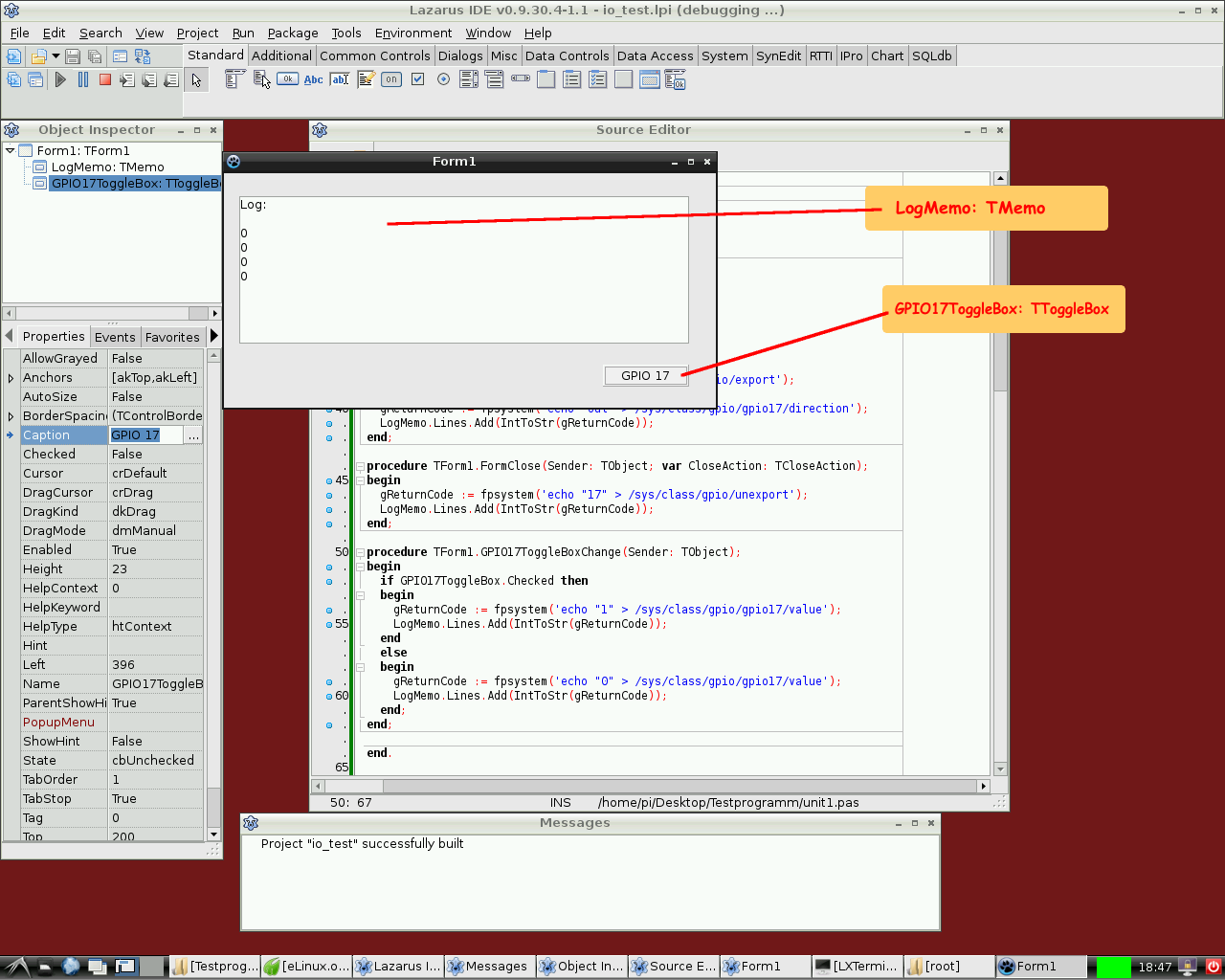 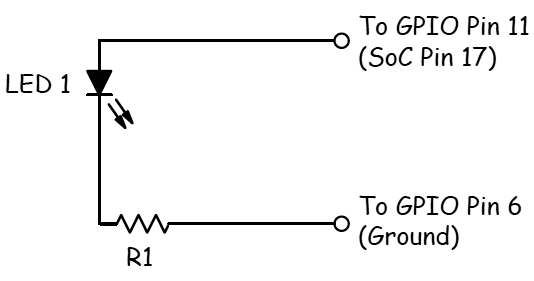 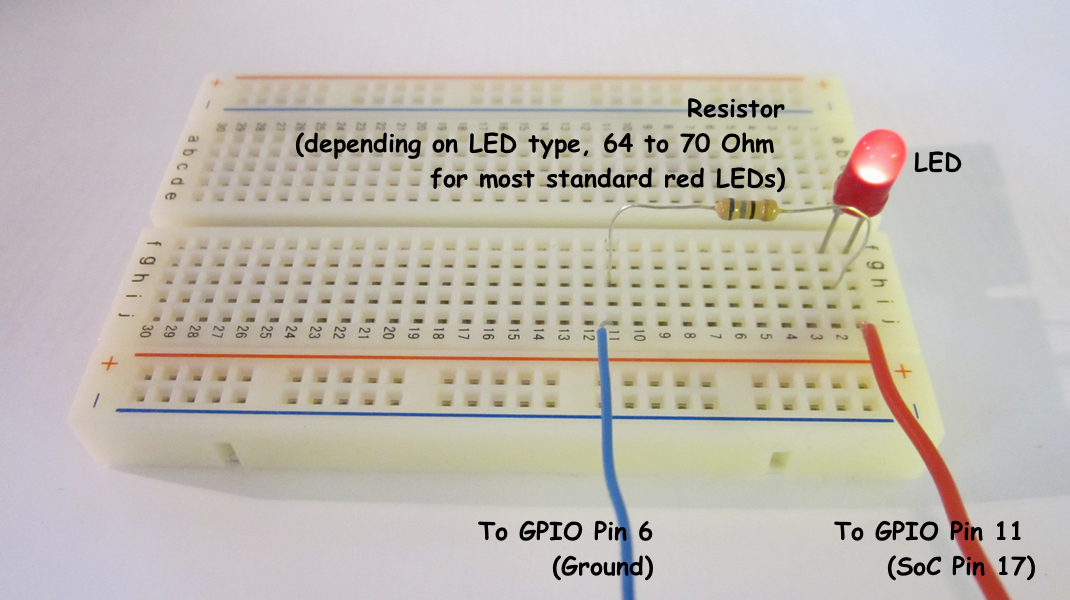 | |
| 101 | 98 | ||
| 102 | 99 | 这种访问外部硬件的方法,不需要额外的库。唯一的要求是baseunix库,这是Free Pascal的RTL部分。 | |
| 103 | 100 | ||
| 104 | 101 | #### 通过GPIO端口控制开关 | |
| 105 | 102 | ||
| 106 | 103 | 下面将演示一个简单程序。控制GPIO的17号引脚的电压,可以用来控制LED、晶体管或继电器。 程序包含*GPIO17ToggleBox*的实例[[doc:lcl/stdctrls/ttogglebox.html|ToggleBox]]和日志返回*LogMemo*类的实例[[doc:lcl/stdctrls/tmemo.html|TMemo]]。 | |
| 107 | 104 | ||
| 108 | 105 | 例如,一个LED的阳极连接到引脚11上(BCM2835 SoC对应的GPIO为17)和LED的阴极通过一个68欧姆的电阻连接引脚6(GND)。随后,LED会随着应用程序的toggle box切换点亮和熄灭。 | |
| 109 | 106 | ||
| 110 | 107 | 该代码需要root权限运行,即从root帐号(不推荐)运行或通过“*su*'。 | |
| 111 | 108 | ||
| 112 | 109 | *控制单元:* | |
| 113 | 110 | ||
| 114 | 111 | ``` pascal | |
| 115 | 112 | unit Unit1; | |
| 116 | 113 | ||
| 117 | 114 | {Demo application for GPIO on Raspberry Pi} | |
| 118 | 115 | {Inspired by the Python input/output demo application by Gareth Halfacree} | |
| 119 | 116 | {written for the Raspberry Pi User Guide, ISBN 978-1-118-46446-5} | |
| 120 | 117 | ||
| 121 | 118 | {$mode objfpc}{$H+} | |
| 122 | 119 | ||
| 123 | 120 | interface | |
| 124 | 121 | ||
| 125 | 122 | uses | |
| 126 | 123 | Classes, SysUtils, FileUtil, Forms, Controls, Graphics, Dialogs, StdCtrls, | |
| 127 | 124 | Unix, BaseUnix; | |
| 128 | 125 | ||
| 129 | 126 | type | |
| 130 | 127 | ||
| 131 | 128 | { TForm1 } | |
| 132 | 129 | ||
| 133 | 130 | TForm1 = class(TForm) | |
| 134 | 131 | LogMemo: TMemo; | |
| 135 | 132 | GPIO17ToggleBox: TToggleBox; | |
| 136 | 133 | procedure FormActivate(Sender: TObject); | |
| 137 | 134 | procedure FormClose(Sender: TObject; var CloseAction: TCloseAction); | |
| 138 | 135 | procedure GPIO17ToggleBoxChange(Sender: TObject); | |
| 139 | 136 | private | |
| 140 | 137 | { private declarations } | |
| 141 | 138 | public | |
| 142 | 139 | { public declarations } | |
| 143 | 140 | end; | |
| 144 | 141 | ||
| 145 | 142 | const | |
| 146 | 143 | PIN_17: PChar = '17'; | |
| 147 | 144 | PIN_ON: PChar = '1'; | |
| 148 | 145 | PIN_OFF: PChar = '0'; | |
| 149 | 146 | OUT_DIRECTION: PChar = 'out'; | |
| 150 | 147 | ||
| 151 | 148 | var | |
| 152 | 149 | Form1: TForm1; | |
| 153 | 150 | gReturnCode: longint; {stores the result of the IO operation} | |
| 154 | 151 | ||
| 155 | 152 | implementation | |
| 156 | 153 | ||
| 157 | 154 | {$R *.lfm} | |
| 158 | 155 | ||
| 159 | 156 | { TForm1 } | |
| 160 | 157 | ||
| 161 | 158 | procedure TForm1.FormActivate(Sender: TObject); | |
| 162 | 159 | var | |
| 163 | 160 | fileDesc: integer; | |
| 164 | 161 | begin | |
| 165 | 162 | { Prepare SoC pin 17 (pin 11 on GPIO port) for access: } | |
| 166 | 163 | try | |
| 167 | 164 | fileDesc := fpopen('/sys/class/gpio/export', O_WrOnly); | |
| 168 | 165 | gReturnCode := fpwrite(fileDesc, PIN_17[0], 2); | |
| 169 | 166 | LogMemo.Lines.Add(IntToStr(gReturnCode)); | |
| 170 | 167 | finally | |
| 171 | 168 | gReturnCode := fpclose(fileDesc); | |
| 172 | 169 | LogMemo.Lines.Add(IntToStr(gReturnCode)); | |
| 173 | 170 | end; | |
| 174 | 171 | { Set SoC pin 17 as output: } | |
| 175 | 172 | try | |
| 176 | 173 | fileDesc := fpopen('/sys/class/gpio/gpio17/direction', O_WrOnly); | |
| 177 | 174 | gReturnCode := fpwrite(fileDesc, OUT_DIRECTION[0], 3); | |
| 178 | 175 | LogMemo.Lines.Add(IntToStr(gReturnCode)); | |
| 179 | 176 | finally | |
| 180 | 177 | gReturnCode := fpclose(fileDesc); | |
| 181 | 178 | LogMemo.Lines.Add(IntToStr(gReturnCode)); | |
| 182 | 179 | end; | |
| 183 | 180 | end; | |
| 184 | 181 | ||
| 185 | 182 | procedure TForm1.FormClose(Sender: TObject; var CloseAction: TCloseAction); | |
| 186 | 183 | var | |
| 187 | 184 | fileDesc: integer; | |
| 188 | 185 | begin | |
| 189 | 186 | { Free SoC pin 17: } | |
| 190 | 187 | try | |
| 191 | 188 | fileDesc := fpopen('/sys/class/gpio/unexport', O_WrOnly); | |
| 192 | 189 | gReturnCode := fpwrite(fileDesc, PIN_17[0], 2); | |
| 193 | 190 | LogMemo.Lines.Add(IntToStr(gReturnCode)); | |
| 194 | 191 | finally | |
| 195 | 192 | gReturnCode := fpclose(fileDesc); | |
| 196 | 193 | LogMemo.Lines.Add(IntToStr(gReturnCode)); | |
| 197 | 194 | end; | |
| 198 | 195 | end; | |
| 199 | 196 | ||
| 200 | 197 | procedure TForm1.GPIO17ToggleBoxChange(Sender: TObject); | |
| 201 | 198 | var | |
| 202 | 199 | fileDesc: integer; | |
| 203 | 200 | begin | |
| 204 | 201 | if GPIO17ToggleBox.Checked then | |
| 205 | 202 | begin | |
| 206 | 203 | { Swith SoC pin 17 on: } | |
| 207 | 204 | try | |
| 208 | 205 | fileDesc := fpopen('/sys/class/gpio/gpio17/value', O_WrOnly); | |
| 209 | 206 | gReturnCode := fpwrite(fileDesc, PIN_ON[0], 1); | |
| 210 | 207 | LogMemo.Lines.Add(IntToStr(gReturnCode)); | |
| 211 | 208 | finally | |
| 212 | 209 | gReturnCode := fpclose(fileDesc); | |
| 213 | 210 | LogMemo.Lines.Add(IntToStr(gReturnCode)); | |
| 214 | 211 | end; | |
| 215 | 212 | end | |
| 216 | 213 | else | |
| 217 | 214 | begin | |
| 218 | 215 | { Switch SoC pin 17 off: } | |
| 219 | 216 | try | |
| 220 | 217 | fileDesc := fpopen('/sys/class/gpio/gpio17/value', O_WrOnly); | |
| 221 | 218 | gReturnCode := fpwrite(fileDesc, PIN_OFF[0], 1); | |
| 222 | 219 | LogMemo.Lines.Add(IntToStr(gReturnCode)); | |
| 223 | 220 | finally | |
| 224 | 221 | gReturnCode := fpclose(fileDesc); | |
| 225 | 222 | LogMemo.Lines.Add(IntToStr(gReturnCode)); | |
| 226 | 223 | end; | |
| 227 | 224 | end; | |
| 228 | 225 | end; | |
| 229 | 226 | ||
| 230 | 227 | end. | |
| 231 | 228 | ``` | |
| 232 | 229 | ||
| 233 | 230 | *Main program:* | |
| 234 | 231 | ||
| 235 | 232 | ``` pascal | |
| 236 | 233 | program io_test; | |
| 237 | 234 | ||
| 238 | 235 | {$mode objfpc}{$H+} | |
| 239 | 236 | ||
| 240 | 237 | uses | |
| 241 | 238 | {$IFDEF UNIX}{$IFDEF UseCThreads} | |
| 242 | 239 | cthreads, | |
| 243 | 240 | {$ENDIF}{$ENDIF} | |
| 244 | 241 | Interfaces, // this includes the LCL widgetset | |
| 245 | 242 | Forms, Unit1 | |
| 246 | 243 | { you can add units after this }; | |
| 247 | 244 | ||
| 248 | 245 | {$R *.res} | |
| 249 | 246 | ||
| 250 | 247 | begin | |
| 251 | 248 | Application.Initialize; | |
| 252 | 249 | Application.CreateForm(TForm1, Form1); | |
| 253 | 250 | Application.Run; | |
| 254 | 251 | end. | |
| 255 | 252 | ``` | |
| 256 | 253 | ||
| 257 | 254 | #### 读取引脚的状态 | |
| 258 | 255 | ||
| 259 | 256 | 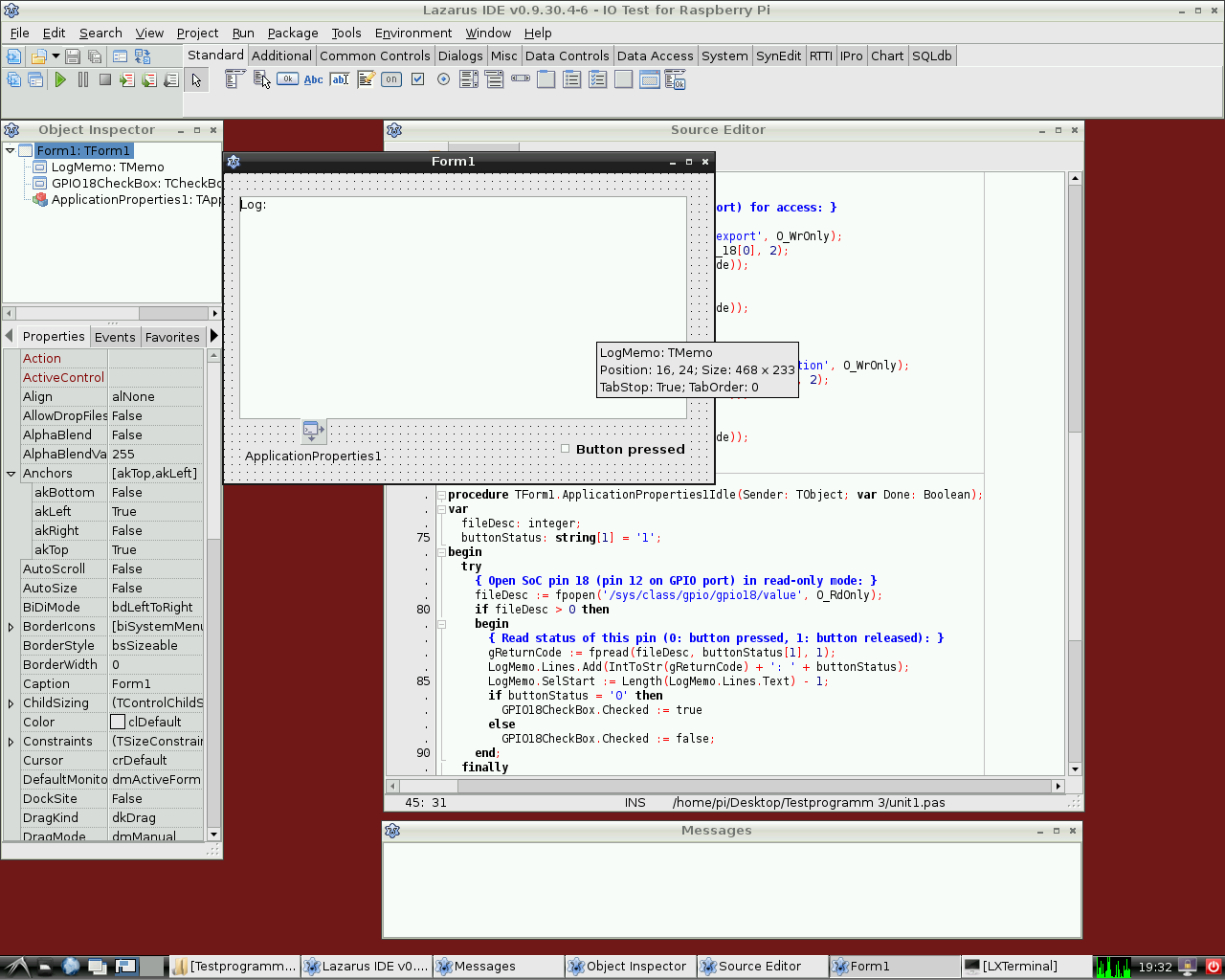 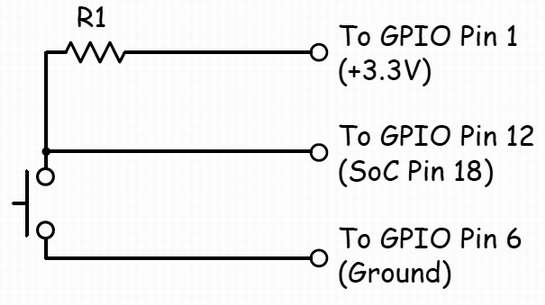 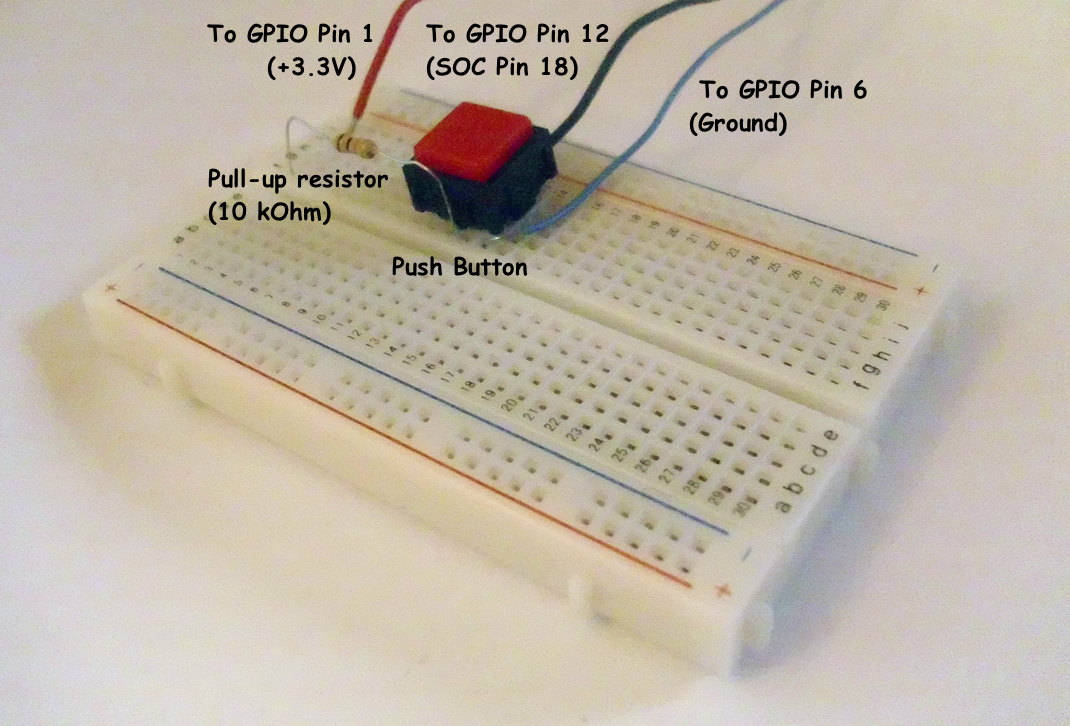 | |
| 260 | 257 | ||
| 261 | 258 | 当然也可以从GPIO端口读取一个开关的状态。 | |
| 262 | 259 | ||
| 263 | 260 | 下面的简单例子非常类似于前一个例子。使用GPIO的18号引脚,控制二进制设备如开关输入,晶体管或继电器。这个程序包含一个名称为[[doc:lcl/stdctrls/tcheckbox.html|CheckBox]]的*GPIO18CheckBox* 与*LogMemo*的实例[[doc:lcl/stdctrls/tmemo.html|TMemo]]日志返回代码。 | |
| 264 | 261 | ||
| 265 | 262 | 在实例中,第12引脚的一端连接一个按钮,按钮的一端(对应的GPIO引脚18的BCM2835 SoC)通过一个10欧姆的上拉电阻和引脚1连接(+3.3 V,看接线图)。按钮的另一端连接6号引脚(GND)。按钮的开关状态对应和程序中复选框的打开或关闭状态对应。 | |
| 266 | 263 | ||
| 267 | 264 | 注意,当按钮释放时18脚的电位为高(由通过上拉电阻连接到引脚1),当按钮压下时电压为低(因为在这种情况下,引脚18是通过开关连接到GND)。因此,按钮按下时GPIO引脚信号为0,当释放时信号为1。 | |
| 268 | 265 | ||
| 269 | 266 | 这个程序同样需要root权限 | |
| 270 | 267 | ||
| 271 | 268 | *控制单元:* | |
| 272 | 269 | ||
| 273 | 270 | ``` pascal | |
| 274 | 271 | unit Unit1; | |
| 275 | 272 | ||
| 276 | 273 | {Demo application for GPIO on Raspberry Pi} | |
| 277 | 274 | {Inspired by the Python input/output demo application by Gareth Halfacree} | |
| 278 | 275 | {written for the Raspberry Pi User Guide, ISBN 978-1-118-46446-5} | |
| 279 | 276 | ||
| 280 | 277 | {This application reads the status of a push-button} | |
| 281 | 278 | ||
| 282 | 279 | {$mode objfpc}{$H+} | |
| 283 | 280 | ||
| 284 | 281 | interface | |
| 285 | 282 | ||
| 286 | 283 | uses | |
| 287 | 284 | Classes, SysUtils, FileUtil, Forms, Controls, Graphics, Dialogs, StdCtrls, | |
| 288 | 285 | ButtonPanel, Unix, BaseUnix; | |
| 289 | 286 | ||
| 290 | 287 | type | |
| 291 | 288 | ||
| 292 | 289 | { TForm1 } | |
| 293 | 290 | ||
| 294 | 291 | TForm1 = class(TForm) | |
| 295 | 292 | ApplicationProperties1: TApplicationProperties; | |
| 296 | 293 | GPIO18CheckBox: TCheckBox; | |
| 297 | 294 | LogMemo: TMemo; | |
| 298 | 295 | procedure ApplicationProperties1Idle(Sender: TObject; var Done: Boolean); | |
| 299 | 296 | procedure FormActivate(Sender: TObject); | |
| 300 | 297 | procedure FormClose(Sender: TObject; var CloseAction: TCloseAction); | |
| 301 | 298 | private | |
| 302 | 299 | { private declarations } | |
| 303 | 300 | public | |
| 304 | 301 | { public declarations } | |
| 305 | 302 | end; | |
| 306 | 303 | ||
| 307 | 304 | const | |
| 308 | 305 | PIN_18: PChar = '18'; | |
| 309 | 306 | IN_DIRECTION: PChar = 'in'; | |
| 310 | 307 | ||
| 311 | 308 | var | |
| 312 | 309 | Form1: TForm1; | |
| 313 | 310 | gReturnCode: longint; {stores the result of the IO operation} | |
| 314 | 311 | ||
| 315 | 312 | implementation | |
| 316 | 313 | ||
| 317 | 314 | {$R *.lfm} | |
| 318 | 315 | ||
| 319 | 316 | { TForm1 } | |
| 320 | 317 | ||
| 321 | 318 | procedure TForm1.FormActivate(Sender: TObject); | |
| 322 | 319 | var | |
| 323 | 320 | fileDesc: integer; | |
| 324 | 321 | begin | |
| 325 | 322 | { Prepare SoC pin 18 (pin 12 on GPIO port) for access: } | |
| 326 | 323 | try | |
| 327 | 324 | fileDesc := fpopen('/sys/class/gpio/export', O_WrOnly); | |
| 328 | 325 | gReturnCode := fpwrite(fileDesc, PIN_18[0], 2); | |
| 329 | 326 | LogMemo.Lines.Add(IntToStr(gReturnCode)); | |
| 330 | 327 | finally | |
| 331 | 328 | gReturnCode := fpclose(fileDesc); | |
| 332 | 329 | LogMemo.Lines.Add(IntToStr(gReturnCode)); | |
| 333 | 330 | end; | |
| 334 | 331 | { Set SoC pin 18 as input: } | |
| 335 | 332 | try | |
| 336 | 333 | fileDesc := fpopen('/sys/class/gpio/gpio18/direction', O_WrOnly); | |
| 337 | 334 | gReturnCode := fpwrite(fileDesc, IN_DIRECTION[0], 2); | |
| 338 | 335 | LogMemo.Lines.Add(IntToStr(gReturnCode)); | |
| 339 | 336 | finally | |
| 340 | 337 | gReturnCode := fpclose(fileDesc); | |
| 341 | 338 | LogMemo.Lines.Add(IntToStr(gReturnCode)); | |
| 342 | 339 | end; | |
| 343 | 340 | end; | |
| 344 | 341 | ||
| 345 | 342 | procedure TForm1.ApplicationProperties1Idle(Sender: TObject; var Done: Boolean); | |
| 346 | 343 | var | |
| 347 | 344 | fileDesc: integer; | |
| 348 | 345 | buttonStatus: string[1] = '1'; | |
| 349 | 346 | begin | |
| 350 | 347 | try | |
| 351 | 348 | { Open SoC pin 18 (pin 12 on GPIO port) in read-only mode: } | |
| 352 | 349 | fileDesc := fpopen('/sys/class/gpio/gpio18/value', O_RdOnly); | |
| 353 | 350 | if fileDesc > 0 then | |
| 354 | 351 | begin | |
| 355 | 352 | { Read status of this pin (0: button pressed, 1: button released): } | |
| 356 | 353 | gReturnCode := fpread(fileDesc, buttonStatus[1], 1); | |
| 357 | 354 | LogMemo.Lines.Add(IntToStr(gReturnCode) + ': ' + buttonStatus); | |
| 358 | 355 | LogMemo.SelStart := Length(LogMemo.Lines.Text) - 1; | |
| 359 | 356 | if buttonStatus = '0' then | |
| 360 | 357 | GPIO18CheckBox.Checked := true | |
| 361 | 358 | else | |
| 362 | 359 | GPIO18CheckBox.Checked := false; | |
| 363 | 360 | end; | |
| 364 | 361 | finally | |
| 365 | 362 | { Close SoC pin 18 (pin 12 on GPIO port) } | |
| 366 | 363 | gReturnCode := fpclose(fileDesc); | |
| 367 | 364 | LogMemo.Lines.Add(IntToStr(gReturnCode)); | |
| 368 | 365 | LogMemo.SelStart := Length(LogMemo.Lines.Text) - 1; | |
| 369 | 366 | end; | |
| 370 | 367 | end; | |
| 371 | 368 | ||
| 372 | 369 | procedure TForm1.FormClose(Sender: TObject; var CloseAction: TCloseAction); | |
| 373 | 370 | var | |
| 374 | 371 | fileDesc: integer; | |
| 375 | 372 | begin | |
| 376 | 373 | { Free SoC pin 18: } | |
| 377 | 374 | try | |
| 378 | 375 | fileDesc := fpopen('/sys/class/gpio/unexport', O_WrOnly); | |
| 379 | 376 | gReturnCode := fpwrite(fileDesc, PIN_18[0], 2); | |
| 380 | 377 | LogMemo.Lines.Add(IntToStr(gReturnCode)); | |
| 381 | 378 | finally | |
| 382 | 379 | gReturnCode := fpclose(fileDesc); | |
| 383 | 380 | LogMemo.Lines.Add(IntToStr(gReturnCode)); | |
| 384 | 381 | end; | |
| 385 | 382 | end; | |
| 386 | 383 | ||
| 387 | 384 | end. | |
| 388 | 385 | ``` | |
| 389 | 386 | ||
| 390 | 387 | 上面的例子主程序是相同的,。 | |
| 391 | 388 | ||
| 392 | 389 | ### 2. 通过封装的外壳访问硬件 | |
| 393 | 390 | ||
| 394 | 391 | 访问硬件的另一种方法是通过封装终端命令。这是通过使用[[Executing External Programs|fpsystem]]功能。这种方法可以访问baseunix单元不支持的功能。下面的代码实现了一个具有相同功能的程序,该程序是从上面的第一个清单所产生的。 | |
| 395 | 392 | ||
| 396 | 393 | *控制单元:* | |
| 397 | 394 | ||
| 398 | 395 | ``` pascal | |
| 399 | 396 | unit Unit1; | |
| 400 | 397 | ||
| 401 | 398 | {Demo application for GPIO on Raspberry Pi} | |
| 402 | 399 | {Inspired by the Python input/output demo application by Gareth Halfacree} | |
| 403 | 400 | {written for the Raspberry Pi User Guide, ISBN 978-1-118-46446-5} | |
| 404 | 401 | ||
| 405 | 402 | {$mode objfpc}{$H+} | |
| 406 | 403 | ||
| 407 | 404 | interface | |
| 408 | 405 | ||
| 409 | 406 | uses | |
| 410 | 407 | Classes, SysUtils, FileUtil, Forms, Controls, Graphics, Dialogs, StdCtrls, Unix; | |
| 411 | 408 | ||
| 412 | 409 | type | |
| 413 | 410 | ||
| 414 | 411 | { TForm1 } | |
| 415 | 412 | ||
| 416 | 413 | TForm1 = class(TForm) | |
| 417 | 414 | LogMemo: TMemo; | |
| 418 | 415 | GPIO17ToggleBox: TToggleBox; | |
| 419 | 416 | procedure FormActivate(Sender: TObject); | |
| 420 | 417 | procedure FormClose(Sender: TObject; var CloseAction: TCloseAction); | |
| 421 | 418 | procedure GPIO17ToggleBoxChange(Sender: TObject); | |
| 422 | 419 | private | |
| 423 | 420 | { private declarations } | |
| 424 | 421 | public | |
| 425 | 422 | { public declarations } | |
| 426 | 423 | end; | |
| 427 | 424 | ||
| 428 | 425 | var | |
| 429 | 426 | Form1: TForm1; | |
| 430 | 427 | gReturnCode: longint; {stores the result of the IO operation} | |
| 431 | 428 | ||
| 432 | 429 | implementation | |
| 433 | 430 | ||
| 434 | 431 | {$R *.lfm} | |
| 435 | 432 | ||
| 436 | 433 | { TForm1 } | |
| 437 | 434 | ||
| 438 | 435 | procedure TForm1.FormActivate(Sender: TObject); | |
| 439 | 436 | begin | |
| 440 | 437 | { Prepare SoC pin 17 (pin 11 on GPIO port) for access: } | |
| 441 | 438 | gReturnCode := fpsystem('echo "17" > /sys/class/gpio/export'); | |
| 442 | 439 | LogMemo.Lines.Add(IntToStr(gReturnCode)); | |
| 443 | 440 | { Set SoC pin 17 as output: } | |
| 444 | 441 | gReturnCode := fpsystem('echo "out" > /sys/class/gpio/gpio17/direction'); | |
| 445 | 442 | LogMemo.Lines.Add(IntToStr(gReturnCode)); | |
| 446 | 443 | end; | |
| 447 | 444 | ||
| 448 | 445 | procedure TForm1.FormClose(Sender: TObject; var CloseAction: TCloseAction); | |
| 449 | 446 | begin | |
| 450 | 447 | { Free SoC pin 17: } | |
| 451 | 448 | gReturnCode := fpsystem('echo "17" > /sys/class/gpio/unexport'); | |
| 452 | 449 | LogMemo.Lines.Add(IntToStr(gReturnCode)); | |
| 453 | 450 | end; | |
| 454 | 451 | ||
| 455 | 452 | procedure TForm1.GPIO17ToggleBoxChange(Sender: TObject); | |
| 456 | 453 | begin | |
| 457 | 454 | if GPIO17ToggleBox.Checked then | |
| 458 | 455 | begin | |
| 459 | 456 | { Swith SoC pin 17 on: } | |
| 460 | 457 | gReturnCode := fpsystem('echo "1" > /sys/class/gpio/gpio17/value'); | |
| 461 | 458 | LogMemo.Lines.Add(IntToStr(gReturnCode)); | |
| 462 | 459 | end | |
| 463 | 460 | else | |
| 464 | 461 | begin | |
| 465 | 462 | { Switch SoC pin 17 off: } | |
| 466 | 463 | gReturnCode := fpsystem('echo "0" > /sys/class/gpio/gpio17/value'); | |
| 467 | 464 | LogMemo.Lines.Add(IntToStr(gReturnCode)); | |
| 468 | 465 | end; | |
| 469 | 466 | end; | |
| 470 | 467 | ||
| 471 | 468 | end. | |
| 472 | 469 | ``` | |
| 473 | 470 | ||
| 474 | 471 | 主程序与上面的例子相同。这个程序必须用根权限执行。 | |
| 475 | 472 | ||
| 476 | 473 | ### 3. wiringPi方法与函数 | |
| 477 | 474 | ||
| 478 | 475 | Alex Schaller封装的Gordon Henderson的Arduino兼容wiringpi库,提供了一种类似Arduino电路板的编码方案。 | |
| 479 | 476 | ||
| 480 | 477 | **Function wiringPiSetup:longint:** 使用wiringpi引脚编号方案初始化wiringpi系统 | |
| 481 | 478 | ||
| 482 | 479 | **Procedure wiringPiGpioMode(mode:longint):** 用Broadcom的GPIO引脚编号方案wiringpi初始化系统。 | |
| 483 | 480 | ||
| 484 | 481 | **Procedure pullUpDnControl(pin:longint;** pud:longint): 控制内部GPIO引脚上拉/下拉电阻。 | |
| 485 | 482 | ||
| 486 | 483 | **Procedure pinMode(pin:longint; mode:longint):** 设置一个PIN的模式:输入、输出或pwm_output。 | |
| 487 | 484 | ||
| 488 | 485 | **Procedure digitalWrite(pin:longint; value:longint):** 设置一个输出位。 | |
| 489 | 486 | ||
| 490 | 487 | **Procedure pwmWrite(pin:longint; value:longint):** 设置一个输出PWM(脉宽调制)值,0到1024之间。 | |
| 491 | 488 | ||
| 492 | 489 | **Function digitalRead(pin:longint):longint:** 读取一个给定引脚的值,返回1或0。 | |
| 493 | 490 | ||
| 494 | 491 | **Procedure delay(howLong:dword):** 等待多少毫秒。 | |
| 495 | 492 | ||
| 496 | 493 | **Procedure delayMicroseconds(howLong:dword):** 等待多少微秒。 | |
| 497 | 494 | ||
| 498 | 495 | **Function millis:dword:** 返回程序调用wiringpisetup函数花费的毫秒数。 | |
| 499 | 496 | ||
| 500 | 497 | ### 4. rpi_hal-hardware抽象库 (GPIO, I2C and SPI 函数与方法) | |
| 501 | 498 | ||
| 502 | 499 | 这个单元大约1700行代码,由Stefan Fischer提供,提供程序和函数访问RPI硬件I2C,SPI和GPIO: | |
| 503 | 500 | ||
| 504 | 501 | 下面是函数和方法的摘录: | |
| 505 | 502 | ||
| 506 | 503 | **procedure gpio_set_pin (pin:longword;highlevel:boolean);** { 设置 RPi GPIO 引脚速率为高或低; 速率 @ 700MHz -\> 0.65MHz } | |
| 507 | 504 | ||
| 508 | 505 | **function gpio_get_PIN (pin:longword):boolean;** { 获取 RPi GPIO 引脚等级,当Pin为'1'时返回True,为'0'时返回false; 速率 @ 700MHz -\> 1.17MHz } | |
| 509 | 506 | ||
| 510 | 507 | **procedure gpio_set_input (pin:longword);** { 设置 RPi GPIO 引脚为直接输入} | |
| 511 | 508 | ||
| 512 | 509 | **procedure gpio_set_output(pin:longword);** { 设置 RPi GPIO 引脚为直接输出 } | |
| 513 | 510 | ||
| 514 | 511 | **procedure gpio_set_alt (pin,altfunc:longword);** { 设置 RPi GPIO 引脚为备用功能 0..5 } | |
| 515 | 512 | ||
| 516 | 513 | **procedure gpio_set_gppud (mask:longword);** { 设置RPI GPIO拉上/下登记(gppud)} | |
| 517 | 514 | ||
| 518 | 515 | ... | |
| 519 | 516 | ||
| 520 | 517 | **function rpi_snr :string;** { 信噪比: 0000000012345678 } | |
| 521 | 518 | ||
| 522 | 519 | **function rpi_hw :string;** { 处理器类型: BCM2708 } | |
| 523 | 520 | ||
| 524 | 521 | **function rpi_proc:string;** { ARMv6-compatible processor rev 7 (v6l) } | |
| 525 | 522 | ||
| 526 | 523 | ... | |
| 527 | 524 | ||
| 528 | 525 | **function i2c_bus_write(baseadr,reg:word; var <data:databuf_t>; lgt:byte; testnr:integer) : integer;** | |
| 529 | 526 | ||
| 530 | 527 | **function i2c_bus_read (baseadr,reg:word; var <data:databuf_t>; lgt:byte; testnr:integer) : integer;** | |
| 531 | 528 | ||
| 532 | 529 | **function i2c_string_read(baseadr,reg:word; var <data:databuf_t>; lgt:byte; testnr:integer) : string;** | |
| 533 | 530 | ||
| 534 | 531 | **function i2c_string_write(baseadr,reg:word; s:string; testnr:integer) : integer;** | |
| 535 | 532 | ||
| 536 | 533 | ... | |
| 537 | 534 | ||
| 538 | 535 | **procedure SPI_Write(devnum:byte; reg,data:word);** | |
| 539 | 536 | ||
| 540 | 537 | **function SPI_Read(devnum:byte; reg:word) : byte;** | |
| 541 | 538 | ||
| 542 | 539 | **procedure SPI_BurstRead2Buffer (devnum,start_reg:byte; xferlen:longword);** | |
| 543 | 540 | ||
| 544 | 541 | **procedure SPI_BurstWriteBuffer (devnum,start_reg:byte; xferlen:longword);** { 从缓冲区SPI的地址写入一段字节的内容 } | |
| 545 | 542 | ||
| 546 | 543 | ... | |
| 547 | 544 | ||
| 548 | 545 | *测试程序 (testrpi.pas):* | |
| 549 | 546 | ||
| 550 | 547 | ``` pascal | |
| 551 | 548 | //Simple Test program, which is using rpi_hal; | |
| 552 | 549 | ||
| 553 | 550 | program testrpi; | |
| 554 | 551 | uses rpi_hal; | |
| 555 | 552 | begin | |
| 556 | 553 | writeln('Show CPU-Info, RPI-HW-Info and Registers:'); | |
| 557 | 554 | rpi_show_all_info; | |
| 558 | 555 | writeln('Let Status LED Blink. Using GPIO functions:'); | |
| 559 | 556 | GPIO_PIN_TOGGLE_TEST; | |
| 560 | 557 | writeln('Test SPI Read function. (piggy back board with installed RFM22B Module is required!)'); | |
| 561 | 558 | Test_SPI; | |
| 562 | 559 | end. | |
| 563 | 560 | ``` | |
| 564 | 561 | ||
| 565 | 562 | ### 5. 底层pascal单元 PiGpio(代替wiringpi C语言库的GPIO控制) | |
| 566 | 563 | ||
| 567 | 564 | *这个单元 (pigpio.pas[2](https://docs.google.com/file/d/0B-b-5ooIWPvGN1BIcEJzRDgyeUE/edit?usp=sharing)) 270 行代码是由Gabor Szollosi提供的 , 运行速度飞快(例如GPIO引脚输出开关频率达到8MHz) :* | |
| 568 | 565 | ||
| 569 | 566 | ``` pascal | |
| 570 | 567 | unit PiGpio; | |
| 571 | 568 | { | |
| 572 | 569 | BCM2835 GPIO Registry Driver, also can use to manipulate cpu other registry areas | |
| 573 | 570 | ||
| 574 | 571 | This code is tested only Broadcom bcm2835 cpu, different arm cpus may need different | |
| 575 | 572 | gpio driver implementation | |
| 576 | 573 | ||
| 577 | 574 | 2013 Gabor Szollosi | |
| 578 | 575 | } | |
| 579 | 576 | {$mode objfpc}{$H+} | |
| 580 | 577 | ||
| 581 | 578 | interface | |
| 582 | 579 | ||
| 583 | 580 | uses | |
| 584 | 581 | Classes, SysUtils; | |
| 585 | 582 | ||
| 586 | 583 | const | |
| 587 | 584 | REG_GPIO = $20000;//bcm2835 gpio register 0x2000 0000. new fpMap uses page offset, one page is 4096bytes | |
| 588 | 585 | // hex 0x1000 so simply calculate 0x2000 0000 / 0x1000 = 0x2000 0 | |
| 589 | 586 | PAGE_SIZE = 4096; | |
| 590 | 587 | BLOCK_SIZE = 4096; | |
| 591 | 588 | // The BCM2835 has 54 GPIO pins. | |
| 592 | 589 | // BCM2835 data sheet, Page 90 onwards. | |
| 593 | 590 | // There are 6 control registers, each control the functions of a block | |
| 594 | 591 | // of 10 pins. | |
| 595 | 592 | ||
| 596 | 593 | CLOCK_BASE = (REG_GPIO + $101); | |
| 597 | 594 | GPIO_BASE = (REG_GPIO + $200); | |
| 598 | 595 | GPIO_PWM = (REG_GPIO + $20C); | |
| 599 | 596 | ||
| 600 | 597 | INPUT = 0; | |
| 601 | 598 | OUTPUT = 1; | |
| 602 | 599 | PWM_OUTPUT = 2; | |
| 603 | 600 | LOW = False; | |
| 604 | 601 | HIGH = True; | |
| 605 | 602 | PUD_OFF = 0; | |
| 606 | 603 | PUD_DOWN = 1; | |
| 607 | 604 | PUD_UP = 2; | |
| 608 | 605 | ||
| 609 | 606 | // PWM | |
| 610 | 607 | ||
| 611 | 608 | PWM_CONTROL = 0; | |
| 612 | 609 | PWM_STATUS = 4; | |
| 613 | 610 | PWM0_RANGE = 16; | |
| 614 | 611 | PWM0_DATA = 20; | |
| 615 | 612 | PWM1_RANGE = 32; | |
| 616 | 613 | PWM1_DATA = 36; | |
| 617 | 614 | ||
| 618 | 615 | PWMCLK_CNTL = 160; | |
| 619 | 616 | PWMCLK_DIV = 164; | |
| 620 | 617 | ||
| 621 | 618 | PWM1_MS_MODE = $8000; // Run in MS mode | |
| 622 | 619 | PWM1_USEFIFO = $2000; // Data from FIFO | |
| 623 | 620 | PWM1_REVPOLAR = $1000; // Reverse polarity | |
| 624 | 621 | PWM1_OFFSTATE = $0800; // Ouput Off state | |
| 625 | 622 | PWM1_REPEATFF = $0400; // Repeat last value if FIFO empty | |
| 626 | 623 | PWM1_SERIAL = $0200; // Run in serial mode | |
| 627 | 624 | PWM1_ENABLE = $0100; // Channel Enable | |
| 628 | 625 | ||
| 629 | 626 | PWM0_MS_MODE = $0080; // Run in MS mode | |
| 630 | 627 | PWM0_USEFIFO = $0020; // Data from FIFO | |
| 631 | 628 | PWM0_REVPOLAR = $0010; // Reverse polarity | |
| 632 | 629 | PWM0_OFFSTATE = $0008; // Ouput Off state | |
| 633 | 630 | PWM0_REPEATFF = $0004; // Repeat last value if FIFO empty | |
| 634 | 631 | PWM0_SERIAL = $0002; // Run in serial mode | |
| 635 | 632 | PWM0_ENABLE = $0001; // Channel Enable | |
| 636 | 633 | ||
| 637 | 634 | type | |
| 638 | 635 | ||
| 639 | 636 | { TIoPort } | |
| 640 | 637 | ||
| 641 | 638 | TIoPort = class // IO bank object | |
| 642 | 639 | private // | |
| 643 | 640 | ||
| 644 | 641 | //function get_pinDirection(aPin: TGpIoPin): TGpioPinConf; | |
| 645 | 642 | ||
| 646 | 643 | public | |
| 647 | 644 | FGpio: ^LongWord; | |
| 648 | 645 | FClk: ^LongWord; | |
| 649 | 646 | FPwm: ^LongWord; | |
| 650 | 647 | procedure SetPinMode(gpin, mode: byte); | |
| 651 | 648 | function GetBit(gpin : byte):boolean;inline; // gets pin bit} | |
| 652 | 649 | procedure ClearBit(gpin : byte);inline;// write pin to 0 | |
| 653 | 650 | procedure SetBit(gpin : byte);inline;// write pin to 1 | |
| 654 | 651 | procedure SetPullMode(gpin, mode: byte); | |
| 655 | 652 | procedure PwmWrite(gpin : byte; value : LongWord);inline;// write pin to pwm value | |
| 656 | 653 | end; | |
| 657 | 654 | ||
| 658 | 655 | { TIoDriver } | |
| 659 | 656 | ||
| 660 | 657 | TIoDriver = class | |
| 661 | 658 | private | |
| 662 | 659 | ||
| 663 | 660 | public | |
| 664 | 661 | destructor Destroy;override; | |
| 665 | 662 | function MapIo:boolean;// creates io memory mapping | |
| 666 | 663 | procedure UnmapIoRegisrty(FMap: TIoPort);// close io memory mapping | |
| 667 | 664 | function CreatePort(PortGpio, PortClk, PortPwm: LongWord):TIoPort; // create new IO port | |
| 668 | 665 | end; | |
| 669 | 666 | ||
| 670 | 667 | var | |
| 671 | 668 | ||
| 672 | 669 | fd: integer;// /dev/mem file handle | |
| 673 | 670 | procedure delayNanoseconds (howLong : LongWord); | |
| 674 | 671 | ||
| 675 | 672 | implementation | |
| 676 | 673 | ||
| 677 | 674 | uses | |
| 678 | 675 | baseUnix, Unix; | |
| 679 | 676 | ||
| 680 | 677 | procedure delayNanoseconds (howLong : LongWord); | |
| 681 | 678 | var | |
| 682 | 679 | sleeper, dummy : timespec; | |
| 683 | 680 | begin | |
| 684 | 681 | sleeper.tv_sec := 0 ; | |
| 685 | 682 | sleeper.tv_nsec := howLong ; | |
| 686 | 683 | fpnanosleep (@sleeper,@dummy) ; | |
| 687 | 684 | end; | |
| 688 | 685 | { TIoDriver } | |
| 689 | 686 | //******************************************************************************* | |
| 690 | 687 | destructor TIoDriver.Destroy; | |
| 691 | 688 | begin | |
| 692 | 689 | inherited Destroy; | |
| 693 | 690 | end; | |
| 694 | 691 | //******************************************************************************* | |
| 695 | 692 | function TIoDriver.MapIo: boolean; | |
| 696 | 693 | begin | |
| 697 | 694 | Result := True; | |
| 698 | 695 | fd := fpopen('/dev/mem', O_RdWr or O_Sync); // Open the master /dev/memory device | |
| 699 | 696 | if fd < 0 then | |
| 700 | 697 | begin | |
| 701 | 698 | Result := False; // unsuccessful memory mapping | |
| 702 | 699 | end; | |
| 703 | 700 | // | |
| 704 | 701 | end; | |
| 705 | 702 | //******************************************************************************* | |
| 706 | 703 | procedure TIoDriver.UnmapIoRegisrty(FMap:TIoPort); | |
| 707 | 704 | begin | |
| 708 | 705 | if FMap.FGpio <> nil then | |
| 709 | 706 | begin | |
| 710 | 707 | fpMUnmap(FMap.FGpio,PAGE_SIZE); | |
| 711 | 708 | FMap.FGpio := Nil; | |
| 712 | 709 | end; | |
| 713 | 710 | if FMap.FClk <> nil then | |
| 714 | 711 | begin | |
| 715 | 712 | fpMUnmap(FMap.FClk,PAGE_SIZE); | |
| 716 | 713 | FMap.FClk := Nil; | |
| 717 | 714 | end; | |
| 718 | 715 | if FMap.FPwm <> nil then | |
| 719 | 716 | begin | |
| 720 | 717 | fpMUnmap(FMap.FPwm ,PAGE_SIZE); | |
| 721 | 718 | FMap.FPwm := Nil; | |
| 722 | 719 | end; | |
| 723 | 720 | end; | |
| 724 | 721 | //******************************************************************************* | |
| 725 | 722 | function TIoDriver.CreatePort(PortGpio, PortClk, PortPwm: LongWord): TIoPort; | |
| 726 | 723 | begin | |
| 727 | 724 | Result := TIoPort.Create;// new io port, pascal calls new fpMap, where offst is page sized 4096 bytes!!! | |
| 728 | 725 | Result.FGpio := FpMmap(Nil, PAGE_SIZE, PROT_READ or PROT_WRITE, MAP_SHARED, fd, PortGpio); // port config gpio memory | |
| 729 | 726 | Result.FClk:= FpMmap(Nil, PAGE_SIZE, PROT_READ or PROT_WRITE, MAP_SHARED, fd, PortClk);; // port clk | |
| 730 | 727 | Result.FPwm:= FpMmap(Nil, PAGE_SIZE, PROT_READ or PROT_WRITE, MAP_SHARED, fd, PortPwm);; // port pwm | |
| 731 | 728 | end; | |
| 732 | 729 | //******************************************************************************* | |
| 733 | 730 | procedure TIoPort.SetPinMode(gpin, mode: byte); | |
| 734 | 731 | var | |
| 735 | 732 | fSel, shift, alt : byte; | |
| 736 | 733 | gpiof, clkf, pwmf : ^LongWord; | |
| 737 | 734 | begin | |
| 738 | 735 | fSel := (gpin div 10)*4 ; //Select Gpfsel 0 to 5 register | |
| 739 | 736 | shift := (gpin mod 10)*3 ; //0-9 pin shift | |
| 740 | 737 | gpiof := Pointer(LongWord(Self.FGpio)+fSel); | |
| 741 | 738 | if (mode = INPUT) then | |
| 742 | 739 | gpiof^ := gpiof^ and ($FFFFFFFF - (7 shl shift)) //7 shl shift komplemens - Sets bits to zero = input | |
| 743 | 740 | else if (mode = OUTPUT) then | |
| 744 | 741 | begin | |
| 745 | 742 | gpiof^ := gpiof^ and ($FFFFFFFF - (7 shl shift)) or (1 shl shift); | |
| 746 | 743 | end | |
| 747 | 744 | else if (mode = PWM_OUTPUT) then | |
| 748 | 745 | begin | |
| 749 | 746 | Case gpin of | |
| 750 | 747 | 12,13,40,41,45 : alt:= 4 ; | |
| 751 | 748 | 18,19 : alt:= 2 ; | |
| 752 | 749 | else alt:= 0 ; | |
| 753 | 750 | end; | |
| 754 | 751 | If alt > 0 then | |
| 755 | 752 | begin | |
| 756 | 753 | gpiof^ := gpiof^ and ($FFFFFFFF - (7 shl shift)) or (alt shl shift); | |
| 757 | 754 | clkf := Pointer(LongWord(Self.FClk)+PWMCLK_CNTL); | |
| 758 | 755 | clkf^ := $5A000011 or (1 shl 5) ; //stop clock | |
| 759 | 756 | delayNanoseconds(200); | |
| 760 | 757 | clkf := Pointer(LongWord(Self.FClk)+PWMCLK_DIV); | |
| 761 | 758 | clkf^ := $5A000000 or (32 shl 12) ; // set pwm clock div to 32 (19.2/3 = 600KHz) | |
| 762 | 759 | clkf := Pointer(LongWord(Self.FClk)+PWMCLK_CNTL); | |
| 763 | 760 | clkf^ := $5A000011 ; //start clock | |
| 764 | 761 | Self.ClearBit(gpin); | |
| 765 | 762 | pwmf := Pointer(LongWord(Self.FPwm)+PWM_CONTROL); | |
| 766 | 763 | pwmf^ := 0 ; // Disable PWM | |
| 767 | 764 | delayNanoseconds(200); | |
| 768 | 765 | pwmf := Pointer(LongWord(Self.FPwm)+PWM0_RANGE); | |
| 769 | 766 | pwmf^ := $400 ; //max: 1023 | |
| 770 | 767 | delayNanoseconds(200); | |
| 771 | 768 | pwmf := Pointer(LongWord(Self.FPwm)+PWM1_RANGE); | |
| 772 | 769 | pwmf^ := $400 ; //max: 1023 | |
| 773 | 770 | delayNanoseconds(200); | |
| 774 | 771 | // Enable PWMs | |
| 775 | 772 | pwmf := Pointer(LongWord(Self.FPwm)+PWM0_DATA); | |
| 776 | 773 | pwmf^ := 0 ; //start value | |
| 777 | 774 | pwmf := Pointer(LongWord(Self.FPwm)+PWM1_DATA); | |
| 778 | 775 | pwmf^ := 0 ; //start value | |
| 779 | 776 | pwmf := Pointer(LongWord(Self.FPwm)+PWM_CONTROL); | |
| 780 | 777 | pwmf^ := PWM0_ENABLE or PWM1_ENABLE ; | |
| 781 | 778 | end; | |
| 782 | 779 | end; | |
| 783 | 780 | end; | |
| 784 | 781 | //******************************************************************************* | |
| 785 | 782 | procedure TIoPort.SetBit(gpin : byte); | |
| 786 | 783 | var | |
| 787 | 784 | gpiof : ^LongWord; | |
| 788 | 785 | begin | |
| 789 | 786 | gpiof := Pointer(LongWord(Self.FGpio) + 28 + (gpin shr 5) shl 2); | |
| 790 | 787 | gpiof^ := 1 shl gpin; | |
| 791 | 788 | end; | |
| 792 | 789 | //******************************************************************************* | |
| 793 | 790 | procedure TIoPort.ClearBit(gpin : byte); | |
| 794 | 791 | var | |
| 795 | 792 | gpiof : ^LongWord; | |
| 796 | 793 | begin | |
| 797 | 794 | gpiof := Pointer(LongWord(Self.FGpio) + 40 + (gpin shr 5) shl 2); | |
| 798 | 795 | gpiof^ := 1 shl gpin; | |
| 799 | 796 | end; | |
| 800 | 797 | //******************************************************************************* | |
| 801 | 798 | function TIoPort.GetBit(gpin : byte):boolean; | |
| 802 | 799 | var | |
| 803 | 800 | gpiof : ^LongWord; | |
| 804 | 801 | begin | |
| 805 | 802 | gpiof := Pointer(LongWord(Self.FGpio) + 52 + (gpin shr 5) shl 2); | |
| 806 | 803 | if (gpiof^ and (1 shl gpin)) = 0 then Result := False else Result := True; | |
| 807 | 804 | end; | |
| 808 | 805 | //******************************************************************************* | |
| 809 | 806 | procedure TIoPort.SetPullMode(gpin, mode: byte); | |
| 810 | 807 | var | |
| 811 | 808 | pudf, pudclkf : ^LongWord; | |
| 812 | 809 | begin | |
| 813 | 810 | pudf := Pointer(LongWord(Self.FGpio) + 148 ); | |
| 814 | 811 | pudf^ := mode; //mode = 0, 1, 2 :Off, Down, Up | |
| 815 | 812 | delayNanoseconds(200); | |
| 816 | 813 | pudclkf := Pointer(LongWord(Self.FGpio) + 152 + (gpin shr 5) shl 2); | |
| 817 | 814 | pudclkf^ := 1 shl gpin ; | |
| 818 | 815 | delayNanoseconds(200); | |
| 819 | 816 | pudf^ := 0 ; | |
| 820 | 817 | pudclkf^ := 0 ; | |
| 821 | 818 | end; | |
| 822 | 819 | //******************************************************************************* | |
| 823 | 820 | procedure TIoPort.PwmWrite(gpin : byte; value : Longword); | |
| 824 | 821 | var | |
| 825 | 822 | pwmf : ^LongWord; | |
| 826 | 823 | port : byte; | |
| 827 | 824 | begin | |
| 828 | 825 | Case gpin of | |
| 829 | 826 | 12,18,40 : port:= PWM0_DATA ; | |
| 830 | 827 | 13,19,41,45 : port:= PWM1_DATA ; | |
| 831 | 828 | else exit; | |
| 832 | 829 | end; | |
| 833 | 830 | pwmf := Pointer(LongWord(Self.FPwm) + port); | |
| 834 | 831 | pwmf^ := value and $FFFFFBFF; // $400 complemens | |
| 835 | 832 | end; | |
| 836 | 833 | //******************************************************************************* | |
| 837 | 834 | end. | |
| 838 | 835 | ``` | |
| 839 | 836 | ||
| 840 | 837 | *Controlling Lazarus unit:(Project files[3](https://drive.google.com/folderview?id=0B-b-5ooIWPvGU043ZTZ0cUc2YkE&usp=sharing))* | |
| 841 | 838 | ||
| 842 | 839 | ``` pascal | |
| 843 | 840 | unit Unit1; | |
| 844 | 841 | ||
| 845 | 842 | {Demo application for GPIO on Raspberry Pi} | |
| 846 | 843 | {Inspired by the Python input/output demo application by Gareth Halfacree} | |
| 847 | 844 | {written for the Raspberry Pi User Guide, ISBN 978-1-118-46446-5} | |
| 848 | 845 | ||
| 849 | 846 | {$mode objfpc}{$H+} | |
| 850 | 847 | ||
| 851 | 848 | interface | |
| 852 | 849 | ||
| 853 | 850 | uses | |
| 854 | 851 | Classes, SysUtils, FileUtil, Forms, Controls, Graphics, Dialogs, StdCtrls, | |
| 855 | 852 | ExtCtrls, Unix, PiGpio; | |
| 856 | 853 | ||
| 857 | 854 | type | |
| 858 | 855 | ||
| 859 | 856 | { TForm1 } | |
| 860 | 857 | ||
| 861 | 858 | TForm1 = class(TForm) | |
| 862 | 859 | GPIO25In: TButton; | |
| 863 | 860 | SpeedButton: TButton; | |
| 864 | 861 | LogMemo: TMemo; | |
| 865 | 862 | GPIO23switch: TToggleBox; | |
| 866 | 863 | Timer1: TTimer; | |
| 867 | 864 | GPIO18Pwm: TToggleBox; | |
| 868 | 865 | Direction: TToggleBox; | |
| 869 | 866 | procedure DirectionChange(Sender: TObject); | |
| 870 | 867 | procedure GPIO18PwmChange(Sender: TObject); | |
| 871 | 868 | procedure GPIO25InClick(Sender: TObject); | |
| 872 | 869 | procedure FormActivate(Sender: TObject); | |
| 873 | 870 | procedure FormClose(Sender: TObject; var CloseAction: TCloseAction); | |
| 874 | 871 | procedure GPIO23switchChange(Sender: TObject); | |
| 875 | 872 | procedure SpeedButtonClick(Sender: TObject); | |
| 876 | 873 | procedure Timer1Timer(Sender: TObject); | |
| 877 | 874 | private | |
| 878 | 875 | { private declarations } | |
| 879 | 876 | public | |
| 880 | 877 | { public declarations } | |
| 881 | 878 | end; | |
| 882 | 879 | ||
| 883 | 880 | const | |
| 884 | 881 | INPUT = 0; | |
| 885 | 882 | OUTPUT = 1; | |
| 886 | 883 | PWM_OUTPUT = 2; | |
| 887 | 884 | LOW = False; | |
| 888 | 885 | HIGH = True; | |
| 889 | 886 | PUD_OFF = 0; | |
| 890 | 887 | PUD_DOWN = 1; | |
| 891 | 888 | PUD_UP = 2; | |
| 892 | 889 | // Convert Raspberry Pi P1 pins (Px) to GPIO port | |
| 893 | 890 | P3 = 0; | |
| 894 | 891 | P5 = 1; | |
| 895 | 892 | P7 = 4; | |
| 896 | 893 | P8 = 14; | |
| 897 | 894 | P10 = 15; | |
| 898 | 895 | P11 = 17; | |
| 899 | 896 | P12 = 18; | |
| 900 | 897 | P13 = 21; | |
| 901 | 898 | P15 = 22; | |
| 902 | 899 | P16 = 23; | |
| 903 | 900 | P18 = 24; | |
| 904 | 901 | P19 = 10; | |
| 905 | 902 | P21 = 9; | |
| 906 | 903 | P22 = 25; | |
| 907 | 904 | P23 = 11; | |
| 908 | 905 | P24 = 8; | |
| 909 | 906 | P26 = 7; | |
| 910 | 907 | ||
| 911 | 908 | var | |
| 912 | 909 | Form1: TForm1; | |
| 913 | 910 | GPIO_Driver: TIoDriver; | |
| 914 | 911 | GpF: TIoPort; | |
| 915 | 912 | PWM :Boolean; | |
| 916 | 913 | i, d : integer; | |
| 917 | 914 | Pin,Pout,Ppwm : byte; | |
| 918 | 915 | ||
| 919 | 916 | implementation | |
| 920 | 917 | ||
| 921 | 918 | {$R *.lfm} | |
| 922 | 919 | ||
| 923 | 920 | { TForm1 } | |
| 924 | 921 | ||
| 925 | 922 | procedure TForm1.FormActivate(Sender: TObject); | |
| 926 | 923 | begin | |
| 927 | 924 | if not GPIO_Driver.MapIo then | |
| 928 | 925 | begin | |
| 929 | 926 | LogMemo.Lines.Add('Error mapping gpio registry'); | |
| 930 | 927 | end | |
| 931 | 928 | else | |
| 932 | 929 | begin | |
| 933 | 930 | GpF := GpIo_Driver.CreatePort(GPIO_BASE, CLOCK_BASE, GPIO_PWM); | |
| 934 | 931 | end ; | |
| 935 | 932 | Timer1.Enabled:= True; | |
| 936 | 933 | Timer1.Interval:= 25; //25 ms controll interval | |
| 937 | 934 | Pin := P22; | |
| 938 | 935 | Pout := P16; | |
| 939 | 936 | Ppwm := P12; | |
| 940 | 937 | i:=1; | |
| 941 | 938 | GpF.SetPinMode(Pout,OUTPUT); | |
| 942 | 939 | GpF.SetPinMode(Pin,INPUT); | |
| 943 | 940 | GpF.SetPullMode(Pin,PUD_Up); // Input PullUp High level | |
| 944 | 941 | end; | |
| 945 | 942 | ||
| 946 | 943 | procedure TForm1.GPIO25InClick(Sender: TObject); | |
| 947 | 944 | begin | |
| 948 | 945 | If GpF.GetBit(Pin) then LogMemo.Lines.Add('In: '+IntToStr(1)) | |
| 949 | 946 | else LogMemo.Lines.Add('In: '+IntToStr(0)); | |
| 950 | 947 | end; | |
| 951 | 948 | ||
| 952 | 949 | procedure TForm1.GPIO18PwmChange(Sender: TObject); | |
| 953 | 950 | begin | |
| 954 | 951 | if GPIO18Pwm.Checked then | |
| 955 | 952 | begin | |
| 956 | 953 | GpF.SetPinMode(Ppwm,PWM_OUTPUT); | |
| 957 | 954 | PWM := True; //PWM on | |
| 958 | 955 | end | |
| 959 | 956 | else | |
| 960 | 957 | begin | |
| 961 | 958 | GpF.SetPinMode(Ppwm,INPUT); | |
| 962 | 959 | PWM := False; //PWM off | |
| 963 | 960 | end; | |
| 964 | 961 | end; | |
| 965 | 962 | ||
| 966 | 963 | procedure TForm1.DirectionChange(Sender: TObject); | |
| 967 | 964 | begin | |
| 968 | 965 | if Direction.Checked then d:=10 else d:=-10; | |
| 969 | 966 | end; | |
| 970 | 967 | ||
| 971 | 968 | ||
| 972 | 969 | procedure TForm1.FormClose(Sender: TObject; var CloseAction: TCloseAction); | |
| 973 | 970 | begin | |
| 974 | 971 | GpF.SetPinMode(Ppwm,INPUT); | |
| 975 | 972 | GpF.ClearBit(Pout); | |
| 976 | 973 | GpIo_Driver.UnmapIoRegisrty(GpF); | |
| 977 | 974 | end; | |
| 978 | 975 | ||
| 979 | 976 | procedure TForm1.GPIO23switchChange(Sender: TObject); | |
| 980 | 977 | ||
| 981 | 978 | Begin | |
| 982 | 979 | Timer1.Enabled := False; | |
| 983 | 980 | if GPIO23switch.Checked then | |
| 984 | 981 | begin | |
| 985 | 982 | GpF.SetBit(Pout); //Turn LED on | |
| 986 | 983 | end | |
| 987 | 984 | else | |
| 988 | 985 | begin | |
| 989 | 986 | GpF.ClearBit(Pout); //Turn LED off | |
| 990 | 987 | end; | |
| 991 | 988 | Timer1.Enabled := True; | |
| 992 | 989 | end; | |
| 993 | 990 | ||
| 994 | 991 | procedure TForm1.SpeedButtonClick(Sender: TObject); | |
| 995 | 992 | var | |
| 996 | 993 | i,p,k,v: longint; | |
| 997 | 994 | ido:TDateTime; | |
| 998 | 995 | begin | |
| 999 | 996 | ido:= Time; | |
| 1000 | 997 | k:= TimeStampToMSecs(DateTimeToTimeStamp(ido)); | |
| 1001 | 998 | LogMemo.Lines.Add('Start: '+TimeToStr(ido)); | |
| 1002 | 999 | p:=10000000 ; | |
| 1003 | 1000 | For i:=1 to p do Begin | |
| 1004 | 1001 | GpF.SetBit(P16); | |
| 1005 | 1002 | GpF.ClearBit(P16); | |
| 1006 | 1003 | end; | |
| 1007 | 1004 | ido:= Time; | |
| 1008 | 1005 | v:= TimeStampToMSecs(DateTimeToTimeStamp(ido)); | |
| 1009 | 1006 | LogMemo.Lines.Add('Stop: '+TimeToStr(ido)+' Frequency: '+ | |
| 1010 | 1007 | IntToStr(p div (v-k))+' kHz'); | |
| 1011 | 1008 | end; | |
| 1012 | 1009 | ||
| 1013 | 1010 | procedure TForm1.Timer1Timer(Sender: TObject); | |
| 1014 | 1011 | begin | |
| 1015 | 1012 | If PWM then Begin | |
| 1016 | 1013 | If (d > 0) and (i+d < 1024) then begin | |
| 1017 | 1014 | i:=i+d; | |
| 1018 | 1015 | GpF.PwmWrite(Ppwm,i); | |
| 1019 | 1016 | end ; | |
| 1020 | 1017 | If (d < 0) and (i+d > -1) then begin | |
| 1021 | 1018 | i:=i+d; | |
| 1022 | 1019 | GpF.PwmWrite(Ppwm,i); | |
| 1023 | 1020 | end; | |
| 1024 | 1021 | end; | |
| 1025 | 1022 | end; | |
| 1026 | 1023 | ||
| 1027 | 1024 | ||
| 1028 | 1025 | end. | |
| 1029 | 1026 | ``` | |
| 1030 | 1027 | ||
| 1031 | 1028 | ## 参考 | |
| 1032 | 1029 | ||
| 1033 | 1030 | - Eben Upton and Gareth Halfacree. Raspberry Pi User Guide. John Wiley and Sons, Chichester 2012, ISBN 111846446X | |
| 1034 | 1031 | - B. J. Rao (2013) The Raspberry Pi, Pi Vision and Lazarus/FPC. [Blaise Pascal Magazine](http://www.blaisepascal.eu). 29: 14-21. | |
| 1035 | 1032 | ||
| 1036 | 1033 | ## 外部链接 | |
| 1037 | 1034 | ||
| 1038 | 1035 | - [Raspberry Pi 基础](http://www.raspberrypi.org) | |
| 1039 | 1036 | - [Raspberry Pi Spy: Raspberry Pi tutorials, scripts, help and downloads](http://www.raspberrypi-spy.co.uk) | |
| 1040 | 1037 | - [Lazarus wrapper unit for Gordon Henderson's wiringPi C library](http://www.lazarus.freepascal.org/index.php/topic,17404.0.html) | |
| 1041 | 1038 | - [Pin layout of the wiringPi library](https://projects.drogon.net/raspberry-pi/wiringpi/pins/) | |
| 1042 | 1039 | - [Additional information on Lazarus and Raspberry Pi at eLinux.org](http://www.elinux.org/Lazarus_on_RPi) | |
| 1043 | 1040 | - [Getting Started with Pascal on the Pi](http://www.pp4s.co.uk/main/gs-pi-intro.html) | |
| 1044 | 1041 | - [Lazberry Pi: Comprehensive information on Lazarus on the Raspberry Pi computer](http://superbitysoft.co.uk/lazberrypi/). | |
| 1045 | 1042 | - [Stefan Fischer's Lazarus unit rpi_hal](http://www.lazarus.freepascal.org/index.php/topic,20991.0.html). | |
| 1046 | 1043 | - [Improved Lazarus Unit for fast access to GPIO](http://www.meltonisl.com/software.html). | |
| 1047 | 1044 | ||
| 1048 | 1045 | --- | |
| 1049 | 1046 | *From the Free Pascal wiki, page "Lazarus on Raspberry Pi/zh CN", as it stood on 2020-02-19 after a change by Trev, out of the wiki's dump of 2024-05-26. Copyright stays with the author who wrote it, according to the old wiki's [[Licensing]] page. If you have concerns about this material, [message the admin](/wiki-contact).* |