

Lazarus on Raspberry Pi/fi: what changed
Revision 2 to 3. Removed lines have a minus sign; added lines have a plus sign.
| Old | New | Line | |
|---|---|---|---|
| 1 | - | ||
| 1 | + | 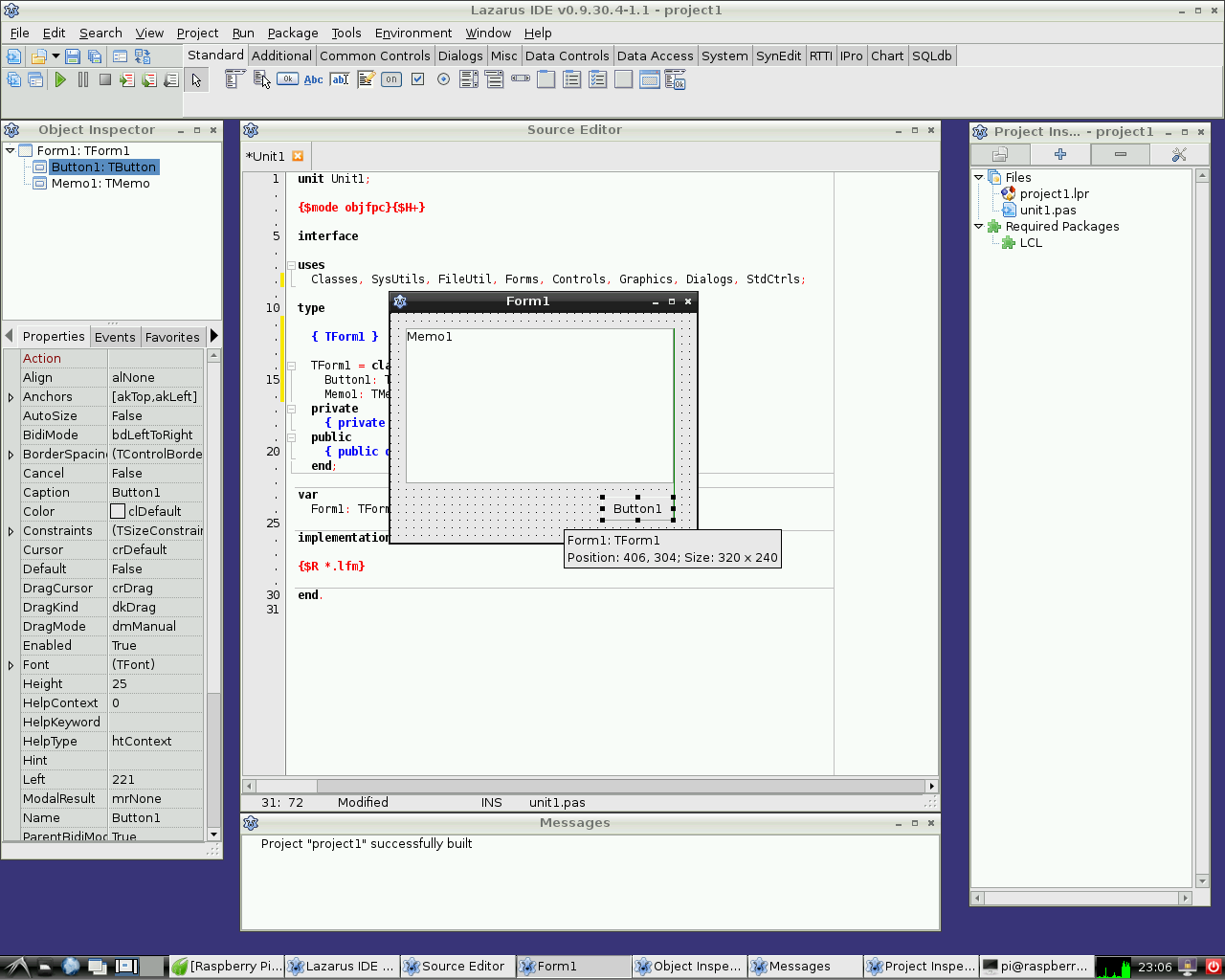 | |
| 2 | 2 | ||
| 3 | 3 | Raspberry Pi on pieni noin luottokortin kokoinen yhden levyn tietokone. Sen on kehittänyt Britannialainen Raspberry Pi säätiö jonka tarkoituksena on edistää opetusta tietojenkäsittelytieteessä. Raspberry Pi:tä käytetään myös useisiin muihin tarkoituksiin, joita ovat muun muuassa erilaiset mediapalvelimet, robotiikka ja säätötekniikka. | |
| 4 | 4 | ||
| 5 | 5 | Raspberry Pi säätiö suosittelee Raspbian Wheezy:ä käyttöjärjestelmäksi. Vaihtoehtoisia käyttöjärjestelmiä Raspberry Pi:ssä ovat RISC OS, eri Linux-jakelut ja jopa Android. | |
| 6 | 6 | ||
| 7 | 7 | Lazarus toimii natiivisti Raspbian käyttöjärjestelmässä. | |
| 8 | 8 | ||
| 9 | 9 | ## Lazaruksen asentaminen ja kääntäminen | |
| 10 | 10 | ||
| 11 | 11 | ### Helppo asennus Raspbian:ssa | |
| 12 | 12 | ||
| 13 | 13 | Raspbian käyttöjärjestelmässä on helppo asentaa Lazarus ja Free Pascal. Tämä on onnistuu avaamalla pääteikkuna ja kirjoittamalla : | |
| 14 | 14 | ||
| 15 | 15 | ` sudo apt-get update`\ | |
| 16 | 16 | ` sudo apt-get upgrade`\ | |
| 17 | 17 | ` sudo apt-get install fpc`\ | |
| 18 | 18 | ` sudo apt-get install lazarus` | |
| 19 | 19 | ||
| 20 | 20 | Tämä asentaa esikäännetyn version Lasaruksesta joka on Raspbianin pakettien hallinnassa. Jotta tämä onnistuu on verkkoyhteys tarpeen. Asennus voi kestää noin 30 minuuttia, mutta merkittäviä osia tässä prosessissa tapahtuu automaattisesti. Asennuksen jälkeen voi välittömästi alkaa käyttämään Lasarusta. Lazarus löytyy LXDE Käynnistä-valikon Programming osiossa. | |
| 21 | 21 | ||
| 22 | 22 | ### Kääntäminen lähdekoodeista | |
| 23 | 23 | ||
| 24 | 24 | You may want to compile Lazarus from subversion sources. See \[<http://www.michellcomputing.co.uk/blog/?p=72>: Michell Computing: Lazarus on the Raspberry Pi\] for details. | |
| 25 | 25 | ||
| 26 | 26 | <File:Lazarus> on Raspberry Pi.jpg\|Lazarus on Raspberry Pi | |
| 27 | 27 | ||
| 28 | 28 | ## Accessing external hardware | |
| 29 | 29 | ||
| 30 | - | ||
| 30 | + | 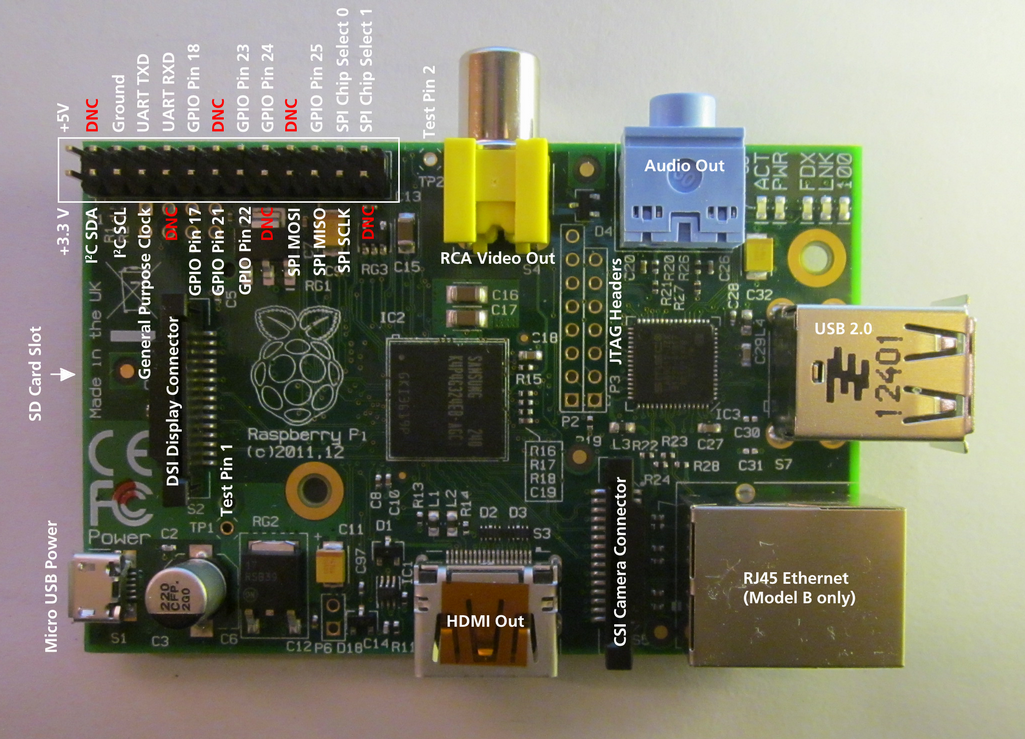 | |
| 31 | 31 | ||
| 32 | 32 | One of the goals in the development of Raspberry Pi was to facilitate effortless access to external devices like sensors and actuators. One way to use this capability is Alex Schaller's wrapper unit for Gordon Henderson Arduino compatible wiringPi library. | |
| 33 | 33 | ||
| 34 | 34 | ### wiringPi procedures and functions | |
| 35 | 35 | ||
| 36 | 36 | **Function wiringPiSetup:longint:** Initializes wiringPi system using the wiringPi pin numbering scheme. | |
| 37 | 37 | ||
| 38 | 38 | **Procedure wiringPiGpioMode(mode:longint):** Initializes wiringPi system with the Broadcom GPIO pin numbering shceme. | |
| 39 | 39 | ||
| 40 | 40 | **Procedure pullUpDnControl(pin:longint;** pud:longint): controls the internal pull-up/down resistors on a GPIO pin. | |
| 41 | 41 | ||
| 42 | 42 | **Procedure pinMode(pin:longint; mode:longint):** sets the mode of a pin to either INPUT, OUTPUT, or PWM_OUTPUT. | |
| 43 | 43 | ||
| 44 | 44 | **Procedure digitalWrite(pin:longint; value:longint):** sets an output bit. | |
| 45 | 45 | ||
| 46 | 46 | **Procedure pwmWrite(pin:longint; value:longint):** sets an output PWM value between 0 and 1024. | |
| 47 | 47 | ||
| 48 | 48 | **Function digitalRead(pin:longint):longint:** reads the value of a given Pin, returning 1 or 0. | |
| 49 | 49 | ||
| 50 | 50 | **Procedure delay(howLong:dword):** waits for at least howLong milliseconds | |
| 51 | 51 | ||
| 52 | 52 | **Procedure delayMicroseconds(howLong:dword):** waits for at least howLong microseconds | |
| 53 | 53 | ||
| 54 | 54 | **Function millis:dword:** returns the number of milliseconds since the program called one of the wiringPiSetup functions | |
| 55 | 55 | ||
| 56 | 56 | ## External Links | |
| 57 | 57 | ||
| 58 | 58 | - [Raspberry Pi Foundation](http://www.raspberrypi.org) | |
| 59 | 59 | - [Raspberry Pi Spy: Raspberry Pi tutorials, scripts, help and downloads](http://www.raspberrypi-spy.co.uk) | |
| 60 | 60 | - [Lazarus wrapper unit for Gordon Henderson's wiringPi C library](http://www.lazarus.freepascal.org/index.php/topic,17404.0.html) | |
| 61 | 61 | - [Pin layout of the wiringPi library](https://projects.drogon.net/raspberry-pi/wiringpi/pins/) | |
| 62 | 62 | - [Additional information on Lazarus and Raspberry Pi at eLinux.org](http://www.elinux.org/Lazarus_on_RPi) | |
| 63 | 63 | ||
| 64 | 64 | --- | |
| 65 | 65 | *From the Free Pascal wiki, page "Lazarus on Raspberry Pi/fi", as it stood on 2013-09-22 after a change by Jwdietrich, out of the wiki's dump of 2024-05-26. Copyright stays with the author who wrote it, according to the old wiki's [[Licensing]] page. If you have concerns about this material, [message the admin](/wiki-contact).* | |
| 66 | 66 | Category: Embedded/fi | |
| 67 | 67 | Category: Lazarus/fi | |
| 68 | 68 | Category: Linux/fi | |
| 69 | 69 | Category: Raspberry Pi/fi | |
| 70 | 70 | Category: Suomi |