

Lazarus and Free Pascal on WSL2: what changed
Revision 2 to 3. Removed lines have a minus sign; added lines have a plus sign.
| Old | New | Line | |
|---|---|---|---|
| 1 | 1 | ## Can a Linux FPC-generated 'hello world' be run unmodified on WSL-2 ? | |
| 2 | 2 | ||
| 3 | 3 | Yes | |
| 4 | 4 | linux FPC-generated 'hello world' can run unmodified on WSL-2. | |
| 5 | 5 | ||
| 6 | 6 | More complex applications can run (i.e. FPC itself installed from a repository) | |
| 7 | 7 | ||
| 8 | 8 | ## Can the Linux version of FPC be installed and run unmodified on WSL2 ? | |
| 9 | 9 | ||
| 10 | 10 | In particular: the program and compiler issue direct kernel calls. | |
| 11 | 11 | ||
| 12 | 12 | We need to know if this is working, or if a LIBC linked version of the Linux binaries is needed. | |
| 13 | 13 | ||
| 14 | 14 | Yes | |
| 15 | 15 | The easiest way is to install through the repository. | |
| 16 | 16 | ||
| 17 | 17 | Direct Kernel calls work fine under WSL2. | |
| 18 | 18 | ||
| 19 | 19 | ## Can a Windows executable execute a WSL2 program, in particular, the compiler. | |
| 20 | 20 | ||
| 21 | 21 | If yes, this must be demonstrated this using a Win32 FPC program. | |
| 22 | 22 | ||
| 23 | 23 | If not, document what the problems are. | |
| 24 | 24 | ||
| 25 | 25 | Yes (potential problems) | |
| 26 | 26 | There's [wslwrap](https://github.com/skalogryz/wslwrap) (Win32 FPC program) application provided that's executing WSL2 program. | |
| 27 | 27 | ||
| 28 | 28 | ||
| 29 | 29 | There's an outstanding issue with truncating and output buffer, if pipe redirection is used: | |
| 30 | 30 | ||
| 31 | 31 | ||
| 32 | 32 | <https://github.com/microsoft/WSL/issues/4082> | |
| 33 | 33 | ||
| 34 | 34 | <https://github.com/microsoft/WSL/issues/4184> | |
| 35 | 35 | ||
| 36 | 36 | This limits the application of WSL application, due to possible characters missing in the output. | |
| 37 | 37 | ||
| 38 | 38 | ## Can the Lazarus IDE execute the WSL2 Linux compiler ? | |
| 39 | 39 | ||
| 40 | 40 | Yes | |
| 41 | 41 | The only tested approach is a quick substitute of the compiler executable, that runs WSL2 linux compiler. | |
| 42 | 42 | ||
| 43 | 43 | One of the approaches is described at: <https://wiki.freepascal.org/Windows_Subsystem_for_Linux#Quick_and_Dirty_-_Using_WSL_FPC_from_Windows> | |
| 44 | 44 | ||
| 45 | 45 | Another approach using the latest wslwrap version is to replace fpc.exe (make a backup!) with wslwrap.exe (copying over) and creating fpc.wrp file with | |
| 46 | 46 | ||
| 47 | 47 | ||
| 48 | 48 | exe=fpc | |
| 49 | 49 | ||
| 50 | 50 | This will allow to compile -TLinux projects, BUT it's also causing interference in IDE itself, as IDE components (i.e. Codetools) depends on the "windows" version of FPC used. | |
| 51 | 51 | ||
| 52 | 52 | Windows vs Linux paths are creating conflicts when using WSL compiler. Examples are of such conflicts are (The project was configured to use a wsl-wrapped FPC): | |
| 53 | 53 | ||
| 54 | - | ||
| 54 | + | ```text | |
| 55 | + | Warning: [TPCTargetConfigCache.Update] cannot find real compiler for this platform: Compiler="C:\FPC_Laz\wsltools\fpc.exe" Options="-FrC:\lazarus\components\codetools\fpc.errore.msg" RealCompiler="C:\Users\Owner\AppData\Local\lazarus\/usr/lib/fpc/3.0.0/ppcx64" | |
| 55 | 56 | ||
| 56 | - | ||
| 57 | + | Hint: [TPCTargetConfigCache.NeedsUpdate] TargetOS="linux" TargetCPU="x86_64" Options="" real compiler file changed "C:\Users\Owner\AppData\Local\lazarus\/usr/lib/fpc/3.0.0/ppcx64" | |
| 57 | 58 | ||
| 58 | - | ||
| 59 | + | Warning: [TPCTargetConfigCache.Update] fpc.exe found cfg a file, the IDE did not: "C:\Users\Owner\AppData\Local\lazarus\\etc\fpc.cfg" | |
| 60 | + | ``` | |
| 59 | 61 | ||
| 60 | 62 | ||
| 61 | 63 | **Note**: a custom compiler can be specified per project (+per build mode?), rather than the entire environment . | |
| 62 | 64 | ||
| 63 | 65 | ## Can a Windows executable execute & debug a WSL2 program using WSL2 gdb ? | |
| 64 | 66 | ||
| 65 | 67 | (This is assuming that a WSL2 version of gdb exists. If not, document this.). | |
| 66 | 68 | ||
| 67 | 69 | In particular, can Lazarus use the WSL2 gdb if such exists. | |
| 68 | 70 | ||
| 69 | 71 | Practically - No (Potentially- Yes) | |
| 70 | 72 | Gdb does present in WSL2 and needs to be installed additionally | |
| 71 | 73 | ||
| 72 | 74 | While it's possible to run WSL2 gdb (and it's surely possible to configure Lazarus to install Gdb) | |
| 73 | 75 | ||
| 74 | 76 | Due to glitches with WSL2 pipe redirection, it's not possible to get gdb reports on time (whenever gdb stops on break point or an error). Lazarus IDE is unable detect the change in the execution. | |
| 75 | 77 | ||
| 76 | 78 | ### Setting up a project | |
| 77 | 79 | ||
| 78 | 80 | ||
| 79 | 81 | 1\. Copy wslwrap.exe twice. One for fpc.exe and another for gdb.exe. | |
| 80 | 82 | ||
| 81 | 83 | 2\. Create corresponding .wrp file | |
| 82 | 84 | ||
| 83 | 85 | ||
| 84 | 86 | gdb.wrp should look like this: | |
| 85 | 87 | ||
| 86 | - | ||
| 87 | - | ||
| 88 | - | ||
| 89 | - | ||
| 88 | + | ```text | |
| 89 | + | exe=gdb | |
| 90 | + | inp.dummy=0 | |
| 91 | + | inp.wintonix=1 | |
| 92 | + | shell=1 | |
| 93 | + | ``` | |
| 90 | 94 | ||
| 91 | 95 | ||
| 92 | 96 | ||
| 93 | 97 | the debugger doesn't need to have "dummy" input, because a normal commands would be sent by IDE | |
| 94 | 98 | ||
| 95 | 99 | the all paths in the commands needs to be replaced. Lazarus is Win, and it sends Windows Paths, those has to be converted to linux paths (so gdb would seet hem) | |
| 96 | 100 | ||
| 97 | 101 | shell must be used, as Ggb checks for the environment. If it doesn't detect a proper shell it would use "exec" command in order to launch a child process, which would eventually fail. | |
| 98 | 102 | ||
| 99 | 103 | 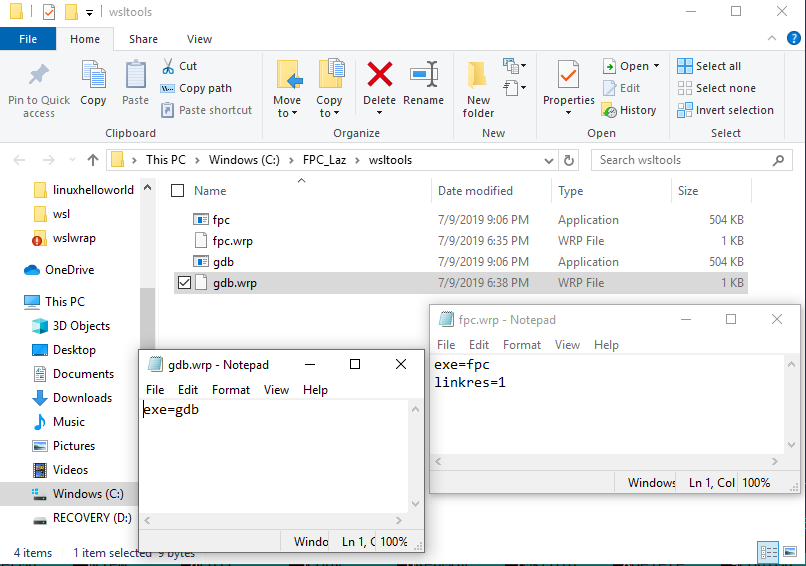 | |
| 100 | 104 | ||
| 101 | 105 | ||
| 102 | 106 | 3\. Specify the new compiler executable in the project setting (not to mess up with IDE) | |
| 103 | 107 | ||
| 104 | 108 | 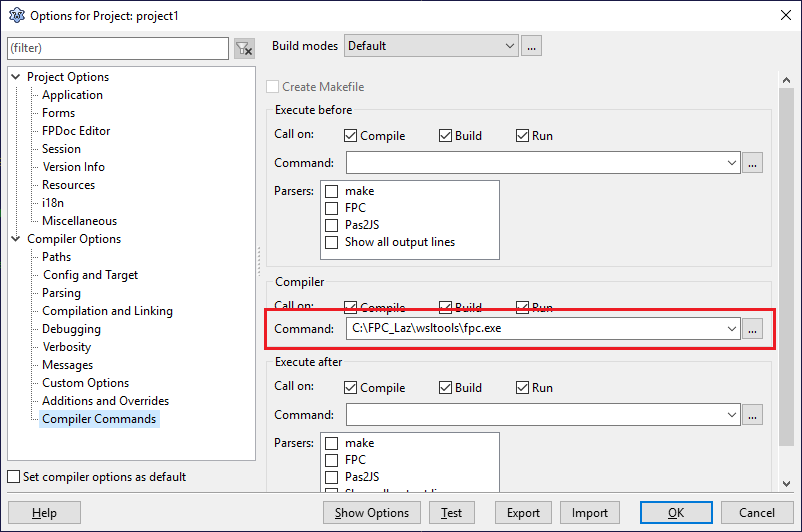 | |
| 105 | 109 | ||
| 106 | 110 | ||
| 107 | 111 | 3.1 You also want to uncheck "Apply conventions" for "Target name" of "Compiler Options/Paths" and update "Target file name" by removing ".exe" extension. | |
| 108 | 112 | ||
| 109 | 113 | 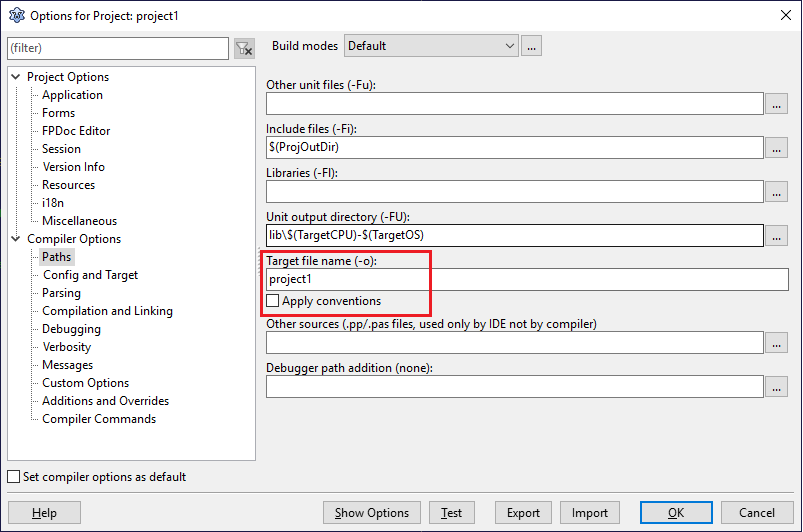 | |
| 110 | 114 | ||
| 111 | 115 | The IDE will start sending a lot of warning regarding non existing configuration files and unsupported targets. Those can be ignored as files would be used by the compiler from WSL and those configuration and files are present in WSL environment. | |
| 112 | 116 | ||
| 113 | 117 | ||
| 114 | 118 | 4\. Specify the wrapped gdb file name in debugger options | |
| 115 | 119 | ||
| 116 | 120 | 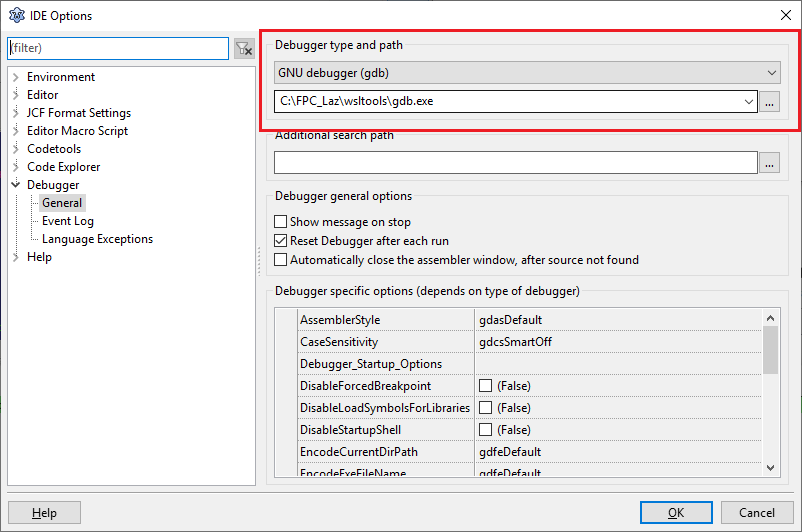 | |
| 117 | 121 | ||
| 118 | 122 | ||
| 119 | 123 | 5\. Run the project. | |
| 120 | 124 | ||
| 121 | 125 | 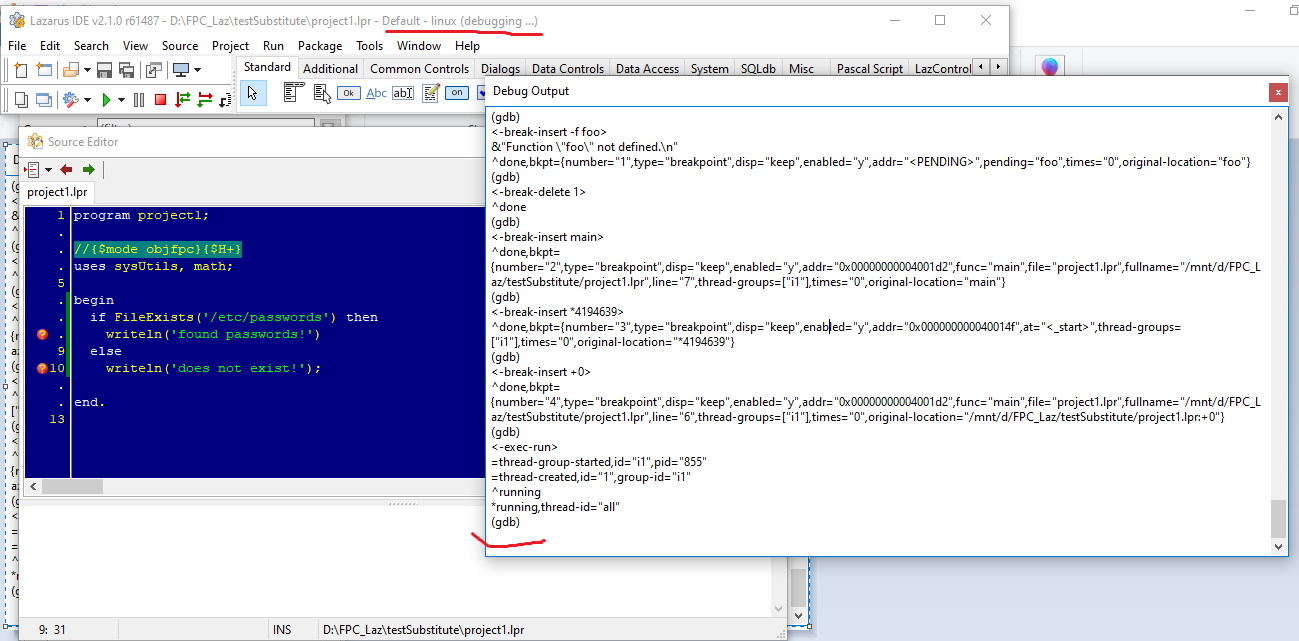 | |
| 122 | 126 | ||
| 123 | 127 | ## Can the FPC windows 64-bit compiler cross-compile a -Tlinux program using WSL 2. If yes, how ? | |
| 124 | 128 | ||
| 125 | 129 | Yes (but undesired approach?) | |
| 126 | 130 | It's possible to use WSL2 utils as cross-compiler binary utils. For example an executable x86_64-linux-ld.exe can be substituted with call to "wsl ld", the link.res file generated by FPC is still using windows paths. Preventing the linux linker from being able to build a binary. | |
| 127 | 131 | ||
| 128 | 132 | It's possible to update link.res prior to the execution of ld, and convert Windows paths to WSL (Linux) paths. | |
| 129 | 133 | ||
| 130 | 134 | Steps (assumption is made that Win32 FPC doesn't have any cross-compile utils installed): | |
| 131 | 135 | ||
| 132 | 136 | ||
| 133 | 137 | 1\. have WSL2 installed | |
| 134 | 138 | ||
| 135 | 139 | 2\. install FPC to WSL2 matching version that is matching the one currently used on Windows. (this is critical as FPC would match units used). (for example the official Lazarus release comes with 3.0.4. Distro's repository would have FPC 3.0.0 available. This won't work for cross-compiling, FPC 3.0.4 needs to be isntalled) | |
| 136 | 140 | ||
| 137 | 141 | 2.1 download (in win32) linux-xxx.xxx.tar from the official FPC | |
| 138 | 142 | ||
| 139 | 143 | 2.2 unpack tar file | |
| 140 | 144 | ||
| 141 | 145 | 2.3 run "wsl sudo ./install.sh" (sudo is need to be able to install to default /usr dir) | |
| 142 | 146 | ||
| 143 | 147 | 3\. copy x86_64-linux units from WSL to your windows FPC directory (i.e. C:\lazarus\fpc\3.0.4\units\x86_64-linux). You can do that by running the following in Windows command line | |
| 144 | 148 | ||
| 145 | 149 | ||
| 146 | 150 | ||
| 147 | 151 | cd "C:\lazarus\fpc\3.0.4\units" | |
| 148 | 152 | ||
| 149 | 153 | wsl cp -r /usr/lib/fpc/3.0.4/units/x86_64-linux ./ | |
| 150 | 154 | ||
| 151 | 155 | 4\. Get the latest [wslwrap](https://github.com/skalogryz/wslwrap) project and compile it. | |
| 152 | 156 | ||
| 153 | 157 | 4.1 Move wslwrap.exe to C:\lazarus\fpc\3.0.4\bin\x86_64-linux\x86_64-linux-ld.exe (not the destinatino folder might not exit) | |
| 154 | 158 | ||
| 155 | 159 | 4.2 create the file C:\lazarus\fpc\3.0.4\bin\x86_64-linux\x86_64-linux-ld.wrp. Add two following lines | |
| 156 | 160 | ||
| 157 | 161 | ||
| 158 | 162 | exe=ld | |
| 159 | 163 | ||
| 160 | 164 | linkres=1 | |
| 161 | 165 | ||
| 162 | 166 | This instructs the current executable when doing call over WSL to cal "ld", but also update link.res file prior to that | |
| 163 | 167 | ||
| 164 | 168 | 5\. Done. Try to compile hello world pas using command line: | |
| 165 | 169 | ||
| 166 | 170 | ||
| 167 | 171 | C:\lazarus\fpc\3.0.4\bin\x86_64-win64\fpc.exe -Tlinux test.pas | |
| 168 | 172 | ||
| 169 | 173 | as a result you should get "test" binary, that can be ran "wsl ./test" | |
| 170 | 174 | ||
| 171 | 175 | The problem is that might require to build more "exceptions" and "wsl" hacks in future. Using straight forward Linux cross-compiler might be more reliable approach - OR - instead using WSL calling directly, rather than as a cross-compiler. | |
| 172 | 176 | ||
| 173 | 177 | Also attempt to use "Math" unit fails immediately due to IE 200208151: <https://bugs.freepascal.org/view.php?id=35781> | |
| 174 | 178 | ||
| 175 | 179 | ## Summary | |
| 176 | 180 | ||
| 177 | 181 | - WSL2 still requires its own fixes. | |
| 178 | 182 | - a number of changes are required in Lazarus IDE to make it "wsl" aware. (so it would use WSL paths, instead of Windows paths). Without that changes, even a smarter "wslwrap" utility would have its own challenges. | |
| 179 | 183 | - no changes are needed in FPC. Though fixing the internal error would make a better use of wsl as cross-compiler. | |
| 180 | 184 | ||
| 181 | 185 | ## See Also | |
| 182 | 186 | ||
| 183 | 187 | - [[WSL]] | |
| 184 | 188 | ||
| 185 | 189 | --- | |
| 186 | 190 | *From the Free Pascal wiki, page "Lazarus and Free Pascal on WSL2", as it stood on 2019-07-12 after a change by Skalogryz, out of the wiki's dump of 2024-05-26. Copyright stays with the author who wrote it, according to the old wiki's [[Licensing]] page. If you have concerns about this material, [message the admin](/wiki-contact).* | |
| 187 | 191 | Category: Linux | |
| 188 | 192 | Category: Windows |