

Lazarus Tutorial/ja: what changed
Revision 2 to 3. Removed lines have a minus sign; added lines have a plus sign.
| Old | New | Line | |
|---|---|---|---|
| 1 | 1 | *このLazarusチュートリアルに、遠慮なくあなたの経験を書き加えてみませんか? どうぞご遠慮なく。* | |
| 2 | 2 | ||
| 3 | 3 | ## 概要 | |
| 4 | 4 | ||
| 5 | 5 | Lazarusは Free Pascal コンパイラのためのフリーでオープンソースな開発ツールです。 Lazarus IDEは、機能が豊富なプログラム環境であり、単独で機能するGUIアプリケーションやコンソールアプリケーションを開発できます。 Lazarusは、現在 Linux、 FreeBSD、 Win32 そして Mac OS X の上で動作し、カスタマイズ可能なソースエディタ、FreePascalコンパイラと統合された完全なGUI、 パッケージマネージャやデバッガを持つビジュアルなフォーム作成環境を提供します。 | |
| 6 | 6 | ||
| 7 | 7 | 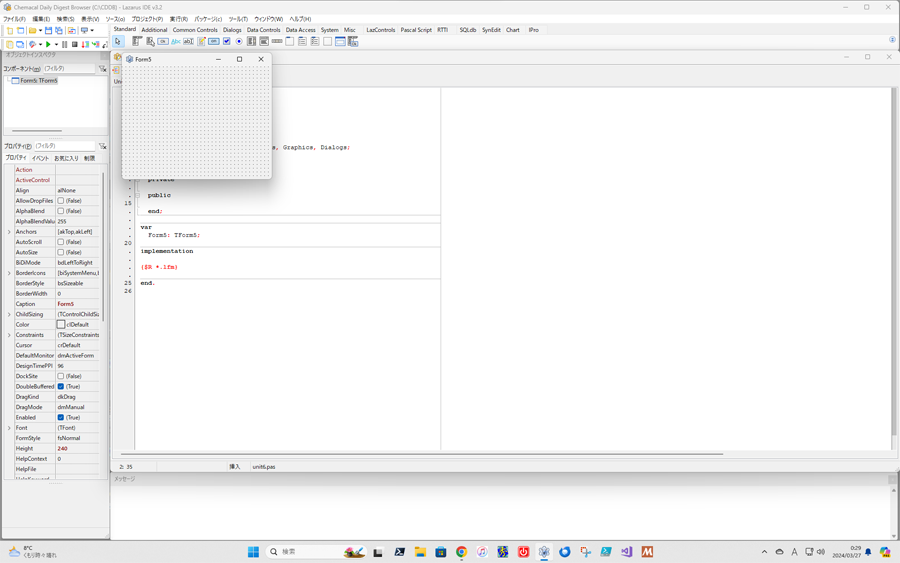 | |
| 8 | 8 | ||
| 9 | 9 | ## Lazarusでプログラムをはじめてみよう | |
| 10 | 10 | ||
| 11 | 11 | [[Installing Lazarus/ja|Lazarusをインストールして]]、起動してみてください。これだけで、Free PascalやLazarusをつかったプログラムをはじめてみることができます。 | |
| 12 | 12 | ||
| 13 | 13 | 起動すると、いくつかのウィンドウがデスクトップ上に現れます。上の方にはメインメニューがあります。左には、**[[IDE Window: Object Inspector/ja|オブジェクトインスペクタ]]**あります。そのほかのデスクトップの大部分は、**[[source code editor/ja|ソースコードエディタ]]**です。多分Form1ウィンドウが作られていて、ソースエディタに重なっているはずです。 | |
| 14 | 14 | ||
| 15 | 15 | 上の方にあるメニューウィンドウの、メニューの下にタブの列があります。'標準'タブが選択されていますね。そこでButtonアイコン(四角の中に「OK」と書いてあるもの)を探してクリックしてください。そして、Form1の上の左中央あたりでクリックしてください。すると'Button1'と書かれた四角い図形(=ボタンです)が現れるはずです。もう一回標準タブのButtonアイコンをクリックして、Form1の右中央でクリックしてください。'Button2'と書かれたボタンが現れます。 | |
| 16 | 16 | ||
| 17 | 17 | Button1をクリックしましょう。オブジェクトインスペクタに、オブジェクトButton1のプロパティが表示されます。'Caption'と名付けられたプロパティに'Button1'と表示されていますね。その部分をクリックして'Button1'を'Press'に書き換えてください。あなたがENTERキーを押すか、別のボックスをクリックすれば、最初にForm1に置いたボタンが'Press'という名前になります。 続いて、オブジェクトインスペクタ上のイベントタブをクリックすると、ボタンに関連付けられている色々なイベントを見ることができます。 イベントには、たとえば、OnClick、OnEnter、OnExitなどがあります。OnClickボックスの右側を選択してください。小さなボックスが...と一緒に表示されます。あなたがこれをクリックすれば、自動的にソースエディタに移動してカーソルはコードの開始部分に移動します。 | |
| 18 | 18 | ||
| 19 | 19 | ``` pascal | |
| 20 | 20 | procedure TForm1.Button1Click(Sender: TObject); | |
| 21 | 21 | begin | |
| 22 | 22 | {ここで次のように入力:} Button1.caption := 'Press again'; | |
| 23 | 23 | {エディタは、このプロシージャ名を補完しました。} | |
| 24 | 24 | end; | |
| 25 | 25 | ``` | |
| 26 | 26 | ||
| 27 | 27 | と入力したら、F12を押してソースエディタから出てForm1ウィンドウを選択してください。 | |
| 28 | 28 | ||
| 29 | 29 | 続いてButton2のプロパティを編集します。Button2をクリックして、プロパティをオブジェクトインスペクタに表示させてください。Captionプロパティを変更して'Button2'から'Exit'にします。イベントタブを選択して、OnClickボックスをクリックしてください。...をクリックして、ソースエディタに入り、真ん中あたりのプロシージャに | |
| 30 | 30 | ||
| 31 | 31 | ``` pascal | |
| 32 | 32 | procedure TForm1.Button2Click(Sender: TObject); | |
| 33 | 33 | begin | |
| 34 | 34 | {ここで次のように入力:} Close; | |
| 35 | 35 | {エディタは、このプロシージャ名を補完しました。} | |
| 36 | 36 | end; | |
| 37 | 37 | ``` | |
| 38 | 38 | ||
| 39 | 39 | こう書いて、もう一度F12を押してForm1ウィンドウに戻ります。 これで、コンパイルを試みる段階まで来ました。コンパイルはとても簡単です。メインメニューにある'実行'を選択するだけです。 サブメニューで'実行'のオプションを選ぶこともできます。 また、単純にF9を押しても行えます。最初のコンパイルが行われ(うまくいけば)、リンクが完了し、コンパイルされたプログラムが実行されます。 | |
| 40 | 40 | ||
| 41 | 41 | 複数のテキストウィンドウが現れてすべてのコンパイラメッセージが表示され、その後はForm1ウィンドウが現れますが、グリッドの点は表示されません。これはあなたのアプリケーションのメインウィンドウであり、あなたがボタンを押すか他の方法で操作をするのを待っています。 | |
| 42 | 42 | ||
| 43 | 43 | では'Press'と書かれたボタンを押してみましょう。あなたはそれが'Press again'と変わることに気づくでしょう。あなたがそれをもう一度押してもそれは'Press again'でしょう!! | |
| 44 | 44 | ||
| 45 | 45 | 'Exit'のボタンも押してみます。ウィンドウが閉じてプログラムが終了します。オリジナルのForm1ウィンドウがドットによるグリッドとともに表示され、編集可能な状態になります。 | |
| 46 | 46 | ||
| 47 | 47 | それではこれまでの作業を保存しておきましょう(これは頻繁に行いましょうね!!)。プロジェクトメニュー \> 別名で保存 \> your_selected_file_name.pas(適当な名前を付けます)とすれば完了です。これで、プログラムを終了して、PCの電源を切っても、保存したところから作業を再開できます。 | |
| 48 | 48 | ||
| 49 | 49 | ### プログラムを変更する | |
| 50 | 50 | ||
| 51 | 51 | 先ほど保存しておいた、プロジェクトを開いてください。 Form1ウィンドウにある'Press'ボタンをクリックして、選択してください。 オブジェクトインスペクタのイベントタブを選択して、OnClickボックスの右側をクリックして、ソースエディタの適切な位置に戻りましょう。 | |
| 52 | 52 | ||
| 53 | 53 | 次に続くコードを参考に、さきほどのコードを書き直してみてください。 | |
| 54 | 54 | ||
| 55 | 55 | ``` pascal | |
| 56 | 56 | procedure TForm1.Button1Click(Sender: TObject); | |
| 57 | 57 | {TButtonのTagプロパティを使います。ここでは0か1の値を設定しています。} | |
| 58 | 58 | begin | |
| 59 | 59 | if Button1.tag =0 then | |
| 60 | 60 | begin | |
| 61 | 61 | Button1.caption := 'Press again'; | |
| 62 | 62 | Button1.tag := 1 | |
| 63 | 63 | end else | |
| 64 | 64 | begin | |
| 65 | 65 | Button1.caption := 'Press'; | |
| 66 | 66 | Button1.tag := 0 | |
| 67 | 67 | end | |
| 68 | 68 | end; | |
| 69 | 69 | ``` | |
| 70 | 70 | ||
| 71 | 71 | 保存し、もう一度コンパイルして実行しましょう。このコードによって、左側のボタンを押すと、今度はふたつのメッセージを交互に表示するようになりました。 | |
| 72 | 72 | ||
| 73 | 73 | さあ、後は自由に工夫してみてください。 | |
| 74 | 74 | ||
| 75 | 75 | もし、このようなGUIをもつプログラムでなく、たとえばあなたが基本的なPascalプログラミングを試してみたい、とかバッチモードで動作するプログラムを書く必要がある、とかシステムプログラミングをしたいとかそういう時には、コンソールやテキストベースのPascalプログラムを書く場面があるかもしれません。 | |
| 76 | 76 | ||
| 77 | 77 | そんな時にも、プログラムを編集、コンパイル、実行するために、Pascalの統合開発環境としてLazarusを使うことができます。 LazarusはPascalによる開発のための理想的な環境を作ります。詳しくは[[Console Mode Pascal/ja|コンソールモードPascalをご]]覧ください。 | |
| 78 | 78 | ||
| 79 | 79 | ## エディタのウインドウ | |
| 80 | 80 | ||
| 81 | 81 | Lazarusを起動すると、いくつかに分割されている'フローティング'ウィンドウが、あなたのデスクトップ上に現れます。 | |
| 82 | 82 | ||
| 83 | 83 | デスクトップ右上に、**Lazarus Editor vXXXXXX - project1**(これはあなたが現在開いているプロジェクトの名前になります)とタイトルに書かれたものが表示されています。 | |
| 84 | 84 | ||
| 85 | 85 | これがプロジェクトのメインコントロールウィンドウで、メインメニューとコンポーネントパレットを含んでいます。 | |
| 86 | 86 | ||
| 87 | 87 |  | |
| 88 | 88 | ||
| 89 | 89 | タイトルバー下のラインは*メインメニュー*でファイル、編集、検索、表示メニューなどを含んでおり、Lazarusの基本的な操作をおこなえます。 | |
| 90 | 90 | ||
| 91 | 91 | この下に一組のビットボタン(よく使うメニューアイテムへのショートカットになっています)があり、その右側にはコンポートネントパレットがあります。 | |
| 92 | 92 | ||
| 93 | 93 | Lazarus Editorウィンドウの下には**[[IDE Window: Object Inspector/ja|オブジェクトインスペクタ]]**が左側に、 **[[source code editor/ja|ソースコードエディタ]]**が右側にあります。他に小さな窓があり、**[Form1](http://lazarus-ccr.sourceforge.net/kbdata/blankform.jpg)**と名付けられていてLazarusソースエディタウィンドウの上に覆いかぶさっているでしょう。これが見えなければ**F12**キーを押すことですぐに画面上に復帰させることができます。 Formウィンドウはあなたのアプリケーションのグラフィカルインターフェイスを作成するためにあり、ソースエディタはあなたのアプリケーションのPascalコードを表示します。The operation of the Object Inspector is discussed in more detail below while the Component Palette is described. | |
| 94 | 94 | ||
| 95 | 95 | あなたが新しいプロジェクトを始めるとき、(Lazarusもしくはあなたが最初にLazarusを起動するとき)デフォルトのフォームが既に作成されていることでしょう。ここにはドットでグリッドが描かれており、あなたがコンポーネントをフォームに配置するときの手助けをします。そしてタイトルバーには**最小化**、 **最大化** そして **閉じる**のボタンがあります。もし あなたがこのウィンドウをクリックすればデスクトップの左側にあるオブジェクトインスペクタにこのフォームのプロパティが表示されます。 | |
| 96 | 96 | ||
| 97 | 97 | 他のウィンドウが貴方の作業中に目にはいるようになることもあるでしょう。 **[プロジェクトインスペクタ](http://lazarus-ccr.sourceforge.net/kbdata/projinsp.jpg)**はあなたのプロジェクトの詳細と、関連するファイルを表示し、またファイルの追加や削除を行うことができます。**メッセージウィンドウ** は貴方のプロジェクトに関するコンパイラからのメッセージやエラー、もしくは進行状態を表示します。もしもLazarusをターミナルウィンドウから起動しているなら、本来ターミナルに表示されるべきことがらや、コンパイラメッセージの詳細が出力されます。 | |
| 98 | 98 | ||
| 99 | 99 | ## メインメニュー | |
| 100 | 100 | ||
| 101 | 101 | Lazarus IDEのメインメニューからアクセスできるすべてのメニューアイテムの詳細な説明については、[[Main menu/ja|Main menu/jaページを]]参照してください。 | |
| 102 | 102 | ||
| 103 | 103 | ## IDE クールバー | |
| 104 | 104 | ||
| 105 | 105 | 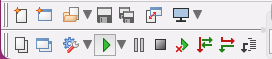 | |
| 106 | 106 | ||
| 107 | 107 | メインコントロールウィンドウの左側、メインメニューの直下、コンポーネントパレットの左にIDEクールバーがあります。ここには、メインメニューの中でよく用いられる機能のボタンがあります: | |
| 108 | 108 | ||
| 109 | 109 | ||
| 110 | 110 | **新規ユニット**、**開く** (ボタン右側の下向き矢印を押すと最近扱ったファイルの一覧が表示されます)、**保存**、**すべて保存**、**新規フォーム**、**フォーム/ユニット切り替え**(フォームかユニットのソースコードを表示)、**ユニットを表示**、**フォームを表示**、**実行**(コンパイルして実行)、**一時停止**、**トレース実行**、**ステップ実行**(最後の2つはデバッガの機能) | |
| 111 | 111 | ||
| 112 | 112 | ## コンポーネントパレット | |
| 113 | 113 | ||
| 114 | 114 | コンポーネントパレットとは、多くのアイコンが並んだタブ付きのツールバーのことです。各アイコンは、フォームを作成する際によく用いられるコンポーネントを表しています。 | |
| 115 | 115 | ||
| 116 | 116 |  | |
| 117 | 117 | ||
| 118 | 118 | それぞれのタブは機能ごとに分けられており、異なった組のアイコンからなります。 全てのタブでは、一番左に矢印のアイコンがあります。これは選択ツール(Selection Tool)と呼びます。 | |
| 119 | 119 | ||
| 120 | 120 | マウスカーソルをコンポーネントパレットのアイコンの上に移動して、しばらくクリックしないで待つと、アイコンが意味するコンポーネントの名前がポップアップします。 それらの名前がすべて 'T' で始まることに注意してください。これは、そのコンポーネントの 「型:'Type'」 、正確に言うとコンポーネントの 「クラス:'Class'」 を示しています。 | |
| 121 | 121 | ||
| 122 | 122 | コンポーネントをフォームに加えると、その [[Class]] が [[Unit]] の **[[Interface]]** 部の **[[Type]]** セクションに追加されます。(通常は TForm1 の定義の一部として) 同時に、そのクラスの **instance** が **[[Var]]** セクションに加えられます(通常、Form1という名前の変数として)。 フォームやコンポーネントが用いる **Methods** は、全て(つまり全ての [[Procedure]] と [[Function]] )、そのユニットの **[[Implementation]]** 部で宣言する必要があります。 | |
| 123 | 123 | ||
| 124 | 124 | #### コンポーネントのサンプルプログラム | |
| 125 | 125 | ||
| 126 | 126 | コンポーネントのサンプルプログラムは、 \$LazarusPath/lazarus/examples に保存されています。 | |
| 127 | 127 | ||
| 128 | 128 | 多くのプログラムで、IDEやコンポーネントパレットを使わないでダイアログや他のコンポーネントを利用する方法が分かるでしょう。全てのコンポーネントは、明確に主となるpascalプログラムで定義されています。 IDEを大いに利用するサンプルもあります。 | |
| 129 | 129 | ||
| 130 | 130 | サンプルプログラムの中には、そのままでは動作しないものもあるでしょう。ファイルやディレクトリのパス、パーミッションを設定する必要があるかも知れません。サンプルプログラムをコンパイルするにあたり、ファイル及びディレクトリに対する 読み/書き/実行 (read/write/execute) のパーミッションを確認して下さい。または適切なパーミッションを持ったディレクトリにファイルをコピーしてください。 | |
| 131 | 131 | ||
| 132 | 132 | まずは、'testall' プログラムを実行してみましょう。利用可能なコンポーネントのメニューと簡単な実行例があります。コードを読んでどう動いているか調べてみましょう! | |
| 133 | 133 | ||
| 134 | 134 | #### コンポーネントの一覧 | |
| 135 | 135 | ||
| 136 | 136 | コンポーネントの一覧を以下に示します。各ユニットには、それらの解説するページへのリンクが張ってあります(ないのもあります)。 あるコンポーネントのプロパティについて知りたければ、そのコンポーネントの継承を調べ、継承元となるコンポーネントについて調べるとよいでしょう。 例えば、TMaskEdit について理解することは、 TCustomMaskEditについて調査する際にも役に立ちます。 | |
| 137 | 137 | ||
| 138 | 138 | **タブの名前** (タブ自体の名前がおよその説明になっています。) | |
| 139 | 139 | ||
| 140 | 140 | - **[Standard](http://lazarus-ccr.sourceforge.net/docs/lcl/stdctrls/index-4.html)**(基本:コンポーネントの記述は、[[Standard tab/ja|Standard タブ]] にあります)。 | |
| 141 | 141 | ||
| 142 | 142 |  | |
| 143 | 143 | ||
| 144 | 144 | ||
| 145 | 145 | [TMainMenu](http://lazarus-ccr.sourceforge.net/docs/lcl/menus/tmainmenu.html), [TPopupMenu](http://lazarus-ccr.sourceforge.net/docs/lcl/menus/tpopupmenu.html), [TButton](http://lazarus-ccr.sourceforge.net/docs/lcl/stdctrls/tbutton.html), [TLabel](http://lazarus-ccr.sourceforge.net/docs/lcl/stdctrls/tlabel.html), [TEdit](http://lazarus-ccr.sourceforge.net/docs/lcl/stdctrls/tedit.html), [TMemo](http://lazarus-ccr.sourceforge.net/docs/lcl/stdctrls/tmemo.html), [TToggleBox](http://lazarus-ccr.sourceforge.net/docs/lcl/stdctrls/ttogglebox.html), [TCheckBox](http://lazarus-ccr.sourceforge.net/docs/lcl/stdctrls/tcheckbox.html), [TRadioButton](http://lazarus-ccr.sourceforge.net/docs/lcl/stdctrls/tradiobutton.html), [TListBox](http://lazarus-ccr.sourceforge.net/docs/lcl/stdctrls/tlistbox.html), [TComboBox](http://lazarus-ccr.sourceforge.net/docs/lcl/stdctrls/tcombobox.html), [TScrollBar](http://lazarus-ccr.sourceforge.net/docs/lcl/stdctrls/tscrollbar.html), [TGroupBox](http://lazarus-ccr.sourceforge.net/docs/lcl/stdctrls/tgroupbox.html),[TRadioGroup](http://lazarus-ccr.sourceforge.net/docs/lcl/extctrls/tradiogroup.html), [TCheckGroup](http://lazarus-ccr.sourceforge.net/docs/lcl/extctrls/tcheckgroup.html), [TPanel](http://lazarus-ccr.sourceforge.net/docs/lcl/extctrls/tpanel.html), [TActionList](http://lazarus-ccr.sourceforge.net/docs/lcl/actnlist/tactionlist.html) | |
| 146 | 146 | ||
| 147 | 147 | - **[Additional](http://lazarus-ccr.sourceforge.net/docs/lcl/extctrls/index-4.html)** (追加:コンポーネントの自体は、[[Additional tab/ja|Additionalタブ]] もご覧下さい。) | |
| 148 | 148 | ||
| 149 | 149 |  | |
| 150 | 150 | ||
| 151 | 151 | ||
| 152 | 152 | [TBitBtn](http://lazarus-ccr.sourceforge.net/docs/lcl/buttons/tbitbtn.html), [TSpeedButton](http://lazarus-ccr.sourceforge.net/docs/lcl/buttons/tspeedbutton.html), [TStaticText](http://lazarus-ccr.sourceforge.net/docs/lcl/stdctrls/tstatictext.html), [TImage](http://lazarus-ccr.sourceforge.net/docs/lcl/extctrls/timage.html), [TShape](http://lazarus-ccr.sourceforge.net/docs/lcl/extctrls/tshape.html), [TBevel](http://lazarus-ccr.sourceforge.net/docs/lcl/extctrls/tbevel.html), [TPaintBox](http://lazarus-ccr.sourceforge.net/docs/lcl/extctrls/tpaintbox.html), [TNotebook](http://lazarus-ccr.sourceforge.net/docs/lcl/extctrls/tnotebook.html), [TLabeledEdit](http://lazarus-ccr.sourceforge.net/docs/lcl/extctrls/tlabelededit.html), [TSplitter](http://lazarus-ccr.sourceforge.net/docs/lcl/extctrls/tsplitter.html), [TTrayIcon](http://lazarus-ccr.sourceforge.net/docs/lcl/extctrls/ttrayicon.html), [TMaskEdit](http://lazarus-ccr.sourceforge.net/docs/lcl/maskedit/tmaskedit.html), [TCheckListBox](http://lazarus-ccr.sourceforge.net/docs/lcl/checklst/tchecklistbox.html), [TScrollBox](http://lazarus-ccr.sourceforge.net/docs/lcl/forms/tscrollbox.html), [TApplicationProperties](http://lazarus-ccr.sourceforge.net/docs/lcl/forms/tapplicationproperties.html), [TStringGrid](http://lazarus-ccr.sourceforge.net/docs/lcl/grids/tstringgrid.html), [TDrawGrid](http://lazarus-ccr.sourceforge.net/docs/lcl/grids/tdrawgrid.html), [TPairSplitter](http://lazarus-ccr.sourceforge.net/docs/lcl/pairsplitter/tpairsplitter.html), [TColorBox](http://lazarus-ccr.sourceforge.net/docs/lcl/colorbox/tcolorbox.html), [TColorListBox](http://lazarus-ccr.sourceforge.net/docs/lcl/colorbox/tcolorlistbox.html), [TChart](http://lazarus-ccr.sourceforge.net/docs/lcl/chart/index.html) | |
| 153 | 153 | ||
| 154 | 154 | - **[Common Controls](http://lazarus-ccr.sourceforge.net/docs/lcl/comctrls/index-4.html)** (コンポーネントの記述は、 [[Common Controls tab]] にあります。) | |
| 155 | 155 | ||
| 156 | 156 |  | |
| 157 | 157 | ||
| 158 | 158 | ||
| 159 | 159 | [TTrackBar](http://lazarus-ccr.sourceforge.net/docs/lcl/comctrls/ttrackbar.html), [TProgressBar](http://lazarus-ccr.sourceforge.net/docs/lcl/comctrls/tprogressbar.html), [TTreeView](http://lazarus-ccr.sourceforge.net/docs/lcl/comctrls/ttreeview.html), [TListView](http://lazarus-ccr.sourceforge.net/docs/lcl/comctrls/tlistview.html), [TStatusBar](http://lazarus-ccr.sourceforge.net/docs/lcl/comctrls/tstatusbar.html), [TToolBar](http://lazarus-ccr.sourceforge.net/docs/lcl/comctrls/ttoolbar.html), [TUpDown](http://lazarus-ccr.sourceforge.net/docs/lcl/comctrls/tupdown.html), [TPageControl](http://lazarus-ccr.sourceforge.net/docs/lcl/comctrls/tpagecontrol.html), [TTabControl](http://lazarus-ccr.sourceforge.net/docs/lcl/comctrls/ttabcontrol.html), [THeaderControl](http://lazarus-ccr.sourceforge.net/docs/lcl/comctrls/theadercontrol.html), [TImageList](http://lazarus-ccr.sourceforge.net/docs/lcl/controls/timagelist.html), [TPopupNotifier](http://lazarus-ccr.sourceforge.net/docs/lcl/popupnotifier/index.html) | |
| 160 | 160 | ||
| 161 | 161 | - **[Dialogs](http://lazarus-ccr.sourceforge.net/docs/lcl/dialogs/index-4.html)** (コンポーネントの記述は、 [[Dialogs tab]] にあります。) | |
| 162 | 162 | ||
| 163 | 163 |  | |
| 164 | 164 | ||
| 165 | 165 | ||
| 166 | 166 | [TOpenDialog](http://lazarus-ccr.sourceforge.net/docs/lcl/dialogs/topendialog.html), [TSaveDialog](http://lazarus-ccr.sourceforge.net/docs/lcl/dialogs/tsavedialog.html), [TSelectDirectoryDialog](http://lazarus-ccr.sourceforge.net/docs/lcl/dialogs/tselectdirectorydialog.html), [TColorDialog](http://lazarus-ccr.sourceforge.net/docs/lcl/dialogs/tcolordialog.html), [TFontDialog](http://lazarus-ccr.sourceforge.net/docs/lcl/dialogs/tfontdialog.html), [TFindDialog](http://lazarus-ccr.sourceforge.net/docs/lcl/dialogs/tfinddialog.html), [TReplaceDialog](http://lazarus-ccr.sourceforge.net/docs/lcl/dialogs/treplacedialog.html), [TOpenPictureDialog](http://lazarus-ccr.sourceforge.net/docs/lcl/extdlgs/topenpicturedialog.html), [TSavePictureDialog](http://lazarus-ccr.sourceforge.net/docs/lcl/extdlgs/tsavepicturedialog.html), [TCalendarDialog](http://lazarus-ccr.sourceforge.net/docs/lcl/extdlgs/tcalendardialog.html), [TCalculatorDialog](http://lazarus-ccr.sourceforge.net/docs/lcl/extdlgs/tcalculatordialog.html), [TPrinterSetupDialog](http://lazarus-ccr.sourceforge.net/docs/lcl/dialogs/tcustomprintersetupdialog.html), [TPrintDialog](http://lazarus-ccr.sourceforge.net/docs/lcl/dialogs/tcustomprintdialog.html), [TPageSetupDialog](http://lazarus-ccr.sourceforge.net/docs/lcl/dialogs/tcustomprintersetupdialog.html) | |
| 167 | 167 | ||
| 168 | 168 | パレットに含まれていませんが、他にもいくつかの便利な **[ダイアログ](http://lazarus-ccr.sourceforge.net/index.php?wiki=DialogExamples)**手続きや関数があります。それらはソースプログラムから直接に呼び出せ、簡単に利用できます。 | |
| 169 | 169 | ||
| 170 | 170 | - **Misc**(その他) | |
| 171 | 171 | ||
| 172 | 172 |  | |
| 173 | 173 | ||
| 174 | 174 | ||
| 175 | 175 | [TColorButton](http://lazarus-ccr.sourceforge.net/index.php?wiki=DialogsTxt), [TSpinEdit](http://lazarus-ccr.sourceforge.net/docs/lcl/spin/tspinedit.html), [TFloatSpinEdit](http://lazarus-ccr.sourceforge.net/docs/lcl/spin/tfloatspinedit.html), [TArrow](http://lazarus-ccr.sourceforge.net/docs/lcl/arrow/tarrow.html), [TCalendar](http://lazarus-ccr.sourceforge.net/docs/lcl/calendar/tcalendar.html), [TEditButton](http://lazarus-ccr.sourceforge.net/docs/lcl/editbtn/teditbutton.html), [TFileNameEdit](http://lazarus-ccr.sourceforge.net/docs/lcl/editbtn/tfilenameedit.html), [TDirectoryEdit](http://lazarus-ccr.sourceforge.net/docs/lcl/editbtn/tdirectoryedit.html), [TDateEdit](http://lazarus-ccr.sourceforge.net/docs/lcl/editbtn/tdateedit.html), [TCalcEdit](http://lazarus-ccr.sourceforge.net/docs/lcl/editbtn/tcalcedit.html), [TFileListBox](http://lazarus-ccr.sourceforge.net/docs/lcl/filectrl/tfilelistbox.html), [TXMLPropStorage](http://lazarus-ccr.sourceforge.net/docs/lcl/xmlpropstorage/txmlpropstorage.html), [TIniPropStorage](http://lazarus-ccr.sourceforge.net/docs/lcl/inipropstorage/tinipropstorage.html), [TBarChart](http://lazarus-ccr.sourceforge.net/docs/lcl/chart/tbarchart.html), [TButtonPanel](http://lazarus-ccr.sourceforge.net/docs/lcl/buttonpanel/tbuttonpanel.html), TIDEDialogLayoutStorage | |
| 176 | 176 | ||
| 177 | 177 | - **[Data Controls](http://lazarus-ccr.sourceforge.net/docs/lcl/dbctrls/index-4.html)**(データの制御。Standard及びAdditionalグループに似ていますが、データベースに適用できます) | |
| 178 | 178 | ||
| 179 | 179 |  | |
| 180 | 180 | ||
| 181 | 181 | ||
| 182 | 182 | [TDBNavigator](http://lazarus-ccr.sourceforge.net/docs/lcl/dbctrls/tdbnavigator.html), [TDBText](http://lazarus-ccr.sourceforge.net/docs/lcl/dbctrls/tdbtext.html), [TDBEdit](http://lazarus-ccr.sourceforge.net/docs/lcl/dbctrls/tdbedit.html), [TDBMemo](http://lazarus-ccr.sourceforge.net/docs/lcl/dbctrls/tdbmemo.html), [TDBImage](http://lazarus-ccr.sourceforge.net/docs/lcl/dbctrls/tdbimage.html), [TDBListBox](http://lazarus-ccr.sourceforge.net/docs/lcl/dbctrls/tdblistbox.html), [TDBComboBox](http://lazarus-ccr.sourceforge.net/docs/lcl/dbctrls/tdbcombobox.html), [TDBCheckBox](http://lazarus-ccr.sourceforge.net/docs/lcl/dbctrls/tdbcheckbox.html), [TDBRadioGroup](http://lazarus-ccr.sourceforge.net/docs/lcl/dbctrls/tdbradiogroup.html), [TDBCalendar](http://lazarus-ccr.sourceforge.net/docs/lcl/dbctrls/tdbcalendar.html), [TDBGroupBox](http://lazarus-ccr.sourceforge.net/docs/lcl/dbctrls/tdbgroupbox.html), [TDBGrid](http://lazarus-ccr.sourceforge.net/docs/lcl/dbgrids/tdbgrid.html) | |
| 183 | 183 | ||
| 184 | 184 | - **Data Access**(データへのアクセス) | |
| 185 | 185 | ||
| 186 | 186 |  | |
| 187 | 187 | ||
| 188 | 188 | ||
| 189 | 189 | TDatasource, TMemDataset, TSdfDataSet, TFixedFormatDataSet, TDbf | |
| 190 | 190 | ||
| 191 | 191 | - **System**(システム) | |
| 192 | 192 | ||
| 193 | 193 |  | |
| 194 | 194 | ||
| 195 | 195 | ||
| 196 | 196 | [TTimer](http://lazarus-ccr.sourceforge.net/docs/lcl/extctrls/ttimer.html), [TIdleTimer](http://lazarus-ccr.sourceforge.net/docs/lcl/extctrls/tidletimer.html), [TLazComponentQueue](http://lazarus-ccr.sourceforge.net/docs/lcl/lresources/tlazcomponentqueue.html), [THtmlHelpDatabase](http://lazarus-ccr.sourceforge.net/docs/lcl/lazhelphtml/thtmlhelpdatabase.html), [THtmlBrowserHelpViewer](http://lazarus-ccr.sourceforge.net/docs/lcl/lazhelphtml/thtmlbrowserhelpviewer.html), [TProcessUTF8](http://lazarus-ccr.sourceforge.net/docs/lcl/asyncprocess/tprocessutf8.html), [TAsyncProcess](http://lazarus-ccr.sourceforge.net/docs/lcl/asyncprocess/tasyncprocess.html), [[doc:fcl/process/tprocess.html|TProcess]], TSimpleIPCClient, TSimpleIPCServer, TXMLConfig, TEventLog | |
| 197 | 197 | ||
| 198 | 198 | - **SynEdit**(SynEdit:他の言語や開発ツールへのインターフェースとなるコンポーネント[sourceforge](http://synedit.sourceforge.net/)) | |
| 199 | 199 | ||
| 200 | 200 |  | |
| 201 | 201 | ||
| 202 | 202 | ||
| 203 | 203 | TSynEdit, TSynAutoComplete, TSynExporterHTML, TSynMacroRecorder, TSynMemo, TSynPasSyn, TSynFreePascalSyn, TSynCppSyn, TSynJavaSyn, TSynPerlSyn, TSynHTMLSyn, TSynXMLSyn, TSynLFMSyn, TSynUNIXShellScriptSyn, TSynCssSyn, TSynPHPSyn, TSynTeXSyn, TSynSQLSyn, TSynPythonSyn, TSynVBSyn, TSynAnySyn, TSynMultiSyn | |
| 204 | 204 | ||
| 205 | 205 | SynEditは、 Borland Delphi, Kylix と C++Builder用の複数行編集コントロールであり、文法ハイライト機能やコード補完機能、HTMLやTeX、RTFへのエクスポート機能を持っています。これは完全なVCL/CLXコントロールであり、Microsoft Windows のコントロールのラッパーではなく、ランタイムライブラリを必要としない、クロスプラットフォームで利用できるコンポーネントです。FreePascalとの互換性も計画されており、 Lararus IDE をエディタも SynEditが利用されています。[sourceforge](http://synedit.sourceforge.net/)も参照ください。 | |
| 206 | 206 | ||
| 207 | 207 | #### コンポーネントパレットの使い方 | |
| 208 | 208 | ||
| 209 | 209 | コンポーネントパレットの利用にあたっては、フォームが作成されており、エディタ上で見えている必要があります(フォームが無い場合は、 File -\> New Form で新たなフォームが作成してください)。 次に、使いたいコンポーネントのアイコンをクリックして選択し、フォーム上のコンポーネントを配置したい位置でクリックすることで、選択されたコンポーネントが配置されます。 コンポーネントの移動やサイズの調整は、マウスで直接操作することでもできますし、コンポーネントのプロパティの値をオブジェクトエディタから直接操作することでもできます。 | |
| 210 | 210 | ||
| 211 | 211 | コンポーネントを新たに追加したときには(自作や他のパッケージから追加するなど)、コンポーネントパレットに新しいタブが現れ、コンポーネントに応じたアイコンが表示されます。それらは他のコンポーネントと同様に使用できます。 | |
| 212 | 212 | ||
| 213 | 213 | ## デバッガ | |
| 214 | 214 | ||
| 215 | 215 | ||
| 216 | 216 | (まだ書かれていません) | |
| 217 | 217 | ||
| 218 | 218 | ## Lazarusのファイルについて | |
| 219 | 219 | ||
| 220 | 220 | ファイルの保存操作をすると、次の二つのファイルを保存することになります: | |
| 221 | 221 | ||
| 222 | - | ||
| 223 | - | ||
| 222 | + | ```text | |
| 223 | + | xxx.pas | |
| 224 | + | yyy.lpr | |
| 225 | + | ``` | |
| 224 | 226 | ||
| 225 | 227 | 他にも保存されるファイルはありますが、あなたが名前をつけられるのはこの二つです。 プロジェクトファイル (lpr) 及びユニットファイル (pas) は同じ名前であってはいけません。Lazarus はユニットの名前(ソースコードに現れる名前)をユニットファイル名(xxxの部分)と同じになるように、またプログラムの名前をプロジェクトファイル名(yyyの部分)と同じになるように設定するので、同じになっていると、プロジェクト中で識別子が重複してしまいます。 一貫性を維持するため、project1 や、unit1 に適当な名前をつけましょう。 | |
| 226 | 228 | ||
| 227 | 229 | たとえば、**again** という名前のプロジェクトを保存しようとする際に、again.pas と again.lpr という名前で保存しようとするとうまくいきません。ユニット名とプログラム名は同じプロジェクト中にあるため、名前が重複したというエラー duplicate name error になります。 | |
| 228 | 230 | ||
| 229 | 231 | そこで、次のようになりました: | |
| 230 | 232 | ||
| 231 | 233 | e:/lazarus/kj/lazhello: | |
| 232 | 234 | ||
| 233 | - | ||
| 234 | - | ||
| 235 | - | ||
| 236 | - | ||
| 237 | - | ||
| 238 | - | ||
| 239 | - | ||
| 240 | - | ||
| 241 | - | ||
| 235 | + | ```text | |
| 236 | + | total 4740 free 76500 | |
| 237 | + | -rwxrwxrwx 1 kjwh root 4618697 Mar 24 11:19 again.exe | |
| 238 | + | -rw-rw-rw- 1 kjwh root 3002 Mar 24 11:21 again.lpi | |
| 239 | + | -rw-rw-rw- 1 kjwh root 190 Mar 24 11:18 again.lpr | |
| 240 | + | -rw-rw-rw- 1 kjwh root 506 Mar 24 11:08 againu.lfm | |
| 241 | + | -rw-rw-rw- 1 kjwh root 679 Mar 24 11:08 againu.lrs | |
| 242 | + | -rw-rw-rw- 1 kjwh root 677 Mar 24 11:08 againu.pas | |
| 243 | + | -rw-rw-rw- 1 kjwh root 2124 Mar 24 11:08 againu.ppu | |
| 244 | + | -rwxrwxrwx 1 kjwh root 335 Mar 24 11:07 ppas.bat | |
| 245 | + | ``` | |
| 242 | 246 | ||
| 243 | 247 | 二つのファイル (again.lpr、againu.pas) を保存したと思っていたのに、もっと多くのファイルが保存されています。 | |
| 244 | 248 | ||
| 245 | 249 | それぞれのファイルの簡単な説明をしておきましょう: | |
| 246 | 250 | ||
| 247 | 251 | **again.exe:** | |
| 248 | 252 | メインプログラムのバイナリ実行ファイルです。Win32では拡張子"exe"がつきます。Linux(やMac OS X)では何もつきません。デバッグ用のシンボルを含むために、Linuxでは巨大なファイルになります。"strip"コマンドでそれらを除去すると実行ファイルを小さくすることができます。 | |
| 249 | 253 | ||
| 250 | 254 | **again.lpi:** | |
| 251 | 255 | Lazarus プロジェクトのメインファイルです (Lazarus Project Information); Delphi でこれと同等なものが .dpr です。このファイルは XML フォーマットで保存されます。 | |
| 252 | 256 | ||
| 253 | 257 | **again.lpr:** | |
| 254 | 258 | メインプログラムのソースファイルです。Lazarus特有の拡張部分を除くと、実際にはごく普通の Pascal ソースファイルです。 | |
| 255 | 259 | ||
| 256 | 260 | uses節があり、コンパイラはその記述に従って必要な全ユニットを見つけます。Program 宣言の名前はファイル名と一致する必要があります。 | |
| 257 | 261 | ||
| 258 | 262 | **againu.lfm:** | |
| 259 | 263 | フォームユニットのレイアウトを格納します。Lazarus はこれを用いてリソースファイルを生成し、それが againu.pas の初期化セクション でインクルードされます。 Lazarus IDE の Tools-\>Convert DFM file to LFM utility を用いると、Delphi の dfm ファイルをlfmに変換することができます。 | |
| 260 | 264 | ||
| 261 | 265 | **againu.lrs:** | |
| 262 | 266 | 生成されたリソースファイルです。Windows のリソースファイルとは異なります。 | |
| 263 | 267 | ||
| 264 | 268 | **againu.pas:** | |
| 265 | 269 | このユニットにフォームのコードを書きます。 | |
| 266 | 270 | ||
| 267 | 271 | **againu.ppu:** | |
| 268 | 272 | ユニットをコンパイルしたオブジェクトコードです。 | |
| 269 | 273 | ||
| 270 | 274 | **ppas.bat:** | |
| 271 | 275 | プログラムをリンクし実行ファイルを作るための簡単なスクリプト(バッチファイル)です。コンパイルが成功すれば、コンパイラによって削除されます。 | |
| 272 | 276 | ||
| 273 | 277 | ## Original contributors and changes | |
| 274 | 278 | ||
| 275 | 279 | This page has been imported from the epikwiki [version](http://lazarus-ccr.sourceforge.net/index.php?wiki=LazarusTutorial). | |
| 276 | 280 | ||
| 277 | 281 | - Created initial page and template. T. Lisjac - 11/04/2003 VlxAdmin | |
| 278 | 282 | - Inserted a note containing instructions for writing your first Lazarus Program. Suggest an administrator places it in the appropriate place on the Tutorial menu. 3/09/2004 User:Kirkpatc | |
| 279 | 283 | - Per above, moved Chris's writeup to the main body of the tutorial VlxAdmin | |
| 280 | 284 | - Began to insert text describing the Lazarus Editor - more to follow! 24 Mar 2004 User:Kirkpatc | |
| 281 | 285 | - Added some more to Lazarus Editor section of Tutorial. 25 Mar 2004 User:Kirkpatc | |
| 282 | 286 | - Added screenshots and revised some of the page formatting VlxAdmin 3/25/2004 | |
| 283 | 287 | - Moved some of kwhitefoot's comments into Tutorial section. Formatting not quite right, but have to go to bed now! 26 Mar 2004 User:Kirkpatc | |
| 284 | 288 | - Formatted, added credits and comments. Removed original notes. VlxAdmin 3/26/2004 | |
| 285 | 289 | - More material added to Editor section of tutorial. 26 Mar 2004 User:Kirkpatc | |
| 286 | 290 | - More material added describing the Main Menu. Renamed 'Hello World' to 'Getting Started' and moved it to nearer the top. 31 March 2004 User:Kirkpatc | |
| 287 | 291 | - Inserted section on Run sub-menu. Some general editing (eg ended each entry with a period to ensure consistency). 9 Apr 2004 User:Kirkpatc | |
| 288 | 292 | - Inserted a new section on How to get started with MySQL in FPC/Lazarus. 13 Apr 2004 User:Kirkpatc | |
| 289 | 293 | - Deleted the section on MySQL from here: it has been copied to Lazarus Database section of tutorial. 14 Apr 2004 User:Kirkpatc | |
| 290 | 294 | - Added some more to the description of the Editor Main Menu. 18 Apr 2004 User:Kirkpatc | |
| 291 | 295 | - Added section on Environment sub-menu. 19 Apr 2004 User:Kirkpatc | |
| 292 | 296 | - Added section on Components sub-menu. 4 May 2004 User:Kirkpatc | |
| 293 | 297 | - Adding Tools sub-menu description (incomplete). 7 May 2004 User:Kirkpatc | |
| 294 | 298 | - Added some screenshots to Menu descriptions. 9 May 2004 User:Kirkpatc | |
| 295 | 299 | - Fixed a bit in Environment Options - thanks VincentSnijders. 14 May 2004 User:Kirkpatc | |
| 296 | 300 | - More additions to Tools sub-menu. 19 May 2004 User:Kirkpatc | |
| 297 | 301 | - Added a section on the Button Bar and started work on The Component Palette. 20 May 2004 User:Kirkpatc | |
| 298 | 302 | - Posted a description file for the StdCtrls unit of the LCL, in the hope that people will add comments. 26 May 2004 User:Kirkpatc | |
| 299 | 303 | - Edited the StdCtrls file, removing a lot of repetitive material and doing some formatting. It is still far too long. 28 May 2004 User:Kirkpatc | |
| 300 | 304 | - Expanding on the Components Palette. 5 June 2004 User:Kirkpatc | |
| 301 | 305 | - Added a lot to the DialogExamples page. 10 June 2004 User:Kirkpatc | |
| 302 | 306 | - Considerable revision of the StdCtrls page, hopefully making it clearer and encouraging people to contribute - particularly in the 'Description' sections. 14 June 2004 User:Kirkpatc | |
| 303 | 307 | - Added pages for Menus and Dialogs units (linked to Component Palette description) - please feel free to add to these pages. 14 June 2004 User:Kirkpatc | |
| 304 | 308 | - Added page for Common Controls (linked to Component Palette). 16 June 2004 User:Kirkpatc | |
| 305 | 309 | - Added MaskEdit page (linked to Component Palette). 17 June 2004 User:Kirkpatc | |
| 306 | 310 | - Added Buttons, ExtCtrls pages (linked to Component Palette). 17 June 2004 User:Kirkpatc | |
| 307 | 311 | - Edited MainMenu component description page. 23 June 2004 User:Kirkpatc | |
| 308 | 312 | - Some additions to Common Controls. 28 June 2004 User:Kirkpatc | |
| 309 | 313 | - A new tutorial on Text-mode Pascal programming has been added. 5 July 2004 User:Kirkpatc | |
| 310 | 314 | - Minor changes to ComCtrls, ExtCtrls, Environment Menu. 10 July User:Kirkpatc | |
| 311 | 315 | - Added FormsTxt, component description page for Component Palette. 20 July 2004 User:Kirkpatc | |
| 312 | 316 | - Some corrections to ConsoleModePascal. 21 July 2004 User:Kirkpatc | |
| 313 | 317 | - Some small changes to ComponentPalette. 22 July 2004 User:Kirkpatc | |
| 314 | 318 | - Some edits and additions to the Lazarus Component section. 23th Jan 2009 User: Miyatake | |
| 315 | 319 | ||
| 316 | 320 | --- | |
| 317 | 321 | *From the Free Pascal wiki, page "Lazarus Tutorial/ja", as it stood on 2024-03-30 after a change by Ariben, out of the wiki's dump of 2024-05-26. Copyright stays with the author who wrote it, according to the old wiki's [[Licensing]] page. If you have concerns about this material, [message the admin](/wiki-contact).* |