

Lazarus Manager: what changed
Revision 1 to 2. Removed lines have a minus sign; added lines have a plus sign.
| Old | New | Line | |
|---|---|---|---|
| 1 | 1 | ## Introduction | |
| 2 | 2 | ||
| 3 | 3 | This program is made to have latest news of lazarus/fpc development, because install everyday the daily snapshot is a little bit laborious. | |
| 4 | 4 | ||
| 5 | 5 | You can edit and improve Lazarus Manager sending me your feedback, maybe I will release the source code in future, but now I prefer to develop it myself. | |
| 6 | 6 | ||
| 7 | 7 | Finally, these scripts are for who doesn't want waste time on installations/configurations, but wants to develop on quick time ("end-users", not "developers of the development system"). | |
| 8 | 8 | ||
| 9 | 9 | **NOTE**: Lazarus Manager is made by Kjow and are **not supported by the FPC/Lazarus team**. This is occasionally updated to *latest revision*, but there may be problems with *last minute* SVN changes (so, it might not work with the *last minute* version). | |
| 10 | 10 | ||
| 11 | 11 | **NOTE 2**: Before Lazarus Manager, there were four scripts (2 for windows and 2 for Linux). These are obsolete. They don't work anymore due changes in Lazarus/FPC source and Windows/Linux structure. **Don't ask for these, they don't exist anymore.** | |
| 12 | 12 | ||
| 13 | - | ||
| 14 | - | ||
| 15 | 13 | ## Windows | |
| 16 | 14 | ||
| 17 | 15 | Lazarus Manager is a sort of "one-click" installation that permit to install Lazarus/FPC svn without anything else. It downloads all the necessary (svn client, utils, binutils, Lazarus branches/trunk svn, FPC branches/trunk svn), makes the directories structure and builds everything for also cross-compile for arm android/linux. | |
| 18 | 16 | ||
| 19 | 17 | From Windows (with android ndk, if required) it build:\ | |
| 20 | - | ||
| 18 | + | ||
| 21 | 19 | * Lazarus branch with targets: | |
| 22 | 20 | ||
| 23 | 21 | - - i386-win32 | |
| 24 | 22 | - X86_64-win64 | |
| 25 | 23 | ||
| 26 | - | ||
| 27 | 24 | *Lazarus trunk with targets: | |
| 28 | 25 | ||
| 29 | 26 | - - i386-win32 | |
| 30 | 27 | - X86_64-win64 | |
| 31 | 28 | - arm-android | |
| 32 | 29 | - arm-linux | |
| 33 | 30 | ||
| 34 | - | ||
| 35 | - | ||
| 36 | 31 | ### First Installation | |
| 37 | 32 | ||
| 38 | 33 | Lazarus Manager has some controls to check if something fails (e.g. android ndk path not found), anyway before start you should know something and set some little things. | |
| 39 | 34 | ||
| 40 | 35 | Lazarus Manager saves latest settings used in **./config.ini**: | |
| 41 | 36 | ||
| 42 | 37 | - Drive | |
| 43 | 38 | - Path | |
| 44 | 39 | - Branches svn url | |
| 45 | 40 | - Trunk svn url | |
| 46 | 41 | - Android ndk paths | |
| 47 | 42 | ||
| 48 | 43 | The usage of Lazarus Manager is intuitive, so in first tab you will find base file urls. | |
| 49 | 44 | ||
| 50 | 45 | If you want to make shortcuts to desktop check the flag in left-bottom corner. | |
| 51 | 46 | ||
| 52 | - | ||
| 53 | - | ||
| 54 | - | ||
| 55 | - | ||
| 56 | - | ||
| 57 | - | ||
| 58 | - | ||
| 59 | - | ||
| 47 | + | 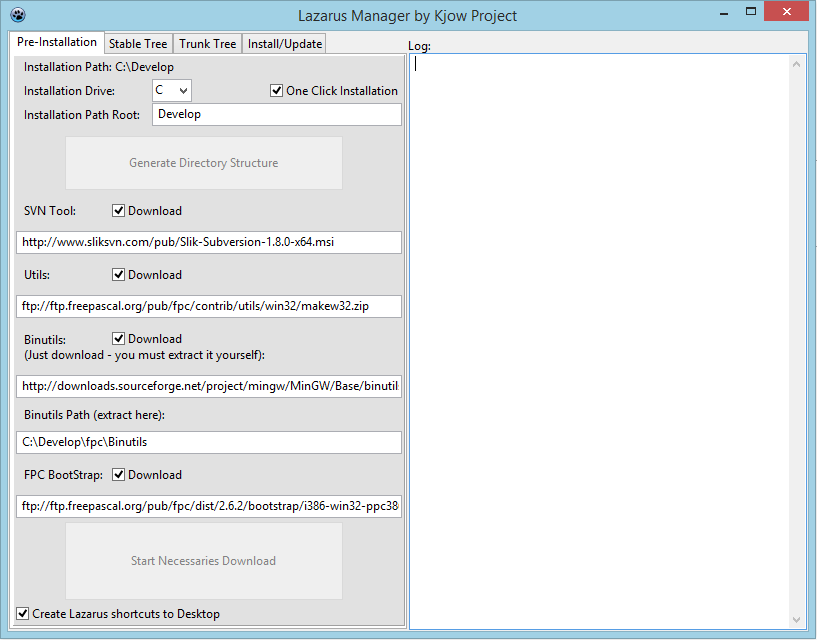 | |
| 60 | 48 | ||
| 61 | 49 | **`NOTE`**`: If you choose to select "One click installation" (recommended), buttons `**`"Generate Directory Structure"`**` and `**`"Start Necessaries Download"`**` are `*[[disabled]]*` and the installation process will do all the work for you.` | |
| 62 | 50 | ||
| 63 | - | ||
| 64 | 51 | In "Stable Tree" tab there are the svn urls (you can change with newer revision when they will came out) and targets: | |
| 65 | 52 | ||
| 66 | - | ||
| 67 | - | ||
| 68 | - | ||
| 69 | - | ||
| 70 | - | ||
| 71 | - | ||
| 72 | - | ||
| 73 | - | ||
| 53 | + | 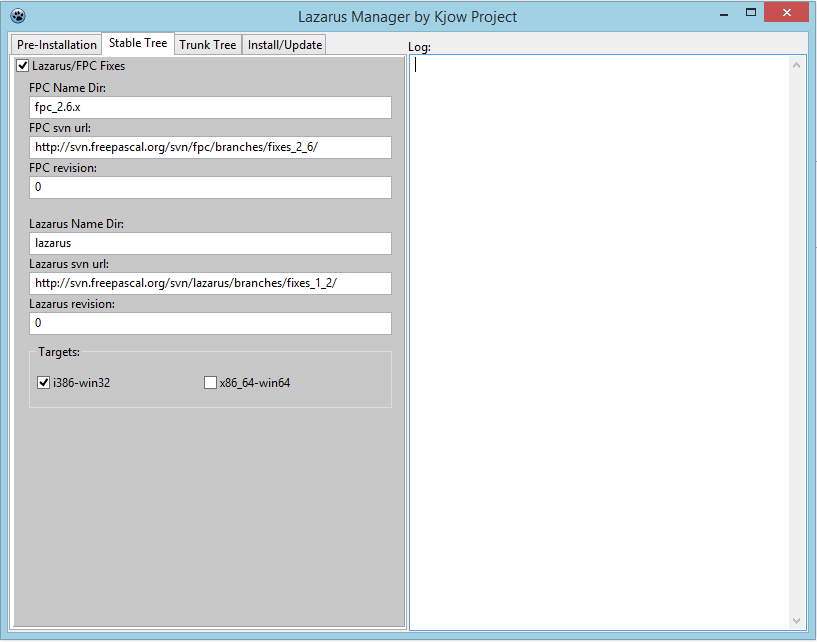 | |
| 74 | 54 | ||
| 75 | 55 | If you need to cross-compile Lazarus app for Android, you need to download and extract the NDK in your hard disk, then you had to save two paths: | |
| 76 | 56 | ||
| 77 | 57 | - arm-linux-androideabi | |
| 78 | 58 | - binutils | |
| 79 | 59 | ||
| 80 | - | ||
| 81 | 60 | E.g. if you use Windows X64 (I tested on Windows 8.1 X64), download and initialize Android NDK for Windows X64. So, if you have version r9 of ndk the requested paths will be: | |
| 82 | 61 | ||
| 83 | 62 | - C:\Android\android-ndk-r9\toolchains\arm-linux-androideabi-4.8\prebuilt\windows-x86_64\arm-linux-androideabi\bin | |
| 84 | 63 | - C:\Android\android-ndk-r9\toolchains\arm-linux-androideabi-4.8\prebuilt\windows-x86_64\bin | |
| 85 | 64 | ||
| 86 | - | ||
| 87 | - | ||
| 88 | - | ||
| 89 | - | ||
| 90 | - | ||
| 91 | - | ||
| 92 | - | ||
| 93 | - | ||
| 65 | + | 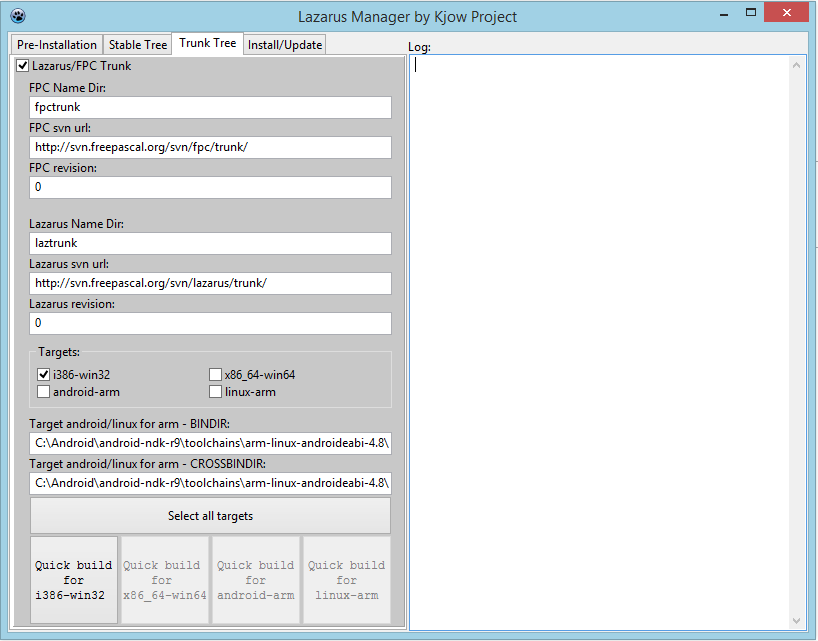 | |
| 94 | 66 | ||
| 95 | 67 | In "Install/Update" tab you can do the first installation or just update actual installation: | |
| 96 | 68 | ||
| 97 | - | ||
| 98 | - | ||
| 99 | - | ||
| 100 | - | ||
| 101 | - | ||
| 102 | - | ||
| 103 | - | ||
| 104 | - | ||
| 69 | + | 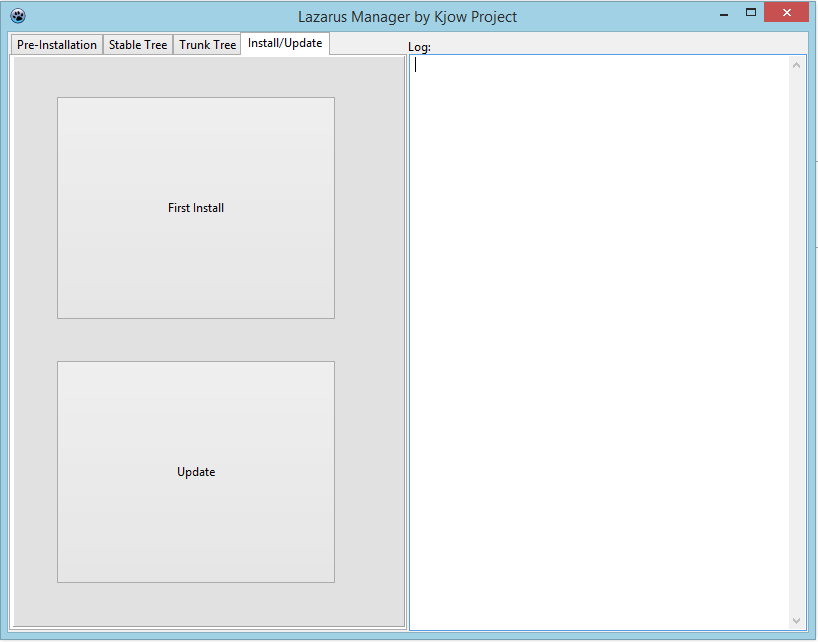 | |
| 105 | 70 | ||
| 106 | 71 | ### Update | |
| 107 | 72 | ||
| 108 | 73 | In the end, if you want automatize update process you can make a link (or batch file) to LazarusManager.exe to put in Windows auto-start directory, or just launch it when necessary. An example of this link is supplied in zip file.\ | |
| 109 | - | ||
| 74 | + | ||
| 110 | 75 | LazarusManager accepts three parameters: | |
| 111 | 76 | ||
| 112 | 77 | - First parameter | |
| 113 | 78 | - **autoupdate** (it indicates that Lazarus should be updated automatically to latest svn, without interactions) | |
| 114 | 79 | ||
| 115 | - | ||
| 116 | 80 | * Second parameter | |
| 117 | 81 | ||
| 118 | 82 | - - **both** (it updates **both** branch and trunk trees) | |
| 119 | 83 | - **branch** (it updates **branch** tree) | |
| 120 | 84 | - **trunk** (it updates **trunk** tree) | |
| 121 | 85 | ||
| 122 | - | ||
| 123 | 86 | * Third parameter (**NOTE: i386-win32 target is always included**) | |
| 124 | 87 | ||
| 125 | 88 | - - **all** (it updates **all** targets) | |
| 126 | 89 | - **x64b** (it updates **x86_64-win64 branch** target) | |
| 127 | 90 | - **x64t** (it updates **x86_64-win64 trunk** target) | |
| 128 | 91 | - **andarm** (it updates **arm-android trunk** target) | |
| 129 | 92 | - **linarm** (it updates **arm-linux trunk** target) | |
| 130 | 93 | ||
| 131 | - | ||
| 132 | 94 | Example 1: | |
| 133 | 95 | ||
| 134 | 96 | `LazarusManager.exe autoupdate both all` | |
| 135 | 97 | ||
| 136 | 98 | Example 2: | |
| 137 | 99 | ||
| 138 | 100 | `LazarusManager.exe autoupdate branch x64b` | |
| 139 | 101 | ||
| 140 | 102 | Wrong combinations are ignored, e.g. | |
| 141 | 103 | ||
| 142 | 104 | `LazarusManager.exe autoupdate branch andarm` | |
| 143 | 105 | ||
| 144 | - | ||
| 145 | - | ||
| 146 | 106 | ### Directory structure | |
| 147 | 107 | ||
| 148 | - | ||
| 149 | - | ||
| 150 | - | ||
| 151 | - | ||
| 108 | + | 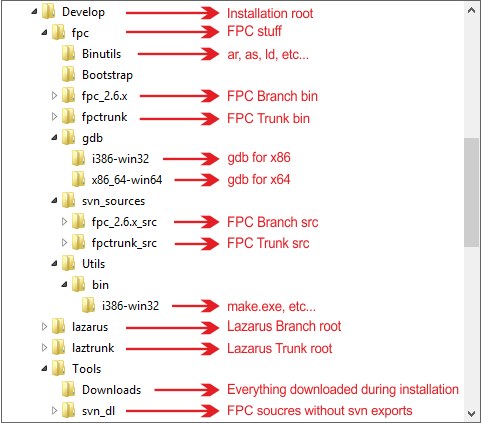 | |
| 152 | 109 | ||
| 153 | 110 | ### How to start Lazarus | |
| 154 | 111 | ||
| 155 | 112 | Lazarus Manager will create in lazarus branch/trunk roots a shortcuts that make start Lazarus with config dir inside the same root instead of Windows user directory, so you can have how many installations you want. | |
| 156 | 113 | ||
| 157 | 114 | To start Lazarus go to Lazarus root (branch or trunk) and double click on **Lazarus_B_Develop** for branch or **Lazarus_T_Develop** for trunk (**NOTE**: "Develop" is the general installation root, if you change it on install phase, it will be name as you choose). | |
| 158 | 115 | ||
| 159 | 116 | ### Configure first Lazarus launch | |
| 160 | 117 | ||
| 161 | 118 | Here it is an example of generic "first run", you need to use correct paths to ensure the right functionality. | |
| 162 | 119 | ||
| 163 | - | ||
| 164 | 120 | <img src="Config.png" title="Configuration (click to zoom)" width="800" /> | |
| 165 | - | ||
| 166 | - | ||
| 167 | 121 | ||
| 168 | 122 | **NOTE**: remember to edit Tools -\> IDE Options -\> Environment to set paths concording the installation: | |
| 169 | 123 | ||
| 170 | - | ||
| 171 | - | ||
| 172 | - | ||
| 173 | - | ||
| 124 | + | 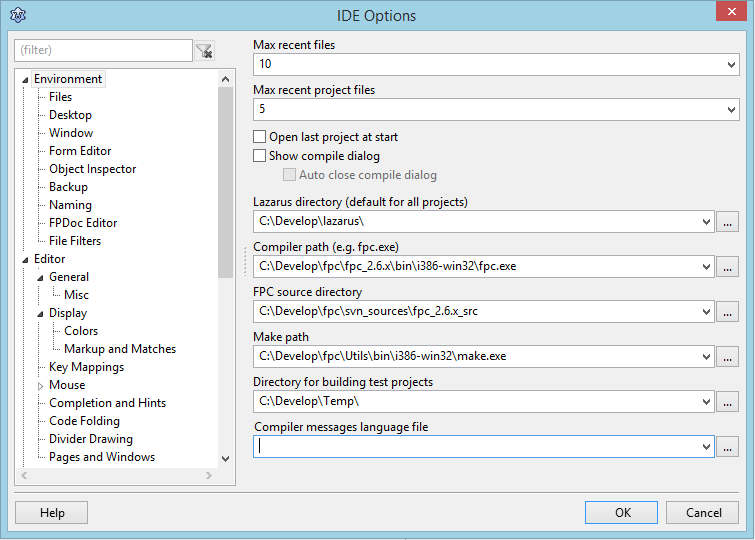 | |
| 174 | 125 | ||
| 175 | 126 | ## Download | |
| 176 | 127 | ||
| 177 | 128 | The link below is dead\ | |
| 178 | - | ||
| 129 | + | You can download Lazarus Manager from [here](http://www.kjow.net/lazarus-utilities/). | |
| 179 | 130 | ||
| 180 | 131 | ## Extra Info | |
| 181 | 132 | ||
| 182 | 133 | - Lazarus Manager will save in the root you choose to install Lazarus a log.txt file with the entry **last** process made (e.g. First Installation, Update, etc). | |
| 183 | 134 | ||
| 184 | 135 | - In log form or in log.txt, at the end of installation there il a reminder of which paths you need to add at the Windows **System PATH**, e.g.: | |
| 185 | 136 | ||
| 186 | 137 | `...`\ | |
| 187 | 138 | `...`\ | |
| 188 | 139 | `...`\ | |
| 189 | 140 | `********************`\ | |
| 190 | 141 | `To complete the installation, please add these paths to System PATH:`\ | |
| 191 | 142 | `C:\Develop\fpc\Bootstrap;C:\Develop\fpc\Binutils;C:\Develop\fpc\Utils\bin\i386-win32;C:\Program Files\SlikSvn\bin\;C:\Develop\fpc\fpc_2.6.x\bin\i386-win32;C:\Develop\fpc\fpctrunk\bin\i386-win32`\ | |
| 192 | 143 | `********************` | |
| 193 | 144 | ||
| 194 | 145 | ## See also | |
| 195 | 146 | ||
| 196 | 147 | - [[Installing Lazarus]] Official way to install Lazarus | |
| 197 | 148 | - [[fpcup]] Another tool that installs/updates FPC+Lazarus for you. | |
| 198 | 149 | - [[fpcupdeluxe]] Yet another tool that installs/updates FPC+Lazarus for you. | |
| 199 | 150 | ||
| 200 | 151 | ## Credit | |
| 201 | 152 | ||
| 202 | 153 | Kjow 01:00, 10 January 2014 (CET)\ | |
| 203 | 154 | Latest Revision: Kjow 15:49, 10 January 2014 (CET) | |
| 204 | 155 | ||
| 205 | 156 | --- | |
| 206 | 157 | *From the Free Pascal wiki, page "Lazarus Manager", as it stood on 2020-01-03 after a change by Bart, out of the wiki's dump of 2024-05-26. Copyright stays with the author who wrote it, according to the old wiki's [[Licensing]] page. If you have concerns about this material, [message the admin](/wiki-contact).* | |
| 207 | 158 | Category: Lazarus |