

Lazarus IDE Tools: what changed
Revision 1 to 2. Removed lines have a minus sign; added lines have a plus sign.
| Old | New | Line | |
|---|---|---|---|
| 1 | 1 | The **[[Lazarus Faq|Lazarus]] IDE Tools** is a library of [[Free Pascal]] source parsing and editing tools, called the "codetools". | |
| 2 | 2 | ||
| 3 | 3 | These tools provide features like *Find Declaration*, *Code Completion*, *Extraction*, *Moving Inserting* and *Beautifying Pascal* sources. These functions can save a lot of time and duplicated work. They are customizable, and every feature is available via shortcuts (see Editor Options). | |
| 4 | 4 | ||
| 5 | 5 | Because they work solely on Pascal sources and understand FPC, [[Delphi]] and [[Kylix]] code, they do not require compiled units or an installed Borland/Embarcadero compiler. Delphi and FPC code can be edited at the same time, with several Delphi and FPC versions. This makes porting Delphi code to FPC/Lazarus much easier. | |
| 6 | 6 | ||
| 7 | 7 | ## Summary Table of IDE shortcuts | |
| 8 | 8 | ||
| 9 | 9 | | | | | |
| 10 | 10 | |----|----| | |
| 11 | - | ||
| 12 | - | ||
| 13 | - | ||
| 14 | - | ||
| 15 | - | ||
| 16 | - | ||
| 17 | - | ||
| 18 | - | ||
| 19 | - | ||
| 20 | - | ||
| 11 | + | | [[Lazarus IDE Tools|Declaration Jumping]] | `Ctrl`+Click or `Alt`+`Up` (jump to declaration of type or variable) | | |
| 12 | + | | [[Lazarus IDE Tools|Method Jumping]] | `Ctrl`+`Shift`+`Up` (toggle between definition and body) | | |
| 13 | + | | [[Lazarus IDE Tools|Code Templates]] | `Ctrl`+`J` | | |
| 14 | + | | [[Lazarus IDE Tools|Syncro Edit]] | `Ctrl`+`J` (while text is selected) | | |
| 15 | + | | [[Lazarus IDE Tools|Code Completion]] (Class Completion) | `Ctrl`+`Shift`+`C`, `Ctrl`+`Shift`+`X` for creating class fields instead of local variables | | |
| 16 | + | | [[Lazarus IDE Tools|Identifier Completion]] | `Ctrl`+`space` | | |
| 17 | + | | [[Lazarus IDE Tools|Word Completion]] | `Ctrl`+`W` | | |
| 18 | + | | [[Lazarus IDE Tools|Parameter Hints]] | `Ctrl`+`Shift`+`space` | | |
| 19 | + | | [[Lazarus IDE Tools|Incremental Search]] | `Ctrl`+`E` | | |
| 20 | + | | [[Lazarus IDE Tools|Rename Identifier]] | `Ctrl`+`Shift`+`E` | | |
| 21 | 21 | ||
| 22 | 22 | ## Method Jumping | |
| 23 | 23 | ||
| 24 | - | ||
| 24 | + | To jump between a procedure body (begin..end) and the procedure definition (procedure Name;) use `Ctrl`+`Shift`+`Up`. | |
| 25 | 25 | ||
| 26 | 26 | For example: | |
| 27 | 27 | ||
| 28 | 28 | ``` pascal | |
| 29 | 29 | interface | |
| 30 | 30 | ||
| 31 | 31 | procedure DoSomething; // procedure definition | |
| 32 | 32 | ||
| 33 | 33 | implementation | |
| 34 | 34 | ||
| 35 | 35 | procedure DoSomething; // procedure body | |
| 36 | 36 | begin | |
| 37 | 37 | end; | |
| 38 | 38 | ``` | |
| 39 | 39 | ||
| 40 | - | ||
| 40 | + | If the cursor is on the procedure body and `Ctrl`+`Shift`+`Up` is pressed, the cursor will jump to the definition. Pressing `Ctrl`+`Shift`+`Up` again will jump to the body, after 'begin'. | |
| 41 | 41 | ||
| 42 | 42 | This works between methods (procedures in classes) as well. | |
| 43 | 43 | ||
| 44 | 44 | Hints: 'Method Jumping' jumps to the same procedure with the same name and parameter list. If there is no exact procedure, it jumps to the best candidate and positions the cursor on the first difference. (For Delphians: Delphi can not do this). | |
| 45 | 45 | ||
| 46 | 46 | For example a procedure with different parameter types: | |
| 47 | 47 | ||
| 48 | 48 | ``` pascal | |
| 49 | 49 | interface | |
| 50 | 50 | ||
| 51 | 51 | procedure DoSomething(p: char); // procedure definition | |
| 52 | 52 | ||
| 53 | 53 | implementation | |
| 54 | 54 | ||
| 55 | 55 | procedure DoSomething(p: string); // procedure body | |
| 56 | 56 | begin | |
| 57 | 57 | end; | |
| 58 | 58 | ``` | |
| 59 | 59 | ||
| 60 | 60 | Jumping from the definition to the body will position the cursor at the 'string' keyword. This can be used for renaming methods and/or changing the parameters. | |
| 61 | 61 | ||
| 62 | 62 | For example: | |
| 63 | 63 | ||
| 64 | 64 | You renamed 'DoSomething' to 'MakeIt': | |
| 65 | 65 | ||
| 66 | 66 | ``` pascal | |
| 67 | 67 | interface | |
| 68 | 68 | ||
| 69 | 69 | procedure MakeIt; // procedure definition | |
| 70 | 70 | ||
| 71 | 71 | implementation | |
| 72 | 72 | ||
| 73 | 73 | procedure DoSomething; // procedure body | |
| 74 | 74 | begin | |
| 75 | 75 | end; | |
| 76 | 76 | ``` | |
| 77 | 77 | ||
| 78 | 78 | Then you jump from MakeIt to the body. The IDE searches for a fitting body, does not find one, and hence searches for a candidate. Since you renamed only one procedure there is exactly one body without definition (DoSomething) and so it will jump to DoSomething and position the cursor right on 'DoSomething'. Then you can simply rename it there too. This works for parameters as well. | |
| 79 | 79 | ||
| 80 | 80 | ## Include Files | |
| 81 | 81 | ||
| 82 | 82 | Include files are files inserted into sources with the {\$I filename} or {\$INCLUDE filename} compiler directive. Lazarus and FPC often uses include files to reduce redundancy and avoid unreadable {\$IFDEF} constructs, needed to support different platforms. | |
| 83 | 83 | ||
| 84 | 84 | Contrary to Delphi, the Lazarus IDE has full support for include files. You can for example jump from the method in the .pas file to the method body in the include file. All codetools like code completion consider include files as special bounds. | |
| 85 | 85 | ||
| 86 | 86 | For instance: When code completion adds a new method body behind another method body, it keeps them both in the same file. This way you can put whole class implementations in include files, as the LCL does for nearly all controls. | |
| 87 | 87 | ||
| 88 | 88 | But there is a trap for newbies: If you open an include file for the first time and try method jumping or find declaration you will get an error. The IDE does not yet know to which unit the include file belongs. You must open the unit first. | |
| 89 | 89 | ||
| 90 | 90 | As soon as the IDE parses the unit, it will parse the include directives there and the IDE will remember this relationship. It saves this information on exit and on project save to ~/.lazarus/includelinks.xml. The next time you open this include file and jump or do a find declaration, the IDE will internally open the unit and the jump will work. You can also hint the IDE by putting `{%mainunit yourunit.pas}` at the top of yourinclude.inc. | |
| 91 | 91 | ||
| 92 | 92 | This mechanism has limits. Some include files are included twice or more. For example: lcl/include/winapih.inc. | |
| 93 | 93 | ||
| 94 | 94 | How you will jump from the procedure/method definitions in this include file to their bodies will depend on your last action. If you worked on lcl/lclintf.pp the IDE will jump to winapi.inc. If you worked on lcl/interfacebase.pp, then it will jump to lcl/include/interfacebase.inc (or one of the other include files). If you are working on both, then you can get confused. ;) | |
| 95 | 95 | ||
| 96 | 96 | ## Code Templates | |
| 97 | 97 | ||
| 98 | 98 | Code Templates converts an identifier into a text or code fragment. | |
| 99 | 99 | ||
| 100 | - | ||
| 100 | + | Code Templates default short cut is `Ctrl`+`J`. You can type an identifier, press `Ctrl`+`J` and the identifier is replaced by the text defined for the identifier. Code Templates can be defined in Tools -\> Options -\> CodeTools. | |
| 101 | 101 | ||
| 102 | - | ||
| 102 | + | Example: Write the identifier 'classf', leave the cursor right behind the 'f' and press `Ctrl`+`J`. The 'classf' will be replaced by | |
| 103 | 103 | ||
| 104 | 104 | ``` pascal | |
| 105 | 105 | T = class(T) | |
| 106 | 106 | private | |
| 107 | 107 | ||
| 108 | 108 | public | |
| 109 | 109 | constructor Create; | |
| 110 | 110 | destructor Destroy; override; | |
| 111 | 111 | end; | |
| 112 | 112 | ``` | |
| 113 | 113 | ||
| 114 | 114 | and the cursor is behind the 'T'. | |
| 115 | 115 | ||
| 116 | - | ||
| 116 | + | You can get the list of templates by positioning the cursor on space (not on an identifier) and pressing `Ctrl`+`J`. The list of code templates will pop up. Use the cursor keys or type some chars to choose one. Return creates the selected template and Escape closes the pop up. | |
| 117 | 117 | ||
| 118 | - | ||
| 118 | + | The biggest time savers are templates 'b'+`Ctrl`+`J` for begin..end. | |
| 119 | 119 | ||
| 120 | 120 | ## Parameter Hints | |
| 121 | 121 | ||
| 122 | 122 | Parameter Hints shows a hint box with the parameter declarations for the current parameter list. | |
| 123 | 123 | ||
| 124 | 124 | For example: `Canvas.FillRect(|);` | |
| 125 | 125 | ||
| 126 | - | ||
| 126 | + | Place the cursor in the brackets and press `Ctrl`+`Shift`+`space`. A hint box will show up showing the parameters of FillRect. | |
| 127 | 127 | ||
| 128 | - | ||
| 129 | - | ||
| 130 | - | ||
| 131 | - | ||
| 128 | + |  | |
| 132 | 129 | ||
| 133 | 130 | Since 0.9.31 there is a button to the right of each declaration to insert the missing parameters.This will copy the parameter names from the chosen declaration to the cursor position. | |
| 134 | 131 | ||
| 135 | - | ||
| 136 | - | ||
| 137 | - | ||
| 138 | - | ||
| 132 | + |  | |
| 139 | 133 | ||
| 140 | 134 | Hint: Use the Variable Declaration Completion to declare the variables. | |
| 141 | 135 | ||
| 142 | 136 | > **Note:** The short cut's name is "Show code context". | |
| 143 | 137 | ||
| 144 | 138 | ## Incremental Search | |
| 145 | 139 | ||
| 146 | - | ||
| 140 | + | Incremental Search changes the statusbar of the source editor. Type some characters and the editor will search and highlight immediately all occurrences in the text. Shortcut is `Ctrl`+`e`. | |
| 147 | 141 | ||
| 148 | - | ||
| 149 | - | ||
| 150 | - | ||
| 142 | + | - For example pressing `e` will search and highlight all occurrences of 'e'. | |
| 143 | + | - Then pressing `t` will search and highlight all occurrences of 'et' and so forth. | |
| 144 | + | - You can jump to the next with `F3` (or `Ctrl`+`e` while in search) and the previous with `Shift`+`F3`. | |
| 151 | 145 | - Backspace deletes the last character | |
| 152 | 146 | - return stops the search without adding a new line in the editor. | |
| 153 | - | ||
| 154 | - | ||
| 147 | + | - You can resume the last search by pressing `Ctrl`+`e` a second time, immediately after you started incr-search with `Ctrl`+`e`. that is while the search term is still empty. | |
| 148 | + | - Paste `Ctrl`+`V` will append the text from the clipboard to the current search text (since lazarus 0.9.27 r19824). | |
| 155 | 149 | ||
| 156 | 150 | ### Hint: Quick searching an identifier with incremental search | |
| 157 | 151 | ||
| 158 | 152 | - Place text cursor on identifier (do not select anything) | |
| 159 | - | ||
| 160 | - | ||
| 161 | - | ||
| 162 | - | ||
| 153 | + | - Press `Ctrl`+`C`. The source editor will select the identifier and copy it to the clipboard | |
| 154 | + | - Press `Ctrl`+`E` to start incremental search | |
| 155 | + | - Press `Ctrl`+`V` to search for the identifier (since 0.9.27) | |
| 156 | + | - Use `F3` and `Shift`+`F3` to quickly jump to next/previous. | |
| 163 | 157 | - Use any key (for example cursor left or right) to end the search | |
| 164 | 158 | ||
| 165 | 159 | ## Syncro Edit | |
| 166 | 160 | ||
| 167 | 161 | Syncro Edit allows you to edit all occurrences of a word at the same time (synchronized). You simple edit the word in one place, and as you type, all other occurrences of the word are updated too. | |
| 168 | 162 | ||
| 169 | 163 | Syncro Edit works on all words in a selected area: | |
| 170 | 164 | ||
| 171 | 165 | - Select a block of text | |
| 172 | - | ||
| 166 | + | - press `Ctrl`+`J` or click the icon in the gutter. (This only works, if there are any words that occur more than once in the selection. | |
| 173 | 167 | - From Lazarus 4.0 on the following are available: | |
| 174 | - | ||
| 175 | - | ||
| 176 | - | ||
| 177 | - | ||
| 178 | - | ||
| 168 | + | - `Ctrl`+`J` Words are grouped independent of the upper/lower casing. | |
| 169 | + | - `Ctrl`+`Shift`+`J` Words are only grouped if they have the same upper/lower casing. | |
| 170 | + | - `Ctrl`+`Alt`+`J` Words are only grouped if they have the same context. Identifiers are different from the same word in a comment, or the same word as keyword or string. | |
| 171 | + | - `Ctrl`+`Shift`+`Alt`+`J` Words are only grouped if they have the same context and same upper/lower casing. | |
| 172 | + | - use the `tab` key to select the word you want to edit (if several different words occurred more than once) | |
| 179 | 173 | - Edit the word | |
| 180 | - | ||
| 174 | + | - Press `Esc` to finish | |
| 181 | 175 | ||
| 182 | 176 | See an animated example [[New IDE features since|here]] | |
| 183 | 177 | ||
| 184 | - | ||
| 178 | + | > **Note:** `Ctrl`+`J` is also used for template edit. It switches its meaning if you select some text. | |
| 185 | 179 | ||
| 186 | 180 | ## Find next / previous word occurrence | |
| 187 | 181 | ||
| 188 | 182 | The two functions can be found in the popup menu of the source editor | |
| 189 | 183 | ||
| 190 | 184 | - Source editor / popup menu / Find / Find next word occurrence | |
| 191 | 185 | - Source editor / popup menu / Find / Find previous word occurrence | |
| 192 | 186 | ||
| 193 | 187 | And you can assign them shortcuts in the editor options. | |
| 194 | 188 | ||
| 195 | 189 | ## Code Completion | |
| 196 | 190 | ||
| 197 | - | ||
| 191 | + | Code Completion can be found in the IDE menu Edit -\> Complete Code and has as standard short cut `Ctrl`+`Shift`+`C`. | |
| 198 | 192 | ||
| 199 | - | ||
| 193 | + | For Delphians: Delphi calls "code completion" the function showing the list of identifiers at the current source position (`Ctrl`+`Space`). Under Lazarus this is called "Identifier completion". | |
| 200 | 194 | ||
| 201 | 195 | Code Completion combines several powerful functions. Examples: | |
| 202 | 196 | ||
| 203 | 197 | - Class Completion: completes properties, adds/updates method bodies, add private variables and private access methods | |
| 204 | 198 | - Forward Procedure Completion: adds procedure bodies | |
| 205 | 199 | - Event Assignment Completion: completes event assignments and adds method definition and body | |
| 206 | 200 | - Variable Declaration Completion: adds local variable definitions | |
| 207 | 201 | - Procedure Call Completion: adds a new procedure | |
| 208 | 202 | - Reversed procedure completion: adds procedure declarations for procedure/function bodies | |
| 209 | 203 | - Reversed Class Completion: adds method declarations for method bodies | |
| 210 | 204 | ||
| 211 | 205 | Which function is used, depends on the cursor position in the editor and will be explained below. | |
| 212 | 206 | ||
| 213 | - | ||
| 207 | + | Code Completion can be found in the IDE menu Edit -\> Complete Code and has as standard short cut `Ctrl`+`Shift`+`C`. | |
| 214 | 208 | ||
| 215 | 209 | ### Class Completion | |
| 216 | 210 | ||
| 217 | 211 | The most powerful code completion feature is "Class Completion". You write a class, add the methods and properties and Code Completion will add the method bodies, the property access methods/variables and the private variables. | |
| 218 | 212 | ||
| 219 | 213 | For example: Create a class (see Code Templates to save you some type work): | |
| 220 | 214 | ||
| 221 | 215 | ``` pascal | |
| 222 | 216 | TExample = class(TObject) | |
| 223 | 217 | public | |
| 224 | 218 | constructor Create; | |
| 225 | 219 | destructor Destroy; override; | |
| 226 | 220 | end; | |
| 227 | 221 | ``` | |
| 228 | 222 | ||
| 229 | - | ||
| 223 | + | Position the cursor somewhere in the class and press `Ctrl`+`Shift`+`C`. This will create the method missing bodies and move the cursor to the first created method body, so you can just start writing the class code: | |
| 230 | 224 | ||
| 231 | 225 | ``` pascal | |
| 232 | 226 | { TExample } | |
| 233 | 227 | ||
| 234 | 228 | constructor TExample.Create; | |
| 235 | 229 | begin | |
| 236 | 230 | | | |
| 237 | 231 | end; | |
| 238 | 232 | ||
| 239 | 233 | destructor TExample.Destroy; | |
| 240 | 234 | begin | |
| 241 | 235 | inherited Destroy; | |
| 242 | 236 | end; | |
| 243 | 237 | ``` | |
| 244 | 238 | ||
| 245 | 239 | > **Note:** The '\|' is the cursor and is not added. | |
| 246 | 240 | ||
| 247 | - | ||
| 241 | + | > **Tip:** You can jump between a method and its body with `Ctrl`+`Shift`+`Up`. | |
| 248 | 242 | ||
| 249 | 243 | You can see, that the IDE added the 'inherited Destroy' call too. This is done, if there is an 'override' keyword in the class definition. | |
| 250 | 244 | ||
| 251 | 245 | Now add a method DoSomething: | |
| 252 | 246 | ||
| 253 | 247 | ``` pascal | |
| 254 | 248 | TExample = class(TObject) | |
| 255 | 249 | public | |
| 256 | 250 | constructor Create; | |
| 257 | 251 | procedure DoSomething(i: integer); | |
| 258 | 252 | destructor Destroy; override; | |
| 259 | 253 | end; | |
| 260 | 254 | ``` | |
| 261 | 255 | ||
| 262 | - | ||
| 256 | + | Then press `Ctrl`+`Shift`+`C` and the IDE will add | |
| 263 | 257 | ||
| 264 | 258 | ``` pascal | |
| 265 | 259 | procedure TExample.DoSomething(i: integer); | |
| 266 | 260 | begin | |
| 267 | 261 | | | |
| 268 | 262 | end; | |
| 269 | 263 | ``` | |
| 270 | 264 | ||
| 271 | 265 | You can see, that the new method body is inserted between Create and Destroy, exactly as in the class definition. This way the bodies keep the same logical ordering as you define. You can define the insertion policy in Tools \> Options -\> Codetools -\> Code Creation. | |
| 272 | 266 | ||
| 273 | 267 | **Complete Properties** | |
| 274 | 268 | ||
| 275 | 269 | Add a property AnInteger: | |
| 276 | 270 | ||
| 277 | 271 | ``` pascal | |
| 278 | 272 | TExample = class(TObject) | |
| 279 | 273 | public | |
| 280 | 274 | constructor Create; | |
| 281 | 275 | procedure DoSomething(i: integer); | |
| 282 | 276 | destructor Destroy; override; | |
| 283 | 277 | property AnInteger: Integer; | |
| 284 | 278 | end; | |
| 285 | 279 | ``` | |
| 286 | 280 | ||
| 287 | - | ||
| 281 | + | Press `Ctrl`+`Shift`+`C` and you will get: | |
| 288 | 282 | ||
| 289 | 283 | ``` pascal | |
| 290 | 284 | procedure TExample.SetAnInteger(const AValue: integer); | |
| 291 | 285 | begin | |
| 292 | 286 | |if FAnInteger=AValue then exit; | |
| 293 | 287 | FAnInteger:=AValue; | |
| 294 | 288 | end; | |
| 295 | 289 | ``` | |
| 296 | 290 | ||
| 297 | - | ||
| 291 | + | The code completion has added a Write access modifier and added some common code. Jump to the class with `Ctrl`+`Shift`+`Up` to see the new class: | |
| 298 | 292 | ||
| 299 | 293 | ``` pascal | |
| 300 | 294 | TExample = class(TObject) | |
| 301 | 295 | private | |
| 302 | 296 | FAnInteger: integer; | |
| 303 | 297 | procedure SetAnInteger(const AValue: integer); | |
| 304 | 298 | public | |
| 305 | 299 | constructor Create; | |
| 306 | 300 | procedure DoSomething(i: integer); | |
| 307 | 301 | destructor Destroy; override; | |
| 308 | 302 | property AnInteger: integer read FAnInteger write SetAnInteger; | |
| 309 | 303 | end; | |
| 310 | 304 | ``` | |
| 311 | 305 | ||
| 312 | 306 | The property was extended by a Read and Write access modifier. The class got the new section 'private' with a Variable 'FAnInteger' and the method 'SetAnInteger'. It is a common Delphi style rule to prepend private variables with an 'F' and the write method with a 'Set'. If you don't like that, you can change this in Tools -\> Options \> Codetools -\> Code Creation. | |
| 313 | 307 | ||
| 314 | 308 | Creating a read only property: | |
| 315 | 309 | ||
| 316 | 310 | ``` pascal | |
| 317 | 311 | property PropName: PropType read; | |
| 318 | 312 | ``` | |
| 319 | 313 | ||
| 320 | 314 | Will be expanded to | |
| 321 | 315 | ||
| 322 | 316 | ``` pascal | |
| 323 | 317 | property PropName: PropType read FPropName; | |
| 324 | 318 | ``` | |
| 325 | 319 | ||
| 326 | 320 | Creating a write only property: | |
| 327 | 321 | ||
| 328 | 322 | ``` pascal | |
| 329 | 323 | property PropName: PropType write; | |
| 330 | 324 | ``` | |
| 331 | 325 | ||
| 332 | 326 | Will be expanded to | |
| 333 | 327 | ||
| 334 | 328 | ``` pascal | |
| 335 | 329 | property PropName: PropType write SetPropName; | |
| 336 | 330 | ``` | |
| 337 | 331 | ||
| 338 | 332 | Creating a read only property with a Read method: | |
| 339 | 333 | ||
| 340 | 334 | ``` pascal | |
| 341 | 335 | property PropName: PropType read GetPropName; | |
| 342 | 336 | ``` | |
| 343 | 337 | ||
| 344 | 338 | Will be kept and a GetPropName function will be added: | |
| 345 | 339 | ||
| 346 | 340 | ``` pascal | |
| 347 | 341 | function GetpropName: PropType; | |
| 348 | 342 | ``` | |
| 349 | 343 | ||
| 350 | 344 | Creating a property with a stored modifier: | |
| 351 | 345 | ||
| 352 | 346 | ``` pascal | |
| 353 | 347 | property PropName: PropType stored; | |
| 354 | 348 | ``` | |
| 355 | 349 | ||
| 356 | 350 | Will be expanded to | |
| 357 | 351 | ||
| 358 | 352 | ``` pascal | |
| 359 | 353 | property PropName: PropType read FPropName write SetPropName stored PropNameIsStored; | |
| 360 | 354 | ``` | |
| 361 | 355 | ||
| 362 | 356 | Because stored is used for streaming read and write modifiers are automatically added as well. | |
| 363 | 357 | ||
| 364 | 358 | Hint: Identifier completion also recognizes incomplete properties and will suggest the default names. For example: | |
| 365 | 359 | ||
| 366 | 360 | ``` pascal | |
| 367 | 361 | property PropName: PropType read |; | |
| 368 | 362 | ``` | |
| 369 | 363 | ||
| 370 | - | ||
| 364 | + | Place the cursor one space behind the 'read' keyword and press `Ctrl`+`Space` for the identifier completion. It will present you the variable 'FPropName' and the procedure 'SetPropName'. | |
| 371 | 365 | ||
| 372 | 366 | ### Forward Procedure Completion | |
| 373 | 367 | ||
| 374 | 368 | "Forward Procedure Completion" is part of the Code Completion and adds missing procedure bodies. It is invoked, when the cursor is on a forward defined procedure. | |
| 375 | 369 | ||
| 376 | 370 | For example: Add a new procedure to the interface section: | |
| 377 | 371 | ||
| 378 | 372 | ``` pascal | |
| 379 | 373 | procedure DoSomething; | |
| 380 | 374 | ``` | |
| 381 | 375 | ||
| 382 | - | ||
| 376 | + | Place the cursor on it and press `Ctrl`+`Shift`+`C` for code completion. It will create in the implementation section: | |
| 383 | 377 | ||
| 384 | 378 | ``` pascal | |
| 385 | 379 | procedure DoSomething; | |
| 386 | 380 | begin | |
| 387 | 381 | | | |
| 388 | 382 | end; | |
| 389 | 383 | ``` | |
| 390 | 384 | ||
| 391 | - | ||
| 385 | + | Hint: You can jump between a procedure definition and its body with `Ctrl`+`Shift`+`Up`. | |
| 392 | 386 | ||
| 393 | 387 | The new procedure body will be added in front of the class methods. If there are already some procedures in the interface the IDE tries to keep the ordering. For example: | |
| 394 | 388 | ||
| 395 | 389 | ``` pascal | |
| 396 | 390 | procedure Proc1; | |
| 397 | 391 | procedure Proc2; // new proc | |
| 398 | 392 | procedure Proc3; | |
| 399 | 393 | ``` | |
| 400 | 394 | ||
| 401 | 395 | If the bodies of Proc1 and Proc3 already exists, then the Proc2 body will be inserted between the bodies of Proc1 and Proc3. This behaviour can be setup in Tools -\> Options -\> Codetools -\> Code Creation. | |
| 402 | 396 | ||
| 403 | 397 | Multiple procedures: | |
| 404 | 398 | ||
| 405 | 399 | ``` pascal | |
| 406 | 400 | procedure Proc1_Old; // body exists | |
| 407 | 401 | procedure Proc2_New; // body does not exist | |
| 408 | 402 | procedure Proc3_New; // " | |
| 409 | 403 | procedure Proc4_New; // " | |
| 410 | 404 | procedure Proc5_Old; // body exists | |
| 411 | 405 | ``` | |
| 412 | 406 | ||
| 413 | 407 | Code Completion will add all 3 procedure bodies (Proc2_New, Proc3_New, Proc4_New). | |
| 414 | 408 | ||
| 415 | 409 | Why is it called "Forward Procedure Completion"? | |
| 416 | 410 | ||
| 417 | 411 | Because it does not only work for procedures defined in the interface, but for procedures with the "forward" modifier as well. And because the codetools treats procedures in the interface as having an implicit 'forward' modifier. | |
| 418 | 412 | ||
| 419 | 413 | ### Event Assignment Completion | |
| 420 | 414 | ||
| 421 | 415 | "Event Assignment Completion" is part of the Code Completion and completes a single Event:=\| statement. It is invoked, when the cursor is behind an assignment to an event. | |
| 422 | 416 | ||
| 423 | 417 | For example: In a method, say the FormCreate event, add a line 'OnPaint:=': | |
| 424 | 418 | ||
| 425 | 419 | ``` pascal | |
| 426 | 420 | procedure TForm1.Form1Create(Sender: TObject); | |
| 427 | 421 | begin | |
| 428 | 422 | OnPaint:=| | |
| 429 | 423 | end; | |
| 430 | 424 | ``` | |
| 431 | 425 | ||
| 432 | - | ||
| 426 | + | The '\|' is the cursor and should not be typed. Then press `Ctrl`+`Shift`+`C` for code completion. The statement will be completed to | |
| 433 | 427 | ||
| 434 | 428 | ``` pascal | |
| 435 | 429 | OnPaint:=@Form1Paint; | |
| 436 | 430 | ``` | |
| 437 | 431 | ||
| 438 | 432 | A new method Form1Paint will be added to the TForm1 class. Then class completion is started and you get: | |
| 439 | 433 | ||
| 440 | 434 | ``` pascal | |
| 441 | 435 | procedure TForm1.Form1Paint(Sender: TObject); | |
| 442 | 436 | begin | |
| 443 | 437 | | | |
| 444 | 438 | end; | |
| 445 | 439 | ``` | |
| 446 | 440 | ||
| 447 | 441 | This works just like adding methods in the object inspector. | |
| 448 | 442 | ||
| 449 | 443 | > **Note:** You must place the cursor just after the ':=' assignment operator. If you place the cursor on the identifier (e.g. OnPaint) code completion will invoke "Local Variable Completion", which fails, because OnPaint is already defined. | |
| 450 | 444 | ||
| 451 | 445 | Hints: | |
| 452 | 446 | ||
| 453 | 447 | - You can choose the default visibility of the new method in Tools / Options / Codetools / Class Completion / Default section of methods (since 1.8) | |
| 454 | 448 | - You can define the new method name by yourself. For example: `OnPaint:=@ThePaintMethod;`. | |
| 455 | 449 | ||
| 456 | 450 | Since 0.9.31 Lazarus completes procedure parameters. For example | |
| 457 | 451 | ||
| 458 | 452 | ``` pascal | |
| 459 | 453 | procedure TForm1.FormCreate(Sender: TObject); | |
| 460 | 454 | var | |
| 461 | 455 | List: TList; | |
| 462 | 456 | begin | |
| 463 | 457 | List:=TList.Create; | |
| 464 | 458 | List.Sort(@MySortFunction|); | |
| 465 | 459 | end; | |
| 466 | 460 | ``` | |
| 467 | 461 | ||
| 468 | - | ||
| 462 | + | Place the cursor on 'MySortFunction' and press `Ctrl`+`Shift`+`C` for code completion. You get a new procedure: | |
| 469 | 463 | ||
| 470 | 464 | ``` pascal | |
| 471 | 465 | function MySortFunction(Item1, Item2: Pointer): Integer; | |
| 472 | 466 | begin | |
| 473 | 467 | | | |
| 474 | 468 | end; | |
| 475 | 469 | ||
| 476 | 470 | procedure TForm1.FormCreate(Sender: TObject); | |
| 477 | 471 | var | |
| 478 | 472 | List: TList; | |
| 479 | 473 | begin | |
| 480 | 474 | List:=TList.Create; | |
| 481 | 475 | List.Sort(@MySortFunction); | |
| 482 | 476 | end; | |
| 483 | 477 | ``` | |
| 484 | 478 | ||
| 485 | 479 | ### Variable Declaration Completion | |
| 486 | 480 | ||
| 487 | 481 | "Variable Declaration Completion" is part of the Code Completion and adds a local variable definition for a Identifier:=Term; statement. It is invoked, when the cursor is on the identifier of an assignment or a parameter. | |
| 488 | 482 | ||
| 489 | 483 | For example: | |
| 490 | 484 | ||
| 491 | 485 | ``` pascal | |
| 492 | 486 | procedure TForm1.Form1Create(Sender: TObject); | |
| 493 | 487 | begin | |
| 494 | 488 | i:=3; | |
| 495 | 489 | end; | |
| 496 | 490 | ``` | |
| 497 | 491 | ||
| 498 | - | ||
| 492 | + | Place the cursor on the 'i' or just behind it. Then press `Ctrl`+`Shift`+`C` for code completion and you will get: | |
| 499 | 493 | ||
| 500 | 494 | ``` pascal | |
| 501 | 495 | procedure TForm1.Form1Create(Sender: TObject); | |
| 502 | 496 | var | |
| 503 | 497 | i: Integer; | |
| 504 | 498 | begin | |
| 505 | 499 | i:=3; | |
| 506 | 500 | end; | |
| 507 | 501 | ``` | |
| 508 | 502 | ||
| 509 | 503 | The codetools first checks, if the identifier 'i' is already defined and if not it will add the declaration 'var i: integer;'. The type of the identifier is guessed from the term right to the assignment ':=' operator. Numbers like the 3 defaults to Integer. | |
| 510 | 504 | ||
| 511 | 505 | Another example: | |
| 512 | 506 | ||
| 513 | 507 | ``` pascal | |
| 514 | 508 | type | |
| 515 | 509 | TWhere = (Behind, Middle, InFront); | |
| 516 | 510 | ||
| 517 | 511 | procedure TForm1.Form1Create(Sender: TObject); | |
| 518 | 512 | var | |
| 519 | 513 | a: array[TWhere] of char; | |
| 520 | 514 | begin | |
| 521 | 515 | for Where:=Low(a) to High(a) do writeln(a[Where]); | |
| 522 | 516 | end; | |
| 523 | 517 | ``` | |
| 524 | 518 | ||
| 525 | - | ||
| 519 | + | Place the cursor on 'Where' and press `Ctrl`+`Shift`+`C` for code completion. You get: | |
| 526 | 520 | ||
| 527 | 521 | ``` pascal | |
| 528 | 522 | procedure TForm1.Form1Create(Sender: TObject); | |
| 529 | 523 | var | |
| 530 | 524 | a: array[TWhere] of char; | |
| 531 | 525 | Where: TWhere; | |
| 532 | 526 | begin | |
| 533 | 527 | for Where:=Low(a) to High(a) do writeln(a[Where]); | |
| 534 | 528 | end; | |
| 535 | 529 | ``` | |
| 536 | 530 | ||
| 537 | 531 | Since 0.9.11 Lazarus also completes parameters. For example | |
| 538 | 532 | ||
| 539 | 533 | ``` pascal | |
| 540 | 534 | procedure TForm1.FormPaint(Sender: TObject); | |
| 541 | 535 | begin | |
| 542 | 536 | with Canvas do begin | |
| 543 | 537 | Line(x1,y1,x2,y2); | |
| 544 | 538 | end; | |
| 545 | 539 | end; | |
| 546 | 540 | ``` | |
| 547 | 541 | ||
| 548 | - | ||
| 542 | + | Place the cursor on 'x1' and press `Ctrl`+`Shift`+`C` for code completion. You get: | |
| 549 | 543 | ||
| 550 | 544 | ``` pascal | |
| 551 | 545 | procedure TForm1.FormPaint(Sender: TObject); | |
| 552 | 546 | var | |
| 553 | 547 | x1: integer; | |
| 554 | 548 | begin | |
| 555 | 549 | with Canvas do begin | |
| 556 | 550 | Line(x1,y1,x2,y2); | |
| 557 | 551 | end; | |
| 558 | 552 | end; | |
| 559 | 553 | ``` | |
| 560 | 554 | ||
| 561 | 555 | Since 0.9.31 Lazarus completes pointer parameters. For example | |
| 562 | 556 | ||
| 563 | 557 | ``` pascal | |
| 564 | 558 | procedure TForm1.FormCreate(Sender: TObject); | |
| 565 | 559 | begin | |
| 566 | 560 | CreateIconIndirect(@IconInfo); | |
| 567 | 561 | end; | |
| 568 | 562 | ``` | |
| 569 | 563 | ||
| 570 | - | ||
| 564 | + | Place the cursor on 'IconInfo' and press `Ctrl`+`Shift`+`C` for code completion. You get: | |
| 571 | 565 | ||
| 572 | 566 | ``` pascal | |
| 573 | 567 | procedure TForm1.FormCreate(Sender: TObject); | |
| 574 | 568 | var | |
| 575 | 569 | IconInfo: TIconInfo; | |
| 576 | 570 | begin | |
| 577 | 571 | CreateIconIndirect(@IconInfo); | |
| 578 | 572 | end; | |
| 579 | 573 | ``` | |
| 580 | 574 | ||
| 581 | - | ||
| 575 | + | In all above examples you can use `Ctrl`+`Shift`+`X` to show a Code Creation dialog where you can set more options. | |
| 582 | 576 | ||
| 583 | 577 | ### Procedure Call Completion | |
| 584 | 578 | ||
| 585 | 579 | Code completion can create a new procedure from a call statement itself. | |
| 586 | 580 | ||
| 587 | 581 | Assume you just wrote the statement "DoSomething(Width);" | |
| 588 | 582 | ||
| 589 | 583 | ``` pascal | |
| 590 | 584 | procedure SomeProcedure; | |
| 591 | 585 | var | |
| 592 | 586 | Width: integer; | |
| 593 | 587 | begin | |
| 594 | 588 | Width:=3; | |
| 595 | 589 | DoSomething(Width); | |
| 596 | 590 | end; | |
| 597 | 591 | ``` | |
| 598 | 592 | ||
| 599 | - | ||
| 593 | + | Position the cursor over the identifier "DoSomething" and press `Ctrl`+`Shift`+`C` to get: | |
| 600 | 594 | ||
| 601 | 595 | ``` pascal | |
| 602 | 596 | procedure DoSomething(aWidth: LongInt); | |
| 603 | 597 | begin | |
| 604 | 598 | ||
| 605 | 599 | end; | |
| 606 | 600 | ||
| 607 | 601 | procedure SomeProcedure; | |
| 608 | 602 | var | |
| 609 | 603 | Width: integer; | |
| 610 | 604 | begin | |
| 611 | 605 | Width:=3; | |
| 612 | 606 | DoSomething(Width); | |
| 613 | 607 | end; | |
| 614 | 608 | ``` | |
| 615 | 609 | ||
| 616 | 610 | It does not yet create functions nor methods. | |
| 617 | 611 | ||
| 618 | 612 | ### Reversed Class Completion | |
| 619 | 613 | ||
| 620 | 614 | "Reversed Class Completion" is part of the **Code Completion** and adds a private method declaration for the current method body. It is invoked, when the cursor is in a method body, not yet defined in the class. This feature is available since Lazarus 0.9.21. | |
| 621 | 615 | ||
| 622 | 616 | For example: | |
| 623 | 617 | ||
| 624 | 618 | ``` pascal | |
| 625 | 619 | procedure TForm1.DoSomething(Sender: TObject); | |
| 626 | 620 | begin | |
| 627 | 621 | end; | |
| 628 | 622 | ``` | |
| 629 | 623 | ||
| 630 | - | ||
| 624 | + | The method DoSomething is not yet declared in TForm1. Press `Ctrl`+`Shift`+`C` and the IDE will add "procedure DoSomething(Sender: TObject);" to the private methods of TForm1. | |
| 631 | 625 | ||
| 632 | 626 | For Delphians: Class completion works under Lazarus always in one way: From class interface to implementation or backwards/reversed from class implementation to interface. Delphi always invokes both directions. The Delphi way has the disadvantage, that if a typo will easily create a new method stub without noticing. | |
| 633 | 627 | ||
| 634 | 628 | ### Comments and Code Completion | |
| 635 | 629 | ||
| 636 | 630 | Code completion tries to keep comments where they belong. For example: | |
| 637 | 631 | ||
| 638 | 632 | ``` pascal | |
| 639 | 633 | FList: TList; // list of TComponent | |
| 640 | 634 | FInt: integer; | |
| 641 | 635 | ``` | |
| 642 | 636 | ||
| 643 | 637 | When inserting a new variable between FList and FInt, the comment is kept in the FList line. Same is true for | |
| 644 | 638 | ||
| 645 | 639 | ``` pascal | |
| 646 | 640 | FList: TList; { list of TComponent | |
| 647 | 641 | This is a comment over several lines, starting | |
| 648 | 642 | in the FList line, so codetools assumes it belongs | |
| 649 | 643 | to the FLIst line and will not break this | |
| 650 | 644 | relationship. Code is inserted behind the comment. } | |
| 651 | 645 | FInt: integer; | |
| 652 | 646 | ``` | |
| 653 | 647 | ||
| 654 | 648 | If the comment starts in the next line, then it will be treated as if it belongs to the code below. For example: | |
| 655 | 649 | ||
| 656 | 650 | ``` pascal | |
| 657 | 651 | FList: TList; // list of TComponent | |
| 658 | 652 | { This comment belongs to the statement below. | |
| 659 | 653 | New code is inserted above this comment and | |
| 660 | 654 | behind the comment of the FList line. } | |
| 661 | 655 | FInt: integer; | |
| 662 | 656 | ``` | |
| 663 | 657 | ||
| 664 | 658 | ### Method update | |
| 665 | 659 | ||
| 666 | 660 | Normally class completion will add all missing method bodies. (Since 0.9.27) But if exactly one method differ between class and bodies then the method body is updated. For example: You have a method *DoSomething*. | |
| 667 | 661 | ||
| 668 | 662 | ``` pascal | |
| 669 | 663 | public | |
| 670 | 664 | procedure DoSomething; | |
| 671 | 665 | end; | |
| 672 | 666 | ||
| 673 | 667 | procedure TForm.DoSomething; | |
| 674 | 668 | begin | |
| 675 | 669 | end; | |
| 676 | 670 | ``` | |
| 677 | 671 | ||
| 678 | 672 | Now add a parameter: | |
| 679 | 673 | ||
| 680 | 674 | ``` pascal | |
| 681 | 675 | public | |
| 682 | 676 | procedure DoSomething(i: integer); | |
| 683 | 677 | end; | |
| 684 | 678 | ``` | |
| 685 | 679 | ||
| 686 | - | ||
| 680 | + | and invoke Code Completion (`Ctrl`+`Shift`+`C`). The method body will be updated and the new parameter will be copied: | |
| 687 | 681 | ||
| 688 | 682 | ``` pascal | |
| 689 | 683 | procedure TForm.DoSomething(i: integer); | |
| 690 | 684 | begin | |
| 691 | 685 | end; | |
| 692 | 686 | ``` | |
| 693 | 687 | ||
| 694 | 688 | ## Refactoring | |
| 695 | 689 | ||
| 696 | 690 | ### Invert Assignments | |
| 697 | 691 | ||
| 698 | 692 | Abstract | |
| 699 | 693 | ||
| 700 | 694 | "Invert Assignments" takes some selected pascal statements and inverts all assignments from this code. This tool is usefull for transforming a "save" code to a "load" one and inverse operation. | |
| 701 | 695 | ||
| 702 | 696 | Example: | |
| 703 | 697 | ||
| 704 | 698 | ``` pascal | |
| 705 | 699 | procedure DoSomething; | |
| 706 | 700 | begin | |
| 707 | 701 | AValueStudio:= BValueStudio; | |
| 708 | 702 | AValueAppartment :=BValueAppartment; | |
| 709 | 703 | AValueHouse:=BValueHouse; | |
| 710 | 704 | end; | |
| 711 | 705 | ``` | |
| 712 | 706 | ||
| 713 | 707 | Select the lines with assignments (between begin and end) and do Invert Assignments. All assignments will be inverted and identation will be add automatically. For example: | |
| 714 | 708 | ||
| 715 | 709 | Result: | |
| 716 | 710 | ||
| 717 | 711 | ``` pascal | |
| 718 | 712 | procedure DoSomething; | |
| 719 | 713 | begin | |
| 720 | 714 | BValueStudio := AValueStudio; | |
| 721 | 715 | BValueAppartment := AValueAppartment; | |
| 722 | 716 | BValueHouse := AValueHouse; | |
| 723 | 717 | end; | |
| 724 | 718 | ``` | |
| 725 | 719 | ||
| 726 | 720 | ### Enclose Selection | |
| 727 | 721 | ||
| 728 | 722 | Select some text and invoke it. A dialog will popup where you can select if the selection should be enclosed into **try..finally** or many other common blocks. | |
| 729 | 723 | ||
| 730 | 724 | ### Rename Identifier | |
| 731 | 725 | ||
| 732 | 726 | Place the cursor on an identifier and invoke it. A dialog will appear, where you can setup the search scope and the new name. | |
| 733 | 727 | ||
| 734 | 728 | - It will rename all occurences and only those that actually use this declaration. That means it does not rename declarations with the same name. | |
| 735 | 729 | - And it will first check for name conflicts. | |
| 736 | 730 | - Limits: It only works on pascal sources, does not yet rename files nor adapt lfm/lrs files nor lazdoc files. | |
| 737 | 731 | ||
| 738 | 732 | ### Find Identifier References | |
| 739 | 733 | ||
| 740 | 734 | Place the cursor on an identifier and invoke it. A dialog will appear, where you can setup the search scope. The IDE will then search for all occurences and only those that actually use this declaration. That means it does not show other declarations with the same name. | |
| 741 | 735 | ||
| 742 | 736 | ### Show abstract methods | |
| 743 | 737 | ||
| 744 | 738 | This feature lists and auto completes virtual, abstracts methods that need to be implemented. Place the cursor on a class declaration and invoke it. If there are missing abstract methods a dialog will appear listing them. Select the methods to implement and the IDE creates the method stubs. Since Lazarus 1.3 it adds missing *class interface* methods too. | |
| 745 | 739 | ||
| 746 | 740 | ### Extract Procedure | |
| 747 | 741 | ||
| 748 | 742 | See [[IDE Window: Extract Procedure|Extract Procedure]]. | |
| 749 | 743 | ||
| 750 | 744 | ## Find Declaration | |
| 751 | 745 | ||
| 752 | 746 | Position the cursor on an identifier and do 'Find Declaration'. Then it will search the declaration of this identifier, open the file and jump to it. If the cursor is already at a declaration it will jump to the previous declaration with the same name. This allows to find redefinitions and overrides. | |
| 753 | 747 | ||
| 754 | 748 | Every find declaration sets a Jump Point. That means you jump with find declaration to the declaration and easily jump back with Search -\> Jump back. | |
| 755 | 749 | ||
| 756 | 750 | There are some differences to Delphi: the codetools work on sources following the normal pascal rules, instead of using the compiler output. The compiler returns the final type. The codetools see the sources and all steps in between. For example: | |
| 757 | 751 | ||
| 758 | 752 | The *Visible* property is first defined in *TControl* (controls.pp), then redefined in TCustomForm and finally redefined in TForm. Invoking find declaration on Visible will you first bring to Visible in TForm. Then you can invoke Find Declaration again to jump to Visible in TCustomForm and again to jump to Visible in TControl. | |
| 759 | 753 | ||
| 760 | 754 | Same is true for types like *TColor*. For the compiler it is simply a 'longint'. But in the sources it is defined as | |
| 761 | 755 | ||
| 762 | 756 | ``` pascal | |
| 763 | 757 | TGraphicsColor = -$7FFFFFFF-1..$7FFFFFFF; | |
| 764 | 758 | TColor = TGraphicsColor; | |
| 765 | 759 | ``` | |
| 766 | 760 | ||
| 767 | 761 | And the same for **forward defined classes**: for instance in *TControl*, there is a private variable | |
| 768 | 762 | ||
| 769 | 763 | ``` pascal | |
| 770 | 764 | FHostDockSite: TWinControl; | |
| 771 | 765 | ``` | |
| 772 | 766 | ||
| 773 | 767 | Find declaration on TWinControl jumps to the forward definition | |
| 774 | 768 | ||
| 775 | 769 | ``` pascal | |
| 776 | 770 | TWinControl = class; | |
| 777 | 771 | ``` | |
| 778 | 772 | ||
| 779 | 773 | And invoking it again jumps to the real implementation | |
| 780 | 774 | ||
| 781 | 775 | ``` pascal | |
| 782 | 776 | TWinControl = class(TControl) | |
| 783 | 777 | ``` | |
| 784 | 778 | ||
| 785 | 779 | This way you can track down every identifier and find every overload. | |
| 786 | 780 | ||
| 787 | 781 | ### Hints | |
| 788 | 782 | ||
| 789 | - | ||
| 783 | + | - ump back with `Ctrl`+`H`. | |
| 790 | 784 | - view/navigate all visited locations via Menu: View -\> "jump history" | |
| 791 | 785 | - With a 5 button Mouse the 2 extra buttons to go forward/backward between the visited points | |
| 792 | 786 | ||
| 793 | 787 | ||
| 794 | 788 | using [[IDE Window: EditorMouseOptionsAdvanced|advanced mouse options]] the buttons can be remapped. | |
| 795 | 789 | ||
| 796 | 790 | ## Identifier Completion | |
| 797 | 791 | ||
| 798 | - | ||
| 792 | + | "Identifier Completion" is invoked by `Ctrl`+`space`. It shows all identifiers in scope. For example: | |
| 799 | 793 | ||
| 800 | 794 | ``` pascal | |
| 801 | 795 | procedure TForm1.FormCreate(Sender: TObject); | |
| 802 | 796 | begin | |
| 803 | 797 | | | |
| 804 | 798 | end; | |
| 805 | 799 | ``` | |
| 806 | 800 | ||
| 807 | - | ||
| 801 | + | Place the cursor between *begin* and *end* and press `Ctrl`+`space`. The IDE/CodeTools will now parse all reachable code and present you a list of all found identifiers. The CodeTools cache the results, so invoking it a second time will be much faster. | |
| 808 | 802 | ||
| 809 | 803 | > **Note:** for Delphians: Delphi calls it *Code completion*. | |
| 810 | 804 | ||
| 811 | 805 | Some identifiers like 'Write', 'ReadLn', 'Low', 'SetLength', 'Self', 'Result', 'Copy' are built into the compiler and are not defined anywhere in source. The identifier completion has a lot of these things built in as well. If you find one missing, just create a feature request in the bug tracker. | |
| 812 | 806 | ||
| 813 | - | ||
| 807 | + | *Identifier completion* does not complete all **keywords**. So you can not use it to complete 'repe' to 'repeat'. For these things use `Ctrl`+`W` Word Completion or `Ctrl`+`J` Code Templates. Since 0.9.27 *identifier completion* completes some keywords. | |
| 814 | 808 | ||
| 815 | 809 | Identifier completion shows even those identifiers, that are not compatible. | |
| 816 | 810 | ||
| 817 | 811 | ### Matching only the first part of a word | |
| 818 | 812 | ||
| 819 | 813 | You can invoke identifier completion only on the first few characters in a word. Position the cursor within a word. *Only characters to the left of the cursor* will be used to look up identifiers. For example: | |
| 820 | 814 | ||
| 821 | 815 | ``` pascal | |
| 822 | 816 | procedure TForm1.FormCreate(Sender: TObject); | |
| 823 | 817 | begin | |
| 824 | 818 | Ca|ption | |
| 825 | 819 | end; | |
| 826 | 820 | ``` | |
| 827 | 821 | ||
| 828 | 822 | The box will show you only identifiers beginning with 'Ca' ( \| indicates the cursor position). | |
| 829 | 823 | ||
| 830 | 824 | ### Keys | |
| 831 | 825 | ||
| 832 | 826 | - Letter or number: add the character to the source editor and the current prefix. This will update the list. | |
| 833 | 827 | - Backspace: remove the last character from source editor and prefix. Updates the list. | |
| 834 | 828 | - Return: replace the whole word at cursor with the selected identifier and close the popup window. | |
| 835 | 829 | - Shift+Return: as *Return*, but replaces only the prefix (left part) of the word at the cursor. | |
| 836 | 830 | - Up/Down: move selection | |
| 837 | 831 | - Escape: close popup without change | |
| 838 | 832 | - Tab: completes the prefix to next choice. For example: The current prefix is 'But' and the identifier completion only shows 'Button1' and 'Button1Click'. Then pressing *Tab* will complete the prefix to 'Button1'. | |
| 839 | 833 | - Else: as *Return* and add the character to the source editor | |
| 840 | 834 | ||
| 841 | 835 | ### Methods | |
| 842 | 836 | ||
| 843 | 837 | When cursor is in a class definition and you identifier complete a method defined in an ancestor class the parameters and the override keyword will be added automatically. For example: | |
| 844 | 838 | ||
| 845 | 839 | ``` pascal | |
| 846 | 840 | TMainForm = class(TForm) | |
| 847 | 841 | protected | |
| 848 | 842 | mous| | |
| 849 | 843 | end; | |
| 850 | 844 | ``` | |
| 851 | 845 | ||
| 852 | 846 | Completing **MouseDown** gives: | |
| 853 | 847 | ||
| 854 | 848 | ``` pascal | |
| 855 | 849 | TMainForm = class(TForm) | |
| 856 | 850 | protected | |
| 857 | 851 | procedure MouseDown(Button: TMouseButton; Shift: TShiftState; X, | |
| 858 | 852 | Y: Integer); override; | |
| 859 | 853 | end; | |
| 860 | 854 | ``` | |
| 861 | 855 | ||
| 862 | 856 | Note that in case there is a semicolon after the identifier | |
| 863 | 857 | ||
| 864 | 858 | ``` pascal | |
| 865 | 859 | TMainForm = class(TForm) | |
| 866 | 860 | protected | |
| 867 | 861 | mous|; | |
| 868 | 862 | end; | |
| 869 | 863 | ``` | |
| 870 | 864 | ||
| 871 | 865 | then the default action is performed, which is to simply complete the identifier: | |
| 872 | 866 | ||
| 873 | 867 | ``` pascal | |
| 874 | 868 | TMainForm = class(TForm) | |
| 875 | 869 | protected | |
| 876 | 870 | mousedown; | |
| 877 | 871 | end; | |
| 878 | 872 | ``` | |
| 879 | 873 | ||
| 880 | 874 | ### Properties | |
| 881 | 875 | ||
| 882 | 876 | ``` pascal | |
| 883 | 877 | property MyInt: integer read |; | |
| 884 | 878 | ``` | |
| 885 | 879 | ||
| 886 | 880 | Identifier completion will show **FMyInt** and **GetMyInt**. | |
| 887 | 881 | ||
| 888 | 882 | ``` pascal | |
| 889 | 883 | property MyInt: integer write |; | |
| 890 | 884 | ``` | |
| 891 | 885 | ||
| 892 | 886 | Identifier completion will show **FMyInt** and **SetMyInt**. | |
| 893 | 887 | ||
| 894 | 888 | ### Uses section / Unit names | |
| 895 | 889 | ||
| 896 | 890 | In uses sections the identifier completion will show the filenames of all units in the search path. These will show all lowercase (e.g. *avl_tree*), because most units have lowercase filenames. On completion it will insert the case of the unit (e.g. *AVL_Tree*). | |
| 897 | 891 | ||
| 898 | 892 | ### Statements | |
| 899 | 893 | ||
| 900 | 894 | ``` pascal | |
| 901 | 895 | procedure TMainForm.Button1Click(Sender: TObject); | |
| 902 | 896 | begin | |
| 903 | 897 | ModalRe|; | |
| 904 | 898 | end; | |
| 905 | 899 | ``` | |
| 906 | 900 | ||
| 907 | 901 | becomes: | |
| 908 | 902 | ||
| 909 | 903 | ``` pascal | |
| 910 | 904 | procedure TMainForm.Button1Click(Sender: TObject); | |
| 911 | 905 | begin | |
| 912 | 906 | ModalResult:=|; | |
| 913 | 907 | end; | |
| 914 | 908 | ``` | |
| 915 | 909 | ||
| 916 | 910 | ### Icons in completion window | |
| 917 | 911 | ||
| 918 | 912 | In Lazarus 1.9+, option exists to show icons instead of "types", for lines in the completion window. Picture shows these icons: | |
| 919 | 913 | ||
| 920 | - | ||
| 921 | - | ||
| 922 | - | ||
| 923 | - | ||
| 914 | + | 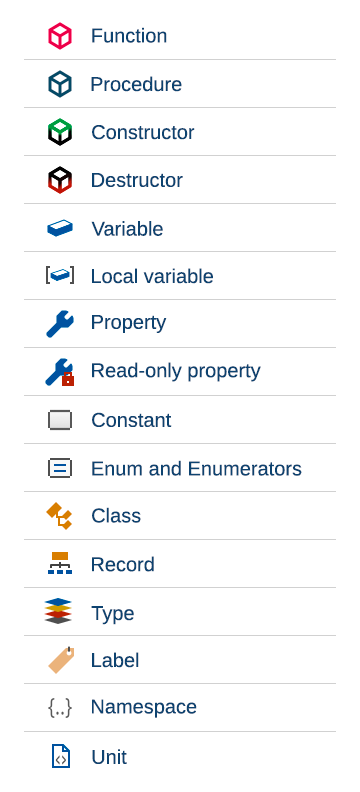 | |
| 924 | 915 | ||
| 925 | 916 | ## Word Completion | |
| 926 | 917 | ||
| 927 | - | ||
| 918 | + | *Word Completion* is invoked by `Ctrl`+`W`. It shows all words of all currently open editors and can therefore be used in non pascal sources, in comments and for keywords. | |
| 928 | 919 | ||
| 929 | 920 | Otherwise it works the same as identifier completion. | |
| 930 | 921 | ||
| 931 | 922 | ## Unit / Identifier Dictionary (Cody) | |
| 932 | 923 | ||
| 933 | 924 | This dialog lets you search for identifiers in other units. The units do not yet have to be used by your code. | |
| 934 | 925 | ||
| 935 | 926 | This feature is part of the package "Cody". To activate the feature install the package. | |
| 936 | 927 | ||
| 937 | 928 | ## Goto Include Directive | |
| 938 | 929 | ||
| 939 | 930 | "Goto Include Directive" in the search menu of the IDE jumps to {\$I filename} statement where the current include file is used. | |
| 940 | 931 | ||
| 941 | 932 | ## Publish Project | |
| 942 | 933 | ||
| 943 | 934 | Creates a copy of the whole project. If you want to send someone just the sources and compiler settings of your code, this function is your friend. | |
| 944 | 935 | ||
| 945 | 936 | A normal project directory contains a lot of information. Most of it is not needed to be published: the .lpi file can contain session information (like caret position and bookmarks of closed units) and the project directory contains a lot of .ppu, .o files and the executable. To create a lpi file with only the base information and only the sources, along with all sub directories use "Publish Project". | |
| 946 | 937 | ||
| 947 | 938 | > **Note:** Since version 0.9.13 there is a new *Project Option* that allows you to store session information in a separate file from the normal .lpi file. This new file ends with the .lps extension and only contains session information, which will leave your .lpi file much cleaner. | |
| 948 | 939 | ||
| 949 | 940 | In the dialog you can setup a filter to include and exclude certain files; with the command after you can compress the output into one archive. | |
| 950 | 941 | ||
| 951 | 942 | ## Hints from comments | |
| 952 | 943 | ||
| 953 | 944 | At several places the IDE shows hints for an identifier. For example when moving the mouse over an identifier in the source editor and waiting a few seconds. When the IDE shows a hint for an identifier it searches the declaration and all its ancestors and looks for comments and fpdoc files. There are many coding styles and many commenting styles. In order to support many of the common comment styles the IDE uses the following heuristics: | |
| 954 | 945 | ||
| 955 | 946 | ### Comments shown in the hint | |
| 956 | 947 | ||
| 957 | 948 | Comments in front of a declaration, without empty line and not starting with the *\<* sign: | |
| 958 | 949 | ||
| 959 | 950 | ``` pascal | |
| 960 | 951 | var | |
| 961 | 952 | {Comment} | |
| 962 | 953 | Identifier: integer; | |
| 963 | 954 | ``` | |
| 964 | 955 | ||
| 965 | 956 | Comments with the *\<* sign belong to the prior identifier. | |
| 966 | 957 | ||
| 967 | 958 | Comments behind an identifier on the same line: | |
| 968 | 959 | ||
| 969 | 960 | ``` pascal | |
| 970 | 961 | var | |
| 971 | 962 | identifier, // Comment | |
| 972 | 963 | other, | |
| 973 | 964 | ``` | |
| 974 | 965 | ||
| 975 | 966 | Comments behind the definition on the same line: | |
| 976 | 967 | ||
| 977 | 968 | ``` pascal | |
| 978 | 969 | var | |
| 979 | 970 | identifier: | |
| 980 | 971 | char; // Comment | |
| 981 | 972 | ``` | |
| 982 | 973 | ||
| 983 | 974 | An example for **\<** sign: | |
| 984 | 975 | ||
| 985 | 976 | ``` pascal | |
| 986 | 977 | const | |
| 987 | 978 | a = 1; | |
| 988 | 979 | //< comment for a | |
| 989 | 980 | b = 2; | |
| 990 | 981 | // comment for c | |
| 991 | 982 | c = 3; | |
| 992 | 983 | ``` | |
| 993 | 984 | ||
| 994 | 985 | All three comment types are supported: | |
| 995 | 986 | ||
| 996 | 987 | ``` pascal | |
| 997 | 988 | {Comment}(*Comment*)//Comment | |
| 998 | 989 | c = 1; | |
| 999 | 990 | ``` | |
| 1000 | 991 | ||
| 1001 | 992 | ### Comments not shown in the hint | |
| 1002 | 993 | ||
| 1003 | 994 | Comments starting with **\$** or **%** are ignored. For example *//% Hiddden*, *//\$ Hidden*, *(*\$ Hidden*)*. | |
| 1004 | 995 | ||
| 1005 | 996 | Comments in front separated with an empty line are treated as not specific to the following identifier. For example the following class header comment is not shown in the hint: | |
| 1006 | 997 | ||
| 1007 | 998 | ``` pascal | |
| 1008 | 999 | type | |
| 1009 | 1000 | { TMyClass } | |
| 1010 | 1001 | ||
| 1011 | 1002 | TMyClass = class | |
| 1012 | 1003 | ``` | |
| 1013 | 1004 | ||
| 1014 | 1005 | The class header comments are created on class completion. You can turn this off in the *Options / Codetools / Class completion / Header comment for class*. If you want to show the header comment in the hint, just remove the empty line. | |
| 1015 | 1006 | ||
| 1016 | 1007 | The following comment will be shown for GL_TRUE, but not for GL_FALSE: | |
| 1017 | 1008 | ||
| 1018 | 1009 | ``` pascal | |
| 1019 | 1010 | // Boolean | |
| 1020 | 1011 | GL_TRUE = 1; | |
| 1021 | 1012 | GL_FALSE = 0; | |
| 1022 | 1013 | ``` | |
| 1023 | 1014 | ||
| 1024 | 1015 | ## Quick Fixes | |
| 1025 | 1016 | ||
| 1026 | 1017 | Quick Fixes are menu items for specific compiler messages. They help you to quickly fix the problem. Select a message in the *Messages* window and right click, or right click in the source editor on the icon to the left. | |
| 1027 | 1018 | ||
| 1028 | 1019 | - Unit not found: remove from uses section | |
| 1029 | 1020 | - Unit not found: find unit in loaded packages and allow to auto add package dependency | |
| 1030 | 1021 | - Constructing a class "\$1" with abstract method "\$2": show dialog to override all abstract methods | |
| 1031 | 1022 | - Local variable "\$1" not used: remove definition | |
| 1032 | 1023 | - Circular unit reference between \$1 and \$2: show Unit Dependencies dialog with full path between the two units | |
| 1033 | 1024 | - Identifier not found: search via Code Browser | |
| 1034 | 1025 | - Identifier not found: search via Cody Dictionary (needs package [[Cody]]) | |
| 1035 | 1026 | - Identifier not found: add local variable | |
| 1036 | 1027 | - Recompiling \$1, checksum changed for \$2: show a dialog with search paths and other information | |
| 1037 | 1028 | - IDE warning: other sources path of package %s contains directory...: open package | |
| 1038 | 1029 | - any hint, note, warning: add IDE directive {%H-} | |
| 1039 | 1030 | - any hint, note, warning: add compiler directive {\$warn id off} (since 1.7) | |
| 1040 | 1031 | - any hint, note, warning: add compiler option -vm\<messageid\> | |
| 1041 | 1032 | - Local variable "i" does not seem to be initialized: insert assignment (since 1.5) | |
| 1042 | 1033 | - Inherited method is hidden: add modifier override, overload, or reintroduce (since 1.9) | |
| 1043 | 1034 | ||
| 1044 | 1035 | ## Outline | |
| 1045 | 1036 | ||
| 1046 | 1037 | This option is located in the IDE Options dialog, Editor - Display - Markup and Matches - Outline (global). | |
| 1047 | 1038 | ||
| 1048 | 1039 | It makes highlighting of Pascal keywords together with their begin-end brackets. This allows to see nesting of big blocks. For example, for such procedure body: | |
| 1049 | 1040 | ||
| 1050 | 1041 | ``` pascal | |
| 1051 | 1042 | with ADockObject do | |
| 1052 | 1043 | begin | |
| 1053 | 1044 | if DropAlign = alNone then | |
| 1054 | 1045 | begin | |
| 1055 | 1046 | if DropOnControl <> nil then | |
| 1056 | 1047 | DropAlign := DropOnControl.GetDockEdge(DropOnControl.ScreenToClient(DragPos)) | |
| 1057 | 1048 | else | |
| 1058 | 1049 | DropAlign := Control.GetDockEdge(DragTargetPos); | |
| 1059 | 1050 | end; | |
| 1060 | 1051 | PositionDockRect(Control, DropOnControl, DropAlign, FDockRect); | |
| 1061 | 1052 | end; | |
| 1062 | 1053 | ``` | |
| 1063 | 1054 | ||
| 1064 | 1055 | it highlights: | |
| 1065 | 1056 | ||
| 1066 | 1057 | - outer with-do-begin-end in orange | |
| 1067 | 1058 | - next if-then-begin-end in green | |
| 1068 | 1059 | - inner if-then-else in cyan | |
| 1069 | 1060 | ||
| 1070 | - | ||
| 1071 | - | ||
| 1072 | - | ||
| 1073 | - | ||
| 1061 | + | 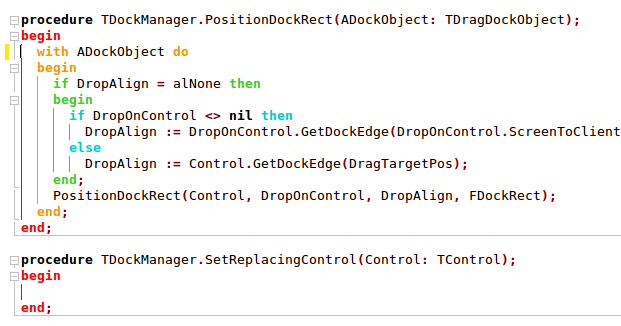 | |
| 1074 | 1062 | ||
| 1075 | 1063 | --- | |
| 1076 | 1064 | *From the Free Pascal wiki, page "Lazarus IDE Tools", as it stood on 2024-05-10 after a change by Michael, out of the wiki's dump of 2024-05-26. Copyright stays with the author who wrote it, according to the old wiki's [[Licensing]] page. If you have concerns about this material, [message the admin](/wiki-contact).* |