

Lazarus IDE Shortcuts: what changed
Revision 1 to 2. Removed lines have a minus sign; added lines have a plus sign.
| Old | New | Line | |
|---|---|---|---|
| 1 | 1 | ## Key mappings | |
| 2 | 2 | ||
| 3 | 3 | All shortcuts can be edited in the [[IDE Window: Editor Options Keymap|Tools > Options > Editor > Key Mappings]] and the preset schemes can be loaded using the [[IDE Window: Choose Key Mapping Scheme|Choose Key Mapping Scheme]] dialog. | |
| 4 | 4 | ||
| 5 | 5 | For what does each shortcut does, see the [[Lazarus Tutorial|Lazarus tutorial]]. | |
| 6 | 6 | ||
| 7 | 7 | ### Gnome | |
| 8 | 8 | ||
| 9 | 9 | The default key mapping for Windows fits quite well under Gnome. | |
| 10 | 10 | ||
| 11 | 11 | ### KDE | |
| 12 | 12 | ||
| 13 | 13 | The default key mapping for Windows fits quite well under KDE. Some keys like F9 are used by KDE. | |
| 14 | 14 | ||
| 15 | 15 | ### macOS, Apple style | |
| 16 | 16 | ||
| 17 | 17 | macOS has quite different key policies. For example most F keys are used by the OS, there are no menu Alt shortcuts and there are substantial guidelines (contrary to Linux and Windows where only a few keys are standardised to work the same under all programs). | |
| 18 | 18 | ||
| 19 | 19 | The Apple [*Human Interface Guidelines* - keyboard section](https://developer.apple.com/design/human-interface-guidelines/macos/user-interaction/keyboard/) deals with key bindings for macOS. | |
| 20 | 20 | ||
| 21 | - | ||
| 21 | + | Xcode is Apple's own integrated development environment. Here are the Xcode shortcuts: 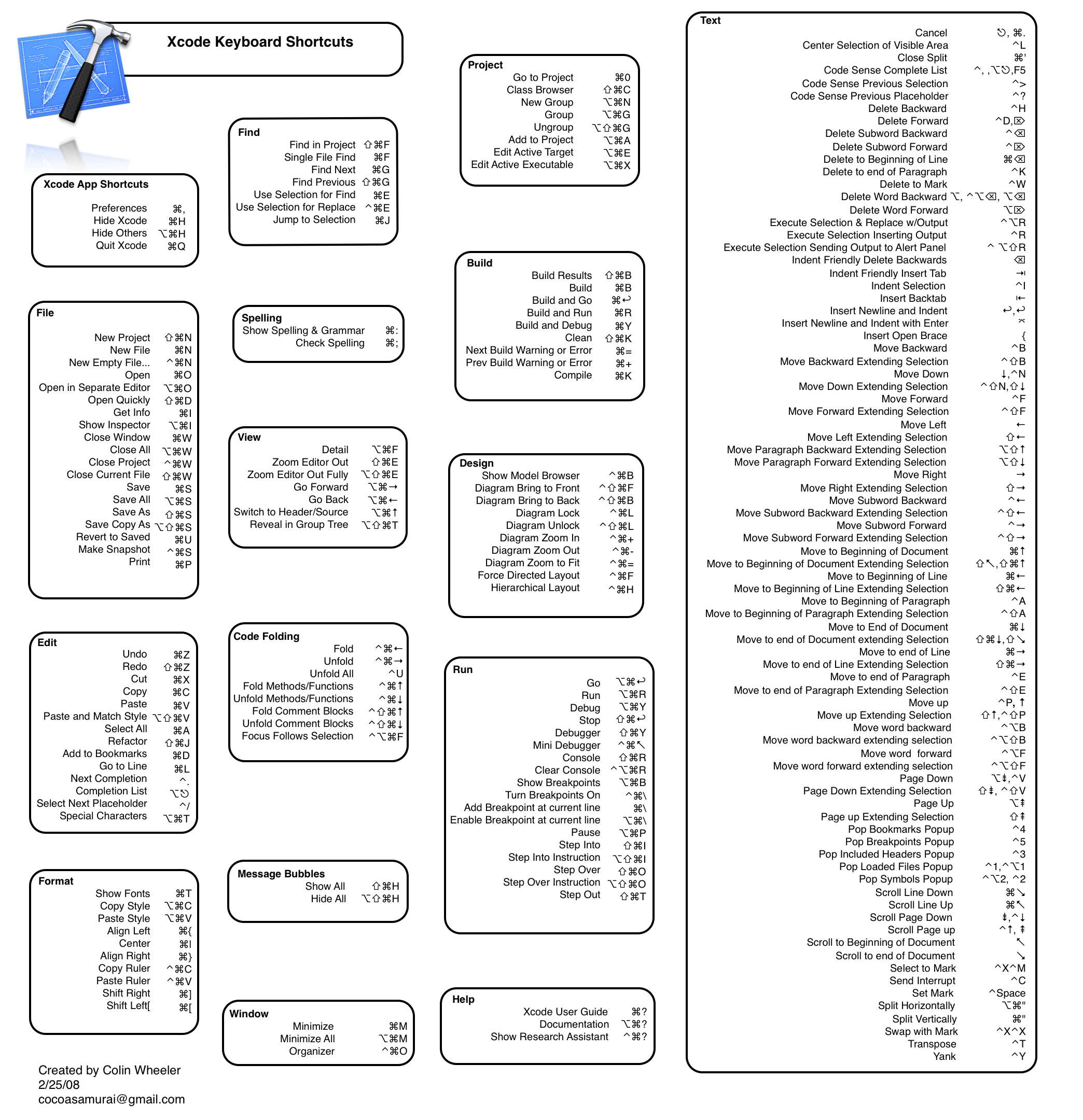 | |
| 22 | 22 | ||
| 23 | 23 | ([Image Source](http://www.1729.us/xcode/Xcode%20Shortcuts%20B_W.png)). | |
| 24 | 24 | ||
| 25 | 25 | ### macOS, Lazarus style | |
| 26 | 26 | ||
| 27 | 27 | A macOS key map is available for Lazarus and can be set via [[IDE Window: Editor Options Keymap|Tools > Options > Editor > Key Mappings / Load a scheme]] which opens the [[IDE Window: Choose Key Mapping Scheme|Choose Key Mapping Scheme]] dialog. This preset scheme is based on the "macOS, Apple style" with some keys overridden (see below). | |
| 28 | 28 | ||
| 29 | 29 | | Keys | Function defined by Apple | Conflict with lazarus default | Solution | | |
| 30 | 30 | |----|----|----|----| | |
| 31 | 31 | | F1 | misc | help | Apple: Cmd-\[Shift\]-? | | |
| 32 | 32 | | Ctrl-Shift-F1 | misc | help editor | Mattias: Cmd-Alt-\[Shift\]-? | | |
| 33 | 33 | | Ctrl-F2 | misc | stop program | Xcode: Shift-Cmd-Enter | | |
| 34 | 34 | | F3 | misc | find next | Apple: Cmd-G | | |
| 35 | 35 | | Shift-F3 | misc | find previous | Apple: Cmd-Shift-G | | |
| 36 | 36 | | F4 | misc | run to cursor | Apple: misc, Mattias: no shortcut for 'run to cursor' | | |
| 37 | 37 | | Ctrl-F4 | misc | close file | Apple: Cmd-Shift-W | | |
| 38 | 38 | | F5 | misc | add breakpoint | Xcode: Ctrl-P | | |
| 39 | 39 | | Ctrl-F5 | misc | add watch | Apple: misc, Mattias: no shortcut for add watch | | |
| 40 | 40 | | Ctrl-F8 | misc | jump next error | Xcode: Cmd-+ | | |
| 41 | 41 | | Ctrl-Shift-F8 | misc | jump previous error | Xcode: Cmd-Shift-+ | | |
| 42 | 42 | | F7 | misc | step into | Mattias: Cmd-Alt-R | | |
| 43 | 43 | | Ctrl-F7 | misc | evaluate | Ctrl-Shift-E | | |
| 44 | 44 | | F8 | misc | step over | Mattias: Cmd-Shift-R | | |
| 45 | 45 | | F9 | misc | run | Xcode: Cmd-R | | |
| 46 | 46 | | Ctrl-F9 | misc | build | Xcode: Cmd-B | | |
| 47 | 47 | | F11 | misc | toggle OI | Mattias: Alt-Cmd-I | | |
| 48 | 48 | | Shift-F11 | misc | add unit to project | Xcode: Alt-Cmd-A | | |
| 49 | 49 | | Ctrl-F11 | misc | open project | Apple: misc, Mattias: no key for 'open project' | | |
| 50 | 50 | | Ctrl-Shift-F11 | misc | project options | Mattias: no key for 'project options' | | |
| 51 | 51 | | F12 | misc | toggle unit/form | Apple: misc, Mattias: Cmd-Alt-F | | |
| 52 | 52 | | Ctrl-F12 | misc | view units | Mattias: Ctrl-Alt-U | | |
| 53 | 53 | | Shift-F12 | misc | view forms | Mattias: Ctrl-Shift-U | | |
| 54 | 54 | | \[Shift\]-Up,Down,Right,Left | move cursor | | | | |
| 55 | 55 | | Alt-\[Shift\]-Left/Right | jump to next word | | | | |
| 56 | 56 | | Alt-Up/Down | jump to start/end of paragraph (laz: Ctrl Q,B) | find declaration | Mattias: find declaration | | |
| 57 | 57 | | Cmd-\[Shift\]-Left/Right | jump to start/end of line (laz:Home/End) | jump next word | Apple: jump to start/end of line | | |
| 58 | 58 | | Cmd-Alt-Left/Right | | | Xcode: switch file | | |
| 59 | 59 | | Cmd-Alt-Up/Down | | | Xcode: jump source/header | | |
| 60 | 60 | | Cmd-Up/Down | jump to start/end of file (laz:Ctrl-Home) | scroll one up/down | Apple: jump to start/end of file | | |
| 61 | 61 | | Ctrl-Up/Down | | | Mattias: scroll one up/down | | |
| 62 | 62 | | Cmd-Shift-Up/Down | select to start/end of file (laz:Shift-Ctrl-Home) | method jump | Apple: select to start/end of file | | |
| 63 | 63 | | Ctrl-Shift-Up/Down | | | Mattias: method jump | | |
| 64 | 64 | | Cmd-\[Shift\]-? | show context help | | | | |
| 65 | 65 | | Delete/Backspace | delete char | | | | |
| 66 | 66 | | \[Shift\]-PageUp/Down | jump page up/down | | | | |
| 67 | 67 | | \[Shift\]-Home/End | jump to start/end of file (laz:Ctrl-Home) | jump to start/end of line | Apple: jump to start/end of file | | |
| 68 | 68 | | Cmd-\[Shift\]-Tab | switch application | jump prev/next file | Apple: switch app | | |
| 69 | 69 | | Ctrl-\[Shift\]-Tab | jump to next control | | | | |
| 70 | 70 | | Cmd-*-Space | spotlight, apple reserved | identifier completion | Apple: misc | | |
| 71 | 71 | | Ctrl-Space | Xcode: set mark | | Mattias: identifier completion | | |
| 72 | 72 | | Shift-Ctrl-Space | | | Mattias: code context | | |
| 73 | 73 | | Alt-Ctrl-Space | | | Mattias: word completion | | |
| 74 | 74 | | Cmd-Alt-Escape | force quit | | | | |
| 75 | 75 | | Cmd-A | select all | | | | |
| 76 | 76 | | Cmd-C | copy | | | | |
| 77 | 77 | | Cmd-Alt-D | show/hide dock | | | | |
| 78 | 78 | | Cmd-Ctrl-D | dictionary | | | | |
| 79 | 79 | | Cmd-E | find word at cursor | incremental find | find is smart to auto use word at cursor. incremental find. | | |
| 80 | 80 | | Cmd-F | find | | | | |
| 81 | 81 | | Cmd-Alt-F | Xcode: view details | | Mattias: Toggle Unit/Form | | |
| 82 | 82 | | Cmd-G | find next (laz:F3) | goto line | Apple: find next | | |
| 83 | 83 | | Cmd-Shift-G | find previous (laz:Shift-F3) | insert guid | | | |
| 84 | 84 | | Ctrl-Shift-G | | insert guid | Mattias: insert guid | | |
| 85 | 85 | | Cmd-\[Alt\]-H | hide app | jump back | Apple: hide app | | |
| 86 | 86 | | Ctrl-\[Shift\]-H | | | Mattias: jump history backward/forward | | |
| 87 | 87 | | Ctrl-I | | indent selection | Xcode: indent selection | | |
| 88 | 88 | | Ctrl-U | | unindent selection | Xcode: unindent selection | | |
| 89 | 89 | | Cmd-L | | | Xcode: goto line | | |
| 90 | 90 | | Cmd-M | minimize window | | | | |
| 91 | 91 | | Cmd-Alt-M | minimize app | | | | |
| 92 | 92 | | Cmd-N | new file | | | | |
| 93 | 93 | | Cmd-Shift-N | | | Tom: Insert line | | |
| 94 | 94 | | Cmd-O | open file | | | | |
| 95 | 95 | | Cmd-Q | quit (laz: none) | goto line | Apple: quit | | |
| 96 | 96 | | Cmd-Shift-Q | log out | | | | |
| 97 | 97 | | Cmd-R | Xcode: build and run | search and replace | Xcode: run | | |
| 98 | 98 | | Cmd-Shift-R | | | Mattias: step over | | |
| 99 | 99 | | Cmd-Alt-R | | | Mattias: step into | | |
| 100 | 100 | | Cmd-S | save | | | | |
| 101 | 101 | | Cmd-Shift-S | Save As (laz: none) | save all | Apple: Cmd-Shift-S | | |
| 102 | 102 | | Cmd-Alt-S | Save All | | | | |
| 103 | 103 | | Cmd-V | paste | | | | |
| 104 | 104 | | Cmd-W | close window (laz: none) | word completion | Apple: close window | | |
| 105 | 105 | | Cmd-Shift-W | Xcode: close file | | | | |
| 106 | 106 | | Cmd-Alt-W | close all files | | | | |
| 107 | 107 | | Cmd-X | cut | | | | |
| 108 | 108 | | Cmd-Y | | | Tom: delete to end of line | | |
| 109 | 109 | | Cmd-Z | undo | | | | |
| 110 | 110 | | Control | The control modifier is used by cocoa in text fields. So it is free for designer and source editor functions | | | | |
| 111 | 111 | | Alt-1-9 | create special chars on some layouts | | | | |
| 112 | 112 | | Ctrl-1-9 | | jump to bookmark | | | |
| 113 | 113 | | Ctrl-Shift-1-9 | | set bookmark | | | |
| 114 | 114 | | Cmd-*-1-9 | apple functions like capture screen | | | | |
| 115 | 115 | ||
| 116 | 116 | #### Overidden "Apple style" keys | |
| 117 | 117 | ||
| 118 | 118 | The "Apple style" scheme of keys can be hard on Lazarus users who work with Lazarus on multiple platforms because many of them are very different from the FreeBSD, Linux and Windows schemes. To minimize this problem the "macOS, Lazarus style" scheme was created (based on the default "macOS, Apple style" scheme, but with some changes to have keys similar to those on other platforms. Below are the keys which differ from the standard "macOS, Apple style" scheme: | |
| 119 | 119 | ||
| 120 | 120 | | Keys | Function in Apple style | Function in Lazarus style | | |
| 121 | 121 | |----------|---------------------------|---------------------------| | |
| 122 | 122 | | Home/End | jump to start/end of file | jump to start/end of line | | |
| 123 | 123 | ||
| 124 | 124 | --- | |
| 125 | 125 | *From the Free Pascal wiki, page "Lazarus IDE Shortcuts", as it stood on 2020-08-11 after a change by Trev, out of the wiki's dump of 2024-05-26. Copyright stays with the author who wrote it, according to the old wiki's [[Licensing]] page. If you have concerns about this material, [message the admin](/wiki-contact).* |