

Lazarus Faq/zh CN: what changed
Revision 2 to 3. Removed lines have a minus sign; added lines have a plus sign.
| Old | New | Line | |
|---|---|---|---|
| 1 | 1 | 这个 FAQ 是从 www.freepascal.org 的 FAQ 复制过来的,这样一来,这个 wiki 文档就更容易维护和扩充了。 | |
| 2 | 2 | ||
| 3 | 3 | ## 一般问题 | |
| 4 | 4 | ||
| 5 | 5 | ### 哪里有更多的 FAQ? | |
| 6 | 6 | ||
| 7 | 7 | 可以看看 [官方站点](http://www.lazarus.freepascal.org)。那里也是另一个 FAQ。 | |
| 8 | 8 | ||
| 9 | 9 | ### 为什么编译成二进制文件会如此之大? | |
| 10 | 10 | ||
| 11 | 11 | 编译产生的二进制文件如此之大的原因是,它包含了许多 **gdb** (GNU debugger,GNU 调试器)所需的信息。 | |
| 12 | 12 | ||
| 13 | 13 | Free Pascal 编译器提供了一个命令行选项 **-Xs** 来移除这些调试信息。(注意,由于一个 bug,版本 2.0.2 及以前的编译器无法正确执行该选项。) | |
| 14 | 14 | ||
| 15 | 15 | 您可以利用一个名为 **strip** 的程序来移除可执行文件中的所有调试符号 (debug symbols)。该程序位于 Lazarus 目录 `\lazarus\pp\bin\i386-win32` 下。要利用 **strip** 做到这一点,只需执行 | |
| 16 | 16 | ||
| 17 | - | ||
| 17 | + | ```text | |
| 18 | + | strip --strip-all exepath | |
| 19 | + | ``` | |
| 18 | 20 | ||
| 19 | 21 | 其中 *`exepath`* 是您希望处理的可执行文件的路径名。 | |
| 20 | 22 | ||
| 21 | 23 | 如果您还希望让您的程序变得更小,不妨使用 [**UPX**](http://upx.sourceforge.net/)。**UPX** 是一个优秀的 EXE 压缩程序。由于使用了就地解压(in-place decompression)技术,它不会产生额外的内存开销。并且它的解压速度非常快(在 Pentium 133 上约为 10 MB/秒)。 | |
| 22 | 24 | ||
| 23 | 25 | 要使用 **UPX**,只需执行 | |
| 24 | 26 | ||
| 25 | - | ||
| 27 | + | ```text | |
| 28 | + | upx exepath | |
| 29 | + | ``` | |
| 26 | 30 | ||
| 27 | 31 | 其中 *`exepath`* 是您希望处理的可执行文件的路径名。 | |
| 28 | 32 | ||
| 29 | 33 | 一个简单的 GUI Lazarus 程序在使用过 **strip** 和 **UPX** 後,压缩效果为: | |
| 30 | 34 | ||
| 31 | 35 | - 在 Linux 上,约 700 KB; | |
| 32 | 36 | - 在 Windows 上,约 420 KB。 | |
| 33 | 37 | ||
| 34 | 38 | 请注意 **UPX** 有时并非只会带来好处。要了解使用 *UPX* 可能带来的坏处,请参阅 [[Size Matters]]。 | |
| 35 | 39 | ||
| 36 | 40 | 另外值得注意的是,用 Lazarus 创建的程序——即使是十分简单的 Hello World 程序——也已经包含了大量重要的功能,包括 | |
| 37 | 41 | ||
| 38 | 42 | - XML 处理库; | |
| 39 | 43 | - 图像处理库,用于 PNG,XPM,BMP 和 ICO 格式; | |
| 40 | 44 | - Lazarus 组件库中的几乎所有组件; | |
| 41 | 45 | - 全部 Free Pascal 运行库。 | |
| 42 | 46 | ||
| 43 | 47 | 因此,虽然您的程序可能显得很大,但**它已经包含了一个真实世界中的非平凡 (non-trivial) 应用程序所需要的全部。**也因此,虽然用 Lazarus 创建的应用程序可能在一开始显得很大,但是,**随着程序复杂度的增加,其大小的增长速度却很慢。**这是由 Free Pascal 编译器和 Lazarus 窗体的工作原理决定的。 | |
| 44 | 48 | ||
| 45 | 49 | 与许多其他语言相比——例如——一个典型的 C++ 程序最初可能很小,但当您向其中加入各种功能时,其大小可能按指数级增长。 | |
| 46 | 50 | ||
| 47 | 51 | 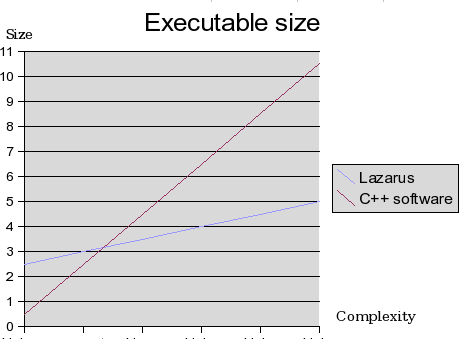 | |
| 48 | 52 | ||
| 49 | 53 | ### 为什么在 Windows 上的连接 (linking) 速度如此缓慢?(已解决) | |
| 50 | 54 | ||
| 51 | 55 | **该问题已在 Free Pascal 2.2 和 Lazarus 0.9.24 中得到解决。**请更新您的 Lazarus。如果您仍需使用旧版本,请继续阅读。 | |
| 52 | 56 | ||
| 53 | 57 | 一般地,在 Windows 上的编译过程比在其他平台上所需的时间长。而此问题的产生是由于 Free Pascal 所使用的 GNU 连接器 (GNU Linker)在 Windows 上运行缓慢。该问题影响的平台只有 Windows,并且也仅在配置相对较低的计算机(例如一台 CPU 频率 1 GHz,内存小于 128 MB 的计算机)上比较明显。 | |
| 54 | 58 | ||
| 55 | 59 | 并且,在这种情况下,如果您使用了智能连接 (Smart Linking) 选项连接 LCL,那么连接过程会更加缓慢。有关这一问题的研究,请参阅 [[File size and smartlinking]]。 | |
| 56 | 60 | ||
| 57 | 61 | 在 Free Pascal 2.2 中,开发人员实现了一个内部连接器。该连接器大大减少了连接所需的时间。 | |
| 58 | 62 | ||
| 59 | 63 | ### 我需要 ppc386.cfg 或 fpc.cfg 吗? | |
| 60 | 64 | ||
| 61 | 65 | 您只需要 `fpc.cfg`。利用该文件,编译器可以了解库 (libraries) 的位置。 | |
| 62 | 66 | ||
| 63 | 67 | ### How do I compile lazarus? | |
| 64 | 68 | ||
| 65 | 69 | Do something like this: | |
| 66 | 70 | ||
| 67 | - | ||
| 68 | - | ||
| 71 | + | ```text | |
| 72 | + | $ cd lazarus | |
| 73 | + | $ make clean all | |
| 74 | + | ``` | |
| 69 | 75 | ||
| 70 | 76 | ### 我怎样在基于LCL的基础上建立其它项目 | |
| 71 | 77 | ||
| 72 | 78 | If you can't use the IDE to build your applications, use lazbuild. This is a command line version of the IDE to build lazarus projects and packages. If you want to build LCL applications without the IDE and without the lazbuild, add the following lines to the end of your *fpc.cfg* | |
| 73 | 79 | ||
| 74 | - | ||
| 75 | - | ||
| 80 | + | ```text | |
| 81 | + | # searchpath for other toolkits (Linux) | |
| 82 | + | -Fu/usr/lib/fpc/$fpcversion/units/$fpctarget/{YourToolKit} | |
| 83 | + | ``` | |
| 76 | 84 | ||
| 77 | - | ||
| 78 | - | ||
| 85 | + | ```text | |
| 86 | + | # searchpath for other toolkits (Windows) | |
| 87 | + | -Fu/{YourLazarusDirectory}/components/units/{YourToolKit} | |
| 88 | + | ``` | |
| 79 | 89 | ||
| 80 | 90 | ||
| 81 | 91 | Where {YourToolKit} may be *gtk2*, *gnome*, *qt* or *win32* and run: | |
| 82 | 92 | ||
| 83 | 93 | ||
| 84 | 94 | ppc386 your.project.pp | |
| 85 | 95 | ||
| 86 | 96 | **Hint:** Don't forget to install the development packages for your toolkit otherwise you might a receive something like: [[Linker message: cannot find -l]]. | |
| 87 | 97 | ||
| 88 | 98 | ### fpc都包括哪些版本? | |
| 89 | 99 | ||
| 90 | 100 | 2.0.4 for MacOSX and 2.2.0 for all other systems. Warning: The 2.2.0 has a bug under MacOSX with case sensitive filenames. You can also use the svn version of fpc 2.2.1 and 2.3.x. 2.0.4版苹果和2.2.0所有其它的系统。 注意2.2.0在苹果平台有一个BUG。(译者注:细节自己看吧!) | |
| 91 | 101 | ||
| 92 | 102 | ### 我不能编译 Lazarus | |
| 93 | 103 | ||
| 94 | 104 | 1. 检查编译器版本是否正确 | |
| 95 | 105 | 2. 检查(fpc)库文件版本是否相同 | |
| 96 | 106 | 3. 检查是否存在fpc.cfg,删除旧的ppc386.cfg文件 | |
| 97 | 107 | 4. 也检查一下系统要求的FAQ | |
| 98 | 108 | ||
| 99 | 109 | ### 当我尝试编译一个项目,有一个错误 | |
| 100 | 110 | ||
| 101 | 111 | #### "Cannot find Unit interfaces". How can I solve this? | |
| 102 | 112 | ||
| 103 | 113 | It means the compiler can not find the file 'interfaces.ppu' **or** it means it found one, but it is wrong or outdated. | |
| 104 | 114 | ||
| 105 | 115 | This unit can be found in {LazarusDir}\lcl\units\\{TargetCPU}-{TargetOS}\\{LCLWidgetSet}\interfaces.ppu. For example: /home/username/lazarus/lcl/units/i386-linux/gtk/interfaces.ppu. | |
| 106 | 116 | ||
| 107 | 117 | Make sure, it is only there. If you have multiple versions of interfaces.ppu, then you probably have a wrong configuration (for instance you added a lcl directory to a search path). Remove all interfaces.ppu, but the one in the directory above. | |
| 108 | 118 | ||
| 109 | 119 | If you selected a different widgetset than you used to build lazarus, you need to build the LCL for this widgetset. | |
| 110 | 120 | ||
| 111 | 121 | If it is there, but you get this error, you are using a different compiler / rtl for compiling your project than you used for compiling your Lazarus IDE. You can do one of the following | |
| 112 | 122 | ||
| 113 | 123 | - Rebuild the LCL (or Lazarus completely) with the compiler selected in the Environmnent Options. You can do this with Tools -\> Build Lazarus. Before doing this, check the current settings in Tools -\> Configure Build Lazarus. | |
| 114 | 124 | - Change the compiler in the Environment Options to the one you used to compile Lazarus. Look carefully also in the Environment Options to see if you are using the correct paths for the Lazarus Directory and the FPC sources directory. Check that there is only one version of the compiler configuration file fpc.cfg - it should reside in /etc/ for Linux/Unix systems or in the same directory as the fpc compiler for Windows systems. Try to run "fpc -vt bogus" to check which fpc.cfg is being used in your system. Rogue copies often creep in if you have updated your compiler to a new version; they may be found in your home directory or in the same directory as the one in which you built your new compiler. DELETE THESE!! | |
| 115 | 125 | - You may also try to change the widgetset currently selected for the project. For example, the sample project "objectinspector" that comes with Lazarus is set to gtk by default. Compiling this project will surely give you "Can't find unit interfaces" in Windows platform. Changing widgetset to default(Win32) in Project \| Compiler Options... \| LCL Widget Type (various) should fix this issue. | |
| 116 | 126 | ||
| 117 | 127 | ### 当我尝试在lazarus下编译delphi项目时,有一个错误 | |
| 118 | 128 | ||
| 119 | 129 | #### at the line :{\$R *.DFM} How can I solve this problem ? | |
| 120 | 130 | ||
| 121 | 131 | Lazarus (or better Linux) doesn't know about resources, so you can't use them in the way Delphi/Win32 does. However Lazarus uses a method pretty compatible with this. You can still use your Delphi layouts (.dfm files) if you use the following steps: | |
| 122 | 132 | ||
| 123 | 133 | - You need a textual version of the .dfm files. D5 and higher are doing this as default. If you have older files: ALT-F12 to see the layout as text and paste/copy. When you have a text .dfm file, just copy it to a .lfm file. | |
| 124 | 134 | - Create a file with lazres (in lazarus/tools) lazres yourform.lrs yourform.lfm | |
| 125 | 135 | - Add the following initialization section to | |
| 126 | 136 | ||
| 127 | - | ||
| 128 | - | ||
| 137 | + | ```text | |
| 138 | + | initialization | |
| 139 | + | {$I yourform.lrs} | |
| 140 | + | ``` | |
| 129 | 141 | ||
| 130 | 142 | Please keep in mind that not all properties in the dfm are supported yet by lazarus, so you might get a crash. | |
| 131 | 143 | ||
| 132 | 144 | #### 'Identifier not found LazarusResources'. | |
| 133 | 145 | ||
| 134 | 146 | When creating a form Lazarus automaticaly add some extra units to the uses section of your form unit. During the conversion of a delphi unit to a Lazarus unit this does not happen. So you need to add LResources to the Uses section of your form unit. | |
| 135 | 147 | ||
| 136 | 148 | ### 当访问对像事件,例如一个按钮的onclick事件,获得下列错误 ERROR unit not found: stdCtrls (错误的单元没有发现,stdCtrls) | |
| 137 | 149 | ||
| 138 | 150 | Make sure, in the Project -\> Project Inspector, that your project depends on the package 'LCL' and that you have installed the FPC sources. | |
| 139 | 151 | ||
| 140 | 152 | Lazarus is the IDE and the visual components library LCL. All other stuff, like IO, Database, FCL and RTL are provided by FPC. The IDE needs the paths to all sources. | |
| 141 | 153 | ||
| 142 | 154 | The FPC source path can be set via: Environment -\> Environment Options -\> Files -\> FPC source directory | |
| 143 | 155 | ||
| 144 | 156 | ### 怎样将一个小文件嵌入到可执行文件中, 外部需要一个独立的文件? 怎样嵌入一个资源? | |
| 145 | 157 | ||
| 146 | 158 | 例子:(译者注:该例子嵌入一个声音WAV资源) | |
| 147 | 159 | ||
| 148 | - | ||
| 160 | + | ```text | |
| 161 | + | /your/lazarus/path/tools/lazres sound.lrs sound1.wav sound2.wav ... | |
| 162 | + | ``` | |
| 149 | 163 | ||
| 150 | 164 | will create sound.lrs from sound1.wav and sound2.wav. | |
| 151 | 165 | ||
| 152 | 166 | Then include it *behind* the form lrs file: | |
| 153 | 167 | ||
| 154 | - | ||
| 155 | - | ||
| 156 | - | ||
| 157 | - | ||
| 168 | + | ``` pascal | |
| 169 | + | ... | |
| 170 | + | initialization | |
| 171 | + | {$i unit1.lrs} // this is main resource file (first) | |
| 172 | + | {$i sound.lrs} // user defined resource file | |
| 158 | 173 | ||
| 159 | - | ||
| 174 | + | end. | |
| 175 | + | ``` | |
| 160 | 176 | ||
| 161 | 177 | In your program you can then use: | |
| 162 | 178 | ||
| 163 | - | ||
| 179 | + | ``` pascal | |
| 180 | + | Sound1AsString:=LazarusResources.Find('sound1').Value; | |
| 181 | + | ``` | |
| 164 | 182 | ||
| 165 | 183 | ### 我怎样能看到调试输出? | |
| 166 | 184 | ||
| 167 | 185 | The LCL has in the LCLProc procedure to write debug output: | |
| 168 | 186 | ||
| 169 | 187 | - **DebugLn:** works about the same as WriteLn, but accepts only strings. | |
| 170 | 188 | - **DbgOut:** works about the same as Write, but accepts only strings. | |
| 171 | 189 | ||
| 172 | 190 | In normal circumstances the output is written to stdout. If stdout is closed, (for example when the application is {\$AppType Gui} or compiled with -WG on windows), no output is written. | |
| 173 | 191 | ||
| 174 | 192 | Debug output can also be written to file. The LCLProc unit checks in its initialization the command line parameters for '--debug-log=\<file\>'. If it finds it sends debug output to \<file\>. | |
| 175 | 193 | ||
| 176 | 194 | If it doesn't find a --debug-log command line parameter, it looks if an environment variable xxx_debuglog exists, where xxx is the program file name without extension. For lazarus this would be lazarus_debuglog. If such an environment variable exists, it uses that as file to write debug output to. Example: if you do: | |
| 177 | 195 | ||
| 178 | - | ||
| 196 | + | ```text | |
| 197 | + | set lazarus_debuglog=c:\lazarus\debug.txt | |
| 198 | + | ``` | |
| 179 | 199 | ||
| 180 | 200 | debug output will be written to c:\lazarus\debug.txt. | |
| 181 | 201 | ||
| 182 | 202 | Since this is implemented in lclproc, every application using lclproc, can use this output facility. | |
| 183 | 203 | ||
| 184 | 204 | Debuging Lazarus | |
| 185 | 205 | Most usefull for windows: If you want output on a console, add {\$APPTYPE console} to lazarus.pp ; Then rebuild Lazarus. | |
| 186 | 206 | ||
| 187 | 207 | ### Lazarus 的各种各样的文件扩展名有什么意义? | |
| 188 | 208 | ||
| 189 | 209 | The [[Lazarus Tutorial|Lazarus Tutorial#The Lazarus files]] explains some extensions by an example. Here is a brief list: | |
| 190 | 210 | ||
| 191 | 211 | `*.lpi` | |
| 192 | 212 | Lazarus Project Information file (stored in XML; contains project-specific settings) | |
| 193 | 213 | ||
| 194 | 214 | `*.lpr` | |
| 195 | 215 | Lazarus Program file; contains Pascal source of main program | |
| 196 | 216 | ||
| 197 | 217 | `*.lfm` | |
| 198 | 218 | Lazarus Form file; contains configuration information for all objects on a form (stored in a Lazarus-specific format; the actions are described by Pascal source code in a corresponding `*.pas` file) | |
| 199 | 219 | ||
| 200 | 220 | `*.pas` or `*.pp` | |
| 201 | 221 | Unit with Pascal code (typically for a form stored in a corresponding `*.lfm` file) | |
| 202 | 222 | ||
| 203 | 223 | `*.lrs` | |
| 204 | 224 | Lazarus Resource file (this is a generated file; not to be confused with a Windows resource file). | |
| 205 | 225 | ||
| 206 | 226 | This file can be created with lazres tool (in directory Lazarus/Tools) using commandline: lazres myfile.lrs myfile.lfm | |
| 207 | 227 | ||
| 208 | 228 | `*.ppu` | |
| 209 | 229 | Compiled unit | |
| 210 | 230 | ||
| 211 | 231 | `*.lpk` | |
| 212 | 232 | Lazarus package information file. (stored in XML; contains package-specific settings) | |
| 213 | 233 | ||
| 214 | 234 | ### I have fixed/improved lazarus. How can I add my changes to the official lazarus source? | |
| 215 | 235 | ||
| 216 | 236 | Create a patch and send it to the developers. For details see [[Creating A Patch]]. | |
| 217 | 237 | ||
| 218 | 238 | ### When I do *var mytext: text;* to declare a text file, I get "Unit1.pas(32,15) Error: Error in type definition". How can I fix this? | |
| 219 | 239 | ||
| 220 | 240 | The TControl class has a [[doc:lcl/controls/tcontrol.text.html|Text]] property. In a method of a form, that has higher visibility, the [[doc:rtl/system/text.html|Text]] type from the system unit. You can use the [[doc:rtl/system/textfile.html|TextFile]] type, which is just an alias for the Text type or you can add the unit to the type definition. | |
| 221 | 241 | ||
| 222 | - | ||
| 223 | - | ||
| 224 | - | ||
| 242 | + | ``` pascal | |
| 243 | + | var | |
| 244 | + | MyTextFile: TextFile; | |
| 245 | + | MyText: System.Text; | |
| 246 | + | ``` | |
| 225 | 247 | ||
| 226 | 248 | A similar name clash exists with assigning and closing a text file. TForm has a *assign* and a [[doc:lcl/forms/tcustomform.close.html|Close]] method. You can use [[doc:rtl/objpas/assignfile.html|AssignFile]] and [[doc:rtl/objpas/closefile.html|CloseFile]] or add the unit name *System*. | |
| 227 | 249 | ||
| 228 | 250 | ### I get an error when using Printer.BeginDoc | |
| 229 | 251 | ||
| 230 | 252 | The unit Printers must be added to the uses section. | |
| 231 | 253 | ||
| 232 | 254 | The Printer4Lazarus package must be added to your project requirement in the IDE under: Project\|Project Inspector\|Add\|New Requirement\|Package Name: | |
| 233 | 255 | ||
| 234 | 256 | If the package Printer4Lazarus package is not in the list when opening the dropdown box it must be installed. The package is part of the Lazarus installation and can be found in: \[lazarus installed directory\]\components\printers | |
| 235 | 257 | ||
| 236 | 258 | If you used the default installation directories \[lazarus installed directory\] is: | |
| 237 | 259 | ||
| 238 | 260 | - Windows: c:\lazarus | |
| 239 | 261 | - Linux: /usr/lib/lazarus | |
| 240 | 262 | ||
| 241 | 263 | The same solution also applies to the exception you can get when referencing Printer.Printers | |
| 242 | 264 | ||
| 243 | 265 | ### Why are TForm.ClientWidth/ClientHeight the same as TForm.Width/Height | |
| 244 | 266 | ||
| 245 | 267 | The TForm.Width/Height do no include the frame, because there was no way to retrieve the frame size on all platforms. Without a reliable way, the LCL would move the forms around on the screen or resize them endless. | |
| 246 | 268 | ||
| 247 | 269 | Eventually when there is a reliable way to get the size and position of a window with frame on all platforms, then it will be changed. To keep compatibility with older LCL forms, a version number and some extra methods will be added. | |
| 248 | 270 | ||
| 249 | 271 | ### I created a Patch to dock the IDE Messages form on the "Source Code Editor" form (at bottom) | |
| 250 | 272 | ||
| 251 | 273 | Such patches will not be applied, because they only implement a small part of the needed docking. The goal is to create a complete dock manager and use that. A complete dock manager can dock all IDE windows and it allows to let the user define how to dock. For example dock the messages window above or below the source editor or ... or not at all. For instance: | |
| 252 | 274 | ||
| 253 | 275 | +-------------------++--+ | |
| 254 | 276 | |menu || | | |
| 255 | 277 | +-------------------+| | | |
| 256 | 278 | +--++---------------+| | | |
| 257 | 279 | |PI|| Source Editor ||CE| | |
| 258 | 280 | +--+| || | | |
| 259 | 281 | +--+| || | | |
| 260 | 282 | | |+---------------++--+ | |
| 261 | 283 | |OI|+-------------------+ | |
| 262 | 284 | | ||messages | | |
| 263 | 285 | +--++-------------------+ | |
| 264 | 286 | ||
| 265 | 287 | The dock manager can store the layout and restore it on next load. Preferably the dock manager can dock in pages too. The dock manager does not need to use drag and drop. All patches implementing docking without a dock manager makes it harder to implement a real dock manager and will be rejected. | |
| 266 | 288 | ||
| 267 | 289 | ### How can I become a developer lazarus and access management in the SVN and bug-tracker? | |
| 268 | 290 | ||
| 269 | 291 | First of all: you must learn about Lazarus, to prove their knowledge and skill. Start to reading the [wiki articles](http://wiki.lazarus.freepascal.org/Lazarus_Documentation), read the Lazarus source code, giving a look at the [Lazarus Bug-Tracker](http://www.lazarus.freepascal.org/mantis), fix some bugs, and if you think you are ready, contact the developers on the [mailing list](http://www.mail-archive.com/lazarus@miraclec.com). | |
| 270 | 292 | ||
| 271 | 293 | ## Where is ... defined | |
| 272 | 294 | ||
| 273 | 295 | ### Virtual key constants | |
| 274 | 296 | ||
| 275 | 297 | Virtual key constants are defined in LCLType. Add LCLtype to your uses. | |
| 276 | 298 | ||
| 277 | 299 | ## 使用 IDE | |
| 278 | 300 | ||
| 279 | 301 | ### How can I use "identifier completion"? | |
| 280 | 302 | ||
| 281 | 303 | You can invoke identifier completion by pressing \[ctrl\]\[space\]. Under the menu item *Environment -\> Editor Options -\> Code Tools -\> Automatic Features* you can set how quick this should happen automatically. | |
| 282 | 304 | ||
| 283 | 305 | ## Linux | |
| 284 | 306 | ||
| 285 | 307 | ### How can I debug on Linux without the IDE? | |
| 286 | 308 | ||
| 287 | 309 | First of all you need a debugger. gdb is the standard debugger under linux and there are several GUI-frontends available. One common frontend is ddd, which is part of most common distributions. To compile lazarus/lcl with debug-information you should then use the following commands to start a debug session: | |
| 288 | 310 | ||
| 289 | - | ||
| 290 | - | ||
| 311 | + | ```text | |
| 312 | + | $ make clean; make OPT=-dDEBUG | |
| 313 | + | $ ddd lazarus | |
| 314 | + | ``` | |
| 291 | 315 | ||
| 292 | 316 | Be warned however, that ddd is not as comfortable as e.g. the Lazarus debugger. Specially if it comes to view the contents of a variable you have to take into account that ddd/gdb are case sensitive whereas Pascal is case-insensitive. Therefore you have to type all variable names in uppercase to see their contents. For more information take a look into the fpc-manuals. | |
| 293 | 317 | ||
| 294 | 318 | ### I can debug now but ddd does not find my sources or complains that they contain no code. Whats that? | |
| 295 | 319 | ||
| 296 | 320 | This is a path-related problem with either gdb or ddd. You can aviod this by | |
| 297 | 321 | ||
| 298 | 322 | - Use the "Change directory" command from the ddd menu and choose the directory where the sources are located. The drawback of this method is that you now can't use the source of the program you started with (e.g. lazarus). Thus it may be neccessary to change the directory multiple times. | |
| 299 | 323 | - In ddd goto \[Edit\] \[gdb-settings\] and set the search-path | |
| 300 | 324 | - Create a \$(HOME)/.gdbinit file like: | |
| 301 | 325 | ||
| 302 | - | ||
| 303 | - | ||
| 304 | - | ||
| 326 | + | ```text | |
| 327 | + | directory /your/path/to/lazarus | |
| 328 | + | directory /your/path/to/lazarus/lcl | |
| 329 | + | directory /your/path/to/lazarus/lcl/include | |
| 330 | + | ``` | |
| 305 | 331 | ||
| 306 | 332 | ### I receive an error during the linking that states /usr/bin/ld can't find -l\<some lib\> | |
| 307 | 333 | ||
| 308 | 334 | **Package Based Distributions** | |
| 309 | 335 | You need to install the package that provides the lib\<somelib\>.so or lib\<somelib\>.a files. Dynamic libs under linux have the extension .so, while static libs have the extension .a. On some Linux distro's you have installed the package (rpm, deb) \<packagename\> which provides \<some lib\>, but you also need the development package (rpm, deb), normally called \<packagename\>-dev, which contains the .a (static lib) and/or the .so (dynamic lib). | |
| 310 | 336 | ||
| 311 | 337 | **Source Based Distributions and Manual Compilation (LFS)** | |
| 312 | 338 | Make sure that there is a lib\<somelib\>.a in the path, and that it contains the right version. To let the linker find the dynamic library, create a symlink called lib\<some lib\>.so to lib\<some lib\>\<version\>-x,y.so if necessary (and/or for static lib; lib\<some lib\>.a to lib\<some lib\>\<version\>-x,y.a). | |
| 313 | 339 | ||
| 314 | 340 | **FreeBSD** | |
| 315 | 341 | As source based distro's, and also make sure you have -Fl/usr/local/lib in your fpc.cfg and/or Lazarus library path. Keep in mind that GTK1.2 has "gtk12" as package name under FreeBSD. (same for glib) NOTE: This has changed as of late. Newest ports have gtk-12 and glib-12 as well. You might stumble on this problem, since FPC requires the "-less" ones, you will need to symlink them like this: | |
| 316 | 342 | ||
| 317 | - | ||
| 318 | - | ||
| 319 | - | ||
| 343 | + | ```text | |
| 344 | + | []# cd /usr/local/lib && ln -s libglib-12.so libglib12.so | |
| 345 | + | []# cd /usr/X11R6/lib && ln -s libgtk-12.so libgtk12.so | |
| 346 | + | []# cd /usr/X11R6/lib && ln -s libgdk-12.so libgdk12.so | |
| 347 | + | ``` | |
| 320 | 348 | ||
| 321 | 349 | **NetBSD** | |
| 322 | 350 | As source based distro's, and also make sure you have -Fl/usr/pkg/lib in your fpc.cfg and/or Lazarus library path | |
| 323 | 351 | ||
| 324 | 352 | ### How can I convert a kylix 2 project into a lazarus project? | |
| 325 | 353 | ||
| 326 | 354 | Nearly the same way as converting a Kylix project into a Delphi/VCL project. | |
| 327 | 355 | ||
| 328 | 356 | The LCL (Lazarus Component Library) tries to be compatible to Delphis VCL. Kylix CLX tries to be QT compatible. Here are some general hints: | |
| 329 | 357 | ||
| 330 | 358 | - Rename all used CLX Q-units like QForms, QControls, QGraphics, ... into their VCL counterparts: Forms, Controls, Graphics, ... | |
| 331 | 359 | - Add LResources to the uses section of every form source | |
| 332 | 360 | - Rename or copy all .xfm files to .lfm files. | |
| 333 | 361 | - Rename or copy .dpr file to .lpr file. | |
| 334 | 362 | - Add "Interfaces" to the uses section in the .lpr file. | |
| 335 | 363 | - Remove {\$R *.res} directive | |
| 336 | 364 | - Remove {\$R *.xfm} directive | |
| 337 | 365 | - Add {\$mode objfpc}{\$H+} or {\$mode delphi}{\$H+} directive to .pas and .lpr files | |
| 338 | 366 | - Add an initialization section to the end of each form source and add an include directive for the .lrs file (lazarus resource file): | |
| 339 | 367 | ||
| 340 | - | ||
| 341 | - | ||
| 368 | + | ```text | |
| 369 | + | initialization | |
| 370 | + | {$I unit1.lrs} | |
| 371 | + | ``` | |
| 342 | 372 | ||
| 343 | 373 | ||
| 344 | 374 | The .lrs files can be created via the lazres tool in: (lazarusdir)/tools/lazres. | |
| 345 | 375 | ||
| 346 | 376 | For example: ./lazres unit1.lrs unit1.lfm | |
| 347 | 377 | ||
| 348 | 378 | - Fix the differences. The LCL does not yet support every property of the VCL and the CLX is not fully VCL compatible. | |
| 349 | 379 | ||
| 350 | 380 | - To make it more platform independant, reduce unit libc (which is deprecated) references and substitute with native FPC units like baseunix/unix as much as possible. This will be necessary to support other targets than linux/x86 (including OS X, FreeBSD and Linux/x86_64) | |
| 351 | 381 | ||
| 352 | 382 | ### When compiling lazarus the compiler can not find a unit. e.g.: gtkint.pp(17,16) Fatal: Can't find unit GLIB | |
| 353 | 383 | ||
| 354 | 384 | 1\. Check a clean rebuild: do a 'make clean all' | |
| 355 | 385 | ||
| 356 | 386 | 2\. Check if the compiler has the correct version (2.0.4 or higher) | |
| 357 | 387 | ||
| 358 | 388 | 3\. Check if the compiler is using the right config file. The normal installation creates /etc/fpc.cfg. But fpc also searches for ~/.ppc386.cfg, ~/.fpc.cfg, /etc/ppc386.cfg and it uses only the first it finds. | |
| 359 | 389 | ||
| 360 | 390 | ||
| 361 | 391 | **Hint:** You can see which config file is used with 'ppc386 -vt bogus' | |
| 362 | 392 | ||
| 363 | 393 | Remove any ppc386.cfg as it is really obsolete. | |
| 364 | 394 | ||
| 365 | 395 | 4\. Check if the config file (/etc/fpc.cfg) contains the right paths to your fpc libs. There must be three lines like this: | |
| 366 | 396 | ||
| 367 | - | ||
| 368 | - | ||
| 369 | - | ||
| 397 | + | ```text | |
| 398 | + | -Fu/usr/lib/fpc/$fpcversion/units/$fpctarget | |
| 399 | + | -Fu/usr/lib/fpc/$fpcversion/units/$fpctarget/rtl | |
| 400 | + | -Fu/usr/lib/fpc/$fpcversion/units/$fpctarget/* | |
| 401 | + | ``` | |
| 370 | 402 | ||
| 371 | 403 | ||
| 372 | 404 | The first part of these paths (/usr/lib/fpc) depends on your system. On some systems this can be for example /usr/local/lib/fpc/... . | |
| 373 | 405 | ||
| 374 | 406 | **Hint:** You can see your searchpaths with 'ppc386 -vt bogus' | |
| 375 | 407 | ||
| 376 | 408 | 5\. Check that the config file (/etc/fpc.cfg) does not contain search paths to the lcl source files (.pp, .pas): | |
| 377 | 409 | ||
| 378 | - | ||
| 379 | - | ||
| 410 | + | ```text | |
| 411 | + | forbidden: -Fu(lazarus_source_directory)/lcl | |
| 412 | + | forbidden: -Fu(lazarus_source_directory)/lcl/interfaces/gtk | |
| 413 | + | ``` | |
| 380 | 414 | ||
| 381 | 415 | ||
| 382 | 416 | If you want to add the lcl for all your fpc projects, make sure that the two paths look like the following and are placed after the above fpc lib paths: | |
| 383 | 417 | ||
| 384 | - | ||
| 385 | - | ||
| 418 | + | ```text | |
| 419 | + | -Fu(lazarus_source_directory)/lcl/units/$fpctarget | |
| 420 | + | -Fu(lazarus_source_directory)/lcl/units/$fpctarget/gtk | |
| 421 | + | ``` | |
| 386 | 422 | ||
| 387 | 423 | 6\. Check if the missing unit (glib.ppu) exists in your fpc lib directory. For example the gtk.ppu can be found in /usr/lib/fpc/\$fpcversion/units/i386-linux/gtk/. If it does not exists, the fpc lib is corrupt and should be reinstalled. | |
| 388 | 424 | ||
| 389 | 425 | 7\. Check if the sources are in a NFS mounted directory. In some cases the NFS updates created files incorrectly. Please, try to move the sources into a non NFS directory and compile there. | |
| 390 | 426 | ||
| 391 | 427 | 8\. If you are still not succeeded try to use samplecfg script as follows: | |
| 392 | 428 | ||
| 393 | 429 | *\#* cd /usr/lib/fpc/*version*/ | |
| 394 | 430 | ||
| 395 | 431 | *\#* sudo ./samplecfg /usr/lib/fpc/*\\\$version* /etc | |
| 396 | 432 | ||
| 397 | 433 | Note! Do not put - / - after etc because if you do that the system will create a file - /etc/fpc.cfg/fpc.cfg. In fact we want that samplecfg make a file - /etc/fpc.cfg - not the folder /etc/fpc.cfg. | |
| 398 | 434 | ||
| 399 | 435 | ### I have installed the binary version, but when compiling a simple project, lazarus gives: Fatal: Can't find unit CONTROLS | |
| 400 | 436 | ||
| 401 | 437 | Probably you are using a newer fpc package, than that used for building the lazarus binaries. The best solution is to download the sources and compile lazarus manually. You can download the source snapshot or get the source via svn: | |
| 402 | 438 | ||
| 403 | - | ||
| 404 | - | ||
| 405 | - | ||
| 406 | - | ||
| 439 | + | ```text | |
| 440 | + | $ bash | |
| 441 | + | $ svn checkout http://svn.freepascal.org/svn/lazarus/trunk lazarus | |
| 442 | + | $ cd lazarus | |
| 443 | + | $ make clean all | |
| 444 | + | ``` | |
| 407 | 445 | ||
| 408 | 446 | Make sure that lazarus get the new source directory: Environment-\>General Options-\>Files-\>Lazarus Directory Top | |
| 409 | 447 | ||
| 410 | 448 | ### Lazarus compiles, but linking fails with: libgdk-pixbuf not found | |
| 411 | 449 | ||
| 412 | 450 | Install the gdk-pixbuf library for gtk1.x: | |
| 413 | 451 | ||
| 414 | 452 | Where to find the gdk-pixbuf library: | |
| 415 | 453 | ||
| 416 | 454 | RPMs: <http://rpmfind.net/linux/rpm2html/search.php?query=gdk-pixbuf&submit=Search+>...&system=&arch= | |
| 417 | 455 | ||
| 418 | 456 | Debian packages: libgdk-pixbuf-dev | |
| 419 | 457 | ||
| 420 | 458 | Sources: <ftp://ftp.gnome.org/pub/gnome/unstable/sources/gdk-pixbuf/> | |
| 421 | 459 | ||
| 422 | 460 | ### I have SuSE and I get /usr/bin/ld: cannot find -lgtk Error: Error while linking | |
| 423 | 461 | ||
| 424 | 462 | SuSE installs the gtk devel libs under /opt/gnome/lib (or /opt/gnome/lib64 for 64 bits), which is not in the standard lib path. Simply add it to your /etc/fpc.cfg. (-Fl/opt/gnome/lib). | |
| 425 | 463 | ||
| 426 | 464 | ### Lazarus crashes with runtime error 211 after I installed a component | |
| 427 | 465 | ||
| 428 | 466 | After I installed a component, Lazarus crashes with the following message: | |
| 429 | 467 | ||
| 430 | - | ||
| 431 | - | ||
| 432 | - | ||
| 468 | + | ``` pascal | |
| 469 | + | Threading has been used before cthreads was initialized. | |
| 470 | + | Make cthreads one of the first units in your uses clause. | |
| 471 | + | Runtime error 211 at $0066E188 | |
| 472 | + | ``` | |
| 433 | 473 | ||
| 434 | 474 | How can I fix this? | |
| 435 | 475 | ||
| 436 | 476 | Your freshly installed component is using threads. FPC on *nix doesn't automatically include threading support, but it must be intialized. This initialization is done in the cthreads unit. Every application using the component needs to add this unit to the uses clause of the main program. Lazarus itself is no exception. This can be done in two ways: | |
| 437 | 477 | ||
| 438 | 478 | 1\) Open the package. In the package editor click on *Options*. Under page *Usage* add to the *custom* options **-dUseCThreads**. Then rebuild the IDE. This way the cthreads unit will be automatically used by the IDE under unix and the cthreads are initialized. | |
| 439 | 479 | ||
| 440 | 480 | 2\) In order to avoid modifying package, a fpc compiler option could be used directly. Open menu Tools-\>Configure "build Lazarus". Configure "build Lazarus" dialog will be shown, in field "Options:" type -Facthreads and then press "OK" button. The next step is to install the package. Lazarus will be built with option -Facthreads which means that it will treat main program as if unit cthreads where first in uses clause. | |
| 441 | 481 | ||
| 442 | 482 | *Hint:* Maybe your old (non-crashing) lazarus executable is stored as lazarus.old in the same directory as the crashing lazarus executable. | |
| 443 | 483 | ||
| 444 | 484 | See also [[Multithreaded Application Tutorial|Multithreaded_Application_Tutorial#Units_needed_for_a_multithreaded_application]] | |
| 445 | 485 | ||
| 446 | 486 | ### When I run a program with threads I get runtime error 232 | |
| 447 | 487 | ||
| 448 | 488 | The complete error message is: | |
| 449 | 489 | ||
| 450 | - | ||
| 451 | - | ||
| 452 | - | ||
| 453 | - | ||
| 490 | + | ``` pascal | |
| 491 | + | This binary has no thread support compiled in. | |
| 492 | + | Recompile the application with a thread-driver in the program uses | |
| 493 | + | clause before other units using thread. | |
| 494 | + | Runtime error 232 | |
| 495 | + | ``` | |
| 454 | 496 | ||
| 455 | 497 | **Solution**: Add cthreads as first unit to the uses clause of your main program, usually the .lpr-file. | |
| 456 | 498 | ||
| 457 | 499 | ### I have Ubuntu Breezy and my fonts in Lazarus IDE look too big | |
| 458 | 500 | ||
| 459 | 501 | If Lazarus is compiled with Gtk1.2, the settings in Gnome Preferences/Font don't have any effect as they are related to Gtk2. You could try this solution: Create a file named .gtkrc.mine in your home directory (if it's not already there) and add these lines to it: | |
| 460 | 502 | ||
| 461 | 503 | style "default-text" { | |
| 462 | 504 | fontset = "-*-arial-medium-r-normal--*-100-*-*-*-*-iso8859-1,\ | |
| 463 | 505 | -*-helvetica-medium-r-normal--*-100-*-*-*-*-*-*" | |
| 464 | 506 | } | |
| 465 | 507 | ||
| 466 | 508 | class "GtkWidget" style "default-text" | |
| 467 | 509 | ||
| 468 | 510 | If this is not enough try and create also a .gtkrc symlink to .gtkrc.mine . It worked in this way under Xubuntu 7.10. | |
| 469 | 511 | ||
| 470 | 512 | ### How can my gtk programs use custom rc files? | |
| 471 | 513 | ||
| 472 | 514 | Option a) Name the rc file *yourprogram.gtkrc* and put it in the same directory where the executable is. | |
| 473 | 515 | ||
| 474 | 516 | Option b) Use unit *GtkInt* and call *GTKWidgetSet.SetRCFilename('your_preferred_rc_file');* Best done before *Application.Initialize* in the .lpr file with *{\$IFDEF LCLGtk}*. | |
| 475 | 517 | ||
| 476 | 518 | ### I have Ubuntu and I cannot compile for Gtk2 due to missing libraries | |
| 477 | 519 | ||
| 478 | 520 | Ubuntu has a problem with not creating all the symbolic links that you'll need even when the libraries are installed. Make sure that all missing libraries when trying to link for Gtk2 have their appropriate links. For instance, you might need to do: | |
| 479 | 521 | ||
| 480 | 522 | cd /usr/lib | |
| 481 | 523 | sudo ln -s libgdk-x11-2.0.so.0 libgtk-x11-2.0.so | |
| 482 | 524 | ||
| 483 | 525 | Make sure that the \[whatever\].so symbolic links are created and point to the actual libraries. | |
| 484 | 526 | ||
| 485 | 527 | ### How can I compile a program for Gtk2? | |
| 486 | 528 | ||
| 487 | 529 | At the moment, the Gtk2 compiled IDE is a little unstable, but you can compile software for Gtk2 using the Gtk1 IDE. | |
| 488 | 530 | ||
| 489 | 531 | To start with recompile LCL for Gtk2. Go to the menu "Tools"-\>"Configure Build Lazarus" and set LCL to clean+build and everything else to none. | |
| 490 | 532 | ||
| 491 | 533 | Now click Ok and go to the menu "Tools"-\>"Build Lazarus" | |
| 492 | 534 | ||
| 493 | 535 | Now you can compile your software with Gtk2 going on the Compiler options and changing the widgetset to Gtk2. | |
| 494 | 536 | ||
| 495 | 537 | ### I get this message: "\[WARNING\] ** Multibyte character encodings (like UTF8) are not supported at the moment." | |
| 496 | 538 | ||
| 497 | 539 | Since revision 10535 (0.9.21) this message doesn't exist anymore. Previously it was used to warn that a UTF-8 encoding was used. The internal keyhandling routines for the gtk1 widgetset couldn't handle such encoding for keypresses, with the result that keypresses with for instance accented chars were not or wrong detected. | |
| 498 | 540 | ||
| 499 | 541 | (original text for older versions of lazarus)\ | |
| 500 | 542 | This warning message indicates that your locale enconding is set to utf-8. If you are using Gtk 1 this can be a serious problem and prevent the correct working of Lazarus or software created with Lazarus. | |
| 501 | 543 | ||
| 502 | 544 | To work around this, just change your locale to a non utf-8 before executing the program on the command line, like this: | |
| 503 | 545 | ||
| 504 | 546 | export LC_CTYPE="pt_BR" | |
| 505 | 547 | export LANG="pt_BR" | |
| 506 | 548 | export LANGUAGE="pt_BR" | |
| 507 | 549 | ./lazarus | |
| 508 | 550 | ||
| 509 | 551 | Substitute pt_BR with the locale for your country. You can create a script to automate this. | |
| 510 | 552 | ||
| 511 | 553 | ## Windows | |
| 512 | 554 | ||
| 513 | 555 | ### When I cycle the compiler, I get:The name specified is not recognized as an internal or external command, operable program or batch file.\>& was unexpected at this time. | |
| 514 | 556 | ||
| 515 | 557 | In the compiler dir exists an OS2 scriptfile named make.cmd. NT sees this also as a script file, so remove it since on NT we don't need it. | |
| 516 | 558 | ||
| 517 | 559 | ### When I cycle the compiler, I get: make\[3\]: ./ppc1.exe: Command not found | |
| 518 | 560 | ||
| 519 | 561 | I don't know why but somehow make has lost its path. Try to cycle with a basedir set like: make cycle BASEDIR=your_fpc_source_dir_herecompiler | |
| 520 | 562 | ||
| 521 | 563 | ### When I try to make Lazarus I get: | |
| 522 | 564 | ||
| 523 | 565 | #### make.exe: * * * interfaces: No such file or directory (ENOENT). Stop.make.exe: * * * \[interfaces_all\] Error 2 | |
| 524 | 566 | ||
| 525 | 567 | You need to upgrade your make. | |
| 526 | 568 | ||
| 527 | 569 | #### makefile:27: *** You need the GNU utils package to use this Makefile. Stop. | |
| 528 | 570 | ||
| 529 | 571 | Make sure you didn't install FPC in a path with spaces in the name. The Makefile doesn't support it. | |
| 530 | 572 | ||
| 531 | 573 | ### How can I give my program an XP look like lazarus has? | |
| 532 | 574 | ||
| 533 | 575 | If you have a myprogram.exe then create a file which called myprogram.exe.manifest and copy-paste this to the file: | |
| 534 | 576 | ||
| 535 | - | ||
| 536 | - | ||
| 537 | - | ||
| 538 | - | ||
| 539 | - | ||
| 540 | - | ||
| 541 | - | ||
| 542 | - | ||
| 543 | - | ||
| 544 | - | ||
| 545 | - | ||
| 546 | - | ||
| 547 | - | ||
| 548 | - | ||
| 549 | - | ||
| 550 | - | ||
| 577 | + | ``` pascal | |
| 578 | + | <?xml version="1.0" encoding="UTF-8" standalone="yes"?> | |
| 579 | + | <assembly xmlns="urn:schemas-microsoft-com:asm.v1" manifestVersion="1.0"> | |
| 580 | + | <assemblyIdentity processorArchitecture="*" version="1.0.0.0" type="win32" name="myprogram"/> | |
| 581 | + | <description>programom</description> | |
| 582 | + | <dependency> | |
| 583 | + | <dependentAssembly> | |
| 584 | + | <assemblyIdentity | |
| 585 | + | type="win32" | |
| 586 | + | name="Microsoft.Windows.Common-Controls" | |
| 587 | + | version="6.0.0.0" | |
| 588 | + | publicKeyToken="6595b64144ccf1df" | |
| 589 | + | language="*" | |
| 590 | + | processorArchitecture="*" /> | |
| 591 | + | </dependentAssembly> | |
| 592 | + | </dependency> | |
| 593 | + | </assembly> | |
| 594 | + | ``` | |
| 551 | 595 | ||
| 552 | 596 | Voila! XP looks. | |
| 553 | 597 | ||
| 554 | 598 | ### When I run Windows program created in Lazarus it starts with a DOS window | |
| 555 | 599 | ||
| 556 | 600 | Specify the -WG argument (Windows GUI) on the command line of the compiler or in the Lazarus IDE check the Windows GUI check box on the compiler options dialog box (Project menu -\> Compiler Options -\> Linking -\> target OS Specific options. | |
| 557 | 601 | ||
| 558 | 602 | ## Mac OS X | |
| 559 | 603 | ||
| 560 | 604 | ### Why does compiling a project fail with 'unknown section attribute: no_dead_strip'? | |
| 561 | 605 | ||
| 562 | 606 | Dead code stripping is not supported by the assembler and linker before Mac OS X 10.4.0. Disable the compiler options | |
| 563 | 607 | ||
| 564 | 608 | - Code \> Unit style \> Smart linkable (-CX) | |
| 565 | 609 | - and Linking \> Link Style \> Link smart (-XX) | |
| 566 | 610 | ||
| 567 | 611 | --Comment: I don't believe this is tied to a particular version of OS X, but rather to the version of Xcode installed. See this [link](http://developer.apple.com/releasenotes/DeveloperTools/RN-CompilerTools/index.html#//apple_ref/doc/uid/TP40001264-DontLinkElementID_12). On my PowerPC 10.4.11 system with Xcode 2.4.1 and FPC 2.2.0, both -CX and -XX work, but the code savings appear to be negligible. | |
| 568 | 612 | ||
| 569 | 613 | ## 许可 | |
| 570 | 614 | ||
| 571 | 615 | ### 我能用 Lazarus 开发商业应用程序吗? | |
| 572 | 616 | ||
| 573 | 617 | 可以。LCL 的许可方式是带例外的 LGPL,该例外允许您将其静态连接到您的应用程序中,而无需发布其代码。但是,任何对 LCL 本身的修改或增强都必须以代码形式发布。Lazarus 即 IDE 本身,是以 GPL 许可的。 | |
| 574 | 618 | ||
| 575 | 619 | ### 为什么有些组件不能用于商业应用程序? | |
| 576 | 620 | ||
| 577 | 621 | Lazarus 带有附加组件,它们由第三方开发,也有着不同的许可方式。如果您需要使用它们,请参阅他们各自的许可文件。 | |
| 578 | 622 | ||
| 579 | 623 | 多数第三方组件都位于 `\lazarus\components` 目录中。 | |
| 580 | 624 | ||
| 581 | 625 | ### How do I know if a Component is part of the LCL ? | |
| 582 | 626 | ||
| 583 | 627 | All LCL units are in the directory "lcl". A List of units belonging to the LCL can be found here <http://lazarus-ccr.sourceforge.net/docs/lcl/> . If you code uses units not listed on this page, you may have used a component that is not part of the LCL. | |
| 584 | 628 | ||
| 585 | 629 | ### Can I make commercial plug-ins for Lazarus ? | |
| 586 | 630 | ||
| 587 | 631 | Yes, the IDEIntf part of the IDE is licensed under the LGPL with the same exception, so that shared data structures in this part will not force you to license your plug-in or design-time package under the GPL. You are free to choose a plug-in of any license; we don't want to limit your choice. Therefore non-GPL compatible plug-ins are allowed. Note that it's not allowed to distribute a precompiled Lazarus with these non-GPL-compatible plugins included statically; however, we do not see this as a severe limitation, since recompiling Lazarus is easy. | |
| 588 | 632 | ||
| 589 | 633 | ## Contributors and Comments | |
| 590 | 634 | ||
| 591 | 635 | This page has been converted from the epikwiki [version](http://lazarus-ccr.sourceforge.net/index.php?wiki=LazarusFaq). | |
| 592 | 636 | ||
| 593 | 637 | --- | |
| 594 | 638 | *From the Free Pascal wiki, page "Lazarus Faq/zh CN", as it stood on 2015-06-06 after a change by FTurtle, out of the wiki's dump of 2024-05-26. Copyright stays with the author who wrote it, according to the old wiki's [[Licensing]] page. If you have concerns about this material, [message the admin](/wiki-contact).* | |
| 595 | 639 | Category: FAQs/zh CN | |
| 596 | 640 | Category: Lazarus/zh CN |