

Lazarus Faq/ko: what changed
Revision 2 to 3. Removed lines have a minus sign; added lines have a plus sign.
| Old | New | Line | |
|---|---|---|---|
| 1 | 1 | 이 문서는 원래 www.lazarus.freepascal.org 에 있던 것 입니다. 관리 및 확장 면에서 위키가 훨씬 더 유용하기 때문에 이 곳으로 복사되었습니다. | |
| 2 | 2 | ||
| 3 | 3 | ## 일반적인 이야기 | |
| 4 | 4 | ||
| 5 | 5 | ### 더 많은 FAQ 를 볼 수 있는 곳은 어디인가요? | |
| 6 | 6 | ||
| 7 | 7 | [공식 웹사이트](http://www.lazarus.freepascal.org)를 보세요. 그밖의 괜찮은 FAQ 가 있습니다. | |
| 8 | 8 | ||
| 9 | 9 | ### 도대체 실행파일의 크기가 왜 이렇게 큰 겁니까? | |
| 10 | 10 | ||
| 11 | 11 | 실행파일의 크기가 큰 이유는 GDB (GNU Debugger) 를 사용하기 위한 많은 정보들을 포함하고 있기 때문입니다. | |
| 12 | 12 | ||
| 13 | 13 | 컴파일러에 이 디버깅 정보를 제거하기 위한 옵션 (-Xs) 이 있습니다만, 버전 2.0.2 이전의 컴파일러는 이 기능에 버그가 있기 때문에 제대로 동작하지 않습니다. 이 버그는 현재 개발버전에서는 수정되었습니다. | |
| 14 | 14 | ||
| 15 | 15 | "strip" 이라는 이름의 프로그램을 사용하면 실행파일로 부터 디버그 심볼을 삭제할 수 있습니다. 이 프로그램은 lazarus\pp\bin\i386-win32\\ 에 있습니다. | |
| 16 | 16 | ||
| 17 | 17 | 커맨드 라인에서 간단하게 "strip --strip-all \<대상 실행파일의 경로와 이름\>" 을 입력 하세요. | |
| 18 | 18 | ||
| 19 | 19 | 실행파일을 좀 더 작게 만들려면, [UPX](http://upx.sourceforge.net/) 가 좋은 해법이 될 것입니다. UPX는 정말 멋진 실행파일 압축기 로서, 압축 해제에 추가적인 메모리가 필요없는 알고리즘을 사용합니다. (역자 주: 이 압축 알고리즘은 [LZO](http://www.oberhumer.com/opensource/lzo/) 라고 불리며, 오래 전 셀빅의 카마수트라 라는 어플에서 사용되었...^^) 또한 상당히 빠른 압축 해제 속도를 가지고 있습니다. (펜티엄 133에서 초당 10 MB 정도) | |
| 20 | 20 | ||
| 21 | 21 | 커맨드 라인에서 간단하게 "upx \<압축할 실행파일의 경로와 이름\>" 을 입력 하세요. | |
| 22 | 22 | ||
| 23 | 23 | 라자루스로 만든 간단한 GUI 어플리케이션의 경우 strip과 upx를 사용한 후 크기는 다음과 같습니다. | |
| 24 | 24 | ||
| 25 | 25 | - 리눅스 상에서는 ~ 700kb | |
| 26 | 26 | - 윈도우 상에서는 ~ 420kb | |
| 27 | 27 | ||
| 28 | 28 | 그렇다고 UPX가 꼭 좋은 것은 아닙니다. UPX에 대한 좀 더 자세한 이야기는 [[Size Matters|크기문제에]] 대한 페이지를 참고하세요. | |
| 29 | 29 | ||
| 30 | 30 | 또 한가지 주목해야 할 사실은, 라자루스의 "hello world" 프로그램은 그 자체로 이미 다음에 나열된 많은 기능들을 포함하고 있다는 것 입니다. | |
| 31 | 31 | ||
| 32 | 32 | - XML 제어 라이브러리 | |
| 33 | 33 | - png, xpm, bmp 그리고 ico 파일을 다루는 이미지 라이브러리 | |
| 34 | 34 | - 라자루스 컴포넌트 라이브러리의 위젯 대부분 | |
| 35 | 35 | - 프리 파스칼 런타일 라이브러리 전체 | |
| 36 | 36 | ||
| 37 | 37 | 큰 크기의 실행파일 이면에는, 사실 이렇게 실제 어플리케이션이 필요로 하는 대부분의 기능들이 이미 들어 있습니다. | |
| 38 | 38 | ||
| 39 | 39 | 라자루스 실행파일의 크기는 처음에는 매우 크지만 아주 조금씩 늘어나게 되는데, 이는 프리파스칼 컴파일러와 라자루스가 폼을 다루는 방식 때문 입니다. C++ 프로젝트의 경우 (뭐 다른 언어들도 마찬가지 입니다만) "hello world" 프로그램은 처음에는 매우 작지만 조금만 복잡한 기능을 추가하면, 그 크기가 급격하게 늘어나게 됩니다. | |
| 40 | 40 | ||
| 41 | 41 | 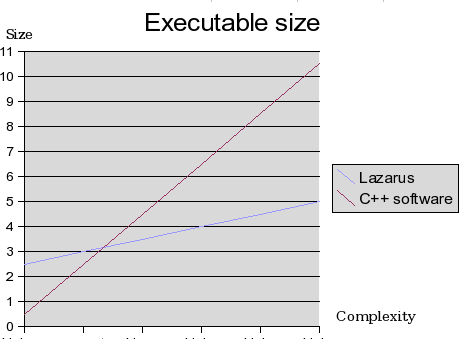 | |
| 42 | 42 | ||
| 43 | 43 | ### 윈도 환경에서 링킹이 오래 걸리는 이유는? | |
| 44 | 44 | ||
| 45 | 45 | 이 문제는 FPC 2.2 와 라자루스 0.9.24 부터 해결되었습니다. 업데이트 하세요. 이후 설명은 이전 버전에 대한 것 입니다. | |
| 46 | 46 | ||
| 47 | 47 | Generally speaking, compilation on Windows takes more time then other platforms because the GNU Linker utilized by Free Pascal is slow on this platform. This problem only affects Windows, and is only bad on relatively old computers (less then 1Ghz) and computers with little RAM (128MB or less). | |
| 48 | 48 | ||
| 49 | 49 | Also, if you smartlink LCL the linking will be much slower. A study about this is located here: [[File size and smartlinking]] | |
| 50 | 50 | ||
| 51 | 51 | A internal linker was developed, and is ready, but will only be available when Free Pascal 2.2 is released (of course it's also available via subversion). It decreases the linking time dramatically. | |
| 52 | 52 | ||
| 53 | 53 | **Note**: In 2.1.1 Windows uses an internal linker for win32/64/ce which speeds the process up a bit. A Lazarus recompile then eats about 280MB. | |
| 54 | 54 | ||
| 55 | 55 | ### ppc386.cfg이나 fpc.cfg이 필요한가요? | |
| 56 | 56 | ||
| 57 | 57 | fpc.cfg만 있으면 됩니다. 이를 통해서 컴파일러는 라이브러리를 어디서 찾아야 하는지 알게 됩니다. | |
| 58 | 58 | ||
| 59 | 59 | ### lazarus 는 어떻게 컴파일하나요? | |
| 60 | 60 | ||
| 61 | 61 | 다음과 같이 하세요: | |
| 62 | 62 | ||
| 63 | - | ||
| 64 | - | ||
| 63 | + | ```text | |
| 64 | + | $ cd lazarus | |
| 65 | + | $ make clean all | |
| 66 | + | ``` | |
| 65 | 67 | ||
| 66 | 68 | ### LCL 을 이용한 다른 프로젝트는 어떻게 빌드할 수 있나요? | |
| 67 | 69 | ||
| 68 | 70 | 프로그램을 만드는데 IDE 를 사용할 수 없다면, lazbuild 를 사용하세요. 이것은 lazarus 프로젝트 및 패키지를 만들기 위한 명령행 버전입니다. LCL 프로그램을 IDE 나 lazbuild 없이 만들려면 다음 행을 *fpc.cfg* 끝에 추가하세요. | |
| 69 | 71 | ||
| 70 | - | ||
| 71 | - | ||
| 72 | + | ```text | |
| 73 | + | # searchpath for other toolkits (Linux) | |
| 74 | + | -Fu/usr/lib/fpc/$fpcversion/units/$fpctarget/{YourToolKit} | |
| 75 | + | ``` | |
| 72 | 76 | ||
| 73 | - | ||
| 74 | - | ||
| 77 | + | ```text | |
| 78 | + | # searchpath for other toolkits (Windows) | |
| 79 | + | -Fu/{YourLazarusDirectory}/components/units/{YourToolKit} | |
| 80 | + | ``` | |
| 75 | 81 | ||
| 76 | 82 | ||
| 77 | 83 | Where {YourToolKit} may be *gtk2*, *gnome*, *qt* or *win32* and run: | |
| 78 | 84 | ||
| 79 | 85 | ||
| 80 | 86 | ppc386 your.project.pp | |
| 81 | 87 | ||
| 82 | 88 | **Hint:** Don't forget to install the development packages for your toolkit otherwise you might a receive something like: [[Linker message: cannot find -l]]. | |
| 83 | 89 | ||
| 84 | 90 | ### FPC의 어떤 버전이 필요한가요? | |
| 85 | 91 | ||
| 86 | 92 | MacOSX는 2.0.4, 그 외의 모든 시스템은 2.2.2 버전이 필요합니다. 또한 2.2.3 버전이나 2.3.x 버전의 경우 svn을 통해서 사용하실 수 있습니다. 주의: 2.2.0 버전은 MacOSX에서 파일명의 대소문자 구분 관련 버그가 있습니다. | |
| 87 | 93 | ||
| 88 | 94 | ### Lazarus가 컴파일이 되지 않습니다. | |
| 89 | 95 | ||
| 90 | 96 | 1. 컴파일러가 올바른 버전인지 체크 하십시오. | |
| 91 | 97 | 2. fpc 라이브러리가 같은 버전인지 체크 하십시오. | |
| 92 | 98 | 3. fpc.cfg 파일 있는지, 그리고 ppc386.cfg 파일이 오래된 것은 아닌지 체크 하십시오. | |
| 93 | 99 | 4. 해당 OS관련 FAQ도 체크 하십시오. | |
| 94 | 100 | ||
| 95 | 101 | ### When I try to compile a project, I have an error | |
| 96 | 102 | ||
| 97 | 103 | #### "Cannot find Unit interfaces". How can I solve this? | |
| 98 | 104 | ||
| 99 | 105 | It means the compiler can not find the file 'interfaces.ppu' **or** it means it found one, but it is wrong or outdated. | |
| 100 | 106 | ||
| 101 | 107 | This unit can be found in {LazarusDir}\lcl\units\\{TargetCPU}-{TargetOS}\\{LCLWidgetSet}\interfaces.ppu. For example: /home/username/lazarus/lcl/units/i386-linux/gtk/interfaces.ppu. | |
| 102 | 108 | ||
| 103 | 109 | Make sure, it is only there. If you have multiple versions of interfaces.ppu, then you probably have a wrong configuration (for instance you added a lcl directory to a search path). Remove all interfaces.ppu, but the one in the directory above. | |
| 104 | 110 | ||
| 105 | 111 | If you selected a different widgetset than you used to build lazarus, you need to build the LCL for this widgetset. | |
| 106 | 112 | ||
| 107 | 113 | If it is there, but you get this error, you are using a different compiler / rtl for compiling your project than you used for compiling your Lazarus IDE. You can do one of the following | |
| 108 | 114 | ||
| 109 | 115 | - Rebuild the LCL (or Lazarus completely) with the compiler selected in the Environmnent Options. You can do this with Tools -\> Build Lazarus. Before doing this, check the current settings in Tools -\> Configure Build Lazarus. | |
| 110 | 116 | - Change the compiler in the Environment Options to the one you used to compile Lazarus. Look carefully also in the Environment Options to see if you are using the correct paths for the Lazarus Directory and the FPC sources directory. Check that there is only one version of the compiler configuration file fpc.cfg - it should reside in /etc/ for Linux/Unix systems or in the same directory as the fpc compiler for Windows systems. Try to run "fpc -vt bogus" to check which fpc.cfg is being used in your system. Rogue copies often creep in if you have updated your compiler to a new version; they may be found in your home directory or in the same directory as the one in which you built your new compiler. DELETE THESE!! | |
| 111 | 117 | - You may also try to change the widgetset currently selected for the project. For example, the sample project "objectinspector" that comes with Lazarus is set to gtk by default. Compiling this project will surely give you "Can't find unit interfaces" in Windows platform. Changing widgetset to default(Win32) in Project \| Compiler Options... \| LCL Widget Type (various) should fix this issue. | |
| 112 | 118 | ||
| 113 | 119 | ### When I try to compile delphi projects under lazarus, I have an error | |
| 114 | 120 | ||
| 115 | 121 | #### at the line :{\$R *.DFM} How can I solve this problem ? | |
| 116 | 122 | ||
| 117 | 123 | Lazarus (or better Linux) doesn't know about resources, so you can't use them in the way Delphi/Win32 does. However Lazarus uses a method pretty compatible with this. You can still use your Delphi layouts (.dfm files) if you use the following steps: | |
| 118 | 124 | ||
| 119 | 125 | - You need a textual version of the .dfm files. D5 and higher are doing this as default. If you have older files: ALT-F12 to see the layout as text and paste/copy. When you have a text .dfm file, just copy it to a .lfm file. | |
| 120 | 126 | - Create a file with lazres (in lazarus/tools) lazres yourform.lrs yourform.lfm | |
| 121 | 127 | - Add the following initialization section to | |
| 122 | 128 | ||
| 123 | - | ||
| 124 | - | ||
| 129 | + | ```text | |
| 130 | + | initialization | |
| 131 | + | {$I yourform.lrs} | |
| 132 | + | ``` | |
| 125 | 133 | ||
| 126 | 134 | Please keep in mind that not all properties in the dfm are supported yet by lazarus, so you might get a crash. | |
| 127 | 135 | ||
| 128 | 136 | #### 'Identifier not found LazarusResources'. | |
| 129 | 137 | ||
| 130 | 138 | When creating a form Lazarus automaticaly add some extra units to the uses section of your form unit. During the conversion of a delphi unit to a Lazarus unit this does not happen. So you need to add LResources to the Uses section of your form unit. | |
| 131 | 139 | ||
| 132 | 140 | ### When accessing events of objects e.g. the onclick event of a button I get the following error. ERROR unit not found: stdCtrls | |
| 133 | 141 | ||
| 134 | 142 | Make sure, in the Project -\> Project Inspector, that your project depends on the package 'LCL' and that you have installed the FPC sources. | |
| 135 | 143 | ||
| 136 | 144 | Lazarus is the IDE and the visual components library LCL. All other stuff, like IO, Database, FCL and RTL are provided by FPC. The IDE needs the paths to all sources. | |
| 137 | 145 | ||
| 138 | 146 | The FPC source path can be set via: Environment -\> Environment Options -\> Files -\> FPC source directory | |
| 139 | 147 | ||
| 140 | 148 | ### How to embed a small file in the executable, without the need of a separate file? How to embed a resource? | |
| 141 | 149 | ||
| 142 | 150 | For example: | |
| 143 | 151 | ||
| 144 | - | ||
| 152 | + | ```text | |
| 153 | + | /your/lazarus/path/tools/lazres sound.lrs sound1.wav sound2.wav ... | |
| 154 | + | ``` | |
| 145 | 155 | ||
| 146 | 156 | will create sound.lrs from sound1.wav and sound2.wav. | |
| 147 | 157 | ||
| 148 | 158 | Then include it *behind* the form lrs file: | |
| 149 | 159 | ||
| 150 | - | ||
| 151 | - | ||
| 152 | - | ||
| 153 | - | ||
| 160 | + | ``` pascal | |
| 161 | + | ... | |
| 162 | + | initialization | |
| 163 | + | {$i unit1.lrs} // this is main resource file (first) | |
| 164 | + | {$i sound.lrs} // user defined resource file | |
| 154 | 165 | ||
| 155 | - | ||
| 166 | + | end. | |
| 167 | + | ``` | |
| 156 | 168 | ||
| 157 | 169 | In your program you can then use: | |
| 158 | 170 | ||
| 159 | - | ||
| 171 | + | ``` pascal | |
| 172 | + | Sound1AsString:=LazarusResources.Find('sound1').Value; | |
| 173 | + | ``` | |
| 160 | 174 | ||
| 161 | 175 | ### 디버그 결과를 어떻게 볼 수 있나요? | |
| 162 | 176 | ||
| 163 | 177 | LCL은 LCLProc 유닛의 2개 프로시져에서 디버그 출력을 작성 할수 있습니다. | |
| 164 | 178 | ||
| 165 | 179 | 2개 프로시져 명: | |
| 166 | 180 | ||
| 167 | 181 | - **DebugLn:** which works about the same as WriteLn, but accepts only strings. | |
| 168 | 182 | - **DbgOut:** which works about the same as Write, but accepts only strings. | |
| 169 | 183 | ||
| 170 | 184 | In normal circumstances the output is written to stdout. If stdout is closed, (for example when the application is {\$AppType Gui} or compiled with -WG on Windows), no output is written. | |
| 171 | 185 | ||
| 172 | 186 | Debug output can also be written to file. The initialization code of the LCLProc unit checks Lazarus.exe's command line parameters for '--debug-log=\<file\>'. On finding this parameter any subsequent debug output is sent to \<file\>. | |
| 173 | 187 | ||
| 174 | 188 | 만약 '--debug-log' 명령어 파라메터를 사용하지 않으면, 시스템 환경설정의 변수 xxx_debuglog를 검사합니다, xxx는 파일 확장자를 제외한 파일 명입니다. For Lazarus this would be lazarus_debuglog. 만약 환경설정에서 변수가 없다면 lazarus_debuglog 환경설정의 변수 파일을 받아서 디버그 출력합니다. | |
| 175 | 189 | ||
| 176 | 190 | 예: 설정하려면: | |
| 177 | 191 | ||
| 178 | - | ||
| 192 | + | ```text | |
| 193 | + | set lazarus_debuglog=c:\lazarus\debug.txt | |
| 194 | + | ``` | |
| 179 | 195 | ||
| 180 | 196 | 디버그 출력은 다음파일에 저장됩니다. c:\lazarus\debug.txt | |
| 181 | 197 | ||
| 182 | 198 | Since this is implemented in lclproc, every application using lclproc, can use this output facility. | |
| 183 | 199 | ||
| 184 | 200 | Debuging Lazarus | |
| 185 | 201 | Most useful for Windows: If you want output on a console, add {\$APPTYPE console} to lazarus.pp ; Then rebuild Lazarus. | |
| 186 | 202 | ||
| 187 | 203 | ### What is the meaning of the various file extensions used by Lazarus? | |
| 188 | 204 | ||
| 189 | 205 | The [[Lazarus Tutorial|Lazarus Tutorial#The Lazarus files]] explains some extensions by an example. Here is a brief list: | |
| 190 | 206 | ||
| 191 | 207 | `*.lpi` | |
| 192 | 208 | Lazarus Project Information file (stored in XML; contains project-specific settings) | |
| 193 | 209 | ||
| 194 | 210 | `*.lpr` | |
| 195 | 211 | Lazarus Program file; contains Pascal source of main program | |
| 196 | 212 | ||
| 197 | 213 | `*.lfm` | |
| 198 | 214 | Lazarus Form file; contains configuration information for all objects on a form (stored in a Lazarus-specific textual format; the actions are described by Pascal source code in a corresponding `*.pas` file) | |
| 199 | 215 | ||
| 200 | 216 | `*.pas` or `*.pp` | |
| 201 | 217 | Unit with Pascal code (typically for a form stored in a corresponding `*.lfm` file) | |
| 202 | 218 | ||
| 203 | 219 | `*.lrs` | |
| 204 | 220 | Lazarus Resource file (this is a generated file; not to be confused with a Windows resource file). | |
| 205 | 221 | ||
| 206 | 222 | This file can be created with lazres tool (in directory Lazarus/Tools) using commandline: lazres myfile.lrs myfile.lfm | |
| 207 | 223 | ||
| 208 | 224 | `*.ppu` | |
| 209 | 225 | Compiled unit | |
| 210 | 226 | ||
| 211 | 227 | `*.lpk` | |
| 212 | 228 | Lazarus package information file. (stored in XML; contains package-specific settings) | |
| 213 | 229 | ||
| 214 | 230 | ### I have fixed/improved lazarus. How can I add my changes to the official lazarus source? | |
| 215 | 231 | ||
| 216 | 232 | Create a patch and send it to the developers. For details see [[Creating A Patch]]. | |
| 217 | 233 | ||
| 218 | 234 | ### When I do *var mytext: text;* to declare a text file, I get "Unit1.pas(32,15) Error: Error in type definition". How can I fix this? | |
| 219 | 235 | ||
| 220 | 236 | The TControl class has a [[doc:lcl/controls/tcontrol.text.html|Text]] property. In a method of a form, that has higher visibility, the [[doc:rtl/system/text.html|Text]] type from the system unit. You can use the [[doc:rtl/system/textfile.html|TextFile]] type, which is just an alias for the Text type or you can add the unit to the type definition. | |
| 221 | 237 | ||
| 222 | - | ||
| 223 | - | ||
| 224 | - | ||
| 238 | + | ``` pascal | |
| 239 | + | var | |
| 240 | + | MyTextFile: TextFile; | |
| 241 | + | MyText: System.Text; | |
| 242 | + | ``` | |
| 225 | 243 | ||
| 226 | 244 | A similar name clash exists with assigning and closing a text file. TForm has a *assign* and a [[doc:lcl/forms/tcustomform.close.html|Close]] method. You can use [[doc:rtl/objpas/assignfile.html|AssignFile]] and [[doc:rtl/objpas/closefile.html|CloseFile]] or add the unit name *System*. | |
| 227 | 245 | ||
| 228 | 246 | ### I get an error when using Printer.BeginDoc | |
| 229 | 247 | ||
| 230 | 248 | The unit Printers must be added to the uses section. | |
| 231 | 249 | ||
| 232 | 250 | The Printer4Lazarus package must be added to your project requirement in the IDE under: Project\|Project Inspector\|Add\|New Requirement\|Package Name: | |
| 233 | 251 | ||
| 234 | 252 | If the package Printer4Lazarus package is not in the list when opening the dropdown box it must be installed. The package is part of the Lazarus installation and can be found in: \[lazarus installed directory\]\components\printers | |
| 235 | 253 | ||
| 236 | 254 | If you used the default installation directories \[lazarus installed directory\] is: | |
| 237 | 255 | ||
| 238 | 256 | - Windows: c:\lazarus | |
| 239 | 257 | - Linux: /usr/lib/lazarus | |
| 240 | 258 | ||
| 241 | 259 | The same solution also applies to the exception you can get when referencing Printer.Printers | |
| 242 | 260 | ||
| 243 | 261 | ### Why are TForm.ClientWidth/ClientHeight the same as TForm.Width/Height | |
| 244 | 262 | ||
| 245 | 263 | The TForm.Width/Height do no include the frame, because there was no way to retrieve the frame size on all platforms. Without a reliable way, the LCL would move the forms around on the screen or resize them endlessly. | |
| 246 | 264 | ||
| 247 | 265 | Eventually when there is a reliable way to get the size and position of a window with its frame on all platforms, then it will be changed. To keep compatibility with older LCL forms, a version number and some extra methods will be added. | |
| 248 | 266 | ||
| 249 | 267 | ### I created a Patch to dock the IDE Messages form on the "Source Code Editor" form (at bottom) | |
| 250 | 268 | ||
| 251 | 269 | Such patches will not be applied, because they only implement a small part of the needed docking. The goal is to create a complete dock manager and use that. A complete dock manager can dock all IDE windows and it allows to let the user define how to dock. For example dock the messages window above or below the source editor or ... or not at all. For instance: | |
| 252 | 270 | ||
| 253 | 271 | +-------------------++--+ | |
| 254 | 272 | |menu || | | |
| 255 | 273 | +-------------------+| | | |
| 256 | 274 | +--++---------------+| | | |
| 257 | 275 | |PI|| Source Editor ||CE| | |
| 258 | 276 | +--+| || | | |
| 259 | 277 | +--+| || | | |
| 260 | 278 | | |+---------------++--+ | |
| 261 | 279 | |OI|+-------------------+ | |
| 262 | 280 | | ||messages | | |
| 263 | 281 | +--++-------------------+ | |
| 264 | 282 | ||
| 265 | 283 | The dock manager can store the layout and restore it on next load. Preferably the dock manager can dock in pages too. The dock manager does not need to use drag and drop. All patches implementing docking without a dock manager makes it harder to implement a real dock manager and will be rejected. | |
| 266 | 284 | ||
| 267 | 285 | ### How can I become a developer lazarus and access management in the SVN and bug-tracker? | |
| 268 | 286 | ||
| 269 | 287 | First of all: you must learn about Lazarus, to prove your knowledge and skill. Start by reading the [[Lazarus Documentation|wiki articles]], read the Lazarus source code, giving a look at the [Lazarus Bug-Tracker](http://www.lazarus.freepascal.org/mantis), fix some bugs, and if you think you are ready, contact the developers on the [mailing list](http://www.mail-archive.com/lazarus@miraclec.com). | |
| 270 | 288 | ||
| 271 | 289 | ## Where is ... defined | |
| 272 | 290 | ||
| 273 | 291 | ### Virtual key constants | |
| 274 | 292 | ||
| 275 | 293 | Virtual key constants are defined in LCLType. Add LCLtype to your uses. | |
| 276 | 294 | ||
| 277 | 295 | ## Using the IDE | |
| 278 | 296 | ||
| 279 | 297 | ### How can I use "identifier completion"? | |
| 280 | 298 | ||
| 281 | 299 | You can invoke identifier completion by pressing \[ctrl\]\[space\]. Under the menu item *Environment -\> Editor Options -\> Code Tools -\> Automatic Features* you can set how quick this should happen automatically. | |
| 282 | 300 | ||
| 283 | 301 | ## Linux | |
| 284 | 302 | ||
| 285 | 303 | ### How can I debug on Linux without the IDE? | |
| 286 | 304 | ||
| 287 | 305 | First of all you need a debugger. gdb is the standard debugger under linux and there are several GUI-frontends available. One common frontend is ddd, which is part of most common distributions. To compile lazarus/lcl with debug-information you should then use the following commands to start a debug session: | |
| 288 | 306 | ||
| 289 | - | ||
| 290 | - | ||
| 307 | + | ```text | |
| 308 | + | $ make clean; make OPT=-dDEBUG | |
| 309 | + | $ ddd lazarus | |
| 310 | + | ``` | |
| 291 | 311 | ||
| 292 | 312 | Be warned however, that ddd is not as comfortable as e.g. the Lazarus debugger. Specially if it comes to view the contents of a variable you have to take into account that ddd/gdb are case sensitive whereas Pascal is case-insensitive. Therefore you have to type all variable names in uppercase to see their contents. For more information take a look into the fpc-manuals. | |
| 293 | 313 | ||
| 294 | 314 | ### I can debug now but ddd does not find my sources or complains that they contain no code. Whats that? | |
| 295 | 315 | ||
| 296 | 316 | This is a path-related problem with either gdb or ddd. You can aviod this by | |
| 297 | 317 | ||
| 298 | 318 | - Use the "Change directory" command from the ddd menu and choose the directory where the sources are located. The drawback of this method is that you now can't use the source of the program you started with (e.g. lazarus). Thus it may be neccessary to change the directory multiple times. | |
| 299 | 319 | - In ddd goto \[Edit\] \[gdb-settings\] and set the search-path | |
| 300 | 320 | - Create a \$(HOME)/.gdbinit file like: | |
| 301 | 321 | ||
| 302 | - | ||
| 303 | - | ||
| 304 | - | ||
| 322 | + | ```text | |
| 323 | + | directory /your/path/to/lazarus | |
| 324 | + | directory /your/path/to/lazarus/lcl | |
| 325 | + | directory /your/path/to/lazarus/lcl/include | |
| 326 | + | ``` | |
| 305 | 327 | ||
| 306 | 328 | ### I receive an error during the linking that states /usr/bin/ld can't find -l\<some lib\> | |
| 307 | 329 | ||
| 308 | 330 | **Package Based Distributions** | |
| 309 | 331 | You need to install the package that provides the lib\<somelib\>.so or lib\<somelib\>.a files. Dynamic libs under linux have the extension .so, while static libs have the extension .a. On some Linux distro's you have installed the package (rpm, deb) \<packagename\> which provides \<some lib\>, but you also need the development package (rpm, deb), normally called \<packagename\>-dev, which contains the .a (static lib) and/or the .so (dynamic lib). | |
| 310 | 332 | ||
| 311 | 333 | Some distributions have commands to find which package contains a file: | |
| 312 | 334 | ||
| 313 | 335 | **Mandriva** | |
| 314 | 336 | ||
| 315 | - | ||
| 337 | + | ```text | |
| 338 | + | []$ urpmf lib<somelib>.so | |
| 339 | + | ``` | |
| 316 | 340 | ||
| 317 | 341 | ||
| 318 | 342 | will list all packages containing the file named lib\<somelib\>.so, you'll have to install those ending in -devel | |
| 319 | 343 | ||
| 320 | 344 | ||
| 321 | 345 | **Debian** | |
| 322 | 346 | ||
| 323 | 347 | ||
| 324 | 348 | install the apt-file utility (apt-get install apt-file) then | |
| 325 | 349 | ||
| 326 | - | ||
| 350 | + | ```text | |
| 351 | + | []$ apt-file search lib<somelib>.so | |
| 352 | + | ``` | |
| 327 | 353 | ||
| 328 | 354 | ||
| 329 | 355 | will list all packages containing the file named lib\<somelib\>.so, you'll have to install those ending in -dev | |
| 330 | 356 | ||
| 331 | 357 | **Source Based Distributions and Manual Compilation (LFS)** | |
| 332 | 358 | Make sure that there is a lib\<somelib\>.a in the path, and that it contains the right version. To let the linker find the dynamic library, create a symlink called lib\<some lib\>.so to lib\<some lib\>\<version\>-x,y.so if necessary (and/or for static lib; lib\<some lib\>.a to lib\<some lib\>\<version\>-x,y.a). | |
| 333 | 359 | ||
| 334 | 360 | **FreeBSD** | |
| 335 | 361 | As source based distro's, and also make sure you have -Fl/usr/local/lib in your fpc.cfg and/or Lazarus library path. Keep in mind that GTK1.2 has "gtk12" as package name under FreeBSD. (same for glib) NOTE: This has changed as of late. Newest ports have gtk-12 and glib-12 as well. You might stumble on this problem, since FPC requires the "-less" ones, you will need to symlink them like this: | |
| 336 | 362 | ||
| 337 | - | ||
| 338 | - | ||
| 339 | - | ||
| 363 | + | ```text | |
| 364 | + | []# cd /usr/local/lib && ln -s libglib-12.so libglib12.so | |
| 365 | + | []# cd /usr/X11R6/lib && ln -s libgtk-12.so libgtk12.so | |
| 366 | + | []# cd /usr/X11R6/lib && ln -s libgdk-12.so libgdk12.so | |
| 367 | + | ``` | |
| 340 | 368 | ||
| 341 | 369 | **NetBSD** | |
| 342 | 370 | As source based distro's, and also make sure you have -Fl/usr/pkg/lib in your fpc.cfg and/or Lazarus library path | |
| 343 | 371 | ||
| 344 | 372 | ### How can I convert a kylix 2 project into a lazarus project? | |
| 345 | 373 | ||
| 346 | 374 | Nearly the same way as converting a Kylix project into a Delphi/VCL project. | |
| 347 | 375 | ||
| 348 | 376 | The LCL (Lazarus Component Library) tries to be compatible to Delphis VCL. Kylix CLX tries to be QT compatible. Here are some general hints: | |
| 349 | 377 | ||
| 350 | 378 | - Rename all used CLX Q-units like QForms, QControls, QGraphics, ... into their VCL counterparts: Forms, Controls, Graphics, ... | |
| 351 | 379 | - Add LResources to the uses section of every form source | |
| 352 | 380 | - Rename or copy all .xfm files to .lfm files. | |
| 353 | 381 | - Rename or copy .dpr file to .lpr file. | |
| 354 | 382 | - Add "Interfaces" to the uses section in the .lpr file. | |
| 355 | 383 | - Remove {\$R *.res} directive | |
| 356 | 384 | - Remove {\$R *.xfm} directive | |
| 357 | 385 | - Add {\$mode objfpc}{\$H+} or {\$mode delphi}{\$H+} directive to .pas and .lpr files | |
| 358 | 386 | - Add an initialization section to the end of each form source and add an include directive for the .lrs file (lazarus resource file): | |
| 359 | 387 | ||
| 360 | - | ||
| 361 | - | ||
| 388 | + | ```text | |
| 389 | + | initialization | |
| 390 | + | {$I unit1.lrs} | |
| 391 | + | ``` | |
| 362 | 392 | ||
| 363 | 393 | ||
| 364 | 394 | The .lrs files can be created via the lazres tool in: (lazarusdir)/tools/lazres. | |
| 365 | 395 | ||
| 366 | 396 | For example: ./lazres unit1.lrs unit1.lfm | |
| 367 | 397 | ||
| 368 | 398 | - Fix the differences. The LCL does not yet support every property of the VCL and the CLX is not fully VCL compatible. | |
| 369 | 399 | ||
| 370 | 400 | - To make it more platform independant, reduce unit libc (which is deprecated) references and substitute with native FPC units like baseunix/unix as much as possible. This will be necessary to support other targets than linux/x86 (including OS X, FreeBSD and Linux/x86_64) | |
| 371 | 401 | ||
| 372 | 402 | ### When compiling lazarus the compiler can not find a unit. e.g.: gtkint.pp(17,16) Fatal: Can't find unit GLIB | |
| 373 | 403 | ||
| 374 | 404 | 1\. Check a clean rebuild: do a 'make clean all' | |
| 375 | 405 | ||
| 376 | 406 | 2\. Check if the compiler has the correct version (2.0.4 or higher) | |
| 377 | 407 | ||
| 378 | 408 | 3\. Check if the compiler is using the right config file. The normal installation creates /etc/fpc.cfg. But fpc also searches for ~/.ppc386.cfg, ~/.fpc.cfg, /etc/ppc386.cfg and it uses only the first it finds. | |
| 379 | 409 | ||
| 380 | 410 | ||
| 381 | 411 | **Hint:** You can see which config file is used with 'ppc386 -vt bogus' | |
| 382 | 412 | ||
| 383 | 413 | Remove any ppc386.cfg as it is really obsolete. | |
| 384 | 414 | ||
| 385 | 415 | 4\. Check if the config file (/etc/fpc.cfg) contains the right paths to your fpc libs. There must be three lines like this: | |
| 386 | 416 | ||
| 387 | - | ||
| 388 | - | ||
| 389 | - | ||
| 417 | + | ```text | |
| 418 | + | -Fu/usr/lib/fpc/$fpcversion/units/$fpctarget | |
| 419 | + | -Fu/usr/lib/fpc/$fpcversion/units/$fpctarget/rtl | |
| 420 | + | -Fu/usr/lib/fpc/$fpcversion/units/$fpctarget/* | |
| 421 | + | ``` | |
| 390 | 422 | ||
| 391 | 423 | ||
| 392 | 424 | The first part of these paths (/usr/lib/fpc) depends on your system. On some systems this can be for example /usr/local/lib/fpc/... . | |
| 393 | 425 | ||
| 394 | 426 | **Hint:** You can see your searchpaths with 'ppc386 -vt bogus' | |
| 395 | 427 | ||
| 396 | 428 | 5\. Check that the config file (/etc/fpc.cfg) does not contain search paths to the lcl source files (.pp, .pas): | |
| 397 | 429 | ||
| 398 | - | ||
| 399 | - | ||
| 430 | + | ```text | |
| 431 | + | forbidden: -Fu(lazarus_source_directory)/lcl | |
| 432 | + | forbidden: -Fu(lazarus_source_directory)/lcl/interfaces/gtk | |
| 433 | + | ``` | |
| 400 | 434 | ||
| 401 | 435 | ||
| 402 | 436 | If you want to add the lcl for all your fpc projects, make sure that the two paths look like the following and are placed after the above fpc lib paths: | |
| 403 | 437 | ||
| 404 | - | ||
| 405 | - | ||
| 438 | + | ```text | |
| 439 | + | -Fu(lazarus_source_directory)/lcl/units/$fpctarget | |
| 440 | + | -Fu(lazarus_source_directory)/lcl/units/$fpctarget/gtk | |
| 441 | + | ``` | |
| 406 | 442 | ||
| 407 | 443 | 6\. Check if the missing unit (glib.ppu) exists in your fpc lib directory. For example the gtk.ppu can be found in /usr/lib/fpc/\$fpcversion/units/i386-linux/gtk/. If it does not exists, the fpc lib is corrupt and should be reinstalled. | |
| 408 | 444 | ||
| 409 | 445 | 7\. Check if the sources are in a NFS mounted directory. In some cases the NFS updates created files incorrectly. Please, try to move the sources into a non NFS directory and compile there. | |
| 410 | 446 | ||
| 411 | 447 | 8\. If you are still not succeeded try to use samplecfg script as follows: | |
| 412 | 448 | ||
| 413 | 449 | *\#* cd /usr/lib/fpc/*version*/ | |
| 414 | 450 | ||
| 415 | 451 | *\#* sudo ./samplecfg /usr/lib/fpc/*\\\$version* /etc | |
| 416 | 452 | ||
| 417 | 453 | Note! Do not put - / - after etc because if you do that the system will create a file - /etc/fpc.cfg/fpc.cfg. In fact we want that samplecfg make a file - /etc/fpc.cfg - not the folder /etc/fpc.cfg. | |
| 418 | 454 | ||
| 419 | 455 | ### I have installed the binary version, but when compiling a simple project, lazarus gives: Fatal: Can't find unit CONTROLS | |
| 420 | 456 | ||
| 421 | 457 | Probably you are using a newer fpc package, than that used for building the lazarus binaries. The best solution is to download the sources and compile lazarus manually. You can download the source snapshot or get the source via svn: | |
| 422 | 458 | ||
| 423 | - | ||
| 424 | - | ||
| 425 | - | ||
| 426 | - | ||
| 459 | + | ```text | |
| 460 | + | $ bash | |
| 461 | + | $ svn checkout http://svn.freepascal.org/svn/lazarus/trunk lazarus | |
| 462 | + | $ cd lazarus | |
| 463 | + | $ make clean all | |
| 464 | + | ``` | |
| 427 | 465 | ||
| 428 | 466 | Make sure that lazarus get the new source directory: Environment-\>General Options-\>Files-\>Lazarus Directory Top | |
| 429 | 467 | ||
| 430 | 468 | ### Lazarus compiles, but linking fails with: libgdk-pixbuf not found | |
| 431 | 469 | ||
| 432 | 470 | Install the gdk-pixbuf library for gtk1.x: | |
| 433 | 471 | ||
| 434 | 472 | Where to find the gdk-pixbuf library: | |
| 435 | 473 | ||
| 436 | 474 | RPMs: <http://rpmfind.net/linux/rpm2html/search.php?query=gdk-pixbuf&submit=Search+>...&system=&arch= | |
| 437 | 475 | ||
| 438 | 476 | Debian packages: libgdk-pixbuf-dev | |
| 439 | 477 | ||
| 440 | 478 | Sources: <ftp://ftp.gnome.org/pub/gnome/unstable/sources/gdk-pixbuf/> | |
| 441 | 479 | ||
| 442 | 480 | ### I have SuSE and I get /usr/bin/ld: cannot find -lgtk Error: Error while linking | |
| 443 | 481 | ||
| 444 | 482 | SuSE installs the gtk devel libs under /opt/gnome/lib (or /opt/gnome/lib64 for 64 bits), which is not in the standard lib path. Simply add it to your /etc/fpc.cfg. (-Fl/opt/gnome/lib). | |
| 445 | 483 | ||
| 446 | 484 | ### Lazarus crashes with runtime error 211 after I installed a component | |
| 447 | 485 | ||
| 448 | 486 | After I installed a component, Lazarus crashes with the following message: | |
| 449 | 487 | ||
| 450 | - | ||
| 451 | - | ||
| 452 | - | ||
| 488 | + | ``` pascal | |
| 489 | + | Threading has been used before cthreads was initialized. | |
| 490 | + | Make cthreads one of the first units in your uses clause. | |
| 491 | + | Runtime error 211 at $0066E188 | |
| 492 | + | ``` | |
| 453 | 493 | ||
| 454 | 494 | How can I fix this? | |
| 455 | 495 | ||
| 456 | 496 | Your freshly installed component is using threads. FPC on *nix doesn't automatically include threading support, but it must be intialized. This initialization is done in the cthreads unit. Every application using the component needs to add this unit to the uses clause of the main program. Lazarus itself is no exception. This can be done in two ways: | |
| 457 | 497 | ||
| 458 | 498 | 1\) Open the package. In the package editor click on *Options*. Under page *Usage* add to the *custom* options **-dUseCThreads**. Then rebuild the IDE. This way the cthreads unit will be automatically used by the IDE under unix and the cthreads are initialized. | |
| 459 | 499 | ||
| 460 | 500 | 2\) In order to avoid modifying package, a fpc compiler option could be used directly. Open menu Tools-\>Configure "build Lazarus". Configure "build Lazarus" dialog will be shown, in field "Options:" type -Facthreads and then press "OK" button. The next step is to install the package. Lazarus will be built with option -Facthreads which means that it will treat main program as if unit cthreads where first in uses clause. | |
| 461 | 501 | ||
| 462 | 502 | *Hint:* Maybe your old (non-crashing) lazarus executable is stored as lazarus.old in the same directory as the crashing lazarus executable. | |
| 463 | 503 | ||
| 464 | 504 | See also [[Multithreaded Application Tutorial|Multithreaded_Application_Tutorial#Units_needed_for_a_multithreaded_application]] | |
| 465 | 505 | ||
| 466 | 506 | ### When I run a program with threads I get runtime error 232 | |
| 467 | 507 | ||
| 468 | 508 | The complete error message is: | |
| 469 | 509 | ||
| 470 | - | ||
| 471 | - | ||
| 472 | - | ||
| 473 | - | ||
| 510 | + | ``` pascal | |
| 511 | + | This binary has no thread support compiled in. | |
| 512 | + | Recompile the application with a thread-driver in the program uses | |
| 513 | + | clause before other units using thread. | |
| 514 | + | Runtime error 232 | |
| 515 | + | ``` | |
| 474 | 516 | ||
| 475 | 517 | **Solution**: Add cthreads as first unit to the uses clause of your main program, usually the .lpr-file. | |
| 476 | 518 | ||
| 477 | 519 | ### I have Ubuntu Breezy and my fonts in Lazarus IDE look too big | |
| 478 | 520 | ||
| 479 | 521 | If Lazarus is compiled with Gtk1.2, the settings in Gnome Preferences/Font don't have any effect as they are related to Gtk2. You could try this solution: Create a file named .gtkrc.mine in your home directory (if it's not already there) and add these lines to it: | |
| 480 | 522 | ||
| 481 | 523 | style "default-text" { | |
| 482 | 524 | fontset = "-*-arial-medium-r-normal--*-100-*-*-*-*-iso8859-1,\ | |
| 483 | 525 | -*-helvetica-medium-r-normal--*-100-*-*-*-*-*-*" | |
| 484 | 526 | } | |
| 485 | 527 | ||
| 486 | 528 | class "GtkWidget" style "default-text" | |
| 487 | 529 | ||
| 488 | 530 | If this is not enough try and create also a .gtkrc symlink to .gtkrc.mine . It worked in this way under Xubuntu 7.10. | |
| 489 | 531 | ||
| 490 | 532 | ### How can my gtk programs use custom rc files? | |
| 491 | 533 | ||
| 492 | 534 | Option a) Name the rc file *yourprogram.gtkrc* and put it in the same directory where the executable is. | |
| 493 | 535 | ||
| 494 | 536 | Option b) Use unit *GtkInt* and call *GTKWidgetSet.SetRCFilename('your_preferred_rc_file');* Best done before *Application.Initialize* in the .lpr file with *{\$IFDEF LCLGtk}*. | |
| 495 | 537 | ||
| 496 | 538 | ### I have Ubuntu and I cannot compile for Gtk2 due to missing libraries | |
| 497 | 539 | ||
| 498 | 540 | Ubuntu has a problem with not creating all the symbolic links that you'll need even when the libraries are installed. Make sure that all missing libraries when trying to link for Gtk2 have their appropriate links. For instance, you might need to do: | |
| 499 | 541 | ||
| 500 | 542 | cd /usr/lib | |
| 501 | 543 | sudo ln -s libgdk-x11-2.0.so.0 libgtk-x11-2.0.so | |
| 502 | 544 | ||
| 503 | 545 | Make sure that the \[whatever\].so symbolic links are created and point to the actual libraries. | |
| 504 | 546 | ||
| 505 | 547 | ### How can I compile a program for Gtk2? | |
| 506 | 548 | ||
| 507 | 549 | At the moment, the Gtk2 compiled IDE is a little unstable, but you can compile software for Gtk2 using the Gtk1 IDE. | |
| 508 | 550 | ||
| 509 | 551 | To start with recompile LCL for Gtk2. Go to the menu "Tools"-\>"Configure Build Lazarus" and set LCL to clean+build and everything else to none. | |
| 510 | 552 | ||
| 511 | 553 | Now click Ok and go to the menu "Tools"-\>"Build Lazarus" | |
| 512 | 554 | ||
| 513 | 555 | Now you can compile your software with Gtk2 going on the Compiler options and changing the widgetset to Gtk2. | |
| 514 | 556 | ||
| 515 | 557 | ### I get this message: "\[WARNING\] ** Multibyte character encodings (like UTF8) are not supported at the moment." | |
| 516 | 558 | ||
| 517 | 559 | Since revision 10535 (0.9.21) this message doesn't exist anymore. Previously it was used to warn that a UTF-8 encoding was used. The internal keyhandling routines for the gtk1 widgetset couldn't handle such encoding for keypresses, with the result that keypresses with for instance accented chars were not or wrong detected. | |
| 518 | 560 | ||
| 519 | 561 | (original text for older versions of lazarus)\ | |
| 520 | 562 | This warning message indicates that your locale enconding is set to utf-8. If you are using Gtk 1 this can be a serious problem and prevent the correct working of Lazarus or software created with Lazarus. | |
| 521 | 563 | ||
| 522 | 564 | To work around this, just change your locale to a non utf-8 before executing the program on the command line, like this: | |
| 523 | 565 | ||
| 524 | 566 | export LC_CTYPE="pt_BR" | |
| 525 | 567 | export LANG="pt_BR" | |
| 526 | 568 | export LANGUAGE="pt_BR" | |
| 527 | 569 | ./lazarus | |
| 528 | 570 | ||
| 529 | 571 | Substitute pt_BR with the locale for your country. You can create a script to automate this. | |
| 530 | 572 | ||
| 531 | 573 | ## Windows | |
| 532 | 574 | ||
| 533 | 575 | ### When I cycle the compiler, I get:The name specified is not recognized as an internal or external command, operable program or batch file.\>& was unexpected at this time. | |
| 534 | 576 | ||
| 535 | 577 | In the compiler directory there is an OS2 scriptfile named make.cmd. Different versions of Windows also see this as a script file, so remove it since what is needed for OS2 becomes a hindrance on Windows. | |
| 536 | 578 | ||
| 537 | 579 | ### When I cycle the compiler, I get: make\[3\]: ./ppc1.exe: Command not found | |
| 538 | 580 | ||
| 539 | 581 | I don't know why but somehow make has lost its path. Try to cycle with a basedir set like: make cycle BASEDIR=your_fpc_source_dir_herecompiler | |
| 540 | 582 | ||
| 541 | 583 | ### When I try to make Lazarus I get: | |
| 542 | 584 | ||
| 543 | 585 | #### make.exe: * * * interfaces: No such file or directory (ENOENT). Stop.make.exe: * * * \[interfaces_all\] Error 2 | |
| 544 | 586 | ||
| 545 | 587 | You need to upgrade your make. | |
| 546 | 588 | ||
| 547 | 589 | #### makefile:27: *** You need the GNU utils package to use this Makefile. Stop. | |
| 548 | 590 | ||
| 549 | 591 | Make sure you didn't install FPC in a path with spaces in the name. The Makefile doesn't support it. | |
| 550 | 592 | ||
| 551 | 593 | ### How can I give my program an XP look like lazarus has? | |
| 552 | 594 | ||
| 553 | 595 | Project -\> Project Options -\> Check 'Use manifest to enables themes'. | |
| 554 | 596 | ||
| 555 | 597 | ### When I run Windows program created in Lazarus it starts with a DOS window | |
| 556 | 598 | ||
| 557 | 599 | Specify the -WG argument (Windows GUI) on the command line of the compiler or in the Lazarus IDE check the Windows GUI check box on the compiler options dialog box (Project menu -\> Compiler Options -\> Linking -\> target OS Specific options. | |
| 558 | 600 | ||
| 559 | 601 | ## Mac OS X | |
| 560 | 602 | ||
| 561 | 603 | ### 'unknown section attribute: no_dead_strip'라는 메시지와 함께 프로젝트 컴파일에 실패하는 이유는? | |
| 562 | 604 | ||
| 563 | 605 | 죽은 코드(Dead code) 제거 기능이 Xcode 1.5이전의 어셈블러와 링커에서는 지원하지 않습니다(Mac OS X 10.3.9버전에서 사용하는). 다음 컴파일 옵션을 꺼 주세요. | |
| 564 | 606 | ||
| 565 | 607 | - Code \> Unit style \> Smart linkable (-CX) | |
| 566 | 608 | - and Linking \> Link Style \> Link smart (-XX) | |
| 567 | 609 | ||
| 568 | 610 | ## Licensing | |
| 569 | 611 | ||
| 570 | 612 | ### Can I make commercial applications with Lazarus ? | |
| 571 | 613 | ||
| 572 | 614 | Yes, the LCL is licensed under the LGPL with an exception, which allows you to link to it statically without releasing the source of your application. Modifications and enhancements to the LCL must be distributed with source. Lazarus, the IDE, is licensed under the GPL. | |
| 573 | 615 | ||
| 574 | 616 | ### Why are some components restricted from usage in commercial application ? | |
| 575 | 617 | ||
| 576 | 618 | Lazarus comes with additional components, that were developed by third parties. Those are under various other Licenses. If you wish to use them you need to see the License within the source files of those packages. Most of those 3rd party components are in the directory "components". | |
| 577 | 619 | ||
| 578 | 620 | ### How do I know if a Component is part of the LCL ? | |
| 579 | 621 | ||
| 580 | 622 | All LCL units are in the directory "lcl". A List of units belonging to the LCL can be found here <http://lazarus-ccr.sourceforge.net/docs/lcl/> . If you code uses units not listed on this page, you may have used a component that is not part of the LCL. | |
| 581 | 623 | ||
| 582 | 624 | ### Can I make commercial plug-ins for Lazarus ? | |
| 583 | 625 | ||
| 584 | 626 | Yes, the IDEIntf part of the IDE is licensed under the LGPL with the same exception, so that shared data structures in this part will not force you to license your plug-in or design-time package under the GPL. You are free to choose a plug-in of any license; we don't want to limit your choice. Therefore non-GPL compatible plug-ins are allowed. Note that it's not allowed to distribute a precompiled Lazarus with these non-GPL-compatible plugins included statically; however, we do not see this as a severe limitation, since recompiling Lazarus is easy. | |
| 585 | 627 | ||
| 586 | 628 | ## Contributors and Comments | |
| 587 | 629 | ||
| 588 | 630 | This page has been converted from the epikwiki [version](http://lazarus-ccr.sourceforge.net/index.php?wiki=LazarusFaq). | |
| 589 | 631 | ||
| 590 | 632 | --- | |
| 591 | 633 | *From the Free Pascal wiki, page "Lazarus Faq/ko", as it stood on 2015-06-06 after a change by FTurtle, out of the wiki's dump of 2024-05-26. Copyright stays with the author who wrote it, according to the old wiki's [[Licensing]] page. If you have concerns about this material, [message the admin](/wiki-contact).* | |
| 592 | 634 | Category: FAQs/ko | |
| 593 | 635 | Category: Korean | |
| 594 | 636 | Category: Lazarus/ko |