

Lazarus Faq/ja: what changed
Revision 2 to 3. Removed lines have a minus sign; added lines have a plus sign.
| Old | New | Line | |
|---|---|---|---|
| 1 | 1 | ## 一般的なこと | |
| 2 | 2 | ||
| 3 | 3 | ### どうしてコンパイル後のバイナリがこんなに大きいの? | |
| 4 | 4 | ||
| 5 | 5 | バイナリが大きくなる理由は、GDB(GNU Debugger)で利用するデバッグ情報を含んでいるためです。 | |
| 6 | 6 | ||
| 7 | 7 | 実行ファイルからデバッグ情報を除去するオプション(-Xs)がありますが、 バージョン2.0.2以前のコンパイラではバグのため正しく動きません。バージョン2.0.4以降のコンパイラでは修正されています。 | |
| 8 | 8 | ||
| 9 | 9 | "strip" というプログラムでデバッグ情報を除去することもできます。 これは、Lazarusディレクトリの下のlazarus\pp\bin\i386-win32\\ にあります。 | |
| 10 | 10 | ||
| 11 | 11 | コマンドラインから、 "strip --strip-all \<実行ファイルへのパス\>" とタイプすることでデバッグ情報を除去できます。 | |
| 12 | 12 | ||
| 13 | 13 | さらにプログラムを小さくしたい場合は、実行ファイルの圧縮ツール [UPX(upx.exe)](http://upx.sourceforge.net/) も利用できます。 これは、"strip" と同じく、Lazarusディレクトリの下の、lazarus\pp\bin\i386-win32\\ にあります。 圧縮を復元するためのメモリのオーバーヘッドはありませんし、復元速度も Pentium 133 で ~10MB/sec 程度と大変高速です。 | |
| 14 | 14 | ||
| 15 | 15 | コマンドラインから、"upx \<実行ファイルへのパス\>" とタイプすることで、"upx" を利用できます。 | |
| 16 | 16 | ||
| 17 | 17 | "strip" と "upx" を簡単な Lazarus の GUI プログラムに適用すると、Linux で 700kb 程度、 Windows で 420kb 程度のサイズに収まるでしょう。 | |
| 18 | 18 | ||
| 19 | 19 | UPXの欠点などの詳細は、[[Size Matters|サイズについてにあります]]。 | |
| 20 | 20 | ||
| 21 | 21 | また、重要なことですが、一般的な hello world すら lazarus で作成すると、以下のような大量の機能が含まれてしまいます。 | |
| 22 | 22 | ||
| 23 | 23 | - XML 利用ライブラリ | |
| 24 | 24 | - 画像利用ライブラリ(png, xpm, bmp, ico ファイルなど) | |
| 25 | 25 | - Lazarus Component Library(LCL) のほとんどすべてのウイジェット | |
| 26 | 26 | - すべての Free Pascal Runtime Library(RTL) | |
| 27 | 27 | ||
| 28 | 28 | このためにとても大きなサイズになりますが、実用アプリケーションで必要とされる機能をすでに含んでいるともいえます。 | |
| 29 | 29 | ||
| 30 | 30 | Lazarus の実行ファイルのサイズは最初から大きいですが、ソースコードやフォームが増えても、少しづつしか増えません。 C++や他の言語では、hello world などはとても小さいかもしれませんが、実用的なアプリケーションを書くようになると急激にサイズが増加するでしょう。 | |
| 31 | 31 | ||
| 32 | 32 | 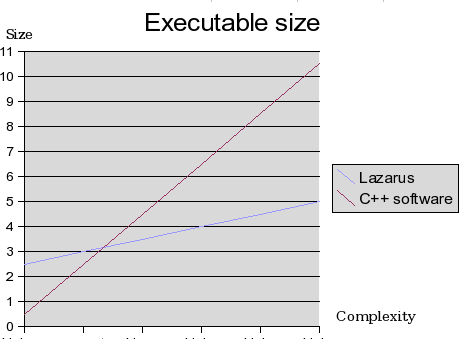 | |
| 33 | 33 | ||
| 34 | 34 | **Lazarus/FPC アプリケーションのサイズを縮小するための簡単なガイド** *(Lazarus 0.9.26 で確認)* | |
| 35 | 35 | ||
| 36 | 36 | - 1\. プロジェクト\|コンパイラオプション\|コード\|スマートリンク可能な(-CX) -\> チェックする。 | |
| 37 | 37 | - 2\. プロジェクト\|コンパイラオプション\|リンク\|デバッグ中\|実行ファイルからシンボルを除く(-Xs) -\> チェックする。 | |
| 38 | 38 | - 3\. プロジェクト\|コンパイラオプション\|リンク\|リンクスタイル\|スマートリンク(-XX) -\> チェックする。 | |
| 39 | 39 | ||
| 40 | 40 | 特に 2. が重要と思われます。 単純なアプリケーションは、いままでの 15-20 MB から 1-3 MB になります。 以下を試すのもよいでしょう: プロジェクト\|コンパイラオプション\|コード\|最適化\|速度より最小化を優先(-Os) -\> チェックする。 (実行速度が低下することに注意) | |
| 41 | 41 | ||
| 42 | 42 | - 4\. "UPX \<実行ファイルのパス\>" によって 1/2~1/3 に圧縮されます。 (注意: [[Size Matters|サイズについてにもあるように]]、UPX利用の欠点もあります。) | |
| 43 | 43 | ||
| 44 | 44 | **Chart of default sizes for an empty Application with various settings and operating systems** | |
| 45 | 45 | ||
| 46 | 46 | Well I ran tests I did on Lazarus 0.9.29 with FPC 2.4 (FPC 2.2.4 with Windows). *Optimized compiler* mean using the advices above but *without using UPX*. *Default Lazarus* means as installed from package/setup. *LCL without debug informations* mean after rebuilding Lazarus IDE and LCL without debug informations (-g-). | |
| 47 | 47 | ||
| 48 | 48 | ||
| 49 | 49 | ||
| 50 | 50 | Default Lazarus | |
| 51 | 51 | ||
| 52 | 52 | ||
| 53 | 53 | ||
| 54 | 54 | LCL without debug informations | |
| 55 | 55 | ||
| 56 | 56 | Ubuntu 64 bits / Lazarus 64 bits | |
| 57 | 57 | ||
| 58 | 58 | Default application | |
| 59 | 59 | ||
| 60 | 60 | ||
| 61 | 61 | ||
| 62 | 62 | 13,4 Mb | |
| 63 | 63 | ||
| 64 | 64 | ||
| 65 | 65 | ||
| 66 | 66 | 7,5 Mb / 8 | |
| 67 | 67 | ||
| 68 | 68 | Optimized compiler | |
| 69 | 69 | ||
| 70 | 70 | ||
| 71 | 71 | ||
| 72 | 72 | 4,4 Mb | |
| 73 | 73 | ||
| 74 | 74 | ||
| 75 | 75 | ||
| 76 | 76 | 2,70 Mb (0.29svn FPC2.4 2,5) | |
| 77 | 77 | ||
| 78 | 78 | ||
| 79 | 79 | ||
| 80 | 80 | Ubuntu 32 bits / Lazarus 32 bits | |
| 81 | 81 | ||
| 82 | 82 | Default application | |
| 83 | 83 | ||
| 84 | 84 | ||
| 85 | 85 | ||
| 86 | 86 | 19,6 Mb | |
| 87 | 87 | ||
| 88 | 88 | ||
| 89 | 89 | ||
| 90 | 90 | 5,7 Mb | |
| 91 | 91 | ||
| 92 | 92 | Optimized compiler | |
| 93 | 93 | ||
| 94 | 94 | ||
| 95 | 95 | ||
| 96 | 96 | 2,9 Mb | |
| 97 | 97 | ||
| 98 | 98 | ||
| 99 | 99 | ||
| 100 | 100 | 1,6 Mb | |
| 101 | 101 | ||
| 102 | 102 | ||
| 103 | 103 | ||
| 104 | 104 | Windows XP 32 bits / Lazarus 32 bits | |
| 105 | 105 | ||
| 106 | 106 | Default application | |
| 107 | 107 | ||
| 108 | 108 | ||
| 109 | 109 | ||
| 110 | 110 | 11,8 Mb | |
| 111 | 111 | ||
| 112 | 112 | ||
| 113 | 113 | ||
| 114 | 114 | 2,14 Mb | |
| 115 | 115 | ||
| 116 | 116 | Optimized compiler | |
| 117 | 117 | ||
| 118 | 118 | ||
| 119 | 119 | ||
| 120 | 120 | 1,62 Mb | |
| 121 | 121 | ||
| 122 | 122 | ||
| 123 | 123 | ||
| 124 | 124 | 1,50 Mb | |
| 125 | 125 | ||
| 126 | 126 | ||
| 127 | 127 | ||
| 128 | 128 | Windows Seven 64 bits / Lazarus 64 bits | |
| 129 | 129 | ||
| 130 | 130 | Default application | |
| 131 | 131 | ||
| 132 | 132 | ||
| 133 | 133 | ||
| 134 | 134 | 12,3 Mb | |
| 135 | 135 | ||
| 136 | 136 | ||
| 137 | 137 | ||
| 138 | 138 | 3,20 Mb | |
| 139 | 139 | ||
| 140 | 140 | Optimized compiler | |
| 141 | 141 | ||
| 142 | 142 | ||
| 143 | 143 | ||
| 144 | 144 | 2,14 Mb | |
| 145 | 145 | ||
| 146 | 146 | ||
| 147 | 147 | ||
| 148 | 148 | 2,16 Mb | |
| 149 | 149 | ||
| 150 | 150 | ### 'Fatal: Circular unit reference between a and b'(ユニットの循環的参照)エラーの回避 | |
| 151 | 151 | ||
| 152 | 152 | 新規ユーザーが、2つのフォーム(TForm)で相互にプロパティを参照し合いたい場合などに陥りやすいエラーです。このエラーは、「uses」を「interface」セクションで宣言しているためにおこり、「uses」を「implementation」に移すことで解消できます。 | |
| 153 | 153 | ||
| 154 | 154 | エラーとなる例: | |
| 155 | 155 | ||
| 156 | - | ||
| 157 | - | ||
| 158 | - | ||
| 159 | - | ||
| 160 | - | ||
| 161 | - | ||
| 162 | - | ||
| 163 | - | ||
| 164 | - | ||
| 165 | - | ||
| 166 | - | ||
| 167 | - | ||
| 168 | - | ||
| 169 | - | ||
| 170 | - | ||
| 171 | - | ||
| 172 | - | ||
| 173 | - | ||
| 174 | - | ||
| 156 | + | ``` pascal | |
| 157 | + | unit a; | |
| 158 | + | ||
| 159 | + | interface | |
| 160 | + | ||
| 161 | + | uses b; | |
| 162 | + | ||
| 163 | + | implementation | |
| 164 | + | ||
| 165 | + | end. | |
| 166 | + | ... | |
| 167 | + | unit b; | |
| 168 | + | ||
| 169 | + | interface | |
| 170 | + | ||
| 171 | + | uses a; | |
| 172 | + | ||
| 173 | + | implementation | |
| 174 | + | ||
| 175 | + | end. | |
| 176 | + | ``` | |
| 175 | 177 | ||
| 176 | 178 | エラーとならない例: | |
| 177 | 179 | ||
| 178 | - | ||
| 179 | - | ||
| 180 | - | ||
| 181 | - | ||
| 182 | - | ||
| 183 | - | ||
| 184 | - | ||
| 185 | - | ||
| 186 | - | ||
| 187 | - | ||
| 188 | - | ||
| 189 | - | ||
| 190 | - | ||
| 191 | - | ||
| 192 | - | ||
| 193 | - | ||
| 194 | - | ||
| 195 | - | ||
| 196 | - | ||
| 180 | + | ``` pascal | |
| 181 | + | unit a; | |
| 182 | + | ||
| 183 | + | interface | |
| 184 | + | ||
| 185 | + | implementation | |
| 186 | + | ||
| 187 | + | uses b; | |
| 188 | + | ||
| 189 | + | end. | |
| 190 | + | ... | |
| 191 | + | unit b; | |
| 192 | + | ||
| 193 | + | interface | |
| 194 | + | ||
| 195 | + | implementation | |
| 196 | + | ||
| 197 | + | uses a; | |
| 198 | + | ||
| 199 | + | end. | |
| 200 | + | ``` | |
| 197 | 201 | ||
| 198 | 202 | ### どうしてリンクがWindowsでは遅いのでしょうか? | |
| 199 | 203 | ||
| 200 | 204 | この問題は、 FPC2.2 以降かつ Lazarus 0.9.24 以降で解決されています。 Lazarus を更新してみてください。 古いバージョンについては以下を参照してください。 | |
| 201 | 205 | ||
| 202 | 206 | 一般的に、Windows でのリンクは他のプラットホームより時間がかかります。 これは、Free Pascal で利用している GNU リンカの動作が Windows で遅いためです。 この問題は Windows のみに影響し、比較的古くメモリの少ないコンピュータ (1GHz以下、128MB以下)で顕著に現れます。 | |
| 203 | 207 | ||
| 204 | 208 | また、LCL をスマートリンクしている場合、リンク作業はさらに遅くなります。 この問題についての調査は[[File size and smartlinking/ja|ファイルサイズとスマートリンクにあります]]。 | |
| 205 | 209 | ||
| 206 | 210 | 内部リンカはすでに開発されていますが、 FreePascal 2.2 以上でないと利用できません。これは、リンク時間を劇的に短くします。 | |
| 207 | 211 | ||
| 208 | 212 | **注意**: 2.1.1 では、Windows は win32/64/ce のために内部リンカを利用します。 これは作業を少し早めるでしょう。 Lazarus は 再コンパイルを行い、280MB ほどを使います。 | |
| 209 | 213 | ||
| 210 | 214 | ### ppc386.cfg や fpc.cfgは必要でしょうか? | |
| 211 | 215 | ||
| 212 | 216 | fpc.cfgのみ必要です。 コンパイラがライブラリを見つけるための方法が書いてあります。 | |
| 213 | 217 | ||
| 214 | 218 | ### どうしたらLazarusをコンパイルできますか? | |
| 215 | 219 | ||
| 216 | 220 | たとえば次のようにしてください。 | |
| 217 | 221 | ||
| 218 | - | ||
| 219 | - | ||
| 222 | + | ```text | |
| 223 | + | $ cd lazarus | |
| 224 | + | $ make clean all | |
| 225 | + | ``` | |
| 220 | 226 | ||
| 221 | 227 | ### どのようにしたら、LCLをベースとした他のプロジェクトをビルドできますか? | |
| 222 | 228 | ||
| 223 | 229 | アプリケーション作成に IDE を使えない場合、lazbuild を利用してください。 これはコマンドライン版の Lazarus プロジェクトのビルド環境です。 IDE も lazbuild も使えない場合、fpc.cfg の最後に次の行を追加してください。 | |
| 224 | 230 | ||
| 225 | - | ||
| 226 | - | ||
| 231 | + | ```text | |
| 232 | + | # 他のツールキットの探索パス (Linux) | |
| 233 | + | -Fu/usr/lib/fpc/$fpcversion/units/$fpctarget/{ツールキット} | |
| 234 | + | ``` | |
| 227 | 235 | ||
| 228 | - | ||
| 229 | - | ||
| 236 | + | ```text | |
| 237 | + | # 他のツールキットの探索パス (Windows) | |
| 238 | + | -Fu/{YourLazarusDirectory}/components/units/{ツールキット} | |
| 239 | + | ``` | |
| 230 | 240 | ||
| 231 | 241 | ||
| 232 | 242 | {ツールキット} には、*gtk2*、*gnome*、*qt* や *win32* などを入れ、下記を実行してください。 | |
| 233 | 243 | ||
| 234 | 244 | ||
| 235 | 245 | ppc386 your.project.pp | |
| 236 | 246 | ||
| 237 | 247 | **ヒント:** ツールキットの開発パッケージのインストールを忘れないでください。 こんなメッセージを受け取るかもしれません。: [[Linker message: cannot find -l]]. | |
| 238 | 248 | ||
| 239 | 249 | ### どのバージョンの FPC(FreePascalCompiler) が必要ですか? | |
| 240 | 250 | ||
| 241 | 251 | FPC Version 2.2.2 が全オペレーティングシステムに対する推奨バージョンです。 | |
| 242 | 252 | ||
| 243 | 253 | ### Lazarusのコンパイルができません。 | |
| 244 | 254 | ||
| 245 | 255 | 1. コンパイラは正しいバージョンですか? | |
| 246 | 256 | 2. fpcのライブラリは同じバージョンですか? | |
| 247 | 257 | 3. コンパイラのインストールパスはスペースを含まないように! | |
| 248 | 258 | 4. fpc.cfg はありますか? 古い ppc386.cfg はあったらだめですよ。 | |
| 249 | 259 | 5. OS 依存についての FAQ も確認してください。 | |
| 250 | 260 | ||
| 251 | 261 | ### プロジェクトをコンパイルしようとするとエラーがでます | |
| 252 | 262 | ||
| 253 | 263 | #### "Cannot find Unit interfaces". これはどうしたら解決できますか? | |
| 254 | 264 | ||
| 255 | 265 | これは、コンパイラが *interfaces.ppu* を見つけられなかったり、 見つけたが それがおかしなファイルであるときに表示されます。 | |
| 256 | 266 | ||
| 257 | 267 | このユニットは、 {LazarusDir}\lcl\units\\{TargetCPU}-{TargetOS}\\{LCLWidgetSet}\interfaces.ppu にあります。 (例えば、/home/username/lazarus/lcl/units/i386-linux/gtk/interfaces.ppu)。 | |
| 258 | 268 | ||
| 259 | 269 | 他の場所などに色々なバージョンの *interfaces.ppu* がある場合、間違った構成になっている(例えば、検索パスに lcl のディレクトリを追加していたり)可能性が高いため、全ての *interfaces.ppu* を削除して、上記のディレクトリの *interfaces.ppu* だけにしてください。 | |
| 260 | 270 | ||
| 261 | 271 | また、Lazarus をビルドするのに用いた widgetset と異なる widgetset を選択した場合、その widgetset 用に LCL をビルドする必要があります。 | |
| 262 | 272 | ||
| 263 | 273 | 上記の確認後にもこのエラーが発生する場合、 あなたが Lazarus IDE をコンパイルするのに用いたコンパイラやrtlと異なるコンパイラやrtlを用いてプロジェクトをコンパイルしていると考えられます。 以下を試してください。 | |
| 264 | 274 | ||
| 265 | 275 | - LCL (もしくは、Lazarus丸ごと) を 環境 -\> オプション で選択しているコンパイラでリビルドしてください。 リビルドは、 ツール -\> Lazarusを構築 で行えます。 構築前に、 ツール -\> "Lazarus構築"を設定 で、現在の設定を確認してください。 | |
| 266 | 276 | ||
| 267 | 277 | - 環境 -\> オプション で、コンパイラを Lazarus をコンパイルしたものに変更してください。 また、環境 -\> オプション で Lazarusディレクトリ や FPCソースディレクトリ へのパスが正しいかどうか確認してください。 さらに、コンパイラ構成ファイルである fpc.cfg が1つのバージョンのものだけがあるかどうか確認してください。 Linux/Unixシステムでは、/etc/ に、 Windows システムでは、fpcコンパイラと同じディレクトリにあるはずです。 "fpc -vt bogus" を実行し、どの fpc.cfg を利用しているかを確認してください。 コンパイラをアップデートした場合に、しばしば古いコピーがこっそり残ります。 ユーザーのホームディレクトリや新しいコンパイラをビルドしたディレクトリなどを確認して、これらを消去してください。 | |
| 268 | 278 | ||
| 269 | 279 | - また、プロジェクトに利用しているウィジェットのセットを変更しても良いかもしれません。 例えば、Lazarus のサンプルフォルダにある "objectinspector" は、 gtk でコンパイルされています。 このプロジェクトを windows 上でコンパイルすると "Can't find unit interfaces" メッセージが表示されるでしょう。 ウィジェットセットを プロジェクト\|コンパイラオプション...\|LCLウィジェットタイプ(様々) から デフォルト(Win32) に変更することで問題が解決されます。 | |
| 270 | 280 | ||
| 271 | 281 | ### Delphi プロジェクトを lazarus でコンパイルしようとしたらエラーがでました | |
| 272 | 282 | ||
| 273 | 283 | #### {\$R *.DFM}という行について: これはどのように解決できますか? | |
| 274 | 284 | ||
| 275 | 285 | Lazarus (Linux という方が分かりやすい) はリソースを解釈できませんので、Delphi/Win32 でしていたような方法をとることはできません。しかしながら、Lazarus はこれと似たようなシンプルな代替方法が使用できます。次の手順を使えば、 Delphi レイアウト(.dfm ファイル)を使用できます: | |
| 276 | 286 | ||
| 277 | 287 | - オリジナルの .dfm ファイルが必要です。 Delphi5 以降はこれがデフォルトに成っています。もし古いバージョンを使っているのなら: ALT + F12 でテキストでレイアウトを参照して、コピー&ペーストすることができます。テキストの .dfm ファイルが得られたら、.lfm ファイルにコピーして下さい。 | |
| 278 | 288 | - (lazarus/tools の)lazres を使ってファイルを作成します。 | |
| 279 | 289 | ||
| 280 | - | ||
| 290 | + | ```text | |
| 291 | + | lazres yourform.lrs yourform.lfm | |
| 292 | + | ``` | |
| 281 | 293 | ||
| 282 | 294 | - イニシャライズセクションに次の行を付け加えます | |
| 283 | 295 | ||
| 284 | - | ||
| 285 | - | ||
| 296 | + | ```text | |
| 297 | + | initialization | |
| 298 | + | {$I yourform.lrs} | |
| 299 | + | ``` | |
| 286 | 300 | ||
| 287 | 301 | lazarus では dfm ファイル内の全てのプロパティがサポートされているわけではないことを心にとどめておいて下さい。クラッシュする場合もあります。 | |
| 288 | 302 | ||
| 289 | 303 | #### 'Identifier not found LazarusResources'というエラーが発生します。 | |
| 290 | 304 | ||
| 291 | 305 | フォームを作成しているとき、Lazarusは自動的に他のユニットをフォームユニットのusesセクションに追加します。しかし、DelphiのユニットをLazarusのユニットに変換したときは、これは起こりません。 ですから、その場合LResourcesをフォームのユニットのUsesセクションに、追加する必要があります。 | |
| 292 | 306 | ||
| 293 | 307 | ### オブジェクトのイベントにアクセスする時、たとえば、ボタンのolclickイベントなどで、次のようなエラーが出ます。 ERROR unit not found: stdCtrls | |
| 294 | 308 | ||
| 295 | 309 | Project -\> Project Inspectorで、プロジェクトが'LCL'パッケージに依存していることを確かめてください。そして、FPCソースをインストールしていることを確かめてください。 | |
| 296 | 310 | ||
| 297 | 311 | LazarusはIDEであり、LCLというビジュアルコンポーネントライブラリです。その他のIO,Database,FCL,RTLといったものは、FPCから提供されます。IDEは全てのソースへのパスを必要とします。 | |
| 298 | 312 | ||
| 299 | 313 | FPCのソースパスは、次のように設定できます。 Environment -\> General Options -\> Files -\> FPC source path | |
| 300 | 314 | ||
| 301 | 315 | ### 別のファイルなしで、実行ファイルだけにできますか?どうしたらリソースを埋め込むことができますか? | |
| 302 | 316 | ||
| 303 | 317 | 例えば、次のようにしてください: | |
| 304 | 318 | ||
| 305 | - | ||
| 319 | + | ```text | |
| 320 | + | /your/lazarus/path/tools/lazres sound.lrs sound1.wav sound2.wav ... | |
| 321 | + | ``` | |
| 306 | 322 | ||
| 307 | 323 | これは、sound1.wavとsound2.wabから、sound.lrs(訳注:というLazarusのリソースファイル)を生成します。 | |
| 308 | 324 | ||
| 309 | 325 | そして、これをlrsフォームにこっそりインクルードします。 | |
| 310 | 326 | ||
| 311 | - | ||
| 312 | - | ||
| 313 | - | ||
| 314 | - | ||
| 327 | + | ``` pascal | |
| 328 | + | ... | |
| 329 | + | initialization | |
| 330 | + | {$i unit1.lrs} // 必ず最初にメインのリソースファイルを指定します。 | |
| 331 | + | {$i sound.lrs} // ユーザー定義のリソースファイル | |
| 315 | 332 | ||
| 316 | - | ||
| 333 | + | end. | |
| 334 | + | ``` | |
| 317 | 335 | ||
| 318 | 336 | プログラムで、これらのファイルを使うことが出来ます。 | |
| 319 | 337 | ||
| 320 | - | ||
| 338 | + | ``` pascal | |
| 339 | + | Sound1AsString:=LazarusResources.Find('sound1').Value; | |
| 340 | + | ``` | |
| 321 | 341 | ||
| 322 | 342 | (訳注:とりあえずバイナリファイルをStringとして取り出すことができる あとは、これをファイルに書き出して読み込むか、ストリームとして流し込むか、など) | |
| 323 | 343 | ||
| 324 | 344 | ### Lazarusで使っている色んなファイル拡張子にはどんな意味がありますか? | |
| 325 | 345 | ||
| 326 | 346 | [[Lazarus Tutorial/ja|Lazarus Tutorial/ja#The Lazarus filesで]]例としていくつかの拡張子について説明しています。 ここでは簡潔に示します。 | |
| 327 | 347 | ||
| 328 | 348 | `*.lpi` | |
| 329 | 349 | Lazarus Project Information ファイル (XML形式; プロジェクト固有の設定情報を持っています) | |
| 330 | 350 | ||
| 331 | 351 | `*.lpr` | |
| 332 | 352 | Lazarus Program file; メインのプログラムとなるパスカルのソースです。 | |
| 333 | 353 | ||
| 334 | 354 | `*.lfm` | |
| 335 | 355 | Lazarus Form file; フォーム上の全てのオブジェクトの情報を持っています。 (Lazarus固有のフォーマットです。アクションは対応する`*.pas` ファイル内に記述されます) | |
| 336 | 356 | ||
| 337 | 357 | `*.pas` or `*.pp` | |
| 338 | 358 | Unit with Pascal code; Pascal で書かれたユニット (一般的にフォームは対応する`*.lfm`ファイルにあります。) | |
| 339 | 359 | ||
| 340 | 360 | `*.lrs` | |
| 341 | 361 | Lazarus Resource file; リソースファイル (これは生成されたファイルです。Windowsのリソースファイルと混同しないでください。). (訳注: フォームの要素などを定義したファイルです。) | |
| 342 | 362 | ||
| 343 | 363 | このファイルは、lazres tool (ディレクトリLazarus/Toolsにある)で、コマンドラインを使って生成されます。 | |
| 344 | 364 | ||
| 345 | - | ||
| 365 | + | ```text | |
| 366 | + | lazres myfile.lrs myfile.lfm | |
| 367 | + | ``` | |
| 346 | 368 | ||
| 347 | 369 | `*.ppu` | |
| 348 | 370 | Compiled unit; コンパイルされたユニット | |
| 349 | 371 | ||
| 350 | 372 | `*.lpk` | |
| 351 | 373 | Lazarus package information file. (XML形式; パッケージ固有の設定情報を持っています) | |
| 352 | 374 | ||
| 353 | 375 | ### テキストファイル型変数を *var mytext: text;* と宣言すると "Error: Error in type definition" と言われる。どうすればいいの? | |
| 354 | 376 | ||
| 355 | 377 | TControl クラスが [[doc:lcl/controls/tcontrol.text.html|Text]] プロパティを持っているからです。フォームのメソッドの中では、system ユニット(訳注: 暗黙のうちに uses される、Free Pascalのランタイムライブラリ)にある [[doc:rtl/system/text.html|Textよりもこちらが]]先に見えてしまいます。テキストファイル型に対するいいかえである[[doc:rtl/system/textfile.html|TextFile]] 型を使うか、ユニット名を明示して型宣言を行います。 | |
| 356 | 378 | ||
| 357 | - | ||
| 358 | - | ||
| 359 | - | ||
| 379 | + | ``` pascal | |
| 380 | + | var | |
| 381 | + | MyTextFile: TextFile; | |
| 382 | + | MyText: System.Text; | |
| 383 | + | ``` | |
| 360 | 384 | ||
| 361 | 385 | 同様の問題がファイル名の登録とテキストファイルのクローズの際に起こります。TForm が *assign* メソッドと [[doc:lcl/forms/tcustomform.close.html|Close]] メソッドを持っているからです。 [[doc:rtl/objpas/assignfile.html|AssignFile]] 及び [[doc:rtl/objpas/closefile.html|CloseFile]] を用いるか、手続き名に system を付けて下さい(訳注: system.assign, system.close とする) | |
| 362 | 386 | ||
| 363 | 387 | ### Printer.BeginDoc がエラーを起こす | |
| 364 | 388 | ||
| 365 | 389 | Printers ユニットを uses 節に含める必要があります。 | |
| 366 | 390 | ||
| 367 | 391 | Printer4Lazarus パッケージをプロジェクトが必要とするものの中に含める必要があります。これはIDEから次のようにします: Project\|Project Inspector\|Add\|New Requirement\|Package Name: | |
| 368 | 392 | ||
| 369 | 393 | ドロップダウンボックスの中に Printer4Lazarus パッケージがなければ、インストールしなければなりません。このパッケージは、Lazarusをインストールした時に次のディレクトリに置かれています: \[lazarus installed directory\]\components\printers | |
| 370 | 394 | ||
| 371 | 395 | \[lazarus installed directory\] はデフォルトでは以下のの通りです: | |
| 372 | 396 | ||
| 373 | 397 | - Windows: c:\lazarus | |
| 374 | 398 | - Linux: /usr/lib/lazarus | |
| 375 | 399 | ||
| 376 | - | ||
| 400 | + | ```text | |
| 401 | + | Printer.Printers を参照すると例外が発生する場合も同様にしてください。 | |
| 402 | + | ``` | |
| 377 | 403 | ||
| 378 | 404 | ### TForm.ClientWidth/ClientHeightがTForm.Width/Heightと同じ値になるのはなぜ? | |
| 379 | 405 | ||
| 380 | 406 | LCLではTForm.Width/Heightはフレームを含まないので、同じになります。なぜなら、すべてのプラットホームでフレームのサイズを取得する方法がないからです。 (特定のOS上などに限定するなどして)信頼できる方法でなくてもよければ、LCLは(フレームを含まない指定値によって)フォームをスクリーン上で移動やリサイズすることができます。 | |
| 381 | 407 | ||
| 382 | 408 | 一方、すべてのプラットホームで、フレーム込みのウインドウサイズについては取得することができ、変更することもできます。 | |
| 383 | 409 | ||
| 384 | 410 | 過去のLCLフォームとの互換性を保つために特殊なバージョンの定数といくつかの拡張メソッドが追加されるでしょう。 | |
| 385 | 411 | ||
| 386 | 412 | ## Debugger | |
| 387 | 413 | ||
| 388 | 414 | ### どうしたらデバッグ出力を見る事ができますか? | |
| 389 | 415 | ||
| 390 | 416 | LCLにはデバッグ出力に書くためのLCLProc手続きがあります。 | |
| 391 | 417 | ||
| 392 | 418 | - **DebugLn:** は引数に1つの文字列しか受け取れませんが、WriteLnと同じように動作します。* **DbgOut:** は引数に1つの文字列しか受け取れませんが、Writeと同じように動作します。 | |
| 393 | 419 | ||
| 394 | 420 | (*訳注:PascalではWrite,WriteLnは可変引数を取る稀有な関数である。) | |
| 395 | 421 | ||
| 396 | 422 | 普通の環境では、出力はstdoutに対して行われます。しかし、stdoutが閉じている場合(たとえば、{\$AppType Gui}のアプリケーションであったり、Windowsで -WGオプションが指定されてコンパイルされている場合など)、出力されません。 | |
| 397 | 423 | ||
| 398 | 424 | デバッグ出力は、そのような時でもファイルに出力されます。LCLProcユニットはinitialization部で、'--debug-log=\<file\>'というコマンドラインパラメータをチェックします。もし、これがあれば、デバッグ出力を\<file\>にします。 | |
| 399 | 425 | ||
| 400 | 426 | この--debug-logコマンドラインパラメータがない場合、環境変数 xxx_debuglogが存在するかどうか確認します。xxxは、拡張子のないプログラムファイル名です。lazarusの場合は、lazarus_debuglogです。もし、このような環境変数がある場合、デバッグ出力のためのファイルを使います。たとえば、 | |
| 401 | 427 | ||
| 402 | - | ||
| 428 | + | ```text | |
| 429 | + | set lazarus_debuglog=c:\lazarus\debug.txt | |
| 430 | + | ``` | |
| 403 | 431 | ||
| 404 | 432 | としたとしましょう。 デバッグ出力は、c:\lazarus\debug.txtに行われます。 | |
| 405 | 433 | ||
| 406 | 434 | この実装は、lclproc内で行われ、全てのアプリケーションはlclprocを使うため、この出力手法を使うことができます。 Lazarusをデバッグする場合 : Windowsでもっとも効果的な方法です。もし、出力をコンソールに出したい場合、lazarus.ppに{\$APPTYPE console}を加えてください。そして、Lazarusをリビルドしてください。 | |
| 407 | 435 | ||
| 408 | 436 | ### How Can I inspect properties? | |
| 409 | 437 | ||
| 410 | 438 | You have to use the latest FPC from trunk (2.5.1) or 2.4 once it is released. | |
| 411 | 439 | ||
| 412 | 440 | If you compile your application using -gw (dwarf debug info), you should be able to inspect properties. | |
| 413 | 441 | ||
| 414 | 442 | Note this is only true for properties that map directly to a variable (the "read" declaration points to a member, not a function). | |
| 415 | 443 | ||
| 416 | 444 | If your property returns the value of a function it is very dangerous to evaluate/inspect it. It would require this function to be called, and very often it would change the values of some of your variables. This would mean it would alter the state of your application in the debugger, and any further code-execution, debugging or inspections would return incorrect results. | |
| 417 | 445 | ||
| 418 | 446 | The optional ability to explicitly inspect the results of functions (with the risks described) , and therefore calling code from the debugger is not yet implemented | |
| 419 | 447 | ||
| 420 | 448 | ### Why does the debugger not show some Variables/Structures ("no such symbol"/"incomplete type") | |
| 421 | 449 | ||
| 422 | 450 | For problems debugging: - properties\ | |
| 423 | 451 | \- Array of ... (Dynamic Array)\ | |
| 424 | 452 | \- Variables in Nested Procedures\ | |
| 425 | 453 | \- "no such symbol in context"\ | |
| 426 | 454 | \- "incomplete type"\ | |
| 427 | 455 | Please see [[GDB Debugger Tips]] | |
| 428 | 456 | ||
| 429 | 457 | ### How can I debug FCL components from packages with Lazarus | |
| 430 | 458 | ||
| 431 | 459 | FCL components and classes are built without debug information by default and as a result, gdb cannot access component methods or properties. To build package components they must be rebuilt with a debug-line information "-gl" switch. | |
| 432 | 460 | ||
| 433 | 461 | This example assumes you have a Linux distribution with /usr/local/ installation prefix and that the Database package fcl-db is what is needed to contain debug-line information. While the fcl-db is used in this example, you may issue this make command from ANY of the included packages. | |
| 434 | 462 | ||
| 435 | 463 | Before you begin, you need to locate your FPC path by examining your FPC configuration file. The file (fpc.cfg) is located at /etc/fpc.cfg. Display the contents of fpc.cfg and find your fpc installation path. Look for a line starting with -Fu in the fpc.cfg: | |
| 436 | 464 | ||
| 437 | - | ||
| 465 | + | ```text | |
| 466 | + | -Fu/usr/local/lib/fpc/$fpcversion/units/$fpctarget/* | |
| 467 | + | ``` | |
| 438 | 468 | ||
| 439 | 469 | Make scripts are installing units into INSTALL_PATH/lib/fpc/\$fpcversion/units/\$fpctarget/, so you must be sure that /usr/local is the installation path, and should be assigned to INSTALL_PREFIX, otherwise the Make scripts will place units where they don't belong or the Make script will fail. | |
| 440 | 470 | ||
| 441 | 471 | **Step 1**: Open a shell terminal\ | |
| 442 | 472 | **Step 2**: cd /user/local/share/src/fpc-2.3.1/fpc/fcl-db/\ | |
| 443 | 473 | **Step 3**: sudo make clean all install INSTALL_PREFIX=/usr/local OPT=-gl\ | |
| 444 | 474 | Note: INSTALL_PREFIX parameter should be properly configured for units to be installed. In the sample below /usr/local is a default fpc path for Linux, but may vary on other OSes. | |
| 445 | 475 | ||
| 446 | - | ||
| 476 | + | ```text | |
| 477 | + | make clean all install INSTALL_PREFIX=/usr/local OPT=-gl | |
| 478 | + | ``` | |
| 447 | 479 | ||
| 448 | 480 | Finally, after rebuilding any FCL units you may want to rebuild LCL as well. | |
| 449 | 481 | ||
| 450 | 482 | ### Problems with GDB on Mac OSX | |
| 451 | 483 | ||
| 452 | 484 | [[GDB Debugger Tips|Please see here for debugger issues under Mac]] | |
| 453 | 485 | ||
| 454 | 486 | ## Contributing / Making Changes to Lazarus | |
| 455 | 487 | ||
| 456 | 488 | ### IDE の、メッセージウィンドとソースエディタウィンドをドッキングできる素敵なパッチを作成したのですが、採用してくれませんか? | |
| 457 | 489 | ||
| 458 | 490 | 完全なドックマネージャ(ドッキングマネージャ)を作るという目標があるので、ドッキングについてのちょっとしたパッチは、採用されません。 完全なドックマネージャとは、 | |
| 459 | 491 | ||
| 460 | 492 | - すべてのIDEウインドウをドッキングできる。 | |
| 461 | 493 | - ユーザー定義ウインドウをドッキングできる。 | |
| 462 | 494 | - ドッキングレイアウトを保存して、次にロードされたときは再生できる。 | |
| 463 | 495 | - ページとしてもドッキングできる。 | |
| 464 | 496 | - ドラッグドロップを必ずしも必要としない。 | |
| 465 | 497 | ||
| 466 | 498 | これらは大変難しいものと思われますが、そうでなければパッチは拒否されます。 | |
| 467 | 499 | ||
| 468 | 500 | Such patches will not be applied, because they only implement a small part of the needed docking. The goal is to create a complete dock manager and use that. A complete dock manager can dock all IDE windows and it allows to let the user define how to dock. For example dock the messages window above or below the source editor or ... or not at all. For instance: | |
| 469 | 501 | ||
| 470 | 502 | +-------------------++--+ | |
| 471 | 503 | |menu || | | |
| 472 | 504 | +-------------------+| | | |
| 473 | 505 | +--++---------------+| | | |
| 474 | 506 | |PI|| Source Editor ||CE| | |
| 475 | 507 | +--+| || | | |
| 476 | 508 | +--+| || | | |
| 477 | 509 | | |+---------------++--+ | |
| 478 | 510 | |OI|+-------------------+ | |
| 479 | 511 | | ||messages | | |
| 480 | 512 | +--++-------------------+ | |
| 481 | 513 | ||
| 482 | 514 | The dock manager can store the layout and restore it on next load. Preferably the dock manager can dock in pages too. The dock manager does not need to use drag and drop. All patches implementing docking without a dock manager makes it harder to implement a real dock manager and will be rejected. | |
| 483 | 515 | ||
| 484 | 516 | As a temporary solution you can use this IDE extension: [[Manual Docker]] | |
| 485 | 517 | ||
| 486 | 518 | ### lazarusを修正したり、改良しました。どのようにしたら公式Lazarusソースに、自分の変更を加えることができますか? | |
| 487 | 519 | ||
| 488 | 520 | パッチを作成して、開発者グループに送ってください。詳細は、[[Creating A Patch/ja|Creating A Patch/jaを]]見てください。 | |
| 489 | 521 | ||
| 490 | 522 | ### どうしたら、lazarusの開発者、SVNのアクセス管理者、バグトラッカーになれますか? | |
| 491 | 523 | ||
| 492 | 524 | まず最初に、Lazarusのことを学び、あなたのスキルと知識を証明してください。 [[Lazarus Documentation|wiki articlesを]]読むことからはじめて、ソースコードを読み、 [Lazarus Bug-Tracker](http://www.lazarus.freepascal.org/mantis)を見て、いくつかのバグをfixした上で、もし、あなたが充分そうなる資格があると思ったら、[メーリングリストの開発者コミュニティ](http://www.mail-archive.com/lazarus@miraclec.com)にコンタクトしてみてください。 | |
| 493 | 525 | ||
| 494 | 526 | ## 定義はどこにありますか? | |
| 495 | 527 | ||
| 496 | 528 | ### 仮想キーコード定数 | |
| 497 | 529 | ||
| 498 | 530 | 仮想キーコード定数は、LCLTypeに定義されています。仮想キーコード定数を使うユニットのuses内にLCLTypeを加えてください。 Virtual key constants are defined in LCLType. Add LCLtype to your uses. | |
| 499 | 531 | ||
| 500 | 532 | ## IDEを使う | |
| 501 | 533 | ||
| 502 | 534 | ### どうしたら"identifier 補完"を使えますか? | |
| 503 | 535 | ||
| 504 | 536 | \[ctrl\]\[space\]で、identifier補完機能を呼び出すことができます。 | |
| 505 | 537 | ||
| 506 | 538 | メニューの*Environment -\> Editor Options -\> Code Tools -\> Automatic Features* で、identifier補完が自動的に高速におこなわれるようにセットすることができます。 | |
| 507 | 539 | ||
| 508 | 540 | ## Linux | |
| 509 | 541 | ||
| 510 | 542 | ### Linux上でIDEから離れてデバッグを行いたいのですが | |
| 511 | 543 | ||
| 512 | 544 | まず、デバッガが必要です。GDBはLinuxの標準的デバッガでいくつかのGUIフロントエンドが使用できます。dddはそのなかでも一般的なもので、多くのディストリビューションに採用されています。lazarus/lclをデバッグ情報付きでコンパイルするには次のようにして、更にデバッグを開始して下さい。 | |
| 513 | 545 | ||
| 514 | - | ||
| 515 | - | ||
| 546 | + | ```text | |
| 547 | + | $ make clean; make OPT=-dDEBUG | |
| 548 | + | $ ddd lazarus | |
| 549 | + | ``` | |
| 516 | 550 | ||
| 517 | 551 | お断りしておきますがdddはlazarusのデバッガより扱いづらいと思います。例を挙げますと、ddd/gdbは大文字小文字の違いにうるさい言語を対象として作られていますが、Pascalはそうではありません。従ってあなたはそれらのコンテンツを見るためには、すべてを大文字でタイプしなければなりません。詳しくはfpcのマニュアルを参照して下さい。 | |
| 518 | 552 | ||
| 519 | 553 | ### デバッグ中なのですが、dddはソースコードが見つからないとか、含まれていないとか言います。どうしたらいいんでしょう | |
| 520 | 554 | ||
| 521 | 555 | それはgdbやdddに対してパスが指定されていないことに起因する問題によるものです。解決できる問題です。 | |
| 522 | 556 | ||
| 523 | 557 | - dddのメニューから "Change directory"コマンドを使ってソースコードが存在するディレクトリを指定してください。しかしこの方法ではプログラムを開始したディレクトリを使用することができません。あなたは複数回ディレクトリを指定し直す必要があるかもしれません。 | |
| 524 | 558 | ||
| 525 | 559 | - dddのEditメニューからgdb-settingsをたどって、検索パスを追加して下さい。 | |
| 526 | 560 | - \$(HOME)/.gdbinitに次のようなテキストファイルを作って下さい。あるいは追加してやって下さい: | |
| 527 | 561 | ||
| 528 | - | ||
| 529 | - | ||
| 530 | - | ||
| 562 | + | ```text | |
| 563 | + | directory /your/path/to/lazarus | |
| 564 | + | directory /your/path/to/lazarus/lcl | |
| 565 | + | directory /your/path/to/lazarus/lcl/include | |
| 566 | + | ``` | |
| 531 | 567 | ||
| 532 | 568 | ||
| 533 | 569 | ||
| 534 | 570 | (訳注:ホームディレクトリ直下に.gdbinitというファイルを作ってくれ、という意味です。これは不可視属性になりますのでls -Aしないと見られなくなります--User:Tooka) | |
| 535 | 571 | ||
| 536 | 572 | ### リンク中に/usr/bin/ld can't find -l\<hogehoge\>というエラーが出ます | |
| 537 | 573 | ||
| 538 | 574 | **パッケージベースのディストリビューションの場合(大抵はこれ)** | |
| 539 | 575 | hogehoge.soとかhogehoge.aという名前のファイルを含むパッケージをインストールして下さい。Linuxにおいてダイナミックリンクライブラリは.so、スタティックリンクライブラリは.aの拡張子を持つことになります。Linuxディストリビューションによってはすでにパッケージの名前がhogehogeのものがインストールされているかもしれません。しかし、そのときは開発用パッケージが必要なのかもしれません。hogehoge-devのインストールをしてみましょう。そのなかにhogehoge.aやhogehoge.soがある、ということはよくあることです。 | |
| 540 | 576 | ||
| 541 | 577 | **ソースコードベースのディストリビューションや自分で設定したシステムの場合(LFS)** | |
| 542 | 578 | hogehoge.aをmakeしてパスの通ったディレクトリにおいて下さい。必要ならば、hogehoge-version.so(.a)へのシンボリックリンクをhogehoge.so(.a)に作成しておきましょう. | |
| 543 | 579 | ||
| 544 | 580 | **FreeBSD** | |
| 545 | 581 | これはソースコードベースのディストリビューションと同じく、makeしてやって-Fl/use/local/libをfpc.cfgに追加するか、追加して更にLazarusライブラリパスに配置します。 GTK1.2には「FreeBSDのパッケージ名としてのgtk12」があるのを覚えておいてください。 (glibと同じように) | |
| 546 | 582 | ||
| 547 | 583 | **NetBSD** | |
| 548 | 584 | これはソースコードベースのディストリビューションと同じく、makeしてやって-Fl/use/local/libをfpc.cfgに追加するか、追加して更にLazarusライブラリパスに配置します。 | |
| 549 | 585 | ||
| 550 | 586 | ### どうやってKylix2のプロジェクトをLazarusに変換して取り込めばいいでしょう | |
| 551 | 587 | ||
| 552 | 588 | Kylixのプロジェクトの変換はDelphi/VCLプロジェクトの変換に似ています。 | |
| 553 | 589 | ||
| 554 | 590 | LCL(Lazarus Component Library)はDelphiのVCLと互換性を持つように作られています。 KylixのCLXはQTと互換性を持つように作られています。 一般的なヒントを以下に記します: | |
| 555 | 591 | ||
| 556 | 592 | - すべてのCLXが使うQ-ユニット——QForms,QControls,QGraphicsとか——をVCL風に変更してください。Forms,Control,Graphicsのように。 | |
| 557 | 593 | - Formを使うソースコードのusesセクションにLResourcesを追加してください。 | |
| 558 | 594 | - すべての.xfmファイルをコピーするかリネームして拡張子を.lfmにしてください。 | |
| 559 | 595 | - すべての.dprファイルをコピーするかリネームして拡張子を.lprにしてください、 | |
| 560 | 596 | - .lprファイルのinterfaceセクションに、Interfacesを追加してください。 | |
| 561 | 597 | - {\$R *.res}という記述を削除してください。 | |
| 562 | 598 | - {\$R *.xfm}という記述を削除してください。 | |
| 563 | 599 | - .pasファイルと.lprファイルに{\$mode objfpc}{\$H+}か{\$mode delphi}{\$H+}という記述を追加してください。 | |
| 564 | 600 | - Add an initialization section to the end of each form source and add an include directive for the .lrs file (lazarus resource file): | |
| 565 | 601 | ||
| 566 | - | ||
| 567 | - | ||
| 602 | + | ```text | |
| 603 | + | initialization | |
| 604 | + | {$I unit1.lrs} | |
| 605 | + | ``` | |
| 568 | 606 | ||
| 569 | 607 | ||
| 570 | 608 | The .lrs files can be created via the lazres tool in: (lazarusdir)/tools/lazres. | |
| 571 | 609 | ||
| 572 | 610 | For example: ./lazres unit1.lrs unit1.lfm | |
| 573 | 611 | ||
| 574 | 612 | - Fix the differences. The LCL does not yet support every property of the VCL and the CLX is not fully VCL compatible. | |
| 575 | 613 | ||
| 576 | 614 | ### lazarusをコンパイルしているとき、コンパイラがユニットを見つけられません。e.g.: gtkint.pp(17,16) Fatal: Can't find unit GLIB | |
| 577 | 615 | ||
| 578 | 616 | 1\. 完全にクリーンな状態してください: 'make clean all' を実行します | |
| 579 | 617 | ||
| 580 | 618 | 2\. コンパイラのバージョンを確認してください(2.0.0 以上) | |
| 581 | 619 | ||
| 582 | 620 | 3\. コンパイラが正しい設定ファイルを使用しているか確認してください。通常は /etc/fpc.cfg にインストールされます。しかし、fpc は ~/.ppc386.cfg や、~/.fpc.cfg、/etc/ppc386.cfg といったファイルを調べ、最初に見つけたものだけを使用します。 (~ はホームディレクトリを指します) | |
| 583 | 621 | ||
| 584 | 622 | ||
| 585 | 623 | **ヒント:** 'ppc386 -vt bogus'とすることでコンフィグファイルを探すことが出来ます。 | |
| 586 | 624 | ||
| 587 | 625 | 複数の ppc386.cfg を使用するのは古い方法ですので削除して下さい。 | |
| 588 | 626 | ||
| 589 | 627 | 4\. コンフィグファイル(/etc/fpc.cfg)の中で fpc のライブラリのパスが正しく設定されているか確認して下さい。fpc のライブラリパスの設定は次のように行います。 | |
| 590 | 628 | ||
| 591 | - | ||
| 592 | - | ||
| 593 | - | ||
| 629 | + | ```text | |
| 630 | + | -Fu/usr/lib/fpc/$fpcversion/units/$fpctarget | |
| 631 | + | -Fu/usr/lib/fpc/$fpcversion/units/$fpctarget/rtl | |
| 632 | + | -Fu/usr/lib/fpc/$fpcversion/units/$fpctarget/* | |
| 633 | + | ``` | |
| 594 | 634 | ||
| 595 | 635 | ||
| 596 | 636 | 最初の部分のパス(/usr/lib/fpc)は、あなたの環境に適合させて下さい。システムによっては、/usr/local/lib/fpc/...とった指定の仕方をする場合もあります。 | |
| 597 | 637 | ||
| 598 | 638 | **ヒント:** コマンドラインから'ppc386 -vt bogus'とすることでサーチパスを確認することが出来ます。 | |
| 599 | 639 | ||
| 600 | 640 | 5\. コンフィグファイル(/etc/fpc.cfg)の中で LCL のソースファイル(.pp、.pas)が正しく設定されているか確認して下さい: | |
| 601 | 641 | ||
| 602 | - | ||
| 603 | - | ||
| 642 | + | ```text | |
| 643 | + | forbidden: -Fu(lazarus_source_directory)/lcl | |
| 644 | + | forbidden: -Fu(lazarus_source_directory)/lcl/interfaces/gtk | |
| 645 | + | ``` | |
| 604 | 646 | ||
| 605 | 647 | ||
| 606 | 648 | もしあなたの fpc プロジェクトに LCL を付け加えたいなら、上述のfpc のライブラリのパスの後に、次の二つのパスを設置します。: | |
| 607 | 649 | ||
| 608 | - | ||
| 609 | - | ||
| 650 | + | ```text | |
| 651 | + | -Fu(lazarus_source_directory)/lcl/units/$fpctarget | |
| 652 | + | -Fu(lazarus_source_directory)/lcl/units/$fpctarget/gtk | |
| 653 | + | ``` | |
| 610 | 654 | ||
| 611 | 655 | 6\. 見つからないユニット(glib.ppu)が fpc ライブラリのディレクトリに存在しているか確認して下さい。例えば、gtk.ppu は /usr/lib/fpc/\$version/units/i386-linux/gtk/ の中に見つけることができます。もしこれらが存在していないならば、fpc ライブラリは正常ではないので、再インストールして下さい。 | |
| 612 | 656 | ||
| 613 | 657 | 7\. ソースファイルが NFS でマウントされたディレクトリに置かれていないか確認して下さい。あるケースでは、NFS が作成したファイルを不正に更新していました。ソースを NFS ではないディレクトリに移動させて、コンパイルをして下さい。 | |
| 614 | 658 | ||
| 615 | 659 | ### I have installed the binary version, but when compiling a simple project, lazarus gives: Fatal: Can't find unit CONTROLS | |
| 616 | 660 | ||
| 617 | 661 | Probably you are using a newer fpc package, than that used for building the lazarus binaries. The best solution is to download the sources and compile lazarus manually. You can download the source snapshot or get the source via svn: | |
| 618 | 662 | ||
| 619 | - | ||
| 620 | - | ||
| 621 | - | ||
| 622 | - | ||
| 663 | + | ```text | |
| 664 | + | $ bash | |
| 665 | + | $ svn checkout http://svn.freepascal.org/svn/lazarus/trunk lazarus | |
| 666 | + | $ cd lazarus | |
| 667 | + | $ make clean all | |
| 668 | + | ``` | |
| 623 | 669 | ||
| 624 | 670 | Make sure that lazarus get the new source directory: Environment-\>General Options-\>Files-\>Lazarus Directory Top | |
| 625 | 671 | ||
| 626 | 672 | ### Lazarusのコンパイルをして、リンク中にこんなことを言われます: libgdk-pixbuf not found | |
| 627 | 673 | ||
| 628 | 674 | gdk-pixbufライブラリ(gkt1.x)をインストールするか使用しないようにします。 | |
| 629 | 675 | ||
| 630 | 676 | gdk-pixbufライブラリはこちらにあります: | |
| 631 | 677 | ||
| 632 | 678 | RPMs: <http://rpmfind.net/linux/rpm2html/search.php?query=gdk-pixbuf&submit=Search+>...&system=&arch= | |
| 633 | 679 | ||
| 634 | 680 | Debianパッケージ: libgdk-pixbuf-dev | |
| 635 | 681 | ||
| 636 | 682 | ソースコード: <ftp://ftp.gnome.org/pub/gnome/unstable/sources/gdk-pixbuf/> | |
| 637 | 683 | ||
| 638 | 684 | Lazarusでしないように設定するには:"ツール"→"Lazarusのビルド設定"にオプションを追加します。 '-dNoGdkPixBufLib' もしくはコマンドラインで次のようにしてください。 "make clean all OPT=-dNoGdkPixBufLib". | |
| 639 | 685 | ||
| 640 | 686 | ### SuSEを使っていますが、リンク時に/usr/bin/ld が Cannot find -lgtk Error というエラーを返します | |
| 641 | 687 | ||
| 642 | 688 | SuSE は gtk の開発用ライブラリを /opt/gnome/lib (64bits 版の場合は /opt/gnome/lib64)にインストールします。このパスは標準的なものではありません。シンプルな解決方法は、/etc/fpc.cfg にこのパスを追加することです。 (-Fl/opt/gnome/lib). | |
| 643 | 689 | ||
| 644 | 690 | ### Lazarus crashes with runtime error 211 after I installed a component | |
| 645 | 691 | ||
| 646 | 692 | After I installed a component, Lazarus crashes with the following message: | |
| 647 | 693 | ||
| 648 | - | ||
| 649 | - | ||
| 650 | - | ||
| 694 | + | ``` pascal | |
| 695 | + | Threading has been used before cthreads was initialized. | |
| 696 | + | Make cthreads one of the first units in your uses clause. | |
| 697 | + | Runtime error 211 at $0066E188 | |
| 698 | + | ``` | |
| 651 | 699 | ||
| 652 | 700 | How can I fix this? | |
| 653 | 701 | ||
| 654 | 702 | Your freshly installed component is using threads. Fpc on *nix doesn't automatically include threading support, but it must be intialized. This initialization is done in the cthreads unit. Every application using the component needs to add this unit to the uses clause of the main program. Lazarus itself is no exception. This can be done in two ways: | |
| 655 | 703 | ||
| 656 | 704 | 1\) Change the source of ide/lazarus.pp: add the cthreads as first unit to the uses clause, so that is looks like this: | |
| 657 | 705 | ||
| 658 | - | ||
| 659 | - | ||
| 660 | - | ||
| 661 | - | ||
| 662 | - | ||
| 706 | + | ``` pascal | |
| 707 | + | uses | |
| 708 | + | //cmem, | |
| 709 | + | cthreads, | |
| 710 | + | {$IFDEF IDE_MEM_CHECK} | |
| 711 | + | ... | |
| 712 | + | ``` | |
| 663 | 713 | ||
| 664 | 714 | and rebuild lazarus. | |
| 665 | 715 | ||
| 666 | 716 | 2\) In order to avoid modifying lazarus.pp file, a fpc compiler option could be used. Once package that uses threads has been compiled, open menu Tools-\>Configure "build Lazarus". Configure "build Lazarus" dialog will be shown, in field "Options:" type -Facthreads and then press "OK" button. The next step is to install the package. Lazarus will be built with option -Facthreads which means that it will treat main program as if unit cthreads where first in uses clause. | |
| 667 | 717 | ||
| 668 | 718 | *Hint:* Maybe your old (non-crashing) lazarus executable is stored as lazarus.old in the same directory as the crashing lazarus executable. | |
| 669 | 719 | ||
| 670 | 720 | ### スレッドを含むプログラムを実行するとランタイムエラー232で終了する | |
| 671 | 721 | ||
| 672 | 722 | 正確なエラーメッセージは: | |
| 673 | 723 | ||
| 674 | - | ||
| 675 | - | ||
| 676 | - | ||
| 677 | - | ||
| 724 | + | ``` pascal | |
| 725 | + | This binary has no thread support compiled in. | |
| 726 | + | Recompile the application with a thread-driver in the program uses | |
| 727 | + | clause before other units using thread. | |
| 728 | + | Runtime error 232 | |
| 729 | + | ``` | |
| 678 | 730 | ||
| 679 | 731 | **解決方法**: メインプログラム(通常は .lpr ファイルです)の uses 節の先頭に cthreads を追加して下さい。 | |
| 680 | 732 | ||
| 681 | 733 | ### Ubuntu 6.06でIDEのフォントが文字化けするのですが | |
| 682 | 734 | ||
| 683 | 735 | LazarusがGtk1.2でコンパイルされた場合、Gtk2のためのGnome設定/フォントは無効です。 この場合、次のように対処してみてください: (もしまだなければ).gtkrc.mineというファイルをホームディレクトリに作成します。その中に以下の行を納入してください。 | |
| 684 | 736 | ||
| 685 | 737 | style "default-text" { | |
| 686 | 738 | fontset = "-ipa-uigothic-medium-r-normal-*-*-120-*-*-*-*-jisx0212.1990-0, | |
| 687 | 739 | -*-arial-medium-r-normal--*-100-*-*-*-*-iso8859-1,\ | |
| 688 | 740 | -*-helvetica-medium-r-normal--*-100-*-*-*-*-*-*" | |
| 689 | 741 | } | |
| 690 | 742 | ||
| 691 | 743 | class "GtkWidget" style "default-text" | |
| 692 | 744 | ||
| 693 | 745 | ここで120というのはフォントサイズ(12になる)です。適当に調整してください。 | |
| 694 | 746 | ||
| 695 | 747 | ### Ubuntuを使っています。ライブラリが見つからないために Gtk2 プログラムがコンパイルできません | |
| 696 | 748 | ||
| 697 | 749 | Ubuntu には、インストールしたライブラリをリンク可能にするためのシンボリックリンクが、全てのライブラリで作成されるわけではないという問題があります。Gtk2 をリンクしようとした際に見つからないと指摘されたライブラリに、適切なシンボリックリンクがあるかどうか確認してください。例えば次のような方法があります: | |
| 698 | 750 | ||
| 699 | 751 | cd /usr/lib | |
| 700 | 752 | sudo ln -s libgdk-x11-2.0.so.0 libgtk-x11-2.0.so | |
| 701 | 753 | ||
| 702 | 754 | 実際のライブラリ(上の例では libgdk-x11-2.0.so.0)に対し、\[ライブラリ名\].so (上の例では libgdk-x11-2.0.so)というリンク可能なシンボリックリンクが作られます。 | |
| 703 | 755 | ||
| 704 | 756 | ### どうすればGtk2プログラムをコンパイルすることが出来ますか? | |
| 705 | 757 | ||
| 706 | 758 | 今のところ、Gtk2 版 IDE は少し不安定(little unstable)です。ですが、Gtk1 版 IDE を使って Gtk2 のソフトウェアをコンパイルすることは可能です。 | |
| 707 | 759 | ||
| 708 | 760 | Gtk2 用の LCL でリコンパイルするには、メニューの“Tools”-\>“Configure Build Lazarus”から、LCL を clean+build に、everything else を none にセットします。 | |
| 709 | 761 | ||
| 710 | 762 | Ok ボタンをクリックし、“Tools”-\>“Build Lazarus”を選択します。 | |
| 711 | 763 | ||
| 712 | 764 | 続いてコンパイラオプションに進み、Gtk2 用のウィジェットセットに変更することで、Gtk2 のソフトウェアをコンパイルできるようになります。 | |
| 713 | 765 | ||
| 714 | 766 | ## Windows | |
| 715 | 767 | ||
| 716 | 768 | ### コンパイラを使っているときに、"The name specified is not recognized as an internal or external command, operable program or batch file.\>& was unexpected at this time." というメッセージが出ることがあります。 | |
| 717 | 769 | ||
| 718 | 770 | コンパイラディレクトリに make.cmdというOS2用のscriptfileが存在しています。Windows-NTでは、それは必要ないのですが、NTがスクリプトファイルとみなしますので、取り除いてください。 | |
| 719 | 771 | ||
| 720 | 772 | ### コンパイルしているときに、"make\[3\]: ./ppc1.exe: Command not found"というメッセージが出ます。 | |
| 721 | 773 | ||
| 722 | 774 | どういう訳か、makeコマンドがパスを消失しています。basedirを次のようにセットしてください。 | |
| 723 | 775 | ||
| 724 | 776 | ||
| 725 | 777 | make cycle BASEDIR=your_fpc_source_dir_herecompiler | |
| 726 | 778 | ||
| 727 | 779 | ### Lazarusをコンパイルしているときに受け取るメッセージ | |
| 728 | 780 | ||
| 729 | 781 | #### make.exe: * * * interfaces: No such file or directory (ENOENT). Stop.make.exe: * * * \[interfaces_all\] Error 2 | |
| 730 | 782 | ||
| 731 | 783 | makeファイルを更新する必要があります。 | |
| 732 | 784 | ||
| 733 | 785 | #### makefile:27: *** You need the GNU utils package to use this Makefile. Stop. | |
| 734 | 786 | ||
| 735 | 787 | スペースがはいっているパスにFPCをインストールしていないかどうか、確認してください。スペースがはいっているパスを、Makefileはサポートしません。 | |
| 736 | 788 | ||
| 737 | 789 | ### どうしたらlazarusのように、自分が作ったプログラムをXP風の見栄えにできますか? | |
| 738 | 790 | ||
| 739 | 791 | myprogram.exeというプログラムの場合は、myprogram.exe.manifestというファイルを作成し、次をコピーペーストしてください。 | |
| 740 | 792 | ||
| 741 | - | ||
| 742 | - | ||
| 743 | - | ||
| 744 | - | ||
| 745 | - | ||
| 746 | - | ||
| 747 | - | ||
| 748 | - | ||
| 749 | - | ||
| 750 | - | ||
| 751 | - | ||
| 752 | - | ||
| 753 | - | ||
| 754 | - | ||
| 755 | - | ||
| 756 | - | ||
| 793 | + | ``` pascal | |
| 794 | + | <?xml version="1.0" encoding="UTF-8" standalone="yes"?> | |
| 795 | + | <assembly xmlns="urn:schemas-microsoft-com:asm.v1" manifestVersion="1.0"> | |
| 796 | + | <assemblyIdentity processorArchitecture="*" version="1.0.0.0" type="win32" name="myprogram"/> | |
| 797 | + | <description>programom</description> | |
| 798 | + | <dependency> | |
| 799 | + | <dependentAssembly> | |
| 800 | + | <assemblyIdentity | |
| 801 | + | type="win32" | |
| 802 | + | name="Microsoft.Windows.Common-Controls" | |
| 803 | + | version="6.0.0.0" | |
| 804 | + | publicKeyToken="6595b64144ccf1df" | |
| 805 | + | language="*" | |
| 806 | + | processorArchitecture="*" /> | |
| 807 | + | </dependentAssembly> | |
| 808 | + | </dependency> | |
| 809 | + | </assembly> | |
| 810 | + | ``` | |
| 757 | 811 | ||
| 758 | 812 | ほらね、XP風でしょ? | |
| 759 | 813 | ||
| 760 | 814 | ### WindowsでLazarusで作ったプログラムを実行させるとDOS窓で開始してしまいます | |
| 761 | 815 | ||
| 762 | 816 | コマンドラインのコンパイラを使っている場合は-WGオプション(=Windows GUI)を指定してください。 LazarusIDEの場合は、Project menu -\> Compiler Options -\> Linking -\> target OS Specific optionsで、コンパイラオプションダイアログでWindows GUIをチェックしてください。 | |
| 763 | 817 | ||
| 764 | 818 | ## Mac OS X | |
| 765 | 819 | ||
| 766 | 820 | ### Why does compiling a project fail with 'unknown section attribute: no_dead_strip'? | |
| 767 | 821 | ||
| 768 | 822 | Dead code stripping is not supported by the assembler and linker before Xcode 1.5 (available for Mac OS X 10.3.9). Disable the compiler options | |
| 769 | 823 | ||
| 770 | 824 | - Code \> Unit style \> Smart linkable (-CX) | |
| 771 | 825 | - and Linking \> Link Style \> Link smart (-XX) | |
| 772 | 826 | ||
| 773 | 827 | ## Licensing | |
| 774 | 828 | ||
| 775 | 829 | ### Can I make commercial applications with Lazarus ? | |
| 776 | 830 | ||
| 777 | 831 | Yes, the LCL is licensed under the LGPL with an exception, which allows you to link to it statically without releasing the source of your application. Modifications and enhancements to the LCL must be distributed with source. Lazarus, the IDE, is licensed under the GPL. | |
| 778 | 832 | ||
| 779 | 833 | ### Why are some components restricted from usage in commercial application ? | |
| 780 | 834 | ||
| 781 | 835 | Lazarus comes with additional components, that were developed by third parties. Those are under various other Licenses. If you wish to use them you need to see the License within the source files of those packages. Most of those 3rd party components are in the directory "components". | |
| 782 | 836 | ||
| 783 | 837 | ### How do I know if a Component is part of the LCL ? | |
| 784 | 838 | ||
| 785 | 839 | All LCL units are in the directory "lcl". A List of units belonging to the LCL can be found here <http://lazarus-ccr.sourceforge.net/docs/lcl/> . If you code uses units not listed on this page, you may have used a component that is not part of the LCL. | |
| 786 | 840 | ||
| 787 | 841 | ### Can I make commercial plug-ins for Lazarus ? | |
| 788 | 842 | ||
| 789 | 843 | Yes, the IDEIntf part of the IDE is licensed under the LGPL with the same exception, so that shared data structures in this part will not force you to license your plug-in or design-time package under the GPL. You are free to choose a plug-in of any license; we don't want to limit your choice. Therefore non-GPL compatible plug-ins are allowed. Note that it's not allowed to distribute a precompiled Lazarus with these non-GPL-compatible plugins included statically; however, we do not see this as a severe limitation, since recompiling Lazarus is easy. | |
| 790 | 844 | ||
| 791 | 845 | ## Contributors and Comments | |
| 792 | 846 | ||
| 793 | 847 | This page has been converted from the epikwiki [version](http://lazarus-ccr.sourceforge.net/index.php?wiki=LazarusFaq). | |
| 794 | 848 | ||
| 795 | 849 | --- | |
| 796 | 850 | *From the Free Pascal wiki, page "Lazarus Faq/ja", as it stood on 2015-06-06 after a change by FTurtle, out of the wiki's dump of 2024-05-26. Copyright stays with the author who wrote it, according to the old wiki's [[Licensing]] page. If you have concerns about this material, [message the admin](/wiki-contact).* | |
| 797 | 851 | Category: FAQs/ja | |
| 798 | 852 | Category: Japanese | |
| 799 | 853 | Category: Lazarus/ja |