

Lazarus Documentation Editor/ja: what changed
Revision 2 to 3. Removed lines have a minus sign; added lines have a plus sign.
| Old | New | Line | |
|---|---|---|---|
| 1 | 1 | ## はじめに | |
| 2 | 2 | ||
| 3 | 3 | Lazarus に不足している重要なもののひとつはドキュメントです。このドキュメントの製作を支援するために、ツールが開発されました。このページではツールの使い方について述べます。このドキュメントで私が\[\$LazDir\]と使用している箇所がありますが、これは Lazarus のベースディレクトリを意味します。その箇所が出てきたら、Lazarus をインストールしたディレクトリだと読み替えてください。 | |
| 4 | 4 | ||
| 5 | 5 | ## 理由 | |
| 6 | 6 | ||
| 7 | 7 | このプロジェクトの最初のゴールは利用可能なオンラインヘルプを作成することです。プラットホームに依存しないヘルプファイルを作成するために、Lazarus で使用される各ユニット用の XML ファイルの作成を開始していました。今のところ、dialogs.pp と buttons.pp だけが始められています。 これらの XML ファイルはインターネット上のhttp://lazarus-ccr.sourceforge.net/docs/lcl/ から情報を得られるように、HTML ページを作成するために使用されます。後の段階で、統合されたヘルプは、再び同じ XML ファイルを使用して開発されます。 | |
| 8 | 8 | ||
| 9 | 9 | ## The Start | |
| 10 | 10 | ||
| 11 | 11 | 上述の通り、プラットホームから独立した XML ドキュメント作成をしていくために使用されます。現在のドキュメントは \[\$LazDir\]/docs/xml 内に見つけることが出来ます。 いまのところ、lcl ディレクトリには殆どスケルトンファイルしかありません。 The XML files you find in this directory are auto generated and need to be adapted to be usable. So now we know where to find the files, lets look at the tool to create / adapt them. | |
| 12 | 12 | ||
| 13 | 13 | ### The Tool | |
| 14 | 14 | ||
| 15 | 15 | "lazde" is a tool to edit the xml files, but can also be used to generate the basic files from source files and by means of an external tool to generate a HTML version of the documentation. An example of the results of the last tool can be seen [here](http://lazarus-ccr.sourceforge.net/docs/lcl/index.html), a part of the documentation sofar. As there is no compiled version of lazde, you have to make one yourself. The sources for "lazde" can be found in \[\$LazDir\]/doceditor/. When you run this program and you have opened \[\$LazDir\]/docs/xml/lcl/dialogs.xml you will be presented with this screen | |
| 16 | 16 | ||
| 17 | 17 | 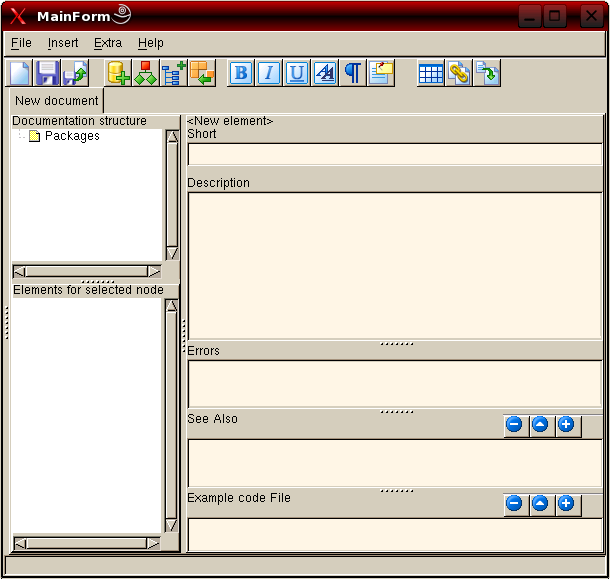 | |
| 18 | 18 | ||
| 19 | 19 | ### The Work | |
| 20 | 20 | ||
| 21 | 21 | 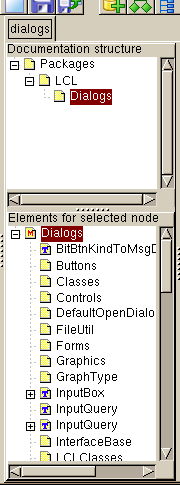 | |
| 22 | 22 | ||
| 23 | 23 | Opening the node "Packages" will show the "LCL" node which contains a "Dialogs" node. Selecting this last node will fill the lower treeview with elements. These elements depict Constants, Types and Classes defined in the Dialogs.pp unit. Used units are added as well as nodes. Other nodes are added for the properies of a class, the parameters for a function and so on. | |
| 24 | 24 | ||
| 25 | 25 | Selecting a node in the lower left treeview will make the content of that node displayed on the right side of the window. | |
| 26 | 26 | ||
| 27 | 27 | When you look at [this page](http://lazarus-ccr.sourceforge.net/docs/lcl/dialogs/index-4.html) you will see an overview of classes defined in the "dialogs" unit. After each class you see a line of text. This text comes from the "short" editbox from lazde. | |
| 28 | 28 | ||
| 29 | 29 | Below the "short" editbox, there is a memofield where you can enter a more elaborate description of the component or the property. | |
| 30 | 30 | ||
| 31 | - | ||
| 31 | + | ```text | |
| 32 | + | Note: If you want to insert a line break use | |
| 33 | + | ``` | |
| 32 | 34 | ||
| 33 | 35 | Next are "Errors", "See also" and "Example code File". | |
| 34 | 36 | ||
| 35 | 37 | "Errors" can be used to tell about errors raised by a function if parameters have values that are out of range. For an example see [this page](http://lazarus-ccr.sourceforge.net/docs/rtl/dateutils/recodeyear.html). | |
| 36 | 38 | ||
| 37 | 39 | Just above "See also" and "Example code File" you see three buttons. These buttons enable you to add and remove links to other pages or code examples respectively. | |
| 38 | 40 | ||
| 39 | 41 | ## The Outcome | |
| 40 | 42 | ||
| 41 | 43 | Have a look at the description of [InputQuery](http://lazarus-ccr.sourceforge.net/docs/lcl/dialogs/inputquery.html). On the top of the page we see what the page is about, in this case the InputQuery function form the dialogs.pp. The first line of text is what is entered in the "Short" editbox in lazde. | |
| 42 | 44 | ||
| 43 | 45 | Next is the declaration of this function in the sources. The declaration part is created by the html-builder and is taken from the sources. Because there are two versions of this function the source position says 0. | |
| 44 | 46 | ||
| 45 | 47 | Then the arguments are given. When you open the InputQuery node in lazde you will see all arguments mentioned as child nodes. The text shown after the arguments is what has been entered in the "Short" editbox when the respective child nodes are selected. | |
| 46 | 48 | ||
| 47 | 49 | As a fourth paragraph the Function result is shown. The text shown here has been entered in the same way as the arguments. | |
| 48 | 50 | ||
| 49 | 51 | Finally the description is shown. This is the text entered in the description box of lazde. | |
| 50 | 52 | ||
| 51 | 53 | ## 新しいユニットを追加する | |
| 52 | 54 | ||
| 53 | 55 | There are of course other units that need to be documented. If it is for instance a unit for some package, chances are there is no xml file to start with. You have to start from scratch then, but lazde has a function to get you off to a flying start. Just go to File -\> New and the following screen will appear: | |
| 54 | 56 | ||
| 55 | 57 | 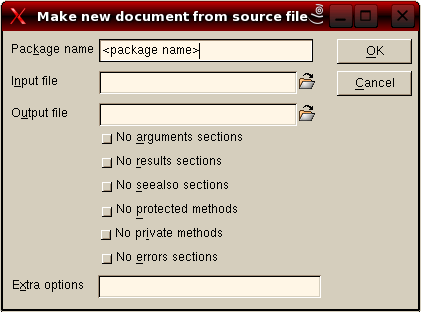 | |
| 56 | 58 | ||
| 57 | 59 | You start by giving the package a name. All units you want to add to this package should have the same package name. Afterwards you enter the source file to use; you can browse to this file as well. Then enter a name for the output file. (Do not forget the xml extension!) And press OK. | |
| 58 | 60 | ||
| 59 | 61 | lazde will then generate the basics for the documentation. The generated file will be opened and the treeview will be populated by all units, classes, types, functions and so on from your source file. Now you are ready to start documenting a new part of Lazarus. | |
| 60 | 62 | ||
| 61 | 63 | Have a look at [[LCL Documentation Roadmap]] to see which units still need to be documented. | |
| 62 | 64 | ||
| 63 | 65 | ## The Final result | |
| 64 | 66 | ||
| 65 | 67 | What I experienced during the use of the program is that I would like to see how the information is shown in its final stage (as a browsable document). For this purpose lazde makes use of a utility to build all necessary HTML-files. | |
| 66 | 68 | ||
| 67 | 69 | This utility can be started from the menu Extra -\> Build. The following screen will be shown: | |
| 68 | 70 | ||
| 69 | 71 | 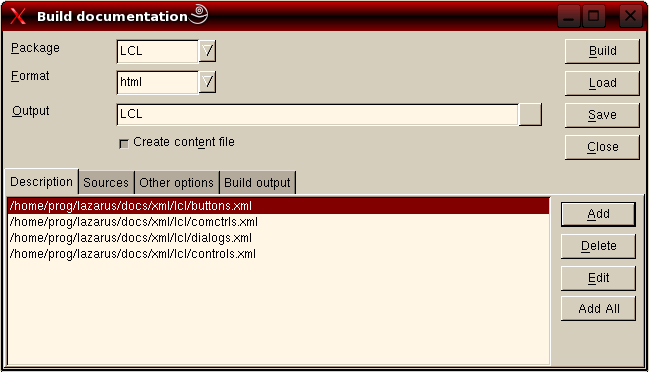 | |
| 70 | 72 | ||
| 71 | 73 | "Package" should be the same as the name you gave when you created the xml files. For "Format" choose HTML. At "Output" you enter the path where the resulting files should be placed. Press "Add all" and all documents your were working on will be added to the project. Then go to the next to tab | |
| 72 | 74 | ||
| 73 | 75 | 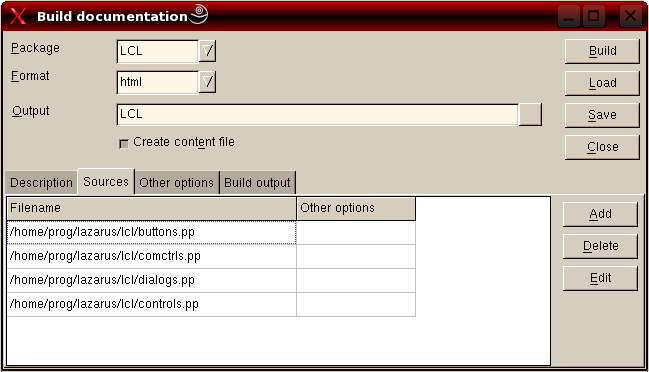 | |
| 74 | 76 | ||
| 75 | 77 | and enter the paths to the source files. After you have pressed build your HD will start to rattle and finally the following output will be shown on the "Build output" tab. | |
| 76 | 78 | ||
| 77 | - | ||
| 78 | - | ||
| 79 | - | ||
| 80 | - | ||
| 81 | - | ||
| 82 | - | ||
| 83 | - | ||
| 84 | - | ||
| 85 | - | ||
| 86 | - | ||
| 79 | + | ```text | |
| 80 | + | Building docs using command: fpdoc --package="LCL" | |
| 81 | + | --output="/home/matthijs/documentatie/LCL" --format=html --content | |
| 82 | + | --descr="/home/matthijs/Projecten/Lazarus/doceditor/buttons.xml" | |
| 83 | + | --descr="/home/matthijs/Projecten/Lazarus/doceditor/comctrls.xml" | |
| 84 | + | --descr="/home/matthijs/Projecten/Lazarus/doceditor/dialogs.xml" | |
| 85 | + | --descr="/home/matthijs/Projecten/Lazarus/doceditor/controls.xml" | |
| 86 | + | --input="/home/matthijs/cvsroot/lazarus/lcl/buttons.pp" | |
| 87 | + | --input="/home/matthijs/cvsroot/lazarus/lcl/comctrls.pp" | |
| 88 | + | --input="/home/matthijs/cvsroot/lazarus/lcl/dialogs.pp" | |
| 89 | + | --input="/home/matthijs/cvsroot/lazarus/lcl/controls.pp" | |
| 87 | 90 | ||
| 88 | - | ||
| 89 | - | ||
| 91 | + | FPDoc - Free Pascal Documentation Tool | |
| 92 | + | (c) 2000 - 2003 Areca Systems GmbH / Sebastian Guenther, sg@freepascal.org | |
| 90 | 93 | ||
| 91 | - | ||
| 92 | - | ||
| 93 | - | ||
| 94 | + | Writing 2788 pages... | |
| 95 | + | Done. | |
| 96 | + | Documentation successfully built. | |
| 97 | + | ``` | |
| 94 | 98 | ||
| 95 | 99 | When you go to the directory you entered at "Output" you will see a index.html file and (in this case 4) sub directories. Open index.html in your favorit browser and see the result of all your hard work on the documentation. You will be able to follow the links and read it all. | |
| 96 | 100 | ||
| 97 | 101 | When you plan to continue working on this package of documentation, press "Save" and save the build options. You will be asked to provide a name for the file and the options will be saved. Next time you want to build the HTML-files you can just "load" them again. | |
| 98 | 102 | ||
| 99 | 103 | ## The Submission | |
| 100 | 104 | ||
| 101 | 105 | When you are satisfied with your work you certainly want to share it with the Lazarus community. All you have to do is make a [[Creating A Patch|patch]], zip this and send it in. | |
| 102 | 106 | ||
| 103 | 107 | ## A small note | |
| 104 | 108 | ||
| 105 | 109 | Note the following: The lazde is work in progress. It is workable, but not completely finished yet. So there can be some bugs in it, but feel free to fix them. | |
| 106 | 110 | ||
| 107 | 111 | --- | |
| 108 | 112 | *From the Free Pascal wiki, page "Lazarus Documentation Editor/ja", as it stood on 2006-08-07 after a change by Tnishiki, out of the wiki's dump of 2024-05-26. Copyright stays with the author who wrote it, according to the old wiki's [[Licensing]] page. If you have concerns about this material, [message the admin](/wiki-contact).* |