

Lazarus Delphi Compiler Tool
Synopsis
The Lazarus Delphi tool allows you to compile with the Delphi compiler instead of the FPC compiler.
It defines a message parser which will allow you to click on a compiler message and be taken to the correct location in the sources. The filenames in compiler output can be converted from windows to unix notation, taking into account the Wine emulator drive configuration.
It also allows to write a configuration file based on the FPC compiler options: Whenever the project is compiled, it writes a configuration file usable for the Delphi compiler, which you can include in the compiler command. The file has the same name as the .lpi file, with adifferent extension (configurable, default .conf).
Installation
The package file components/compilers/delphi/lazdelphi.lpk needs to be installed.
Usage
The package defines 4 macros:
DCC
The delphi compiler executable path, as set in the global settings.
DCCCONFIG
If the 'Generate compiler configuration' settting is checked, this contains the generated delphi compiler configuration file, prepended with @.
If the setting is not set, the macro will be empty.
DCCARGS
The combined values of the global and project 'Extra compiler arguments' settings.
DCCCOMPILE
This is equivalent to $(DCC) $(DCCCONFIG) $(DCCARGS).
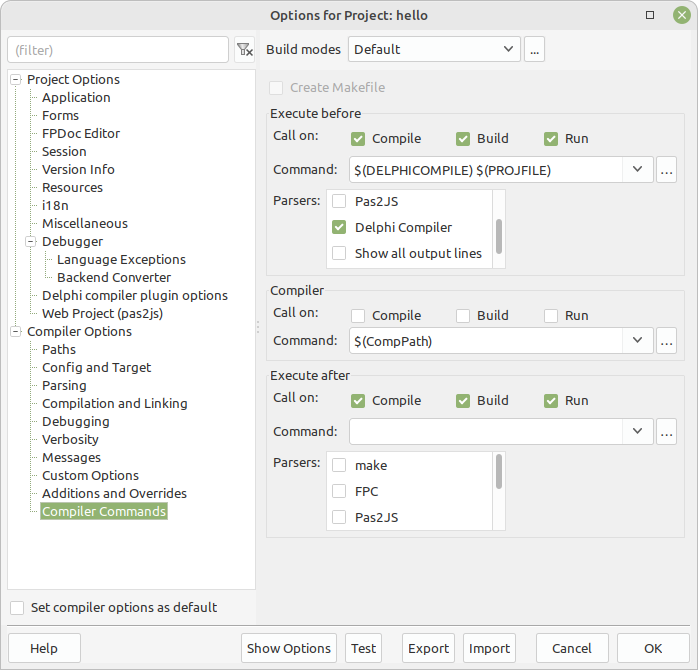
These can be used in the pre compiler command: Here you must do 3 things;
- specify the macro you wish in the Execute before command
- Select the 'Delphi compiler' parser in the Execute before command
- Disable calling the compiler
A sample is visible in the following image
Global Settings
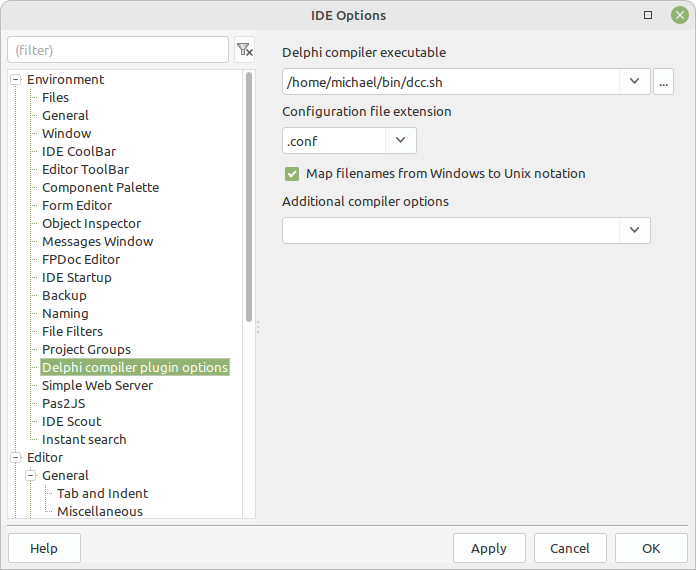
The following things can be set in the Tools -- Options menu:
- Delphi compiler executable - the path to the delphi compiler.
- Configuration file extension - the extension of the configuration file.
- Map filenames from Windows to Unit notation on unix-like options, when set, any filenames in compiler output will be converted from Windows to Unix notation.
- Additional compiler options - use this to specify delphi command-line options common to all Delphi projects, for example the location of the linker or the library path.
Project settings
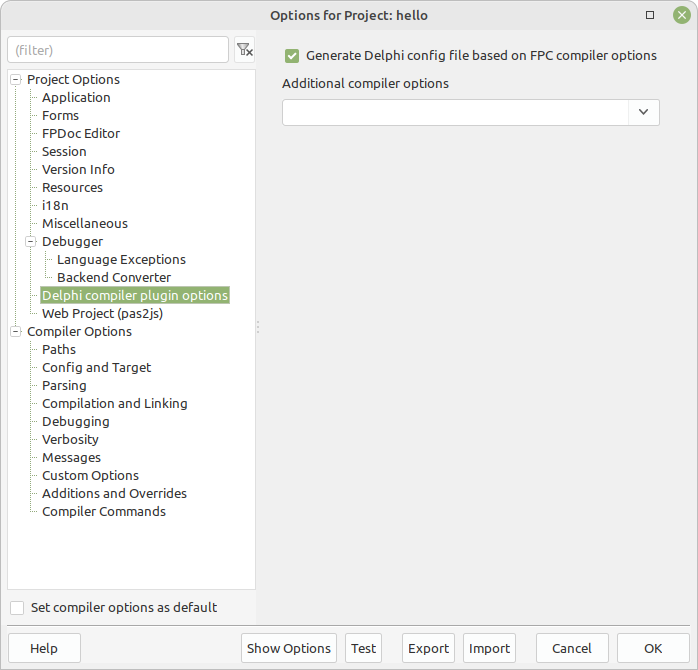
The following things can be set in the Project options menu:
- Generate Delphi config file based on FPC compiler options as the name says, when checked a configuration file will be generated for the project whenever it is compiled.
- Additional compiler options - use this to specify delphi command-line options specific to the current project.
From the Free Pascal wiki, page "Lazarus Delphi Compiler Tool", as it stood on 2023-05-15 after a change by Michael, out of the wiki's dump of 2024-05-26. Copyright stays with the author who wrote it, according to the old wiki's Licensing page. If you have concerns about this material, message the admin.
Talk about this page
Nobody has opened a bench for this page yet. Sign in to open one.