

Lazarus Database Tutorial/zh CN: what changed
Revision 2 to 3. Removed lines have a minus sign; added lines have a plus sign.
| Old | New | Line | |
|---|---|---|---|
| 1 | 1 | ## 概述 | |
| 2 | 2 | ||
| 3 | 3 | 本教程是讲述在Lazarus 下如何为流行的多种数据库开发应用程序。 | |
| 4 | 4 | ||
| 5 | 5 | Lazarus 支持多种数据库的‘开箱即用’,当然,开发者必须预先安装要使用的数据库系统。访问数据库,要么通过编写代码实现,要么通过可视化的拖拉控件到窗体来实现。数据感知(data-aware)控件将DataSource 属性指向TDataSource 控件,就能显示数据库字段内容. Datasource 控件将DataSets 属性连接到 database类组件(例如:TPSQLDatabase,TSQLiteDataSet),就能显示表的内容. 数据感知组件位于“数据控制(Data Control)”标签页。数据源(Datasource)和数据库控件位于“数据操作(Data Access)”标签。 | |
| 6 | 6 | ||
| 7 | 7 | ## Lazarus 和 MySQL | |
| 8 | 8 | ||
| 9 | 9 | ### 在Lin或Win下使MySQL工作 | |
| 10 | 10 | ||
| 11 | 11 | 跟随小麦用户手册的介绍,确认小麦的守护进程(服务)运行可靠,并且所有潜在用户(包括:root、mysql、你自己还有任何需要的人)拥有他们需要的权限,来自多个主机或许(包括‘localhost’,本地主机名,任何其他主机在你的网络上)足够安全。最好包括root在内的所有账户都有密码。用手册中的例子测试数据库系统的动作,并且检查所有用户真的能够可靠存取。 | |
| 12 | 12 | ||
| 13 | 13 | ### 从FPC文本模式连接MySQL | |
| 14 | 14 | ||
| 15 | 15 | (Get MySQL working for FPC in text mode) | |
| 16 | 16 | ||
| 17 | 17 | (译注:略,请参见英文页面) See [[Lazarus Database Tutorial/SampleListing|Sample Console Listing]]. | |
| 18 | 18 | ||
| 19 | 19 | ### 从Lazarus程序连接到MySQL | |
| 20 | 20 | ||
| 21 | 21 | 该教程显示如何连接辣子到小麦数据库,并且执行一个简单的查询,仅使用基本的辣子组件;这里没有用到数据感知组件,但能更好得阐述连接数据库接口的原理。 | |
| 22 | 22 | ||
| 23 | 23 | #### 界面部分 | |
| 24 | 24 | ||
| 25 | 25 | 在辣子中创建一个新项目: | |
| 26 | 26 | ||
| 27 | - | ||
| 27 | + | ```text | |
| 28 | + | Project -> New Project -> Application | |
| 29 | + | ``` | |
| 28 | 30 | ||
| 29 | 31 | 将出现一个自动生成的窗体。缩放窗体至半个屏幕大小,然后重命名窗体的标题为‘TryMySQL’(译注:随便起个名字,和下面一致就行)。 | |
| 30 | 32 | ||
| 31 | 33 | 程序界面截图: | |
| 32 | 34 | ||
| 33 | 35 | 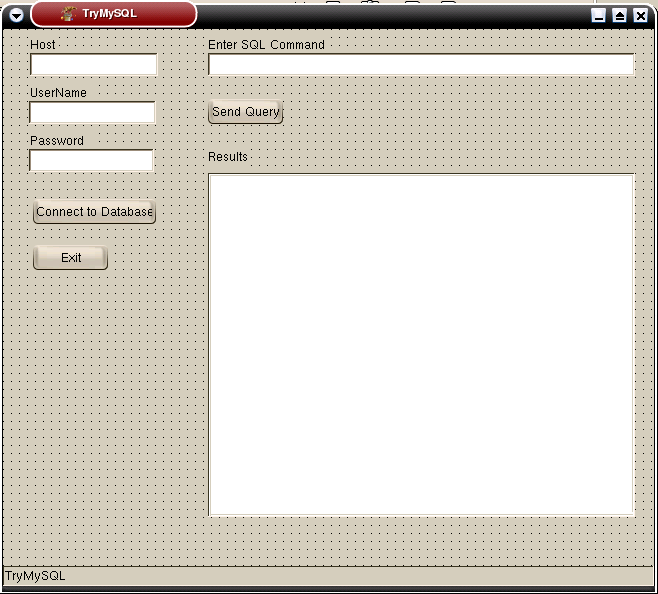 | |
| 34 | 36 | ||
| 35 | 37 | 程序界面设计过程如下: | |
| 36 | 38 | ||
| 37 | 39 | 自标准组件标签页拖放三个编辑框(Edit Boxes)到表单的左上侧,然后马上给上面每个box一个标签(Label)。改变名字(name)和标题(caption)为‘Host’(还有HostLLabel,HostEdit),‘UserName’(还有UserLabel,UserEdit),‘Password’(在Passwdlabel和PasswdEdit,似乎是具体组件的属性值)。或者你还可以从额外的标签(Additional tab)中使用LabelledEdit组件。 | |
| 38 | 40 | ||
| 39 | 41 | 选择Passwd Edit按钮,并且找到 PasswordChar 属性:改变它为 * 符号或者类似的字符,这样,当你键入密码时,字符就不会显示在你的屏幕上,而是反映一系列的星号(x)。确认每一个编辑框的Text属性是空的。 | |
| 40 | 42 | ||
| 41 | 43 | 现在,放置另一个 Edit 盒子,并且label at 在你表单的右上角。改变标签为‘输入SQL命令吧’(Enter SQL Command),然后命名它为CommandEdit。 | |
| 42 | 44 | ||
| 43 | 45 | 放置三个按钮在表单上:两个在编辑框的左下脚,一个在右侧,命令行的下方。 | |
| 44 | 46 | ||
| 45 | 47 | 设置左侧的按钮为‘Connect to Database连接数据库’(ConnnectButton)和‘Exit退出’(ExitButton),右侧的按钮为‘Send Query递交查询’(QueryButton)。 | |
| 46 | 48 | ||
| 47 | 49 | 放置一个大的 备注框(Memo Box)标记命名为‘Results结果’(ResultMemo),在右下脚,填充所有空白位置。找到 ScrollBars(滚动条)属性,并且选择 ssAutoBoth (双向自动)以保证滚动条自动出现,当文本充满空间时。使 WordWrap(分词)属性为真。 (译注:说了这么多,不如先来一张图) | |
| 48 | 50 | ||
| 49 | 51 | 放置一个Status Bar(状态条,从 Common Controls tab通用控制标签)到表单底部,命它的 SimpleText 属性为‘TryMySQL’(这个名字前面出现过)。 | |
| 50 | 52 | ||
| 51 | 53 | #### 代码部分 | |
| 52 | 54 | ||
| 53 | 55 | 现在,我们需要写一些事件处理。 | |
| 54 | 56 | ||
| 55 | 57 | 左侧三个编辑框需要输入主机、用户名和密码。当这些被满意得输入后,点击连接按钮。该按钮的OnCLick 事件程序(event handler)是基于上文中 FPC文本模式中的一部分。(译注:略掉了,还要吗?) | |
| 56 | 58 | ||
| 57 | 59 | The responses from the database cannot now be written using the Pascal write or writeln statements: rather, the replies have to be converted into strings and displayed in the Memo box. Whereas the Pascal write and writeln statements are capable of performing a lot of type conversion 'on the fly', the use of a memo box for text output necessitates the explicit conversion of data types to the correct form of string, so Pchar variables have to be converted to strings using StrPas, and integers have to be converted with IntToStr. 来自数据库的响应现在还不能写,用Pascal写,或者写成(writeln)报表(statements):因为(rather),结果必须被转换为字串并显示在Memo框内。但是Pascal写和writeln语句是……大量类型转换‘,用memo况来显示文本需要详细地转换数据类型,正确的表单字串,所以,Pchar变量必须转换为字串,用 StrPas,整数用IntToStr转换。 | |
| 58 | 60 | ||
| 59 | 61 | 在Memo框中显示字符串需要: | |
| 60 | 62 | ||
| 61 | - | ||
| 62 | - | ||
| 63 | - | ||
| 64 | - | ||
| 65 | - | ||
| 63 | + | ``` pascal | |
| 64 | + | procedure ShowString (S : string); | |
| 65 | + | (* display a string in a Memo box *) | |
| 66 | + | begin | |
| 67 | + | trymysqlForm1.ResultsMemo.Lines.Add (S) | |
| 68 | + | end; | |
| 69 | + | ``` | |
| 66 | 70 | ||
| 67 | 71 | 连接按钮的事件程序于是就成为这样: | |
| 68 | 72 | ||
| 69 | - | ||
| 70 | - | ||
| 71 | - | ||
| 72 | - | ||
| 73 | - | ||
| 74 | - | ||
| 75 | - | ||
| 76 | - | ||
| 77 | - | ||
| 78 | - | ||
| 79 | - | ||
| 80 | - | ||
| 81 | - | ||
| 82 | - | ||
| 83 | - | ||
| 84 | - | ||
| 85 | - | ||
| 86 | - | ||
| 87 | - | ||
| 88 | - | ||
| 89 | - | ||
| 90 | - | ||
| 91 | - | ||
| 92 | - | ||
| 93 | - | ||
| 94 | - | ||
| 95 | - | ||
| 96 | - | ||
| 97 | - | ||
| 98 | - | ||
| 99 | - | ||
| 100 | - | ||
| 101 | - | ||
| 102 | - | ||
| 103 | - | ||
| 104 | - | ||
| 105 | - | ||
| 106 | - | ||
| 73 | + | ``` pascal | |
| 74 | + | procedure TtrymysqlForm1.ConnectButtonClick(Sender: TObject); | |
| 75 | + | (* Connect to MySQL using user data from Text entry boxes on Main Form *) | |
| 76 | + | var strg: string; | |
| 77 | + | begin | |
| 78 | + | dummy1 := trymysqlForm1.HostEdit.text+#0; | |
| 79 | + | host := @dummy1[1]; | |
| 80 | + | dummy2 := trymysqlForm1.UserEdit.text+#0; | |
| 81 | + | user := @dummy2[1] ; | |
| 82 | + | dummy3 := trymysqlForm1.PasswdEdit.text+#0; | |
| 83 | + | passwd := @dummy3[1] ; | |
| 84 | + | alloc := mysql_init(PMYSQL(@qmysql)); | |
| 85 | + | sock := mysql_real_connect(alloc, host, user, passwd, database, 0, nil, 0); | |
| 86 | + | if sock=Nil then | |
| 87 | + | begin | |
| 88 | + | strg :='Couldn''t connect to MySQL.'; showstring (strg); | |
| 89 | + | Strg :='Error was: '+ StrPas(mysql_error(@qmysql)); showstring (strg); | |
| 90 | + | end | |
| 91 | + | else | |
| 92 | + | begin | |
| 93 | + | trymysqlForm1.statusBar1.simpletext := 'Connected to MySQL'; | |
| 94 | + | strg := 'Now choosing database : ' + database; showstring (strg); | |
| 95 | + | {$ifdef Unix} | |
| 96 | + | strg :='Mysql_port : '+ IntToStr(mysql_port); showstring (strg); | |
| 97 | + | strg :='Mysql_unix_port : ' + StrPas(mysql_unix_port); showstring (strg); | |
| 98 | + | {$endif} | |
| 99 | + | Strg :='Host info : ' + StrPas(mysql_get_host_info(sock)); | |
| 100 | + | showstring (strg); | |
| 101 | + | Strg :='Server info : ' + StrPas(mysql_stat(sock)); showstring (strg); | |
| 102 | + | Strg :='Client info : ' + Strpas(mysql_get_client_info); showstring (strg); | |
| 103 | + | ||
| 104 | + | trymysqlForm1.statusbar1.simpletext := 'Selecting Database ' + DataBase +'...'; | |
| 105 | + | if mysql_select_db(sock,DataBase) < 0 then | |
| 106 | + | begin | |
| 107 | + | strg :='Couldn''t select database '+ Database; ShowString (strg); | |
| 108 | + | Strg := mysql_error(sock); ShowString (strg); | |
| 109 | + | end | |
| 110 | + | end; | |
| 111 | + | end; | |
| 112 | + | ``` | |
| 107 | 113 | ||
| 108 | 114 | 右侧的文本框接下来输入一个SQL语句,末尾没有分号;当你对内容和语法满意时,按下SendQuery按钮,查询开始,结果将会写在ResultsMemo(结果)框内。 | |
| 109 | 115 | ||
| 110 | 116 | The SendQuery event handler is again based on the FPC text-mode version, except that once again explicit type-conversion has to be done before strings are displayed in the box. | |
| 111 | 117 | ||
| 112 | 118 | A difference from the text-mode FPC program is that if an error condition is detected, the program does not halt and MySQL is not closed; instead, control is returned to the main form and an opportunity is given to correct the entry before the command is re-submitted. The application finally exits (with closure of MySQL) when the Exit Button is clicked. | |
| 113 | 119 | ||
| 114 | 120 | 发送查询(SendQuery)的代码如下: | |
| 115 | 121 | ||
| 116 | - | ||
| 117 | - | ||
| 118 | - | ||
| 119 | - | ||
| 120 | - | ||
| 121 | - | ||
| 122 | - | ||
| 123 | - | ||
| 124 | - | ||
| 125 | - | ||
| 126 | - | ||
| 127 | - | ||
| 128 | - | ||
| 129 | - | ||
| 130 | - | ||
| 131 | - | ||
| 132 | - | ||
| 133 | - | ||
| 134 | - | ||
| 135 | - | ||
| 136 | - | ||
| 137 | - | ||
| 138 | - | ||
| 139 | - | ||
| 140 | - | ||
| 141 | - | ||
| 142 | - | ||
| 143 | - | ||
| 144 | - | ||
| 145 | - | ||
| 146 | - | ||
| 147 | - | ||
| 148 | - | ||
| 149 | - | ||
| 150 | - | ||
| 151 | - | ||
| 152 | - | ||
| 122 | + | ``` pascal | |
| 123 | + | procedure TtrymysqlForm1.QueryButtonClick(Sender: TObject); | |
| 124 | + | var | |
| 125 | + | dumquery, strg: string; | |
| 126 | + | begin | |
| 127 | + | dumquery := TrymysqlForm1.CommandEdit.text; | |
| 128 | + | dumquery := dumquery+#0; | |
| 129 | + | query := @dumquery[1]; | |
| 130 | + | trymysqlForm1.statusbar1.simpletext := 'Executing query : '+ dumQuery +'...'; | |
| 131 | + | strg := 'Executing query : ' + dumQuery; showstring (strg); | |
| 132 | + | if (mysql_query(sock,Query) < 0) then | |
| 133 | + | begin | |
| 134 | + | Strg :='Query failed '+ StrPas(mysql_error(sock)); showstring (strg); | |
| 135 | + | end | |
| 136 | + | else | |
| 137 | + | begin | |
| 138 | + | recbuf := mysql_store_result(sock); | |
| 139 | + | if RecBuf=Nil then | |
| 140 | + | begin | |
| 141 | + | Strg :='Query returned nil result.'; showstring (strg); | |
| 142 | + | end | |
| 143 | + | else | |
| 144 | + | begin | |
| 145 | + | strg :='Number of records returned : ' + IntToStr(mysql_num_rows (recbuf)); | |
| 146 | + | Showstring (strg); | |
| 147 | + | Strg :='Number of fields per record : ' + IntToStr(mysql_num_fields(recbuf)); | |
| 148 | + | showstring (strg); | |
| 149 | + | rowbuf := mysql_fetch_row(recbuf); | |
| 150 | + | while (rowbuf <>nil) do | |
| 151 | + | begin | |
| 152 | + | Strg :='(Id: '+ rowbuf[0]+', Name: ' + rowbuf[1]+ ', Email : ' + | |
| 153 | + | rowbuf[2] +')'; | |
| 154 | + | showstring (strg); | |
| 155 | + | rowbuf := mysql_fetch_row(recbuf); | |
| 156 | + | end; | |
| 157 | + | end; | |
| 158 | + | end; | |
| 159 | + | end; | |
| 160 | + | ``` | |
| 153 | 161 | ||
| 154 | 162 | 保存你的项目(Project),并且执行:运行-》运行。 | |
| 155 | 163 | ||
| 156 | 164 | - 下载 MYSQL 示例源代码 | |
| 157 | 165 | ||
| 158 | 166 | 一份完整的程序清单可以从这里获得: [Sample Source Code](http://lazarus-ccr.sourceforge.net/kbdata/mysqldemo.tar.gz) | |
| 159 | 167 | ||
| 160 | 168 | ### 使用TMySQL50Connection控件连接 | |
| 161 | 169 | ||
| 162 | 170 | 英文版写的过多,不会翻译,自己写了个代码,不过英文版写的很详细,有兴趣或者会翻译的可以重新编辑一下本段。 | |
| 163 | 171 | ||
| 164 | 172 | 各个控件的连接方式: | |
| 165 | 173 | ||
| 166 | 174 | 一、TMySQL50Connection; | |
| 167 | 175 | ||
| 168 | 176 | 二、TSQLTransaction并且Database属性为TMySQL50Connection; | |
| 169 | 177 | ||
| 170 | 178 | 三、TSQLQuery且Database属性为TMySQL50Connection、Transaction属性为TSQLTransaction; | |
| 171 | 179 | ||
| 172 | 180 | 四、TDatasource的DataSet属性TSQLQuery; | |
| 173 | 181 | ||
| 174 | 182 | 五、TDBGrid的Datasource属性为TDatasource | |
| 175 | 183 | ||
| 176 | 184 | procedure TfrmMain.btnMYSQLClick(Sender: TObject); | |
| 177 | 185 | begin | |
| 178 | 186 | try | |
| 179 | 187 | //conn_mysql5是TMySQL50Connection | |
| 180 | 188 | conn_mysql5.HostName := '127.0.0.1';//主机 | |
| 181 | 189 | conn_mysql5.UserName := 'root';//登录名 | |
| 182 | 190 | conn_mysql5.Password := '123';//密码 | |
| 183 | 191 | conn_mysql5.CharSet := 'utf8';//如果在MYSQL中建表设置了UTF8,此处也设置,中文显示是正常的 | |
| 184 | 192 | conn_mysql5.DatabaseName := 'test'; //MYSQL的数据库 | |
| 185 | 193 | conn_mysql5.Open; | |
| 186 | 194 | except | |
| 187 | 195 | on E: Exception do | |
| 188 | 196 | begin | |
| 189 | 197 | ShowMessage('连接出错:' + E.Message); | |
| 190 | 198 | Exit; | |
| 191 | 199 | end; | |
| 192 | 200 | end; | |
| 193 | 201 | //打开一个表 | |
| 194 | 202 | SQLQuery1.Close; | |
| 195 | 203 | SQLQuery1.SQL.Text := 'select * from t1'; | |
| 196 | 204 | try | |
| 197 | 205 | SQLQuery1.Open; | |
| 198 | 206 | except | |
| 199 | 207 | on E: Exception do | |
| 200 | 208 | begin | |
| 201 | 209 | ShowMessage('打开表出错:' + E.Message); | |
| 202 | 210 | Exit; | |
| 203 | 211 | end; | |
| 204 | 212 | end; | |
| 205 | 213 | end; | |
| 206 | 214 | ||
| 207 | 215 | ## Lazarus 和 PostgreSQL | |
| 208 | 216 | ||
| 209 | 217 | 这是一个很简短的教程,针对Lazarus 0.9.12及以后版本,连接到PostgreSQL数据库,本地或远程,使用TPQConnection组件。 | |
| 210 | 218 | ||
| 211 | 219 | After correct install, follow these steps: | |
| 212 | 220 | ||
| 213 | 221 | - Place a PQConnection from the SQLdb tab | |
| 214 | 222 | - Place a SQLQuery from the SQLdb tab | |
| 215 | 223 | - Place a SQLTransaction from the SQLdb tab | |
| 216 | 224 | - Place a DataSource from the DataAccess tab | |
| 217 | 225 | - Place a DBGrid from the DataControls tab | |
| 218 | 226 | ||
| 219 | 227 | - In the PQConnection fill in: | |
| 220 | 228 | - transaction property with the respective SQLTransaction object | |
| 221 | 229 | - Database name | |
| 222 | 230 | - HostName | |
| 223 | 231 | - UserName + password | |
| 224 | 232 | ||
| 225 | 233 | - Check that the SQLTransaction was automatically changed to point to the PQConnection | |
| 226 | 234 | ||
| 227 | 235 | - In the SQLQuery fill in: | |
| 228 | 236 | - transaction property with the respective object | |
| 229 | 237 | - database property with respective object | |
| 230 | 238 | - SQL (something like 'select * from anytable') | |
| 231 | 239 | ||
| 232 | 240 | - In the DataSource object fill in the DataSet property with the SQLQuery object | |
| 233 | 241 | ||
| 234 | 242 | - In the DBGrid fill in the datasource as the DataSource Object | |
| 235 | 243 | ||
| 236 | 244 | Turn everything to connected and active and the DBGrid should be filled in design time. TDBText and TDBEdit seem to work but (for me) they only _show_ _data_. | |
| 237 | 245 | ||
| 238 | 246 | To change contents in the database, I called the DB Engine direct with the following code: | |
| 239 | 247 | ||
| 240 | - | ||
| 241 | - | ||
| 242 | - | ||
| 243 | - | ||
| 244 | - | ||
| 245 | - | ||
| 246 | - | ||
| 247 | - | ||
| 248 | - | ||
| 249 | - | ||
| 250 | - | ||
| 251 | - | ||
| 252 | - | ||
| 248 | + | ``` pascal | |
| 249 | + | try | |
| 250 | + | sql:= 'UPDATE table SET setting=1'; | |
| 251 | + | PQDataBase.Connected:=True; | |
| 252 | + | PQDataBase.ExecuteDirect('Begin Work;'); | |
| 253 | + | PQDataBase.ExecuteDirect(sql); | |
| 254 | + | PQDataBase.ExecuteDirect('Commit Work;'); | |
| 255 | + | PQDataBase.Connected:=False; | |
| 256 | + | except | |
| 257 | + | on E : EDatabaseError do | |
| 258 | + | MemoLog.Append('DB ERROR:'+sql+chr(13)+chr(10)+E.ClassName+chr(13)+chr(10)+E.Message); | |
| 259 | + | on E : Exception do | |
| 260 | + | MemoLog.Append('ERROR:'+sql+chr(13)+chr(10)+E.ClassName+chr(13)+chr(10)+E.Message); | |
| 261 | + | end; | |
| 262 | + | ``` | |
| 253 | 263 | ||
| 254 | 264 | - 备注: | |
| 255 | 265 | - Tested on windows, Lazarus 0.9.12 + PgSQL 8.3.1 | |
| 256 | 266 | - Some tests in linux, Lazarus 0.9.12 and PgSQL 8.0.x | |
| 257 | 267 | ||
| 258 | 268 | - Instalation and errors: | |
| 259 | 269 | - In the tested version of Lazarus .12, fields of type "text" and "numeric" have bugs | |
| 260 | 270 | - I used with no problems char fixed size, int and float8 | |
| 261 | 271 | - Sometimes restarting Lazarus solves stupid errors... | |
| 262 | 272 | - After some errors, the transactions remain active and should be deactivated mannually | |
| 263 | 273 | - Changes made in Lazarus are of course not visible until transaction commited | |
| 264 | 274 | - The integrated debugger seems buggy (at least in windows) - sometimes running outside of the IDE may help to find errors | |
| 265 | 275 | - In linux certain error messages are printed in the console -- run your program in the command line, sometimes there is some extra useful debugging info | |
| 266 | 276 | - Error: "Can not load Postgresql client. Is it installed (libpq.so) ?" | |
| 267 | 277 | - Add the path to seach libpq* from the PostgreSQL installation. | |
| 268 | 278 | - In linux add the path to the libpq.so file to the libraries section in your /etc/fpc.cfg file. For example : -Fl/usr/local/pgsql/lib | |
| 269 | 279 | - In windows, add these libs anywhere in the Path environment variable or project dir | |
| 270 | 280 | - I windows, I copied all the DLLs in my C:\Program Files\PostgreSQL\8.1\bin dir to another dir in the PATH | |
| 271 | 281 | - Or add this postgres\bin dir to the path | |
| 272 | 282 | ||
| 273 | 283 | ## Lazarus and SQLite | |
| 274 | 284 | ||
| 275 | 285 | by Luiz Américo | |
| 276 | 286 | ||
| 277 | 287 | Visit the [sqlite4fpc homepage](http://www.geocities.com/camara_luiz/) to find the API reference and more tutorials. | |
| 278 | 288 | ||
| 279 | 289 | ### Introduction | |
| 280 | 290 | ||
| 281 | 291 | TSqliteDataset and TSqlite3Dataset are TDataset descendants that access, respectively, 2.8.x and 3.x.x sqlite databases. Below is a list of the principal advantages and disadvantages: | |
| 282 | 292 | ||
| 283 | 293 | Advantages: | |
| 284 | 294 | ||
| 285 | 295 | - Flexible: programmers can choose to use or not to use the SQL language, allowing them to work with simple table layouts or any complex layout that SQL/sqlite allows | |
| 286 | 296 | - Automatic database update: no need to update the database manually with SQL statements, a single method take cares of it | |
| 287 | 297 | - Fast: it caches the data in memory, making browsing in the dataset fast | |
| 288 | 298 | - No server installation/configuration: just ship together with sqlite dynamic library | |
| 289 | 299 | ||
| 290 | 300 | Disadvantages | |
| 291 | 301 | ||
| 292 | 302 | - Requires external file (sqlite library) | |
| 293 | 303 | ||
| 294 | 304 | ### Requirements | |
| 295 | 305 | ||
| 296 | 306 | - For sqlite2 databases: | |
| 297 | 307 | - fpc 2.0.0 | |
| 298 | 308 | - Lazarus 0.9.10 | |
| 299 | 309 | - sqlite runtime library 2.8.15 or above (get from www.sqlite.org) | |
| 300 | 310 | ||
| 301 | 311 | - For sqlite3 databases: | |
| 302 | 312 | - fpc 2.0.2 | |
| 303 | 313 | - Lazarus 0.9.11 (svn revision 8443 or above) | |
| 304 | 314 | - sqlite runtime library 3.2.1 or above (get from www.sqlite.org) | |
| 305 | 315 | ||
| 306 | 316 | **Before initiating a lazarus projects, ensure that:** | |
| 307 | 317 | ||
| 308 | 318 | - the sqlite library is on the system PATH or in the executable directory | |
| 309 | 319 | - under Linux, put cmem as the first unit in uses clause of the main program | |
| 310 | 320 | ||
| 311 | 321 | ### How To Use (Basic Usage) | |
| 312 | 322 | ||
| 313 | 323 | Install the package found at /components/sqlite directory (see instructions [[Install Packages|here]]) | |
| 314 | 324 | ||
| 315 | 325 | At design time set the following properties: | |
| 316 | 326 | ||
| 317 | 327 | - FileName: path of the sqlite file \[required\] | |
| 318 | 328 | - TableName: name of the table used in the sql statement \[required\] | |
| 319 | 329 | - Sql: a SQL select statement \[optional\] | |
| 320 | 330 | ||
| 321 | 331 | **Creating a Table (Dataset)** | |
| 322 | 332 | ||
| 323 | 333 | Double click in the component icon or use the 'Create Table' item of the popup menu that appears when clicking the right mouse button. A simple self-explaining table editor will be show. | |
| 324 | 334 | ||
| 325 | - | ||
| 326 | - | ||
| 327 | - | ||
| 328 | - | ||
| 329 | - | ||
| 330 | - | ||
| 331 | - | ||
| 332 | - | ||
| 333 | - | ||
| 334 | - | ||
| 335 | - | ||
| 336 | - | ||
| 337 | - | ||
| 338 | - | ||
| 339 | - | ||
| 335 | + | ```text | |
| 336 | + | Here is all field types supported by TSqliteDataset and TSqlite3Dataset: | |
| 337 | + | ||
| 338 | + | Integer | |
| 339 | + | AutoInc | |
| 340 | + | String | |
| 341 | + | Memo | |
| 342 | + | Bool | |
| 343 | + | Float | |
| 344 | + | Word | |
| 345 | + | DateTime | |
| 346 | + | Date | |
| 347 | + | Time | |
| 348 | + | LargeInt | |
| 349 | + | Currency | |
| 350 | + | ``` | |
| 340 | 351 | ||
| 341 | 352 | **Retrieving the data** | |
| 342 | 353 | ||
| 343 | 354 | After creating the table or with a previously created Table, open the dataset with Open method. If the SQL property was not set then all records from all fields will be retrieved, the same if you set the SQL to: | |
| 344 | 355 | ||
| 345 | - | ||
| 356 | + | ``` pascal | |
| 357 | + | SQL:='Select * from TABLENAME'; | |
| 358 | + | ``` | |
| 346 | 359 | ||
| 347 | 360 | **Applying changes to the underlying datafile** | |
| 348 | 361 | ||
| 349 | 362 | To use the ApplyUpdates function, the dataset must contain at least one field that fills the requirements for a Primary Key (values must be UNIQUE and not NULL) | |
| 350 | 363 | ||
| 351 | 364 | It's possible to do that in two ways: | |
| 352 | 365 | ||
| 353 | 366 | - Set PrimaryKey property to the name of a Primary Key field | |
| 354 | 367 | - Add an AutoInc field (This is easier since the TSqliteDataSet automatically handles it as a Primary Key) | |
| 355 | 368 | ||
| 356 | 369 | If one of the two conditions is set then just call | |
| 357 | 370 | ||
| 358 | - | ||
| 371 | + | ```text | |
| 372 | + | ApplyUpdates; | |
| 373 | + | ``` | |
| 359 | 374 | ||
| 360 | 375 | PS1: If both conditions are set, the field corresponding to PrimaryKey is used to apply the updates. | |
| 361 | 376 | ||
| 362 | 377 | PS2: Setting PrimaryKey to a field that is not a Primary Key will lead to loss of data if ApplyUpdates is called, so ensure that the chosen field contains not Null and Unique values before using it. | |
| 363 | 378 | ||
| 364 | 379 | ### Remarks | |
| 365 | 380 | ||
| 366 | 381 | - Although it has been tested with 10000 records and worked fine, TSqliteDataset keeps all the data in memory, so remember to retrieve only the necessary data (principally with Memo Fields). | |
| 367 | 382 | - The same datafile (Filename property) can host several tables/datasets | |
| 368 | 383 | - Several datasets (different combinations of fields) can be created using the same table simultaneously | |
| 369 | 384 | - It's possible to filter the data using WHERE statements in the sql, closing and reopening the dataset (or calling RefetchData method). But in this case, the order and number of fields must remain the same | |
| 370 | 385 | - It's also possible to use complex SQL statements using aliases, joins, views in multiple tables (remember that they must reside in the same datafile), but in this case ApplyUpdates won't work. If someone wants to use complex queries and to apply the updates to the datafile, mail me and I will give some hints how to do that | |
| 371 | 386 | - Setting filename to a sqlite2.x datafile not created by TSqliteDataset and opening it is allowed but some fields won't have the correct field type detected. These will be treated as string fields. | |
| 372 | 387 | ||
| 373 | 388 | Generic examples can be found at fpc/fcl/db/sqlite CVS directory | |
| 374 | 389 | ||
| 375 | 390 | Luiz Américo pascalive(at)bol(dot)com(dot)br | |
| 376 | 391 | ||
| 377 | 392 | ## Lazarus and MSSQL | |
| 378 | 393 | ||
| 379 | 394 | It is working with Zeoslib (latest cvs), see the links on bottom of page. | |
| 380 | 395 | ||
| 381 | 396 | ## Lazarus and Interbase / Firebird | |
| 382 | 397 | ||
| 383 | 398 | See [[Install Packages]]. On this page is a first small example en explanation about how to connect to an IB or FB server. | |
| 384 | 399 | ||
| 385 | 400 | Also work with the latest Zeoslib (from cvs). | |
| 386 | 401 | ||
| 387 | 402 | ### FBLib Firebird Library | |
| 388 | 403 | ||
| 389 | 404 | [1](http://fblib.altervista.org/%7CFBLib) is an open Source Library No Data Aware for direct access to Firebird Relational Database from Borland Delphi / Kylix, Freepascal and Lazarus. | |
| 390 | 405 | ||
| 391 | 406 | Current Features include: | |
| 392 | 407 | ||
| 393 | 408 | - Direct Access to Firebird 1.0.x 1.5.x Classic or SuperServer | |
| 394 | 409 | - Multiplatform \[Win32,Gnu/Linux,FreeBSD) | |
| 395 | 410 | - Automatic select client library 'fbclient' or 'gds32' | |
| 396 | 411 | - Query with params | |
| 397 | 412 | - Support SQL Dialect 1/3 | |
| 398 | 413 | - LGPL License agreement | |
| 399 | 414 | - Extract Metadata | |
| 400 | 415 | - Simple Script Parser | |
| 401 | 416 | - Only 100-150 KB added into final EXE | |
| 402 | 417 | - Support BLOB Fields | |
| 403 | 418 | - Export Data to HTML SQL Script | |
| 404 | 419 | - Service manager (backup,restore,gfix...) | |
| 405 | 420 | - Events Alerter | |
| 406 | 421 | ||
| 407 | 422 | You can download documentation on [FBLib's website](http://fblib.altervista.org/). | |
| 408 | 423 | ||
| 409 | 424 | ## Lazarus 和 dBase | |
| 410 | 425 | ||
| 411 | 426 | Tony Maro: You might also want to visit the beginnings of the [[Lazarus Tdbf Tutorial|TDbf Tutorial page]] (译注:略,建议另开新页) | |
| 412 | 427 | ||
| 413 | 428 | ## Related Links | |
| 414 | 429 | ||
| 415 | 430 | - [[Databases|Creating Databases Applications with Lazarus using the DB-unit]]\ | |
| 416 | 431 | - [[MySQLDatabases|Creating a database application using MySQL]]\ | |
| 417 | 432 | - [[Zeos tutorial|Creating a database application using the Zeos components]] | |
| 418 | 433 | - [Pascal Data Objects](http://pdo.sourceforge.net) is a database API that worked for both FPC and Delphi and utilises native MySQL libraries for version 4.1 and 5.0 and Firebird SQL 1.5, and 2.0. It's inspired by PHP's PDO class. | |
| 419 | 434 | ||
| 420 | 435 | ## Contributors and Changes | |
| 421 | 436 | ||
| 422 | 437 | This page has been converted from the epikwiki [version](http://lazarus-ccr.sourceforge.net/index.php?wiki=LazarusDatabase). | |
| 423 | 438 | ||
| 424 | 439 | --- | |
| 425 | 440 | *From the Free Pascal wiki, page "Lazarus Database Tutorial/zh CN", as it stood on 2011-10-03 after a change by Lioncn, out of the wiki's dump of 2024-05-26. Copyright stays with the author who wrote it, according to the old wiki's [[Licensing]] page. If you have concerns about this material, [message the admin](/wiki-contact).* | |
| 426 | 441 | Category: zh |