

Lazarus Custom Drawn Controls: what changed
Revision 1 to 2. Removed lines have a minus sign; added lines have a plus sign.
| Old | New | Line | |
|---|---|---|---|
| 1 | 1 | The **Lazarus Custom Drawn Controls** are a set of controls equivalent to the standard Lazarus controls, but which draw themselves. They can have many uses, including the ability to fully customize the drawing, the ability to have exactly the same look in different platforms and also a higher consistency of behavior. | |
| 2 | 2 | ||
| 3 | 3 | This set of controls is divided into two parts: | |
| 4 | 4 | ||
| 5 | 5 | - the custom drawn controls which are necessary for implementing Lazarus widgetsets and are located in the unit lazarus/lcl/customdrawncontrols.pas. These are described here. | |
| 6 | 6 | - all other custom drawn controls, which are used often, but aren't indispensable to implement a LCL custom drawn widgetset. Those are located in the package lazarus/components/customdrawn. These are described in the page [[Lazarus Custom Drawn Package]] | |
| 7 | 7 | ||
| 8 | 8 | ## How start using these components? | |
| 9 | 9 | ||
| 10 | 10 | To be able to use them in the Lazarus GUI designer install the package lazarus/components/customdrawn.lpk | |
| 11 | 11 | ||
| 12 | 12 | To only create customdrawn components by code one can simply add customdrawncontrols, customdrawndrawers and customdrawn_common to the uses clause, declare them and use them. Note that currently only the Win2000 drawer is in the LCL, so any other drawers need to be obtained from the package customdrawn.lpk | |
| 13 | 13 | ||
| 14 | 14 | It is important to note that styles are only available if you add the corresponding unit of the style to the uses clause. | |
| 15 | 15 | ||
| 16 | 16 | ## How do these components work? | |
| 17 | 17 | ||
| 18 | 18 | The basic programming technique utilized by this set of controls is explained at the [[Developing with Graphics|Developing with Graphics#Create a custom control which draws itself]] page. | |
| 19 | 19 | ||
| 20 | 20 | The code of the controls itself is implemented in the unit customdrawncontrols.pas, but this unit has no drawing code at all. Customdrawncontrols.pas provides the code which processes all the control's keyboard and mouse events, implementing all the mouse and key response behaviour. Each control instance has a Drawer connected to it. A Drawer in our nomenclature (an instance of the TCDDrawer class) is similar to a theme rendering engine or suchlike. The unit customdrawndrawers.pas manages the list of all known drawers and it also declares all the basic data types needed for State and StateEx. These properties contain all the information about the control's current state, which is passed to the drawer so that it can have the information it requires to draw the control correctly. Only one instance of each drawer can exist in a program, and all controls refer to that single instance through the drawer's manager in customdrawndrawers.pas. Each control has a property called DrawStyle which allows you to choose (from an enumerated type) which draw style to use, and then customdrawndrawers.pas converts this information into a Drawer instance. You can specify the dsDefault DrawStyle which will then use the style specified in the global variable DefaultStyle. This was done to allow the style of all controls to be changed at once. Simply change this global variable and then call Invalidate on the controls. You can see below a code snippet from customdrawndrawers.pas which shows the methods which have been exposed to manage the list of drawers and also the Default style: | |
| 21 | 21 | ||
| 22 | 22 | ``` pascal | |
| 23 | 23 | unit customdrawndrawers; | |
| 24 | 24 | //... | |
| 25 | 25 | TCDDrawStyle = ( | |
| 26 | 26 | // The default is given by the DefaultStyle global variable | |
| 27 | 27 | // Don't implement anything for this drawer | |
| 28 | 28 | dsDefault = 0, | |
| 29 | 29 | // This is a common drawer, the base for all others. It implements the look from dsWin2000 | |
| 30 | 30 | dsCommon, | |
| 31 | 31 | // Operating system styles | |
| 32 | 32 | dsWinCE, dsWin2000, dsWinXP, | |
| 33 | 33 | dsKDEPlastique, dsGNOME, dsMacOSX, | |
| 34 | 34 | dsAndroid, | |
| 35 | 35 | // Other special styles for the user | |
| 36 | 36 | dsExtra1, dsExtra2, dsExtra3, dsExtra4, dsExtra5, | |
| 37 | 37 | dsExtra6, dsExtra7, dsExtra8, dsExtra9, dsExtra10 | |
| 38 | 38 | ); | |
| 39 | 39 | //... | |
| 40 | 40 | procedure RegisterDrawer(ADrawer: TCDDrawer; AStyle: TCDDrawStyle); | |
| 41 | 41 | function GetDefaultDrawer: TCDDrawer; | |
| 42 | 42 | function GetDrawer(AStyle: TCDDrawStyle): TCDDrawer; | |
| 43 | 43 | ||
| 44 | 44 | var | |
| 45 | 45 | DefaultStyle: TCDDrawStyle = dsCommon; // For now default to the most complete one, later per platform | |
| 46 | 46 | ``` | |
| 47 | 47 | ||
| 48 | 48 | Each Drawer class has methods to draw all controls and also all available primitives. All new drawers created by users should inherit from the class TCDCommonDrawer (which is the basic common drawer declared in the unit customdrawn_common.pas). If you don't inherit from TCDCommonDrawer your application might crash if it hits an abstract method. This is the most complete drawer, which implements all abstract methods from its base class, so inheriting from it guarantees that there will never be crashes owing to methods you have not yet implemented. Other drawers can override the desired methods to change the drawing style. | |
| 49 | 49 | ||
| 50 | 50 | The dsCommon drawer uses only TCanvas for all its rendering, but other themes might also use TLazIntfImage and TFPImageCanvas instead, in order to have a faster pixel access. This programming technique is described in [[Developing with Graphics|Developing with Graphics#Working with TLazIntfImage]]. | |
| 51 | 51 | ||
| 52 | 52 | ### Color Palette | |
| 53 | 53 | ||
| 54 | 54 | Drawers have also access to a color Palette, which has the usual LCL system colors. Default drawers will load their colors from the operating system via the LCL acording to the native platform. However, outside their native platform, drawers will use a standard color palette. | |
| 55 | 55 | ||
| 56 | 56 | ``` pascal | |
| 57 | 57 | TCDColorPalette = class | |
| 58 | 58 | public | |
| 59 | 59 | ScrollBar, Background, ActiveCaption, InactiveCaption, | |
| 60 | 60 | Menu, Window, WindowFrame, MenuText, WindowText, CaptionText, | |
| 61 | 61 | ActiveBorder, InactiveBorder, AppWorkspace, Highlight, HighlightText, | |
| 62 | 62 | BtnFace, BtnShadow, GrayText, BtnText, InactiveCaptionText, | |
| 63 | 63 | BtnHighlight, color3DDkShadow, color3DLight, InfoText, InfoBk, | |
| 64 | 64 | // | |
| 65 | 65 | HotLight, GradientActiveCaption, GradientInactiveCaption, | |
| 66 | 66 | MenuHighlight, MenuBar, Form: TColor; | |
| 67 | 67 | end; | |
| 68 | 68 | ||
| 69 | 69 | { There are 5 possible sources of input for color palettes: | |
| 70 | 70 | palDefault - Uses palNative when the operating system matches the drawer style, | |
| 71 | 71 | palFallback otherwise | |
| 72 | 72 | palNative - Obtain from the operating system | |
| 73 | 73 | palFallback - Use the fallback colors of the drawer | |
| 74 | 74 | palUserConfig-Load it from the user configuration files, ToDo | |
| 75 | 75 | palCustom - The user application has set its own palette | |
| 76 | 76 | } | |
| 77 | 77 | TCDPaletteKind = (palDefault, palNative, palFallback, palUserConfig, palCustom); | |
| 78 | 78 | ||
| 79 | 79 | { TCDDrawer } | |
| 80 | 80 | ||
| 81 | 81 | TCDDrawer = class | |
| 82 | 82 | protected | |
| 83 | 83 | public | |
| 84 | 84 | Palette: TCDColorPalette; | |
| 85 | 85 | constructor Create; virtual; | |
| 86 | 86 | destructor Destroy; override; | |
| 87 | 87 | procedure SetPaletteKind(APaletteKind: TCDPaletteKind); | |
| 88 | 88 | procedure LoadNativePaletteColors; | |
| 89 | 89 | procedure LoadFallbackPaletteColors; virtual; | |
| 90 | 90 | ``` | |
| 91 | 91 | ||
| 92 | 92 | As the code above shows, you can choose where the colors should come from - either from the operating system current theme, from the drawer's default, or from a user-defined scheme provided by your application. This allows you to change all yor application's colors at runtime simply by changing the palette. | |
| 93 | 93 | ||
| 94 | 94 | ## The Drawers | |
| 95 | 95 | ||
| 96 | 96 | ### dsCommon | |
| 97 | 97 | ||
| 98 | 98 | This is the base drawer for all others and it implements a Win2000-look with some small improvements, like better focus drawings on controls | |
| 99 | 99 | ||
| 100 | 100 | ### dsWinCE | |
| 101 | 101 | ||
| 102 | 102 | Imitates the Windows CE look, with some small improvements like better focus drawings on controls | |
| 103 | 103 | ||
| 104 | 104 | ### dsWin2000 | |
| 105 | 105 | ||
| 106 | 106 | Imitates the Windows 2000 look. Since dsCommon provides the Windows 2000 look already, this class implements no methods at all | |
| 107 | 107 | ||
| 108 | 108 | ### dsWinXP | |
| 109 | 109 | ||
| 110 | 110 | Imitates the Windows XP look | |
| 111 | 111 | ||
| 112 | 112 | ### dsKDEPlastique | |
| 113 | 113 | ||
| 114 | 114 | Imitates the look of the Plastique Qt/KDE Theme | |
| 115 | 115 | ||
| 116 | 116 | ### dsAndroid | |
| 117 | 117 | ||
| 118 | 118 | Imitates the Android look | |
| 119 | 119 | ||
| 120 | 120 | ### dsWindows7 | |
| 121 | 121 | ||
| 122 | 122 | 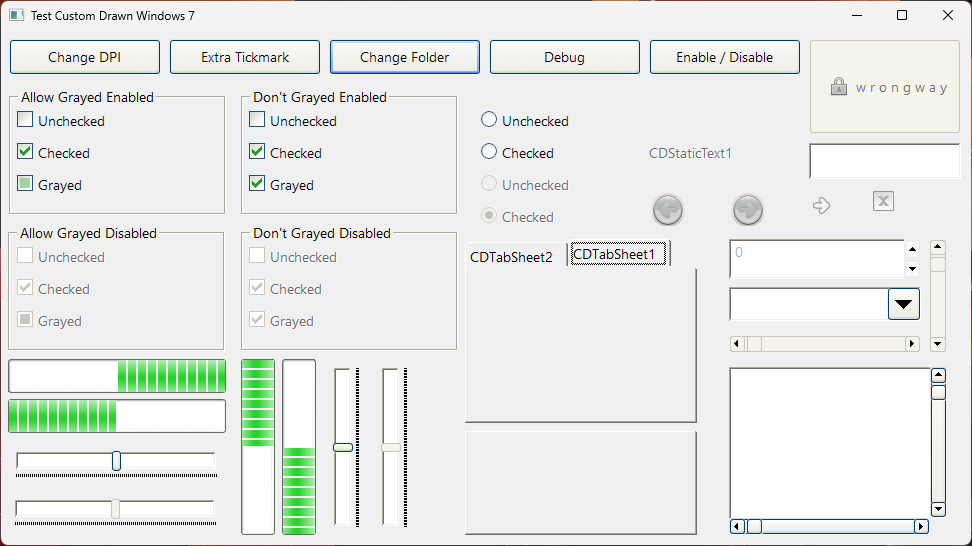 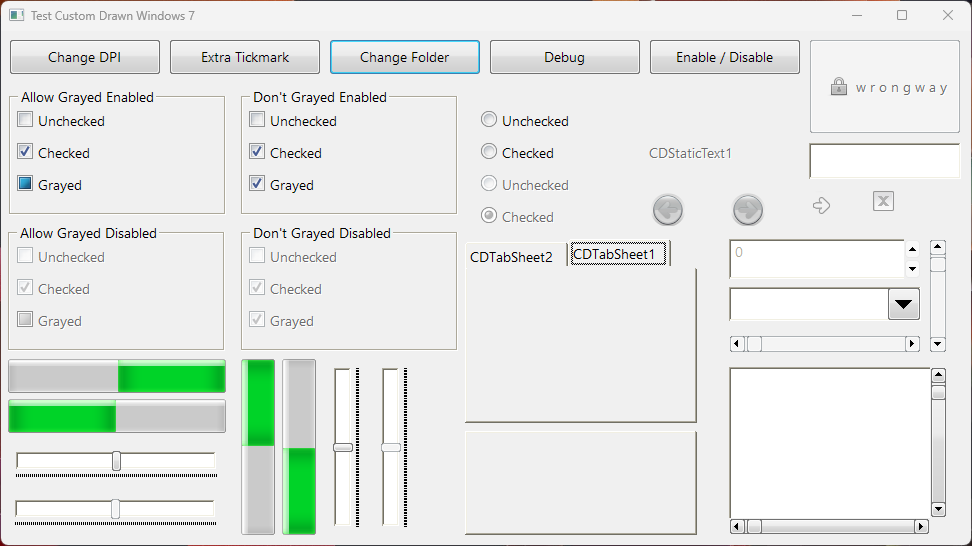 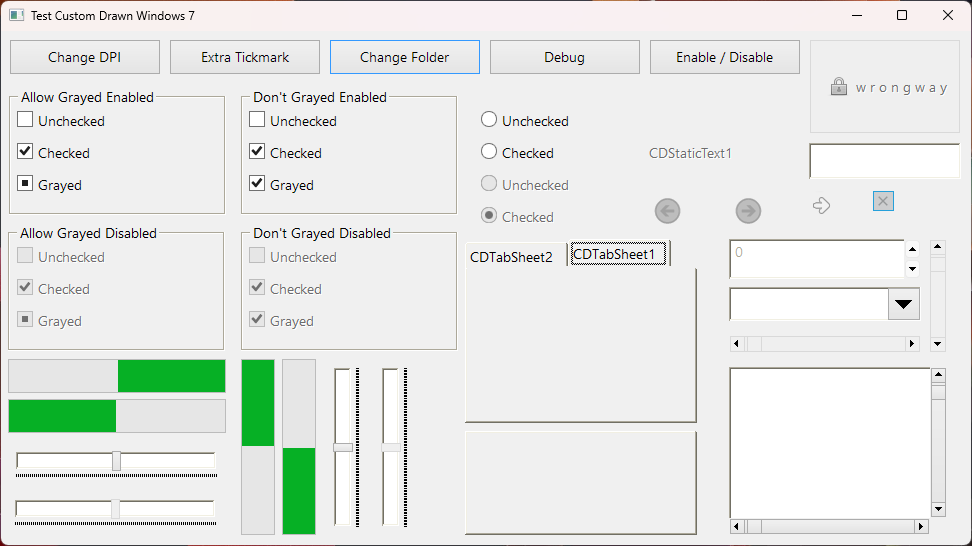 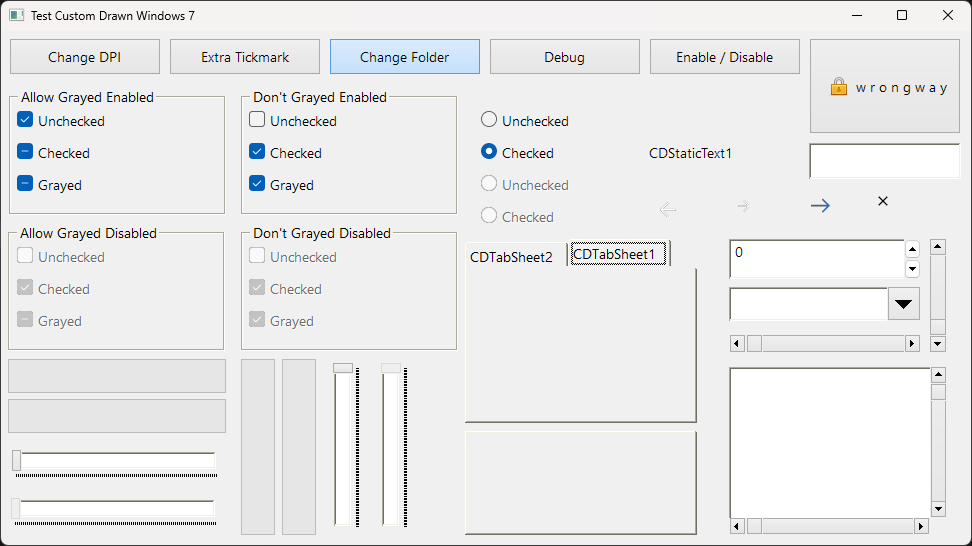 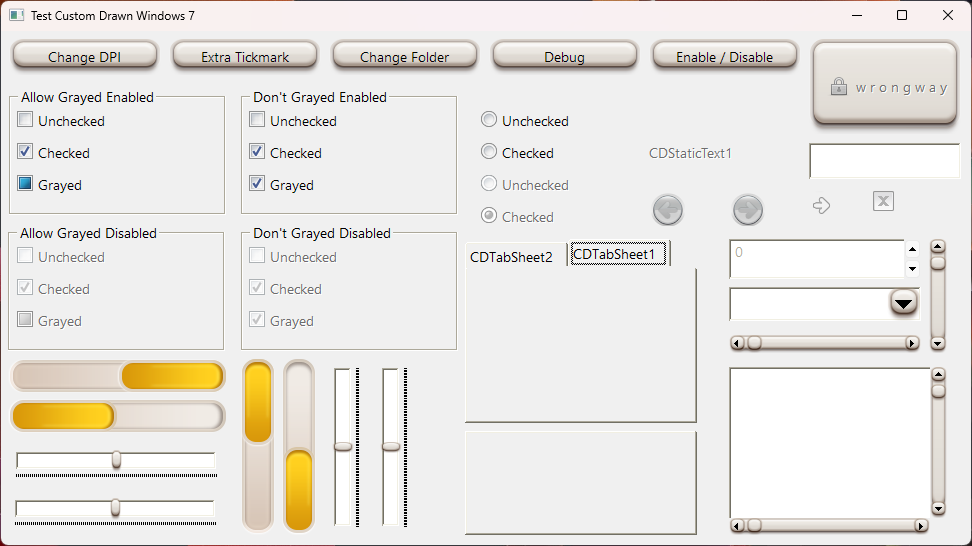 | |
| 123 | 123 | ||
| 124 | 124 | Imitates the Windows look. Currently is available only with BGRABitmap graphic library, and you can get this drawer in the BGRAControls package: [[BGRAControls]] | |
| 125 | 125 | ||
| 126 | 126 | ### BGRAControls Custom Drawn default style | |
| 127 | 127 | ||
| 128 | - | ||
| 129 | - | ||
| 130 | - | ||
| 131 | - | ||
| 128 | + | 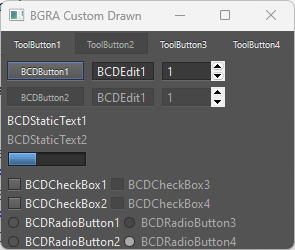 | |
| 132 | 129 | ||
| 133 | 130 | ## Controls which imitate the Standard Palette | |
| 134 | 131 | ||
| 135 | 132 | ### TCDButton | |
| 136 | 133 | ||
| 137 | 134 | This is a fully custom drawn button. | |
| 138 | 135 | ||
| 139 | 136 | Usage example: | |
| 140 | 137 | ||
| 141 | 138 | ``` pascal | |
| 142 | 139 | uses customdrawnextras; | |
| 143 | 140 | ||
| 144 | 141 | procedure TForm1.FormCreate(Sender: TObject); | |
| 145 | 142 | var | |
| 146 | 143 | MyButton: TCDButton; | |
| 147 | 144 | begin | |
| 148 | 145 | MyButton := TCDButton.Create(Self); | |
| 149 | 146 | MyButton.Parent := Self; | |
| 150 | 147 | MyButton.DrawStyle := dsWin2000; | |
| 151 | 148 | MyButton.Left := 100; | |
| 152 | 149 | MyButton.Top := 100; | |
| 153 | 150 | MyButton.Width := 200; | |
| 154 | 151 | MyButton.Height := 50; | |
| 155 | 152 | MyButton.Caption := 'My Button'; | |
| 156 | 153 | MyButton.Color := clRed; | |
| 157 | 154 | MyButton.OnClick := @HandleButtonClick; | |
| 158 | 155 | end; | |
| 159 | 156 | ``` | |
| 160 | 157 | ||
| 161 | - | ||
| 162 | - | ||
| 163 | - | ||
| 164 | - | ||
| 158 | + | 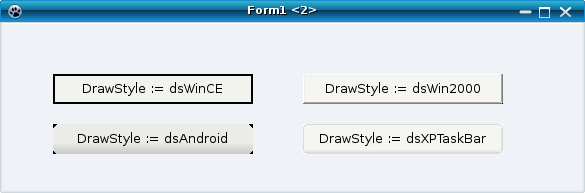 | |
| 165 | 159 | ||
| 166 | 160 | ### TCDEdit | |
| 167 | 161 | ||
| 168 | 162 | This is a fully custom drawn edit control. | |
| 169 | 163 | ||
| 170 | - | ||
| 171 | - | ||
| 172 | - | ||
| 173 | - | ||
| 164 | + | 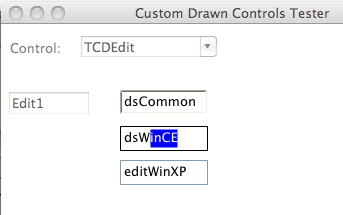 | |
| 174 | 165 | ||
| 175 | 166 | ### TCDCheckBox | |
| 176 | 167 | ||
| 177 | 168 | This is a fully custom drawn check box. | |
| 178 | 169 | ||
| 179 | - | ||
| 180 | - | ||
| 181 | - | ||
| 182 | - | ||
| 170 | + | 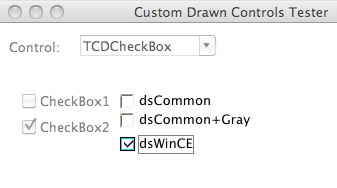 | |
| 183 | 171 | ||
| 184 | 172 | ### TCDRadioButton | |
| 185 | 173 | ||
| 186 | - | ||
| 187 | - | ||
| 188 | - | ||
| 189 | - | ||
| 174 | + | 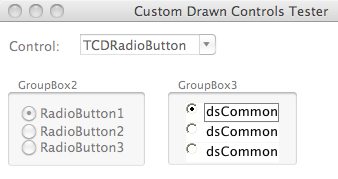 | |
| 190 | 175 | ||
| 191 | 176 | ### TCDScrollBar | |
| 192 | 177 | ||
| 193 | - | ||
| 194 | - | ||
| 195 | - | ||
| 196 | - | ||
| 178 | + | 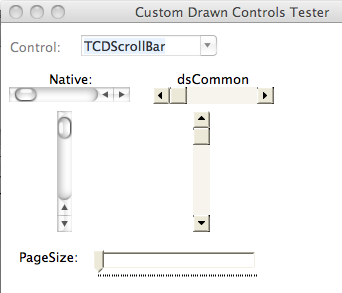 | |
| 197 | 179 | ||
| 198 | 180 | ### TCDGroupBox | |
| 199 | 181 | ||
| 200 | 182 | This is a fully custom drawn group box. | |
| 201 | 183 | ||
| 202 | - | ||
| 203 | - | ||
| 204 | - | ||
| 205 | - | ||
| 184 | + | 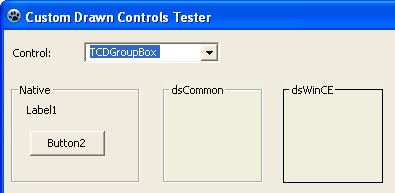 | |
| 206 | 185 | ||
| 207 | 186 | ## Controls which imitate the Additional Palette | |
| 208 | 187 | ||
| 209 | 188 | ### TCDStaticText | |
| 210 | 189 | ||
| 211 | 190 | ## Controls which imitate the Common Controls Palette | |
| 212 | 191 | ||
| 213 | 192 | ### TCDTrackBar | |
| 214 | 193 | ||
| 215 | 194 | A substitute for TTrackBar | |
| 216 | 195 | ||
| 217 | - | ||
| 218 | - | ||
| 219 | - | ||
| 220 | - | ||
| 196 | + | 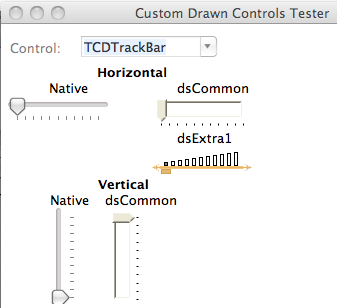 | |
| 221 | 197 | ||
| 222 | 198 | ### TCDProgressBar | |
| 223 | 199 | ||
| 224 | - | ||
| 225 | - | ||
| 226 | - | ||
| 227 | - | ||
| 200 | + | 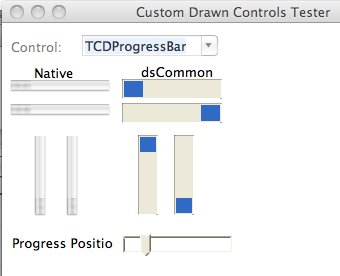 | |
| 228 | 201 | ||
| 229 | 202 | ### TCDListView | |
| 230 | 203 | ||
| 231 | 204 | Under construction. | |
| 232 | 205 | ||
| 233 | 206 | ### TCDTabControl | |
| 234 | 207 | ||
| 235 | 208 | A substitute for TTabControl | |
| 236 | 209 | ||
| 237 | 210 | ### TCDPageControl | |
| 238 | 211 | ||
| 239 | 212 | A substitute for TPageControl | |
| 240 | 213 | ||
| 241 | - | ||
| 242 | - | ||
| 243 | - | ||
| 244 | - | ||
| 214 | + | 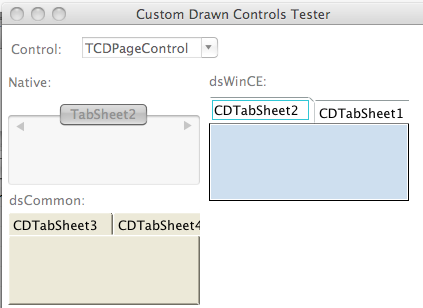 | |
| 245 | 215 | ||
| 246 | 216 | ## Custom Drawn Packages | |
| 247 | 217 | ||
| 248 | 218 | Moved here: [[Lazarus Custom Drawn Package]] | |
| 249 | 219 | ||
| 250 | 220 | ## Other good custom drawn components for Lazarus | |
| 251 | 221 | ||
| 252 | 222 | - [[VirtualTreeview]] | |
| 253 | 223 | - [[ATTabs]] | |
| 254 | 224 | - [[ATStatusBar]] | |
| 255 | 225 | - [[ATScrollBar]] | |
| 256 | 226 | ||
| 257 | 227 | ## Maintainers | |
| 258 | 228 | ||
| 259 | 229 | - Felipe Monteiro de Carvalho | |
| 260 | 230 | - JiXian Yang | |
| 261 | 231 | ||
| 262 | 232 | ## See Also | |
| 263 | 233 | ||
| 264 | 234 | - [[Lazarus Components Directory]] | |
| 265 | 235 | - [[Lazarus Custom Drawn Package]] | |
| 266 | 236 | - [[Custom Drawn Interface]] | |
| 267 | 237 | ||
| 268 | 238 | --- | |
| 269 | 239 | *From the Free Pascal wiki, page "Lazarus Custom Drawn Controls", as it stood on 2024-02-08 after a change by 007, out of the wiki's dump of 2024-05-26. Copyright stays with the author who wrote it, according to the old wiki's [[Licensing]] page. If you have concerns about this material, [message the admin](/wiki-contact).* |