

LazPaint Edit
English · Suomi
Selection tools
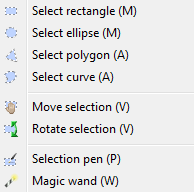
You can select parts of an image using different shapes provided in the Select menu: rectangle, ellipse, polygon and curve. It is also possible to draw the selection with the selection pen.
With most tools, if you right-click, it will subtract instead of adding to the selection.
The selection is anti-aliased, i.e. the rounded borders are rendered as round as possible. So for example, you can use the selection to make a nice hole in an image, let's say if you want to draw a cheese.
The magic wand Tool selects the pixels that are around the clicked pixel and that have approximately the same color. In the toolbar, the Tolerance up-down defines how close the colors must be to be included.
Editing the selection
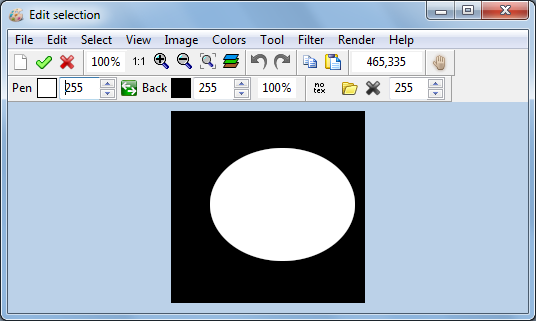
It is possible to edit the selection as a black and white mask with the menu Select, Edit Selection. This mask can be saved and loaded, so you can stored the current shape of the selection and retrieve it later.
Other selection tools
The selection can then be inverted, copied and pasted using the items of the Edit menu.
The shape or and the content of the selection can be rotated with the Rotate selection tool.
The menu Edit, Selection Fit will retrieve the selection and reduce the selection to the part where there are pixels.
From the Free Pascal wiki, page "LazPaint Edit", as it stood on 2017-03-16 after a change by Djzepi, out of the wiki's dump of 2024-05-26. Copyright stays with the author who wrote it, according to the old wiki's Licensing page. If you have concerns about this material, message the admin.
Edited on wiki.freepascal.org by 3 people, 2014–2017
From the official wiki's backup of 26 May 2024: who edited this page there, and when. Edits made there after that date were not recorded, and the earlier versions are not shown here; the main page says why.
| When | Who | What changed |
|---|---|---|
| Circular | created | |
| Circular | Modifying the selection | |
| Circular | Selection tools: image | |
| Circular | Editing the selection: image | |
| Circular | image in section | |
| Circular | back menu | |
| Jwdietrich | categorization | |
| Djzepi |
Talk about this page
Nobody has opened a bench for this page yet. Sign in to open one.