

LazPaint: what changed
Revision 1 to 2. Removed lines have a minus sign; added lines have a plus sign.
| Old | New | Line | |
|---|---|---|---|
| 1 | - | ||
| 2 | - | ||
| 3 | - | ||
| 4 | - | ||
| 5 | - | ||
| 6 | - | ||
| 7 | - | ||
| 8 | - | ||
| 9 | - | ||
| 10 | - | ||
| 11 | - | ||
| 12 | - | ||
| 13 | - | ||
| 14 | - | ||
| 15 | - | ||
| 16 | - | ||
| 17 | - | ||
| 18 | - | ||
| 19 | - | ||
| 20 | - | ||
| 21 | - | ||
| 22 | - | ||
| 23 | - | ||
| 24 | - | ||
| 1 | + | **LazPaint** | |
| 25 | 2 | ||
| 26 | - | ||
| 3 | + | Free cross-platform image editor with raster and vector layers, written in Lazarus (Free Pascal).\ | |
| 27 | 4 | ||
| 28 | - | ||
| 5 | + | [Blog](https://lazpaint.blogspot.com/) [Last changes](https://lazpaint.github.io/last/) Documentation [Download](https://lazpaint.github.io/) [Screenshots](http://lazpaint.blogspot.com/p/screenshots.html) [Forum](https://forum.lazarus.freepascal.org/index.php/board,46.0.html) [f](https://www.facebook.com/LazPaint) | |
| 29 | 6 | ||
| 30 | - | ||
| 7 | + | [Donate](http://sourceforge.net/donate/index.php?group_id=404555) | |
| 31 | 8 | ||
| 32 | - | ||
| 9 | + | **History** | |
| 33 | 10 | ||
| 34 | 11 | LazPaint was started to demonstrate the capabilities of the graphic library [[BGRABitmap]]. It provides advanced drawing functions in [[Lazarus]] development environment. Both provided a source of inspiration for the other and finally LazPaint became real image editor. Thanks to the help of Lazarus community, the program has been compiled on Windows, Linux and macOS. | |
| 35 | 12 | ||
| 36 | - | ||
| 37 | - | ||
| 38 | - | ||
| 39 | - | ||
| 40 | 13 | ||
| 41 | 14 | ||
| 42 | - | ||
| 43 | - | ||
| 44 | - | ||
| 45 | - | ||
| 46 | - | ||
| 15 | + | **Features** | |
| 47 | 16 | ||
| 48 | 17 | [[LazPaint File|Files]]: read and write a variety of file formats, including layered bitmaps and 3D files. | |
| 49 | 18 | ||
| 50 | 19 | [[LazPaint Tools|Tools]]: many tools are available to draw on the layers. | |
| 51 | 20 | ||
| 52 | 21 | [[LazPaint Edit|Edit/Select]]: select parts of an image with antialiasing and modify the selection as a mask. | |
| 53 | 22 | ||
| 54 | 23 | [[LazPaint Windows|View]]: color window, layer stack window and toolbox window. | |
| 55 | 24 | ||
| 56 | 25 | [[LazPaint Command line|Command line]]: call LazPaint from a console. | |
| 57 | 26 | ||
| 58 | 27 | [[LazPaint scripts|Scripts]]: scripts are provided to do layer effects. You can as well write your own [Python](https://www.python.org/) scripts. | |
| 59 | 28 | ||
| 60 | - | ||
| 61 | - | ||
| 62 | - | ||
| 63 | - | ||
| 64 | - | ||
| 65 | - | ||
| 66 | 29 | ### Quick start | |
| 67 | 30 | ||
| 68 | - | ||
| 69 | - | ||
| 70 | - | ||
| 71 | - | ||
| 72 | - | ||
| 73 | - | ||
| 74 | - | ||
| 31 | + | **Useful keys** | |
| 75 | 32 | ||
| 76 | 33 | - Maintaining Space key down switches temporarily in move mode | |
| 77 | 34 | - F6 key hides/shows all tool windows | |
| 78 | 35 | - Ctrl key aligns to image pixels and limits possible angles with rotation tool | |
| 79 | 36 | - Backspace key erases last point in a polygon or last letter in a text | |
| 80 | 37 | - Enter key releases the selection | |
| 81 | 38 | ||
| 82 | 39 | Right mouse button can be used to: | |
| 83 | 40 | ||
| 84 | 41 | - Swap drawing colors temporarily | |
| 85 | 42 | - Subtract from selection (selection tool) | |
| 86 | 43 | - Define reference position (light position for shaded text and shapes, rotation center, clone tool source) | |
| 87 | 44 | - Finish a shape (polygon, curve) | |
| 88 | 45 | - Rotate a shape (clicking corners) | |
| 89 | 46 | ||
| 90 | 47 | Left clicking in the small color preview will select the pen / background / outline color or if it is a gradient, the start / end color, to be edited with the color chooser. | |
| 91 | 48 | ||
| 92 | - | ||
| 93 | - | ||
| 94 | - | ||
| 95 | - | ||
| 96 | 49 | ||
| 97 | 50 | ||
| 98 | - | ||
| 99 | - | ||
| 100 | - | ||
| 101 | - | ||
| 102 | - | ||
| 51 | + | **Video tutorials** | |
| 103 | 52 | ||
| 104 | 53 | Video tutorials are available on Youtube : | |
| 105 | 54 | ||
| 106 | 55 | - [Getting started](http://www.youtube.com/watch?v=9G6XcQdBtDo) | |
| 107 | 56 | - [Advanced drawing tools](http://www.youtube.com/watch?v=UEGQk1UhJ2w) | |
| 108 | 57 | - [Using selection tools](http://www.youtube.com/watch?v=6zWohQYLW3g) | |
| 109 | 58 | - [Text with projected shadow](http://www.youtube.com/watch?v=EmKzqKneJeI) | |
| 110 | 59 | - [Drawing a vortex](http://www.youtube.com/watch?v=9z6WgIaUYwQ) | |
| 111 | 60 | - [Export for Krita](http://www.youtube.com/watch?v=FFEZpl15Rb4) | |
| 112 | 61 | - [Using layers, magic wand and perspective](http://www.youtube.com/watch?v=Hxinfs6ziFc) | |
| 113 | 62 | - [Draw a fire](http://www.youtube.com/watch?v=yWgo0fcdOSg) (*overlay* blending mode) | |
| 114 | 63 | - [Draw lightnings](http://www.youtube.com/watch?v=69cHd5W-Zyg) (*negation* blending mode) | |
| 115 | 64 | - [Draw a neon with blur](http://www.youtube.com/watch?v=1rtHSPAUDnA) (*lighten* blending mode) | |
| 116 | 65 | - [Spline selection and glow effect](http://www.youtube.com/watch?v=Lewg3iYkln8) (*glow* blending mode) | |
| 117 | 66 | - [Drop shadow](https://www.youtube.com/watch?v=rsdPha36y50) (example of layer effect) | |
| 118 | 67 | ||
| 119 | - | ||
| 120 | - | ||
| 121 | - | ||
| 122 | - | ||
| 123 | - | ||
| 124 | - | ||
| 125 | 68 | ### Download | |
| 126 | 69 | ||
| 127 | - | ||
| 128 | - | ||
| 129 | - | ||
| 130 | - | ||
| 131 | - | ||
| 132 | - | ||
| 133 | 70 | *Binaries can be downloaded on GitHub for Windows, Linux and macOS.* | |
| 134 | 71 | ||
| 135 | 72 | **[Download](https://lazpaint.github.io)** **[Portable](https://portableapps.com/apps/graphics_pictures/lazpaint-portable)** | |
| 136 | 73 | ||
| 137 | 74 | [Support this project](http://sourceforge.net/donate/index.php?group_id=404555) | |
| 138 | 75 | ||
| 139 | 76 | [[LazPaint Make it portable|How to make a portable version]] | |
| 140 | 77 | ||
| 141 | - | ||
| 142 | - | ||
| 143 | - | ||
| 144 | - | ||
| 145 | 78 | ||
| 146 | 79 | ||
| 147 | - | ||
| 148 | - | ||
| 149 | - | ||
| 150 | - | ||
| 151 | 80 | **Source code** | |
| 152 | 81 | ||
| 153 | 82 | The source code can be downloaded on GitHub: | |
| 154 | 83 | ||
| 155 | 84 | LazPaint: <https://github.com/bgrabitmap/lazpaint/> | |
| 156 | 85 | ||
| 157 | 86 | BGRAControls: <https://github.com/bgrabitmap/bgracontrols/> | |
| 158 | 87 | ||
| 159 | 88 | BGRABitmap: <https://github.com/bgrabitmap/bgrabitmap/> | |
| 160 | 89 | ||
| 161 | 90 | Dependencies: | |
| 162 | 91 | ||
| 163 | 92 | 1. LazPaint depends on [[BGRAControls]] and [[BGRABitmap]]. | |
| 164 | 93 | 2. [[BGRAControls]] depends on [[BGRABitmap]]. | |
| 165 | 94 | ||
| 166 | 95 | You can download the source code and compile it for a specific platform. MacOS version is now fully functional. | |
| 167 | 96 | ||
| 168 | - | ||
| 169 | - | ||
| 170 | - | ||
| 171 | - | ||
| 172 | - | ||
| 173 | - | ||
| 174 | 97 | ### Compilation of latest version | |
| 175 | 98 | ||
| 176 | 99 | 1. Get **Lazarus** as a package in your distribution or download it at <https://sourceforge.net/projects/lazarus/files/> | |
| 177 | 100 | 2. Open **Lazarus** to check it works | |
| 178 | 101 | 3. Download latest version of *BGRABitmap* at <https://github.com/bgrabitmap/bgrabitmap/releases> | |
| 179 | 102 | 4. Open the package file *BGRABitmapPack.lpk* in **Lazarus** | |
| 180 | 103 | 5. Download latest version of *BGRAControls* at <https://github.com/bgrabitmap/bgracontrols/releases> | |
| 181 | 104 | 6. Open the package file *bgracontrols.lpk* in **Lazarus** | |
| 182 | 105 | 7. Download *LazPaint* at <https://github.com/bgrabitmap/lazpaint/releases> | |
| 183 | 106 | 8. Open the package file *lazpaintcontrols.lpk* in **Lazarus** | |
| 184 | 107 | 9. Open the project file *lazpaint.lpi* or *lazpaint.lpr* in **Lazarus** (choose to Open project if prompted) | |
| 185 | 108 | 10. Click the green triangle "Run" and check if the program is working | |
| 186 | 109 | 11. Close *LazPaint* and close **Lazarus** and go in the *release* folder of the project | |
| 187 | 110 | ||
| 188 | 111 | The essential files are: the executable file, the readme file, the *models*, *i18n* and *scripts* folders. | |
| 189 | 112 | ||
| 190 | 113 | Additional files and instructions are in *release* folder for each platform: | |
| 191 | 114 | ||
| 192 | 115 | - ***windows***: run the batch file *stage.bat* to generate a *lazpaint32* and *lazpaint64* folders that contains everything (it adds particular support for WebP and RAW images by adding *dcraw.exe* and *libwebp.dll*). | |
| 193 | 116 | - ***macOS***: go in the folder with the terminal and call *./makedmg.sh* to generate the bundle. | |
| 194 | 117 | - ***debian***: go in the folder with the terminal and call *./makedeb.sh* to generate the DEB package and the TAR.GZ file. | |
| 195 | 118 | ||
| 196 | 119 | Note: when debugging on Windows, you may want to have support for WebP and RAW images. You can do that by copying the *dcraw.exe* and *libwebp.dll* files next to the compiled files (for example *debug\i386-win32* for 32-bit version). | |
| 197 | 120 | ||
| 198 | 121 | ### Screenshots | |
| 199 | 122 | ||
| 200 | 123 | #### LazPaint on Linux (and dark theme) | |
| 201 | 124 | ||
| 202 | - | ||
| 203 | - | ||
| 204 | - | ||
| 205 | - | ||
| 125 | + |  | |
| 206 | 126 | ||
| 207 | 127 | #### LazPaint on Windows | |
| 208 | 128 | ||
| 209 | - | ||
| 210 | - | ||
| 211 | - | ||
| 212 | - | ||
| 129 | + | 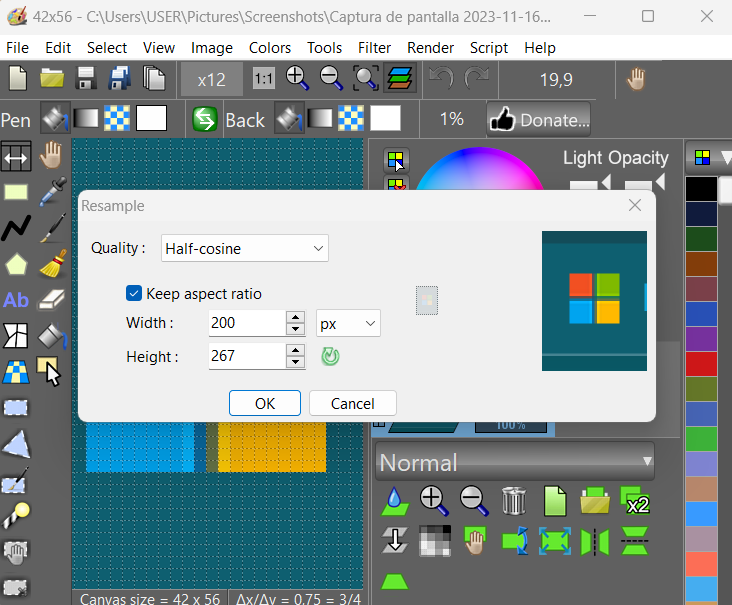 | |
| 213 | 130 | ||
| 214 | 131 | #### LazPaint on Puppy Linux | |
| 215 | 132 | ||
| 216 | - | ||
| 217 | - | ||
| 218 | - | ||
| 219 | - | ||
| 133 | + | 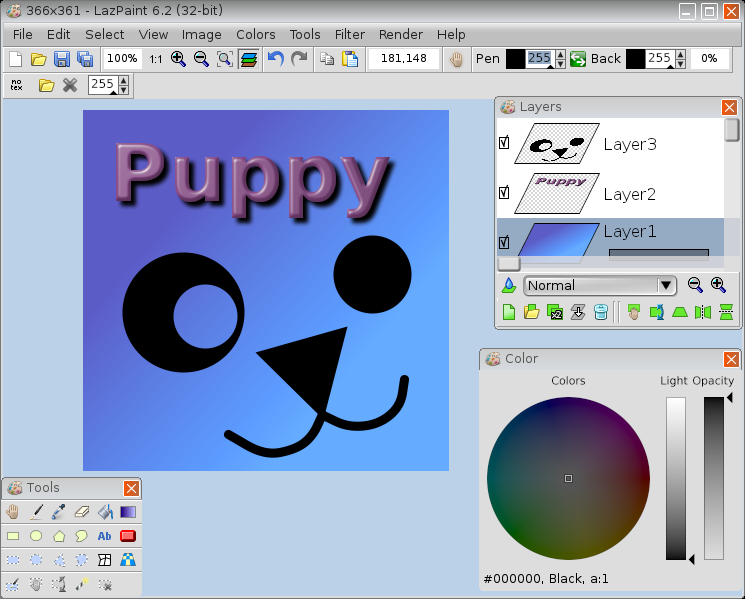 | |
| 220 | 134 | ||
| 221 | 135 | ### Interface | |
| 222 | 136 | ||
| 223 | 137 | Many common actions can be done with the toolbar. Zoom can be changed with the magnifying glass (+ or -), or by clicking on the 1:1 button to show the image at its original size in pixels, or with the zoom fit button to set the zoom so that the whole image be within the window. | |
| 224 | 138 | ||
| 225 | 139 | It is possible to undo/redo the 200 last operations. If you have a doubt on what you are drawing, undo back to the beginning, save a copy, and redo the modifications before going further. | |
| 226 | 140 | ||
| 227 | 141 | ### Image manipulation | |
| 228 | 142 | ||
| 229 | 143 | An image can be resampled, flipped horizontally and vertically. | |
| 230 | 144 | ||
| 231 | 145 | Smart zoom x3 : resize the image x3 and detects borders; this provides a useful zoom with ancient games sprites. | |
| 232 | 146 | ||
| 233 | 147 | ### Color manipulation | |
| 234 | 148 | ||
| 235 | 149 | - Colorize : set the color of an image while preserving intensities | |
| 236 | 150 | - Shift colors : cycle colors and change colorness (saturation) | |
| 237 | 151 | - Intensity : make colors lighter or darker without making them white | |
| 238 | 152 | - Lightness : make colors lighter or darker by making them whiter | |
| 239 | 153 | - Normalize : use the whole range of each color channel and alpha channel | |
| 240 | 154 | - Negative : invert colors (with gamma correction) | |
| 241 | 155 | - Linear negative : invert colors (without gamma correction) | |
| 242 | 156 | - Grayscale : converts colors to grayscale with gamma correction | |
| 243 | 157 | ||
| 244 | 158 | ### Filters | |
| 245 | 159 | ||
| 246 | 160 | Filters can be applied to the whole image or to the active selection. | |
| 247 | 161 | ||
| 248 | 162 | - Radial blur : non directional blur | |
| 249 | 163 | - Motion blur : directional blur | |
| 250 | 164 | - Custom blur : blur according to a mask | |
| 251 | 165 | ||
| 252 | 166 | - Sharpen : makes contours more accute, complementary to Smooth | |
| 253 | 167 | - Smooth : softens whole image, complementary to Sharpen | |
| 254 | 168 | - Median : computes the median of colors around each pixel, which softens corners | |
| 255 | 169 | ||
| 256 | 170 | - Contour : draws contours on a white background (like a pencil drawing) | |
| 257 | 171 | - Emboss : draws contours with shadow | |
| 258 | 172 | ||
| 259 | 173 | - Sphere : spherical projection | |
| 260 | 174 | - Cylinder : cylinder projection | |
| 261 | 175 | - Clouds : add clouds of the current pen color | |
| 262 | 176 | ||
| 263 | 177 | --- | |
| 264 | 178 | *From the Free Pascal wiki, page "LazPaint", as it stood on 2024-01-30 after a change by Circular, out of the wiki's dump of 2024-05-26. Copyright stays with the author who wrote it, according to the old wiki's [[Licensing]] page. If you have concerns about this material, [message the admin](/wiki-contact).* |