

LazGitGui: what changed
Revision 1 to 2. Removed lines have a minus sign; added lines have a plus sign.
| Old | New | Line | |
|---|---|---|---|
| 1 | 1 | LazGitGui is a graphical user interface for [git](https://git-scm.com/book/en/v2). In some way, it tries to resemble the popular 'git gui' program but with some additions that allow you, with a glimpse, to get a general state of the repository. | |
| 2 | 2 | ||
| 3 | 3 | If you don't know what 'git gui' is, it is a graphical representation of the git status, where one can do basic git operations like watch what files in the work space have been modified and see the differences with respect to the original files. It also allow move files between the unstaged and the staged area and make commits from it, and much more. | |
| 4 | 4 | ||
| 5 | 5 | Git Gui has some cool features not yet available in this program, for example the selective apply or revert of hunk and line changes from the diff viewer. | |
| 6 | 6 | ||
| 7 | 7 | Contrary to Git Gui which relies on gitk for that feature, LazGitGui has a log feature that allows you to see the history of the repository and do some operation on branches and commits. | |
| 8 | 8 | ||
| 9 | 9 | ## Features | |
| 10 | 10 | ||
| 11 | 11 | - Clone a repository. | |
| 12 | 12 | - Handle remotes dialog. | |
| 13 | 13 | - State panel that shows current and upstream branches. Commits ahead and commits behind. Tag description. | |
| 14 | 14 | - User defined buttons to assign click and run git commands. | |
| 15 | 15 | - List of untracked and changed files, selecting a file shows its changes or if is untracked the file content. A context menu contain numerous features like: | |
| 16 | 16 | - Stage one, some or all files. | |
| 17 | 17 | - Restore one, some or all changed files. | |
| 18 | 18 | - Delete files. | |
| 19 | 19 | - Edit files in an internal or external editor. | |
| 20 | 20 | - Create a patch from the selection and save it to a file. | |
| 21 | 21 | - Show the file history. | |
| 22 | 22 | - Modify the ignore file with information of the selected file. | |
| 23 | 23 | - Show tracked and ignored files. | |
| 24 | 24 | - List of staged files ready to be committed. | |
| 25 | 25 | - Buttons for reload, fetch, pull, push and push with dialog. | |
| 26 | 26 | - Amend a commit. | |
| 27 | 27 | - A repository information button. | |
| 28 | - | ||
| 28 | + | - A Log window listing commits with the following features: | |
| 29 | 29 | - Filter or Search commits by multiple terms. | |
| 30 | 30 | - Show the changes made by a commit. | |
| 31 | 31 | - Show the repository tree at some commit in history, this helps to check what was the content of certain file at some commit in particular. | |
| 32 | 32 | - Show the file history of the selected file. | |
| 33 | 33 | - Show the graph detailing the relationship between commits. | |
| 34 | 34 | - Regular expression rules for matching bug, commit and URL links in commit subject (commit links are valuable for pointing at previous commits in history). | |
| 35 | 35 | - The log window context menu has the following features: | |
| 36 | 36 | - Go to the checked out commit (HEAD or Detached HEAD), go to parent or child commit. | |
| 37 | 37 | - Create a tag a this commit. | |
| 38 | 38 | - Delete tags. | |
| 39 | 39 | - Switch to a tag. | |
| 40 | 40 | - Create a branch a this commit. | |
| 41 | 41 | - Switch to a branch. | |
| 42 | 42 | - Delete local and remote branches. | |
| 43 | 43 | - Start a Rebase on top of the selected commit. | |
| 44 | 44 | - Cherry Pick this commit. | |
| 45 | 45 | - Revert this commit. | |
| 46 | 46 | - Merge. | |
| 47 | 47 | - Start a Bisect operation by selecting a pair of commits. | |
| 48 | 48 | - Reset current branch to a commit. | |
| 49 | 49 | - Switch to a commit. | |
| 50 | 50 | - Copy commit information: full, sha, subject, etc. | |
| 51 | 51 | - Other features: | |
| 52 | 52 | - Lock to start directory. While launching LazGitGui with the --locked argument, it will show the repository restricted to the given directory instead of the whole repository. | |
| 53 | 53 | - Dropping a patch file in LazGitGui allows to apply the patch to the repository (no commit is created by this operation). | |
| 54 | 54 | - The log window title show information about the repository state. | |
| 55 | 55 | - Git state and links to actions. LazGitGui now detects if the repository is doing any of the following operations in some intermediate state: Rebase, Cherry pick, Revert, Merge and Bisect. It will show some options for taking a corresponding action, here an example of a rebase with conflicts: 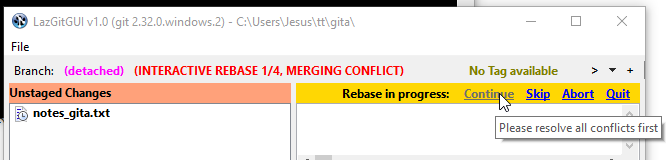 | |
| 56 | 56 | ||
| 57 | 57 | ## Screenshots | |
| 58 | 58 | ||
| 59 | 59 | ***Status Screen*** 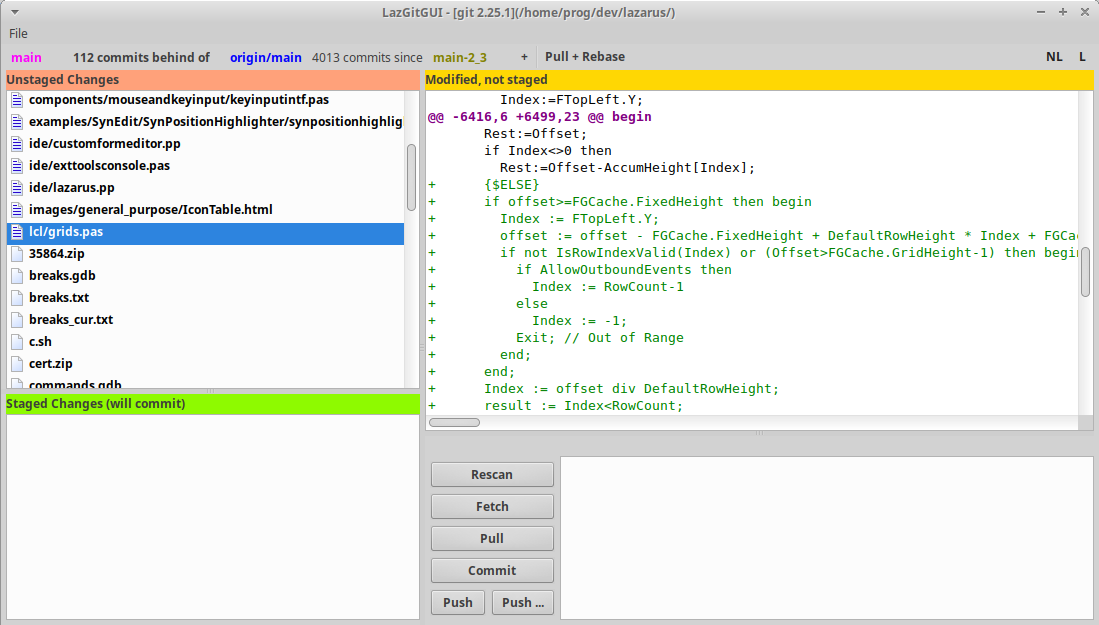 | |
| 60 | 60 | ||
| 61 | 61 | ***Log Screen*** 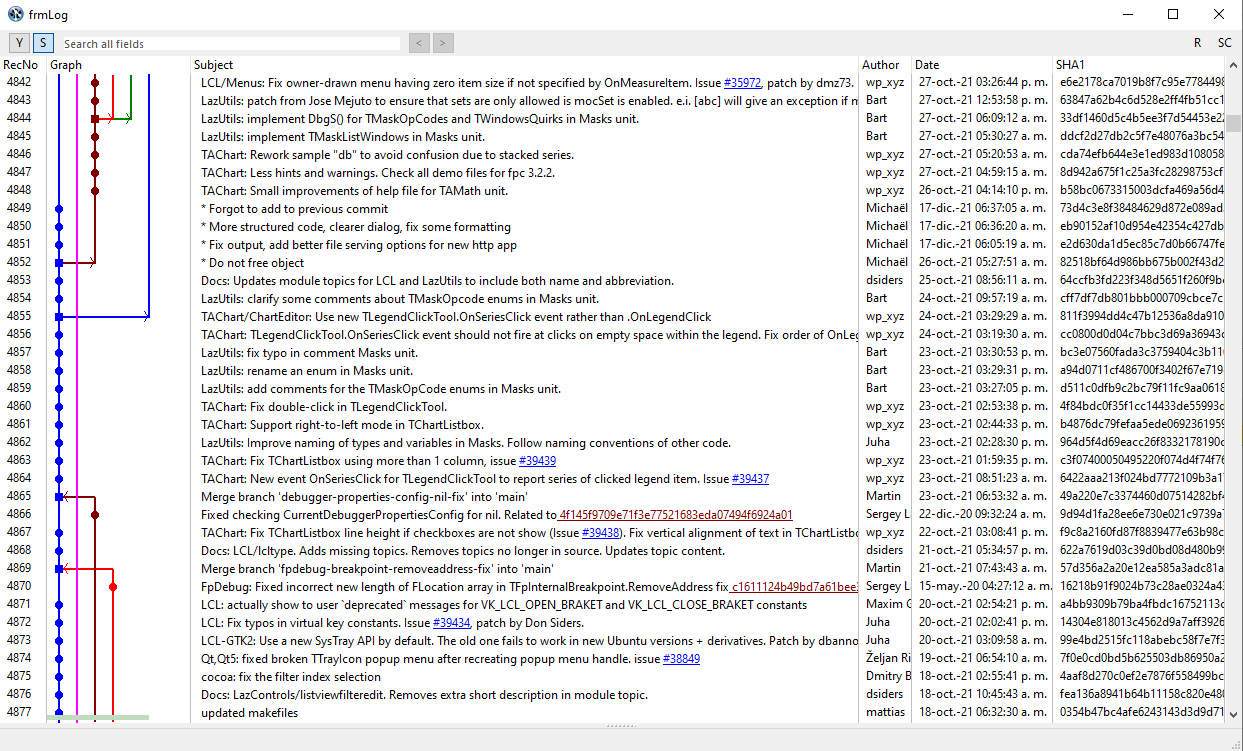 | |
| 62 | 62 | ||
| 63 | 63 | ***File History Screen*** 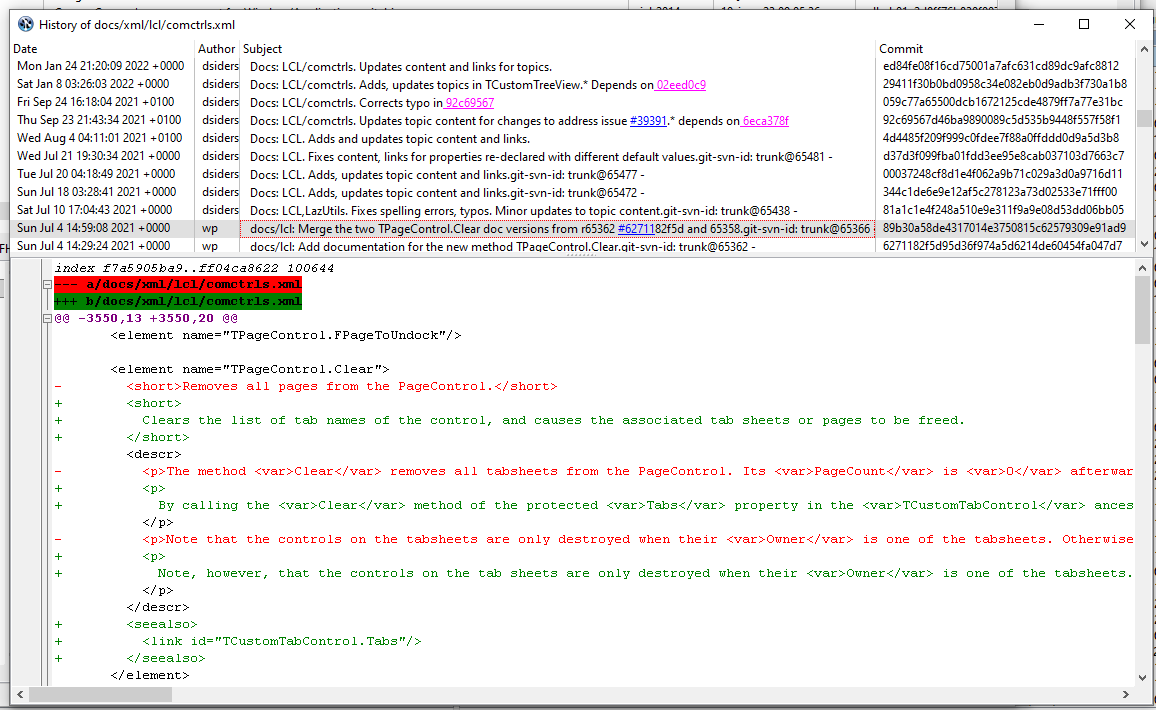 | |
| 64 | 64 | ||
| 65 | 65 | ## Download | |
| 66 | 66 | ||
| 67 | 67 | Clone from the [LazGitGui repository](https://gitlab.com/jramx/lazgitgui) | |
| 68 | 68 | ||
| 69 | 69 | ## Documentation | |
| 70 | 70 | ||
| 71 | 71 | The following are extracts from the documentation available in the docs/documentation.md file | |
| 72 | 72 | ||
| 73 | 73 | ## Building LazGitGui | |
| 74 | 74 | ||
| 75 | 75 | At the moment there are no binary releases available so the program has to be compiled and used from the compiling directory. | |
| 76 | 76 | ||
| 77 | 77 | This is a [Lazarus/Free Pascal](https://www.lazarus-ide.org) program so you will need Lazarus in order to compile it, a standard install will be enough as LazGitGui does not use special packages. | |
| 78 | 78 | ||
| 79 | 79 | The most recent Lazarus release should be fine but if it's not please let me know. | |
| 80 | 80 | ||
| 81 | 81 | In Lazarus, open the project file lazgitgui.lpi and compile it. | |
| 82 | 82 | ||
| 83 | 83 | ## How to use | |
| 84 | 84 | ||
| 85 | 85 | LazGitGui can use a supplied path passed as the last parameter in the command line, it can be a directory or a file residing within the working area of the repository at any level, if a path is not specified it will use the current working directory. Some suggestions for invoking LazGitGui: | |
| 86 | 86 | ||
| 87 | 87 | From Lazarus, an external tool can be configured with the following properties: | |
| 88 | 88 | ||
| 89 | 89 | (Linux + Windows) | |
| 90 | 90 | ||
| 91 | 91 | Title: LazGitGui | |
| 92 | 92 | Program Filename: PATH/TO/LazGitGui executable | |
| 93 | 93 | Parameters: --logfile=PATH/TO/LazGitGui/ide.log $EdFile() | |
| 94 | 94 | Shortcut: CTRL+ALT+G | |
| 95 | 95 | ||
| 96 | 96 | (macOS) | |
| 97 | 97 | ||
| 98 | 98 | Title: LazGitGui | |
| 99 | 99 | Program Filename: open | |
| 100 | 100 | Parameters: -a PATH/TO/LazGitGui.app --args --logfile=PATH/TO/LazGitGui/ide.log $EdFile() | |
| 101 | 101 | Shortcut: CMD + G | |
| 102 | 102 | ||
| 103 | 103 | The logfile parameter is optional. | |
| 104 | 104 | ||
| 105 | 105 | ## Requirements | |
| 106 | 106 | ||
| 107 | 107 | LazGitGui only requires the git program, any version since 1.9.0 should work. | |
| 108 | 108 | ||
| 109 | 109 | The program tries automatically to find the git executable in the system (or user) path, once located, it gets stored in the LazGitGui config file. LazGitGui does this only once, the next time the program is started, the git executable path is read from the config file. | |
| 110 | 110 | ||
| 111 | 111 | In the case that LazGitGui was unable to locate the git program, or if one specific version of git is needed and because at the moment LazGitGui does not have a config screen, you have two options: Use the command line or edit the config file: | |
| 112 | 112 | ||
| 113 | 113 | **Editing the config file** | |
| 114 | 114 | ||
| 115 | 115 | The config file can be found in the following locations: | |
| 116 | 116 | ||
| 117 | 117 | Windows: %LOCALAPPDATA%\appdata\lazgitgui\config\lazgitgui.cfg.json | |
| 118 | 118 | Linux/mac: $HOME/.config/lazgitgui\lazgitgui.cfg.json | |
| 119 | 119 | ||
| 120 | 120 | for example (this works under Linux): | |
| 121 | 121 | ||
| 122 | 122 | ``` json | |
| 123 | 123 | { | |
| 124 | 124 | ... | |
| 125 | 125 | "lazgitgui.cfg" : { "git" : "/usr/bin/git" }, | |
| 126 | 126 | ... | |
| 127 | 127 | } | |
| 128 | 128 | ``` | |
| 129 | 129 | ||
| 130 | 130 | **Using the command line** | |
| 131 | 131 | ||
| 132 | 132 | use the --git parameter to enter the git executable location: | |
| 133 | 133 | ||
| 134 | 134 | `--git=PATH/TO/GIT_EXECUTABLE`. | |
| 135 | 135 | ||
| 136 | 136 | ## Modes | |
| 137 | 137 | ||
| 138 | 138 | By default, LazGitGUI will start full mode with the \[\[\|Status Screen\]. | |
| 139 | 139 | ||
| 140 | 140 | If the -l or --log argument is supplied it will be launched in the [[Standalone Log]] mode where only the log window will be displayed. | |
| 141 | 141 | ||
| 142 | 142 | If the -f \<file\> or --filehistory=\<file\> argument is supplied, it will be run in [[File History]] mode which shows all the changes of the given file. In this case \<file\> have to be an existing tracked file within the working area, if\<file\> is not supplied it exists with an error. | |
| 143 | 143 | ||
| 144 | 144 | ## Report issues | |
| 145 | 145 | ||
| 146 | 146 | Please file a report in the [bug tracker](https://gitlab.com/jramx/lazgitgui/-/issues) | |
| 147 | 147 | ||
| 148 | 148 | --- | |
| 149 | 149 | *From the Free Pascal wiki, page "LazGitGui", as it stood on 2023-08-24 after a change by Jesusrmx, out of the wiki's dump of 2024-05-26. Copyright stays with the author who wrote it, according to the old wiki's [[Licensing]] page. If you have concerns about this material, [message the admin](/wiki-contact).* |