

LazActiveX: what changed
Revision 1 to 2. Removed lines have a minus sign; added lines have a plus sign.
| Old | New | Line | |
|---|---|---|---|
| 1 | 1 | ## Overview | |
| 2 | 2 | ||
| 3 | 3 | The LazActiveX package contains the TActiveXContainer component and the IDE integration of the necessary tools to create ActiveX components from a type library or directly from the object (exe or dll). ActiveX is a Microsoft Windows technology and can only be used on that platform. Cross compilation to windows is possible but the typelib importer used to create the COM bindings works only on Windows (wine not tested). | |
| 4 | 4 | ||
| 5 | 5 | ## Installing | |
| 6 | 6 | ||
| 7 | 7 | > **Warning:** LazActiveX needs FPC newer than 2.6.1. Importing type libraries only works on Windows XP or newer. | |
| 8 | 8 | ||
| 9 | 9 | From the 'Package'/'Install/Uninstall Packages ...' window, select LazActiveX 0.1, click 'Install Selected' and then 'Save and Rebuild IDE'. Alternatively, open the LazActiveX.lpk package and click on 'Use \>\>'/'Install'. | |
| 10 | 10 | ||
| 11 | 11 | When the installation succeeds, a new 'ActiveX' tab is added to your component palette. | |
| 12 | 12 | ||
| 13 | - | ||
| 14 | - | ||
| 15 | - | ||
| 16 | - | ||
| 13 | + |  | |
| 17 | 14 | ||
| 18 | 15 | ## Usage | |
| 19 | 16 | ||
| 20 | 17 | There are 3 different ways of using ActiveX components: | |
| 21 | 18 | ||
| 22 | 19 | 1. drop the TActiveXContainer on a form and assign the ActiveX ClassName to the OleClassName property. Suitable for late binding and without direct event support. | |
| 23 | 20 | 2. import the ActiveX type library, drop the TActiveXContainer on a form, instantiate the ActiveX object and assign it to the ComServer property. Suitable for early binding and with event support. | |
| 24 | 21 | 3. create a new component from the type library or the object and drop that new component on the form. This also uses early binding and has full event support. Event handlers can be assigned from the IDE. | |
| 25 | 22 | ||
| 26 | 23 | ### TActiveXContainer late binding | |
| 27 | 24 | ||
| 28 | 25 | Although the theory is quite complex, late binding is the fastest way to get an ActiveX component running. | |
| 29 | 26 | ||
| 30 | 27 | Late binding refers to the fact that the interfacing to the object is all done at run-time. References to objects are stored as dispinterfaces in variants and the methods and properties of the objects are "discovered" at run-time. | |
| 31 | 28 | ||
| 32 | 29 | The compiler generates all the run-time magic for you, but the downside is that the compiler isn't able to help you in finding the names of methods or properties at design time. | |
| 33 | 30 | ||
| 34 | 31 | Good documentation for the ActiveX object is very important (sample code for VB can easily be translated to Pascal). All errors in method names and their parameters are run-time errors. The run-time "discovery" also adds quite some overhead. | |
| 35 | 32 | ||
| 36 | 33 | **Example:** Embed VLC player in a form. VLC has to be installed !! | |
| 37 | 34 | ||
| 38 | 35 | - Drop a TActiveXContainer, a TButton and a TFileNameEdit on a form. | |
| 39 | 36 | - Resize and position TActiveXContainer to your liking and enter 'VideoLAN.VLCPlugin.2' as OleClassName, set Active to true. This will give a form that resembles the following: | |
| 40 | 37 | ||
| 41 | - | ||
| 42 | - | ||
| 43 | - | ||
| 44 | - | ||
| 38 | + | 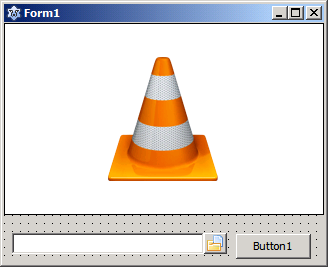 | |
| 45 | 39 | ||
| 46 | 40 | - create an Onclick event for the button and enter | |
| 47 | 41 | ||
| 48 | 42 | ``` pascal | |
| 49 | 43 | procedure TForm1.Button1Click(Sender: TObject); | |
| 50 | 44 | var | |
| 51 | 45 | actx: variant; | |
| 52 | 46 | fn: widestring; | |
| 53 | 47 | begin | |
| 54 | 48 | actx := ActiveXContainer1.ComServer; | |
| 55 | 49 | fn := UTF8Decode('file:///'+StringReplace(FileNameEdit1.FileName, '\', '/', [rfReplaceAll])); | |
| 56 | 50 | // or using uriparser (add uriparser unit to uses clause) | |
| 57 | 51 | // fn := UTF8Decode(UriParser.FilenameToURI(FileNameEdit1.FileName)); | |
| 58 | 52 | actx.playlist.add(fn); | |
| 59 | 53 | actx.playlist.play; | |
| 60 | 54 | end; | |
| 61 | 55 | ``` | |
| 62 | 56 | ||
| 63 | 57 | - Run the program, select a movie and click the button to view the movie. Note that VLC and gdb seem to cause some problems (slow start-up in the best case, hangs or crashes). Run the program preferably outside the IDE. | |
| 64 | 58 | ||
| 65 | 59 | ### TActiveXContainer early binding | |
| 66 | 60 | ||
| 67 | 61 | Early binding means that all interfaces are known to the compiler. So we need to create the pascal bindings for the ActiveX object. The importtl.exe tool in the fpc utils directory does that for you and creates coclasses and event listeners to facilitate the use of the objects in pascal. A GUI for the importtl.exe tool is integrated with the LazActiveX package and is accessible in the Tools menu: Import Type Library. | |
| 68 | 62 | ||
| 69 | - | ||
| 70 | - | ||
| 71 | - | ||
| 72 | - | ||
| 63 | + | 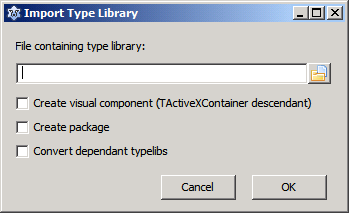 | |
| 73 | 64 | ||
| 74 | 65 | Check 'Convert dependent typelibs' to convert also the typelibs for the COM objects that are eventually used by the selected object. Clicking OK will start the typelib import and create new units in the IDE. The units have the following naming: LibraryName_MajorVersion_MinorVersion_TLB. Ex: Access_9_0_TLB. | |
| 75 | 66 | ||
| 76 | 67 | ||
| 77 | 68 | **Delphi users**: Delphi unit naming does not use version numbers. | |
| 78 | 69 | ||
| 79 | 70 | Instantiating an ActiveX object is done at run-time by calling the Create method for the appropriate CoClass created for the library. Some ActiveX libraries expose several objects and multiple CoClasses are created. Consult the documentation for the ActiveX library in case of doubt. Assigning the instantiated ActiveX object to the ComServer property of an TActiveXContainer on a form and setting it's active property to true is all that is needed to embed it in the application. | |
| 80 | 71 | ||
| 81 | 72 | **Example:** Embed VLC player in a form. VLC has to be installed !! | |
| 82 | 73 | ||
| 83 | 74 | \- Drop a TActiveXContainer, a TButton and a TFileNameEdit on a form. Resize and position TActiveXContainer to your liking | |
| 84 | 75 | ||
| 85 | 76 | \- Open 'Import Type Library' from the tools menu and select 'axvlc.dll' in your VLC installation directory. Click OK. The AXVLC_1_0_TLB unit is created. | |
| 86 | 77 | ||
| 87 | 78 | \- Add AXVLC_1_0_TLB to the uses clause. | |
| 88 | 79 | ||
| 89 | 80 | \- Create an OnClick event for the button and an OnCreate event for the form. Enter the following code: | |
| 90 | 81 | ||
| 91 | 82 | ``` pascal | |
| 92 | 83 | uses ..., variants, .... | |
| 93 | 84 | ||
| 94 | 85 | var | |
| 95 | 86 | VLC:IVLCControl2; | |
| 96 | 87 | ||
| 97 | 88 | procedure TForm1.Button1Click(Sender: TObject); | |
| 98 | 89 | var fn: widestring; | |
| 99 | 90 | begin | |
| 100 | 91 | fn := UTF8Decode('file:///'+StringReplace(FileNameEdit1.FileName, '\', '/', [rfReplaceAll])); | |
| 101 | 92 | VLC.playlist.add(fn,'',vararrayof([':aspect-ratio=16:9'])); | |
| 102 | 93 | VLC.playlist.play; | |
| 103 | 94 | end; | |
| 104 | 95 | ||
| 105 | 96 | procedure TForm1.FormCreate(Sender: TObject); | |
| 106 | 97 | begin | |
| 107 | 98 | VLC:=CoVLCPlugin2.Create; | |
| 108 | 99 | ActiveXContainer1.ComServer:=VLC; | |
| 109 | 100 | ActiveXContainer1.Active:=true; | |
| 110 | 101 | end; | |
| 111 | 102 | ``` | |
| 112 | 103 | ||
| 113 | 104 | \- Run the program, select a movie and click the button to view the movie. | |
| 114 | 105 | ||
| 115 | 106 | The typelib importer adds also event support for ActiveX that generate them. In that case, alongside the CoClass a TEventSink descendant is defined that implements the ActiveX object and all its OnEvent properties. Use the TEventSink descendant instead of the CoClass if you want to use the events. Its name starts with TEvs followed by the class name. | |
| 116 | 107 | ||
| 117 | 108 | **Example:** Internet Explorer in a form with event support. | |
| 118 | 109 | ||
| 119 | 110 | \- Drop a TActiveXContainer, a TButton, TLabel and a TEdit on a form. Resize and position TActiveXContainer to your liking | |
| 120 | 111 | ||
| 121 | 112 | \- Open 'Import Type Library' from the tools menu and select 'C:\WINDOWS\system32\ieframe.dll'. Click OK. The SHDocVw_1_1_TLB unit is created. | |
| 122 | 113 | ||
| 123 | 114 | \- Add SHDocVw_1_1_TLB to the uses clause. | |
| 124 | 115 | ||
| 125 | 116 | \- Create an OnClick event for the button and an OnCreate event for the form. | |
| 126 | 117 | ||
| 127 | 118 | \- Create in class TForm1 the private procedure OnStatusTextChange(Sender: TObject;Text_:WideString); | |
| 128 | 119 | ||
| 129 | 120 | \- Enter the following code: | |
| 130 | 121 | ||
| 131 | 122 | ``` pascal | |
| 132 | 123 | var | |
| 133 | 124 | Browser:TEvsWebBrowser; | |
| 134 | 125 | ||
| 135 | 126 | procedure TForm1.Button1Click(Sender: TObject); | |
| 136 | 127 | var | |
| 137 | 128 | url,onull:Olevariant; | |
| 138 | 129 | ||
| 139 | 130 | begin | |
| 140 | 131 | url:=Utf8decode(Edit1.Text); | |
| 141 | 132 | onull:=NULL; | |
| 142 | 133 | Browser.ComServer.Navigate2(url,onull,onull,onull,onull); | |
| 143 | 134 | end; | |
| 144 | 135 | ||
| 145 | 136 | procedure TForm1.FormCreate(Sender: TObject); | |
| 146 | 137 | begin | |
| 147 | 138 | Browser:=TEvsWebBrowser.Create(Self); | |
| 148 | 139 | ActiveXContainer1.ComServer:=Browser.ComServer; | |
| 149 | 140 | ActiveXContainer1.Active:=true; | |
| 150 | 141 | Browser.OnStatusTextChange:=@OnStatusTextChange; | |
| 151 | 142 | end; | |
| 152 | 143 | ||
| 153 | 144 | procedure TForm1.FormDestroy(Sender: TObject); | |
| 154 | 145 | begin | |
| 155 | 146 | Browser.Free; | |
| 156 | 147 | end; | |
| 157 | 148 | ||
| 158 | 149 | procedure TForm1.OnStatusTextChange(Sender: TObject; Text_: WideString); | |
| 159 | 150 | begin | |
| 160 | 151 | Label1.Caption:=UTF8Encode(Text_); | |
| 161 | 152 | end; | |
| 162 | 153 | ``` | |
| 163 | 154 | ||
| 164 | 155 | \- Run the program, enter an URL in the Edit control and click the button to navigate to the URL. Label1 will show the status messages sent by the browser. | |
| 165 | 156 | ||
| 166 | 157 | \- To access the document object (DOM) you have to import also the typelib from C:\WINDOWS\system32\mshtml.tlb and add the created MSHTML_4_0_TLB to the uses clause. To display for example the contents of the \<body\> tag of the downloaded page, add a TMemo and a second TButton to the form and add the following code: | |
| 167 | 158 | ||
| 168 | 159 | ``` pascal | |
| 169 | 160 | procedure TForm1.Button2Click(Sender: TObject); | |
| 170 | 161 | var Doc: IHTMLDocument2; //defined in MSHTML_4_0_TLB | |
| 171 | 162 | begin | |
| 172 | 163 | Doc := Browser.ComServer.Document as IHTMLDocument2; | |
| 173 | 164 | Memo1.Lines.Text := utf8encode(Doc.parentWindow.document.Get_body.innerHTML); | |
| 174 | 165 | end; | |
| 175 | 166 | ``` | |
| 176 | 167 | ||
| 177 | 168 | Note that CoClasses are not destroyed. As all COM objects they are reference counted and destroy themselves when the last reference goes out of scope. The TEventSink descendant has to be destroyed. | |
| 178 | 169 | ||
| 179 | 170 | ### Creating visual ActiveX components from type libraries or objects | |
| 180 | 171 | ||
| 181 | 172 | Instead of using the TActiveXContainer component directly the importtl tool can create TActiveXContainer descendants for every ActiveX object embedded in the type library and create a lpk package for you. The descendants have full support for events generated by the objects. To create a package with the ActiveX components open the 'Import Type Library' window in the 'Tools' menu. Select the library to import, check 'Create package' and eventually 'Convert dependent typelibs', click on 'OK' to create the package. You will be prompted for a directory to store the package. Install the new package. After the Lazarus rebuild you'll find the new components in the ActiveX tab of the component palette. | |
| 182 | 173 | ||
| 183 | - | ||
| 184 | - | ||
| 185 | - | ||
| 186 | - | ||
| 174 | + | 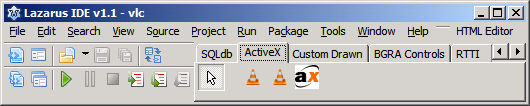 | |
| 187 | 175 | ||
| 188 | 176 | **Example**: Embed VLC player in a form. VLC has to be installed !! | |
| 189 | 177 | ||
| 190 | 178 | \- Open 'Import Type Library' from the tools menu and select 'axvlc.dll' in your VLC installation directory. Check 'Create package'. Click OK. Select a directory to store the package. The AXVLC_1_0_TLBP package and all the needed units are created. Install the AXVLC_1_0_TLBP package and rebuild the IDE. | |
| 191 | 179 | ||
| 192 | 180 | \- Drop a TAxcVLCPlugin2 (from ActiveX component tab), a TButton and a TFileNameEdit on a form. | |
| 193 | 181 | ||
| 194 | 182 | \- Set TAxcVLCPlugin2.Active to true and resize and position TActiveXContainer to your liking. | |
| 195 | 183 | ||
| 196 | 184 | \- Create an Onclick event for the button and enter: | |
| 197 | 185 | ||
| 198 | 186 | ``` pascal | |
| 199 | 187 | uses variants, URIParser; | |
| 200 | 188 | ... | |
| 201 | 189 | procedure TForm1.Button1Click(Sender: TObject); | |
| 202 | 190 | begin | |
| 203 | 191 | AxcVLCPlugin2_1.OleServer.playlist.add(URIParser.FilenameToURI(FileNameEdit1.FileName),'',vararrayof([':aspect-ratio=16:9'])); | |
| 204 | 192 | AxcVLCPlugin2_1.OleServer.playlist.play; | |
| 205 | 193 | end; | |
| 206 | 194 | ``` | |
| 207 | 195 | ||
| 208 | 196 | \- Run the program, select a movie and click the button to view the movie. | |
| 209 | 197 | ||
| 210 | 198 | Event handlers for the components can be created directly from the Object Inspector. (Note the VLC version 1.1.5.0 typelib advertises events but fails to establish a connection point. This appears to be a bug in VLC). | |
| 211 | 199 | ||
| 212 | 200 | ||
| 213 | 201 | **Delphi users**: Delphi creates a stub for every method and property in its ActiveX components. importtl does not add this additional layer and the AxctiveX methods are called through the components OleServer property. Fe. AxcVLCPlugin2_1.OleServer.playlist.play is the equivalent to VLCPlugin21.playlist.play in Delphi. | |
| 214 | 202 | ||
| 215 | 203 | --- | |
| 216 | 204 | *From the Free Pascal wiki, page "LazActiveX", as it stood on 2023-04-09 after a change by Serbod, out of the wiki's dump of 2024-05-26. Copyright stays with the author who wrote it, according to the old wiki's [[Licensing]] page. If you have concerns about this material, [message the admin](/wiki-contact).* | |
| 217 | 205 | Category: Components | |
| 218 | 206 | Category: Lazarus | |
| 219 | 207 | Category: Lazarus IDE plugins |