

lNet examples
Tip: You can use the non-visual code in Lazarus applications. This is necessary for macOS because lNet visual components do not support the Cocoa or Carbon widget sets. To successfully compile the lNet library and non-visual code examples with FPC 3.2.2 or FPC 3.3.1 requires the lNet version available from https://github.com/trevoz/lnet which has many changes made to it so that it will compile with a modern FPC and to support TLSv1.3.
lNet provided console (non-visual) code examples
In the lNet examples/console/ directory you will find example programs for:
- FTP
- HTTP
- SMTP
- TCP
- Telnet
- UDP
lNet provided visual code examples
In the lNet examples/visual/ directory you will find example programs for:
- FTP
- HTTP
- SMTP
- TCP and UDP (combined)
- Telnet
These examples will not compile on macOS because the lNet visual components have no interface bindings for the Cocoa or Carbon widget sets.
Lazarus SMTP client example
This is a simple Lazarus SMTP client.
- Memo1 contains the body of the email message.
- For debugging purposes, Memo2 is used to record the log of the email transaction.
- Compiles with FPC 3.2.2 and FPC 3.3.1 on FreeBSD (tested on 12-RELEASE), macOS 10.12+, Linux (Ubuntu 21.10) and Windows 32 bit and 64 bit (tested on Windows 10).
- STARTTLS is enabled (with FSMTP.StartTLS;). The encrypted TLS (Transport Layer Security) connection is used when communicating between the mail server and the client to provide better security. FreeBSD 12, macOS 10.12+ and Windows 10 pick TLS v1.3, Linux (Ubuntu 21.10) picks TLS v1.2 (except Linux has problems - see below).
- Note: TLS does not work in Linux due to an inscrutable epoll error (Error on epoll [4]: Interrupted system call) from the Linux-specific
lib/sys/lepolleventer.incfile. Fixes welcome :-) - TLS v1.3 has been added.
- All insecure SSL and TLS methods have been removed (ie SSL2, SSL3, TLSv1, TLSv1.1) leaving TLS v1.2 and v1.3.
- The lNet library from https://github.com/trevoz/lnet is required.
- Add the path to the lNet library units to the Project Options > Paths - "Other unit files".
unit Unit1;

{$mode objfpc}{$H+}

interface

uses
  Classes, SysUtils, Forms, Controls, Graphics, Dialogs, StdCtrls,
  lnet, lsmtp, lnetssl;

type

  { TForm1 }

  TForm1 = class(TForm)
    Button1: TButton;      // Send email button
    BodyLabel: TLabel;
    EmailLogLabel: TLabel;
    Memo1: TMemo;          // Mail content
    Memo2: TMemo;          // Mail log
    SubjectEdit: TEdit;    // Mail subject
    SubjectLabel: TLabel;
    MailToEdit: TEdit;     // MailTo
    MailToLabel: TLabel;
    MailFromEdit: TEdit;   // MailFrom
    MailFromLabel: TLabel;
    procedure Button1Click(Sender: TObject);
  private

  public

  end;

  type

  { TLSMTPClientTest }

  TLSMTPClientTest = class(TComponent)
   private
    FSMTP: TLSMTPClient; // this is THE smtp connection
    FSSL: TLSSLSession;
    FQuit: Boolean;  // helper for main loop
    { these events are used to see what happens on the SMTP connection. They are used via "CallAction".
      OnReceive will get fired whenever new data is received from the SMTP server.
      OnConnect will get fired when connecting to the SMTP server ends with success.
      OnDisconnect will get fired when the other side closes the connection gracefully.
      OnError will get called when any kind of error occurs on the connection. }
    procedure OnReceive(aSocket: TLSocket);
    procedure OnConnect(aSocket: TLSocket);
    procedure OnDisconnect(aSocket: TLSocket);
    procedure OnError(const msg: string; aSocket: TLSocket);
    { This event is used to monitor TLS session handshake. If SSL or TLS is used
      we will know if the handshake went ok if this event is fired on the session }
    procedure OnSSLConnect(aSocket: TLSocket);
   public
    constructor Create(aOwner: TComponent); override;
    procedure Run; // main SMTP processing loop
  end;

var
  Form1: TForm1;
  SMTP: TLSMTPClientTest;

implementation

{$R *.lfm}

{ TForm1 }

procedure TLSMTPClientTest.OnReceive(aSocket: TLSocket);
var
  s: string;
begin
  if FSMTP.GetMessage(s) > 0 then // if we actually received something from SMTP server
    begin
     Form1.Memo2.Append(s);       // inform user

     // Check server response to see if we should quit because mail delivered
     If pos('250 2.0.0',s) <> 0 then
       FQuit := True
    end;
end;

procedure TLSMTPClientTest.OnConnect(aSocket: TLSocket);
begin
  Form1.Memo2.Append('Connected' + LineEnding); // inform user of successful connect
end;

procedure TLSMTPClientTest.OnDisconnect(aSocket: TLSocket);
begin
  Form1.Memo2.Append('Lost connection'); // inform user about lost connection
  FQuit := True;      // since SMTP shouldn't do this unless we issued a QUIT,
                      // consider it to be end of session and quit it.
end;

procedure TLSMTPClientTest.OnError(const msg: string; aSocket: TLSocket);
begin
  Form1.Memo2.Append(msg);  // inform user of error
  FQuit := True;            // and quit session.
end;

procedure TLSMTPClientTest.OnSSLConnect(aSocket: TLSocket);
begin
  Form1.Memo2.Append('SSL session handshake was successful');
end;

constructor TLSMTPClientTest.Create(aOwner: TComponent);
begin
  inherited;
  FQuit := False;

  FSSL := TLSSLSession.Create(Self);
  FSSL.SSLActive := False;            // make it "off" by default
  FSSL.OnSSLConnect := @OnSSLConnect; // let's watch if TLS/SSL handshake is ok

  FSMTP := TLSMTPClient.Create(Self);
  FSMTP.Session := FSSL;         // set the SSL session, so if it's a SSL/TLS SMTP we can use it
  FSMTP.Timeout := 100;          // responsive enough, but won't hog CPU
  FSMTP.OnReceive := @OnReceive; // assign all events
  FSMTP.OnConnect := @OnConnect;
  FSMTP.OnDisconnect := @OnDisconnect;
  FSMTP.OnError := @OnError;
end;

// Main SMTP processing loop
procedure TLSMTPClientTest.Run;
var
  Addr, Subject, Sender, Recipients, Message: string;
  Port: Integer;
begin
  Addr := '192.168.1.4';                // hard code my mailserver
  Port := 25;                           // hard code my SMTP port number

  Sender := Form1.MailFromEdit.Text;    // get info about email from Form1 edit fields
  Recipients := Form1.MailToEdit.Text;
  Subject := Form1.SubjectEdit.Text;
  Message := Form1.Memo1.Text;

  Form1.Memo2.Append('Connecting to ' + Addr + ':' + IntToStr(Port) + '... ');

  if FSMTP.Connect(Addr, Port) then
    repeat                          // try to connect
        FSMTP.CallAction;           // if initial connect went ok, wait for acknowledgment/otherwise
    until FSMTP.Connected or FQuit; // if quit (eg error), or we connected, then continue

  If(FQuit) then  // if we need to quit because of a connection error
    exit;         // exit now

  while not FQuit do       // do main loop
    begin
      FSMTP.Ehlo;          // "Polite people say HELO first" (yeah, but nearly everyone is enhanced now)
      FSMTP.CallAction;    // main event mechanism, must call periodicly and ASAP, or specify high timeout
      FSMTP.StartTLS;      // ask for TLS
      FSMTP.SendMail(Sender, Recipients, Subject, Message); // send the email
    end;
  end;

procedure TForm1.Button1Click(Sender: TObject);
begin
  Button1.Enabled := False;     // disable button until session finished
  Memo2.Clear;                  // clear email log
  SMTP := TLSMTPClientTest.Create(nil);

  Try
    SMTP.Run;                     // try to deliver the mail
  Finally
    SMTP.Free;
    Button1.Enabled := True;      // enable button now session finished
    Memo1.Clear;                  // clear email content
  End;
end;

end.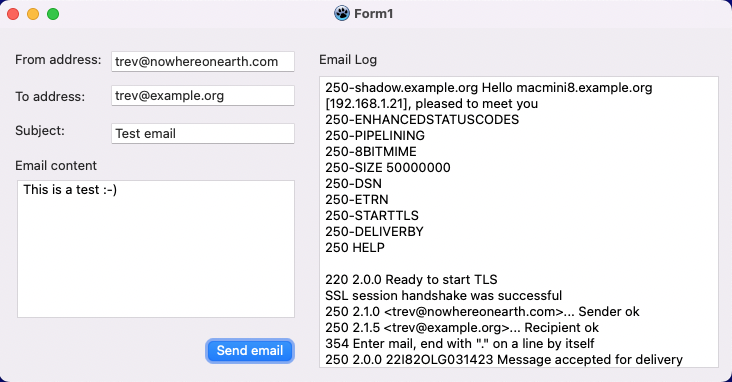
Here's a copy of the transaction on the mail server for the above message:
Mar 18 16:22:33 shadow sm-mta[66179]: 221820LG031423: Milter (milter-relay): init success to negotiate
Mar 18 16:22:33 shadow sm-mta[66179]: 221820LG031423: Milter (milter-regex): init success to negotiate
Mar 18 16:22:33 shadow sm-mta[66179]: 221820LG031423: Milter (greylist): init success to negotiate
Mar 18 16:22:33 shadow sm-mta[66179]: 221820LG031423: Milter: connect to filters
Mar 18 16:22:33 shadow sm-mta[66179]: 221820LG031423: STARTTLS=server, relay=macmini8.example.org [192.168.1.21], version=TLSv1.3, verify=NO, cipher=TLS_AES_256_GCM_SHA384, bits=256/256
Mar 18 16:22:34 shadow milter-greylist[25940]: 221820LG031423: addr = macmini8.example.org[192.168.1.21], from = <trev@nowhereonearth.com>, rcpt = <trev@example.org>
Mar 18 16:22:34 shadow milter-greylist[25940]: whitelisted by {greylist}
Mar 18 16:22:34 shadow sm-mta[66179]: 221820LG031423: Subject:Test.email
Mar 18 16:22:34 shadow sm-mta[66179]: 221820LG031423: from=<trev@nowhereonearth.com>, size=73, class=0, nrcpts=1, msgid=<202203180522.22I5MXc3066179@shadow.example.org>, proto=ESMTP, daemon=IPv4, relay=macmini8.example.org [192.168.1.21]
Mar 18 16:22:34 shadow sm-mta[66179]: 221820LG031423: Milter (greylist) add: header: X-Greylist: Message whitelisted by Sendmail access database, not delayed by milter-greylist-4.6.4 (shadow.example.org [192.168.1.4]); Fri, 18 Mar 2022 16:22:34 +1100 (AEDT)
Mar 18 16:22:34 shadow sm-mta[66179]: 221820LG031423: Milter accept: message
Mar 18 16:22:34 shadow sm-mta[66180]: 221820LG031423: to=<trev@example.org>, delay=00:00:00, xdelay=00:00:00, mailer=local, pri=30597, relay=local, dsn=2.0.0, stat=Sent
The full project source code is available for download from SourceForge.
See also
- lNet
- Synapse - Email Examples
- RFC2821 Simple Mail Transfer Protocol (SMTP)
- RFC3207 SMTP Service Extension for Secure SMTP over Transport Layer Security (TLS)
- RFC5246 The Transport Layer Security (TLS) Protocol Version 1.2
- RFC8446 The Transport Layer Security (TLS) Protocol Version 1.3
From the Free Pascal wiki, page "lNet examples", as it stood on 2022-05-18 after a change by Trev, out of the wiki's dump of 2024-05-26. Copyright stays with the author who wrote it, according to the old wiki's Licensing page. If you have concerns about this material, message the admin.
Talk about this page
Nobody has opened a bench for this page yet. Sign in to open one.