

LCL Unicode Support/ja: what changed
Revision 1 to 2. Removed lines have a minus sign; added lines have a plus sign.
| Old | New | Line | |
|---|---|---|---|
| 1 | 1 | ## イントロダクション | |
| 2 | 2 | ||
| 3 | 3 | Lazarus は、バージョン0.9.25で、Gtk1 を除くすべてのプラットフォームにおいてユニコードに完全対応しました。 このページは、FPC 2.6.4 を使用している Lazarus バージョン1.4 までについての内容です。 | |
| 4 | 4 | ||
| 5 | 5 | Lazarus は バージョン2.0 から、FPC 3.0+ の機能を用いたユニコードへの対応の改善がなされています。 その詳細は、右のリンク先を見てください。[[Unicode Support in Lazarus/ja]] | |
| 6 | 6 | ||
| 7 | 7 | ## ユーザー向けの解説 | |
| 8 | 8 | ||
| 9 | 9 | Lazurus がユニコードに対応したウイジェットセットを持つといっても、すべてがユニコードに対応しているわけではないことに注意して下さい。 開発者は、使用する文字列のエンコーディングを知り、異なるエンコーディングを用いるライブラリに対しても正しい変換を行う必要があります。 | |
| 10 | 10 | ||
| 11 | 11 | エンコーディングは普通ライブラリ(例えば、DLL や Lazarus のパッケージなど)ごとに定まっています。 各ライブラリは、1種類のエンコーディングに対応しており、大抵は unicode ( Lazarus では UTF-8 ) か、 ANSI (正確にはシステムのエンコーディングであり、 UTF-8 の可能性もあります) のいずれかです。 FPC のバージョンが2.6より古い場合、 RTL と FCL は ANSI エンコーディングが前提になっています。 | |
| 12 | 12 | ||
| 13 | 13 | Unicode と ANSI 間の変換は、以下の関数でできます。 | |
| 14 | 14 | ||
| 15 | 15 | - FPC の System ユニットの**UTF8ToAnsi**関数 と **AnsiToUTF8** 関数 | |
| 16 | 16 | - Lazarus の FileUtil ユニットの**UTF8ToSys**関数と**SysToUTF8** 関数 | |
| 17 | 17 | ||
| 18 | 18 | 後者がよりスマート(早い)ですが、プログラムにいくつかのコードを書く必要があるかもしれません。 | |
| 19 | 19 | ||
| 20 | 20 | ### FPC は ユニコードis not Unicode aware | |
| 21 | 21 | ||
| 22 | 22 | Free Pascal Runtime Library (RTL) と Free Pascal Free Component Library (FCL) in current FPC versions (\<= 2.6.x) are ANSI, so you will need to convert strings coming from Unicode libraries or going to Unicode libraries (e.g. the LCL). | |
| 23 | 23 | ||
| 24 | 24 | There are significant improvements to development branches of FPC 2.7.1 with regard to Strings. See RawByteString and UTF8String in [[FPC Unicode support]]. | |
| 25 | 25 | ||
| 26 | 26 | ### ANSI と ユニコード間の変換 | |
| 27 | 27 | ||
| 28 | 28 | > **Note:** AnsiToUTF8 と UTF8ToAnsi は Linux, BSD そして Mac OS X においてはrequire a widestring managerを必要とします。 代わりに、 SysToUTF8 と UTF8ToSys 関数(FileUtil ユニットの) 、または add the widestring manager by adding cwstring as one of the first units to your program's uses section. | |
| 29 | 29 | ||
| 30 | 30 | 例: | |
| 31 | 31 | ||
| 32 | 32 | TEdit からの文字列を RTL のファイル関数の引数として与えたい、としましょう。: | |
| 33 | 33 | ||
| 34 | 34 | ``` pascal | |
| 35 | 35 | var | |
| 36 | 36 | MyString: string; // utf-8 エンコード | |
| 37 | 37 | begin | |
| 38 | 38 | MyString := MyTEdit.Text; | |
| 39 | 39 | SomeRTLRoutine(UTF8ToAnsi(MyString)); | |
| 40 | 40 | end; | |
| 41 | 41 | ``` | |
| 42 | 42 | ||
| 43 | 43 | 逆ならば、 | |
| 44 | 44 | ||
| 45 | 45 | ``` pascal | |
| 46 | 46 | var | |
| 47 | 47 | MyString: string; // ANSI エンコード | |
| 48 | 48 | begin | |
| 49 | 49 | MyString := SomeRTLRoutine; | |
| 50 | 50 | MyTEdit.Text := AnsiToUTF8(MyString); | |
| 51 | 51 | end; | |
| 52 | 52 | ``` | |
| 53 | 53 | ||
| 54 | 54 | **重要**: UTF8ToAnsi はUTF8文字列が正しくないキャラクタを含むとき、空の文字列を返します。 | |
| 55 | 55 | ||
| 56 | 56 | **重要**: AnsiToUTF8 と UTF8ToAnsi はLinux、BSD、Mac OS X環境では、widestringマネージャを必要とします。 (FileUtilユニットの)SysToUTF8 や UTF8ToSys 関数や、プログラムのusesセクションの最初のユニットにcwstringを加えることで、widestringマネージャを使うことができます。 | |
| 57 | 57 | ||
| 58 | 58 | ### Dealing with UTF8 strings and characters | |
| 59 | 59 | ||
| 60 | 60 | If you want to iterate over the characters of an UTF8 string, there are basically two ways. | |
| 61 | 61 | ||
| 62 | 62 | - iterate over the bytes - useful for searching a substring or when looking only at the ASCII characters of the UTF8 string. For example when parsing xml files. | |
| 63 | 63 | - iterate over the characters - useful for graphical components like synedit. For example when you want to know the third printed character on the screen. | |
| 64 | 64 | ||
| 65 | 65 | #### Searching a substring | |
| 66 | 66 | ||
| 67 | 67 | Due to the special nature of UTF8 you can simply use the normal string functions: | |
| 68 | 68 | ||
| 69 | 69 | ``` pascal | |
| 70 | 70 | procedure Where(SearchFor, aText: string); | |
| 71 | 71 | var | |
| 72 | 72 | BytePos: LongInt; | |
| 73 | 73 | CharacterPos: LongInt; | |
| 74 | 74 | begin | |
| 75 | 75 | BytePos:=Pos(SearchFor,aText); | |
| 76 | 76 | CharacterPos:=UTF8Length(PChar(aText),BytePos-1); | |
| 77 | 77 | writeln('The substring "',SearchFor,'" is in the text "',aText,'"', | |
| 78 | 78 | ' at byte position ',BytePos,' and at character position ',CharacterPos); | |
| 79 | 79 | end; | |
| 80 | 80 | ``` | |
| 81 | 81 | ||
| 82 | 82 | #### Accessing an UTF8 string as array | |
| 83 | 83 | ||
| 84 | 84 | An array consists of elements with the same size. An UTF8 character can have 1 to 4 bytes. So you have to convert the UTF8 string to either an array of unicode values (longwords) or to an array of PChar with a pointer to each character. | |
| 85 | 85 | ||
| 86 | 86 | #### Iterating over characters using UTF8CharacterToUnicode | |
| 87 | 87 | ||
| 88 | 88 | The following demonstrates how to iterate the 32bit unicode value of each character in an UTF8 string: | |
| 89 | 89 | ||
| 90 | 90 | ``` pascal | |
| 91 | 91 | uses LCLProc; | |
| 92 | 92 | ... | |
| 93 | 93 | procedure IterateUTF8Characters(const AnUTF8String: string); | |
| 94 | 94 | var | |
| 95 | 95 | p: PChar; | |
| 96 | 96 | unicode: Cardinal; | |
| 97 | 97 | CharLen: integer; | |
| 98 | 98 | begin | |
| 99 | 99 | p:=PChar(AnUTF8String); | |
| 100 | 100 | repeat | |
| 101 | 101 | unicode:=UTF8CharacterToUnicode(p,CharLen); | |
| 102 | 102 | writeln('Unicode=',unicode); | |
| 103 | 103 | inc(p,CharLen); | |
| 104 | 104 | until (CharLen=0) or (unicode=0); | |
| 105 | 105 | end; | |
| 106 | 106 | ``` | |
| 107 | 107 | ||
| 108 | 108 | ### ディレクトリやファイル名の扱い | |
| 109 | 109 | ||
| 110 | 110 | Lazarus のコントロールや関数はファイル名とディレクトリ名であっても、 utf-8 エンコーディングとして取り扱いますが、 RTL は ANSI 文字列として扱います。 | |
| 111 | 111 | ||
| 112 | 112 | たとえば、 TFileListBox の Directory プロパティにカレントディレクトリをセットするボタンがあるとしましょう。 RTL の関数 [[doc:rtl/sysutils/getcurrentdir.html|GetCurrentDir]] は ANSI エンコーディングの文字列を返します。 ユニコードではないので、変換が必要です。 | |
| 113 | 113 | ||
| 114 | 114 | ``` pascal | |
| 115 | 115 | procedure TForm1.Button1Click(Sender: TObject); | |
| 116 | 116 | begin | |
| 117 | 117 | FileListBox1.Directory:=SysToUTF8(GetCurrentDir); | |
| 118 | 118 | // または、FileUtilユニットの関数を利用できます。 | |
| 119 | 119 | FileListBox1.Directory:=GetCurrentDirUTF8; | |
| 120 | 120 | end; | |
| 121 | 121 | ``` | |
| 122 | 122 | ||
| 123 | 123 | FileUtil ユニットは UTF-8 文字列による共通ファイル関数を定義しています。 | |
| 124 | 124 | ||
| 125 | 125 | ``` pascal | |
| 126 | 126 | // basic functions similar to the RTL but working with UTF-8 instead of the | |
| 127 | 127 | // system encoding | |
| 128 | 128 | ||
| 129 | 129 | // AnsiToUTF8 and UTF8ToAnsi need a widestring manager under Linux, BSD, MacOSX | |
| 130 | 130 | // but normally these OS use UTF-8 as system encoding so the widestringmanager | |
| 131 | 131 | // is not needed. | |
| 132 | 132 | function NeedRTLAnsi: boolean;// true if system encoding is not UTF-8 | |
| 133 | 133 | procedure SetNeedRTLAnsi(NewValue: boolean); | |
| 134 | 134 | function UTF8ToSys(const s: string): string;// as UTF8ToAnsi but more independent of widestringmanager | |
| 135 | 135 | function SysToUTF8(const s: string): string;// as AnsiToUTF8 but more independent of widestringmanager | |
| 136 | 136 | ||
| 137 | 137 | // file operations | |
| 138 | 138 | function FileExistsUTF8(const Filename: string): boolean; | |
| 139 | 139 | function FileAgeUTF8(const FileName: string): Longint; | |
| 140 | 140 | function DirectoryExistsUTF8(const Directory: string): Boolean; | |
| 141 | 141 | function ExpandFileNameUTF8(const FileName: string): string; | |
| 142 | 142 | function ExpandUNCFileNameUTF8(const FileName: string): string; | |
| 143 | 143 | {$IFNDEF VER2_2_0} | |
| 144 | 144 | function ExtractShortPathNameUTF8(Const FileName : String) : String; | |
| 145 | 145 | {$ENDIF} | |
| 146 | 146 | function FindFirstUTF8(const Path: string; Attr: Longint; out Rslt: TSearchRec): Longint; | |
| 147 | 147 | function FindNextUTF8(var Rslt: TSearchRec): Longint; | |
| 148 | 148 | procedure FindCloseUTF8(var F: TSearchrec); | |
| 149 | 149 | function FileSetDateUTF8(const FileName: String; Age: Longint): Longint; | |
| 150 | 150 | function FileGetAttrUTF8(const FileName: String): Longint; | |
| 151 | 151 | function FileSetAttrUTF8(const Filename: String; Attr: longint): Longint; | |
| 152 | 152 | function DeleteFileUTF8(const FileName: String): Boolean; | |
| 153 | 153 | function RenameFileUTF8(const OldName, NewName: String): Boolean; | |
| 154 | 154 | function FileSearchUTF8(const Name, DirList : String): String; | |
| 155 | 155 | function FileIsReadOnlyUTF8(const FileName: String): Boolean; | |
| 156 | 156 | function GetCurrentDirUTF8: String; | |
| 157 | 157 | function SetCurrentDirUTF8(const NewDir: String): Boolean; | |
| 158 | 158 | function CreateDirUTF8(const NewDir: String): Boolean; | |
| 159 | 159 | function RemoveDirUTF8(const Dir: String): Boolean; | |
| 160 | 160 | function ForceDirectoriesUTF8(const Dir: string): Boolean; | |
| 161 | 161 | ||
| 162 | 162 | // environment | |
| 163 | 163 | function ParamStrUTF8(Param: Integer): string; | |
| 164 | 164 | function GetEnvironmentStringUTF8(Index : Integer): String; | |
| 165 | 165 | function GetEnvironmentVariableUTF8(const EnvVar: String): String; | |
| 166 | 166 | function GetAppConfigDirUTF8(Global: Boolean): string; | |
| 167 | 167 | ``` | |
| 168 | 168 | ||
| 169 | 169 | #### Mac OS X | |
| 170 | 170 | ||
| 171 | 171 | FileUtilユニットのファイル関数はMac OS Xでは特別な配慮が必要です。 OS Xはファイル名を(1つのファイル名になるように)正規化します。 たとえば、'ä.txt'というファイル名をユニコードでエンコードすると(訳注 aのウムラウトの部分のみで)「#\$C3#\$A4 」と 「'a'#\$CC#\$88」の、2つの異なる順序でエンコードできます。 Linux とBSDでは両方のどちらのエンコードでも作ることができます。しかしながらOS Xでは自動的に3バイトのシーケンスで作ります。 | |
| 172 | 172 | ||
| 173 | 173 | これはすなわち、単にエンコードのバイト列の一致では判断できない、ということを意味しています。コード上では次の点に注意します。 | |
| 174 | 174 | ||
| 175 | 175 | ``` pascal | |
| 176 | 176 | if Filename1=Filename2 then ... // これは充分ではありません。 | |
| 177 | 177 | if AnsiCompareFileName(Filename1,Filename2)=0 then ... // cwstringを使わない環境で fpc 2.2.2では上手く動きません。 | |
| 178 | 178 | if CompareFilenames(Filename1,Filename2)=0 then ... // FileUtilやFileProcsを使う場合、これはいつでも上手く行きます。 | |
| 179 | 179 | ``` | |
| 180 | 180 | ||
| 181 | 181 | ## UTF8 and source files - the missing BOM | |
| 182 | 182 | ||
| 183 | 183 | When you create source files with Lazarus and type some non ascii characters the file is saved in UTF8. It does **not use BOM** (Byte Order Mark). You can change the encoding via right click on source editor / File Settings / Encoding. The reason for the lacking BOM is how FPC treats Ansistrings. For compatibility the LCL uses Ansistrings and for portability the LCL uses UTF8. | |
| 184 | 184 | ||
| 185 | 185 | Note: Some MS Windows text editors might treat the files as system codepage and show them as invalid characters. Do not add the BOM. If you add the BOM you have to change all string assignments. | |
| 186 | 186 | ||
| 187 | 187 | For example: | |
| 188 | 188 | ||
| 189 | 189 | ``` pascal | |
| 190 | 190 | Button1.Caption := 'Über'; | |
| 191 | 191 | ``` | |
| 192 | 192 | ||
| 193 | 193 | When no BOM is given (and no codepage parameter was passed) the compiler treats the string as system encoding and copies each byte unconverted to the string. This is how the LCL expects strings. | |
| 194 | 194 | ||
| 195 | 195 | ``` pascal | |
| 196 | 196 | // source file saved as UTF without BOM | |
| 197 | 197 | if FileExists('Über.txt') then ; // wrong, because FileExists expects system encoding | |
| 198 | 198 | if FileExistsUTF8('Über.txt') then ; // correct | |
| 199 | 199 | ``` | |
| 200 | 200 | ||
| 201 | 201 | ## Widestrings and Ansistrings | |
| 202 | 202 | ||
| 203 | 203 | When passing Ansistrings to Widestrings you have to convert the encoding. | |
| 204 | 204 | ||
| 205 | 205 | ``` pascal | |
| 206 | 206 | var | |
| 207 | 207 | w: widestring; | |
| 208 | 208 | begin | |
| 209 | 209 | w:='Über'; // wrong, because FPC will convert system codepage to UTF16 | |
| 210 | 210 | w:=UTF8ToUTF16('Über'); // correct | |
| 211 | 211 | Button1.Caption:=UTF16ToUTF8(w); | |
| 212 | 212 | end; | |
| 213 | 213 | ``` | |
| 214 | 214 | ||
| 215 | 215 | ## Source file with UTF8 BOM | |
| 216 | 216 | ||
| 217 | 217 | If you do a lot of widestring conversions in a unit, the code might become more readable saving the source as UTF8 with BOM. The compiler allows one encoding per unit. | |
| 218 | 218 | ||
| 219 | 219 | ### Windows環境での東アジア言語 | |
| 220 | 220 | ||
| 221 | 221 | WindowsXP のユーザーインターフェース用のデフォルトフォント(Tahoma)は、アラビア語、ロシア語、西欧言語などのいくつかの言語で正しく表示がおこなえますが、中国、韓国、日本などの東アジア諸国の言語では正しく表示できません。 | |
| 222 | 222 | ||
| 223 | 223 | コントロールパネルで、地域の設定を選び、言語タブをクリックして、EastAsiaLanguageパックをインストールし、それらの言語の標準のユーザーインターフェースフォントを正しくつかいましょう。 明らかにWindowsXPではこれらの言語がすでにインストールされている言語パックに含まれています。より詳しい情報は[こちら](http://newton.uor.edu/Departments&Programs/AsianStudiesDept/Language/asianlanguageinstallation_XP.html)をどうぞ。 | |
| 224 | 224 | ||
| 225 | 225 | ## 実装のガイドライン | |
| 226 | 226 | ||
| 227 | 227 | ### 要求事項 | |
| 228 | 228 | ||
| 229 | 229 | Lazarusの精神は、"Write once, Compile everywhere."です。 これは、理想的には、ユニコードを使うアプリケーションでは、ターゲットにむけた条件定義などがなく、1つのユニコードをサポートするソースコードで、すべてのターゲットのプログラムを生成できる、ということです。 | |
| 230 | 230 | ||
| 231 | 231 | LCLの"interface"の部分はターゲットプラットホームがユニコードをサポートするよう、ターゲットプラットホームのためのユニコードサポートを実装するべきです。そして、同時に、アプリケーションプログラマからは、プラットホームに依存している実装を隠蔽しなくてはなりません。 | |
| 232 | 232 | ||
| 233 | 233 | Lazarusに関して言えることは、アプリケーションコードとLCLの境界における内部的な文字列の通信は、LCLとWidgetsetsと同様に、古典的な(バイト並びの)stringで成り立っている、ということです。 論理的には、それらの保持には、UTF-8を使ってエンコードされているべきです。 | |
| 234 | 234 | ||
| 235 | 235 | ### Unicodeへの移行 | |
| 236 | 236 | ||
| 237 | 237 | LazarusではAnsiエンコーディングが、もっともよく利用されています。なぜなら、0.9.24までのGtk1とWin32のインターフェースでは、それがデフォルトだからです。With 0.9.25では全てのウィジェットセットがデフォルトで UTF-8 を利用します。gtk1 は例外で、UTF-8 をサポートするのはシステムの文字コードが UTF-8 である場合に限られ、しかも制限があります。そこで、インターフェースに直接文字列を送る(プログラムコードの中であれオブジェクトインスペクタの中であれ)タイプのアプリケーションでは、UTF-8への変換が必要になります。現在、私達はエンコーディングに関して、いくつかのウイジェットセットのグループをもっています。 | |
| 238 | 238 | ||
| 239 | 239 | - ANSIエンコーディングのインターフェース: gtk1(ANSI用) | |
| 240 | 240 | - UTF-8エンコーディングのインターフェース: gtk1(UTF-8用), gtk2, qt, fpGUI, carbon, win32, wince, そのほかすべて | |
| 241 | 241 | ||
| 242 | 242 | gtk1 は、ANSIとUTF-8の両方のグループであることに注意してください。理由は、Gtk1では、環境変数でそれらを決めることができるからです。 | |
| 243 | 243 | ||
| 244 | 244 | IDEは複数のエンコーディングを用いたファイルの読み込み、保存、編集を行えるよう拡張されました(ファイル毎にエンコーディングが決まります)。ファイルがどのエンコーディングによっているかを自動判定するルーチンが内蔵されており、ユーザがエンコーディングを変更することも常時可能です(Source Editor / Popup Menu / File Settings/ Encoding)。よって、古いファイルやプロジェクトをIDEで開き、エンコーディングを変更して保存することも可能です。 | |
| 245 | 245 | ||
| 246 | 246 | ## ロードマップ | |
| 247 | 247 | ||
| 248 | 248 | 今、ロードマップを作成して、実行に移す時です。私達は、ガイドラインをもっています。 次のような実現可能な計画をたてました。2つのグループに仕事を分ける計画です。 1つ目は、優先的に主要な柱となる仕事を、2番目はそれ以外の仕事を計画しています。 | |
| 249 | 249 | ||
| 250 | 250 | 私達が、Lazarusはユニコードが使えるよ、といえる前に、すべての主要な仕事は完全に実装されていなくてはなりません。そして、そのことが、私達の努力の最も向かう方向です。 | |
| 251 | 251 | ||
| 252 | 252 | 2番目の仕事は、あったらいいな、というものです。しかし、誰かがそれらのために奉仕をしない限り、実装されることはないでしょう。 | |
| 253 | 253 | ||
| 254 | 254 | ### 1番目に重要な仕事 | |
| 255 | 255 | ||
| 256 | 256 | **Win32 Widgetset に UTF-8をサポートさせる** | |
| 257 | 257 | ||
| 258 | 258 | ノート:このステップでは、私達はすべての32ビットWindowsのバージョンを同時にターゲットとしています。この努力でつくられるすべてのコードは、この作業によって発生するバグを避けられるよう、現在のwin32インターフェースとIFDEFによって分離されるでしょう。 移行する時期になれば、IFDEFはユニコードだけが残るように除去されます。 | |
| 259 | 259 | ||
| 260 | 260 | 状態:完全に実装されました。 | |
| 261 | 261 | ||
| 262 | 262 | **Gtk 2 キーボード関数をUTF-8で動くように更新する** | |
| 263 | 263 | ||
| 264 | 264 | ノート: | |
| 265 | 265 | ||
| 266 | 266 | 状態:ほとんど完了しました。いくつかのgtk2上での編集前の機能がまだサポートされていません。しかし、どの言語がそれを必要とするのかは分かりません。(訳注:漢字入力のことかも?) | |
| 267 | 267 | ||
| 268 | 268 | **Lazarus IDE が正しくWin32 ウイジェットセットで動いてUTF-8をサポートするようにする** | |
| 269 | 269 | ||
| 270 | 270 | ノート: | |
| 271 | 271 | ||
| 272 | 272 | 状態:完了しました。文字コードマップで255キャラクタしか表示できないという制限がありますが、最近のOSの機能ではユニコードでの文字コードマップを提供しています。 | |
| 273 | 273 | ||
| 274 | 274 | **Lazarus IDE が正しくGtk2 ウイジェットセットで動いてUTF-8をサポートするようにする** | |
| 275 | 275 | ||
| 276 | 276 | ノート: 状態:完了しました。 gtk2 intfにバグがありますが、utf-8とは関係がありません。 | |
| 277 | 277 | ||
| 278 | 278 | ### 2番目に重要な仕事 | |
| 279 | 279 | ||
| 280 | 280 | **Windows CE ウイジェットセットをUTF-8を使うように更新する** | |
| 281 | 281 | ||
| 282 | 282 | ノート:文字列の変換ルーチンは winceproc.ppに集約されています。多くのテストが必要です。 | |
| 283 | 283 | ||
| 284 | 284 | 状態:完了しました。 | |
| 285 | 285 | ||
| 286 | 286 | **Gtk 1 キーボード関数をUTF-8で動くように更新する** | |
| 287 | 287 | ||
| 288 | 288 | Notes: | |
| 289 | 289 | ||
| 290 | 290 | 状態:まだ実装されていない | |
| 291 | 291 | ||
| 292 | 292 | **syneditでRTL(右から左へ)の記法** | |
| 293 | 293 | ||
| 294 | 294 | Notes: RTLはたとえば、アラビア語のように右から左への記法を意味します。 | |
| 295 | 295 | ||
| 296 | 296 | 状態:まだ実装されていない | |
| 297 | 297 | ||
| 298 | 298 | ## ユニコードの要点 | |
| 299 | 299 | ||
| 300 | 300 | ユニコード標準は、文字を0から10FFFF(h)までの整数に割り当てています。それぞれの割り当ては、コードポイントと呼ばれています。いいかえると、ユニコード文字列は、原理的には、U+000000 から U+10FFFF(0から1 114 111)までのコードポイントで定義されます。 | |
| 301 | 301 | ||
| 302 | 302 | 一意のバイト順になるように、現在のユニコードのコードポイントには、3つの枠組みがあります。 これらの枠組みには、UTF-8,UTF-16,UTF-32とよばれるユニコード変換形式(訳注:Unicode transformation formats=UTF)があります。 これらの間の相互変換は可能です。 | |
| 303 | 303 | ||
| 304 | 304 | 基本となる要素を示します。 | |
| 305 | 305 | ||
| 306 | 306 | ` UTF-8 UTF-16 UTF-32`\ | |
| 307 | 307 | `最小 code point [16進] 000000 000000 000000`\ | |
| 308 | 308 | `最大 code point [16進] 10FFFF 10FFFF 10FFFF`\ | |
| 309 | 309 | `Code unit size [ビット数] 8 16 32`\ | |
| 310 | 310 | `1文字の最小バイト数 1 2 4`\ | |
| 311 | 311 | `1文字の最大バイト数 4 4 4` | |
| 312 | 312 | ||
| 313 | 313 | **UTF-8** には、いくつかの重要で便利な特徴があります。 つまり、バイト順で解釈されるので、バイトのlo-やhi-オーダーのようなものは存在しません。 | |
| 314 | 314 | ||
| 315 | 315 | (訳注:バイトのオーダーについて、8ビットを超える複数のバイトで表現する場合、バイト順をどう表現/解釈するか、プロセッサによってことなっています。CPUやハードウエア系の用語ではビッグエンディアン、リトルエンディアンとも呼ばれます。インテルのx86系プロセッサは、リトルエンディアン、PowerPCやMIPS系、Cellプロセッサはビッグエンディアンです。また、両方のエンディアンを扱えるバイエンディアンというプロセッサも存在します。ネットワーク上はビッグエンディアンが主流なため、インテルはバイトオーダーを高速にあわせるため、486以降に、BSWAP命令が追加されました。ソフトウエアでは、自由にメーカーが決めることができるため、どちらのフォーマットも存在しますが、Windowsで最初作られたソフトはリトルエンディアン、Macで最初作られたソフトはビッグエンディアンが多いようです。しかし、ユニコードのテキストファイルなどは、これらの区別をするためにBOMが設定されることがあります。) | |
| 316 | 316 | ||
| 317 | 317 | Unicode文字のU+0000から+007F(ASCII)は、単に00hから7Fhになり、ASCIIと互換性があります。 これはすなわち、7bitのASCII文字セットしか含まないファイルや文字はASCIいとUTF-8は同じである、ということを意味します。 U+007F以上の文字は、複数のバイトの並びでエンコードされ、それぞれには、2つの最も意味のあるビットセットを持っています。(訳注:most significant bitは通常はMSB(最上位ビット)と略されます) | |
| 318 | 318 | ||
| 319 | 319 | 1文字のバイト列には、その中に他の文字の、より長いバイト列を含んでいます。 このことは、部分文字列の検索を容易にします。非アスキー文字をあらわすマルチバイトの最初のバイトは、必ずC0hからFDhの範囲にあり、これは、この文字のために、どれくらいのバイト長さがあるのか示しています。マルチバイト列における、全ての続くバイトは、80hからBFhにあります。このおかげで、再構成をしたり、堅牢なプログラムを作ることができます。 | |
| 320 | 320 | ||
| 321 | 321 | (訳注: 上記の訳の説明ではよく分からないと思いますが、デバッグの際などに知っておいたほうがいいと思うので説明すると、 utf-8形式のユニコード文字列のバイト表現は、 | |
| 322 | 322 | ||
| 323 | 323 | - 最初のバイトが(00-7f)hは1バイト、 | |
| 324 | 324 | - 最初のバイトが(c0-df)hの場合は2バイト、 | |
| 325 | 325 | - 最初のバイトが(e0-ef)hの場合は3バイト、 | |
| 326 | 326 | - 最初のバイトが(f0-f7)hの場合は4バイトで構成されています。 | |
| 327 | 327 | ||
| 328 | 328 | 2文字目以降のバイトは、常に(80-bf)hであって、 JISやEUCに比べると判定などがしやすい、というを上の文章が言っている(再構成や、堅牢)のだろうと思います。 | |
| 329 | 329 | ||
| 330 | 330 | ちなみに、漢字の表現には3バイト、新拡張JISコード文字には、4バイトが必要。 | |
| 331 | 331 | ||
| 332 | 332 | 日本語のテキストファイルはS-JISの1.5倍のサイズになってしまいますが、ソースコードなどは、ほとんど英文字が多いので、ファイルサイズはそれほど増えないでしょう。 | |
| 333 | 333 | ||
| 334 | 334 | 訳注ここまで ) | |
| 335 | 335 | ||
| 336 | 336 | **UTF-16**は次のような特徴があります。: UTF-16はU+0000からU+d7ffまでの文字は1つの16bitワードを使い、その他のユニコード文字は2つの16ビットワードを使います。 | |
| 337 | 337 | ||
| 338 | 338 | 最後に、**UTF-32**では、すべてのユニコード文字は1つの32ビットとして表現できます。 | |
| 339 | 339 | ||
| 340 | 340 | 更なる情報は、こちらをみてください: [Unicode FAQ - Basic questions](http://www.unicode.org/faq/basic_q.html), [Unicode FAQ - UTF-8, UTF-16, UTF-32 & BOM](http://www.unicode.org/faq/utf_bom.html), [Wikipedia: UTF-8](http://en.wikipedia.org/wiki/UTF-8) [1](http://en.wikipedia.org/wiki/ISO-8859) | |
| 341 | 341 | ||
| 342 | 342 | ## Lazarusコンポーネントライブラリのアーキテクチャの要点 | |
| 343 | 343 | ||
| 344 | 344 | LCL(Lazarusコンポーネントライブラリ)は2つの部分からできています。 | |
| 345 | 345 | ||
| 346 | 346 | 1. DelphiのVCLのように、クラス階層を実装していて、ターゲットプラットホームに依存しない部分 | |
| 347 | 347 | 2. "Interfaces" つまり、それぞれのターゲットのAPIをインターフェースするために実装している部分。 | |
| 348 | 348 | ||
| 349 | 349 | 2つの部分の橋渡しの仕組みは、抽象クラスである TWidgetsetにあります。 それぞれのwidgetsetは、TWidgetsetから派生したクラスの中で実装されています。 | |
| 350 | 350 | ||
| 351 | 351 | Gtk1 widgetsetが最も古いものです。このwidgetsetにおいていは文字列のエンコードはLANG環境変数によって決定されます。このエンコードは、通常はisoのシングルバイトであるISO-8859-nが使われています。最近の多くのディストリビューション(たとえば、Mandriva 2007など)は、Gtk1をUTF-8として設定して出荷されています。ところが、LazarusのGtk1インターフェースは、キーボードの扱いでUTF-8を適切に扱っていません。この問題が最近大きくなり、Lazarusに対するクロスプラットホームでのユニコードサポートの要望が日増しにつよくなっています。 | |
| 352 | 352 | ||
| 353 | 353 | Gtk2 widgetsetはUTF-8エンコードでのみ動作し、UTF-8 に完全対応しています。 | |
| 354 | 354 | ||
| 355 | 355 | Lazarus 0.9.28 Windows と Windows CE インターフェースはユニコードに完全対応しています。 | |
| 356 | 356 | ||
| 357 | 357 | Qtインターフェースは、UTF-8として準備されています。Qtそのものは、UTF-16をネイティブなエンコードとして採用しています。LazarusのQtインターフェースはUTF-8をUTF-16に変換しています。 | |
| 358 | 358 | ||
| 359 | 359 | こちらも参照してください。: [[LCL Internals/ja|Internals of the LCL]] | |
| 360 | 360 | ||
| 361 | 361 | ## win32インターフェースでユニコードを有効にする | |
| 362 | 362 | ||
| 363 | 363 | ### 方針 | |
| 364 | 364 | ||
| 365 | 365 | まず最初に、最も重要なこととして、Win32インターフェースのすべてのユニコードパッチは、これまでのANSIインターフェースを壊してしまわないように、IFDEF WindowsUnicodeSupportによって囲まれていなければなりません。これらの作業が安定してきてから、すべてのifdefが取り除かれて、ユニコード部分だけが残るようになります。この時点で、すべての既存のANSI文字を使うプログラムが、Unicodeへ移行できるようになるでしょう。 | |
| 366 | 366 | ||
| 367 | 367 | Win9xでのWindowsプラットホームは、ISOコードページ標準でなりたっており、Unicodeは部分的なサポートしかありません。WinNTとWindowsCEを起源とするWindowsプラットホームは、完全にUnicodeをサポートしています。Win9xとNTには、古いANSI文字を引数にとる*Aという関数と、Unicodeワイド文字列(つまり、UTF-16でエンコードされた文字列)を引数にとる*Wという関数の、2つの同じ機能をもったAPI関数を提供しています。Windows CEでは、ワイドAPI関数しか使いません。 | |
| 368 | 368 | ||
| 369 | 369 | #### Windows 9xに存在するワイド文字列関数 | |
| 370 | 370 | ||
| 371 | 371 | いくつかのWide系API関数はWindows9xにも存在します。ここに、そのような関数のリストを示します。: <http://msdn.microsoft.com/library/default.asp?url=/library/en-us/mslu/winprog/other_existing_unicode_support.asp> | |
| 372 | 372 | ||
| 373 | 373 | 変換例: | |
| 374 | 374 | ||
| 375 | 375 | GetTextExtentPoint32(hdcNewBitmap, LPSTR(ButtonCaption), | |
| 376 | 376 | Length(ButtonCaption), TextSize); | |
| 377 | 377 | ||
| 378 | 378 | これは、次のようにします。 | |
| 379 | 379 | ||
| 380 | 380 | {$ifdef WindowsUnicodeSupport} | |
| 381 | 381 | GetTextExtentPoint32W(hdcNewBitmap, PWideChar(Utf8Decode(ButtonCaption)), Length(WideCaption), TextSize); | |
| 382 | 382 | {$else} | |
| 383 | 383 | GetTextExtentPoint32(hdcNewBitmap, LPSTR(ButtonCaption), Length(ButtonCaption), TextSize); | |
| 384 | 384 | {$endif} | |
| 385 | 385 | ||
| 386 | 386 | #### AnsiとWideのバージョンが必要な関数 | |
| 387 | 387 | ||
| 388 | 388 | 最初の変換例: | |
| 389 | 389 | ||
| 390 | 390 | function TGDIWindow.GetTitle: String; | |
| 391 | 391 | var | |
| 392 | 392 | l: Integer; | |
| 393 | 393 | begin | |
| 394 | 394 | l := Windows.GetWindowTextLength(Handle); | |
| 395 | 395 | SetLength(Result, l); | |
| 396 | 396 | Windows.GetWindowText(Handle, @Result[1], l); | |
| 397 | 397 | end; | |
| 398 | 398 | ||
| 399 | 399 | これは、次のようにします。 | |
| 400 | 400 | ||
| 401 | 401 | function TGDIWindow.GetTitle: String; | |
| 402 | 402 | var | |
| 403 | 403 | l: Integer; | |
| 404 | 404 | AnsiBuffer: string; | |
| 405 | 405 | WideBuffer: WideString; | |
| 406 | 406 | begin | |
| 407 | 407 | ||
| 408 | 408 | {$ifdef WindowsUnicodeSupport} | |
| 409 | 409 | ||
| 410 | 410 | if UnicodeEnabledOS then | |
| 411 | 411 | begin | |
| 412 | 412 | l := Windows.GetWindowTextLengthW(Handle); | |
| 413 | 413 | SetLength(WideBuffer, l); | |
| 414 | 414 | l := Windows.GetWindowTextW(Handle, @WideBuffer[1], l); | |
| 415 | 415 | SetLength(WideBuffer, l); | |
| 416 | 416 | Result := Utf8Encode(WideBuffer); | |
| 417 | 417 | end | |
| 418 | 418 | else | |
| 419 | 419 | begin | |
| 420 | 420 | l := Windows.GetWindowTextLength(Handle); | |
| 421 | 421 | SetLength(AnsiBuffer, l); | |
| 422 | 422 | l := Windows.GetWindowText(Handle, @AnsiBuffer[1], l); | |
| 423 | 423 | SetLength(AnsiBuffer, l); | |
| 424 | 424 | Result := AnsiToUtf8(AnsiBuffer); | |
| 425 | 425 | end; | |
| 426 | 426 | ||
| 427 | 427 | {$else} | |
| 428 | 428 | ||
| 429 | 429 | l := Windows.GetWindowTextLength(Handle); | |
| 430 | 430 | SetLength(Result, l); | |
| 431 | 431 | Windows.GetWindowText(Handle, @Result[1], l); | |
| 432 | 432 | ||
| 433 | 433 | {$endif} | |
| 434 | 434 | ||
| 435 | 435 | end; | |
| 436 | 436 | ||
| 437 | 437 | ### ロードマップ | |
| 438 | 438 | ||
| 439 | 439 | #### Unicodeに対応し、動作しているもの | |
| 440 | 440 | ||
| 441 | 441 | - TForm, TButton, TLabel | |
| 442 | 442 | - Most controls | |
| 443 | 443 | - Menus | |
| 444 | 444 | - LCLIntf.ExtTextOut and most other text related winapis | |
| 445 | 445 | - TStrings based controls. Examples: TComboBox, TListBox, etc | |
| 446 | 446 | - SynEdit shows and can input UTF-8 characters correctly | |
| 447 | 447 | - Setting/Getting unicode strings to/from the ClipBoard | |
| 448 | 448 | - Setting the Application Title in the project options to (for example) 'Minha Aplicação'. | |
| 449 | 449 | - Double clicking words with non-ascii chars in the editor to select them | |
| 450 | 450 | ||
| 451 | 451 | #### Unicode化における既知の問題 | |
| 452 | 452 | ||
| 453 | 453 | - SynEdit does not support RTL (right to left) | |
| 454 | - | ||
| 454 | + | - Is OpenFileDialogCallBack tested with selection large numbers of files? | |
| 455 | 455 | - Is this problem unicode specific? I think it's a generic problem. --Sekelsenmat 13:40, 14 February 2008 (CET) | |
| 456 | 456 | - Maybe. I know I tested it with large number of files before the Unicode version was added. If it is a generic problem, then the the non-Unicode version got broken, when the Unicode version was added. Vincent 21:45, 15 February 2008 (CET) | |
| 457 | - | ||
| 458 | - | ||
| 459 | - | ||
| 457 | + | - Associated bugtracker item: <http://bugs.freepascal.org/view.php?id=10918> Fixed and implemented. | |
| 458 | + | - class function TWin32WSSelectDirectoryDialog.CreateHandle: Title, FileName and InitialDir should be made Unicode aware. | |
| 459 | + | - Associated bugtracker item: <http://bugs.freepascal.org/view.php?id=10919> Implemented. | |
| 460 | 460 | ||
| 461 | 461 | **Unicode化で起こりうる問題** | |
| 462 | 462 | ||
| 463 | 463 | Based on a code review, the following needs to be tested, because the code doesn't seem to be Unicode aware: | |
| 464 | 464 | ||
| 465 | - | ||
| 466 | - | ||
| 467 | - | ||
| 465 | + | - class procedure TWin32WSCustomComboBox.SetText | |
| 466 | + | - TWin32WSCustomTrayIcon.Show: ATrayIcon.Hint is not Unicode aware | |
| 467 | + | - TWin32WidgetSet.MessageBox doesn't call MessageBoxW. | |
| 468 | 468 | - TWin32WidgetSet.TextOut: Is Windows.TextOut supported on windows 9X? | |
| 469 | 469 | - Yes, please see [[LCL Unicode Support|LCL_Unicode_Support#Wide_functions_present_on_Windows_9x]]. Althought I never tested this. | |
| 470 | 470 | - MessageBox buttons don't show unicode correctly when they are translated. Tested on the IDE. Could be a problem on the IDE however. | |
| 471 | 471 | - Note: I couldn't reproduce using the portuguese translation --Sekelsenmat 22:20, 12 January 2008 (CET) | |
| 472 | 472 | - (list of unconfirmed problems, if confirmed can be moved to the list above) | |
| 473 | 473 | ||
| 474 | 474 | ### スクリーンショット | |
| 475 | 475 | ||
| 476 | - | ||
| 477 | - | ||
| 478 | - | ||
| 479 | - | ||
| 476 | + | 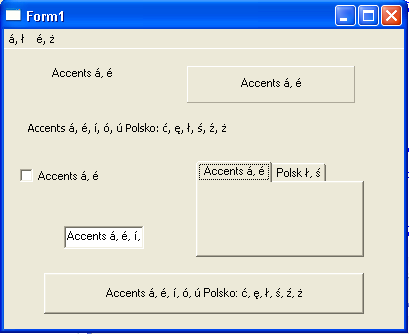 | |
| 480 | 477 | ||
| 481 | 478 | ## 日本語版特別情報 | |
| 482 | 479 | ||
| 483 | 480 | - 現在 TStringListUTF8 や TFileStreamUTF8 などの実装が進められています。興味のある人は、components\lazutils\lazutf8classes.pas や components\lazutils\lazutf8.pas を参照してください。 | |
| 484 | 481 | ||
| 485 | 482 | ただ、現実装にはやや不安な点があることも確かですので、ここにいくつか情報をあげておきます。 | |
| 486 | 483 | ||
| 487 | 484 | TStringListUTF8 を大文字小文字を区別しないでソートしたときの実装がやや不安定です。そこで、次のような TStringListUTF8_mod クラスを作成して使用するとよいかもしれません。 | |
| 488 | 485 | ||
| 489 | 486 | ``` pascal | |
| 490 | 487 | type | |
| 491 | 488 | TStringListUTF8_mod = class(TStringListUTF8) | |
| 492 | 489 | protected | |
| 493 | 490 | function DoCompareText(const s1,s2 : string) : PtrInt; override; | |
| 494 | 491 | public | |
| 495 | 492 | end; | |
| 496 | 493 | ||
| 497 | 494 | function TStringListUTF8_mod.DoCompareText(const s1, s2: string): PtrInt; | |
| 498 | 495 | begin | |
| 499 | 496 | if CaseSensitive then | |
| 500 | 497 | Result:= CompareStr(s1, s2) | |
| 501 | 498 | else | |
| 502 | 499 | Result:= WideCompareText(UTF8Decode(s1), UTF8Decode(s2)); | |
| 503 | 500 | end; | |
| 504 | 501 | ``` | |
| 505 | 502 | ||
| 506 | 503 | こちらの方が信頼性が高い可能性があります。特に Windows では API で処理するので、速度も速い可能性もあります(実装では、UTF8LowerCase を実行後に CompareStr を実行しているだけですので。速度的に改善すべき余地があると思うのですが外国の開発者の理解を得るのは容易ではないです)。 | |
| 507 | 504 | ||
| 508 | 505 | Windows 限定になりますが、次のコードも試す価値があります。 | |
| 509 | 506 | ||
| 510 | 507 | ``` pascal | |
| 511 | 508 | uses | |
| 512 | 509 | lazutf8, Windows; | |
| 513 | 510 | ||
| 514 | 511 | type | |
| 515 | 512 | TStringListUTF8_mod = class(TStringListUTF8) | |
| 516 | 513 | protected | |
| 517 | 514 | function DoCompareText(const s1,s2 : string) : PtrInt; override; | |
| 518 | 515 | public | |
| 519 | 516 | end; | |
| 520 | 517 | ||
| 521 | 518 | { | |
| 522 | 519 | Copyright(C)malcome Lazarusユーザーの方はこのコードを自由に使用して構いません。 | |
| 523 | 520 | } | |
| 524 | 521 | function _UTF8CompareText(const S1, S2: utf8string): Integer; | |
| 525 | 522 | var | |
| 526 | 523 | l1, l2: Integer; | |
| 527 | 524 | c1, c2: LongWord; | |
| 528 | 525 | p1, p2: PChar; | |
| 529 | 526 | begin | |
| 530 | 527 | p1 := @S1[1]; | |
| 531 | 528 | p2 := @S2[1]; | |
| 532 | 529 | if (p1 <> nil) and (p2 <> nil) then begin | |
| 533 | 530 | while (p1^ <> #0) and (p2^ <> #0) do begin | |
| 534 | 531 | c1:= UTF8CharacterToUnicode(p1, l1); | |
| 535 | 532 | c2:= UTF8CharacterToUnicode(p2, l2); | |
| 536 | 533 | if (c1 = 0) or (c2 = 0) then Break; | |
| 537 | 534 | if c1 <> c2 then begin | |
| 538 | 535 | c1:= LongWord(Windows.CharLowerW(PWideChar(c1))); | |
| 539 | 536 | c2:= LongWord(Windows.CharLowerW(PWideChar(c2))); | |
| 540 | 537 | if c1 <> c2 then Break; | |
| 541 | 538 | end; | |
| 542 | 539 | Inc(p1, l1); Inc(p2, l2); | |
| 543 | 540 | end; | |
| 544 | 541 | if (p1^ = #0) or (p2^ = #0) then | |
| 545 | 542 | Result := Byte(p1^) - Byte(p2^) | |
| 546 | 543 | else | |
| 547 | 544 | Result := c1 - c2 | |
| 548 | 545 | end else | |
| 549 | 546 | Result := p1 - p2; | |
| 550 | 547 | end; | |
| 551 | 548 | ||
| 552 | 549 | function TStringListUTF8_mod.DoCompareText(const s1, s2: string): PtrInt; | |
| 553 | 550 | begin | |
| 554 | 551 | if CaseSensitive then | |
| 555 | 552 | Result:= CompareStr(s1, s2) | |
| 556 | 553 | else | |
| 557 | 554 | Result:= _UTF8CompareText(s1, s2); | |
| 558 | 555 | end; | |
| 559 | 556 | ``` | |
| 560 | 557 | ||
| 561 | 558 | この方が、文字列すべてを操作対象としない分だけ速度が上がり、文字列リストが大きくなれば大きくなるほど、オリジナル版と顕著な速度差が生じると思われます。UTF8 を一度 UTF16 に変換しなくてもよいようにすればさらに速度が上がるとともに、Windows 以外の OS にも対応できるようになりますが、現時点ではソースが長くなりすぎますのでここには掲載できません。 | |
| 562 | 559 | ||
| 563 | 560 | さらに、アプリケーションを日本や英語圏など半角アルファベット以外の文字の大文字小文字についてはさほど気にしない国でしか使用しないのであるならば、 | |
| 564 | 561 | ||
| 565 | 562 | ``` pascal | |
| 566 | 563 | type | |
| 567 | 564 | TStringListUTF8_mod = class(TStringListUTF8) | |
| 568 | 565 | protected | |
| 569 | 566 | function DoCompareText(const s1,s2 : string) : PtrInt; override; | |
| 570 | 567 | public | |
| 571 | 568 | end; | |
| 572 | 569 | ||
| 573 | 570 | function TStringListUTF8_mod.DoCompareText(const s1, s2: string): PtrInt; | |
| 574 | 571 | begin | |
| 575 | 572 | if CaseSensitive then | |
| 576 | 573 | Result:= CompareStr(s1, s2) | |
| 577 | 574 | else | |
| 578 | 575 | Result:= CompareText(s1, s2); | |
| 579 | 576 | end; | |
| 580 | 577 | ``` | |
| 581 | 578 | ||
| 582 | 579 | とすることでかなり高速化できます(漢字などのUTF8コードがASCIIコードに重なることがないため、CompareText でもうまく処理できるため)。 | |
| 583 | 580 | ||
| 584 | 581 | 関連しますが、lazutf8.pas の UTF8LowerCase 関数、UTF8UpperCase 関数も、 | |
| 585 | 582 | ||
| 586 | 583 | ``` pascal | |
| 587 | 584 | function UTF8LowerCase(const s: String): String; | |
| 588 | 585 | begin | |
| 589 | 586 | Result := UTF8Encode(WideLowerCase(UTF8Decode(s))); | |
| 590 | 587 | end; | |
| 591 | 588 | ||
| 592 | 589 | function UTF8UpperCase(const s: String): String; | |
| 593 | 590 | begin | |
| 594 | 591 | Result := UTF8Encode(WideUpperCase(UTF8Decode(s))); | |
| 595 | 592 | end; | |
| 596 | 593 | ``` | |
| 597 | 594 | ||
| 598 | 595 | の方(LCLProc にもともとあったコードの方)が信頼性も速度も上かもしれません。仮にクライアントから問題を報告されても、「Windows API の仕様です」と答えられるというのもメリットかもしれません。 | |
| 599 | 596 | ||
| 600 | 597 | - Windowsにおいて、TPicture.LoadFromFile のように、内部で UTF8ToSys 関数をコールすることでユニコード対応を謳っているだけのものには、注意が必要です。Ansiに変換できない文字コードがUTF8に含まれていた場合、うまく処理できないからです(たとえば平仮名とハングルを混ぜたファイル名を使った場合や旧漢字体を使った場合など)。ParamStrUTF8 のように内部で SysToUTF8を使用しているでだけなのに、ユニコード対応を謳っているものも同様です。徐々に改善されてきているみたいですが、外国の開発者達の理解を得にくい問題ですので、アプリケーション作成の際に注意して対応してください。 | |
| 601 | 598 | ||
| 602 | 599 | ## 参考 | |
| 603 | 600 | ||
| 604 | 601 | - [[UTF-8]] - UTF-8文字列についての記述 | |
| 605 | 602 | ||
| 606 | 603 | --- | |
| 607 | 604 | *From the Free Pascal wiki, page "LCL Unicode Support/ja", as it stood on 2020-02-19 after a change by Trev, out of the wiki's dump of 2024-05-26. Copyright stays with the author who wrote it, according to the old wiki's [[Licensing]] page. If you have concerns about this material, [message the admin](/wiki-contact).* |