

LCL Internals: what changed
Revision 1 to 2. Removed lines have a minus sign; added lines have a plus sign.
| Old | New | Line | |
|---|---|---|---|
| 1 | 1 | ------------------------------------------------------------------------ | |
| 2 | 2 | ||
| 3 | 3 | > **Note:** This document is work in progress. You can help by writing sections of this document. If you cannot find the information you are looking for in this document, please add your question to the discussion page. This will help us to write documentation at a level that is neither too simple nor too complicated, and fully cover the areas that people want to know about. | |
| 4 | 4 | ||
| 5 | 5 | ------------------------------------------------------------------------ | |
| 6 | 6 | ||
| 7 | 7 | ## Internals of the LCL | |
| 8 | 8 | ||
| 9 | 9 | There is the LCL, and the "interface". The LCL is the part that is platform independent, and it resides in the lazarus/lcl/ directory. This directory contains mainly class definitions. Many of the different controls are actually implemented in the lazarus/lcl/include/ directory in the various .inc files. This is to find the implementation of a specific control, TCustomMemo for example, faster (which is in custommemo.inc). Every .inc starts with a line {%MainUnit ...} to define where it is included. | |
| 10 | 10 | ||
| 11 | 11 | Then there is the "interface" which lives in a subdirectory of the lazarus/lcl/interfaces/ directory. The gtk interface is in gtk/, win32 in win32/, etc. They all have a Interfaces unit, which is used by the lcl and creates the main interface object. Usually the main interface object is defined in XXint.pp (win32int.pp), and implemented in various inc files, XXobject.inc, for the interface specific methods, XXwinapi.inc for winapi implementation methods, XXlistsl.inc for implementation of the stringlist used by the TComboBox, TListBox, and other such controls, XXcallback.inc for handling of widget events and taking appropriate action to notify the LCL. | |
| 12 | 12 | ||
| 13 | 13 | Every control has a WidgetSetClass property which is of the 'mirror' class in the interfaces directory, for example: mirror of TCustomEdit is TWSCustomEdit, which methods are implemented by TWin32WSCustomEdit in win32wsstdctrls. This is the way the LCL communicates with the interface, and how it lets the interface do things. | |
| 14 | 14 | ||
| 15 | 15 | Communication of interface back to LCL is mostly done by sending messages, usually 'DeliverMessage' which calls TControl.Perform(\<message_id\>, wparam, lparam) with wparam and lparam being the extra info for the message. | |
| 16 | 16 | ||
| 17 | 17 | ### Pie and RadialPie | |
| 18 | 18 | ||
| 19 | 19 | The LCLIntf unit contains two functions to draw pie-shapes: | |
| 20 | 20 | ||
| 21 | 21 | `function `[[doc:lcl/lclintf/pie.html|Pie]]`(DC: HDC; x1, y1, x2, y2, sx, sy, ex, ey: Integer): Boolean;`\ | |
| 22 | 22 | `function `[[doc:lcl/lclintf/radialpie.html|RadialPie]]`(DC: HDC; x1, y1, x2, y2, Angle1, Angle2: Integer): Boolean; ` | |
| 23 | 23 | ||
| 24 | 24 | The Pie function uses a two points (sx,sy) and (ex,ey) to indicate start and end of the arc. RadialPie uses Angles to indicate start and end of the arc. | |
| 25 | 25 | ||
| 26 | 26 | Pie calls TWidgetSet.Pie and RadialPie calls TWidgetSet.RadialPie. The default implementation of TWidgetSet.Pie is to convert the parameters to angles and to call TWidgetSet.RadialPie. TWidgetSet.RadialPie creates an array of points for the arc and calls TWidgetSet.Polygon. | |
| 27 | 27 | ||
| 28 | 28 | The win32 widgetset overrides TWidgetSet.Pie to call the Windows Pie function directly. | |
| 29 | 29 | ||
| 30 | 30 | > **Note:** in older versions of Lazarus there existed RadialPie with angles which did the same as the current RadialPie and RadialPie, which does the same as our Pie. Those functions have been removed in Lazarus 0.9.21. | |
| 31 | 31 | ||
| 32 | 32 | ### Adding a new unit to the LCL | |
| 33 | 33 | ||
| 34 | 34 | First add the new unit name into allclunits.pp. | |
| 35 | 35 | ||
| 36 | 36 | To make sure the unit is registered in the components palette see the files RegisterLCL.pas and pkgfileslcl.inc, they are located in lazarus/packager. | |
| 37 | 37 | ||
| 38 | 38 | ## How to create a new Widgetset | |
| 39 | 39 | ||
| 40 | 40 | This is a step-by-step tutorial of developing a new [[Widgetset|widgetset]]. It is based on my experience creating the basics of the new qt4 interface. | |
| 41 | 41 | ||
| 42 | 42 | To start with, why would someone want to add an Widgetset? The answer is to be able to port existing lazarus software to more platforms, without modifying their code. | |
| 43 | 43 | ||
| 44 | 44 | Now, let´s write the widgetset. First of all, you need to have pascal bindings for the widget and know how to use it. Normally this is not hard. A few hours doing basic tutorials available on the internet should be enougth to get started. If the bindings do not exist already, you need to create them. If the tutorials are on another language, translate them to pascal and make them work. | |
| 45 | 45 | ||
| 46 | 46 | Now, for Qt I utilized Den Jean qt4 bindings for pascal, and created a very basic Qt program using them: | |
| 47 | 47 | ||
| 48 | 48 | ``` pascal | |
| 49 | 49 | program qttest; | |
| 50 | 50 | ||
| 51 | 51 | uses qt4; | |
| 52 | 52 | ||
| 53 | 53 | var | |
| 54 | 54 | App: QApplicationH; | |
| 55 | 55 | MainWindow: QMainWindowH; | |
| 56 | 56 | begin | |
| 57 | 57 | App := QApplication_Create(@argc,argv); | |
| 58 | 58 | ||
| 59 | 59 | MainWindow := QMainWindow_Create; | |
| 60 | 60 | ||
| 61 | 61 | QWidget_show(MainWindow); | |
| 62 | 62 | ||
| 63 | 63 | QApplication_Exec; | |
| 64 | 64 | end. | |
| 65 | 65 | ``` | |
| 66 | 66 | ||
| 67 | 67 | The above project compiles and creates a qt4 program. Now we will use its code to write a new widgetset. After we are done, the lazarus program below will compile fine into a qt4 software: | |
| 68 | 68 | ||
| 69 | 69 | ``` pascal | |
| 70 | 70 | program qttest; | |
| 71 | 71 | ||
| 72 | 72 | {$mode objfpc}{$H+} | |
| 73 | 73 | ||
| 74 | 74 | uses | |
| 75 | 75 | Interfaces, Classes, Forms, | |
| 76 | 76 | { Add your units here } | |
| 77 | 77 | qtform; | |
| 78 | 78 | ||
| 79 | 79 | begin | |
| 80 | 80 | Application.Initialize; | |
| 81 | 81 | Application.CreateForm(TForm1, Form1); | |
| 82 | 82 | Application.Run; | |
| 83 | 83 | end. | |
| 84 | 84 | ``` | |
| 85 | 85 | ||
| 86 | 86 | Where the form is maintained by Lazarus IDE and designed visually. | |
| 87 | 87 | ||
| 88 | 88 | The first thing to do on a new widgetset is add an empty skeleton for it. Very early development widgetsets, like qt and carbon, can serve as an skeleton. | |
| 89 | 89 | ||
| 90 | 90 | Looking at the files on the many widgets you can see the first file to be called by the lcl: Interfaces.pas This file just calls another called QtInt.pas or similar. QtInt.pas has the code for the TWidgetSet class, which we must implement. On an empty skeleton you can see that the class has various functions it must implement: | |
| 91 | 91 | ||
| 92 | 92 | ``` pascal | |
| 93 | 93 | TQtWidgetSet = Class(TWidgetSet) | |
| 94 | 94 | private | |
| 95 | 95 | App: QApplicationH; | |
| 96 | 96 | public | |
| 97 | 97 | {$I qtwinapih.inc} | |
| 98 | 98 | {$I qtlclintfh.inc} | |
| 99 | 99 | public | |
| 100 | 100 | // Application | |
| 101 | 101 | procedure AppInit(var ScreenInfo: TScreenInfo); override; | |
| 102 | 102 | procedure AppRun(const ALoop: TApplicationMainLoop); override; | |
| 103 | 103 | procedure AppWaitMessage; override; | |
| 104 | 104 | procedure AppProcessMessages; override; | |
| 105 | 105 | procedure AppTerminate; override; | |
| 106 | 106 | procedure AppMinimize; override; | |
| 107 | 107 | procedure AppBringToFront; override; | |
| 108 | 108 | public | |
| 109 | 109 | constructor Create; | |
| 110 | 110 | destructor Destroy; override; | |
| 111 | 111 | function DCGetPixel(CanvasHandle: HDC; X, Y: integer): TGraphicsColor; override; | |
| 112 | 112 | procedure DCSetPixel(CanvasHandle: HDC; X, Y: integer; AColor: TGraphicsColor); override; | |
| 113 | 113 | procedure DCRedraw(CanvasHandle: HDC); override; | |
| 114 | 114 | procedure SetDesigning(AComponent: TComponent); override; | |
| 115 | 115 | ||
| 116 | 116 | function InitHintFont(HintFont: TObject): Boolean; override; | |
| 117 | 117 | ||
| 118 | 118 | // create and destroy | |
| 119 | 119 | function CreateComponent(Sender : TObject): THandle; override; // deprecated | |
| 120 | 120 | function CreateTimer(Interval: integer; TimerFunc: TFNTimerProc): integer; override; | |
| 121 | 121 | function DestroyTimer(TimerHandle: integer): boolean; override; | |
| 122 | 122 | end; | |
| 123 | 123 | ``` | |
| 124 | 124 | ||
| 125 | 125 | ### How to implement a new windowed component | |
| 126 | 126 | ||
| 127 | 127 | Windowed components are all descendents from TWinControl. Those controls have a Handle and thus, should be created by the Widgetset. It's easy to add new windowed components to a widgetset. | |
| 128 | 128 | ||
| 129 | 129 | Let's say you want to add TQtWSCustomEdit to Qt Widgetset. To start with TCustomEdit is a descendent of TWinControl and is located on the StdCtrls unit. | |
| 130 | 130 | ||
| 131 | 131 | Now, go to QtWSStrCtrls unit and look for the declaration of TQtWSCustomEdit. | |
| 132 | 132 | ||
| 133 | 133 | ``` pascal | |
| 134 | 134 | ||
| 135 | 135 | TQtWSCustomEdit = class(TWSCustomEdit) | |
| 136 | 136 | private | |
| 137 | 137 | protected | |
| 138 | 138 | public | |
| 139 | 139 | end; | |
| 140 | 140 | ``` | |
| 141 | 141 | ||
| 142 | 142 | Add static methods that are declared on TWSCustomEdit and override them. The code should now look like this: | |
| 143 | 143 | ||
| 144 | 144 | ``` pascal | |
| 145 | 145 | ||
| 146 | 146 | TQtWSCustomEdit = class(TWSCustomEdit) | |
| 147 | 147 | private | |
| 148 | 148 | protected | |
| 149 | 149 | public | |
| 150 | 150 | class function CreateHandle(const AWinControl: TWinControl; | |
| 151 | 151 | const AParams: TCreateParams): HWND; override; | |
| 152 | 152 | class procedure DestroyHandle(const AWinControl: TWinControl); override; | |
| 153 | 153 | { class function GetSelStart(const ACustomEdit: TCustomEdit): integer; override; | |
| 154 | 154 | class function GetSelLength(const ACustomEdit: TCustomEdit): integer; override; | |
| 155 | 155 | ||
| 156 | 156 | class procedure SetCharCase(const ACustomEdit: TCustomEdit; NewCase: TEditCharCase); override; | |
| 157 | 157 | class procedure SetEchoMode(const ACustomEdit: TCustomEdit; NewMode: TEchoMode); override; | |
| 158 | 158 | class procedure SetMaxLength(const ACustomEdit: TCustomEdit; NewLength: integer); override; | |
| 159 | 159 | class procedure SetPasswordChar(const ACustomEdit: TCustomEdit; NewChar: char); override; | |
| 160 | 160 | class procedure SetReadOnly(const ACustomEdit: TCustomEdit; NewReadOnly: boolean); override; | |
| 161 | 161 | class procedure SetSelStart(const ACustomEdit: TCustomEdit; NewStart: integer); override; | |
| 162 | 162 | class procedure SetSelLength(const ACustomEdit: TCustomEdit; NewLength: integer); override; | |
| 163 | 163 | ||
| 164 | 164 | class procedure GetPreferredSize(const AWinControl: TWinControl; | |
| 165 | 165 | var PreferredWidth, PreferredHeight: integer); override;} | |
| 166 | 166 | end; | |
| 167 | 167 | ``` | |
| 168 | 168 | ||
| 169 | 169 | The commented part of the code are procedures you need to implement for TCustomEdit to be fully functional, but just CreateHandle and DestroyHandle should be enough for it to be show on the form and be editable, so it fits our needs in this article. | |
| 170 | 170 | ||
| 171 | 171 | Hit CTRL+SHIFT+C to code complete and the implement CreateHandle and DestroyHandle. In the case of Qt4 the code will be like this: | |
| 172 | 172 | ||
| 173 | 173 | ``` pascal | |
| 174 | 174 | { TQtWSCustomEdit } | |
| 175 | 175 | ||
| 176 | 176 | class function TQtWSCustomEdit.CreateHandle(const AWinControl: TWinControl; | |
| 177 | 177 | const AParams: TCreateParams): HWND; | |
| 178 | 178 | var | |
| 179 | 179 | Widget: QWidgetH; | |
| 180 | 180 | Str: WideString; | |
| 181 | 181 | begin | |
| 182 | 182 | // Creates the widget | |
| 183 | 183 | WriteLn('Calling QTextDocument_create'); | |
| 184 | 184 | Str := WideString((AWinControl as TCustomMemo).Lines.Text); | |
| 185 | 185 | Widget := QTextEdit_create(@Str, QWidgetH(AWinControl.Parent.Handle)); | |
| 186 | 186 | ||
| 187 | 187 | // Sets it's initial properties | |
| 188 | 188 | QWidget_setGeometry(Widget, AWinControl.Left, AWinControl.Top, | |
| 189 | 189 | AWinControl.Width, AWinControl.Height); | |
| 190 | 190 | ||
| 191 | 191 | QWidget_show(Widget); | |
| 192 | 192 | ||
| 193 | 193 | Result := THandle(Widget); | |
| 194 | 194 | end; | |
| 195 | 195 | ||
| 196 | 196 | class procedure TQtWSCustomEdit.DestroyHandle(const AWinControl: TWinControl); | |
| 197 | 197 | begin | |
| 198 | 198 | QTextEdit_destroy(QTextEditH(AWinControl.Handle)); | |
| 199 | 199 | end; | |
| 200 | 200 | ``` | |
| 201 | 201 | ||
| 202 | 202 | Now uncomment the like "RegisterWSComponent(TCustomEdit, TQtWSCustomEdit);" on the bottom of the unit and that's it! | |
| 203 | 203 | ||
| 204 | 204 | You can now drop a TCustomEdit on the bottom of a form and expect it to work. :^) | |
| 205 | 205 | ||
| 206 | 206 | ### Implementing TBitmap | |
| 207 | 207 | ||
| 208 | 208 | To implement TBitmap it is necessary to understand TRawImage and TLazIntfImage as explained here: [[Developing with Graphics|Developing with Graphics#Working with TLazIntfImage.2C TRawImage and TLazCanvas]] | |
| 209 | 209 | ||
| 210 | 210 | So, let's say you want to compile the following code: | |
| 211 | 211 | ||
| 212 | 212 | ``` pascal | |
| 213 | 213 | procedure TMyForm.HandleOnPaint(Sender: TObject); | |
| 214 | 214 | var | |
| 215 | 215 | Bitmap: TBitmap; | |
| 216 | 216 | begin | |
| 217 | 217 | Bitmap := TBitmap.Create; | |
| 218 | 218 | try | |
| 219 | 219 | Bitmap.LoadFromFile('myfile.bmp'); | |
| 220 | 220 | Canvas.Draw(0, 0, Bitmap); | |
| 221 | 221 | finally | |
| 222 | 222 | Bitmap.Free; | |
| 223 | 223 | end; | |
| 224 | 224 | end; | |
| 225 | 225 | ``` | |
| 226 | 226 | ||
| 227 | 227 | Below is the order on which functions from the widgetset interface are called when executing that code: | |
| 228 | 228 | ||
| 229 | 229 | 1 - BeginPaint | |
| 230 | 230 | ||
| 231 | 231 | This will be called only if the OnPaint event sends zero as the DC for the paint event | |
| 232 | 232 | ||
| 233 | 233 | 2 - GetDC(0); | |
| 234 | 234 | ||
| 235 | 235 | Just create a device context. | |
| 236 | 236 | ||
| 237 | 237 | 3 - TCDWidgetSet.RawImage_QueryDescription | |
| 238 | 238 | ||
| 239 | 239 | The default implementation of this routine is good for most widgetsets | |
| 240 | 240 | ||
| 241 | 241 | 4 - TCDWidgetSet.RawImage_CreateBitmaps | |
| 242 | 242 | ||
| 243 | 243 | Here you need to create a native image object and load it from RawData.Data where the information is stored based on your description of the pixel format on item 2. | |
| 244 | 244 | ||
| 245 | 245 | 5 - CreateCompatibleDC(0) | |
| 246 | 246 | ||
| 247 | 247 | This creates a temporary DC just to store the image, but at this point there is no information about the image so at this point this DC is really dummy | |
| 248 | 248 | ||
| 249 | 249 | 6 - SelectObject | |
| 250 | 250 | ||
| 251 | 251 | With the image as the object to be selected and the DC just created above as target DC. | |
| 252 | 252 | ||
| 253 | 253 | 7 - StretchMaskBlt | |
| 254 | 254 | ||
| 255 | 255 | Finally the drawing function! DestDC is the DC allocated on BeginPaint. | |
| 256 | 256 | ||
| 257 | 257 | 8 - EndPaint | |
| 258 | 258 | ||
| 259 | 259 | Again, not always utilized. | |
| 260 | 260 | ||
| 261 | 261 | ### TBitmap.LoadFromDevice for screenshot taking | |
| 262 | 262 | ||
| 263 | 263 | It is recomended that you first implement TBitmap before trying this step. | |
| 264 | 264 | ||
| 265 | 265 | On LCL you can use the following code takes a screenshot from the entire screen and paints it on the canvas: | |
| 266 | 266 | ||
| 267 | 267 | ``` pascal | |
| 268 | 268 | var | |
| 269 | 269 | ScreenDC: HDC; | |
| 270 | 270 | Bitmap: TBitmap; | |
| 271 | 271 | begin | |
| 272 | 272 | Bitmap := TBitmap.Create; | |
| 273 | 273 | try | |
| 274 | 274 | ScreenDC := GetDC(0); | |
| 275 | 275 | Bitmap.LoadFromDevice(ScreenDC); | |
| 276 | 276 | ReleaseDC(0, ScreenDC); | |
| 277 | 277 | Canvas.Draw(0, 0, Bitmap); | |
| 278 | 278 | finally | |
| 279 | 279 | Bitmap.Free; | |
| 280 | 280 | end; | |
| 281 | 281 | end; | |
| 282 | 282 | ``` | |
| 283 | 283 | ||
| 284 | 284 | If you already implemented TBitmap, there are only 2 new functions to be implemented for LoadFromDevice: GetDeviceSize and GetRawImageFromDevice | |
| 285 | 285 | ||
| 286 | 286 | Below is a big trace, covering all widgetset functions being called on a OnPaint event that takes a screenshot and paints it on the screen. This trace was taken with Qt widgetset, and may have some imperfections. The Handle numbers should be used to check which object is being utilized on the functions. | |
| 287 | 287 | ||
| 288 | 288 | ` [WinAPI BeginPaint] Result=-1220713544`\ | |
| 289 | 289 | ` [WinAPI GetClientBounds]`\ | |
| 290 | 290 | ` [WinAPI SetWindowOrgEx] DC: -1220713544 NewX: 0 NewY: 0` | |
| 291 | 291 | ||
| 292 | 292 | \<syntaxhighlight lang="pascal\> //Enters on Paint event | |
| 293 | 293 | ||
| 294 | 294 | Bitmap := TBitmap.Create; try | |
| 295 | 295 | ||
| 296 | 296 | ` ScreenDC := GetDC(0);` | |
| 297 | 297 | ||
| 298 | - | ||
| 299 | - | ||
| 300 | 298 | ` [WinAPI GetDC] hWnd: 0 Result: -1220712920` | |
| 301 | 299 | ||
| 302 | 300 | ``` pascal | |
| 303 | 301 | Bitmap.LoadFromDevice(ScreenDC); | |
| 304 | 302 | ``` | |
| 305 | 303 | ||
| 306 | 304 | ` [WinAPI GetDeviceSize]`\ | |
| 307 | 305 | ` [WinAPI GetRawImageFromDevice] SrcDC: -1220712920 SrcWidth: 0 SrcHeight: 0`\ | |
| 308 | 306 | ` [WinAPI CreateBitmapFromRawImage] Width:1024 Height:768 DataSize: 3145728 CreateMask: False Bitmap:-1220746696`\ | |
| 309 | 307 | ` [WinAPI GetObject] GDIObj: -1220746696 Result=84 ObjectType=Image` | |
| 310 | 308 | ||
| 311 | 309 | ``` pascal | |
| 312 | 310 | ReleaseDC(0, ScreenDC); | |
| 313 | 311 | ``` | |
| 314 | 312 | ||
| 315 | 313 | ` [WinAPI ReleaseDC] hWnd: 0 DC: -1220712920` | |
| 316 | 314 | ||
| 317 | 315 | ``` pascal | |
| 318 | 316 | Canvas.Draw(0, 0, Bitmap); | |
| 319 | 317 | ``` | |
| 320 | 318 | ||
| 321 | 319 | ` [WinAPI CreateCompatibleDC] DC: 0`\ | |
| 322 | 320 | ` [WinAPI GetDC] hWnd: 0 Result: -1220712920`\ | |
| 323 | 321 | ` [WinAPI SelectObject] DC=-1220712920 GDIObj=-1220746696 Result=0 ObjectType=Image`\ | |
| 324 | 322 | ` [WinAPI StretchMaskBlt] DestDC:-1220713544 SrcDC:-1220712920 Image:137185120 X:0 Y:0 W:1024 H:768 XSrc:0 YSrc:0 WSrc:1024 HSrc:768` | |
| 325 | 323 | ||
| 326 | 324 | ``` pascal | |
| 327 | 325 | finally | |
| 328 | 326 | Bitmap.Free; | |
| 329 | 327 | end; | |
| 330 | 328 | ``` | |
| 331 | 329 | ||
| 332 | 330 | ` [WinAPI SelectObject] DC=-1220712920 GDIObj=0 Invalid GDI Object`\ | |
| 333 | 331 | ` [WinAPI DeleteObject] GDIObject: -1220746696 Result=False ObjectType=Image` | |
| 334 | 332 | ||
| 335 | 333 | Now exited the OnPaint event | |
| 336 | 334 | ||
| 337 | 335 | ` [WinAPI DeleteObject] GDIObject: 0`\ | |
| 338 | 336 | ` [WinAPI DeleteObject] GDIObject: 0`\ | |
| 339 | 337 | ` [WinAPI DeleteObject] GDIObject: 0`\ | |
| 340 | 338 | ` [WinAPI DeleteObject] GDIObject: 0`\ | |
| 341 | 339 | ` [WinAPI SetWindowOrgEx] DC: -1220713544 NewX: -152 NewY: -246`\ | |
| 342 | 340 | ` [WinAPI DeleteObject] GDIObject: 0`\ | |
| 343 | 341 | ` [WinAPI DeleteObject] GDIObject: 0`\ | |
| 344 | 342 | ` [WinAPI DeleteObject] GDIObject: 0`\ | |
| 345 | 343 | ` [WinAPI DeleteObject] GDIObject: 0` | |
| 346 | 344 | ||
| 347 | 345 | ``` pascal | |
| 348 | 346 | TWidgetSet.InitializeCriticalSection | |
| 349 | 347 | TWidgetSet.EnterCriticalSection | |
| 350 | 348 | ``` | |
| 351 | 349 | ||
| 352 | 350 | ` [WinAPI SelectObject] DC=-1220713544 GDIObj=0 Invalid GDI Object`\ | |
| 353 | 351 | ` [WinAPI MoveToEx] DC:-1220713544 X:0 Y:0`\ | |
| 354 | 352 | ` [WinAPI SelectObject] DC=-1220713544 GDIObj=-1220746760 Result=-1220746856 ObjectType=Brush`\ | |
| 355 | 353 | ` [WinAPI SelectObject] DC=-1220713544 GDIObj=-1220746856 Result=-1220746856 ObjectType=Brush` | |
| 356 | 354 | ||
| 357 | 355 | ``` pascal | |
| 358 | 356 | TWidgetSet.LeaveCriticalSection | |
| 359 | 357 | ``` | |
| 360 | 358 | ||
| 361 | 359 | ` [WinAPI SetWindowOrgEx] DC: -1220713544 NewX: 0 NewY: 0`\ | |
| 362 | 360 | ` [WinAPI EndPaint] Handle: -1220611768 PS.HDC: -1220713544` | |
| 363 | 361 | ||
| 364 | 362 | ### Implementing drawing in the OnPaint event of a form or another control | |
| 365 | 363 | ||
| 366 | 364 | For drawing in the OnPaint event of a form, the event itself comes from the underlaying widgetset library. The LCL interface should handle this event and create an appropriate DC object on the event handler and then call LCLSendPaintMsg. Besides that one should also implement the corresponding drawing methods, such as Rectangle or ExtTextOut. Pen, Brush and Font related routines might also be useful. | |
| 367 | 365 | ||
| 368 | 366 | Here is the OnPaint event handler from the Cocoa widgetset which shows how it calls LCLSentPaintMsg: | |
| 369 | 367 | ||
| 370 | 368 | ``` pascal | |
| 371 | 369 | procedure TLCLCommonCallback.Draw(ControlContext: NSGraphicsContext; | |
| 372 | 370 | const bounds, dirty:NSRect); | |
| 373 | 371 | var | |
| 374 | 372 | struct : TPaintStruct; | |
| 375 | 373 | begin | |
| 376 | 374 | if not Assigned(Context) then Context:=TCocoaContext.Create; | |
| 377 | 375 | ||
| 378 | 376 | Context.ctx:=ControlContext; | |
| 379 | 377 | if Context.InitDraw(Round(bounds.size.width), Round(bounds.size.height)) then | |
| 380 | 378 | begin | |
| 381 | 379 | FillChar(struct, SizeOf(TPaintStruct), 0); | |
| 382 | 380 | struct.hdc := HDC(Context); | |
| 383 | 381 | {$IFDEF VerboseWinAPI} | |
| 384 | 382 | DebugLn(Format('[TLCLCommonCallback.Draw] OnPaint event started context: %x', [HDC(context)])); | |
| 385 | 383 | {$ENDIF} | |
| 386 | 384 | LCLSendPaintMsg(Target, HDC(Context), @struct); | |
| 387 | 385 | {$IFDEF VerboseWinAPI} | |
| 388 | 386 | DebugLn('[TLCLCommonCallback.Draw] OnPaint event ended'); | |
| 389 | 387 | {$ENDIF} | |
| 390 | 388 | end; | |
| 391 | 389 | end; | |
| 392 | 390 | ``` | |
| 393 | 391 | ||
| 394 | 392 | And a list of WinAPI routines which were called when running this event: | |
| 395 | 393 | ||
| 396 | 394 | [TCocoaWidgetSet.GetDC] hWnd: 0 Result: 12400C0 | |
| 397 | 395 | [TLCLCommonCallback.Draw] OnPaint event started context: 1240340 | |
| 398 | 396 | TCocoaWidgetSet.CreatePenIndirect | |
| 399 | 397 | TCocoaWidgetSet.SelectObject DC: 1240340 GDIObj: 10EC460 | |
| 400 | 398 | TCocoaWidgetSet.SelectObject Result: 0 | |
| 401 | 399 | TCocoaWidgetSet.SelectObject DC: 1240340 GDIObj: 10EBF00 | |
| 402 | 400 | TCocoaWidgetSet.SelectObject Result: 0 | |
| 403 | 401 | [TCocoaWidgetSet.Rectangle] DC: 1240340 X1: 100 Y1: 100 X2: 200 Y2: 200 | |
| 404 | 402 | TCocoaWidgetSet.SelectObject DC: 1240340 GDIObj: 10EC4A0 | |
| 405 | 403 | TCocoaWidgetSet.SelectObject Result: 0 | |
| 406 | 404 | [TCocoaWidgetSet.GetTextExtentPoint] DC: 1240340 Str: Some text Count: 9 | |
| 407 | 405 | [TCocoaWidgetSet.GetTextExtentPoint] Size: 65,17 | |
| 408 | 406 | [TLCLCommonCallback.Draw] OnPaint event ended | |
| 409 | 407 | ||
| 410 | 408 | ### Implementing TLabel | |
| 411 | 409 | ||
| 412 | 410 | Implementing TLabel is particularly hard, despite it being such a basic component, because it requires that almost all painting be implemented. TLabel is not a windowed control, instead it depends on paint messages to be drawn directly into the form canvas. | |
| 413 | 411 | ||
| 414 | 412 | Before trying to get TLabel working it is recomended to test if drawing functions such as Rectangle work inside a form's OnPaint event. | |
| 415 | 413 | ||
| 416 | 414 | Several WinAPI methods need to be implemented, particularly: | |
| 417 | 415 | ||
| 418 | 416 | **Device Context Methods** | |
| 419 | 417 | ||
| 420 | 418 | BeginPaint, GetDC, EndPaint, ReleaseDC, CreateCompatibleDC | |
| 421 | 419 | ||
| 422 | 420 | see [[Device Contexts and GDI objects in the LCL interfaces]] | |
| 423 | 421 | ||
| 424 | 422 | **GDI Objects Methods** | |
| 425 | 423 | ||
| 426 | 424 | SelectObject, DeleteObject, CreateFontIndirect, CreateFontIndirectEx | |
| 427 | 425 | ||
| 428 | 426 | **Miscelaneous functions** | |
| 429 | 427 | ||
| 430 | 428 | InvalidateRect, GetClientBounds, SetWindowOrgEx | |
| 431 | 429 | ||
| 432 | 430 | **Text drawing Methods** | |
| 433 | 431 | ||
| 434 | 432 | DrawText. Instead of implementing DrawText one can also use the default TWidgetSet.DrawText, like the Carbon and Cocoa widgetsets do. But in this case it is necessary that one implements at least GetTextMetrics, GetTextExtentPoint and ExtTextOut. Without GetTextMetrics a form with a label will crash because the autosize will not be able to calculate the appropriate size for the label. | |
| 435 | 433 | ||
| 436 | 434 | **Region functions to determine if the control is behind another** | |
| 437 | 435 | ||
| 438 | 436 | CombineRgn, CreateRectRgn, GetClipRGN, RectVisible | |
| 439 | 437 | ||
| 440 | 438 | Below is the order in which paint procedures are called on a form with only one TLabel, to better understand the painting sequence: | |
| 441 | 439 | ||
| 442 | 440 | 1 - GetDC is called once on software startup with hWnd = 0 | |
| 443 | 441 | ||
| 444 | 442 | 2 - The form is shown | |
| 445 | 443 | ||
| 446 | 444 | 3 - GetDC is called again (this wouldn't happen without the label). A few font related functions are called, as well as DrawText with CalcRect set to True to calculate the size of the label. | |
| 447 | 445 | ||
| 448 | 446 | 4 - InvalidateRect is called on the form canvas | |
| 449 | 447 | ||
| 450 | 448 | 5 - Control goes back to the operating system until a paint message comes from the widgetset | |
| 451 | 449 | ||
| 452 | 450 | 6 - BeginPaint is called, and at this point code on OnPaint event of the form will be executed | |
| 453 | 451 | ||
| 454 | 452 | 7 - DrawText is called again with CalcRect set to false | |
| 455 | 453 | ||
| 456 | 454 | 8 - The Painting ends. | |
| 457 | 455 | ||
| 458 | 456 | ### Implementing visibility for forms and controls and window state | |
| 459 | 457 | ||
| 460 | 458 | The code that controls visibility is split between visibility for forms, and for controls | |
| 461 | 459 | ||
| 462 | 460 | **Visibility for forms and window state** | |
| 463 | 461 | ||
| 464 | 462 | This part also controls the state of the window (minimized, maximized or normal). It is implemented as a copy of the Windows API function ShowWindow, so you must implemente the TMyWidgetset.ShowWindow on the file mywinapi.inc Don´t forget to also add a header to the file mywinapih.inc | |
| 465 | 463 | ||
| 466 | 464 | Below is code that implements this function on the Qt widgetset. It should be very easy to understand, copy and implement on your own widgetset. You can also take a look how Gtk implements this. On Windows, the Windows API is called directly, of course, so there is no code to look at. | |
| 467 | 465 | ||
| 468 | 466 | ``` pascal | |
| 469 | 467 | {------------------------------------------------------------------------------ | |
| 470 | 468 | function ShowWindow(hWnd: HWND; nCmdShow: Integer): Boolean; | |
| 471 | 469 | ||
| 472 | 470 | nCmdShow: | |
| 473 | 471 | SW_SHOWNORMAL, SW_MINIMIZE, SW_SHOWMAXIMIZED | |
| 474 | 472 | ------------------------------------------------------------------------------} | |
| 475 | 473 | function TQtWidgetSet.ShowWindow(hWnd: HWND; nCmdShow: Integer): Boolean; | |
| 476 | 474 | var | |
| 477 | 475 | Widget: QWidgetH; | |
| 478 | 476 | begin | |
| 479 | 477 | {$ifdef VerboseQtWinAPI} | |
| 480 | 478 | WriteLn('WinAPI ShowWindow'); | |
| 481 | 479 | {$endif} | |
| 482 | 480 | ||
| 483 | 481 | Result := False; | |
| 484 | 482 | ||
| 485 | 483 | Widget := QWidgetH(hWnd); | |
| 486 | 484 | ||
| 487 | 485 | // if Widget = nil then RaiseException('TQtWidgetSet.ShowWindow hWnd is nil'); | |
| 488 | 486 | ||
| 489 | 487 | case nCmdShow of | |
| 490 | 488 | ||
| 491 | 489 | SW_SHOW: QWidget_setVisible(Widget, True); | |
| 492 | 490 | ||
| 493 | 491 | SW_SHOWNORMAL: QWidget_showNormal(Widget); | |
| 494 | 492 | ||
| 495 | 493 | SW_MINIMIZE: QWidget_setWindowState(Widget, QtWindowMinimized); | |
| 496 | 494 | ||
| 497 | 495 | SW_SHOWMINIMIZED: QWidget_showMinimized(Widget); | |
| 498 | 496 | ||
| 499 | 497 | SW_SHOWMAXIMIZED: QWidget_showMaximized(Widget); | |
| 500 | 498 | ||
| 501 | 499 | SW_HIDE: QWidget_setVisible(Widget, False); | |
| 502 | 500 | ||
| 503 | 501 | end; | |
| 504 | 502 | ||
| 505 | 503 | Result := True; | |
| 506 | 504 | end; | |
| 507 | 505 | ``` | |
| 508 | 506 | ||
| 509 | 507 | **Visibility for controls** | |
| 510 | 508 | ||
| 511 | 509 | For controls inside a form you need to implement TMyWSWinControl.ShowHide class function that resides on the TMyWSWinControl class on the file mywscontrols.pp | |
| 512 | 510 | ||
| 513 | 511 | Remember that most controls are descendent from TWinControl, so implementing this function there will guarantee that the Visible property is implemented for all standard controls that have it. Below is a sample code for Qt widgetset. | |
| 514 | 512 | ||
| 515 | 513 | ``` pascal | |
| 516 | 514 | {------------------------------------------------------------------------------ | |
| 517 | 515 | Method: TQtWSWinControl.ShowHide | |
| 518 | 516 | Params: AWinControl - the calling object | |
| 519 | 517 | ||
| 520 | 518 | Returns: Nothing | |
| 521 | 519 | ||
| 522 | 520 | Shows or hides a widget. | |
| 523 | 521 | ------------------------------------------------------------------------------} | |
| 524 | 522 | class procedure TQtWSWinControl.ShowHide(const AWinControl: TWinControl); | |
| 525 | 523 | begin | |
| 526 | 524 | if AWinControl = nil then exit; | |
| 527 | 525 | ||
| 528 | 526 | if not AWinControl.HandleAllocated then exit; | |
| 529 | 527 | ||
| 530 | 528 | if AWinControl.HandleObjectShouldBeVisible then | |
| 531 | 529 | QWidget_setVisible(TQtWidget(AWinControl.Handle).Widget, True) | |
| 532 | 530 | else QWidget_setVisible(TQtWidget(AWinControl.Handle).Widget, False); | |
| 533 | 531 | end; | |
| 534 | 532 | ``` | |
| 535 | 533 | ||
| 536 | 534 | ### Implementing TStrings based Components | |
| 537 | 535 | ||
| 538 | 536 | Some components use a TStrings to store the information they display, such as: TCustomMemo, TCustomListBox and TCustomComboBox. | |
| 539 | 537 | ||
| 540 | 538 | To implement those it is not enougth to only implement their functions on the TQtCustomMemo class for example. One of the functions to implement will be called GetStrings, which looks like this: | |
| 541 | 539 | ||
| 542 | 540 | ``` pascal | |
| 543 | 541 | class function TQtWSCustomListBox.GetStrings(const ACustomListBox: TCustomListBox): TStrings; | |
| 544 | 542 | var | |
| 545 | 543 | ListWidgetH: QListWidgetH; | |
| 546 | 544 | begin | |
| 547 | 545 | ListWidgetH := QListWidgetH((TQtWidget(ACustomListBox.Handle).Widget)); | |
| 548 | 546 | Result := TQtListStrings.Create(ListWidgetH, ACustomListBox); | |
| 549 | 547 | end; | |
| 550 | 548 | ``` | |
| 551 | 549 | ||
| 552 | 550 | This function must return a TStrings descendent designed to detect when strings are added to or removed from the string list and to send this information to the widgetset to update the control. For example, the following declaration shows what TQtListStrings looks like: | |
| 553 | 551 | ||
| 554 | 552 | ``` pascal | |
| 555 | 553 | ||
| 556 | 554 | TQtListStrings = class(TStrings) | |
| 557 | 555 | private | |
| 558 | 556 | FListChanged: Boolean; // StringList and QtListWidget out of sync | |
| 559 | 557 | FStringList: TStringList; // Holds the items to show | |
| 560 | 558 | FQtListWidget: QListWidgetH; // Qt Widget | |
| 561 | 559 | FOwner: TWinControl; // Lazarus Control Owning ListStrings | |
| 562 | 560 | FUpdating: Boolean; // We're changing Qt Widget | |
| 563 | 561 | procedure InternalUpdate; | |
| 564 | 562 | procedure ExternalUpdate(var Astr: TStringList; Clear: Boolean = True); | |
| 565 | 563 | procedure IsChanged; // OnChange triggered by program action | |
| 566 | 564 | protected | |
| 567 | 565 | function GetTextStr: string; override; | |
| 568 | 566 | function GetCount: integer; override; | |
| 569 | 567 | function Get(Index : Integer) : string; override; | |
| 570 | 568 | //procedure SetSorted(Val : boolean); virtual; | |
| 571 | 569 | public | |
| 572 | 570 | constructor Create(ListWidgetH : QListWidgetH; TheOwner: TWinControl); | |
| 573 | 571 | destructor Destroy; override; | |
| 574 | 572 | procedure Assign(Source : TPersistent); override; | |
| 575 | 573 | procedure Clear; override; | |
| 576 | 574 | procedure Delete(Index : integer); override; | |
| 577 | 575 | procedure Insert(Index : integer; const S: string); override; | |
| 578 | 576 | procedure SetText(TheText: PChar); override; | |
| 579 | 577 | //procedure Sort; virtual; | |
| 580 | 578 | public | |
| 581 | 579 | //property Sorted: boolean read FSorted write SetSorted; | |
| 582 | 580 | property Owner: TWinControl read FOwner; | |
| 583 | 581 | function ListChangedHandler(Sender: QObjectH; Event: QEventH): Boolean; cdecl; | |
| 584 | 582 | end; | |
| 585 | 583 | ``` | |
| 586 | 584 | ||
| 587 | 585 | You can see its implementation in the qtobjects.pas unit of the qt interface | |
| 588 | 586 | ||
| 589 | 587 | ### Implementing Menus | |
| 590 | 588 | ||
| 591 | 589 | Menus are available on the LCL to create main menus or popup menus. A TMenu is the owner of a larger menu structure with many items. Items can have subitems, and don't need extra TMenus. | |
| 592 | 590 | ||
| 593 | 591 | Also remember that on LCL the handle is only created when needed and at that time all properties of the controls are already initialized. This helps a lot on widgetsets where depending on the properties of a menu item it can be of one class or another, like Qt. | |
| 594 | 592 | ||
| 595 | 593 | The following things need to be implemented in order for the menus to work: | |
| 596 | 594 | ||
| 597 | 595 | 1\) All methods on the QtWSMenus unit, which will implement menu creation and modification | |
| 598 | 596 | ||
| 599 | 597 | 2\) function TWinCEWidgetSet.SetMenu(AWindowHandle: HWND; AMenuHandle: HMENU): Boolean; from the wincewinapi.inc file, which will implement support for a main menu associated with a window. | |
| 600 | 598 | ||
| 601 | 599 | #### Menu Creation Order | |
| 602 | 600 | ||
| 603 | 601 | One important thing to understand when implementing menus, is in which order they are created. For example, we want to create the following menu structure: | |
| 604 | 602 | ||
| 605 | - | ||
| 606 | - | ||
| 607 | - | ||
| 608 | - | ||
| 603 | + | 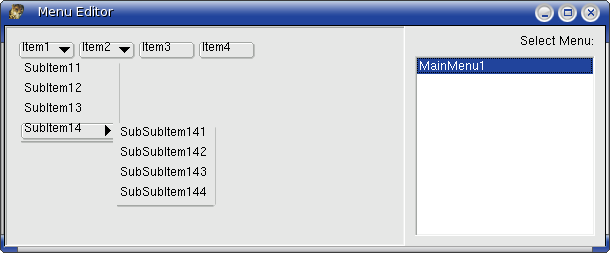 | |
| 609 | 604 | ||
| 610 | 605 | And when our application is executed, there will be a 'Creating MenuItem' message with the caption of the menu each time TQtWSMenuItem.CreateHandle is called, and a 'Creating Menu' message with the name of the menu (TMenu descendents don't have a caption), each time TQtWSMenu.CreateHandle is called. | |
| 611 | 606 | ||
| 612 | 607 | Here is the resulting output of such software: | |
| 613 | 608 | ||
| 614 | 609 | Creating Menu. Name: MainMenu1 | |
| 615 | 610 | Creating MenuItem: Item1 Parent=Menu.Items : TMenuItem | |
| 616 | 611 | Creating MenuItem: SubItem11 Parent=Item1 : TMenuItem | |
| 617 | 612 | Creating MenuItem: SubItem12 Parent=Item1 : TMenuItem | |
| 618 | 613 | Creating MenuItem: SubItem13 Parent=Item1 : TMenuItem | |
| 619 | 614 | Creating MenuItem: SubItem14 Parent=Item1 : TMenuItem | |
| 620 | 615 | Creating MenuItem: SubSubItem141 Parent=SubItem14 : TMenuItem | |
| 621 | 616 | Creating MenuItem: SubSubItem142 Parent=SubItem14 : TMenuItem | |
| 622 | 617 | Creating MenuItem: SubSubItem143 Parent=SubItem14 : TMenuItem | |
| 623 | 618 | Creating MenuItem: SubSubItem144 Parent=SubItem14 : TMenuItem | |
| 624 | 619 | Creating MenuItem: Item2 Parent=Menu.Items : TMenuItem | |
| 625 | 620 | Creating MenuItem: SubItem21 Parent=Item2 : TMenuItem | |
| 626 | 621 | Creating MenuItem: SubItem22 Parent=Item2 : TMenuItem | |
| 627 | 622 | Creating MenuItem: SubItem23 Parent=Item2 : TMenuItem | |
| 628 | 623 | Creating MenuItem: Item3 Parent=Menu.Items : TMenuItem | |
| 629 | 624 | Creating MenuItem: Item4 Parent=Menu.Items : TMenuItem | |
| 630 | 625 | ||
| 631 | 626 | For all MenuItems one can use GetParentMenu to get their parent owner: Menu (TMainMenu). | |
| 632 | 627 | ||
| 633 | 628 | ### Control enabling/disabling | |
| 634 | 629 | ||
| 635 | 630 | The current way to set control enabling/disabling is by implementing the winapi EnableWindow. This API should work generically on any control. It should enable/disable mouse and keyboard input for the specified window or control, but also mark it as uneditable by the user, by making it greyed for example. | |
| 636 | 631 | ||
| 637 | 632 | ``` pascal | |
| 638 | 633 | {------------------------------------------------------------------------------ | |
| 639 | 634 | Method: EnableWindow | |
| 640 | 635 | Params: HWnd - handle to window | |
| 641 | 636 | BEnable - whether to enable the window | |
| 642 | 637 | Returns: If the window was previously disabled | |
| 643 | 638 | ||
| 644 | 639 | Enables or disables mouse and keyboard input to the specified window or | |
| 645 | 640 | control. | |
| 646 | 641 | ------------------------------------------------------------------------------} | |
| 647 | 642 | function TWin32WidgetSet.EnableWindow(hWnd: HWND; bEnable: Boolean): Boolean; | |
| 648 | 643 | ``` | |
| 649 | 644 | ||
| 650 | 645 | ### Return Control Text (Captions) | |
| 651 | 646 | ||
| 652 | 647 | The method to return control text is GetText(). | |
| 653 | 648 | ||
| 654 | 649 | However, the method doesn't always have to return text (even if it can). It should only return text (by assigning AText value and setting result to TRUE), if a user can modify the text on the control itself (typically by typing it in by keyboard or some other manipulation). | |
| 655 | 650 | ||
| 656 | 651 | If the text itself is considered to be "static" then method can return FALSE at all times. | |
| 657 | 652 | ||
| 658 | 653 | LCL caches the text most of the time, and thus if control returns false, it would pull the cached value. | |
| 659 | 654 | ||
| 660 | 655 | ``` pascal | |
| 661 | 656 | {------------------------------------------------------------------------------ | |
| 662 | 657 | Function: TWSWinControl.GetText | |
| 663 | 658 | Params: Sender: The control to retrieve the text from | |
| 664 | 659 | Returns: the requested text | |
| 665 | 660 | ||
| 666 | 661 | Retrieves the text from a control. | |
| 667 | 662 | ------------------------------------------------------------------------------} | |
| 668 | 663 | class function TWSWinControl.GetText(const AWinControl: TWinControl; var AText: String): Boolean; | |
| 669 | 664 | ``` | |
| 670 | 665 | ||
| 671 | 666 | ### Shaped Windows | |
| 672 | 667 | ||
| 673 | 668 | Windows can be shaped based on a TBitmap or on a TRegion. The region is the visible part. | |
| 674 | 669 | ||
| 675 | 670 | To implement shaped windows based on a TBitmap, implement TWSWinControl.setShape | |
| 676 | 671 | ||
| 677 | 672 | To implement shaped windows based on a TRegion implement LCLIntf.SetWindowRgn | |
| 678 | 673 | ||
| 679 | 674 | See also: [[LCL Tips|LCL Tips#Creating a non-rectangular window or control]] | |
| 680 | 675 | ||
| 681 | 676 | ### System colors | |
| 682 | 677 | ||
| 683 | 678 | Some color constants are actually system colors, like clBtnFace, clForm, clWindow, etc, etc. | |
| 684 | 679 | ||
| 685 | 680 | To implement support for system colors the WinAPI routine GetSysColor should be implemented: | |
| 686 | 681 | ||
| 687 | 682 | `function GetSysColor(nIndex: Integer): DWORD; override;` | |
| 688 | 683 | ||
| 689 | 684 | And here is a snip of the color constants which should be supported. Check LCLType for the latest values: | |
| 690 | 685 | ||
| 691 | 686 | ``` pascal | |
| 692 | 687 | //============================================== | |
| 693 | 688 | // API system Color constants pbd | |
| 694 | 689 | // note these are usually shown ORed with | |
| 695 | 690 | // $80000000 as these would have interfered with | |
| 696 | 691 | // other MS color enumerations | |
| 697 | 692 | // GetSysColor and SetSysColor expects the values | |
| 698 | 693 | // below | |
| 699 | 694 | //============================================== | |
| 700 | 695 | ||
| 701 | 696 | type | |
| 702 | 697 | COLORREF = LongInt; | |
| 703 | 698 | TColorRef = COLORREF; | |
| 704 | 699 | ||
| 705 | 700 | const | |
| 706 | 701 | CLR_INVALID = TColorRef($FFFFFFFF); | |
| 707 | 702 | ||
| 708 | 703 | COLOR_SCROLLBAR = 0; | |
| 709 | 704 | COLOR_BACKGROUND = 1; | |
| 710 | 705 | COLOR_ACTIVECAPTION = 2; | |
| 711 | 706 | COLOR_INACTIVECAPTION = 3; | |
| 712 | 707 | COLOR_MENU = 4; | |
| 713 | 708 | COLOR_WINDOW = 5; | |
| 714 | 709 | COLOR_WINDOWFRAME = 6; | |
| 715 | 710 | COLOR_MENUTEXT = 7; | |
| 716 | 711 | COLOR_WINDOWTEXT = 8; | |
| 717 | 712 | COLOR_CAPTIONTEXT = 9; | |
| 718 | 713 | COLOR_ACTIVEBORDER = 10; | |
| 719 | 714 | COLOR_INACTIVEBORDER = 11; | |
| 720 | 715 | COLOR_APPWORKSPACE = 12; | |
| 721 | 716 | COLOR_HIGHLIGHT = 13; | |
| 722 | 717 | COLOR_HIGHLIGHTTEXT = 14; | |
| 723 | 718 | COLOR_BTNFACE = 15; | |
| 724 | 719 | COLOR_BTNSHADOW = 16; | |
| 725 | 720 | COLOR_GRAYTEXT = 17; | |
| 726 | 721 | COLOR_BTNTEXT = 18; | |
| 727 | 722 | COLOR_INACTIVECAPTIONTEXT = 19; | |
| 728 | 723 | COLOR_BTNHIGHLIGHT = 20; | |
| 729 | 724 | COLOR_3DDKSHADOW = 21; | |
| 730 | 725 | COLOR_3DLIGHT = 22; | |
| 731 | 726 | COLOR_INFOTEXT = 23; | |
| 732 | 727 | COLOR_INFOBK = 24; | |
| 733 | 728 | // PBD: 25 is unassigned in all the docs I can find | |
| 734 | 729 | // if someone finds what this is supposed to be then fill it in | |
| 735 | 730 | // note defaults below, and cl[ColorConst] in graphics | |
| 736 | 731 | COLOR_HOTLIGHT = 26; | |
| 737 | 732 | COLOR_GRADIENTACTIVECAPTION = 27; | |
| 738 | 733 | COLOR_GRADIENTINACTIVECAPTION = 28; | |
| 739 | 734 | COLOR_MENUHILIGHT = 29; | |
| 740 | 735 | COLOR_MENUBAR = 30; | |
| 741 | 736 | ||
| 742 | 737 | COLOR_FORM = 31; | |
| 743 | 738 | ||
| 744 | 739 | COLOR_ENDCOLORS = COLOR_FORM; | |
| 745 | 740 | ||
| 746 | 741 | COLOR_DESKTOP = COLOR_BACKGROUND; | |
| 747 | 742 | COLOR_3DFACE = COLOR_BTNFACE; | |
| 748 | 743 | COLOR_3DSHADOW = COLOR_BTNSHADOW; | |
| 749 | 744 | COLOR_3DHIGHLIGHT = COLOR_BTNHIGHLIGHT; | |
| 750 | 745 | COLOR_3DHILIGHT = COLOR_BTNHIGHLIGHT; | |
| 751 | 746 | COLOR_BTNHILIGHT = COLOR_BTNHIGHLIGHT; | |
| 752 | 747 | ||
| 753 | 748 | MAX_SYS_COLORS = COLOR_ENDCOLORS; | |
| 754 | 749 | SYS_COLOR_BASE = TColorRef($80000000); | |
| 755 | 750 | ``` | |
| 756 | 751 | ||
| 757 | 752 | ### ShowMessage | |
| 758 | 753 | ||
| 759 | 754 | These standard dialogs are implemented purely in the LCL in the following places: | |
| 760 | 755 | ||
| 761 | 756 | - Class TPromptDialog file lcl/include/promptdialog.inc | |
| 762 | 757 | ||
| 763 | 758 | ### SpinEdit | |
| 764 | 759 | ||
| 765 | 760 | Both TFloatSpinEdit and TSpinEdit are implemented in the class TWSFloatSpinEdit. | |
| 766 | 761 | ||
| 767 | 762 | ### Clipboard | |
| 768 | 763 | ||
| 769 | 764 | Clipboard support is implemented in lclintf by implementing Windows API routines. The routines are: | |
| 770 | 765 | ||
| 771 | 766 | ``` pascal | |
| 772 | 767 | function ClipboardFormatToMimeType(FormatID: TClipboardFormat): string; {$IFDEF IF_BASE_MEMBER}virtual;{$ENDIF} | |
| 773 | 768 | function ClipboardGetData(ClipboardType: TClipboardType; | |
| 774 | 769 | FormatID: TClipboardFormat; Stream: TStream): boolean; {$IFDEF IF_BASE_MEMBER}virtual;{$ENDIF} | |
| 775 | 770 | // ! ClipboardGetFormats: List will be created. You must free it yourself with FreeMem(List) ! | |
| 776 | 771 | function ClipboardGetFormats(ClipboardType: TClipboardType; | |
| 777 | 772 | var Count: integer; var List: PClipboardFormat): boolean; {$IFDEF IF_BASE_MEMBER}virtual;{$ENDIF} | |
| 778 | 773 | function ClipboardGetOwnerShip(ClipboardType: TClipboardType; | |
| 779 | 774 | OnRequestProc: TClipboardRequestEvent; FormatCount: integer; | |
| 780 | 775 | Formats: PClipboardFormat): boolean; {$IFDEF IF_BASE_MEMBER}virtual;{$ENDIF} | |
| 781 | 776 | function ClipboardRegisterFormat(const AMimeType: string): TClipboardFormat; {$IFDEF IF_BASE_MEMBER}virtual;{$ENDIF} | |
| 782 | 777 | ``` | |
| 783 | 778 | ||
| 784 | 779 | Sequence of calls during program startup: | |
| 785 | 780 | ||
| 786 | 781 | ``` pascal | |
| 787 | 782 | TCocoaWidgetSet.ClipboardRegisterFormat AMimeType=image/bmp Result=51027040 | |
| 788 | 783 | TCocoaWidgetSet.ClipboardRegisterFormat AMimeType=image/delphi.bitmap Result=0 | |
| 789 | 784 | TCocoaWidgetSet.ClipboardRegisterFormat AMimeType=image/xpm Result=0 | |
| 790 | 785 | TCocoaWidgetSet.ClipboardRegisterFormat AMimeType=image/png Result=0 | |
| 791 | 786 | TCocoaWidgetSet.ClipboardRegisterFormat AMimeType=image/jpeg Result=0 | |
| 792 | 787 | ``` | |
| 793 | 788 | ||
| 794 | 789 | Sequence of calls during "Caption := Clipboard.AsText": | |
| 795 | 790 | ||
| 796 | 791 | ``` pascal | |
| 797 | 792 | TCocoaWidgetSet.ClipboardRegisterFormat AMimeType=text/plain Result=51026976 | |
| 798 | 793 | TCocoaWidgetSet.ClipboardGetData ClipboardType=clipboard FormatID: 51026976 | |
| 799 | 794 | ``` | |
| 800 | 795 | ||
| 801 | 796 | ### TSpeedButton | |
| 802 | 797 | ||
| 803 | 798 | This control is a TGraphicControl descendent, so it has no handle and paints itself. To retain native look, it uses the function ThemeServices.DrawElement(Details.Element=teButton) to paint itself, so implement this function to have this control working. Naturally, lot's of other DC, WindowOrg, Text Drawing and Painting routines will have to be working, as explained for TLabel. | |
| 804 | 799 | ||
| 805 | 800 | ### TRadioButton and TCheckButton | |
| 806 | 801 | ||
| 807 | 802 | **Messages:** | |
| 808 | 803 | ||
| 809 | 804 | Basically the Widgetset must do: | |
| 810 | 805 | ||
| 811 | 806 | - Send LM_CHANGE when a radio button is unchecked/checked (LCL will take care if OnClick will be called or not) | |
| 812 | 807 | - Dont send LM_CHANGE when TWSCustomCheckBox.SetState is called (SetChecked) | |
| 813 | 808 | ||
| 814 | 809 | See also this bug report: <http://bugs.freepascal.org/view.php?id=13939> | |
| 815 | 810 | ||
| 816 | 811 | ### FullScreen support | |
| 817 | 812 | ||
| 818 | 813 | FullScreen is implemented as a Windows state wsFullScreen, and as such is implemented in LCLIntf.ShowWindow where the constant SW_SHOWFULLSCREEN should be handled. | |
| 819 | 814 | ||
| 820 | 815 | ## An example of how the LCL interfaces work | |
| 821 | 816 | ||
| 822 | 817 | Below is a simple example. Suppose you have developed a trayicon component. How would you implement it in the LCL to work correctly on the various different supported platforms? | |
| 823 | 818 | ||
| 824 | 819 | You would need to generate the following files: | |
| 825 | 820 | ||
| 826 | 821 | \trayicon.pas | |
| 827 | 822 | ||
| 828 | 823 | \wstrayicon.pas | |
| 829 | 824 | ||
| 830 | 825 | \gtk\gtkwstrayicon.pas | |
| 831 | 826 | ||
| 832 | 827 | \gtk\trayintf.pas | |
| 833 | 828 | ||
| 834 | 829 | \win32\win32wstrayicon.pas | |
| 835 | 830 | ||
| 836 | 831 | \win32\trayintf.pas | |
| 837 | 832 | ||
| 838 | 833 | Providing separate wsXXX.pas and \\\$(LCLWidgetType)\XXXintf.pas files avoids the need for ifdefs altogether. You will need to add as a unit path \$(LCLWidgetType) to the XXXintf.pas file in order initialize the correct trayintf.pas file, which in turn initializes the correct WS Tray class. | |
| 839 | 834 | ||
| 840 | 835 | Inside trayicon.pas you include wstrayicon. Derive your main class from an LCL class, and only use wstrayicon in its implementation. All LCL classes that communicate with a widgetset, must be derived from [[doc:/lcl/lclclasses/tlclcomponent.html|TLCLComponent]] declared in the [[doc:/lcl/lclclasses|LCLClasses]] unit. | |
| 841 | 836 | ||
| 842 | 837 | ``` pascal | |
| 843 | 838 | unit TrayIcon; | |
| 844 | 839 | ||
| 845 | 840 | interface | |
| 846 | 841 | ||
| 847 | 842 | type | |
| 848 | 843 | TTrayIcon = class(TLCLComponent) | |
| 849 | 844 | public | |
| 850 | 845 | procedure DoTray; | |
| 851 | 846 | end; | |
| 852 | 847 | ||
| 853 | 848 | implementation | |
| 854 | 849 | ||
| 855 | 850 | uses wstrayicon; | |
| 856 | 851 | ||
| 857 | 852 | procedure TTrayIcon.DoTray; | |
| 858 | 853 | begin | |
| 859 | 854 | // Call wstrayicon | |
| 860 | 855 | end; | |
| 861 | 856 | ||
| 862 | 857 | end. | |
| 863 | 858 | ``` | |
| 864 | 859 | ||
| 865 | 860 | in trayintf you use gtkwstrayicon or win32trayicon depending on which trayintf file it is. | |
| 866 | 861 | ||
| 867 | 862 | in wstrayicon you create a class like so: | |
| 868 | 863 | ||
| 869 | 864 | ``` pascal | |
| 870 | 865 | unit WSTrayIcon; | |
| 871 | 866 | ||
| 872 | 867 | uses WSLCLClasses, Controls, TrayIcon; // and other things as well | |
| 873 | 868 | ||
| 874 | 869 | TWSTrayIconClass = class of TWSTrayIcon; | |
| 875 | 870 | TWSTrayIcon = class(TWSWinControl); | |
| 876 | 871 | public | |
| 877 | 872 | class procedure EmbedTrayIcon(const ATrayIcon: TCustomTrayIcon); | |
| 878 | 873 | virtual; // these must all be virtual and class procedures!! | |
| 879 | 874 | class procedure RemoveTrayIcon(const ATrayIcon: TCustomTrayIcon); virtual; | |
| 880 | 875 | .... | |
| 881 | 876 | end; | |
| 882 | 877 | ... | |
| 883 | 878 | ||
| 884 | 879 | implementation | |
| 885 | 880 | ||
| 886 | 881 | procedure TWSTrayIcon.EmbedTrayIcon(const ATrayIcon: TCustomTrayIcon); | |
| 887 | 882 | begin | |
| 888 | 883 | //do nothing | |
| 889 | 884 | end; | |
| 890 | 885 | ||
| 891 | 886 | procedure TWSTrayIcon.RemoveTrayIcon(const ATrayIcon: TCustomTrayIcon); | |
| 892 | 887 | begin | |
| 893 | 888 | //do nothing | |
| 894 | 889 | end; | |
| 895 | 890 | ``` | |
| 896 | 891 | ||
| 897 | 892 | now in gtkwstrayicon.pas do this: | |
| 898 | 893 | ||
| 899 | 894 | ``` pascal | |
| 900 | 895 | uses WSTrayIcon, WSLCLClasses, Controls, TrayIcon, gtk, gdk; | |
| 901 | 896 | ||
| 902 | 897 | TGtkWSTrayIcon = class(TWSTrayIcon); | |
| 903 | 898 | private | |
| 904 | 899 | class function FindSystemTray(const ATrayIcon: TCustomTrayIcon): | |
| 905 | 900 | TWindow; virtual; | |
| 906 | 901 | public | |
| 907 | 902 | class procedure EmbedTrayIcon(const ATrayIcon: TCustomTrayIcon); override; | |
| 908 | 903 | class procedure RemoveTrayIcon(const ATrayIcon: TCustomTrayIcon); | |
| 909 | 904 | override; | |
| 910 | 905 | class function CreateHandle(const AWinControl: TWinControl; const | |
| 911 | 906 | AParams: TCreateParams): HWND; override; | |
| 912 | 907 | .... | |
| 913 | 908 | end; | |
| 914 | 909 | ... | |
| 915 | 910 | ||
| 916 | 911 | implementation | |
| 917 | 912 | ||
| 918 | 913 | procedure TGtkWSTrayIcon.CreateHandle(const AWinControl: TWinControl; | |
| 919 | 914 | const AParams: TCreateParams): HWND; | |
| 920 | 915 | var | |
| 921 | 916 | WidgetInfo: PWidgetInfo; | |
| 922 | 917 | begin | |
| 923 | 918 | ||
| 924 | 919 | Result := gtk_plug_new; | |
| 925 | 920 | WidgetInfo := CreateWidgetInfo(AWinControl, Result); // it's something | |
| 926 | 921 | like this anyway | |
| 927 | 922 | TGtkWSWincontrolClass(WidgetSetClass).SetCallbacks(AWinControl); | |
| 928 | 923 | // and more stuff | |
| 929 | 924 | end; | |
| 930 | 925 | ||
| 931 | 926 | function TGtkWSTrayIcon.FindSystemTray(const ATrayIcon: | |
| 932 | 927 | TCustomTrayIcon): TWindow; | |
| 933 | 928 | begin | |
| 934 | 929 | // do something | |
| 935 | 930 | end; | |
| 936 | 931 | ||
| 937 | 932 | procedure TGtkWSTrayIcon.EmbedTrayIcon(const ATrayIcon: TCustomTrayIcon); | |
| 938 | 933 | var | |
| 939 | 934 | SystemTray: TWindow; | |
| 940 | 935 | begin | |
| 941 | 936 | SystemTray := FindSystemTray(ATrayIcon); | |
| 942 | 937 | //do something | |
| 943 | 938 | end; | |
| 944 | 939 | ||
| 945 | 940 | procedure TGtkWSTrayIcon.RemoveTrayIcon(const ATrayIcon: TCustomTrayIcon); | |
| 946 | 941 | begin | |
| 947 | 942 | //do something | |
| 948 | 943 | end; | |
| 949 | 944 | ||
| 950 | 945 | ...... | |
| 951 | 946 | ||
| 952 | 947 | initialization | |
| 953 | 948 | ||
| 954 | 949 | RegisterWSComponent(TCustomTrayIcon, TGtkWSTrayIcon); //this is very | |
| 955 | 950 | important!!! | |
| 956 | 951 | ||
| 957 | 952 | end. | |
| 958 | 953 | ``` | |
| 959 | 954 | ||
| 960 | 955 | then finally in trayicon.pas you go as normal | |
| 961 | 956 | ||
| 962 | 957 | ``` pascal | |
| 963 | 958 | uses WSTrayIcon; //etc. you DON'T include GtkWSTrayIcon here! | |
| 964 | 959 | ||
| 965 | 960 | TCustomTrayIcon = class(TWinControl) | |
| 966 | 961 | public | |
| 967 | 962 | procedure EmbedControl; | |
| 968 | 963 | .... | |
| 969 | 964 | end; | |
| 970 | 965 | ||
| 971 | 966 | ... | |
| 972 | 967 | procedure TTrayIcon.EmbedControl; | |
| 973 | 968 | begin | |
| 974 | 969 | TWSTrayIconClass(WidgetSetClass).EmbedControl(Self); | |
| 975 | 970 | ||
| 976 | 971 | end; | |
| 977 | 972 | ``` | |
| 978 | 973 | ||
| 979 | 974 | ## Minimum Toolkit versions | |
| 980 | 975 | ||
| 981 | 976 | | Lazarus version | Min. FPC | Min. Gtk 2 | Min. Qt 4 | Min. Windows | Min. Windows CE | Min. macOS (Carbon) | Min. macOS (Cocoa) | Min. Req. of LCL-CustomDrawn | | |
| 982 | 977 | |----|----|----|----|----|----|----|----|----| | |
| 983 | 978 | | 0.9.24 | 2.2.0 | 2.6+ | 4.2+ | Windows 98+ | Recommended 4.0+ | 10.4 | N/A | N/A | | |
| 984 | 979 | | 0.9.26 | 2.2.2 | 2.6+ | 4.3+ | Windows 98+ | Recommended 4.0+ | 10.4 | N/A | N/A | | |
| 985 | 980 | | 0.9.28 | 2.2.4 | 2.8+ | 4.5+ | Windows 98+ | Recommended 4.0+ | 10.4 | N/A | N/A | | |
| 986 | 981 | | 0.9.30 | 2.4.0 | 2.8+ | 4.5+ | Windows 98+ | Recommended 5.0+ | 10.4 | N/A | N/A | | |
| 987 | 982 | | 0.9.31 | 2.4.4 | 2.8+ | 4.5+ | Windows 98+ | Recommended 5.0+ | 10.4 | 10.6 | Android 2.2+, Windows 2000+, X11, Snow Leopard 10.6+ | | |
| 988 | 983 | | 1.2.6 | 2.6.4 | 2.8+ | 4.5+* | Windows 98+ | Recommended 5.0+ | 10.4 | 10.6 | Android 2.2+, Windows 2000+, X11, Snow Leopard 10.6+ | | |
| 989 | 984 | ||
| 990 | 985 | - \- Actually 4.5.0 ...4.8.4 with pre-built Qt4Pas.dll, 4.8.5+ requires a different Qt4Pas.dll | |
| 991 | 986 | ||
| 992 | 987 | See Also: [[Installing Lazarus on macOS|FPC + Lazarus Compatibility Matrix]]. | |
| 993 | 988 | ||
| 994 | 989 | --- | |
| 995 | 990 | *From the Free Pascal wiki, page "LCL Internals", as it stood on 2021-12-09 after a change by Trev, out of the wiki's dump of 2024-05-26. Copyright stays with the author who wrote it, according to the old wiki's [[Licensing]] page. If you have concerns about this material, [message the admin](/wiki-contact).* |