

LCL AutoSizing: what changed
Revision 0 to 1. Removed lines have a minus sign; added lines have a plus sign.
Title: LCL AutoSizing
| Old | New | Line | |
|---|---|---|---|
| 1 | + | ## Overview / Terminology | |
| 2 | + | ||
| 3 | + | This page explains the LCL auto sizing algorithm. AutoSizing means here: Automatic resizing and repositioning of LCL controls. | |
| 4 | + | ||
| 5 | + | If you are merely interested in how to use the AutoSize properties, see [[Autosize / Layout]]. | |
| 6 | + | ||
| 7 | + | ## Properties | |
| 8 | + | ||
| 9 | + | The following properties defines the behavior of the LCL autosizing: | |
| 10 | + | ||
| 11 | + | - Current Left,Top,Width,Height,ClientWidth,ClientHeight | |
| 12 | + | - Loaded Left,Top,Width,Height,ClientWidth,ClientHeight | |
| 13 | + | - AutoSize | |
| 14 | + | - Anchors | |
| 15 | + | - AnchorSides | |
| 16 | + | - Align | |
| 17 | + | - BorderSpacing | |
| 18 | + | - ChildSizing | |
| 19 | + | - Constraints | |
| 20 | + | ||
| 21 | + | For Delphi compatibility the LCL supports the method AdjustClientRect which is an extension to the ChildSizing.LeftRightSpacing/TopBottomSpacing properties. | |
| 22 | + | ||
| 23 | + | ## Order | |
| 24 | + | ||
| 25 | + | ### Overview | |
| 26 | + | ||
| 27 | + | The autosizing works in several phases: | |
| 28 | + | ||
| 29 | + | - DisableAutosizing. In the first phase the application changes properties, creates or deletes controls. The whole form is locked. No Autosizing is done, no bounds are sent to the widgetset. | |
| 30 | + | - EnableAutoSizing. The parent form DoAllAutoSize is called. | |
| 31 | + | - All needed handles are created recursively by TWinControl.DoAllAutoSize. They are not yet made visible. | |
| 32 | + | - TControl.DoAllAutoSize computes the bounds by calling DoAutoSize for all controls. It does that in a loop until no bound changes. | |
| 33 | + | - The bounds are sent to the widgetset (TWinControl.RealizeBoundsRecursive calling RealizeBounds). | |
| 34 | + | - The handles are made visible (if HandleObjectShouldBeVisible and not Showing then). | |
| 35 | + | ||
| 36 | + | Basically the AutoSizing properties work in this order: | |
| 37 | + | ||
| 38 | + | - The constraints are applied to every step. | |
| 39 | + | - First comes the Align in order alTop, alBottom, alLeft, alRight and finally alClient. For example alLeft has 3 aligned sides and one free side. The free side is handled by the below rules. BorderSpacing is applied to aligned sides. alCustom and alNone have no aligned sides. | |
| 40 | + | - Next comes ChildSizing. If ChildSizing.Layout is not cclNone then all child controls with Align=alNone, Anchors=\[akLeft,akTop\] and no AnchorSide controls are resized/repositioned. These child controls are called on this page "non aligned controls". | |
| 41 | + | - Next comes AutoSize. If ChildSizing.Layout is cclNone then all "non aligned controls" are moved to the top, left and the control is shrunken or enlarged to fit around all its children (not only the "non aligned controls"). | |
| 42 | + | - Next comes the Anchors. Only those sides are anchored, which were not handled by Align (e.g. akRight on alLeft). If an AnchorSide control is set the side will be aligned to the side of the other control. Otherwise the default anchor rules apply, which are mostly similar to the Delphi ones. | |
| 43 | + | - every change of bounds triggers an OnResize/OnChangeBounds event, which may be used by the application to do arbitrary things. | |
| 44 | + | ||
| 45 | + | ### Algorithm for Align and Anchors | |
| 46 | + | ||
| 47 | + | The main method is TWinControl.AlignControls. | |
| 48 | + | ||
| 49 | + | 1. init RemainingClientRect to ClientRect and RemainingBorderSpace to Rect(0,0,0,0) | |
| 50 | + | 2. call AdjustClient to adjust RemainingClientRect | |
| 51 | + | 3. apply ChildSizing.LeftRightSpacing,ChildSizing.TopBottomSpacing | |
| 52 | + | 4. call DoAlign with alTop,alBottom,alLeft,alRight,alClient,alCustom,alNone | |
| 53 | + | 1. DoAlign collects child controls with this Align value and call for each such control DoPosition | |
| 54 | + | 1. DoPosition calculates the new Left,Top,Width,Height | |
| 55 | + | ||
| 56 | + | ### DoAutoSize | |
| 57 | + | ||
| 58 | + | This is called by DoAllAutoSize and should not be called by the application. Applications should call AdjustSize and/or InvalidatePreferredSize. | |
| 59 | + | ||
| 60 | + | If it is not overriden the normal TWinControl.DoAutoSize does the following, when AutoSize=true: | |
| 61 | + | ||
| 62 | + | It will move "non aligned controls" - child controls with default anchors (Anchors=\[akLeft,akTop\],Align=alNone). It moves all of them the same amount, so their total bounding box fits left and top. The spacing of BorderSpacing and ChildSizing is considered. | |
| 63 | + | ||
| 64 | + | Before the move, there is space to the left and above the buttons: 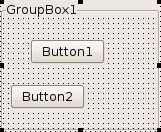 | |
| 65 | + | ||
| 66 | + | After the move: 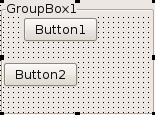 | |
| 67 | + | ||
| 68 | + | Then the preferred size of the control is computed. This calculation considers child controls, Align, Anchors, Constraints, ChildSizing.Layout and the other LCL properties. | |
| 69 | + | ||
| 70 | + | The control is resized: 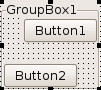 | |
| 71 | + | ||
| 72 | + | See also: [[Autosize / Layout|Align and parent AutoSize]] | |
| 73 | + | ||
| 74 | + | ### DisableAutoSizing/EnableAutosizing | |
| 75 | + | ||
| 76 | + | see [[Autosize / Layout|here]]. | |
| 77 | + | ||
| 78 | + | ### Differences from Delphi | |
| 79 | + | ||
| 80 | + | - Delphi has no BorderSpacing, AnchorSides, ChildSizing. | |
| 81 | + | - Delphi does not support AutoSize and Align on all controls. | |
| 82 | + | - Delphi's AutoSize algorithm does not support nested autosized controls with the Align property. For example a Panel1 with Align=alTop in a Panel2 and both panels have AutoSize=true. Panel2 will not shrink/enlarge horizontally, which means Panel1 will not shrink/enlarge either. So, Panel1 is not autosized to the needed size for its children. | |
| 83 | + | ||
| 84 | + | ## FAQ | |
| 85 | + | ||
| 86 | + | see [[Autosize / Layout]]. | |
| 87 | + | ||
| 88 | + | --- | |
| 89 | + | *From the Free Pascal wiki, page "LCL AutoSizing", as it stood on 2020-01-03 after a change by Bart, out of the wiki's dump of 2024-05-26. Copyright stays with the author who wrote it, according to the old wiki's [[Licensing]] page. If you have concerns about this material, [message the admin](/wiki-contact).* |