

LCL Accessibility: what changed
Revision 3 to 4. Removed lines have a minus sign; added lines have a plus sign.
| Old | New | Line | |
|---|---|---|---|
| 1 | 1 | Accessibility means planning and developing applications in a way in which allows an individual with visual impairments or other disabilities to perform a task that they would otherwise be unable to do, or increase the ease and safety with which a task can be performed, or anything that assists individuals to carry-out daily activities. | |
| 2 | 2 | ||
| 3 | 3 | # LCL Accessibility Introduction | |
| 4 | 4 | ||
| 5 | 5 | The LCL should automatically provide accessibility for all of its standard controls, or allow the underlying widgetset to provide its own accessibility for the controls utilized directly from the widgetset. LCL users need to provide accessibility only for TCustomControl descendents introduced in the application. LCL developers need to provide accessibility for all TCustomControl descendents in the LCL and also for all non-windowed controls in the LCL (such as TLabel). | |
| 6 | 6 | ||
| 7 | 7 | The accessibility information provided is a tree of accessible objects which represent the controls hierarchy in the application and which can cover both windowed and non-windowed controls. What the screen reader does exactly with this information is theoretically up to it to decide, but of course it is necessary to test to verify if the most popular screen readers are actually using the information provided in the expected way. The LCL is responsible for making these bridges, since it provides a quite simple accessibility interface. Platform APIs, especially the one from macOS, are more complex. | |
| 8 | 8 | ||
| 9 | 9 | TControl will automatically create an accessible object and place it correctly in the accessible objects tree, so it is not necessary to manually create accessible objects unless a control has sub-items which should be represented individually and are not TControl-descendents. One typical example are the items of the TTreeView control. They are not controls, but can be selected individually and therefore each item should be an accessible object on its own. | |
| 10 | 10 | ||
| 11 | 11 | ``` pascal | |
| 12 | 12 | TLazAccessibilityRole = ( | |
| 13 | 13 | larAnimation, // An object that displays an animation. | |
| 14 | 14 | larButton, // A button. | |
| 15 | 15 | larCell, // A cell in a table. | |
| 16 | 16 | larChart, // An object that displays a graphical representation of data. | |
| 17 | 17 | larCheckBox, // An object that can be checked or unchecked, or sometimes in an intermediary state | |
| 18 | 18 | larClock, // A clock displaying time. | |
| 19 | 19 | larColorPicker, // A control which allows selecting a color. | |
| 20 | 20 | larComboBox, // A list of choices that the user can select from. | |
| 21 | 21 | larDateField, // A controls which displays and possibly allows to choose a date. | |
| 22 | 22 | larGrid, // A grid control which displays cells | |
| 23 | 23 | larGroup, // A control which groups others, such as a TGroupBox. | |
| 24 | 24 | larIgnore, // Something to be ignored. For example a blank space between other objects. | |
| 25 | 25 | larImage, // A graphic or picture or an icon. | |
| 26 | 26 | larLabel, // A text label as usually placed near other widgets. | |
| 27 | 27 | larListBox, // A list of items, from which the user can select one or more items. | |
| 28 | 28 | larListItem, // An item in a list of items. | |
| 29 | 29 | larMenuBar, // A main menu bar. | |
| 30 | 30 | larMenuItem, // A item in a menu. | |
| 31 | 31 | larProgressIndicator, // A control which shows a progress indication. | |
| 32 | 32 | larResizeGrip, // A grip that the user can drag to change the size of widgets. | |
| 33 | 33 | larScrollBar, // A control to scroll another one | |
| 34 | 34 | larSpinner, // A control which allows to increment / decrement a value. | |
| 35 | 35 | larTabControl, // A control with tabs, like TPageControl. | |
| 36 | 36 | larTextEditorMultiline, // A multi-line text editor (for example: TMemo, SynEdit) | |
| 37 | 37 | larTextEditorSingleline, // A single-line text editor (for example: TEdit) | |
| 38 | 38 | larTrackBar, // A control which allows to drag a slider. | |
| 39 | 39 | larTreeView, // A list of items in a tree structure. | |
| 40 | 40 | larTreeItem, // An item in a tree structure. | |
| 41 | 41 | larWindow // A top level window. | |
| 42 | 42 | ); | |
| 43 | 43 | ||
| 44 | 44 | // The Child Accessible Objects are designed for non-TControl children | |
| 45 | 45 | // of a TCustomControl descendent, for example the items of a TTreeView | |
| 46 | 46 | ||
| 47 | 47 | { TLazAccessibleObject } | |
| 48 | 48 | ||
| 49 | 49 | TLazAccessibleObject = class | |
| 50 | 50 | private | |
| 51 | 51 | FHandle: PtrInt; | |
| 52 | 52 | FPosition: TPoint; | |
| 53 | 53 | FSize: TSize; | |
| 54 | 54 | function GetHandle: PtrInt; | |
| 55 | 55 | function GetPosition: TPoint; | |
| 56 | 56 | function GetSize: TSize; | |
| 57 | 57 | procedure SetPosition(AValue: TPoint); | |
| 58 | 58 | procedure SetSize(AValue: TSize); | |
| 59 | 59 | protected | |
| 60 | 60 | FChildren: TFPList; // of TLazAccessibleObject | |
| 61 | 61 | FAccessibleDescription: TCaption; | |
| 62 | 62 | FAccessibleValue: TCaption; | |
| 63 | 63 | FAccessibleRole: TLazAccessibilityRole; | |
| 64 | 64 | class procedure WSRegisterClass; virtual;//override; | |
| 65 | 65 | public | |
| 66 | 66 | OwnerControl: TControl; | |
| 67 | 67 | Parent: TLazAccessibleObject; | |
| 68 | 68 | DataObject: TObject; // Available to be used to connect to an object | |
| 69 | 69 | SecondaryHandle: PtrInt; // Available for Widgetsets to use | |
| 70 | 70 | constructor Create(AOwner: TControl); virtual; | |
| 71 | 71 | destructor Destroy; override; | |
| 72 | 72 | procedure SetAccessibleDescription(const ADescription: TCaption); | |
| 73 | 73 | procedure SetAccessibleValue(const AValue: TCaption); | |
| 74 | 74 | procedure SetAccessibleRole(const ARole: TLazAccessibilityRole); | |
| 75 | 75 | function FindOwnerWinControl: TWinControl; | |
| 76 | 76 | function AddChildAccessibleObject: TLazAccessibleObject; virtual; | |
| 77 | 77 | procedure ClearChildAccessibleObjects; | |
| 78 | 78 | procedure RemoveChildAccessibleObject(AObject: TLazAccessibleObject); | |
| 79 | 79 | function GetChildAccessibleObject(AIndex: Integer): TLazAccessibleObject; | |
| 80 | 80 | function GetChildAccessibleObjectWithDataObject(ADataObject: TObject): TLazAccessibleObject; | |
| 81 | 81 | function GetChildAccessibleObjectsCount: Integer; | |
| 82 | 82 | function GetSelectedChildAccessibleObject: TLazAccessibleObject; virtual; | |
| 83 | 83 | function GetChildAccessibleObjectAtPos(APos: TPoint): TLazAccessibleObject; virtual; | |
| 84 | 84 | // Primary information | |
| 85 | 85 | property AccessibleDescription: TCaption read FAccessibleDescription write SetAccessibleDescription; | |
| 86 | 86 | property AccessibleValue: TCaption read FAccessibleValue write SetAccessibleValue; | |
| 87 | 87 | property AccessibleRole: TLazAccessibilityRole read FAccessibleRole write SetAccessibleRole; | |
| 88 | 88 | property Position: TPoint read GetPosition write SetPosition; | |
| 89 | 89 | property Size: TSize read GetSize write SetSize; | |
| 90 | 90 | property Handle: PtrInt read GetHandle write FHandle; | |
| 91 | 91 | end; | |
| 92 | 92 | ||
| 93 | 93 | TControl = class(TLCLComponent) | |
| 94 | 94 | private | |
| 95 | 95 | ... | |
| 96 | 96 | // accessibility | |
| 97 | 97 | function GetAccessibleObject: TLazAccessibleObject; | |
| 98 | 98 | function CreateAccessibleObject: TLazAccessibleObject; virtual; | |
| 99 | 99 | function GetSelectedChildAccessibleObject: TLazAccessibleObject; virtual; | |
| 100 | 100 | function GetChildAccessibleObjectAtPos(APos: TPoint): TLazAccessibleObject; virtual; | |
| 101 | 101 | public | |
| 102 | 102 | // standard properties, which should be supported by all descendants | |
| 103 | 103 | property AccessibleDescription: TCaption read GetAccessibleDescription write SetAccessibleDescription; | |
| 104 | 104 | property AccessibleValue: TCaption read GetAccessibleValue write SetAccessibleValue; | |
| 105 | 105 | property AccessibleRole: TLazAccessibilityRole read GetAccessibleRole write SetAccessibleRole; | |
| 106 | 106 | ... | |
| 107 | 107 | end; | |
| 108 | 108 | ``` | |
| 109 | 109 | ||
| 110 | 110 | ## Obtaining the accessible object associated with a control | |
| 111 | 111 | ||
| 112 | 112 | Use TControl.GetAccessibleObject: TLazAccessibleObject; | |
| 113 | 113 | ||
| 114 | 114 | ## Setting the basic accessible fields for a control | |
| 115 | 115 | ||
| 116 | 116 | Use TControl.AcessibleDescription, TControl.AccessibleValue, TControl.AccessibleRole. TControl.GetAccessibleObject().AccessibleDescription is the same thing as TControl.AccessibleDescription and they are connected. | |
| 117 | 117 | ||
| 118 | 118 | # Screen Readers | |
| 119 | 119 | ||
| 120 | 120 | The first step in testing screen reader support is installing one and being able to use it to check what users will see when using your application. | |
| 121 | 121 | ||
| 122 | 122 | ## macOS VoiceOver | |
| 123 | 123 | ||
| 124 | 124 | The screen reader for the vast majority of users in macOS is VoiceOver which comes pre-installed with the operating system. To activate it go to System Preferences \> Accessibility and turn VoiceOver on. It couldnt be any simpler. Using it is also mostly easy and intuitive. | |
| 125 | 125 | ||
| 126 | 126 | 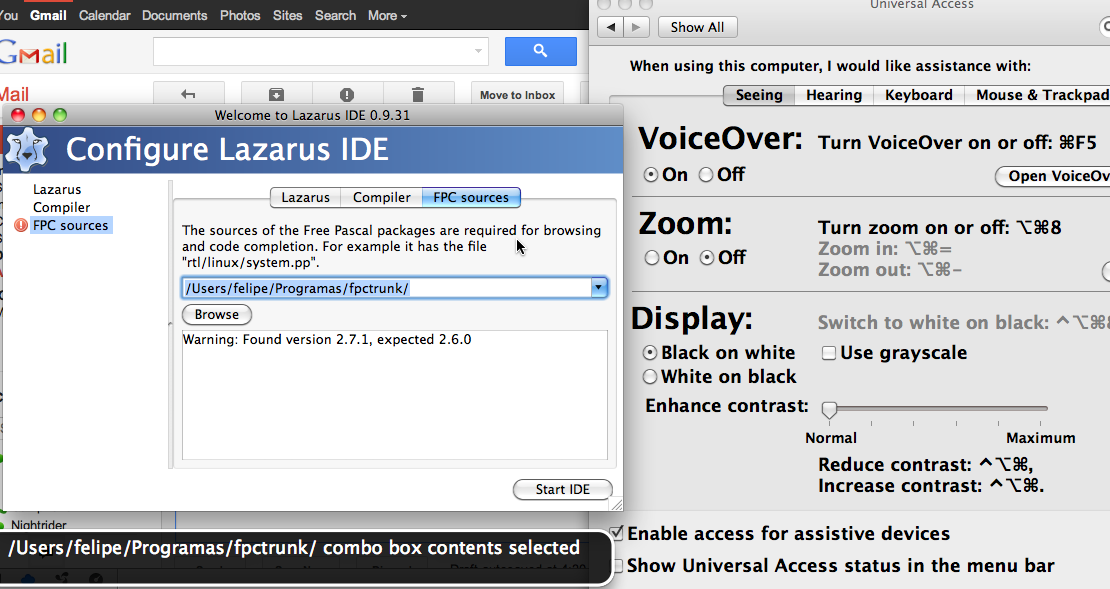 | |
| 127 | 127 | ||
| 128 | 128 | ## Orca for Linux | |
| 129 | 129 | ||
| 130 | 130 | Orca is currently the most popular screen reader in Linux for both GNOME and KDE. See: <http://en.wikipedia.org/wiki/Orca_(assistive_technology)> | |
| 131 | 131 | ||
| 132 | 132 | # Speech synthesis | |
| 133 | 133 | ||
| 134 | 134 | An intelligible text-to-speech program allows individuals with visual impairments or reading disabilities to listen to written words on their computer. See the [[Speech Synthesis]] article for details of cross-platform and native operating system solutions. | |
| 135 | 135 | ||
| 136 | 136 | # Accessibility Inspector Tools | |
| 137 | 137 | ||
| 138 | 138 | Accessibility inspectors can help a lot at checking if the application is giving correct information. | |
| 139 | 139 | ||
| 140 | 140 | ## macOS | |
| 141 | 141 | ||
| 142 | 142 | In /Applications/Xcode.app/Contents/Applications/ there is an Accessibility Inspector application which will be very useful when developing in this platform. | |
| 143 | 143 | ||
| 144 | 144 | See also: | |
| 145 | 145 | ||
| 146 | 146 | - Apple's [macOS accessibility documentation](https://developer.apple.com/accessibility/macos/) | |
| 147 | 147 | - Apple's [Using the Accessibility Inspector](https://developer.apple.com/library/archive/documentation/Accessibility/Conceptual/AccessibilityMacOSX/OSXAXTestingApps.html) | |
| 148 | 148 | ||
| 149 | 149 | # Accessibility APIs | |
| 150 | 150 | ||
| 151 | 151 | ## Carbon | |
| 152 | 152 | ||
| 153 | 153 | Search Google for: | |
| 154 | 154 | ||
| 155 | - | ||
| 155 | + | ```text | |
| 156 | + | site:developer.apple.com carbon accessibility | |
| 157 | + | ``` | |
| 156 | 158 | ||
| 157 | 159 | The main accessibility code for Carbon is in lcl/interfaces/carbon/carbonprivatecontrol.inc in the function CarbonControl_Accessibility | |
| 158 | 160 | ||
| 159 | 161 | The events for this handler are: | |
| 160 | 162 | ||
| 161 | 163 | - kEventAccessibleGetChildAtPoint | |
| 162 | 164 | - kEventAccessibleGetFocusedChild | |
| 163 | 165 | - kEventAccessibleGetAllAttributeNames | |
| 164 | 166 | - kEventAccessibleGetAllParameterizedAttributeNames | |
| 165 | 167 | - kEventAccessibleGetNamedAttribute | |
| 166 | 168 | - kEventAccessibleSetNamedAttribute | |
| 167 | 169 | - kEventAccessibleIsNamedAttributeSettable | |
| 168 | 170 | - kEventAccessibleGetAllActionNames | |
| 169 | 171 | - kEventAccessiblePerformNamedAction | |
| 170 | 172 | - kEventAccessibleGetNamedActionDescription | |
| 171 | 173 | ||
| 172 | 174 | For kEventAccessibleGetNamedAttribute the main named attributes are: | |
| 173 | 175 | ||
| 174 | 176 | - AXRole | |
| 175 | 177 | - AXRoleDescription | |
| 176 | 178 | - AXDescription | |
| 177 | 179 | - AXHelp | |
| 178 | 180 | - AXParent | |
| 179 | 181 | - AXChildren | |
| 180 | 182 | - AXWindow | |
| 181 | 183 | - AXTopLevelUIElement | |
| 182 | 184 | - AXEnabled | |
| 183 | 185 | - AXSize | |
| 184 | 186 | - AXPosition | |
| 185 | 187 | ||
| 186 | 188 | And besides the ones listed here there are tons more. See which attributes each role should implement here: [http://developer.apple.com/library/mac/#documentation/UserExperience/Reference/Accessibility_RoleAttribute_Ref/Role.html#//apple_ref/doc/uid/TP40007870-Roles-AXStaticText](http://developer.apple.com/library/mac/#documentation/UserExperience/Reference/Accessibility_RoleAttribute_Ref/Role.html#//apple_ref/doc/uid/TP40007870-Roles-AXStaticText) | |
| 187 | 189 | ||
| 188 | 190 | Table explaining the events: <http://developer.apple.com/library/mac/#documentation/Accessibility/Reference/AccessibilityCarbonRef/Reference/reference.html> | |
| 189 | 191 | ||
| 190 | 192 | Documentation explaining in details which attributes are required for each Role: <http://developer.apple.com/library/mac/#documentation/UserExperience/Reference/Accessibility_RoleAttribute_Ref/Attributes.html> | |
| 191 | 193 | ||
| 192 | 194 | List of routines to handle a AXUIElementRef: <http://developer.apple.com/library/mac/#documentation/Accessibility/Reference/AccessibilityLowlevel/AXUIElement_h/CompositePage.html> | |
| 193 | 195 | ||
| 194 | 196 | ## Cocoa | |
| 195 | 197 | ||
| 196 | 198 | - Apple [Accessibility Programming Guide](https://developer.apple.com/library/archive/documentation/Accessibility/Conceptual/AccessibilityMacOSX/index.html) | |
| 197 | 199 | - Apple docs for the [NSAccessibility Protocol](http://developer.apple.com/library/mac/#documentation/Cocoa/Reference/ApplicationKit/Protocols/NSAccessibility_Protocol/Reference/Reference.html) | |
| 198 | 200 | - Apple docs for [Accessibility Roles and Attributes Reference](http://developer.apple.com/library/mac/#documentation/UserExperience/Reference/Accessibility_RoleAttribute_Ref/Notifications.html) | |
| 199 | 201 | ||
| 200 | 202 | ## Microsoft Active Accessibility | |
| 201 | 203 | ||
| 202 | 204 | See: <http://en.wikipedia.org/wiki/Microsoft_Active_Accessibility> | |
| 203 | 205 | ||
| 204 | 206 | Also: <http://www.stevetrefethen.com/blog/UsingtheMSAAIAccessibleinterfacewithinaDelphiApplication.aspx> | |
| 205 | 207 | ||
| 206 | 208 | Concrete code from MS: <http://msdn.microsoft.com/en-us/library/windows/desktop/cc307844.aspx> | |
| 207 | 209 | ||
| 208 | 210 | ## AT-SPI for Linux | |
| 209 | 211 | ||
| 210 | 212 | See: <http://en.wikipedia.org/wiki/AT-SPI> | |
| 211 | 213 | ||
| 212 | 214 | For making an application support AT-SPI there are two solutions: | |
| 213 | 215 | ||
| 214 | 216 | 1-\> Make the application a DBus server and serve the interface described in the following XML files: <http://git.gnome.org/browse/at-spi2-core/tree/xml> | |
| 215 | 217 | ||
| 216 | 218 | 2-\> Use libatk, but this library requires a GLib main loop | |
| 217 | 219 | ||
| 218 | 220 | ## Qt | |
| 219 | 221 | ||
| 220 | 222 | See: <http://doc.qt.nokia.com/4.3/qaccessiblewidget.html> | |
| 221 | 223 | ||
| 222 | 224 | Also: <http://doc.qt.nokia.com/4.3/qaccessible.html#Role-enum> | |
| 223 | 225 | ||
| 224 | 226 | Also: <http://doc.qt.nokia.com/qq/qq24-accessibility.html> | |
| 225 | 227 | ||
| 226 | 228 | ## Concepts mapping | |
| 227 | 229 | ||
| 228 | 230 | | TLazAccessibleObject | Qt | macOS | MSAA | AT-SPI | Comments | | |
| 229 | 231 | |----|----|----|----|----|----| | |
| 230 | 232 | | AccessibleRole | QAccessible::Role | AXRole | Role | ?\|\|- | | | |
| 231 | 233 | | AccessibleDescription | QAccessibleWidget::setDescription | AXRoleDescription, AXDescription, AXTitleUIElement | ? | ?\|\|- | | | |
| 232 | 234 | | AccessibleValue | QAccessibleWidget::setValue | AXValue | Value, Name, State | ?\|\|- | | | |
| 233 | 235 | | Position | ? | AXPosition | ? | ?\|\|- | | | |
| 234 | 236 | | Size | ? | AXSize | ? | ?\|\|- | | | |
| 235 | 237 | | Handle | ? | AXUIElementRef | ? | ?\|\|- | | | |
| 236 | 238 | | Parent | ? | AXParent | ? | ?\|\|- | | | |
| 237 | 239 | | SecondaryHandle | Vacant | Vacant | Vacant | Vacant\|\|- | | | |
| 238 | 240 | ||
| 239 | 241 | --- | |
| 240 | 242 | *From the Free Pascal wiki, page "LCL Accessibility", as it stood on 2021-02-24 after a change by Trev, out of the wiki's dump of 2024-05-26. Copyright stays with the author who wrote it, according to the old wiki's [[Licensing]] page. If you have concerns about this material, [message the admin](/wiki-contact).* | |
| 241 | 243 | Category: Accessibility | |
| 242 | 244 | Category: GUI | |
| 243 | 245 | Category: LCL | |
| 244 | 246 | Category: Linux | |
| 245 | 247 | Category: Windows | |
| 246 | 248 | Category: macOS |