

KOL: what changed
Revision 1 to 2. Removed lines have a minus sign; added lines have a plus sign.
| Old | New | Line | |
|---|---|---|---|
| 1 | 1 | ## Introduction | |
| 2 | 2 | ||
| 3 | 3 | \ | |
| 4 | - | ||
| 4 | + | ||
| 5 | 5 | The Key Objects Library, a.k.a. KOL, is an object oriented framework created by Vladimir Kladov ([website](http://f0460945.xsph.ru/rindex.htm)) in 2000. It is the successor to the XCL library by the same author. The Mirror Classes Kit, a.k.a. MCK, is a set of visual components to write KOL applications in a visual design way, from within the Delphi IDE. | |
| 6 | 6 | ||
| 7 | 7 | The current point release is 3.23 for KOL and 3.23 for MCK. | |
| 8 | 8 | ||
| 9 | 9 | New versions appear with Irregular intervals, but the library is currently maintained. There is an svn repository for KOL and MCK at <https://svn.code.sf.net/p/kolmck/code/> which is usually more up to date than the point releases. | |
| 10 | 10 | ||
| 11 | 11 | The main reason creating this library is explained through the dissatisfaction of Vladimir and others towards ever increasing code bloat. Nobody seemed to care anymore about *efficient* coding. According to KOL users there a strong correlation between Moore's law and degrading code optimizing efficiency. | |
| 12 | 12 | ||
| 13 | 13 | An MCK project designed in a Delphi IDE can be recompiled with both 32 bit and 64 bit FPC 2.7.1 or later compilers without change. This way you can without having to upgrade your Delphi to a recent version: | |
| 14 | 14 | ||
| 15 | 15 | - obtain a 64 bit version of a project. | |
| 16 | 16 | - obtain a unicode version of a Delphi project (5-2007) by simply defining -dUNICODE_CTRLS. | |
| 17 | 17 | - or both! | |
| 18 | 18 | ||
| 19 | 19 | The framework centers around three basic concepts: | |
| 20 | 20 | ||
| 21 | 21 | - It uses - some say old school - pascal objects, not classes. | |
| 22 | 22 | - Most of the widgets are basically one and the same object. Polymorphism is through constructing functions. | |
| 23 | 23 | - It ignores the VCL/LCL, in fact it attempts to replace them. | |
| 24 | 24 | ||
| 25 | 25 | This has several **advantages**, some of which are: | |
| 26 | 26 | ||
| 27 | 27 | - The size of your binary is very tiny, on average more than 20 times smaller than a VCL/LCL binary, but a factor 100 or more is not unusual. | |
| 28 | 28 | - KOL binaries (both executables and dll's) have much much faster load times and feel snappier. | |
| 29 | 29 | - KOL is very easy to extend once you understand its concepts. It is a fully object oriented framework. | |
| 30 | 30 | ||
| 31 | 31 | It also has very obvious **disadvantages**, some of which are: | |
| 32 | 32 | ||
| 33 | 33 | - KOL is a framework. It doesn't mix very well with classes and it can't be sensibly mixed with LCL/VCL code because you will loose the size advantage. | |
| 34 | 34 | - If you are not familiar with the old Object Pascal paradigm from Turbo Pascal the learning curve can be steep. | |
| 35 | 35 | - You will miss some functionality that has become common place, like RTTI, but most of these features are often codebloat and the reason why KOL exists in the first place. | |
| 36 | 36 | - Because you are often working on the same object with multiple appearances, it may be confusing that some methods or properties that you can see in the code editor do not apply. | |
| 37 | 37 | ||
| 38 | 38 | ## Requirements | |
| 39 | 39 | ||
| 40 | 40 | - Free Pascal compiler 2.6.4 or later for Win32 | |
| 41 | 41 | - Free Pascal compiler 2.7.1 or later for Win64 | |
| 42 | 42 | - [KOL 3.23 or later](http://f0460945.xsph.ru/rindex.htm) for win32 | |
| 43 | 43 | - The Mirror Classes Kit a.k.a. MCK for those who want to develop using a visual designer like Lazarus or Delphi. | |
| 44 | 44 | - [Release preview of KOL 3.23-64](https://yadi.sk/d/Z0uMP31_67nJY) for KOL win32/64 | |
| 45 | 45 | - [[KOL-CE|See the KOL CE page]] for win-ce development and requirements. | |
| 46 | 46 | - Not required, but recommended is a copy of FPC's RTL and/or Delphi's RTL sources | |
| 47 | 47 | ||
| 48 | 48 | ## Supported targets | |
| 49 | 49 | ||
| 50 | 50 | - All 32-bit Windows: from Windows 95 to Windows 8.1. | |
| 51 | 51 | - All 64-bit x86_64 from Windows 2000 to Windows 8.1. | |
| 52 | 52 | - [[WinCE port|Windows CE]] based PocketPC and Smartphones. More information on the [[KOL-CE|KOL CE page]] | |
| 53 | 53 | ||
| 54 | 54 | ## Example | |
| 55 | 55 | ||
| 56 | 56 | Let's illustrate KOL with a simple example. A form, a button and some action. You will notice that the code resembles that of a LCL/VCL application and basically: It does exactly the same! The main difference is the use of objects and pointer to objects instead of classes and the use of constructing functions instead of constructors. | |
| 57 | 57 | ||
| 58 | 58 | Here's the main program file: | |
| 59 | 59 | ||
| 60 | 60 | ``` pascal | |
| 61 | 61 | program koldemo; | |
| 62 | 62 | {This line makes us FPC and Delphi compatible} | |
| 63 | 63 | {$IFDEF FPC}{$MODE DELPHI}{$H+}{$ENDIF} | |
| 64 | 64 | {$APPTYPE GUI} | |
| 65 | 65 | uses | |
| 66 | 66 | Kol, | |
| 67 | 67 | koldemo1 in 'koldemo1.pas'; | |
| 68 | 68 | ||
| 69 | 69 | begin | |
| 70 | 70 | NewForm1( Form1, nil); | |
| 71 | 71 | Run(Form1.form); | |
| 72 | 72 | end. | |
| 73 | 73 | ``` | |
| 74 | 74 | ||
| 75 | - | ||
| 76 | 75 | And here is the main unit, again, you will notice it is very similar to LCL/VCL code:\ | |
| 77 | 76 | ||
| 78 | 77 | ``` pascal | |
| 79 | 78 | unit koldemo1; | |
| 80 | 79 | ||
| 81 | 80 | interface | |
| 82 | 81 | uses | |
| 83 | 82 | Windows, Messages, Kol; | |
| 84 | 83 | const | |
| 85 | 84 | cps:KolString = 'Kol project in ' + {$IFDEF FPC}'Freepascal '{$ELSE}'Delphi '{$ENDIF} + | |
| 86 | 85 | {$IFDEF WIN64}'64 bits '{$ELSE}'32 bits '{$ENDIF} + | |
| 87 | 86 | {$IFDEF UNICODE_CTRLS}'Unicode'{$ELSE}'Ansi'{$ENDIF}; | |
| 88 | 87 | type | |
| 89 | 88 | ||
| 90 | 89 | PForm1=^TForm1; | |
| 91 | 90 | TForm1=object(Tobj) | |
| 92 | 91 | {Note both widgets are of the same type} | |
| 93 | 92 | Form, Button:pControl; | |
| 94 | 93 | public | |
| 95 | 94 | {The message handler for our Button} | |
| 96 | 95 | procedure ButtonClick(Sender:PObj); | |
| 97 | 96 | end; | |
| 98 | 97 | ||
| 99 | 98 | procedure NewForm1( var Result: PForm1; AParent: PControl ); | |
| 100 | 99 | ||
| 101 | 100 | var | |
| 102 | 101 | Form1:pForm1; | |
| 103 | 102 | ||
| 104 | 103 | implementation | |
| 105 | 104 | ||
| 106 | 105 | procedure NewForm1( var Result: PForm1; AParent: PControl ); | |
| 107 | 106 | begin | |
| 108 | 107 | New(Result,Create); | |
| 109 | 108 | with Result^ do | |
| 110 | 109 | begin | |
| 111 | 110 | {The appearance of a widget depends on its creating function} | |
| 112 | 111 | Form := NewForm(AParent,cps); | |
| 113 | 112 | Button := NewButton(Form,'&Click Me'); | |
| 114 | 113 | {Attach the MessageHandler} | |
| 115 | 114 | Button.OnClick := ButtonClick; | |
| 116 | 115 | { The applet variable is the Application object | |
| 117 | 116 | Assigning the main form to it assigns the main message loop to the form.} | |
| 118 | 117 | Applet:=Form; | |
| 119 | 118 | Form.Add2AutoFree(Result); | |
| 120 | 119 | end; | |
| 121 | 120 | end; | |
| 122 | 121 | ||
| 123 | 122 | procedure TForm1.ButtonClick(Sender: PObj); | |
| 124 | 123 | begin | |
| 125 | 124 | ShowMessage('Ouch!'); | |
| 126 | 125 | end; | |
| 127 | 126 | ||
| 128 | 127 | end. | |
| 129 | 128 | ``` | |
| 130 | 129 | ||
| 131 | 130 | So what's so special about it? Well, for one, compile this and look at the executable size. A similar program, Form + Button + ShowMessage compiled with Delphi 7 is **394 Kilobytes** and it gets much worse for progressive newer versions of Delphi:2267 Kilobytes XE7-32, 3672 Kilobytes XE7-64. For comparison: the KOL version compiled with D7 is **156** times smaller than the VCL version compiled with XE7. | |
| 132 | 131 | ||
| 133 | 132 | Compiled with PPC386 it renders an executable of 48128 bytes. Compiled like: | |
| 134 | 133 | ||
| 135 | 134 | `ppc386 -Mdelphi -CX -XX -Xs -Os koldemo.dpr ` | |
| 136 | 135 | ||
| 137 | 136 | Compiled with PPCX64 for Windows it renders 65536 bytes. Compiled like: | |
| 138 | 137 | ||
| 139 | 138 | `ppcx64 -Mdelphi -Rintel -CX -XX -Xs -Os koldemo.dpr` | |
| 140 | 139 | ||
| 141 | 140 | The above examples are for an ANSI application. To compile a UNICODE application, simply add the UNICODE_CTRLS define, like: | |
| 142 | 141 | ||
| 143 | 142 | `ppcx64 -Mdelphi -Rintel -dUNICODE_CTRLS -CX -XX -Xs -Os koldemo.dpr` | |
| 144 | 143 | ||
| 145 | 144 | Note that especially for 64 bit, Free Pascal renders consistently smaller code than its expensive cousin. Also note that 32 bit Free Pascal has a slightly bigger runtime payload than its cousin. The size difference disappears when your application becomes more complex. | |
| 146 | 145 | ||
| 147 | 146 | ## Tip | |
| 148 | 147 | ||
| 149 | 148 | For size, KOL defaults to an ugly system font. Here are multiple ways to remedy that: | |
| 150 | 149 | ||
| 151 | 150 | ``` pascal | |
| 152 | 151 | {Add this code after the NewForm Function} | |
| 153 | 152 | {Release the font} | |
| 154 | 153 | Form.Font.ReleaseHandle; | |
| 155 | 154 | {Assign the default windows GUI font object} | |
| 156 | 155 | Form.Font.AssignHandle(GetStockObject(DEFAULT_GUI_FONT)); | |
| 157 | 156 | ``` | |
| 158 | 157 | ||
| 159 | 158 | The second method is slightly more involved, but is the [\|MSDN](http://msdn.microsoft.com/en-us/library/windows/desktop/dd144925%28v=vs.85%29.aspx) recommended way: | |
| 160 | 159 | ||
| 161 | 160 | ``` pascal | |
| 162 | 161 | {Add this function} | |
| 163 | 162 | function GetGuiFont:TLogFont; | |
| 164 | 163 | var Metrics:TNonClientMetrics; | |
| 165 | 164 | begin | |
| 166 | 165 | Metrics.cbSize := SizeOf(Metrics); | |
| 167 | 166 | SystemParametersInfo(SPI_GETNONCLIENTMETRICS, SizeOf(Metrics), @Metrics, 0); | |
| 168 | 167 | Result := Metrics.lfMessageFont; | |
| 169 | 168 | end; | |
| 170 | 169 | {And call it after the form creation} | |
| 171 | 170 | Form.Font.LogFontStruct :=GetGuiFont; | |
| 172 | 171 | ``` | |
| 173 | 172 | ||
| 174 | 173 | Fonts in KOL are objects of type TGraphicTool. This object can also represent pens and brushes. We can also create a new GraphicTool object representing the GUI font: | |
| 175 | 174 | ||
| 176 | 175 | ``` pascal | |
| 177 | 176 | {The KOL way to assign the GUI font} | |
| 178 | 177 | function GuiFont:PGraphicTool; | |
| 179 | 178 | var Metrics:TNonClientMetrics; | |
| 180 | 179 | begin | |
| 181 | 180 | Result := NewFont; | |
| 182 | 181 | Metrics.cbSize := SizeOf(Metrics); | |
| 183 | 182 | SystemParametersInfo(SPI_GETNONCLIENTMETRICS, SizeOf(Metrics), @Metrics, 0); | |
| 184 | 183 | Result.LogFontStruct := Metrics.lfMessageFont; | |
| 185 | 184 | end; | |
| 186 | 185 | {We can now assign the new font to the Form's font property} | |
| 187 | 186 | Form.Font.Assign(GuiFont); | |
| 188 | 187 | ``` | |
| 189 | 188 | ||
| 190 | 189 | And this is the result: 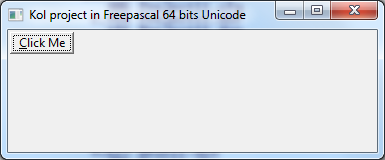 | |
| 191 | 190 | ||
| 192 | 191 | --- | |
| 193 | 192 | *From the Free Pascal wiki, page "KOL", as it stood on 2023-02-04 after a change by Alextp, out of the wiki's dump of 2024-05-26. Copyright stays with the author who wrote it, according to the old wiki's [[Licensing]] page. If you have concerns about this material, [message the admin](/wiki-contact).* | |
| 194 | 193 | Category: Tutorials |