

KOL-CE: what changed
Revision 2 to 3. Removed lines have a minus sign; added lines have a plus sign.
| Old | New | Line | |
|---|---|---|---|
| 1 | 1 | ## Introduction | |
| 2 | 2 | ||
| 3 | 3 | KOL-CE is Free Pascal/Lazarus port of KOL&MCK devloped by Vladimir Kladov ([website](http://f0460945.xsph.ru/rindex.htm)). KOL-CE is developed by Yury Sidorov and distributed under [wxWindows Library Licence](http://www.opensource.org/licenses/wxwindows.php). | |
| 4 | 4 | ||
| 5 | 5 | KOL-CE allows to create very compact Win32/WinCE GUI applications (starting from ~40KB executable for project with empty form). | |
| 6 | 6 | ||
| 7 | 7 | MCK is Lazarus package wich allows VISUAL development of KOL-CE projects in Lazarus IDE. | |
| 8 | 8 | ||
| 9 | 9 | Initially KOL-CE was planned as KOL port for [[WinCE port|WinCE]] only. But later it was decided to keep Win32 functionality and made it work with FPC smoothly. The original MCK can not be used with Lazarus at all. The more current versions of [[KOL]] also work very well with FPC and targets both 32 and 64 bit applications, but do not include an MCK for Lazarus yet: you can use MCK from KOL-CE and recompile against the newer kol.pas version with some thought, but requires patching some of the Lazarus MCK generated sourcecode to reflect kol's current status. | |
| 10 | 10 | ||
| 11 | 11 | ### Requirements | |
| 12 | 12 | ||
| 13 | 13 | - Free Pascal compiler 2.2.0 or later for Win32. | |
| 14 | 14 | - arm-wince cross compiler 2.2.0 or later for Win32 (for [[WinCE port|WinCE]] development). | |
| 15 | 15 | - Lazarus 0.9.26 or later for Win32. | |
| 16 | 16 | ||
| 17 | 17 | ### Supported targets | |
| 18 | 18 | ||
| 19 | 19 | - All 32-bit Windows: from Windows 95 to Windows 8.1. | |
| 20 | 20 | - [[WinCE port|Windows CE]] based PocketPC and Smartphones. | |
| 21 | 21 | ||
| 22 | 22 | ## Download | |
| 23 | 23 | ||
| 24 | 24 | Download the latest release of KOL-CE [here](http://sourceforge.net/project/showfiles.php?group_id=188451). | |
| 25 | 25 | ||
| 26 | 26 | Also you can check out the freshest KOL-CE sources from svn using this link: <https://kol-ce.svn.sourceforge.net/svnroot/kol-ce/trunk> | |
| 27 | 27 | ||
| 28 | 28 | ## Installation | |
| 29 | 29 | ||
| 30 | 30 | ------------------------------------------------------------------------ | |
| 31 | 31 | ||
| 32 | 32 | **Important:** Since KOL-CE 2.80.2 `DisableFakeMethods` define is not needed anymore. | |
| 33 | 33 | ||
| 34 | 34 | If you previously used KOL-CE 2.80.1 or older, you need to rebuild Lazarus **without** `DisableFakeMethods` define before installing MCK package. Otherwise **event handlers will not work**! | |
| 35 | 35 | ||
| 36 | 36 | To do that: | |
| 37 | 37 | ||
| 38 | 38 | 1. Run Lazarus. | |
| 39 | 39 | 2. Choose **Tools \> Configure "Build Lazarus"...** menu item. | |
| 40 | 40 | 3. Choose **Clean Up + Build all** on **Quick Build Options** page. | |
| 41 | 41 | 4. Open **Advanced Build Options** page and **remove** `-dDisableFakeMethods` from **Options** input field. | |
| 42 | 42 | 5. Click **Build** button to rebuild Lazarus. | |
| 43 | 43 | ||
| 44 | 44 | ------------------------------------------------------------------------ | |
| 45 | 45 | ||
| 46 | 46 | 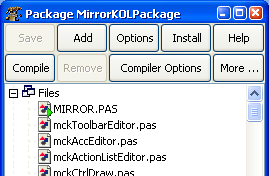 | |
| 47 | 47 | ||
| 48 | 48 | 1. Download KOL-CE sources and put them on some folder on your filesystem. | |
| 49 | 49 | 2. Run Lazarus and choose **Components \> Load package file** menu item. Then navigate to **MCK** folder and choose **`MirrorKOLPackage.lpk`** file. | |
| 50 | 50 | 3. Package window will appear. Press **Install** button. | |
| 51 | 51 | 4. Lazarus will compile MCK package and IDE will be restarted. | |
| 52 | 52 | 5. After restart KOL tab will appear on components palette. | |
| 53 | 53 | ||
| 54 | 54 |  | |
| 55 | 55 | ||
| 56 | 56 | NOTE: If you can't see all KOL components on the palette, resize window with components palette vertically. You will see the second row of components on KOL tab (as on screenshot above). | |
| 57 | 57 | ||
| 58 | 58 | MCK package upgrade is very simple as well. Just overwrite KOL-CE sources with new version, open MCK package and press **Install** button to recompile the package. | |
| 59 | 59 | ||
| 60 | 60 | ## Using MCK | |
| 61 | 61 | ||
| 62 | 62 | ### Creating MCK project | |
| 63 | 63 | ||
| 64 | 64 | 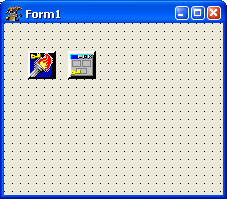 | |
| 65 | 65 | ||
| 66 | 66 | 1. Start Lazarus and select **File \> New...** menu item. | |
| 67 | 67 | 2. Choose **KOL Application** under **Project** section and press **OK** button. | |
| 68 | 68 | 3. New project for KOL application will be created. | |
| 69 | 69 | 4. Save this project with desired name. | |
| 70 | 70 | 5. Play with your new KOL/MCK Project (adjust parameters, drop TKOL... components, compile, run, debug, etc.) Enjoy! | |
| 71 | 71 | ||
| 72 | 72 | ### Adding a form | |
| 73 | 73 | ||
| 74 | 74 | 1. Select **File \> New...** menu item. | |
| 75 | 75 | 2. Choose **KOL Form** under **File** section and press **OK** button. | |
| 76 | 76 | 3. Save new form with desired name. | |
| 77 | 77 | ||
| 78 | 78 | ### Writing code | |
| 79 | 79 | ||
| 80 | 80 | Do not use names from RTL/FCL/LCL, especially from SysUtils, Classes, Forms, etc. All what you need, you should find in KOL, Windows, Messages units. And may be, write by yourself (or copy from another sources). When you write code in mirror project - usually place it in event handlers. You also can add any code where you wish but avoid changing first section of your mirror LCL form class declaration. And do not change auto-generated inc-files. Always remember, that code, that you write in mirror project, must be accepted both by LCL and KOL. By LCL - at the stage of compiling mirror project (and this is necessary, because otherwise converting mirror project to reflected KOL project will not be possible). And by KOL - at the stage of compiling written code in KOL namespace. | |
| 81 | 81 | ||
| 82 | 82 | ### IMPORTANT | |
| 83 | 83 | ||
| 84 | 84 | To resolve conflict between words `LCL.Self` and `KOL.@Self`, which are interpreted differently in KOL and LCL, special field is introduced - `Form`. In LCL, `Form` property of `TKOLForm` component "returns" `Self`, i.e. form object itself. And in KOL, `Form: PControl` is a field of object, containing resulting form object. Since this, it is correctly to change form's properties in following way: | |
| 85 | 85 | ||
| 86 | - | ||
| 86 | + | ``` pascal | |
| 87 | + | Form.Caption := 'Hello!'; | |
| 88 | + | ``` | |
| 87 | 89 | ||
| 88 | 90 | (Though old-style operator Caption := 'Hello!'; is compiled normally while converting mirror project to KOL, it will be wrong in KOL environment). But discussed above word `Form` is only to access form's properties - not its child controls. You access child controls and form event handlers by usual way. e.g.: | |
| 89 | 91 | ||
| 90 | - | ||
| 91 | - | ||
| 92 | + | ``` pascal | |
| 93 | + | Button1.Caption := 'OK'; | |
| 94 | + | Button1Click(Form); | |
| 95 | + | ``` | |
| 92 | 96 | ||
| 93 | 97 | ### Run-time form creation | |
| 94 | 98 | ||
| 95 | 99 | It is possible to create several instances of the same form at run-time. And at least, it is possible to make form not AutoCreate, and create it programmatically when needed. Use global function `NewForm1` (replacing Form1 with your mirror form name), for instance: | |
| 96 | 100 | ||
| 97 | - | ||
| 101 | + | ```text | |
| 102 | + | NewForm1( TempForm1, Applet ); | |
| 103 | + | ``` | |
| 98 | 104 | ||
| 99 | 105 | To make this possible, NEVER access global variable created in the unit during conversation, unless You know why You are doing so. Refer to Form variable instead. | |
| 100 | 106 | ||
| 101 | 107 | ## WinCE | |
| 102 | 108 | ||
| 103 | 109 | #### Setup | |
| 104 | 110 | ||
| 105 | 111 | 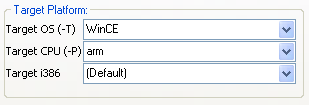 You need to install arm-wince cross compiler for Win32 to compile WinCE executables. Get it [here](http://www.freepascal.org/download.var). | |
| 106 | 112 | ||
| 107 | 113 | To compile for arm-wince target open compiler options of your project using **Project \> Compiler options...** menu item. Open **Code** tab and change target platform to arm-wince. | |
| 108 | 114 | ||
| 109 | 115 | **NOTE:** You can receive the following error while compiling your KOL-CE project for WinCE: | |
| 110 | 116 | ||
| 111 | - | ||
| 112 | - | ||
| 113 | - | ||
| 114 | - | ||
| 117 | + | ```text | |
| 118 | + | Compiling resource KOL-CE.rc | |
| 119 | + | arm-wince-windres.exe: no resources | |
| 120 | + | KOL.PAS(57901) Error: Error while linking | |
| 121 | + | KOL.PAS(57901) Fatal: There were 1 errors compiling module, stopping | |
| 122 | + | ``` | |
| 115 | 123 | ||
| 116 | 124 | In such case you need to edit Windows **PATH** environment variable and add path to folder where win32 fpc binaries are located.\ | |
| 117 | 125 | To find out which path to add, go to **Environment options** in Lazarus and see compiler path.\ | |
| 118 | 126 | **Quit Lazarus before editing PATH**.\ | |
| 119 | 127 | To edit **PATH** variable right click on **My Computer** icon go to **Advanced** tab and click **Environment Variables** button. | |
| 120 | 128 | ||
| 121 | 129 | #### Hints and notes | |
| 122 | 130 | ||
| 123 | 131 | - To make form fullscreen as most Pocket PC applications have, don't change the form position and size. If form size and/or position was changed the form will look like dialog with caption and close button. In MCK set **defaultSize** and **defaultPosition** of TKOLForm to True to make form fullscreen. | |
| 124 | 132 | ||
| 125 | 133 | #### Known issues | |
| 126 | 134 | ||
| 127 | 135 | - The following components are not supported: RichEdit. | |
| 128 | 136 | - Transparency and double buffering are not supported. | |
| 129 | 137 | - Only gsVertical, gsHorizontal gradient panel styles are supported. | |
| 130 | 138 | - Horizontal text alignment does not work in single line edit control. Use memo if you need text alignment. | |
| 131 | 139 | - Vertical text alignment does not work for panel and label. | |
| 132 | 140 | ||
| 133 | 141 | ## Documentation | |
| 134 | 142 | ||
| 135 | 143 | - Visit official KOL&MCK website for documentation and information: <http://kolmck.ru> | |
| 136 | 144 | - Read MCK documentation in **KOLmirrorReadme.txt** file inside MCK folder. | |
| 137 | 145 | ||
| 138 | 146 | ## KOL-CE in real-world applications | |
| 139 | 147 | ||
| 140 | 148 | - [Password Manager XP Mobile](http://www.cp-lab.com/windows-mobile.html) | |
| 141 | 149 | - [ChARMeD disassembler](http://blog.carolos.za.net/2007/05/charmed-for-pocket-pc-beta-030.html) | |
| 142 | 150 | - [WMWifiRouter](http://www.jongma.org/WMWifiRouter/) | |
| 143 | 151 | ||
| 144 | 152 | ## See also | |
| 145 | 153 | ||
| 146 | 154 | - [[KOL|The wiki page for KOL]] | |
| 147 | 155 | - [Official KOL&MCK website](http://f0460945.xsph.ru/rindex.htm) | |
| 148 | 156 | - KOL-CE page at SourceForge <http://sourceforge.net/projects/kol-ce/> | |
| 149 | 157 | - [[WinCE port|WinCE port of Free Pascal]] | |
| 150 | 158 | - [[Windows CE Interface]] | |
| 151 | 159 | - [[Windows CE Development Notes]] | |
| 152 | 160 | ||
| 153 | 161 | ## Contacts | |
| 154 | 162 | ||
| 155 | 163 | Report bugs, submit patches and ask questions at project's page at SourceForge: <http://sourceforge.net/projects/kol-ce/> | |
| 156 | 164 | ||
| 157 | 165 | --- | |
| 158 | 166 | *From the Free Pascal wiki, page "KOL-CE", as it stood on 2021-04-29 after a change by Seenkao, out of the wiki's dump of 2024-05-26. Copyright stays with the author who wrote it, according to the old wiki's [[Licensing]] page. If you have concerns about this material, [message the admin](/wiki-contact).* |